
ECOSYS M2040DN - Multifunction Printer KYOCERA - Free user manual and instructions
Find the device manual for free ECOSYS M2040DN KYOCERA in PDF.


| Product type | Monochrome laser multifunction printer |
| Brand | Kyocera |
| Model | ECOSYS M2040DN |
| Functions | Copy, print, scan, fax (optional) |
| Print speed | Up to 40 pages per minute (A4) |
| Print resolution | Up to 1200 x 1200 dpi |
| Duplex printing | Automatic built-in |
| Standard paper capacity | 500 sheets (tray 1) + 100 sheets (bypass) |
| Paper sizes | A4, A5, A6, B5, Letter, Legal, envelopes, etc. |
| Scanning | Color scanning, resolution up to 600 x 600 dpi, document feeder up to 50 sheets |
| Copying | Zoom 25-400%, collation, duplex, combine |
| Connectivity | Ethernet 10/100/1000 Base-T, USB 2.0, Wi-Fi (optional), Wi-Fi Direct |
| Touchscreen | 7-inch color touchscreen |
| Dimensions (W x D x H) | 390 x 427 x 384 mm |
| Weight | Approximately 16.5 kg |
| Power supply | AC 220-240 V, 50/60 Hz |
| Power consumption | Printing: 600 W, Standby: 40 W, Energy saving: 1 W |
| Noise level | Printing: 52 dB(A), Standby: 30 dB(A) |
| Toner cartridge capacity | Original Kyocera cartridge, variable yield (up to 10,000 pages) |
| Maintenance | Cleaning the exposure glass, slit glass, and machine interior. Replacing the toner cartridge and refreshing the drums. |
| Safety | Laser safety (Class 1), auto-off function, sleep mode, built-in security software |
| Spare parts and repairability | Original Kyocera toner cartridges, drum, fuser unit. Repairability index: 7/10 (estimate). Manufacturer support available. |
| General information | User manual included. Compatible with Windows, Mac, Linux. Warranty: 1 year (depending on country). |
Frequently Asked Questions - ECOSYS M2040DN KYOCERA
User questions about ECOSYS M2040DN KYOCERA
0 question about this device. Answer the ones you know or ask your own.
Ask a new question about this device
Download the instructions for your Multifunction Printer in PDF format for free! Find your manual ECOSYS M2040DN - KYOCERA and take your electronic device back in hand. On this page are published all the documents necessary for the use of your device. ECOSYS M2040DN by KYOCERA.
USER MANUAL ECOSYS M2040DN KYOCERA
natural_image
Exterior view of a Kyocera ECOSYS M2640ldw printer (no visible text or symbols on the device body)Préface
Safety Instructions Regarding the Disconnection of Power 1-7
Compliance and Conformity 1-7
Other precautions (for users in California, the United States) 1-7
Warranty (the United States and Canada) 1-8
Wireless Connection (Mexico only) 1-9
Programme Energy Star (ENERGY STAR®) 1-17
Command Center RX 2-53
Envoi personnel (E-mail) 5-41
natural_image
Illustration of a printer and a speaker icon (no text or symbols)natural_image
Simple line drawing of a desktop computer with monitor and tower (no text or symbols)Safety Instructions Regarding the Disconnection of Power 1-7
Compliance and Conformity 1-7
Other precautions (for users in California, the United States) 1-7
Warranty (the United States and Canada) 1-8
Wireless Connection (Mexico only) 1-9
Programme Energy Star (ENERGY STAR®) 1-17
Avis
CLASS 1 LASER PRODUCT
KLASSE 1 LASER PRODUKT
SAFETY OF LASER BEAM (USA)
1. Safety of laser beam
This machine has been certified by the manufacturer to Class 1 level under the radiation performance standards established by the U.S.DHHS (Department of Health and Human Services) in 1968. This indicates that the product is safe to use during normal operation and maintenance. The laser optical system, enclosed in a protective housing and sealed within the external covers, never permits the laser beam to escape.
2. The CDRH Act
A laser-product-related act was implemented on Aug. 2, 1976, by the Center for Devices and Radiological Health (CDRH) of the U.S. Food and Drug Administration (FDA). This act prohibits the sale of laser products in the U.S. without certification, and applies to laser products manufactured after Aug. 1, 1976. The label shown below indicates compliance with the CDRH regulations and must be attached to laser products marketed in the United States. The position of the rating label is show below.
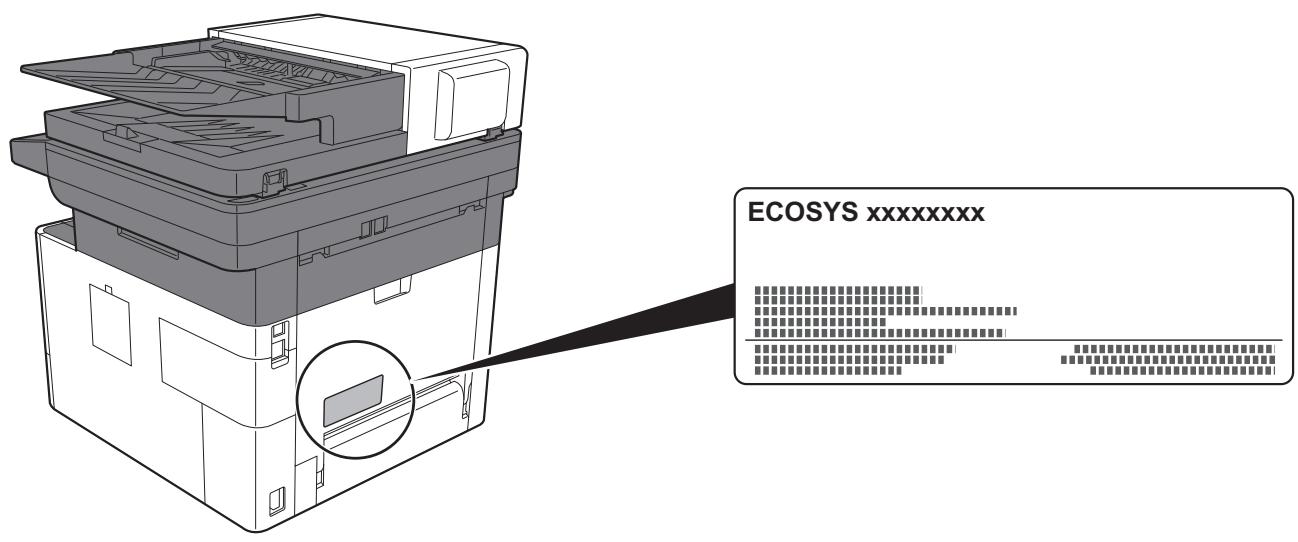
3. Maintenance
For safety of the service personnel, follow the maintenance instructions in the other section of this manual.
4. Safety switch
The power to the laser unit is cut off when the front cover is opened.
Safety Instructions Regarding the Disconnection of Power
Caution: The power plug is the main isolation device! Other switches on the equipment are only functional switches and are not suitable for isolating the equipment from the power source.
Compliance and Conformity
This equipment has been tested and found to comply with the limits for a Class B digital device, pursuant to Part 15 of the FCC Rules.
These limits are designed to provide reasonable protection against harmful interference in a residential installation. This equipment generates, uses and can radiate radio frequency energy and, if not installed and used in accordance with the instructions, may cause harmful interference to radio communications. However, there is no guarantee that interference will not occur in a particular installation. If this equipment does cause harmful interference to radio or television reception, which can be determined by turning the equipment off and on, the user is encouraged to try to correct the interference by one or more of the following measures:
• Reorient or relocate the receiving antenna.
- Increase the separation between the equipment and receiver.
- Connect the equipment into an outlet on a circuit different from that to which the receiver is connected.
- Consult the dealer or an experienced radio/TV technician for help.
- The use of a non-shielded interface cable with the referenced device is prohibited.
CAUTION — The changes or modifications not expressly approved by the party responsible for compliance could void the user's authority to operate the equipment.
This device complies with Part 15 of FCC Rules.
Operation is subject to the following two conditions; (1) this device may not cause harmful interference, and (2) this device must accept any interference received, including interference that may cause undesired operation.
This device complies with Industry Canada licence-exempt RSS standard(s). Operation is subject to the following two conditions: (1) this device may not cause interference, and (2) this device must accept any interference, including interference that may cause undesired operation of the device.
The antenna(s) used for this transmitter must be installed to provide a separation distance of at least 20 cm from all persons and must not be co-located or operating in conjunction with any other transmitter.
* The above statements are valid only in the United States of America and Canada.
NOTE — Use shielded interface cables.
Other precautions (for users in California, the United States)
Perchlorate Material - special handling may apply. See www.dtsc.ca.gov/hazardouswaste/perchlorate.
Warranty (the United States and Canada)
ECOSYS M2640idw
COLOR MULTIFUNCTIONAL PRODUCT LIMITED WARRANTY
KYOCERA Document Solutions America, Inc. and KYOCERA Document Solutions Canada, Ltd. (both referred to as "KYOCERA") warrant the Customer's new Color Multifunctional Product (referred to as "MFP"), and the new accessories installed with the initial installation of the MFP, against any defects in material and workmanship for a period of one year, or 100,000 copies/prints from date of installation, whichever first occurs. In the event the MFP or an accessory is found to be defective within the warranty period, KYOCERA's only obligation and the Customer's exclusive remedy shall be replacement of any defective parts. KYOCERA shall have no obligation to furnish labor.
This warranty covers Maintenance Kits and the components of Maintenance Kits included with the original MFP for a period of one year or 100,000 copies/prints, whichever first occurs. Maintenance Kits consist of the developing unit and the drum unit. Replacement Maintenance Kits have a 90 day Limited Warranty.
This warranty is valid only for the original retail purchaser (referred to as the "Customer") of a new KYOCERA MFP in the United States of America or Canada, based upon the country of purchase.
In order to obtain performance of this warranty, the Customer must immediately notify the Authorized KYOCERA Dealer from whom the product was purchased. If the KYOCERA Dealer is not able to provide service, write to KYOCERA at the address below for the name and address of the Authorized KYOCERA Dealer in your area, or check KYOCERA's website at www.kyoceradocumentsolutions.com for KYOCERA Document Solutions America, Inc. or www.kyoceradocumentsolutions.ca for KYOCERA Document Solutions Canada, Ltd.
This warranty does not cover MFPs or accessories which: (a) have become damaged due to operator negligence, misuse, accidents, improper storage or unusual physical or electrical stress,
(b) have used parts or supplies which are not genuine KYOCERA brand parts or supplies, (c) have been installed or serviced by a technician not employed by KYOCERA or an Authorized KYOCERA Dealer, or (d) have had the serial number modified, altered, or removed.
This warranty gives the Customer specific legal rights. The Customer may also have other rights, which vary from state to state, or province to province. Neither the seller, nor any other person, is authorized to extend the time period or expand this warranty on behalf of KYOCERA.
THIS WARRANTY IS MADE IN LIEU OF ALL OTHER WARRANTIES AND CONDITIONS, EXPRESS OR IMPLIED, AND KYOCERA SPECIFICALLY DISCLAIMS ANY IMPLIED WARRANTY OR CONDITION OF MERCHANTABILITY OR FITNESS FOR A PARTICULAR PURPOSE. THIS WARRANTY SHALL NOT EXTEND TO, AND KYOCERA SHALL NOT BE LIABLE FOR, ANY INCIDENTAL OR CONSEQUENTIAL DAMAGES WHICH MAY ARISE OUT OF THE USE OF, OR INABILITY TO USE, THE MFP.
KYOCERA Document Solutions America, Inc.
225 Sand Road,
Fairfield, New Jersey 07004-0008, USA
KYOCERA Document Solutions Canada, Ltd.
6120 Kestrel Rd., Mississauga, ON L5T 1S8, Canada
Wireless Connection (Mexico only)
The operation of this equipment is subject to the following two conditions:
(1) it is possible that this equipment or device may not cause harmful interference, and (2) this equipment or device must accept any interference, including interference that may cause undesired operation.
Copyright (c) 1998-2006 OpenSSL Project. All rights reserved.
Redistribution and use in source and binary forms, with or without modification, are permitted provided that the following conditions are met:
- Redistributions of source code must retain the above copyright notice, this list of conditions and the following disclaimer.
- Redistributions in binary form must reproduce the above copyright notice, this list of conditions and the following disclaimer in the documentation and/or other materials provided with the distribution.
- All advertising materials mentioning features or use of this software must display the following acknowledgment: "This product includes software developed by the OpenSSL Project for use in the OpenSSL Toolkit. (http://www.openssl.org/)"
- The names "OpenSSL Toolkit" and "OpenSSL Project" must not be used to endorse or promote products derived from this software without prior written permission. For written permission, please contact openssl-core@openssl.org.
- Products derived from this software may not be called "OpenSSL" nor may "OpenSSL" appear in their names without prior written permission of the OpenSSL Project.
- Redistributions of any form whatsoever must retain the following acknowledgment: "This product includes software developed by the OpenSSL Project for use in the OpenSSL Toolkit (http://www.openssl.org/)
THIS SOFTWARE IS PROVIDED BY THE OpenSSL PROJECT "AS IS" AND ANY EXPRESSED OR IMPLIED WARRANTIES, INCLUDING, BUT NOT LIMITED TO, THE IMPLIED WARRANTIES OF MERCHANTABILITY AND FITNESS FOR A PARTICULAR PURPOSE ARE DISCLAIMED. IN NO EVENT SHALL THE OpenSSL PROJECT OR ITS CONTRIBUTORS BE LIABLE FOR ANY DIRECT, INDIRECT, INCIDENTAL, SPECIAL, EXEMPLARY, OR CONSEQUENTIAL DAMAGES (INCLUDING, BUT NOT LIMITED TO, PROCUREMENT OF SUBSTITUTE GOODS OR SERVICES; LOSS OF USE, DATA, OR PROFITS; OR BUSINESS INTERRUPTION) HOWEVER CAUSED AND ON ANY THEORY OF LIABILITY, WHETHER IN CONTRACT, STRICT LIABILITY, OR TORT (INCLUDING NEGLIGENCE OR OTHERWISE) ARISING IN ANY WAY OUT OF THE USE OF THIS SOFTWARE, EVEN IF ADVISED OF THE POSSIBILITY OF SUCH DAMAGE.
Original SSLeay License
Copyright (C) 1995-1998 Eric Young (eay@cryptsoft.com) All rights reserved.
This package is an SSL implementation written by Eric Young (eay@cryptsoft.com). The implementation was written so as to conform with Netscapes SSL.
This library is free for commercial and non-commercial use as long as the following conditions are adhered to. The following conditions apply to all code found in this distribution, be it the RC4, RSA, Ihash, DES, etc., code; not just the SSL code. The SSL documentation included with this distribution is covered by the same copyright terms except that the holder is Tim Hudson (tjh@cryptsoft.com).
Copyright remains Eric Young's, and as such any Copyright notices in the code are not to be removed.
If this package is used in a product, Eric Young should be given attribution as the author of the parts of the library used.
This can be in the form of a textual message at program startup or in documentation (online or textual) provided with the package.
Redistribution and use in source and binary forms, with or without modification, are permitted provided that the following conditions are met:
- Redistributions of source code must retain the copyright notice, this list of conditions and the following disclaimer.
- Redistributions in binary form must reproduce the above copyright notice, this list of conditions and the following disclaimer in the documentation and/or other materials provided with the distribution.
- All advertising materials mentioning features or use of this software must display the following acknowledgement: "This product includes cryptographic software written by Eric Young (eay@cryptsoft.com)" The word 'cryptographic' can be left out if the routines from the library being used are not cryptographic related :-).
- If you include any Windows specific code (or a derivative thereof) from the apps directory (application code) you must include an acknowledgement: "This product includes software written by Tim Hudson (tjh@cryptsoft.com)"
THIS SOFTWARE IS PROVIDED BY ERIC YOUNG "AS IS" AND ANY EXPRESS OR IMPLIED WARRANTIES, INCLUDING, BUT NOT LIMITED TO, THE IMPLIED WARRANTIES OF MERCHANTABILITY AND FITNESS FOR A PARTICULAR PURPOSE ARE DISCLAIMED. IN NO EVENT SHALL THE AUTHOR OR CONTRIBUTORS BE LIABLE FOR ANY DIRECT, INDIRECT, INCIDENTAL, SPECIAL, EXEMPLARY, OR CONSEQUENTIAL DAMAGES (INCLUDING, BUT NOT LIMITED TO, PROCUREMENT OF SUBSTITUTE GOODS OR SERVICES; LOSS OF USE, DATA, OR PROFITS; OR BUSINESS INTERRUPTION) HOWEVER CAUSED AND ON ANY THEORY OF LIABILITY, WHETHER IN CONTRACT, STRICT LIABILITY, OR TORT (INCLUDING NEGLIGENCE OR OTHERWISE) ARISING IN ANY WAY OUT OF THE USE OF THIS SOFTWARE, EVEN IF ADVISED OF THE POSSIBILITY OF SUCH DAMAGE.
The licence and distribution terms for any publicly available version or derivative of this code cannot be changed. i.e. this code cannot simply be copied and put under another distribution licence [including the GNU Public Licence.]
Monotype Imaging License Agreement
1 Software shall mean the digitally encoded, machine readable, scalable outline data as encoded in a special format as well as the UFST Software.
2 You agree to accept a non-exclusive license to use the Software to reproduce and display weights, styles and versions of letters, numerals, characters and symbols (Typefaces) solely for your own customary business or personal purposes at the address stated on the registration card you return to Monotype Imaging. Under the terms of this License Agreement, you have the right to use the Fonts on up to three printers. If you need to have access to the fonts on more than three printers, you need to acquire a multiuser license agreement which can be obtained from Monotype Imaging. Monotype Imaging retains all rights, title and interest to the Software and Typefaces and no rights are granted to you other than a License to use the Software on the terms expressly set forth in this Agreement.
3 To protect proprietary rights of Monotype Imaging, you agree to maintain the Software and other proprietary information concerning the Typefaces in strict confidence and to establish reasonable procedures regulating access to and use of the Software and Typefaces.
4 You agree not to duplicate or copy the Software or Typefaces, except that you may make one backup copy. You agree that any such copy shall contain the same proprietary notices as those appearing on the original.
5 This License shall continue until the last use of the Software and Typefaces, unless sooner terminated. This License may be terminated by Monotype Imaging if you fail to comply with the terms of this License and such failure is not remedied within thirty (30) days after notice from Monotype Imaging. When this License expires or is terminated, you shall either return to Monotype Imaging or destroy all copies of the Software and Typefaces and documentation as requested.
6 You agree that you will not modify, alter, disassemble, decrypt, reverse engineer or decompile the Software.
7 Monotype Imaging warrants that for ninety (90) days after delivery, the Software will perform in accordance with Monotype Imaging-published specifications, and the diskette will be free from defects in material and workmanship. Monotype Imaging does not warrant that the Software is free from all bugs, errors and omissions.
The parties agree that all other warranties, expressed or implied, including warranties of fitness for a particular purpose and merchantability, are excluded.
8 Your exclusive remedy and the sole liability of Monotype Imaging in connection with the Software and Typefaces is repair or replacement of defective parts, upon their return to Monotype Imaging.
In no event will Monotype Imaging be liable for lost profits, lost data, or any other incidental or consequential damages, or any damages caused by abuse or misapplication of the Software and Typefaces.
9 Massachusetts U.S.A. law governs this Agreement.
10 You shall not sublicense, sell, lease, or otherwise transfer the Software and/or Typefaces without the prior written consent of Monotype Imaging.
11 Use, duplication or disclosure by the Government is subject to restrictions as set forth in the Rights in Technical Data and Computer Software clause at FAR 252-227-7013, subdivision (b)(3)(ii) or subparagraph (c)(1)(ii), as appropriate. Further use, duplication or disclosure is subject to restrictions applicable to restricted rights software as set forth in FAR 52.227-19 (c)(2).
12 You acknowledge that you have read this Agreement, understand it, and agree to be bound by its terms and conditions. Neither party shall be bound by any statement or representation not contained in this Agreement. No change in this Agreement is effective unless written and signed by properly authorized representatives of each party. By opening this diskette package, you agree to accept the terms and conditions of this Agreement.
Knopflerfish License
This product includes software developed by the Knopflerfish Project.
http://www.knopflerfish.org
Copyright 2003-2010 The Knopflerfish Project. All rights reserved.
Redistribution and use in source and binary forms, with or without modification, are permitted provided that the following conditions are met:
- Redistributions of source code must retain the above copyright notice, this list of conditions and the following disclaimer.
- Redistributions in binary form must reproduce the above copyright notice, this list of conditions and the following disclaimer in the documentation and/or other materials provided with the distribution.
- Neither the name of the KNOPFLERFISH project nor the names of its contributors may be used to endorse or promote products derived from this software without specific prior written permission.
THIS SOFTWARE IS PROVIDED BY THE COPYRIGHT HOLDERS AND CONTRIBUTORS "AS IS" AND ANY EXPRESS OR IMPLIED WARRANTIES, INCLUDING, BUT NOT LIMITED TO, THE IMPLIED WARRANTIES OF MERCHANTABILITY AND FITNESS FOR A PARTICULAR PURPOSE ARE DISCLAIMED. IN NO EVENT SHALL THE COPYRIGHT OWNER OR CONTRIBUTORS BE LIABLE FOR ANY DIRECT, INDIRECT, INCIDENTAL, SPECIAL, EXEMPLARY, OR CONSEQUENTIAL DAMAGES (INCLUDING, BUT NOT LIMITED TO, PROCUREMENT OF SUBSTITUTE GOODS OR SERVICES; LOSS OF USE, DATA, OR PROFITS; OR BUSINESS INTERRUPTION) HOWEVER CAUSED AND ON ANY THEORY OF LIABILITY, WHETHER IN CONTRACT, STRICT LIABILITY, OR TORT (INCLUDING NEGLIGENCE OR OTHERWISE) ARISING IN ANY WAY OUT OF THE USE OF THIS SOFTWARE, EVEN IF ADVISED OF THE POSSIBILITY OF SUCH DAMAGE.
Apache License (Version 2.0)
Apache License
Version 2.0, January 2004
http://www.apache.org/licenses/
TERMS AND CONDITIONS FOR USE, REPRODUCTION, AND DISTRIBUTION
1. Definitions.
"License" shall mean the terms and conditions for use, reproduction, and distribution as defined by Sections 1 through 9 of this document.
"Licensor" shall mean the copyright owner or entity authorized by the copyright owner that is granting the License.
"Legal Entity" shall mean the union of the acting entity and all other entities that control, are controlled by, or are under common control with that entity. For the purposes of this definition, "control" means (i) the power, direct or indirect, to cause the direction or management of such entity, whether by contract or otherwise, or (ii) ownership of fifty percent (50%) or more of the outstanding shares, or (iii) beneficial ownership of such entity.
"You" (or "Your") shall mean an individual or Legal Entity exercising permissions granted by this License.
"Source" form shall mean the preferred form for making modifications, including but not limited to software source code, documentation source, and configuration files.
"Object" form shall mean any form resulting from mechanical transformation or translation of a Source form, including but not limited to compiled object code, generated documentation, and conversions to other media types.
"Work" shall mean the work of authorship, whether in Source or Object form, made available under the License, as indicated by a copyright notice that is included in or attached to the work (an example is provided in the Appendix below).
"Derivative Works" shall mean any work, whether in Source or Object form, that is based on (or derived from) the Work and for which the editorial revisions, annotations, elaborations, or other modifications represent, as a whole, an original work of authorship. For the purposes of this License, Derivative Works shall not include works that remain separable from, or merely link (or bind by name) to the interfaces of, the Work and Derivative Works thereof.
"Contribution" shall mean any work of authorship, including the original version of the Work and any modifications or additions to that Work or Derivative Works thereof, that is intentionally submitted to Licensor for inclusion in the Work by the copyright owner or by an individual or Legal Entity authorized to submit on behalf of the copyright owner. For the purposes of this definition, "submitted" means any form of electronic, verbal, or written communication sent to the Licensor or its representatives, including but not limited to communication on electronic mailing lists, source code control systems, and issue tracking systems that are managed by, or on behalf of, the Licensor for the purpose of discussing and improving the Work, but excluding communication that is conspicuously marked or otherwise designated in writing by the copyright owner as "Not a Contribution."
"Contributor" shall mean Licensor and any individual or Legal Entity on behalf of whom a Contribution has been received by Licensor and subsequently incorporated within the Work.
- Grant of Copyright License. Subject to the terms and conditions of this License, each Contributor hereby grants to You a perpetual, worldwide, non-exclusive, no-charge, royalty-free, irrevocable copyright license to reproduce, prepare Derivative Works of, publicly display, publicly perform, sublicense, and distribute the Work and such Derivative Works in Source or Object form.
- Grant of Patent License. Subject to the terms and conditions of this License, each Contributor hereby grants to You a perpetual, worldwide, non-exclusive, no-charge, royalty-free, irrevocable (except as stated in this section) patent license to make, have made, use, offer to sell, sell, import, and otherwise transfer the Work, where such license applies only to those patent claims licensable by such Contributor that are necessarily infringed by their Contribution(s) alone or by combination of their Contribution(s) with the Work to which such Contribution(s) was submitted. If You institute patent litigation against any entity (including a cross-claim or counterclaim in a lawsuit) alleging that the Work or a Contribution incorporated within the Work constitutes direct or contributory patent infringement, then any patent licenses granted to You under this License for that Work shall terminate as of the date such litigation is filed.
- Redistribution. You may reproduce and distribute copies of the Work or Derivative Works thereof in any medium, with or without modifications, and in Source or Object form, provided that You meet the following conditions:
(a)You must give any other recipients of the Work or Derivative Works a copy of this License; and
(b) You must cause any modified files to carry prominent notices stating that You changed the files; and
(c) You must retain, in the Source form of any Derivative Works that You distribute, all copyright, patent, trademark, and attribution notices from the Source form of the Work, excluding those notices that do not pertain to any part of the Derivative Works; and
(d) If the Work includes a "NOTICE" text file as part of its distribution, then any Derivative Works that You distribute must include a readable copy of the attribution notices contained within such NOTICE file, excluding those notices that do not pertain to any part of the Derivative Works, in at least one of the following places: within a NOTICE text file distributed as part of the Derivative Works; within the Source form or documentation, if provided along with the Derivative Works; or, within a display generated by the Derivative Works, if and wherever such third-party notices normally appear. The contents of the NOTICE file are for informational purposes only and do not modify the License. You may add Your own attribution notices within Derivative Works that You distribute, alongside or as an addendum to the NOTICE text from the Work, provided that such additional attribution notices cannot be construed as modifying the License.
You may add Your own copyright statement to Your modifications and may provide additional or different license terms and conditions for use, reproduction, or distribution of Your modifications, or for any such Derivative Works as a whole, provided Your use, reproduction, and distribution of the Work otherwise complies with the conditions stated in this License.
- Submission of Contributions. Unless You explicitly state otherwise, any Contribution intentionally submitted for inclusion in the Work by You to the Licensor shall be under the terms and conditions of this License, without any additional terms or conditions. Notwithstanding the above, nothing herein shall supersede or modify the terms of any separate license agreement you may have executed with Licensor regarding such Contributions.
- Trademarks. This License does not grant permission to use the trade names, trademarks, service marks, or product names of the Licensor, except as required for reasonable and customary use in describing the origin of the Work and reproducing the content of the NOTICE file.
- Disclaimer of Warranty. Unless required by applicable law or agreed to in writing, Licensor provides the Work (and each Contributor provides its Contributions) on an "AS IS" BASIS, WITHOUT WARRANTIES OR CONDITIONS OF ANY KIND, either express or implied, including, without limitation, any warranties or conditions of TITLE, NON-INFRINGEMENT, MERCHANTABILITY, or FITNESS FOR A PARTICULAR PURPOSE. You are solely responsible for determining the appropriateness of using or redistributing the Work and assume any risks associated with Your exercise of permissions under this License.
- Limitation of Liability. In no event and under no legal theory, whether in tort (including negligence), contract, or otherwise, unless required by applicable law (such as deliberate and grossly negligent acts) or agreed to in writing, shall any Contributor be liable to You for damages, including any direct, indirect, special, incidental, or consequential damages of any character arising as a result of this License or out of the use or inability to use the Work (including but not limited to damages for loss of goodwill, work stoppage, computer failure or malfunction, or any and all other commercial damages or losses), even if such Contributor has been advised of the possibility of such damages.
- Accepting Warranty or Additional Liability. While redistributing the Work or Derivative Works thereof, You may choose to offer, and charge a fee for, acceptance of support, warranty, indemnity, or other liability obligations and/or rights consistent with this License. However, in accepting such obligations, You may act only on Your own behalf and on Your sole responsibility, not on behalf of any other Contributor, and only if You agree to indemnify, defend, and hold each Contributor harmless for any liability incurred by, or claims asserted against, such Contributor by reason of your accepting any such warranty or additional liability.
END OF TERMS AND CONDITIONS
APPENDIX: How to apply the Apache License to your work.
To apply the Apache License to your work, attach the following boilerplate notice, with the fields enclosed by brackets "[]" replaced with your own identifying information. (Don't include the brackets!) The text should be enclosed in the appropriate comment syntax for the file format. We also recommend that a file or class name and description of purpose be included on the same "printed page" as the copyright notice for easier identification within third-party archives.
Copyright [yyyy] [name of copyright owner]
Licensed under the Apache License, Version 2.0 (the "License"); you may not use this file except in compliance with the License. You may obtain a copy of the License at
http://www.apache.org/licenses/LICENSE-2.0
Unless required by applicable law or agreed to in writing, software distributed under the License is distributed on an "AS IS" BASIS, WITHOUT WARRANTIES OR CONDITIONS OF ANY KIND, either express or implied. See the License for the specific language governing permissions and limitations under the License.
Programme Energy Star (ENERGY STAR®)

ENERGY STAR
Command Center RX 2-53
natural_image
Illustration of a printer with a blue power button icon inside, showing internal components and a control panel (no text or symbols)Mise hors tension
1 Mettre la machine hors tension.
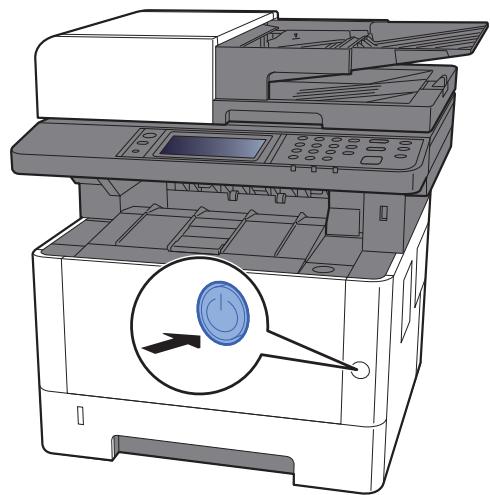
natural_image
Illustration of a printer with a power button icon and control panel (no text or symbols)Aff.mess. mise hrs tens. (page 8-21)
Réseau principal (client) (page 8-39)
natural_image
Illustration of a hand holding a CD on a laptop screen (no text or symbols present)
REMARQUE
natural_image
Illustration of a hand holding a CD to open a laptop screen (no text or symbols visible)
REMARQUE
natural_image
Illustration of a hand holding a CD to open a laptop screen (no text or symbols visible)
REMARQUE
natural_image
Illustration of a hand holding a CD next to a laptop screen showing a simple diagram (no text or symbols present)
REMARQUE
natural_image
Illustration of a hand holding a CD to open a laptop screen (no text or symbols present)natural_image
Illustration showing two hands holding a stack of papers and a closed book, with arrows indicating motion (no text or symbols)natural_image
Diagram showing a printer assembly process with a blue plastic case underneath (no text or symbols present)
REMARQUE
natural_image
Illustration of a hand pressing down on a mechanical device with blue insulation (no text or symbols)
IMPORTANT
natural_image
3D diagram of a device rear panel with an arrow pointing to the side (no text or symbols)
IMPORTANT
6 Afficher l'écran.
natural_image
Illustration of a printer with a blue arrow indicating a point of interest (no text or symbols present)natural_image
Illustration of a hand holding a CD to open a laptop screen, no text or symbols present
REMARQUE
natural_image
Illustration of a printer with an open lid and control panel, showing internal components (no text or symbols)
REMARQUE
natural_image
Illustration of a printer with open lid and internal compartments, showing paper feed and print tray (no text or symbols)natural_image
Illustration of a printer with a paper airplane being inserted (no text or symbols visible)natural_image
Two-step illustration of a printer's internal structure showing the open and closed states, with no visible text or symbols.natural_image
Illustration of a printer with an open lid and arrow indicating direction (no text or symbols present)flowchart
graph TD
    A["Printer Setup"] --> B["Component 1: Printer Icon"]
    A --> C["Component 2: Printer Icon"]
    A --> D["Component 3: Printer Icon"]
    A --> E["Component 4: Printer Icon"]
2 Activer/désactiver l'application.
natural_image
Illustration of a printer with an open lid and control panel, showing internal components (no text or symbols)
natural_image
Illustration of a printer with open lid and hands inserting paper (no text or symbols visible)flowchart
graph TD
    A["Document Image"] --> B["Printer"]
    B --> C["Computer Interface Icon"]
→ Réseau principal (client) (page 8-39)
natural_image
Illustration of a printer with an open lid and control panel, showing no text or symbols.
natural_image
Illustration of a printer with hands operating the paper, showing a close-up of the lid (no text or symbols present)natural_image
Illustration of a printer with an open lid and control panel, showing internal components (no text or symbols)
natural_image
Illustration of a printer with open lid and hands interacting with a screen (no text or symbols visible)natural_image
Illustration of a printer with an open lid and control panel, showing internal components (no text or symbols)
natural_image
Illustration of a printer with open lid and hands inserting paper (no text or symbols visible)natural_image
Illustration of a printer being opened into an open scanner, showing the process with a downward arrow (no text or symbols present)natural_image
Illustration of an open printer with a digital display and paper tray, showing internal components (no text or symbols)
natural_image
Illustration of a printer with open lid and hands inserting paper (no text or symbols visible)natural_image
Illustration of a printer with an open lid and control panel, showing internal components (no text or symbols)
natural_image
Illustration of a printer with open lid and hands inserting paper (no text or symbols visible)Envoi personnel (E-mail)
natural_image
Technical illustration of a printer with an inset showing a close-up of its internal structure (no text or symbols present)natural_image
Illustration of a printer being opened into an open scanner, showing the left and right views with no visible text or symbols.natural_image
Diagram of a printer with an inset showing a close-up of its internal structure (no text or symbols present)2 [Menu] > [Retirer mémoire]
flowchart
graph LR
    A["Star Rating"] --> B["Rating"]
    B --> C["Final Rating"]
Recto verso


Original
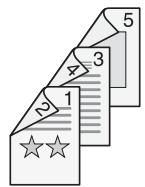
Copie
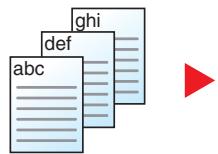
Original
A
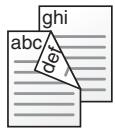
B
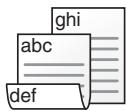
Copie
flowchart
graph LR
    A["Document 1: 1, 2 stars"] --> B["Arrow pointing to '3' in the second step"]
    B --> C["Document 2: 1, 2 stars"] --> D["Arrow pointing to '3' in the second step"]
Format d'originaux


Image de l'original


natural_image
Two leaf icons with white patterns, one gray and one white, connected by a red arrow (no text or symbols)Netteté


natural_image
Colorful paperclip samples arranged in a pile, no text or symbols visibleOriginal


natural_image
Colorful paperclip samples arranged in a scattered pattern (no text or symbols visible)Plus net


natural_image
Colorful paperclip samples arranged in a pile on white background (no text or symbols)natural_image
Child walking on a green field with colorful balloons floating in the sky (no text or symbols)Original


natural_image
Child running with a colorful balloon in a green field under a blue sky (no text or symbols)Plus élevé


natural_image
Child running on a green field holding colorful balloons against a blue sky with clouds (no text or symbols)flowchart
graph LR
    A["1: Document Review with stars"] --> B["2: Questionnaire with stars"]
    B --> C["3: Final Output with red dot"]

REMARQUE
Aff.mess. mise hrs tens.
Touche [Menu Système/Compteur] > [Param. communs] > [Aff.mess. mise hrs tens.]
Configurer Wi-Fi Direct.
Réseau principal (client)
natural_image
Illustration of a hand using a handheld tool to clean or print a document on an open printer (no text or symbols visible)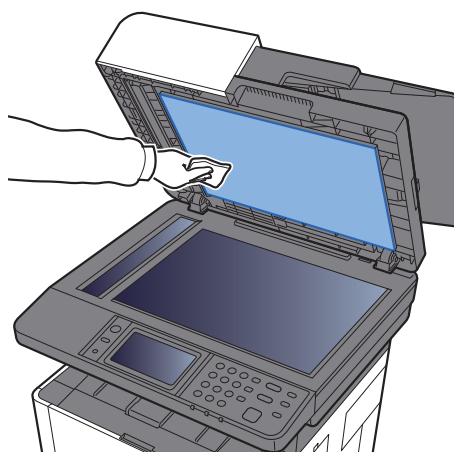
natural_image
Illustration of a hand inserting a printer into an open scanner (no text or symbols visible)natural_image
Diagram showing the open and closed views of an ERP printer, with arrows indicating process flow (no text or symbols present)
IMPORTANT
natural_image
Technical line drawing of a mechanical component with a circular prohibition symbol (no text or labels)
IMPORTANT
natural_image
Technical illustration of two mechanical components: a cylindrical component and a rectangular device with a circular no-smoking symbol (no text or labels)
IMPORTANT
natural_image
Illustration of a hand pressing down on an open laptop keyboard with visible internal components and arrows indicating motion (no text or symbols)
IMPORTANT
natural_image
Illustration of hands installing or adjusting a blue plastic cover into an open industrial machine (no text or symbols visible)natural_image
Diagram showing a printer's internal structure before and after assembly, with no visible text or symbols.10 Refermer le capot avant.
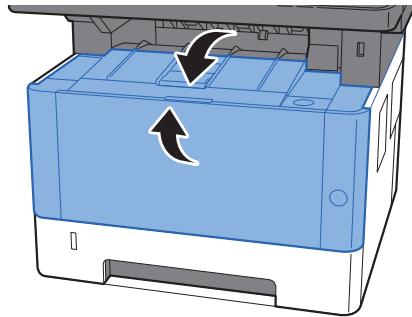
natural_image
Illustration of a blue printer with an arrow indicating rotation or movement (no text or symbols present)natural_image
Illustration of a printer with an arrow pointing to the front panel (no text or symbols present)
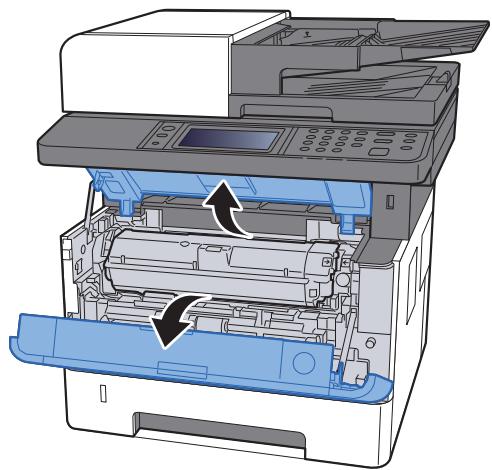
natural_image
Diagram of an open printer with internal components and a blue cover, showing no text or symbols.natural_image
Diagram of a printer internal structure with an inset showing a blue circular component and an arrow indicating direction (no text or symbols present)
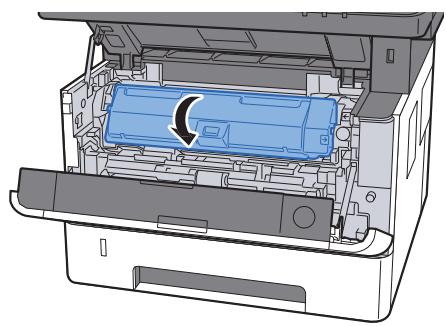
natural_image
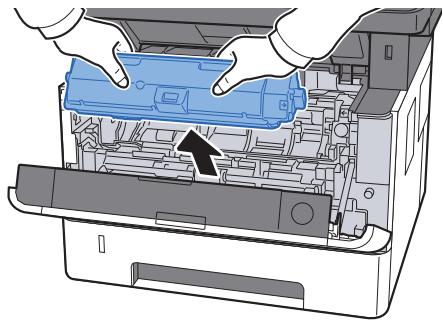
Diagram of an open printer internal structure showing internal components and a blue plastic casing with a circular arrow indicating rotation (no text or symbols present)3 Retirer la cartouche de toner.
natural_image
Illustration of hands operating a printer into a machine, showing internal components and a blue component (no text or symbols)natural_image
Diagram of a blue mechanical component being wrapped in a transparent sheet, with an arrow indicating motion (no text or symbols present)natural_image
Blue plastic cylindrical component with a magnified inset showing a folded paper box (no text or symbols)
IMPORTANT
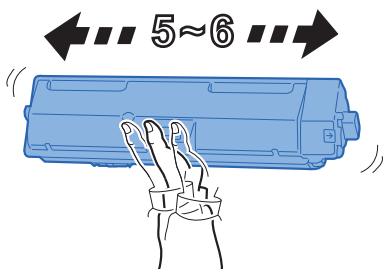
6 Agiter la cartouche de toner.
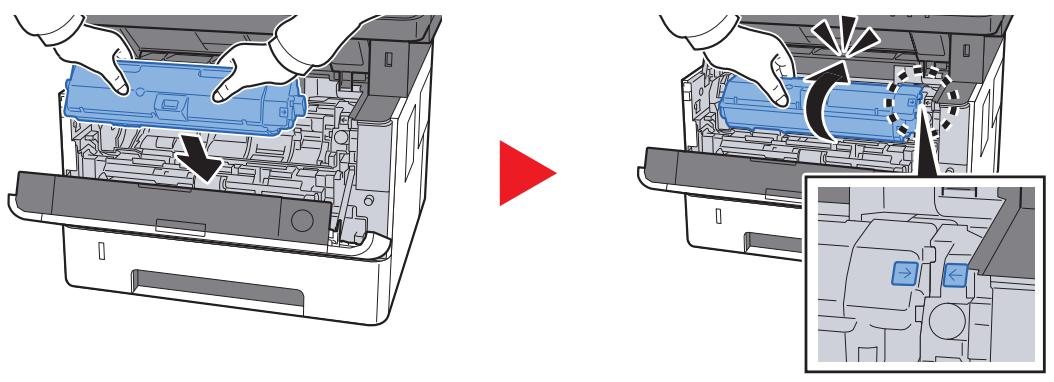
7 Installer la cartouche de toner.
natural_image
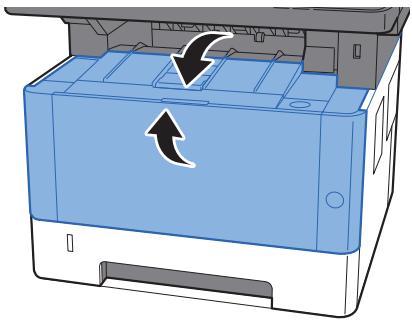
Diagram showing a printer's internal structure before and after assembly, with no visible text or symbols.8 Refermer le capot avant.
natural_image
Illustration of a printer's front panel with arrows indicating rotation (no text or symbols)
REMARQUE
natural_image
Diagram showing a printer being inserted into a blue plastic holder, with no visible text or symbols.natural_image
Diagram of a printer with a paper feed and a downward arrow indicating compression (no text or symbols)natural_image
Diagram of a blue plastic container with an arrow pointing to the bottom side (no text or symbols present)natural_image
Diagram of a printer with an arrow pointing to the lid area (no text or symbols present)
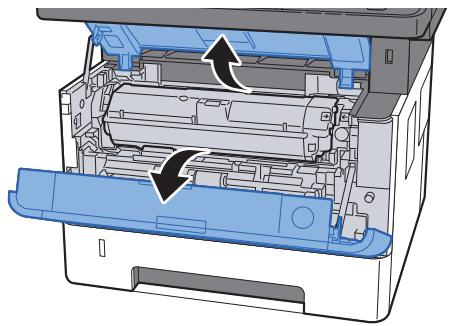
natural_image
Diagram of an open printer showing internal components and a paperclip (no text or symbols)5 Refermer le capot avant.
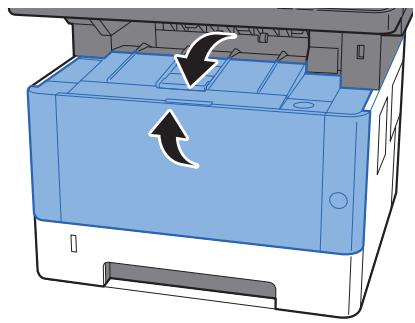
natural_image
Illustration of a blue printer with an arrow indicating rotation or compression (no text or symbols present)natural_image
Diagram of a printer assembly showing internal components and a blue plastic holder (no text or symbols)natural_image
Line drawing of a printer with paper being inserted, showing internal structure and page layout (no text or symbols)natural_image
Diagram of a device's internal structure with a blue highlighted component and an arrow indicating direction (no text or symbols)natural_image
Diagram of an open printer with a paperclip and arrow pointing to the lid (no text or symbols present)
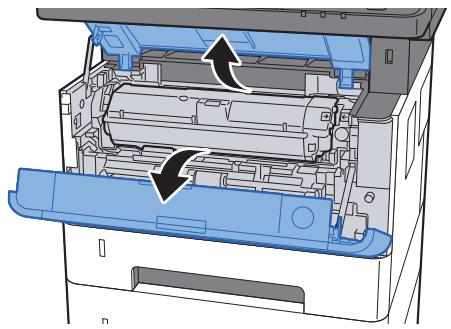
natural_image
Diagram of an open printer internal structure showing internal components and arrows indicating flow or movement (no text or symbols present)5 Refermer le capot avant.
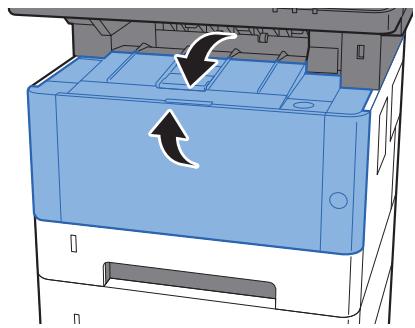
natural_image
Diagram of a printer's internal structure showing paper feeding into a paper holder with an arrow indicating rotation (no text or symbols present)natural_image
Diagram of a printer assembly showing internal components and a blue plastic casing (no text or symbols)natural_image
Illustration of a printer printer with a paper feed and a downward arrow indicating print (no text or symbols present)natural_image
3D diagram of a container with blue and gray layers, showing an arrow pointing to the bottom layer (no text or symbols)natural_image
Diagram of an open printer with a paperclip and arrow pointing to the lid (no text or symbols present)
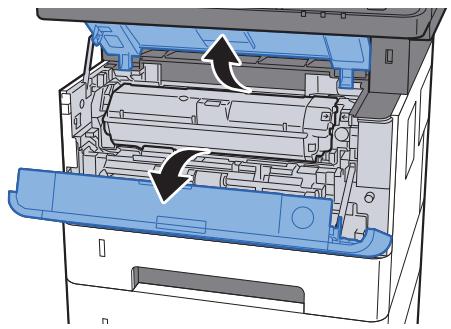
natural_image
Diagram of an open printer internal structure showing internal components and arrows indicating flow or movement (no text or symbols present)5 Refermer le capot avant.
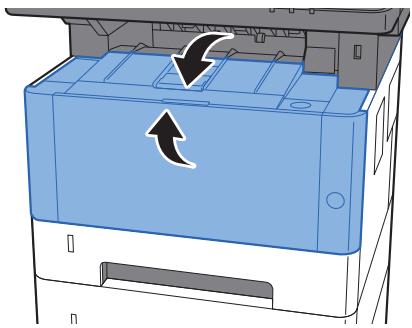
natural_image
Diagram of a printer's front panel showing internal structure with arrows indicating rotation (no text or symbols)natural_image
Illustration of a printer with paper being inserted, showing internal components and a lightning bolt symbol (no text or labels)natural_image
Diagram of a printer being inserted into a sheet, showing paper and paper packaging (no text or symbols)natural_image
Illustration of a printer being inserted into a paper airplane, showing paper sheet and printer (no text or symbols)natural_image
Diagram showing a printer being inserted into a blue plastic holder, with no visible text or symbols.natural_image
Diagram showing a paper being inserted into a container with a downward arrow indicating compression (no text or symbols present)natural_image
Diagram of a blue plastic container with an arrow pointing to it, no text or symbols present
IMPORTANT
natural_image
Technical line drawing of two mechanical components with a prohibition symbol (no text or labels present)
IMPORTANT
natural_image
Technical line drawings of two mechanical components with a prohibition symbol (no text or labels)
IMPORTANT
natural_image
Diagram of an open printer internal structure showing internal components and a paper feed (no text or symbols)natural_image
Interior view of a printer showing internal structure with no visible text or symbolsnatural_image
Illustration of hands installing or adjusting a blue plastic cover into an open industrial machine (no text or symbols visible)natural_image
Diagram showing a printer's internal structure before and after assembly, with no visible text or symbols.14 Refermer le capot avant.
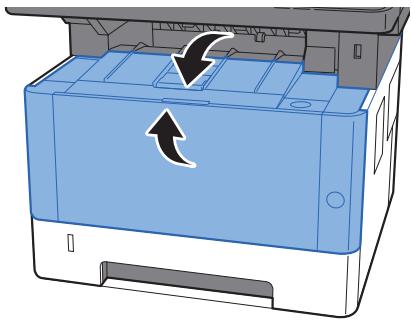
natural_image
Illustration of a printer with a paper roll and arrow indicating rotation (no text or symbols)natural_image
Cross-sectional diagram of a printer or printer showing internal structure and fluid flow (no text or symbols)natural_image
Technical line drawing of a printer internal structure showing internal components and an external paper feeding into a slot (no text or symbols present)
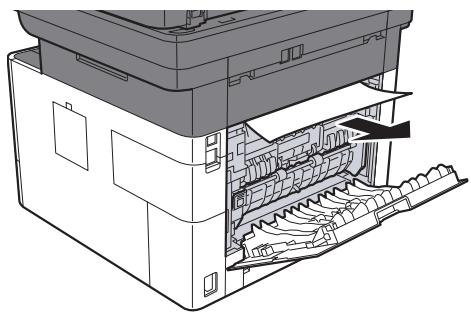
natural_image
Technical line drawing of an open industrial machine with internal components (no text or symbols)natural_image
Diagram of a printer's internal structure showing internal components and a blue arrow indicating a process (no text or symbols present)natural_image
Diagram of a printer's internal structure showing paper feed, paper tray, and paper roll (no text or labels)natural_image
Illustration of a printer being inserted into a plastic holder, showing internal components and a downward arrow (no text or symbols)natural_image
Cross-sectional diagram of a printer or printer showing internal components and casing (no text or symbols)
natural_image
Cross-sectional diagram of a printer internal structure showing internal components and a highlighted blue component (no text or symbols)natural_image
Technical line drawing of a printer or printer with internal structure and paper feed (no text or symbols)natural_image
Cross-sectional diagram of a printer or printer showing internal structure and part (no text or symbols)natural_image
Diagram of a device rear panel with an arrow pointing to the side (no text or symbols present)natural_image
3D diagram of a printer or printer casing with an arrow indicating rotation or movement (no text or symbols present)natural_image
Illustration of a printer with an open lid and a blue button, showing internal components (no text or symbols)
natural_image
Diagram of an open printer with internal components and a blue cover, showing no text or symbols.12 Refermer le capot avant.
natural_image
Illustration of a blue printer with an arrow indicating rotation or compression (no text or symbols present)natural_image
Illustration of a printer with a digital display and paper feed being inserted (no text or symbols visible)natural_image
Illustration of a printer's internal structure showing the lid and internal compartments (no text or symbols)
natural_image
Illustration of an open printer with internal compartments and a digital display (no text or symbols)natural_image
3D diagram of a mechanical component with an arrow indicating rotation or assembly (no text or symbols present)
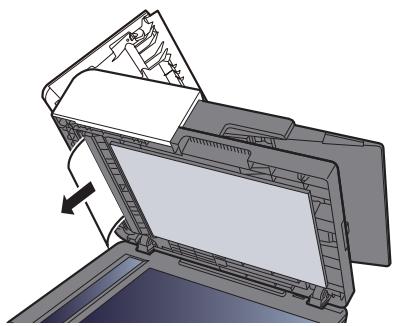
natural_image
Diagram of a printer or printer with an open lid and internal structure, showing no text or symbols.natural_image
Illustration of a printer's internal structure being opened, showing the lid and base panel (no text or symbols)
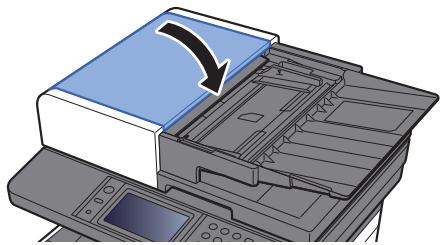
natural_image
Illustration of a printer with a blue cover and arrow indicating a copy or transformation (no text or symbols present)11 Annexe
(5) SD/SDHC Memory Card
(6) USB Keyboard
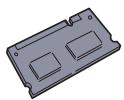
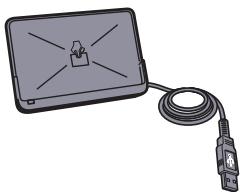
natural_image
Illustration of a rectangular electronic device connected to a cable with a connector (no text or symbols visible)(1) "Expansion Memory"
natural_image
Diagram of a printer's internal structure showing paper feed and paper roll (no text or symbols)
natural_image
Diagram of a printer internal structure showing internal components and a blue plastic cover (no text or symbols)
natural_image
Technical line drawing of a mechanical device with internal components and a hand operating the shaft (no text or symbols)Card Authentication Kit(B) Operation Guide
(4) UG-33 "Option ThinPrint"
natural_image
Technical diagram of a mechanical device showing internal components and a blue component (no text or symbols)natural_image
Diagram showing a printer's internal structure before and after processing, with no visible text or symbols.(6) USB Keyboard "Clavier USB"
Application 5-15, 8-24
Applications en option 11-6
Card Authentication Kit 11-4
Client SMB (transmission)
Command Center RX 2-53
Conf. dest. avant envoi 8-23
Enhanced WSD over SSL
FTP Client (transmission)
Monotype Imaging License Agreement 1-13
Mopria 4-10
Card Authentication Kit 11-4
Carte mémoire SD/SDHC 11-4
Support Mode Auto 8-16
Type de support 8-16
Papier recyclé 11-18
Conf. dest. avant envoi 8-23
Action lect. CAD 8-22
Programme Energy Star (ENERGY STAR®) 1-17
Propriété util. 8-9
RA (Stateless) 11-27
Paramètres 8-32
Raccordement
Câble réseau 2-8
Câble secteur 2-9
Câble USB 2-9
Raccourcis 5-19
Ajout 5-19
Réseau principal (client) 8-39
Réseau sans fil
Paramètres 2-26
Réseau principal (client) 8-39
Système/réseau 8-29
T
Wireless Connection 1-9
This machine has passed all quality controls and final inspection.
KYOCERA Document Solutions America, Inc.
Headquarters
225 Sand Road,
Fairfield, New Jersey 07004-0008, USA
Phone: +1-973-808-8444
Fax: +1-973-882-6000
Latin America
8240 NW 52nd Terrace Dawson Building, Suite 100
Miami, Florida 33166, USA
Phone: +1-305-421-6640
Fax: +1-305-421-6666
KYOCERA Document Solutions Canada, Ltd.
6120 Kestrel Rd., Mississauga, ON L5T 1S8, Canada
Phone: +1-905-670-4425
Fax: +1-905-670-8116
KYOCERA Document Solutions
Mexico, S.A. de C.V.
Calle Arquimedes No. 130, 4 Piso, Colonia Polanco
Chapultepec, Delegacion Miguel Hidalgo,
KYOCERA Document Solutions Brazil, Ltda.
Alameda África, 545, Pólo Empresarial Consbrás, Tamboré, Santana de Parnaíba, State of São Paulo, CEP 06543-306, Brazil
Phone: +55-11-2424-5353
Fax: +55-11-2424-5304
KYOCERA Document Solutions Chile SpA
Jose Ananias 505, Macul. Santiago, Chile
Phone: +562-2350-7000
Fax: +562-2350-7150
KYOCERA Document Solutions
Australia Pty. Ltd.
Level 3, 6-10 Talavera Road North Ryde N.S.W, 2113, Australia
Phone: +61-2-9888-9999
Fax: +61-2-9888-9588
KYOCERA Document Solutions
New Zealand Ltd.
Ground Floor, 19 Byron Avenue, Takapuna, Auckland, New Zealand
Phone: +64-9-415-4517
Fax: +64-9-415-4597
KYOCERA Document Solutions Asia Limited
Unit 3 & 5, 16/F., Mita Centre, 552-566, Castle Peak Road
Tsuen Wan, New Territories, Hong Kong
Phone: +852-2496-5678
Fax: +852-2610-2063
KYOCERA Document Solutions
(China) Corporation
8F, No. 288 Nanjing Road West, Huangpu District,
Shanghai,200003, China
Phone: +86-21-5301-1777
Fax: +86-21-5302-8300
KYOCERA Document Solutions
(Thailand) Corp., Ltd.
335 Ratchadapisek Road, Wongsawang, Bangsue, Bangkok 10800, Thailand
Phone: +66-2-586-0333
Fax: +66-2-586-0278
KYOCERA Document Solutions
Singapore Pte. Ltd.
12 Tai Seng Street #04-01A,
Luxasia Building, Singapore 534118
Phone: +65-6741-8733
Fax: +65-6748-3788
KYOCERA Document Solutions
Hong Kong Limited
Unit 1,2,4,6,8 & 10, 16/F., Mita Centre, 552-566, Castle
Peak Road Tsuen Wan, New Territories, Hong Kong
Phone: +852-3582-4000
Fax: +852-3185-1399
KYOCERA Document Solutions
Taiwan Corporation
6F., No.37, Sec. 3, Minquan E. Rd.,
Zhongshan Dist., Taipei 104, Taiwan R.O.C.
Phone: +886-2-2507-6709
Fax: +886-2-2507-8432
KYOCERA Document Solutions Korea Co., Ltd.
3F Daewoo Foundation Bldg 18, Toegye-ro, Jung-gu, Seoul, Korea
Phone: +822-6933-4050
Fax: +822-747-0084
KYOCERA Document Solutions
India Private Limited
Second Floor, Centrum Plaza, Golf Course Road,
Sector-53, Gurgaon, Haryana 122002, India
Phone: +91-0124-4671000
Fax: +91-0124-4671001
KYOCERA Document Solutions Europe B.V.
KYOCERA Document Solutions (U.K.) Limited
Eldon Court, 75-77 London Road,
Reading, Berkshire RG1 5BS,
United Kingdom
Phone: +44-118-931-1500
Fax: +44-118-931-1108
KYOCERA Document Solutions Italia S.p.A.
Via Monfalcone 15, 20132, Milano, Italy,
Phone: +39-02-921791
Fax: +39-02-92179-600
KYOCERA Document Solutions Belgium N.V.
Sint-Martinusweg 199-201 1930 Zaventem,
Belgium
Phone: +32-2-7209270
Fax: +32-2-7208748
KYOCERA Document Solutions France S.A.S.
Phone: +33-1-69852600
Fax: +33-1-69853409
KYOCERA Document Solutions Espana, S.A.
South Africa (Pty) Ltd.
KYOCERA House, Hertford Office Park,
90 Bekker Road (Cnr. Allandale), Midrand, South Africa
Phone: +27-11-540-2600
Fax: +27-11-466-3050
KYOCERA Document Solutions Russia LLC.
Building 2, 51/4, Schepkina St., 129110, Moscow, Russia
Phone: +7(495)741-0004
Fax: +7(495)741-0018
KYOCERA Document Solutions Middle East
Dubai Internet City, Bldg. 17,
Office 157 P.O. Box 500817, Dubai,
United Arab Emirates
Phone: +971-04-433-0412
KYOCERA Document Solutions Inc.
2-28, 1-chome, Tamatsukuri, Chuo-ku
Osaka 540-8585, Japan
Phone: +81-6-6764-3555
http://www.kyoceradocumentsolutions.com