
AIRPODS - Wireless Earbuds APPLE - Free user manual and instructions
Find the device manual for free AIRPODS APPLE in PDF.



| Product Type | Wireless headphones |
| Brand | Apple |
| Model | AirPods |
| Dimensions (earbud) | 16,5 x 18,0 x 40,5 mm |
| Dimensions (case) | 44,3 x 21,3 x 53,5 mm |
| Weight (earbud) | 4 g |
| Weight (case) | 38 g |
| Battery life (listening) | Up to 5 hours |
| Battery life (with case) | More than 24 hours |
| Connectivity | Bluetooth |
| Main functions | Play/Pause, Siri, call control, skip forward/back, volume |
| Compatibility | iPhone, iPad, iPod touch, Mac, Apple Watch |
| Care and cleaning | Clean with a soft, dry cloth. Avoid moisture. |
| Safety | Keep out of reach of children under 3 years. Use at moderate volume to prevent hearing damage. |
| Spare parts and repairability | Battery not replaceable by user. Apple service recommended. |
Frequently Asked Questions - AIRPODS APPLE
User questions about AIRPODS APPLE
0 question about this device. Answer the ones you know or ask your own.
Ask a new question about this device
Download the instructions for your Wireless Earbuds in PDF format for free! Find your manual AIRPODS - APPLE and take your electronic device back in hand. On this page are published all the documents necessary for the use of your device. AIRPODS by APPLE.
USER MANUAL AIRPODS APPLE
Congratulations on purchasing the Apple EarPods with Remote and Mic.
To use the Apple EarPods with Remote and Mic, plug them into a supported iPod, iPhone, or iPad and insert the earphones in your ears.
You can use the earphones with these models:
- iPod shuffle (3rd generation or later)
- iPod nano (4th generation or later)
- iPod classic (120GB and 160GB)
- iPod touch (2nd generation or later)
iPhone 3GS or later - iPad (any generation)
Important: Not all features listed below are supported by all models. Check your product's user guide for more information.
| To | Do this |
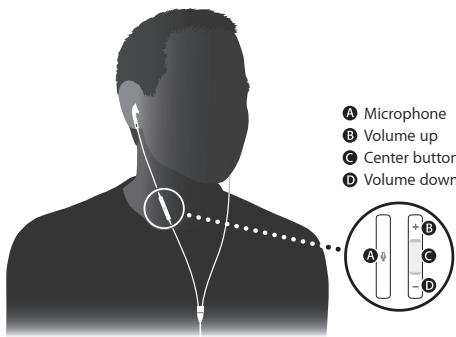
| Play or pause a song or video | Press the center button once. Press again to resume playback. |
| Skip to the next song or chapter | Press the center button twice quickly. |
| Fast-forward | Press the center button twice quickly and hold. |
| Go to the previous song or chapter | Press the center button three times quickly. |
| Rewind | Press the center button three times quickly and hold. |
| Answer or end a call | Press the center button once to answer. Press again to end the call. |
| Decline an incoming call | Hold down the center button for about two seconds, then let go. When you let go, two low beeps confirm that you declined the call. |
| Switch to an incoming or on-hold call and put the current call on hold | Press the center button once. Press again to switch back to the first call. |
| Switch to an incoming or on-hold call and end the current call | Hold down the center button for about two seconds, then let go. When you let go, two low beeps confirm that you ended the first call. |
| Increase volume | Press the + button. |
| Decrease volume | Press the - button. |
Using Siri
You can use Siri with your Apple EarPods with Remote and Mic. To use Siri, press and hold the center button. To continue a conversation with Siri, press and hold the button each time you want to talk. For more information about setting up and using Siri, see the user guide for your device.
Using VoiceOver
You can use VoiceOver on iPod shuffle (3rd generation or later) and iPod nano (5th generation or later) to announce the currently playing song title, artist name, and playlist, and to switch playlists.
To use VoiceOver, press the center button to hear the song title and artist name. Continue pressing until you hear a tone, then release the button. VoiceOver announces the current playlist, and then all your playlists. Press the center button when you hear the name of the playlist you want.
Important Safety Information
Avoid Hearing Damage
WARNING: Permanent hearing loss may occur if earphones are used at high volume. Set the volume to a safe level. You can adapt over time to a higher volume of sound that may sound normal but can be damaging to your hearing. If you experience ringing in your ears or muffled speech, stop listening and have your hearing checked. The louder the volume, the less time is required before your hearing could be affected. Hearing experts suggest that to protect your hearing:
- Limit the amount of time you use the earphones at high volume.
- Avoid turning up the volume to block out noisy surroundings.
- Turn down the volume if you can't hear people speaking near you.
For information about how to set a maximum volume limit, see the user guide for your iPod, iPhone, or iPad.
Keep Out of Reach of Children
WARNING: The small parts included with this product can be a choking hazard. This product is not intended for use by small children and should be kept away from children under 3 years of age.
Do Not Use While Driving
Important: Use of earphones while operating a vehicle is not recommended and is illegal in some areas. Check and obey the applicable laws and regulations on the use of earphones while operating a vehicle. Be careful and attentive while driving. Stop listening to your audio device if you find it disruptive or distracting while operating any type of vehicle or performing another activity that requires your full attention.
In Case of Skin Irritation
Earphones can lead to ear infections if not properly cleaned. Clean the earbuds frequently with an antiseptic, such as isopropyl alcohol. If a skin problem develops, discontinue use. If the problem persists, consult a physician.
More information about the Apple EarPods with Remote and Mic is available at: www.apple.com/support
Avoid Electrostatic Shock
When using headphones in areas where the air is very dry, it is easy to build up static electricity and possible for your ear to receive a small electrostatic discharge from the headphones. To minimize the risk of electrostatic discharge from the headphones, avoid using the headphones in extremely dry environments, or touch a grounded unpainted metal object before inserting the headphones.
Apple EarPods with Remote and Mic 1
Regulatory Compliance Information
Disposal and Recycling Information
Your product must be disposed of properly according to local laws and regulations. When your product reaches its end of life, contact Apple or your local authorities to learn about recycling options.
For more information about Apple's recycling program, go to:
www.apple.com/recycling
中国
| 有毒或有害物质 | 零部件 | |
| 电路板 | 附件 | |
| 铅(Pb) | X | X |
| 汞(Hg) | O | O |
| 镉(Cd) | O | O |
| 六价铬(Cr,VI) | O | O |
| 多溴联苯(PBB) | O | O |
| 多溴二苯醚(PBDE) | O | O |
Apple and the Environment
Apple Inc. recognizes its responsibility to minimize the environmental impacts of its operations and products. More information is available on the web at: www.apple.com/environment
www.apple.com www.apple.com/support
© 2012 Apple Inc. All rights reserved.
Apple, the Apple logo, iPod, iPhone, iPod classic, iPod nano, iPod shuffle, iPod touch, and Siri are trademarks of Apple Inc., registered in the U.S. and other countries.
ZM034-6542-A
Printed in XXXX

Brand : APPLE
Model : AIRPODS
Category : Wireless Earbuds