
GX950 - Mouse ASUS - Free user manual and instructions
Find the device manual for free GX950 ASUS in PDF.



| Product Type | Wired laser gaming mouse |
| Brand | ASUS |
| Model | GX950 |
| Dimensions (L x W x H) | 122 x 82 x 43 mm |
| Weight | 150 g (adjustable with 5 weights of 4.5 g each) |
| Power | Via USB port (wired) |
| Connectivity | Wired, gold-plated USB connector, 1.8 m cable with sleeve |
| Sensor | Laser Twin-Eye |
| Resolution | 50 ~ 8200 dpi, adjustable by levels (presets: 800, 1600, 3200, 5600 dpi) |
| Buttons | 8 programmable buttons: left, right, scroll wheel (click and tilt), two side buttons, DPI button, profile selector |
| Main Functions | Button programming, macros, DPI adjustment, profiles (3 + 1 normal), profile selection by color LED, angle snapping, lift height, polling rate (125-1000 Hz) |
| Configuration Software | ASUS ROG Gaming Mouse GX950 Utility (Windows) |
| System Compatibility | Windows XP / Vista / 7 |
| Maintenance and Cleaning | Clean with a soft dry cloth; do not use liquids or abrasive products |
| Safety | FCC Class B compliant, REACH directive, WEEE directive (do not dispose with household waste) |
| Spare Parts and Repairability | Additional weights (4.5 g x 5), mouse feet, USB cable |
| General Information | Manual available in PDF; first edition May 2012 |
Frequently Asked Questions - GX950 ASUS
User questions about GX950 ASUS
0 question about this device. Answer the ones you know or ask your own.
Ask a new question about this device
Download the instructions for your Mouse in PDF format for free! Find your manual GX950 - ASUS and take your electronic device back in hand. On this page are published all the documents necessary for the use of your device. GX950 by ASUS.
USER MANUAL GX950 ASUS
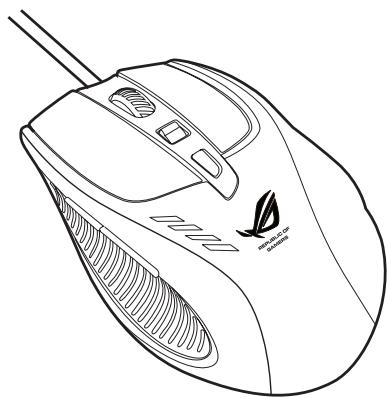
ASUS GX950 Gaming Mouse
User Manual
Q7297
First Edition (V1)
May 2012
Copyright © 2012 ASUSTeK Computer Inc. All Rights Reserved.
No part of this manual, including the products and software described in it, may be reproduced, transmitted, transcribed, stored in a retrieval system, or translated into any language in any form or by any means, except documentation kept by the purchaser for backup purposes, without the express written permission of ASUSTeK Computer Inc. ("ASUS").
Product warranty or service will not be extended if: (1) the product is repaired, modified or altered, unless such repair, modification of alteration is authorized in writing by ASUS; or (2) the serial number of the product is defaced or missing.
ASUS PROVIDES THIS MANUAL "AS IS"WITHOUT WARRANTY OF ANY KIND, Either EXPRESS OR IMplied, INCLUDING BUT NOT LIMITED TO THE IMPLIED WARRANTYIONS OR CONDITIONS OF MERCHANTABILITY OR FITNESS FOR A PARTICULAR PURPOSE. IN NO EVENT SHALL ASUS, ITS DIRECTORS, OFFICERS, EMPLOYEES OR AGENTS BE LIABLE FOR ANY INDIRECT, SPECIAL, INCIDENTAL, OR CONSEQUENTIAL DAMAGES (INCLUDING DAMAGESS FOR LOSS OF PROFITS, LOSS OF BUSINESS, LOSS OF USE OR DATA, INTERUCTION OF BUSINESS AND THE LIKE), EVEN IF ASUS HAS BEEN ADVISED OF THE POSSIBILITY OF SUCH DAMAGES ASING FROM ANY DEFECT OR ERROR IN THIS MANUAL OR PRODUCT.
SPECIFICATIONS AND INFORMATION CONTAINED IN THIS MANUAL ARE FURNISHED FOR INFORMATIONAL USE ONLY, AND ARE SUBJECT TO CHANGE AT ANY TIME WITHOUT NOTICE, AND SHOULD NOT BE CONSTRUED AS A COMMITMENT BY ASUS. ASUS ASSUMES NO RESPONSIBILITY OR LIABILITY FOR ANY ERRORS OR INACCURACIES THAT MAY APPEAR IN THIS MANUAL, INCLUDING THE PRODUCTS AND SOFTWARE DESCRIBED IN IT.
Products and corporate names appearing in this manual may or may not be registered trademarks or copyrights of their respective companies, and are used only for identification or explanation and to the owners' benefit, without intent to infringe.
Contents
English 1
繁體中文 17
简体中文 31
Français 45
Deutsch 60
Italiano 75
日本語 90
Pycckn 105
Čestina 120
Magyar. 135
Polski 150
Portugues 165
Româna 180
Slovensky 195
Sloven's ina 210
Espanol 225
Türkce 240
Contact Information
ASUSTeK COMPUTER INC.
Address
15 Li-Te Road, Peitou, Taipei, Taiwan 11259
Telephone
+886-2-2894-3447
Fax
+886-2-2890-7798
info@asus.com.tw
Web site
www.asus.com.tw
Technical Support
Telephone
+86-21-38429911
Online support
support.asus.com
ASUS COMPUTER INTERNATIONAL (America)
Address
800 Corporate Way, Fremont, CA 94539, USA
Telephone
+1-510-739-3777
Fax
+1-510-608-4555
Web site
usa.asus.com
Technical Support
Telephone
+1-812-282-2787
Support fax
+1-812-284-0883
Online support
support.asus.com
ASUS COMPUTER GmbH (Germany and Austria)
Address
Harkort Str. 21-23, D-40880 Ratingen, Germany
Fax
+49-2102-959911
Web site
www.asus.de
Online contact
www.asus.de/sales
Technical Support
Telephone (Component)
+49-1805-010923*
Telephone (System/Notebook/Eee/LCD)
+49-1805-010920*
Support Fax
+49-2102-9599-11
Online support
support.asus.com
- EUR 0.14/minute from a German fixed landline; EUR 0.42/minute from a mobile phone.
Notices
Federal Communications Commission Statement
This device complies with Part 15 of the FCC Rules. Operation is subject to the following two conditions:
This device may not cause harmful interference, and
This device must accept any interference received including interference that may cause undesired operation.
This equipment has been tested and found to comply with the limits for a Class B digital device, pursuant to Part 15 of the FCC Rules. These limits are designed to provide reasonable protection against harmful interference in a residential installation. This equipment generates, uses and can radiate radio frequency energy and, if not installed and used in accordance with manufacturer's instructions, may cause harmful interference to radio communications. However, there is no guarantee that interference will not occur in a particular installation. If this equipment does cause harmful interference to radio or television reception, which can be determined by turning the equipment off and on, the user is encouraged to try to correct the interference by one or more of the following measures:
Reorient or relocate the receiving antenna.
- Increase the separation between the equipment and receiver.
- Connect the equipment to an outlet on a circuit different from that to which the receiver is connected.
- Consult the dealer or an experienced radio/TV technician for help.
CAUTION: Any changes or modifications not expressly approved by the grantee of this device could void the user's authority to operate the equipment.
Safety Certifications
- CE Marking
China RoHS EFUP Labeling - 10 Years
C-Tick Mark
BSMI Certification
C
E



Complies with 21 CFR 1040.10 and 1040.11 except for deviations pursuant to Laser Notice No. 50, dated June 24, 2007.
REACH
Complying with the REACH (Registration, Evaluation, Authorisation, and Restriction of Chemicals) regulatory framework, we published the chemical substances in our products at ASUS REACH website at http://csr.asus.com/english/REACH.htm.

DO NOT throw the mouse in municipal waste. This product has been designed to enable proper reuse of parts and recycling. This symbol of the crossed out wheeled bin indicates that the product (electrical and electronic equipment) should not be placed in municipal waste. Check local regulations for disposal of electronic products.
ASUS Recycling/Takeback Services
ASUS recycling and takeback programs come from our commitment to the highest standards for protecting our environment. We believe in providing solutions for you to be able to responsibly recycle our products, batteries, other components, as well as the packaging materials. Please go to http://csr.asus.com/english/Takeback.htm for the detailed recycling information in different regions.
Package Contents
Check your ASUS GX950 Gaming Mouse package for the following items:
- ASUS GX950 Gaming Mouse
- User Manual

If any of the above items is damaged or missing, contact your retailer immediately.
Specifications Summary
| Model Name | GX950 |
| Connectivity Technology | Wired |
| Tracking | Laser |
| OS Support | Windows® XP / Windows® Vista / Windows® 7 |
| Dimensions (mm) | Mouse: 122(L) x 82(W) x 43(H) |
| Cable Length | 1.8m with cable sleeve |
| Weight | Mouse: 150g (adjustable) |
| Buttons / Switches | 1 x Left button / Right button / Scroll wheel 2 x Side buttons 1 x DPI button 1 x Profile switch |
| Resolution | 50 ~ 8200 dpi (adjustable) Default: 800dpi (Level 1), 1600dpi (Level 2), 3200dpi (Level 3), 5600dpi (Level 4) |
| Interface | Gold plated USB |

Specifications are subject to change without prior notice.
Knowing your ASUS GX950 Gaming Mouse
Your ASUS GX950 Gaming Mouse comes with a left button, a right button, a scroll wheel, two side buttons, a DPI button, and a specially designed Profile Switch button.
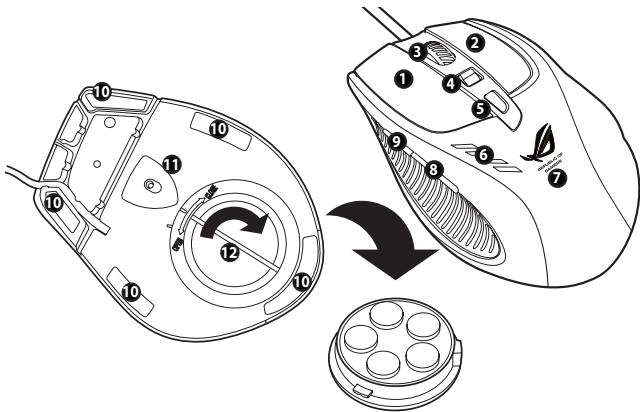
| 1 | Left button |
| 2 | Right button |
| 3 | Scroll wheel |
| 4 | DPI switch Move the DPI switch forward/backward to change the mouse resolution. The DPI switch LEDs light up when you move the DPI switch. See the table on the next page for the LED indications*. |
| 5 | Profile switch / Profile indicator Press the Profile switch to select a profile. The switch lights up when you press it. See the table on the next page for the LED indications**. |
| 6 | LED DPI indicator* |
| 7 | GX950 logo |
| 8 | IE Forward button |
| 9 | IE Backward button |
| 10 | Mouse feet |
| 11 | Twin-Eye Laser sensor |
| 12 | Weight base (5 x 4.5g blocks)*** |
*** To adjust the mouse weight, add or remove the weight blocks.
- DPI switch LED indications
| Number of lit LEDs | Indications |
| 1 | Level 1 (default: 800 dpi) |
| 2 | Level 2 (default: 1600 dpi) |
| 3 | Level 3 (default: 3200 dpi) |
| 4 | Level 4 (default: 5600 dpi) |
** Profile switch LED indications
| LED colors | Indications |
| Do not light up. | Normal Profile |
| Green | Profile 1 |
| Red | Profile 2 |
| Orange | Profile 3 |

NOTE: The DPI levels go up and down in a cycle. When the mouse is set to Level 4, and you keep moving the DPI switch forward, the DPI level will go down to Level 1 and then go up to Level 2 and higher DPI levels. When the mouse is set to Level 1, and you keep moving the DPI switch backward, the DPI level will go up to Level 4 and then go down to Level 3 and lower DPI levels.
Connecting your ASUS GX950 Gaming Mouse
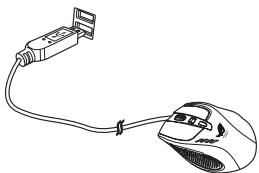
Connect your ASUS GX950 Gaming Mouse to your computer's USB port.
Customizing your mouse (DPI values / Macro commands / Button functions)
Go to ASUS website at www.asus.com to download the latest driver and install it to customize your mouse's DPI values, Macro commands, and button functions.
Using the setup utility
Do either of the following to launch the setup utility:
- Click the ASUS ROG Gaming Mouse GX950 shortcut on the Windows® desktop.
- Click Start > All Programs > ASUS Gaming Mouse > ASUS ROG Gaming Mouse GX950.
- Right-click the icon from the Windows® taskbar, then select Launch GX950 APP.
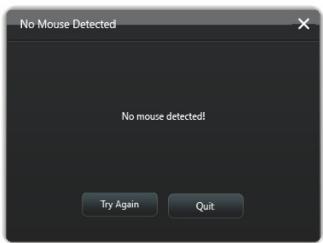
If the screen below appears, plug your ASUS GX950 Gaming Mouse into your computer's USB port. The utility will automatically detect the mouse and continue to the main menu.
Main menu
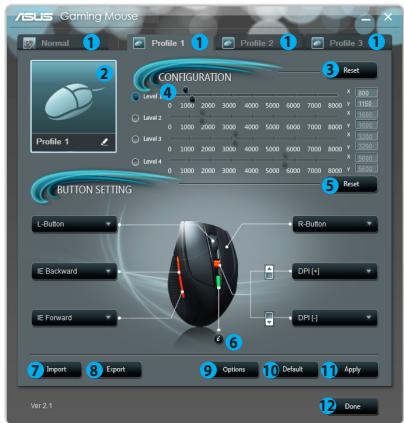
| Items | Descriptions |
| 1. | Click each tab to display the selected profile menu. |
| 2. | Displays the profile icon which is configurable in Profile 1~3 menus. |
| 3. | Click to reset the DPI configuration to the last settings you have saved. |
| 4. | Drag the slider to adjust the DPI value for each level.* |
| 5. | Click to reset the button settings to the last settings you have saved. |
| 6. | Click to display the indications of different Profile indicator colors. |
| 7. | Click to load a profile you have saved for your mouse. |
| 8. | Click to save the current profile settings to your hard disk drive. |
| 9. | Click to display the Options menu which allows you to adjust the mouse polling rate, configure the Angle Snapping and Lift-off features. See page 15 for details. |
| 10. | Click to reset all the mouse settings to the factory defaults. |
| 11. | Click to save the settings you have made. |
| 12. | Click to save the settings you have made and exit the program. |
- Each profile provides four DPI levels. The DPI switch LEDs light up indicating the DPI level you are using. See page 9 for the detailed LED indications.
Profile 1 menu
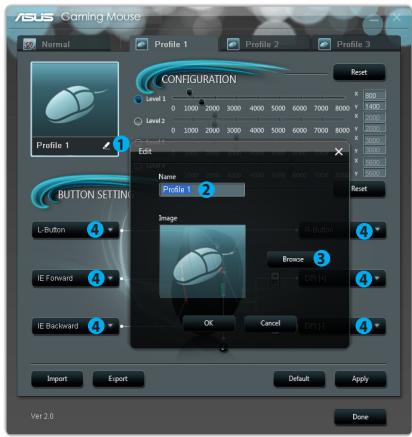
Items Descriptions
- Click to open the Edit menu which allows you to change the profile name and profile icon.
- Enter the profile name you want to use.
- Click to locate the image file you want to use as the profile icon.
- Select a function for each button / action from the drop down list. * Refer to the table below for more details.
Items
Descriptions
L-Button
Makes the button behave like the left mouse button.
R-Button
Makes the button behave like the right mouse button.
M-Button
Makes the button behave like the middle mouse button.
IE Backward
Makes the button behave like the IE Backward button. When selected, press the button to go to the previous page you viewed.
IE Forward
Makes the button behave like the IE Forward button. When selected, press the button to go to the next page you viewed.
| Items | Descriptions |
| Keyboard | When selected,press the button to perform a keystroke or keystroke sequence. |
| Macro | When selected,press the button to run a command or series of commands which you can edit though the Edit Macro menu. See page 14 for more details. |
| DPI[+] | When selected,press the button to increase the DPI value. |
| DPI[-] | When selected,press the button to decrease the DPI value. |
| Profile Switch | Makes the button behave like the profile switch button. |
| Wheel [left] / [right] | When selected,press the button to scroll leftward / rightward as a tilt wheel does.NOTE:This function only work in the Microsoft® Office applications under the Windows® 7 / Vista operating systems. |
| Rapid Fire [mouse] | When selected,press the button to do a rapid fire in a click-to-attack game, which is the same as clicking the left mouse button three times. |
| Rapid Fire [key] | When selected,press the button to do a rapid fire in a game using the Spacebar to attack,which is the same as pressing the Spacebar three times. |
| Web Browser | When selected,press the button to launch your default web browser. |
| When selected,press the button to launch your default email application. | |
| Media Player | When selected,press the button to launch your default media player. |
| Play/Pause | When selected,these buttons become playback control buttons in an active media player. |
| Stop | |
| Next Track | |
| Prev Track | |
| Volume Up / Down | When selected,press the button to increase / decrease the system volume. |
| Mute | When selected,press the button to turn the volume's mute mode on/off. |
| Calculator | When selected,press the button to launch the Calculator application. |
| My Computer | When selected,press the button to open My Computer window. |
| Launch GX950 APP | When selected,press the button to launch this setup utility. |
| Disabled | Select this item to deactivate the button. |
Edit Macro menu
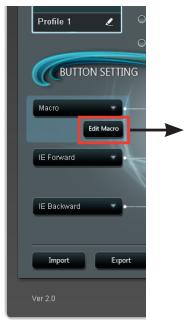
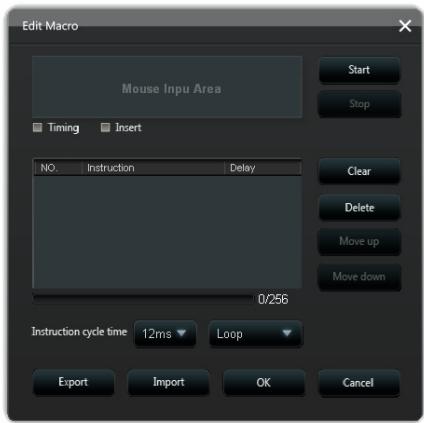
| Items | Descriptions |
| Edit Macro | Click to open the Edit Macro menu. |
| Timing | Check this item to record the time between pressing down and releasing a button. (Default: 12ms) |
| Insert | When checked, the new instruction will be inserted before the selected instruction. Otherwise, any new instruction will be given the first priority. |
| Start | Click to start recording the keystrokes and/or mouse actions. |
| Stop | Click to stop recording the keystrokes and/or mouse actions. |
| Clear | Click to clear all the saved instructions. |
| Move up/down | Click to move up/down the selected instruction. |
| Instruction cycle time | When Timing is unchecked, all the actions' delay time will be the value you chose from the drop down list. |
| Loop | Sets the macro to run at a click and stop when you click again. |
| Fire | Sets the macro to run once at one click. |
| Keeping fire | Sets the macro to run when you hold down the button and stop when you release the button. |
| Export | Click to save the current macro to your hard disk drive. |
| Import | Click to load a macro from your hard disk drive. |
Options menu
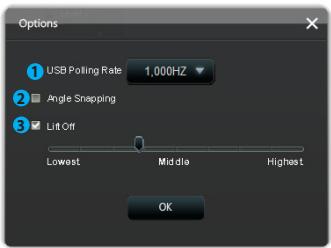
Items Descriptions
- Select your mouse polling rate from the drop down list. Configuration options: 125Hz , 250Hz , 500Hz , 1000Hz (default).
- Tick Angle Snapping to enable the Angle Snapping feature.
Angle snapping brings smooth and straight mouse movements. By default, Angle Snapping is disabled.
- Tick Lift Off to enable the Lift-off feature, and then drag the bar to adjust the Lift-off height from the lowest to the highest. Clear the Lift Off box to automatically adjust the Lift-off height.
When the Lift-off feature is enabled, your mouse stops tracking when you lift your mouse off the mouse surface higher than the specified Lift-off height.
Taskbar menu
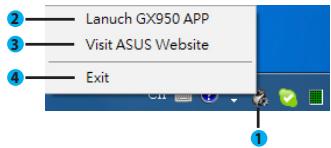
Items Descriptions
- The GX950 mouse logo appears on the taskbar when the program is properly installed.
- Click to open the main menu of the GX950 mouse setup utility.
- Click to visit the ASUS official website.
- Click to exit the setup utility.
華碩GX950 游戲滑鼠
使用手册
T7297
第1.00版(V1)
2012年5月發行
版權說明
Federal Communications Commission Statement
This device complies with Part 15 of the FCC Rules. Operation is subject to the following two conditions:
This device may not cause harmful interference, and
- This device must accept any interference received including interference that may cause undesired operation.
This equipment has been tested and found to comply with the limits for a Class B digital device, pursuant to Part 15 of the FCC Rules. These limits are designed to provide reasonable protection against harmful interference in a residential installation. This equipment generates, uses and can radiate radio frequency energy and, if not installed and used in accordance with manufacturer's instructions, may cause harmful interference to radio communications. However, there is no guarantee that interference will not occur in a particular installation. If this equipment does cause harmful interference to radio or television reception, which can be determined by turning the equipment off and on, the user is encouraged to try to correct the interference by one or more of the following measures:
Reorient or relocate the receiving antenna.
- Increase the separation between the equipment and receiver.
- Connect the equipment to an outlet on a circuit different from that to which the receiver is connected.
- Consult the dealer or an experienced radio/TV technician for help.
CAUTION: Any changes or modifications not expressly approved by the grantee of this device could void the user's authority to operate the equipment.
Safety Certifications
- CE Marking
China RoHS EFUP Labeling - 10 Years
C-Tick Mark
BSMI Certification - UL Mark
C E

I.T.E.



Complies with 21 CFR 1040.10 and 1040.11 except for deviations pursuant to Laser Notice No. 50, dated June 24, 2007.
REACH
15 Li-Te Road, Peitou, Taipei, Taiwan 11259
Telephone
+886-2-2894-3447
Fax
+886-2-2890-7798
info@asus.com.tw
Site Web
www.asus.com.tw
Support technique
Telephone
+86-21-38429911
Online support
support.asus.com
ASUS COMPUTER INTERNATIONAL (Amérique)
Adresse
800 Corporate Way, Fremont, CA 94539, USA
Telephone
+1-510-739-3777
Fax
+1-510-608-4555
Site Web
usa.asus.com
Support technique
Telephone
+1-812-282-2787
Fax
+1-812-284-0883
Support en ligne
support.asus.com
ASUS France SARL
Adresse
10, Allee de Bienvenue, 93160 Noisy Le Grand, France
Telephone
+33(0)149329650
Site Web
www.france.asus.com
Support technique
Telephone
+33(0)821232787
Fax
+33(0)149329699
Web
support.asus.com
Notes
- Marque CE
China RoHS EFUP Labeling - 10 Years - Marque C-Tick
- Certification BSMI
C
E



15 Li-Te Road, Peitou, Taipei, Taiwan 11259
Telefon
+886-2-2894-3447
Fax
+886-2-2890-7798
info@asus.com.tw
Website
www.asus.com.tw
Harkort Str. 21-23, D-40880 Ratingen, Germany
Fax
+49-2102-959911
Website
www.asus.de
Online-Kontakt
www.asus.de/sales
Federal Communications Commission Statement
This device complies with Part 15 of the FCC Rules. Operation is subject to the following two conditions:
This device may not cause harmful interference, and
- This device must accept any interference received including interference that may cause undesired operation.
This equipment has been tested and found to comply with the limits for a Class B digital device, pursuant to Part 15 of the FCC Rules. These limits are designed to provide reasonable protection against harmful interference in a residential installation. This equipment generates, uses and can radiate radio frequency energy and, if not installed and used in accordance with manufacturer's instructions, may cause harmful interference to radio communications. However, there is no guarantee that interference will not occur in a particular installation. If this equipment does cause harmful interference to radio or television reception, which can be determined by turning the equipment off and on, the user is encouraged to try to correct the interference by one or more of the following measures:
Reorient or relocate the receiving antenna.
- Increase the separation between the equipment and receiver.
- Connect the equipment to an outlet on a circuit different from that to which the receiver is connected.
- Consult the dealer or an experienced radio/TV technician for help.
CAUTION: Any changes or modifications not expressly approved by the grantee of this device could void the user's authority to operate the equipment.
CE Marking
China RoHS EFUP Labeling - 10 Years
C-Tick Mark
BSMI Certification


Complies with 21 CFR 1040.10 and 1040.11 except for deviations pursuant to Laser Notice No. 50, dated June 24, 2007.
REACH

m = 311 ;
Supporto Online support.asus.com
ASUS COMPUTER INTERNATIONAL (America)
Indirizzo 800 Corporate Way, Fremont, CA 94539, USA
Telefono +1-510-739-3777
Fax +1-510-608-4555
Sito web usa.asus.com
Supporto Tecnico
Telefono +1-812-282-2787
Fax Supporto +1-812-284-0883
Supporto Online support.asus.com
ASUSTeK ITALY S.r.l (Italia)
Dichiarazione FCC (Federal Communications Commission)
CE Marking
China RoHS EFUP Labeling - 10 Years
C-Tick Mark
BSMI Certification
CE



Complies with 21 CFR 1040.10 and 1040.11 except for deviations pursuant to Laser Notice No. 50, dated June 24, 2007.
Comunicazione REACH
Copyright © 2012 ASUSTeK Computer Inc. All Rights Reserved.
Federal Communications Commission Statement (原文)
This device complies with Part 15 of the FCC Rules. Operation is subject to the following two conditions:
This device may not cause harmful interference, and
This device must accept any interference received including interference that may cause undesired operation.
This equipment has been tested and found to comply with the limits for a Class B digital device, pursuant to Part 15 of the FCC Rules. These limits are designed to provide reasonable protection against harmful interference in a residential installation. This equipment generates, uses and can radiate radio frequency energy and, if not installed and used in accordance with manufacturer's instructions, may cause harmful interference to radio communications. However, there is no guarantee that interference will not occur in a particular installation. If this equipment does cause harmful interference to radio or television reception, which can be determined by turning the equipment off and on, the user is encouraged to try to correct the interference by one or more of the following measures:
Reorient or relocate the receiving antenna.
- Increase the separation between the equipment and receiver.
- Connect the equipment to an outlet on a circuit different from that to which the receiver is connected.
- Consult the dealer or an experienced radio/TV technician for help.
CAUTION: Any changes or modifications not expressly approved by the grantee of this device could void the user's authority to operate the equipment.
Safety Certifications
- CE Marking
China RoHS EFUP Labeling - 10 Years
C-Tick Mark
BSMI Certification


Complies with 21 CFR 1040.10 and 1040.11 except for deviations pursuant to Laser Notice No. 50, dated June 24, 2007.
REACH(原文)
Complying with the REACH (Registration, Evaluation, Authorisation, and Restriction of Chemicals) regulatory framework, we published the chemical substances in our products at ASUS REACH website at http://csr.asus.com/english/REACH.htm.

15 Li-Te Road, Peitou, Taipei, Taiwan 11259
Tepepon
+886-2-2894-3447
Qakc
+886-2-2890-7798
info@asus.com.tw
CaHT
www.asus.com.tw
Texnuecka noDpejka
TeIeDoh
+86-21-38429911
OhnaHnTIOePckKa
support.asus.com
ASUS COMPUTER INTERNATIONAL (Amepika)
Ampec
800 Corporate Way, Fremont, CA 94539, USA Teleno
+1-510-739-3777
ΦaKc
+1-510-608-4555
CaHT
usa.asus.com
Texnuecka noDpejka
Tenepon
+1-812-282-2787
ΦaKc
+1-812-284-0883
OhnaHnIopdEppKa
support.asus.com
Harkort Str. 21-23, D-40880 Ratingen, Germany
ΦaKc
+49-2102-959911
CaHT
www.asus.de
OHJIAIH KOHTAKT
www.asus.de/sales
Texnuecka noDpejka
Tenefoh (KOMNHOENTbl)
+49-1805-010923*
Tenefoh (CnCTema/Hoyt6yK/Eee/LCD)
+49-1805-010920*
ΦaKc
+49-2102-9599-11
OhnaHnTIOePckKa
support.asus.com
*0.14 eBPO B MmHHTy DЯ TcAIOHOAPbHbIX TeLEFOHOB, EUR 0.42 eBPO B MmHHTy DЯ M6MbHbIX TeLEFOHOB.
YBeDomJIeHnIa
YdoctOBepeHne FedepaIbHOI KOMnCCNIO TO CB3N CIUA
JaHHOe YcTPOCTBTO COOTBTCTBYET UaTH 15 PpaBnF FCC. 3KcNpIyataua NIObOpYOBaHnI OIOyCTHMA pIN CO6KnOHeHm CJIeDyUOxIcx YcNOB:
JaHHeOyCTpOJCTBO He NOJIxHO CO3aBaTaB TOMEx
Ha pa60ty yctpo7rBa MoryT OKa3bBbTaCBA BHeUHIN NOMEXN, BKIOHOAR NOMEXN, Bb3bBAOICHE HHexenatbeHbpeXmMbE rO pa60by.
Dahnoe oobpyoabnne 6bIIO npoTeCTNPOBBOH NO COTHO COOTBE TCTBYOUMR OPAHNEHNO mO CKPPOBbIM yoctpOBtBnKlACa B CooTBE TCBN C hAcTbU 15 PabIN FCC.3TN oropAHENHRA PPACHTaHb N aOBceCneHHE ZaHIbTB pAayMHbX npEepNaON t BpeHOHb XoBdETCBN pIny CTAOBKe B JIKINOMeueHNm Dahihoe OobpyoABnne cO3aet,NCNBo3ETN MOKeT KJHybTH eBTHPOBnDAHIO3e, KOPTAR, piny TCAHOBKE IIN NCIOBtBOAHM dAnHORo OobpyoABnne H B COOTBE TCBN C INHCYPKUAMM pINOH2OJIteJI, MOKeT cO3aBAtB NOMEXn B PAOBcONBaN. TeM HE MNEe, HEB03MOxHO rapaHTPOBAt OBCTCTBE NOMEX B KAKJDM KOHKPETHOM Cnyae.B Cnlyae,ecNI daHNoe oobpyoABnne DECTBnHb BOBsBAeT NOMEXn B PAIOI NIN TELEB3IOHOM PnpMeE,TO MoKHO POReBPHTB, BKIOVNB I BkIOHUN DAIHOOB OOBpyoABnne, NIObOBATEH N EPOKOMEHUYETN NIOBTATCbraYdAJMIb NOMEXn CNeIyOuIMM CpeCTDbAM:
- PepeopneHTnpoBaTb IINI pepeMeCTnTb npHIMMaIOUy o aHTeHHy.
- YBeJIuHTb paCCTOHHne MExJy DaHbIM pIb6Opom IpIeMHNKOM.
- PodknIOuHTb TaHHOe OOBpyoBaHMe K pO3eTKe IpyoI 3NeKTOpeJIn, HekJeI Ta, K KOTOpR IOKnIOuHEn PnENMkH.
- PpokohcyIbTnpoBaTbcra C npOdaBcM INI KBAJIncuPPOBaHHbIM paJNo/ TB-TexHkOM.
OCTOPXHO:Изменин Или Дориняк К даню pyнгу, He corIanobAHbIe HENOCpIcTeBHeHCO cToPOnOH, otBtETCBHnA 3a COBTBCTBMe IpaBnAM, MOrT y cIeNbIte HEnCtBHTeHbIM pIabo NIOJIbOBATeHЯ NaIbIbOBAHm DAHbIM O6OpyDObAHmE.
CepTnΦkatab63oNaChocTh
- CoOTBeTcTBHe eBpOneiCKM cTaHapTAM (CE Marking)
China RoHS EFUP Labeling - 10 Years
C-Tick Mark
BSMI Certification


UcTpoIcTBo COBmEtHMc 21 CFR 1040.10 n 1040.11,3a NCKJIIOHEnEM OTKJIOHeHnB, CooTBeTCTBMn C Laser Notice No.50,ot 24 MHO7 2007.
REACH
Cornocho pernameHTy EC REACH (Registration, Evaluation, Authorization, and Restriction of Chemicals - Pernctrauia, OLeKa, PazpeuHn Hn OrpauHneHn Ha nOpJb30BaHn XMMueckXx BeueCTb), ha caite ASUS REACH pazMeueHn CmKoX XMMueckXx BeueCTb COepkauixxCB npOkykTx ASUS: http://csr.asus.com/english/REACH.htm.

HE bIbpaacBbAte MeIbIb BMeCTe c6bTobMbIMyCOpOM. 3OT TPOjDKT ppeJH3aHaeHEn IINIOBTOPHorO mNc0b3OBHAnIE INPEeKo4TOF. CmEBON pepeHKeKHTORY MOCOPHO 6BaKa O3HaayE, 1TO PPOjDKT (3eKTPUHeCKoe H3eKTKPOHHe O6OpyDObAHne) HeJIb3r yIITINIOBpOABbB MeCtE 6c bTOBtMIMyCOpOM. OHAKoMaTbTeCb cRnabIaAMm YIITINIAZCuTAXIK PPOjDKT.
Ytlinnaaunnnepepaotka
Kompania ASUS 6epet Ha c6e8 o63aTeBCTBa no yTnI3aun CTaporo obopyoabnna, nxc0ja n3 pinnuonBCCETOPOHNHaauNTbO kpykuaoueCpeBb. Ml npoeDcTaBHe mpeHenn Hauim KIneHTam IanypebaKToN HAuxn npOkytOB, AkkymyTAporOB n Dpynx KOMnoHETOB, a TAKKe ynakOBK, Id nOnyNeHHn OnpDboHn INbpOmaNbO oyTnI3auau N nepepaBoTK B pa3nHbX perHOx nocTehttp://csr.asus.com/english/Takeback.htm.
KOMJIeKT NOCTABKN
B komnlekt noctabk ASUS GX950 bxoind cJeDyoUoee:
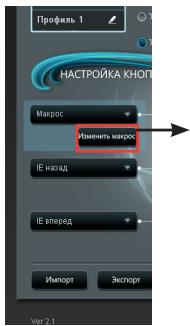
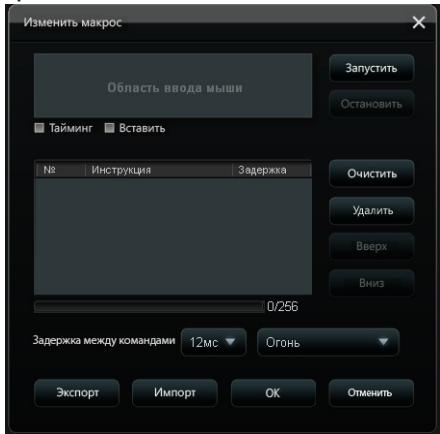
MeHIO "N3MeHnTb MaKpOc"
15 Li-Te Road, Peitou, Taipei, Taiwan 11259
Telefon
+886-2-2894-3447
Fax
+886-2-2890-7798
info@asus.com.tw
Webove stranky
www.asus.com.tw
Technická podpora
Telefon
+86-21-38429911
Podpora online
support.asus.com
ASUS COMPUTER INTERNATIONAL (Amerika)
Adresa
800 Corporate Way, Fremont, CA 94539, USA
Telefon
+1-510-739-3777
Fax
+1-510-608-4555
Webove stranky
usa.asus.com
Technická podpora
Telefon
+1-812-282-2787
Harkort Str. 21-23, D-40880 Ratingen, Germany
Fax
+49-2102-959911
Webove stranky
www.asus.de
Kontakt online
www.asus.de/sales
Technická podpora
Telefon (Součast)
+49-1805-010923*
Telefon (Systém/notebook/Eee/LCD)
+49-1805-010920*
Federal Communications Commission Statement
This device complies with Part 15 of the FCC Rules. Operation is subject to the following two conditions:
This device may not cause harmful interference, and
This device must accept any interference received including interference that may cause undesired operation.
This equipment has been tested and found to comply with the limits for a Class B digital device, pursuant to Part 15 of the FCC Rules. These limits are designed to provide reasonable protection against harmful interference in a residential installation. This equipment generates, uses and can radiate radio frequency energy and, if not installed and used in accordance with manufacturer's instructions, may cause harmful interference to radio communications. However, there is no guarantee that interference will not occur in a particular installation. If this equipment does cause harmful interference to radio or television reception, which can be determined by turning the equipment off and on, the user is encouraged to try to correct the interference by one or more of the following measures:
Reorient or relocate the receiving antenna.
- Increase the separation between the equipment and receiver.
- Connect the equipment to an outlet on a circuit different from that to which the receiver is connected.
- Consult the dealer or an experienced radio/TV technician for help.
CAUTION: Any changes or modifications not expressly approved by the grantee of this device could void the user's authority to operate the equipment.
Safety Certifications
CE Marking
China RoHS EFUP Labeling - 10 Years
C-Tick Mark
BSMI Certification
C
E



Complies with 21 CFR 1040.10 and 1040.11 except for deviations pursuant to Laser Notice No. 50, dated June 24, 2007.
REACH
Copyright © 2012 ASUSTeK Computer Inc. All Rights Reserved.
Federal Communications Commission Statement
This device complies with Part 15 of the FCC Rules. Operation is subject to the following two conditions:
This device may not cause harmful interference, and
This device must accept any interference received including interference that may cause undesired operation.
This equipment has been tested and found to comply with the limits for a Class B digital device, pursuant to Part 15 of the FCC Rules. These limits are designed to provide reasonable protection against harmful interference in a residential installation. This equipment generates, uses and can radiate radio frequency energy and, if not installed and used in accordance with manufacturer's instructions, may cause harmful interference to radio communications. However, there is no guarantee that interference will not occur in a particular installation. If this equipment does cause harmful interference to radio or television reception, which can be determined by turning the equipment off and on, the user is encouraged to try to correct the interference by one or more of the following measures:
Reorient or relocate the receiving antenna.
- Increase the separation between the equipment and receiver.
- Connect the equipment to an outlet on a circuit different from that to which the receiver is connected.
- Consult the dealer or an experienced radio/TV technician for help.
CAUTION: Any changes or modifications not expressly approved by the grantee of this device could void the user's authority to operate the equipment.
Safety Certifications
- CE Marking
China RoHS EFUP Labeling - 10 Years
C-Tick Mark
BSMI Certification


Complies with 21 CFR 1040.10 and 1040.11 except for deviations pursuant to Laser Notice No. 50, dated June 24, 2007.
REACH
Adres Harkort Str. 21-23, D-40880 Ratingen, Germany
Faks +49-2102-959911
Strona internetowa www.asus.de
Federal Communications Commission Statement
This device complies with Part 15 of the FCC Rules. Operation is subject to the following two conditions:
This device may not cause harmful interference, and
This device must accept any interference received including interference that may cause undesired operation.
This equipment has been tested and found to comply with the limits for a Class B digital device, pursuant to Part 15 of the FCC Rules. These limits are designed to provide reasonable protection against harmful interference in a residential installation. This equipment generates, uses and can radiate radio frequency energy and, if not installed and used in accordance with manufacturer's instructions, may cause harmful interference to radio communications. However, there is no guarantee that interference will not occur in a particular installation. If this equipment does cause harmful interference to radio or television reception, which can be determined by turning the equipment off and on, the user is encouraged to try to correct the interference by one or more of the following measures:
Reorient or relocate the receiving antenna.
- Increase the separation between the equipment and receiver.
- Connect the equipment to an outlet on a circuit different from that to which the receiver is connected.
- Consult the dealer or an experienced radio/TV technician for help.
CAUTION: Any changes or modifications not expressly approved by the grantee of this device could void the user's authority to operate the equipment.
Safety Certifications
CE Marking
China RoHS EFUP Labeling - 10 Years
C-Tick Mark
BSMI Certification
CE



Complies with 21 CFR 1040.10 and 1040.11 except for deviations pursuant to Laser Notice No. 50, dated June 24, 2007.
REACH
15 Li-Te Road, Peitou, Taipei, Taiwan 11259
Telephone
+886-2-2894-3447
Fax
+886-2-2890-7798
info@asus.com.tw
Web site
www.asus.com.tw
Technical Support
Telephone
+86-21-38429911
Online support
support.asus.com
ASUS COMPUTER INTERNATIONAL (America)
Address
800 Corporate Way, Fremont, CA 94539, USA
Telephone
+1-510-739-3777
Fax
+1-510-608-4555
Web site
usa.asus.com
Technical Support
Telephone
+1-812-282-2787
Support fax
+1-812-284-0883
Online support
support.asus.com
ASUS COMPUTER GmbH (Germany and Austria)
Address
Harkort Str. 21-23, D-40880 Ratingen, Germany
Fax
+49-2102-959911
Web site
www.asus.de
Online contact
www.asus.de/sales
Technical Support
Telephone (Component)
+49-1805-010923*
Telephone (System/Notebook/Eee/LCD)
+49-1805-010920*
Support Fax
+49-2102-9599-11
Online support
support.asus.com
- EUR 0.14/minute from a German fixed landline; EUR 0.42/minute from a mobile phone.
Avisos
Federal Communications Commission Statement
This device complies with Part 15 of the FCC Rules. Operation is subject to the following two conditions:
This device may not cause harmful interference, and
This device must accept any interference received including interference that may cause undesired operation.
This equipment has been tested and found to comply with the limits for a Class B digital device, pursuant to Part 15 of the FCC Rules. These limits are designed to provide reasonable protection against harmful interference in a residential installation. This equipment generates, uses and can radiate radio frequency energy and, if not installed and used in accordance with manufacturer's instructions, may cause harmful interference to radio communications. However, there is no guarantee that interference will not occur in a particular installation. If this equipment does cause harmful interference to radio or television reception, which can be determined by turning the equipment off and on, the user is encouraged to try to correct the interference by one or more of the following measures:
Reorient or relocate the receiving antenna.
- Increase the separation between the equipment and receiver.
- Connect the equipment to an outlet on a circuit different from that to which the receiver is connected.
Consult the dealer or an experienced radio/TV technician for help.
CAUTION: Any changes or modifications not expressly approved by the grantee of this device could void the user's authority to operate the equipment.
Safety Certifications
- CE Marking
China RoHS EFUP Labeling - 10 Years
C-Tick Mark
BSMI Certification
C
E



Complies with 21 CFR 1040.10 and 1040.11 except for deviations pursuant to Laser Notice No.50, dated June 24, 2007.
REACH
Cumpirno o quadro regularente REACH (Registo, Avaliacao, Autorizacao e Restraico dos Produtos Quimicos), divulgamos as substancias químicas incluidas nos��rosculos no Web site ASUS REACH emhttp://csr.asus.com/english/REACH.htm.

Specifications Summary
| Model Name | GX950 |
| Connectivity Technology | Com fios |
| Tracking | Laser |
| OS Support | Windows* XP / Windows* Vista / Windows* 7 |
| Dimensions (mm) | Rato: 122(L) x 82(W) x 43(H) |
| Cable Length | 1,8m com bolsa para o cabo |
| Weight | Rato: 150g (Ajustavel) |
| Buttons / Switches | 1 x Botão esquerdo / Botão direito / Roda de deslocamento 2 x Botões laterais 1 x Botão de PPP 1× Interruptor de mudança de perflí |
| Resolution | 50 ~ 8200 dpi (Ajustavel) Default: 800dpi (Nivel 1), 1600dpi (Nivel 2), 3200dpi (Nivel 3), 5600dpi (Nivel 4) |
| Interface | USB banhado a ouro |

Federal Communications Commission Statement
This device complies with Part 15 of the FCC Rules. Operation is subject to the following two conditions:
This device may not cause harmful interference, and
This device must accept any interference received including interference that may cause undesired operation.
This equipment has been tested and found to comply with the limits for a Class B digital device, pursuant to Part 15 of the FCC Rules. These limits are designed to provide reasonable protection against harmful interference in a residential installation. This equipment generates, uses and can radiate radio frequency energy and, if not installed and used in accordance with manufacturer's instructions, may cause harmful interference to radio communications. However, there is no guarantee that interference will not occur in a particular installation. If this equipment does cause harmful interference to radio or television reception, which can be determined by turning the equipment off and on, the user is encouraged to try to correct the interference by one or more of the following measures:
Reorient or relocate the receiving antenna.
- Increase the separation between the equipment and receiver.
- Connect the equipment to an outlet on a circuit different from that to which the receiver is connected.
- Consult the dealer or an experienced radio/TV technician for help.
CAUTION: Any changes or modifications not expressly approved by the grantee of this device could void the user's authority to operate the equipment.
Safety Certifications
CE Marking
China RoHS EFUP Labeling - 10 Years
C-Tick Mark
BSMI Certification
- UL Mark
C E

I.T.E.



Complies with 21 CFR 1040.10 and 1040.11 except for deviations pursuant to Laser Notice No. 50, dated June 24, 2007.
REACH
In conformitate cu cadrul regulator REACH (Inregistrarea, Evaluarea, Autorizarea 山 Restrictionarea substantelor chimice), publicam substantele chimice din produse loastre la pagina web a ASUS REACH http://csr.asus.com/english/REACH.htm.

Adresa Harkort Str. 21-23, D-40880 Ratingen, Germany
Fax +49-2102-959911
Federal Communications Commission Statement
This device complies with Part 15 of the FCC Rules. Operation is subject to the following two conditions:
This device may not cause harmful interference, and
This device must accept any interference received including interference that may cause undesired operation.
This equipment has been tested and found to comply with the limits for a Class B digital device, pursuant to Part 15 of the FCC Rules. These limits are designed to provide reasonable protection against harmful interference in a residential installation. This equipment generates, uses and can radiate radio frequency energy and, if not installed and used in accordance with manufacturer's instructions, may cause harmful interference to radio communications. However, there is no guarantee that interference will not occur in a particular installation. If this equipment does cause harmful interference to radio or television reception, which can be determined by turning the equipment off and on, the user is encouraged to try to correct the interference by one or more of the following measures:
Reorient or relocate the receiving antenna.
- Increase the separation between the equipment and receiver.
- Connect the equipment to an outlet on a circuit different from that to which the receiver is connected.
- Consult the dealer or an experienced radio/TV technician for help.
CAUTION: Any changes or modifications not expressly approved by the grantee of this device could void the user's authority to operate the equipment.
Safety Certifications
- CE Marking
China RoHS EFUP Labeling - 10 Years
C-Tick Mark
BSMI Certification
CE



Complies with 21 CFR 1040.10 and 1040.11 except for deviations pursuant to Laser Notice No.50, dated June 24, 2007.
REACH
Harkort Str. 21-23, D-40880 Ratingen, Germany
Faks +49-2102-959911
Federal Communications Commission Statement
This device complies with Part 15 of the FCC Rules. Operation is subject to the following two conditions:
This device may not cause harmful interference, and
This device must accept any interference received including interference that may cause undesired operation.
This equipment has been tested and found to comply with the limits for a Class B digital device, pursuant to Part 15 of the FCC Rules. These limits are designed to provide reasonable protection against harmful interference in a residential installation. This equipment generates, uses and can radiate radio frequency energy and, if not installed and used in accordance with manufacturer's instructions, may cause harmful interference to radio communications. However, there is no guarantee that interference will not occur in a particular installation. If this equipment does cause harmful interference to radio or television reception, which can be determined by turning the equipment off and on, the user is encouraged to try to correct the interference by one or more of the following measures:
Reorient or relocate the receiving antenna.
- Increase the separation between the equipment and receiver.
- Connect the equipment to an outlet on a circuit different from that to which the receiver is connected.
- Consult the dealer or an experienced radio/TV technician for help.
CAUTION: Any changes or modifications not expressly approved by the grantee of this device could void the user's authority to operate the equipment.
Safety Certifications
CE Marking
China RoHS EFUP Labeling - 10 Years
C-Tick Mark
BSMI Certification


Complies with 21 CFR 1040.10 and 1040.11 except for deviations pursuant to Laser Notice No. 50, dated June 24, 2007.
REACH
Federal Communications Commission Statement
This device complies with Part 15 of the FCC Rules. Operation is subject to the following two conditions:
This device may not cause harmful interference, and
This device must accept any interference received including interference that may cause undesired operation.
This equipment has been tested and found to comply with the limits for a Class B digital device, pursuant to Part 15 of the FCC Rules. These limits are designed to provide reasonable protection against harmful interference in a residential installation. This equipment generates, uses and can radiate radio frequency energy and, if not installed and used in accordance with manufacturer's instructions, may cause harmful interference to radio communications. However, there is no guarantee that interference will not occur in a particular installation. If this equipment does cause harmful interference to radio or television reception, which can be determined by turning the equipment off and on, the user is encouraged to try to correct the interference by one or more of the following measures:
Reorient or relocate the receiving antenna.
- Increase the separation between the equipment and receiver.
- Connect the equipment to an outlet on a circuit different from that to which the receiver is connected.
- Consult the dealer or an experienced radio/TV technician for help.
CAUTION: Any changes or modifications not expressly approved by the grantee of this device could void the user's authority to operate the equipment.
Safety Certifications
- CE Marking
China RoHS EFUP Labeling - 10 Years
C-Tick Mark
BSMI Certification
C
E



Complies with 21 CFR 1040.10 and 1040.11 except for deviations pursuant to Laser Notice No. 50, dated June 24, 2007.
REACH
Online yardim support.asus.com
ASUS COMPUTER INTERNATIONAL (Amerika)
Adres 800 Corporate Way, Fremont, CA 94539, USA
Telefon +1-510-739-3777
Online yardim support.asus.com
Adres Harkort Str. 21-23, D-40880 Ratingen, Germany
Faks +49-2102-959911
Web sitesi www.asus.de
Online yardim support.asus.com
- Bir Almanya sabit hadn arama 0.14 Euro/dakika; cep Telefonundan arama 0.42 Euro/dakika.
Uyarilar
Federal Communications Commission Statement
This device complies with Part 15 of the FCC Rules. Operation is subject to the following two conditions:
This device may not cause harmful interference, and
- This device must accept any interference received including interference that may cause undesired operation.
This equipment has been tested and found to comply with the limits for a Class B digital device, pursuant to Part 15 of the FCC Rules. These limits are designed to provide reasonable protection against harmful interference in a residential installation. This equipment generates, uses and can radiate radio frequency energy and, if not installed and used in accordance with manufacturer's instructions, may cause harmful interference to radio communications. However, there is no guarantee that interference will not occur in a particular installation. If this equipment does cause harmful interference to radio or television reception, which can be determined by turning the equipment off and on, the user is encouraged to try to correct the interference by one or more of the following measures:
Reorient or relocate the receiving antenna.
- Increase the separation between the equipment and receiver.
- Connect the equipment to an outlet on a circuit different from that to which the receiver is connected.
Consult the dealer or an experienced radio/TV technician for help.
CAUTION: Any changes or modifications not expressly approved by the grantee of this device could void the user's authority to operate the equipment.
CE Marking
China RoHS EFUP Labeling - 10 Years
C-Tick Mark
BSMI Certification


Complies with 21 CFR 1040.10 and 1040.11 except for deviations pursuant to Laser Notice No. 50, dated June 24, 2007.
REACH


- ASUS GX950 Gaming Mouse
- Copyright © 2012 ASUSTeK Computer Inc. All Rights Reserved.
- Contents
- Contact Information
- ASUSTeK COMPUTER INC.
- Technical Support
- ASUS COMPUTER INTERNATIONAL (America)
- ASUS COMPUTER GmbH (Germany and Austria)
- Notices
- Federal Communications Commission Statement
- Safety Certifications
- REACH
- ASUS Recycling/Takeback Services
- Package Contents
- Specifications Summary
- Knowing your ASUS GX950 Gaming Mouse
- Connecting your ASUS GX950 Gaming Mouse
- Customizing your mouse (DPI values / Macro commands / Button functions)
- Using the setup utility
- Main menu
- Profile 1 menu
- Items Descriptions
- Items
- Descriptions
- L-Button
- R-Button
- M-Button
- IE Backward
- IE Forward
- Edit Macro menu
- Options menu
- Taskbar menu
- 華碩GX950 游戲滑鼠
- 版權說明
- Support technique
- ASUS COMPUTER INTERNATIONAL (Amérique)
- ASUS France SARL
- Notes
- Supporto Tecnico
- ASUSTeK ITALY S.r.l (Italia)
- Dichiarazione FCC (Federal Communications Commission)
- Comunicazione REACH
- Federal Communications Commission Statement (原文)
- REACH(原文)
- Texnuecka noDpejka
- ASUS COMPUTER INTERNATIONAL (Amepika)
- YBeDomJIeHnIa
- YdoctOBepeHne FedepaIbHOI KOMnCCNIO TO CB3N CIUA
- CepTnΦkatab63oNaChocTh
- Ytlinnaaunnnepepaotka
- KOMJIeKT NOCTABKN
- MeHIO "N3MeHnTb MaKpOc"
- Technická podpora
- ASUS COMPUTER INTERNATIONAL (Amerika)
- Avisos
- Uyarilar
Brand : ASUS
Model : GX950
Category : Mouse