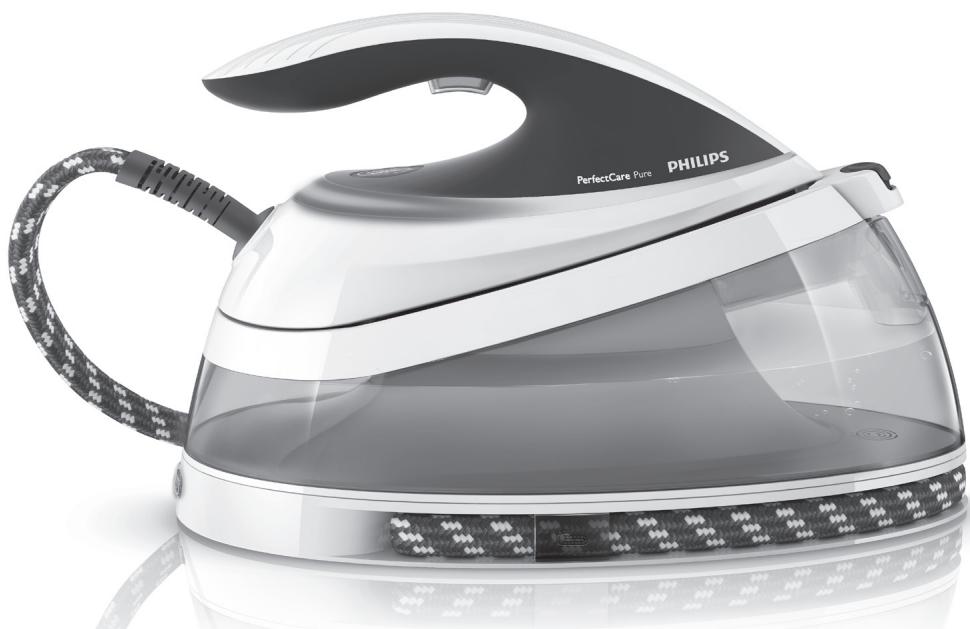
USER MANUAL GC7641/30 PERFECTCARE PURE PHILIPS
Always here to help you
Register your product and get support at www.philips.com/welcome
GC7600 series
Question? Contact Philips
User manual
PHILIPS



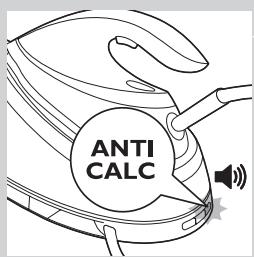
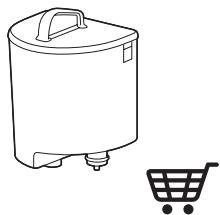
- ANTI-CALC: Important information
Cartouche anticalcaire : Informations importantes :
ANTICALCARE: informazioni importanti
-
ANTI-CALC: Informações importantes:
ANTICAL: Información importante:
-
Replace the ANTI-CALC cartridge when the ANTI-CALC replacement light flashes and the appliance beeps. If you do not, the product will stop working to prevent damaging itself. You could either replace the cartridge or use demineralised water with exhausted cartridge.
- Remplacez la cartouche anticalcaire lorsque levoyant de remplacement clignote et que l'appareil émet des bips sonores. Si vous ne remplacez pas la cartouche, la centrale vapeur cessera de fonctionner pour éviter d'être endommagée. Vous pouvez soit remplacer la cartouche, soit utiliser de l'eau déminéralisée en conservant la cartouche usagée.
- Quando la spia di sostituzione lampeggia e l'apparecchio emette un segnale acustico, è necessario sostuire la cartuccia anticalcare. In caso contrario, l'apparecchio smetterà di funzionare per prevenire danni. Potete sostuire completamente la cartuccia oppure utilizzato acqua demineralizzata con la cartuccia esaurita.
- Substitua a recarga ANTI-CALC quando a luz de substituição ANTI-CALC ficar intermitente e o aparecido emitir sinais sonoros. Se não o fazer, o produits para funcional para evitar danos. Pode substituir a recarga ou utilize a água desmineralizada com uma recarga gasta.
- Sustituya el cartucho ANTICAL cuando el piloto de sustitución del cartucho ANTICAL parpadee y el aparato emita un pitido. Si no lo hace, el productodeer de funcinar para evitar daños en el本身就是. Puede sustituir el cartucho outilizar agua desmineralizada con el cartucho agotado.
- To purchase more ANTI-CALC cartridges, go to your local Philips dealer or search for GC002 or GC004 in the online shop at www.philips.com/shop.
Pour acheter des cartouches anticalcaire supplémentaires, rendez-vous chez votre revendeur Philips ou effectuez une recherche avec les codes GC002 ou GC004 dans la Boutique en ligne à l'adresse www.philips.com/shop.
- Per acquistare le cartucce ANTICALCARE, rivolgetevi al rivenditore Philips di zona oppure cercate il modello GC002 o GC004 nell'Online Shop all'indirizzo www.philips.com/shop.
- Para comprar mais recargas ANTI-CALC, dirija-se ao revendedor Philips local ou procure GC002 ou GC004 na loja online em www.philips.com/shop.
- Para comprar más cartuchos ANTICAL, academia a su distribuidor local de Philips o busque GC002 o GC004 en la tienda online en www.philips.com/shop.
ENGLISH 6
FRANÇAIS 14
ITALIANO 22
PORTUGUES 30
ESPANOL 38
6 ENGLISH
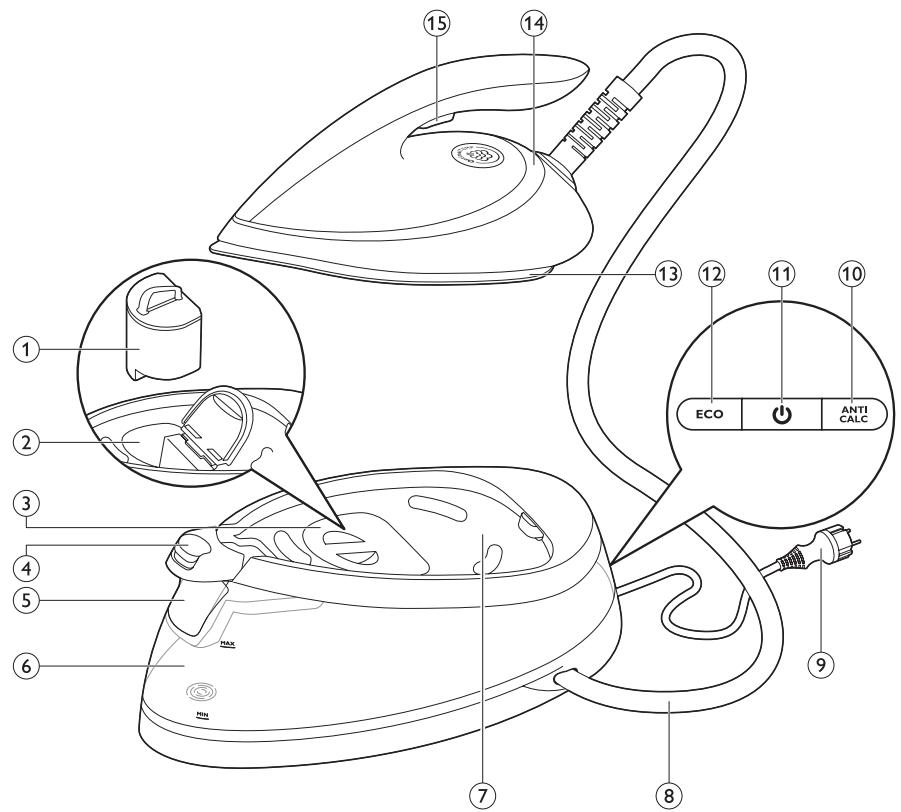
General description (Fig. 4)
1 ANTI-CALC cartridge
2 ANTI-CALC cartridge compartment
3 ANTI-CALC cartridge compartment lid
4 Carry lock release button (specific types only)
5 Filling funnel lid
6 Water tank with water level indicator
7 Iron platform
8 Supply hose
9 Mains cord with plug
10 ANTI-CALC cartridge replacement light
11 On/off button with power-on light
12 ECO button with light
13 Soleplate
14 'Iron ready' light
15 Steam trigger/steam boost button
Important
Read the separate important information leaflet and the user manual carefully before you use the appliance. Save both documents for future reference. To fully benefit from the support that Philips offers, register your product at www.philips.com/welcome.
Before first use - Placing the ANTI-CALC cartridge
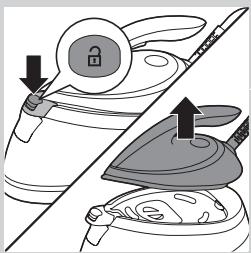
Note:The appliance does not produce steam if the ANT-CALC cartridge is not in place.
1 Press the carry lock release button (specific types only) and remove the iron from the iron platform.
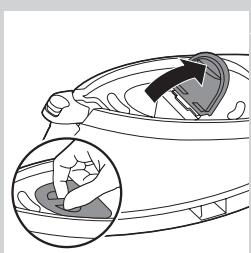
2 Open the ANTI-CALC cartridge compartment.
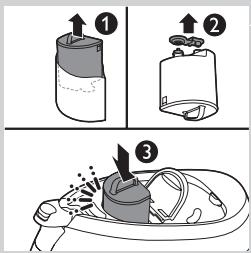
3 Take the ANTI-CALC cartridge out of its package (1) and pull the rubber cap from its bottom (2). Place the ANTI-CALC cartridge in the compartment and press it down until it locks into place (3). Then close the ANTI-CALC cartridge compartment lid.
Note: Some water droplets may fall out of the ANTI-CALC cartridge when you place it into the compartment. This is normal and the water is harmless.
Preparing for use
Filling the water tank
- Fill the water tank before every use or when the water level in the water tank drops below the minimum level. You can refill the water tank at any time during use.
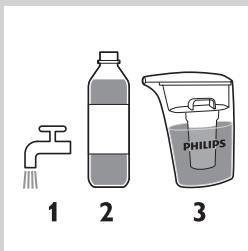
- Make sure you only use one of the 3 types of water mentioned below to fill the water tank:
1 Tap water
The ANTI-CALC cartridge filters scale particles from tap water. The scale content in the filtered water is regularly monitored by an electronic sensor. This sensor informs you when the cartridge needs to be replaced.
2 Demineralised water
You can safely use demineralised water in your steam generator. Make sure that the ANTI-CALC cartridge is always in place, as the cartridge serves as a link between the water tank and the iron. When you use demineralised water, the ANTI-CALC cartridge is not used and therefore replacement of the cartridge is not necessary.
3 Descaled water from the IronCare
The IronCare removes scale from tap water to ensure optimum performance for your iron. For more information, go to
www.philips.com/ironcare.
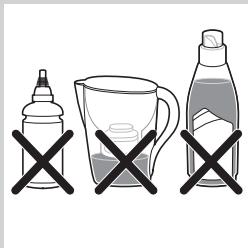
Caution: Do not use perfumed water, water from a tumble dryer, rainwater, vinegar, mineral water, magnetically treated water (Aqua+), water from a drinking water filter, starch, descaling agents, ironing aids, salt or chemicals in the water tank. These types of water have been tested. They are not suitable and may even cause damage to the appliance. If you use any of these types of water, your guarantee becomes invalid.
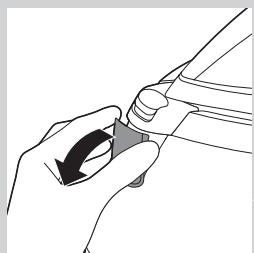
1 Open the filling funnel lid.
8 ENGLISH
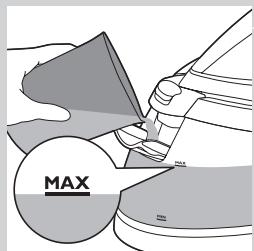
2 Fill the water tank with tap water up to the MAX indication. Then close filling funnel lid ('click').
Using the appliance
OptimalTemp technology
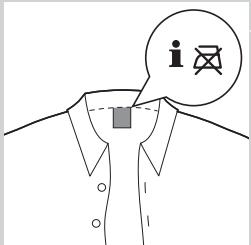
Do not iron non-ironable fabrics.
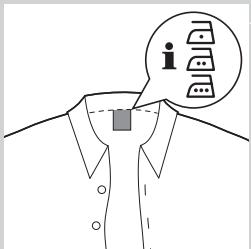
This appliance is equipped with OptimalTemp technology, which enables you to iron all types of ironable fabrics without adjusting the iron temperature or steam setting.
- Fabrics with these symbols are ironable, for example linen, cotton, polyester, silk, wool, viscose and rayon.
- Fabrics with this symbol are not ironable. These fabrics include synthetic fabrics such as Spandex or elastane, Spandex-mixed fabrics and polyolefins (e.g. polypropylene), but also prints on garments.
Ironing
1 Place the steam generator on a stable and even surface.
2 Make sure that there is enough water in the water tank (see section 'Filling the water tank' in chapter 'Preparing for use').
3 Plug in the appliance and press the on/off button. Wait for approx. 2 minutes until the 'iron ready' light stops flashing.
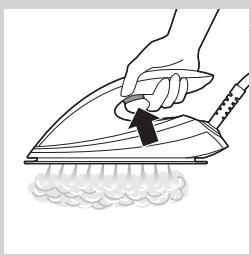
4 Press and hold the steam trigger to start ironing. Keep the steam trigger pressed continuously when you move the iron over the fabric.
Note: When you use the appliance for the first time or after replacement of the ANTI-CALC cartridge, it may take 10 seconds for steam to come out of the appliance.
Note: The pump is activated each time you press the steam trigger. It produces subtle rattling sound, which is normal. When there is no water in the water tank, the pump sound is louder. Fill up the water tank with water when the water level drops below the minimum level.
Steam boost function
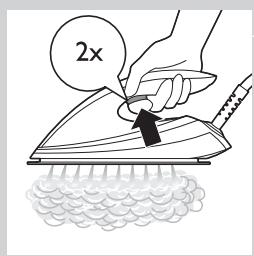
- Use the steam boost function to remove stubborn creases. Press the steam trigger twice quickly.
Vertical steam ironing
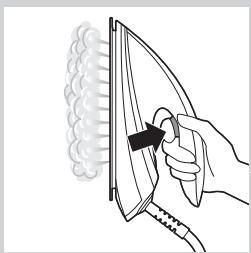
Hot steam is emitted from the iron. Never attempt to remove creases from a garment that someone is wearing. Do not apply steam near your or someone else's hand.
You can use the steam iron in vertical position to remove wrinkles from hanging fabrics.
1 Hold the iron in vertical position, press the steam trigger and touch the garment lightly with the soleplate.
Putting down the iron during ironing
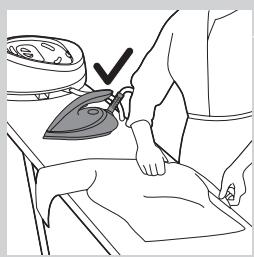
During ironing, you can place the iron either on the iron platform or horizontally on the ironing board. Thanks to the OptimalTemp technology, the soleplate will not damage the ironing board cover.
Energy saving
ECO mode
By using the ECO mode (reduced amount of steam), you can save energy without compromising on the ironing result.
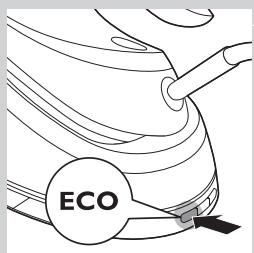
1 To activate the ECO mode, press the ECO button. The light in the ECO button goes on.
2 To switch back to the 'OptimalTemp' setting, press the ECO button again.
For the shortest ironing time, we advise you to use the 'OptimalTemp' setting.
Safety auto-off (specific types only)
The safety auto-off function automatically switches off the appliance if it has not been used for 5 minutes, to save energy.
IMPORTANT: Replacing the ANTI-CALC cartridge
ANTI-CALC replacement light
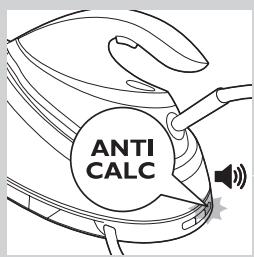
It is very important that you replace the ANTI-CALC cartridge when the ANTI-CALC cartridge replacement light starts flashing and the appliance starts beeping.
Note:The cartridge lasts 3 months on average, but this depends on the hardness of the water you use and on how many hours you iron.
- The ANTI-CALC replacement light starts flashing and the appliance starts beeping to indicate that the ANTI-CALC cartridge needs to be replaced.
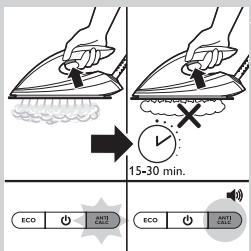
- You can still continue steam ironing for 15-30 min. (depending on the hardness of the water used) when the ANTI-CALC replacement light flashes and the appliance beeps. However, the steam output will diminish and ultimately the steam generator stops producing steam to prevent scale build-up that would permanently damage your appliance.
- To let the appliance produce steam again, you have to replace the ANTI-CALC cartridge. If you do not want to replace the ANTI-CALC cartridge, you have to use demineralised water or descaled water from the IronCare. In that case, you need to leave the exhausted cartridge in the compartment.
Replacing the ANTI-CALC cartridge
1 Switch off the appliance and let it cool down.
2 Follow the steps in chapter 'Before first use - Placing the ANTI-CALC cartridge'.
Cleaning
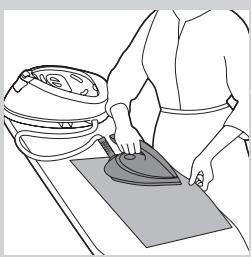
To properly maintain your appliance, clean it regularly.
1 Clean the appliance with a moist cloth.
2 To easily and effectively remove stains, let the soleplate heat up and move the iron over a moist cloth.
Tip: Clean the soleplate regularly to ensure smooth gliding.
Storage
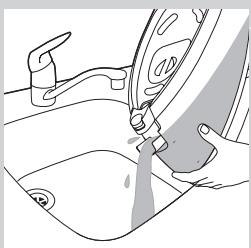
1 Switch off the steam generator and unplug it.
Pour the water out of the water tank into the sink.
3 Fold the supply hose.
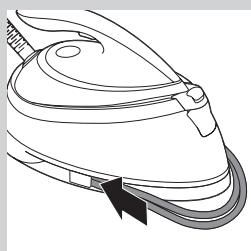
4 Wind the supply hose inside the supply hose storage compartment and secure it inside the storage hook.
5 Fold the mains cord and fasten it with the Velcro strip.
6 Specific types only: You can carry the appliance with one hand by the handle of the iron when the iron is locked on the iron platform.
Troubleshooting
This chapter summarises the most common problems you could encounter with the appliance. If you are unable to solve the problem with the information below, visit www.philips.com/support for a list of frequently asked questions or contact the Consumer Care Centre in your country.
12 ENGLISH
| Problem | Possible cause | Solution |
| The appliance does not produce any steam. | There is not enough water in the water tank. | Fill the water tank beyond the MIN indication. |
| You have not pressed the steam trigger. | Press the steam trigger and keep it pressed when you iron. |
| You have just installed a new ANTI-CALC cartridge. | Press and hold the steam trigger for 10 seconds until steam comes out. |
| The ANTI-CALC cartridge is not placed properly. | Press down the ANTI-CALC cartridge until it locks into position. |
| The appliance beeps and less or no steam comes out of the iron when I press the steam trigger. | You have to replace the ANTI-CALC cartridge. | Replace the ANTI-CALC cartridge (see chapter 'IMPORTANT: Replacing the ANTI-CALC cartridge'). You can also use demineralised water or descaled water from the IronCare. In that case, you need to leave the exhausted cartridge in the compartment. |
| The 'ANTI-CALC cartridge replacement' light keeps flashing. | You have to replace the ANTI-CALC cartridge. | Replace the ANTI-CALC cartridge (see chapter 'IMPORTANT: Replacing the ANTI-CALC cartridge'). You can also use demineralised water or descaled water from the IronCare. In that case, you need to leave the exhausted cartridge in the compartment. |
| The appliance produces a loud pumping sound (subtle pumping sound is normal). | You have just installed a new ANTI-CALC cartridge. | Continue to press the steam trigger until the pumping sound stops and steam comes out of the soleplate. |
| The water tank is empty. | Refill the water tank with water and press the steam trigger until the pumping sound stops and steam comes out of the soleplate. |
| The ANTI-CALC cartridge is not in place. | Place the ANTI-CALC cartridge (see chapter 'Before first use - Placing the ANTI-CALC cartridge'). |
| The ANTI-CALC cartridge is damaged or shows cracks or hairline cracks. | Inspect the ANTI-CALC cartridge thoroughly. If you see any sign of damage or cracks, no matter how small, replace the ANTI-CALC cartridge with a new one. |
| The appliance has switched off. | The safety auto-off function is activated automatically when the steam generator has not been used for more than 5 minutes. | Press the on/off button to reactivate the steam generator. |
| The iron leaves a shine or an imprint on the garment. | The surface to be ironed was uneven, for instance because you were ironing over a seam or a fold in the garment. | Perfect Care is safe on all garments. The shine or imprint is not permanent and will disappear when you wash the garment. Avoid ironing over seams or folds or you can place a cotton cloth over the area to be ironed to avoid imprints. |
| The ironing board cover becomes wet or water droplets come out of the soleplate. | Steam has condensed on the ironing board cover after a long ironing session. | Replace the ironing board cover if the foam material has worn out. You can also add an extra layer of felt material under the ironing board cover to prevent condensation on the ironing board. |
| You may have an ironing board that is not designed to cope with the high steam rate of the steam generator. | Put an extra layer of felt material under the ironing board cover to prevent condensation on the ironing board. |
| There is too much steam coming out of the iron. | The default setting of the iron is the OptimalTemp setting. In this setting the iron provides a high steam output. | Activate the ECO mode to iron with a lower steam output. See section 'Energy saving' in this user manual. |
This iron has been approved by The Woolmark Company Pty Ltd for the ironing of wool only products provided that the garments are ironed according to the instructions on the garment label and those issued by the manufacturer of this iron. R1303. In United Kingdom, Eire, HongKong and India, the Woolmark trademark is a Certification trademark.
14 FRANÇAIS



