
DMP-BD79 - Blu-ray player PANASONIC - Free user manual and instructions
Find the device manual for free DMP-BD79 PANASONIC in PDF.


| Product Type | Blu-ray Player |
| Brand | Panasonic |
| Model | DMP-BD79 |
| Dimensions (W × H × D) with stand | 253 mm × 95 mm × 250 mm |
| Weight | Approx. 0.9 kg (unit only), 1.0 kg with stand |
| Power supply | DC 12 V (AC adapter 100-240 V, 50/60 Hz) |
| Power consumption | Approx. 8.9 W (operation), 0.5 W (standby), 4 W (quick start standby) |
| Playable formats | BD-Video, DVD-Video, CD audio, BD-RE/R, DVD-R/RW/R DL, CD-R/RW, DivX files, MKV files, JPEG files, MPO files, FLAC files, MP3 files, WAV files |
| Connectivity | HDMI, optical digital output, Ethernet, USB 2.0, SD card reader, built-in Wi-Fi (802.11 b/g/n) |
| Main features | Blu-ray 3D playback, 1080p upscaling, Internet access (VIERA Connect), home networking (DLNA), Wi-Fi Direct |
| Remote control | With touchpad, alkaline batteries included |
| Laser class | Class 1 |
| Operating temperature | +5 °C to +35 °C |
| Operating humidity | 10% to 80% RH (no condensation) |
| Maintenance | Clean with a soft, dry cloth; do not use solvents. |
| Included accessories | Remote control, batteries, AC adapter, HDMI cable, stand, CD-ROM with manual |
| Safety | Do not expose to rain or moisture; avoid shocks; disconnect if problems occur. |
| General information | Compliant with European standards; for household use only. |
Frequently Asked Questions - DMP-BD79 PANASONIC
User questions about DMP-BD79 PANASONIC
0 question about this device. Answer the ones you know or ask your own.
Ask a new question about this device
Download the instructions for your Blu-ray player in PDF format for free! Find your manual DMP-BD79 - PANASONIC and take your electronic device back in hand. On this page are published all the documents necessary for the use of your device. DMP-BD79 by PANASONIC.
USER MANUAL DMP-BD79 PANASONIC
Basic Operating Instructions
Blu-ray Disc™ Player
Thank you for purchasing this product.
For optimum performance and safety, please read these instructions carefully.
Please keep this manual for future reference.
More detailed instructions on the operation of this unit are contained in "Operating
Instructions (PDF format)" in the supplied CD-ROM. Install it on your PC to read it.

Reading the Operating Instructions
(PDF format)
For Windows
1 Turn the PC on and insert the CD-ROM containing the Operating Instructions (supplied).
2 Select the desired language and then click [Operating Instructions] to install.
3 Double click the "BBT01EG Operating Instructions" shortcut icon on the desktop.
When the Operating Instructions (PDF format) will not open
You will need Adobe Acrobat Reader 5.0 or later or Adobe Reader 7.0 or later to browse or print the Operating Instructions (PDF format).
Insert the CD-ROM containing the Operating Instructions (supplied), click [Adobe(R) Reader(R)] and then follow the messages on the screen to install.
(Compatible OS: Windows XP SP3/Windows Vista SP2/Windows 7)
- You can download and install a version of Adobe Reader that you can use with your OS from the following website. http://get.adobe.com/reader/otherversions
To uninstall the Operating Instructions (PDF format)
Delete the PDF file from the
"Program Files\Panasonic\DMP\” folder.
- When the contents in the Program Files folder cannot be displayed, click the [Show the contents of this folder] to display them.
For Macintosh
1 Turn the PC on and insert the CD-ROM containing the Operating Instructions (supplied).
2 Open the "Manual" folder in "VFF0885" and then copy the PDF file with the desired language inside the folder.
3 Double click the PDF file to open it.
Operating Instructions (PDF format) cannot be played back on the player itself.
Table of contents
Reading the Operating Instructions
(PDF format). 2
Safety precautions. 2
Accessories 3
Playable media 4
Using the touchpad .6
STEP 1: Installing the Unit. 8
STEP2:Connecting to a TV .8
STEP 3: Connecting to the network. 9
STEP 4: Connecting the AC mains lead . . . . . .9
STEP5:Settings 10
Inserting or removing media 10
HOME menu 11
Playback 11
Specifications 12
Precautions for wireless LAN connection . . . . .12
Restriction on use of unauthorized copied content ( 11)
Safety precautions
WARNING
Unit
To reduce the risk of fire, electric shock or product damage,
- Do not expose this unit to rain, moisture, dripping or splashing.
- Do not place objects filled with liquids, such as vases, on this unit.
- Use only the recommended accessories.
- Do not remove covers.
- Do not repair this unit by yourself. Refer servicing to qualified service personnel.
- Do not let metal objects fall inside this unit.
- Do not place heavy items on this unit.
AC mains lead
To reduce the risk of fire, electric shock or product damage,
- Ensure that the power supply voltage corresponds to the voltage printed on this unit.
- Insert the mains plug fully into the socket outlet.
- Do not pull, bend, or place heavy items on the lead.
- Do not handle the plug with wet hands.
- Hold onto the mains plug body when disconnecting the plug.
- Do not use a damaged mains plug or socket outlet.
Install this unit so that the AC mains lead can be unplugged from the socket outlet immediately if any problem occurs.
Small object
- Keep the Memory Card out of reach of children to prevent swallowing.
- Keep the screw out of reach of children to prevent swallowing.
CAUTION
Unit
- This unit utilizes a laser. Use of controls or adjustments or performance of procedures other than those specified herein may result in hazardous radiation exposure.
- Do not place sources of naked flames, such as lighted candles, on this unit.
- This unit may receive radio interference caused by mobile telephones during use. If such interference occurs, please increase separation between this unit and the mobile telephone.
- This unit is intended for use in moderate climates.
Placement
Place this unit on an even surface.
To reduce the risk of fire, electric shock or product damage,
- Do not install or place this unit in a bookcase, built-in cabinet or in another confined space. Ensure this unit is well ventilated.
- Do not obstruct this unit's ventilation openings with newspapers, tablecloths, curtains, and similar items.
- Do not place the unit on amplifiers/receivers or equipment that may become hot. The heat can damage the unit.
- Do not expose this unit to direct sunlight, high temperatures, high humidity, and excessive vibration.
Batteries
Mishandling of batteries can cause electrolyte leakage and may cause a fire.
- Danger of explosion if battery is incorrectly replaced. Replace only with the type recommended by the manufacturer.
- When disposing the batteries, please contact your local authorities or dealer and ask for the correct method of disposal.
- Do not mix old and new batteries or different types at the same time.
- Do not heat or expose to flame.
- Do not leave the battery(ies) in a car exposed to direct sunlight for a long period of time with doors and windows closed.
- Do not take apart or short circuit.
- Do not recharge alkaline or manganese batteries.
- Do not use batteries if the covering has been peeled off.
Remove batteries if you do not intend to use the remote control for a long period of time. Store in a cool, dark place.
AC adaptor
The AC adaptor operates on AC between 100 V and 240 V. But obtain a suitable plug adaptor if the plug does not fit the AC mains socket.
Accessories
Check the supplied accessories before using this unit.
1 Remote control
(N2QAYB000712)
2 Batteries for remote control
1 AC adaptor
1 AC mains lead
1 HDMI cable
1 Pedestal
1 CD-ROM

- Product numbers provided in these operating instructions correct as of April 2012. These may be subject to change.
- Do not use AC mains lead with other equipment.
Using the remote control
Insert so the poles (+ and -) match those in the remote control.
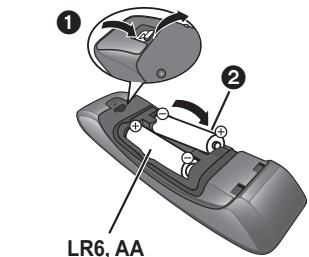
(Alkaline batteries)
See page 8 for the location of the remote control signal sensor.
Playable media
| Device | Disc markings | Device types | Contents format |
| BD | Blu-rayDisc | BD-Video | Video |
| BD-RE | Video, JPEG, MPO | ||
| BD-R | Video, DivX®, MKV | ||
| DVD | DVDVIDEO | DVD-Video | Video |
| DVDR4.7 | DVD-R | Video, AVCHD, DivX®, MKV, JPEG, MPO, FLAC, MP3, WAV | |
| DVDRLDL | DVD-R DL | ||
| DVDRW | DVD-RW | Video, AVCHD | |
| — | +R/+RW/+R DL | ||
| CD | COMPACTDISCGDIGITAL AUDIO | Music CD | Music [CD-DA] |
| — | CD-RCD-RW | DivX®, MKV, JPEG, MPO, FLAC, MP3, Music [CD-DA], WAV | |
| SD | SDXC | SD Memory Card (from 8 MB to 2 GB)SDHC Memory Card (from 4 GB to 32 GB)SDXC Memory Card (48 GB, 64 GB)(Compatible with both mini and micro types) | AVCHD, AVCHD 3D, MP4, MPEG2, JPEG, MPO |
| USB | — | USB devices(up to 2 TB) | DivX®, MKV, MP4,MPEG2, JPEG, MPO,FLAC, MP3, WAV |
Discs that cannot be played by this unit
DVD-RAM
Super Audio CD
- Photo CD
DVD-Audio
Video CD and Super Video CD
WMA discs
DivX Plus HD discs
HD DVD
Region management information BD-Video
This unit can play BD-Video discs supporting the region code "B".
Example:


DVD-Video
This unit can play DVD-Video discs supporting the region number "2" or "ALL". Example:


■Finalize
DVD-R/RW/R DL, +R/+RW/+R DL and CD-R/RW recorded by a recorder, etc. needs to be finalized by the recorder to play on this unit. Please refer to the recorder's instructions.
BD-Video
This unit supports high bit rate audio (Dolby® Digital Plus, Dolby® TrueHD, DTS-HD High Resolution Audio and DTS-HD Master Audio) adopted in BD-Video.
3D
- 3D videos and 3D still pictures can be played back when this unit is connected to a 3D compatible TV using a High Speed HDMI Cable.
- 2D video can be enjoyed as 3D virtually. ([OPTION] "3D Settings" "Signal Format" "2D to 3D")
Music CD
Operation and sound quality of CDs that do not conform to CD-DA specifications (copy control CDs, etc.) cannot be guaranteed.
SD card
- miniSD Cards, microSD Cards, microSDHC Cards and microSDXC Cards can be used, but must be used with an adaptor card. These are usually supplied with such cards, or otherwise customer provided.
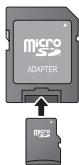
- To protect the card's contents, move the record prevention tab (on the SD card) to "LOCK".
- This unit is compatible with SD Memory Cards that meet SD Card Specifications FAT12 and FAT16 formats, as well as SDHC Memory Cards in FAT32 format and SDXC Memory Cards in exFAT.
- If the SD card is used with incompatible computers or devices, recorded contents may be erased due to the card being formatted etc.
- Usable memory may be slightly less than the card capacity.
USB device
- This unit does not guarantee connection with all USB devices.
- This unit does not support USB device charging.
- FAT12, FAT16, FAT32, and NTFS file systems are supported.
- This unit supports USB2.0 High Speed.
- This unit can support an HDD formatted to FAT32 and NTFS. Some types of HDD may require the use of its external power supply unit.
BD-RE,BD-R
Discs recorded in DR mode using Panasonic Blu-ray Disc recorders may not play back the audio etc., correctly.

- It may not be possible to play the above media in some cases due to the type of media, the condition of the recording, the recording method, and how the files were created.
- The producers of the disc can control how discs are played, so you may not always be able to control play as described in these operating instructions. Read the disc's instructions carefully.
Using the touchpad
The touchpad of the remote control is used for various operations such as moving the highlight or pointer, confirming the selection, playback control, entering characters, etc.
Basic touchpad operation
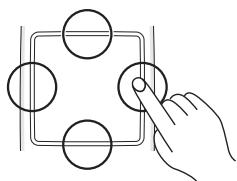
Move the highlight or the pointer
While touching the touchpad, the highlight or pointer will move according to the movement of your finger.
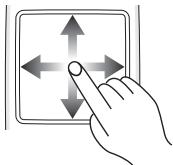
e.g.,
You can move the highlight continuously to up, down, left and right, by touching and holding an edge of the touchpad.
- It may not work depending on the screen.
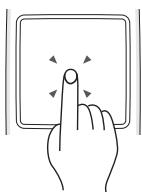
Confirm the selection
Tap the touchpad to confirm the selection. Release your finger as soon as it touches the touchpad.
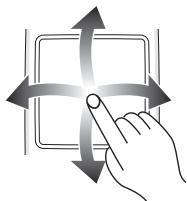
Switching the screen
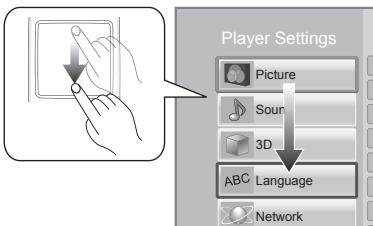
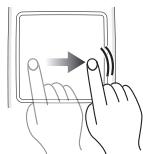
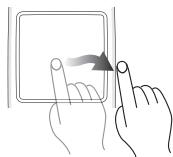
Some screens can be switched by lightly flicking your finger horizontally or vertically on the touchpad.
Flick your finger quickly and release from the touchpad.
e.g.,
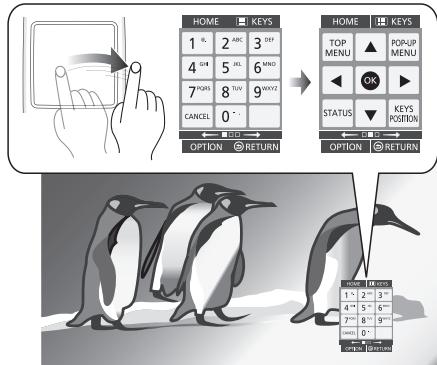
Bad example of flicking
Finger stops on the touchpad
Movement is too slow

It may not operate correctly in following cases:
Operation with your fingernails
Operation wearing gloves
Operation with wet hand
- Do not press the touchpad with pointed objects such as ballpoint pen, etc., or press with excessive force.
Using the KEYS screen
The KEYS screen that can perform item selection, playback control, text input, etc., is displayed on the screen when [KEYS] is pressed. KEYS screen operation will take priority over all other operation on the screen.
1 Select the screen to operate by pressing on [KEYS] several times.
( below, Types of KEYS screen)
- Screen can also be switched by flicking horizontally.
2 Move the pointer onto the key to select.
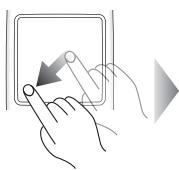
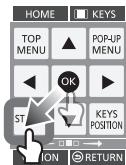
3 Release your finger and then tap.
To hide the KEYS screen
Press [RETURN].
Types of KEYS screen
Following screens switch in turn each time [KEYS] is pressed.
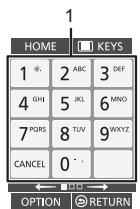
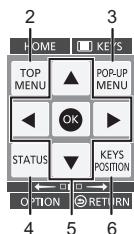
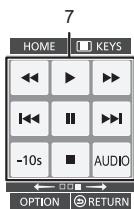
1 Select title numbers, etc./Enter numbers or characters
2 Show Top menu
3 Show Pop-up menu
4 Show status messages
5 [▲,▼,▲,▶]: Move the highlight for selection [OK]: Confirm the selection
6 Change the display position of the KEYS screen. The position switches each time the key is selected.
7 Basic playback control buttons
[←←][→→] : Search/Slow-motion
[14][15]:Skip
AUDIO: Changing audio
[-10s]:Skipbackward 10 seconds
- [HOME], [KEYS], [OPTION] and [RETURN] indications are only for guidance purpose. Selection of these keys is not possible on the KEYS screen.
Entering characters
1 When the keyboard screen appears: Move the highlight or the pointer onto "Input Mode", then tap.
You can select the input method from two types as follows. The mode switches each time "Input Mode" is selected.
Mode 1:
The highlight moves vertically or horizontally as your finger moves on the touchpad.
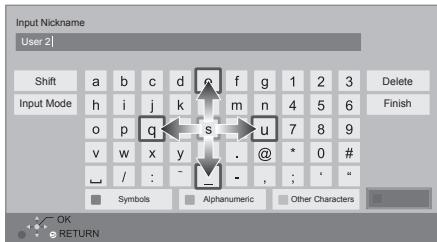
Mode 2:
The pointer moves freely according to the movement of your finger.
Select to move the cursor in the text box
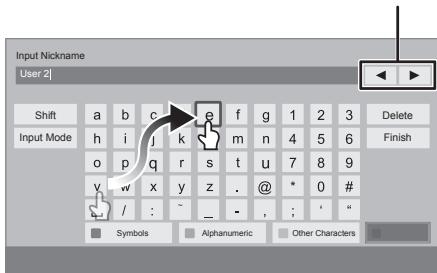
2 Move the highlight or the pointer onto a key, then tap.
STEP 1 : Installing the Unit
The unit can be installed in four ways. About the ways other than described below, see "Operating Instructions" in the supplied CD-ROM.
- Use the pedestal supplied with the unit.
- Beware of tipping or falling of the main unit when connecting the cables after installation.
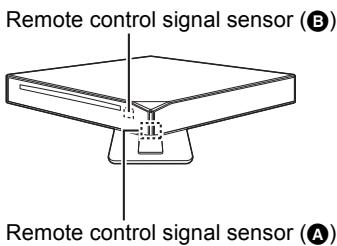
- The remote control signal sensor that will operate will change depending on the installation.
In the following installation way, A will operate as the sensor. In the other ways, B will operate as the sensor.
So please note this when pointing the remote control at the unit.
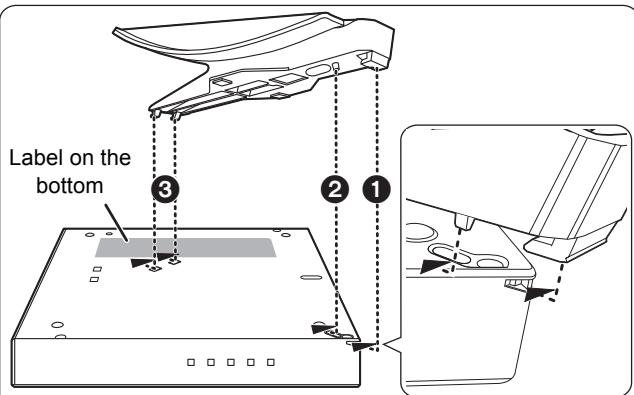
- Secure the pedestal by fitting it in the direction of the arrows.
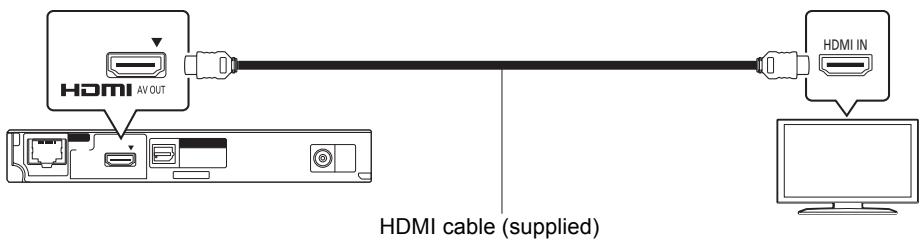
STEP 2: Connecting to a TV
- Before making any connections, we recommend that you temporarily disconnect all the units from AC power.
- Use the High Speed HDMI cables. Non-HDMI-compliant cables cannot be utilized.
The HDMI-compliant cable is supplied with this unit.
It is recommended that you use Panasonic's HDMI cable. When outputting 1080p signal, please use HDMI cables 5.0 meters or less.
Recommended part number (High Speed HDMI Cable):
RP-CDHS15 (1.5 m), RP-CDHS30 (3.0 m), RP-CDHS50 (5.0 m), etc.
STEP 3: Connecting to the network
The following services can be used when this unit is connected to broadband.
- Firmware can be updated
- You can enjoy BD-Live
- You can enjoy VIERA Connect
- You can access other devices (Home Network)
- This unit supports Wi-Fi Direct™ and can make a wireless connection to wireless devices without router. You can use this function when enjoying Home Network feature, etc. Internet access is not available while connected via Wi-Fi Direct™.
For details about connection method, refer to the instructions supplied with the connected equipment.
Wireless LAN connection
This unit can be connected to a wireless router wirelessly.
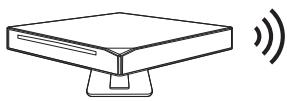
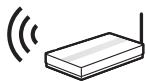

Wireless router, etc.

Internet
- For up-to-date compatibility information on your wireless router, refer to http://panasonic.jp/support/global/cs/
(This site is in English only.)
- The unit is not compatible with public wireless LAN services provided in airports, stations, cafes, etc.
- See page 12 for the precautions for wireless LAN connection.
LAN cable connection
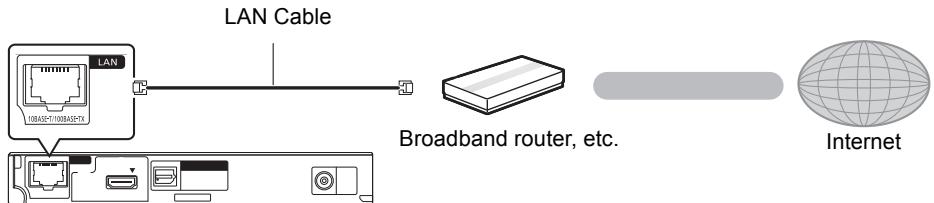
- Use category 5 or above straight LAN cables (STP) when connecting to peripheral devices.
- Inserting any cable other than a LAN cable in the LAN terminal can damage the unit.
STEP 4: Connecting the AC mains lead
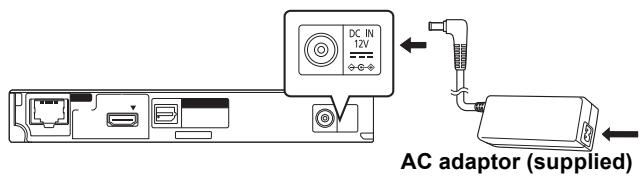
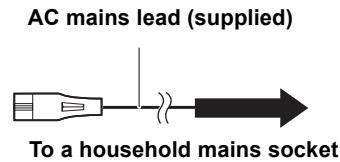
- This unit consumes a small amount of AC power ( 12) even when turned off. In the interest of power conservation, if you are not planning to use the unit for an extended period of time, please disconnect the AC mains lead from the household mains socket.
- The unit is in the standby condition (Standby/on LED lights red) ( 10) when the AC mains lead is connected. The primary circuit is always "live" as long as the AC adaptor is connected to an electrical outlet.
- Do not use any other AC adaptors except the supplied one.
STEP 5: Settings
Easy Setting
After connecting your new player for the first time and pressing [O], a screen for the basic settings will appear.
Preparation
Turn on the television and select the appropriate video input on the television.
1 Press [O].
Please wait until the Status LED (C) lights blue.
Setup screen appears.
Standby/on switch (I/II)
Touch to switch the unit from on to standby mode or vice versa. In standby mode, the unit is still consuming a small amount of power.

Standby/on LED (red/green)
When the unit is connected to the AC mains supply, this indicator lights red in standby mode and lights green when the unit is turned on.
2 Follow the on-screen instructions and apply the settings.

- You can perform this setup anytime by selecting "Easy Setting" in the Setup menu. ([HOME] "Setup" "Player Settings" "System")
- If this unit is connected to a Panasonic TV (VIERA) supporting HDAVI Control 2 or later via an HDMI cable, then setting information on the TV such as "On-Screen Language" is acquired by this unit.
Easy Network Setting
After completing "Easy Setting", you can perform "Easy Network Setting".
Select "Wired" or "Wireless".
"Wired" connection
Follow the on-screen instructions to apply your connection settings.
■ "Wireless" connection
Select "Search for wireless network" or "WPS (PUSH button)", then follow the on-screen instructions and apply the settings.
Inserting or removing media
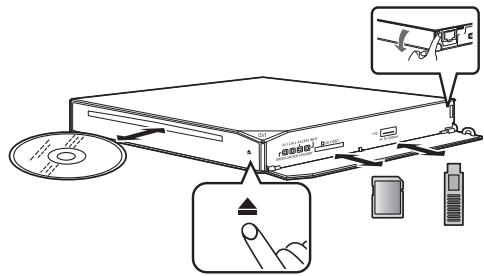
Inserting disc in the disc slot
The disc will be pulled in when inserted partially.
To eject the disc
Touch [▲].
Notes
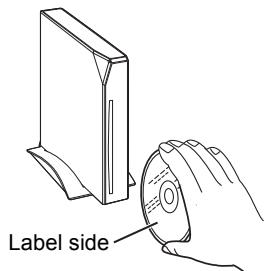
- When inserting a media item, ensure that it is facing the right way up. e.g., When installed vertically
- When removing the SD card, press the centre of the card and pull it straight out.
- If you connect a Panasonic product with a USB connection cable, the setup screen may be displayed on the connected equipment. For details, refer to the instructions for the connected equipment.
HOME menu
Major functions of this unit can be operated from the HOME menu.
Preparation
Turn on the television and select the appropriate video input on the television.
1 Press [D] to turn on the unit.
2 Operate the touchpad to select the item.
Tap to select the centred item.
Swipe or flick your finger up, down, left, or right to select other items.
- If there are any other items, repeat this step.
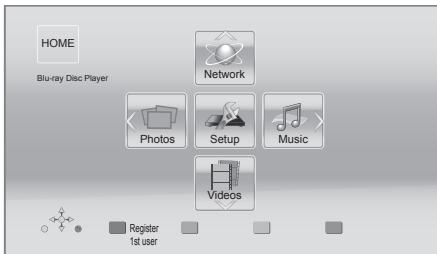
To show the HOME menu Press [HOME].
![PANASONIC DMP-BD79 - To show the HOME menu Press [HOME]. - 1](/content/2024/12/192998/images/d8e299d42773c890a4cc743079b1f0129c186f12f89474015e5d5ed56faffad9.jpg)
- Items to be displayed may vary with the media.
Playback
1 Insert the media.
Playback starts depending on the media.
2 Select the item to play.
Repeat this procedure if necessary.

Basic playback control buttons ( 7)
- To save on electricity, the unit is turned off automatically if there is no button operation for about 30 minutes when not playing back (such as when paused, displaying the menu, displaying still pictures, etc.).
Restriction on use of unauthorized copied content
This unit adopts the following technology for copyright protection.
Cinavia Notice
This product uses Cinavia technology to limit the use of unauthorized copies of some commercially-produced film and videos and their soundtracks. When a prohibited use of an unauthorized copy is detected, a message will be displayed and playback or copying will be interrupted.
More information about Cinavia technology is provided at the Cinavia Online Consumer Information Center at http://www.cinavia.com. To request additional information about Cinavia by mail, send a postcard with your mailing address to:
Cinavia Consumer Information Center, P.O. Box 86851, San Diego, CA, 92138, USA.
Specifications
Specifications are subject to change without notice.
| Signal system | PAL/NTSC |
| Operating temperature range | +5 °C to +35 °C |
| Operating humidity range | 10 % to 80 % RH (no condensation) |
| Digital audio output | Optical digital output (Optical terminal) |
| HDMI AV output | Output connector: Type A (19 pin) 1 system |
| SD card slot | 1 system |
| USB slot | USB2.0 1 system |
| Ethernet | 10BASE-T/100BASE-TX 1 system |
| Wireless LAN | Standard Compliance: IEEE802.11 b/g/n |
| Frequency range: 2.4 GHz band | |
| Security: WPA™/WPA2™ (Encryption Type: TKIP/AES, Authentication Type: PSK), WEP (64 bit/128 bit) | |
| LASER Specification | Class 1 LASER Product Wave length: 790 nm (CDs)/660 nm (DVDs)/405 nm (BDs) Laser power: No hazardous radiation is emitted with the safety protection |
| Power supply | DC 12 V (DC IN terminal) |
| Power consumption* | Approx. 8.9 W |
| Power consumption in standby mode* | Approx. 0.5 W |
| Power consumption in quick start standby mode* | Approx. 4 W |
| AC Adaptor | Power source: 100 to 240 V, 50/60 Hz Power consumption: 42 W DC output: DC 12 V 2500 mA |
| Dimensions (W×H×D) Horizontal installation with no pedestal | 179 mm×27 mm×180 mm • Including the projecting parts |
| Dimensions (W×H×D) Horizontal diagonal installation with pedestal | 253 mm×95 mm×250 mm • Including the projecting parts |
| Mass | Approx. 0.9 kg |
| Mass Including pedestal | Approx. 1.0 kg |
- Using supplied AC adaptor
- Product Identification Marking is located on the bottom of the main unit and AC adaptor respectively.
- This unit supports "HDAVI Control 5" function.
Precautions for wireless LAN connection
The following limits are in place regarding the usage of this unit. You must be aware of these limits before using this unit.
Panasonic will in no way be responsible for any incidental damage which may arise due to a failure to obey these limits, or to any condition of use or disuse of this unit.
Data transmitted and received over radio waves may be intercepted and monitored.
- This unit contains delicate electronic components.
Please use this unit in the manner in which it was intended and follow the following points:
- Do not expose this unit to high temperatures or direct sunlight.
- Do not bend, or subject this unit to strong impacts.
- Keep this unit away from moisture.
- Do not disassemble or alter this unit in any way.
€ 1731①
Declaration of Conformity (DoC)
Hereby, "Panasonic Corporation" declares that this product is in compliance with the essential requirements and other relevant provisions of Directive 1999/5/EC.
Customers can download a copy of the original DoC to our R&TTE products from our DoC server:
http://www.doc.panasonic.de
Contact in the EU: Panasonic Services Europe, a Division of Panasonic Marketing Europe GmbH,
Panasonic Testing Centre, Winsberging 15, 22525 Hamburg, Germany
This product is intended to be used in the following countries.
Austria, Belgium, Bulgaria, Cyprus, Czech Republic, Denmark, Finland, France, Germany, Greece, Hungary, Ireland, Italy, Iceland, Liechtenstein, Luxembourg, Malta, Netherlands, Norway, Poland, Portugal, Romania, Slovakia, Slovenia, Spain, Sweden, United Kingdom, Switzerland
This product is intended for general consumer. (Category 3) The WLAN feature of this product shall exclusively be used inside buildings.
This product on purpose to connect to access point of 2.4 GHz WLAN.
| "AVCHD", "AVCHD 3D", "AVCHD Progressive" and "AVCHD 3D/Progressive" are trademarks of Panasonic Corporation and Sony Corporation. | |
| Java is a registered trademark of Oracle and/or its affiliates. | |
| Manufactured under license from Dolby Laboratories. Dolby and the double-D symbol are trademarks of Dolby Laboratories. | |
| Manufactured under license under U.S. Patent Nos: 5,956,674; 5,974,380; 6,226,616; 6,487,535; 7,392,195; 7,272,567; 7,333,929; 7,212,872 & other U.S. and worldwide patents issued & pending. DTS-HD, the Symbol, & DTS-HD and the Symbol together are registered trademarks & DTS-HD Master Audio | Essential is a trademark of DTS, Inc. Product includes software. © DTS, Inc. All Rights Reserved. | |
| HDMI, the HDMI Logo, and High-Definition Multimedia Interface are trademarks or registered trademarks of HDMI Licensing LLC in the United States and other countries. | |
| This product is licensed under the AVC patent portfolio license and VC-1 patent portfolio license for the personal and non-commercial use of a consumer to (i) encode video in compliance with the AVC Standard and VC-1 Standard ("AVC/VC-1 Video") and/or (ii) decode AVC/VC-1 Video that was encoded by a consumer engaged in a personal and non-commercial activity and/or was obtained from a video provider licensed to provide AVC/VC-1 Video. No license is granted or shall be implied for any other use. Additional information may be obtained from MPEG LA, LLC. See http://www.mpegla.com. | |
| HDAVI ControlTM is a trademark of Panasonic Corporation. | |
| VIERA Connect is a trademark of Panasonic Corporation. | |
| MPEG Layer-3 audio coding technology licensed from Fraunhofer IIS and Thomson. | |
| SDXC Logo is a trademark of SD-3C, LLC. | |
| "DVD Logo" is a trademark of DVD Format/Logo Licensing Corporation. | |
| The Wi-Fi CERTIFIED Logo is a certification mark of the Wi-Fi Alliance. The Wi-Fi Protected Setup Mark is a mark of the Wi-Fi Alliance. WI FI CERTIFIED WIFIDIWIFIDI WIFIDI WIFIDI WIFIDI WIFIDI WIFIDI WIFIDI WIFIDI WIFIDI WIFIDI WIFIDI WIFIDI WIFIDI WIFIDI WIFIDI WIFIDI WIFIDI WIFIDI WIFIDI WIFIDI WIFIDI WIFIDI WIFIDI WIFIDI WIFIDI WIFIDIWIFIDI WIFIDI WIFIDI WIFIDI WIFIDI WIFIDI WIFIDI WIFIDI WIFIDI WIFIDI WIFIDI WIFIDI WIFIDI WIFIDI WIFIDI WIFIDI WIFIDI WIFIDI WIFIDI WIFIDI WIFIDI WIFIDI WIFIDI WIFIDI WIFIDl WIFIDl WIFIDl WIFIDl WIFIDl WIFIDl WIFIDl WIFIDl WIFIDl WIFIDl WIFIDl WIFIDl WIFIDl WIFIDl WIFIDl WIFIDl WIFIDl WIFIDl WIFIDl WIFIDl WIFIDl WIFIDl WIFIDl WIFIDl WIFIDl WIFIDI WIFIDl WIFIDl WIFIDl WIFIDl WIFIDl WIFIDl WIFIDl WIFIDl WIFIDl WIFIDl WIFIDl WIFIDl WIFIDl WIFIDl WIFIDl WIFIDl WIFIDl WIFIDl WIFIDl WIFIDl WIFIDl WIFIDl WIFIDl WIFIDI WIFIDI WIFIDl WIFIDl WIFIDl WIFIDl WIFIDl WIFIDl WIFIDl WIFIDl WIFIDl WIFIDl WIFIDl WIFIDl WIFIDl WIFIDl WIFIDl WIFIDl WIFIDl WIFIDl WIFIDl WIFIDl WIFIDl WIFIDl WIFIDI WIFIDl WIFIDI WIFIDl WIFIDl WIFIDl WIFIDl WIFIDl WIFIDl WIFIDl WIFIDl WIFIDl WIFIDl WIFIDl WIFIDl WIFIDl WIFIDl WIFIDl WIFIDl WIFIDl WIFIDl WIFIDl WIFIDl WIFIDl WIFIDl WIFIDI WIFIDI WIFIDI WIFIDl WIFIDl WIFIDl WIFIDl WIFIDl WIFIDl WIFIDl WIFIDl WIFIDl WIFIDl WIFIDl WIFIDl WIFIDl WIFIDl WIFIDl WIFIDl WIFIDl WIFIDl WIFIDl WIFIDl WIFIDl WIFIDI WIFIDl WIFIDl WIFIDI WIFIDl WIFIDl WIFIDl WIFIDl WIFIDl WIFIDl WIFIDl WIFIDl WIFIDl WIFIDl WIFIDl WIFIDl WIFIDl WIFIDl WIFIDl WIFIDl WIFIDl WIFIDl WIFIDl WIFIDl WIFIDl WIFIDI WIFIDl WIFIDI WIFIDI WIFIDl WIFIDl WIFIDl WIFIDl WIFIDl WIFIDl WIFIDl WIFIDl WIFIDl WIFIDl WIFIDl WIFIDl WIFIDl WIFIDl WIFIDl WIFIDl WIFIDl WIFIDl WIFIDl WIFIDl WIFIDl WIFIDI WIFIDI WIFIDl WIFIDI WIFIDl WIFIDl WIFIDl WIFIDl WIFIDl WIFIDl WIFIDl WIFIDl WIFIDl WIFIDl WIFIDl WIFIDl WIFIDl WIFIDl WIFIDl WIFIDl WIFIDl WIFIDl WIFIDl WIFIDl WIFIDl WIFIDI WIFIDI WIFIDI WIFIDI WIFIDl WIFIDl WIFIDl WIFIDl WIFIDl WIFIDl WIFIDl WIFIDl WIFIDl WIFIDl WIFIDl WIFIDl WIFIDl WIFIDl WIFIDl WIFIDl WIFIDl WIFIDl WIFIDl WIFIDl WIFIDI WIFIDl WIFIDl WIFIDl WIFIDI WIFIDl WIFIDl WIFIDl WIFIDl WIFIDl WIFIDl WIFIDl WIFIDl WIFIDl WIFIDl WIFIDl WIFIDl WIFIDl WIFIDl WIFIDl WIFIDl WIFIDl WIFIDl WIFIDl WIFIDl WIFIDI WIFIDl WIFIDl WIFIDI WIFIDI WIFIDl WIFIDl WIFIDl WIFIDl WIFIDl WIFIDl WIFIDl WIFIDl WIFIDl WIFIDl WIFIDl WIFIDl WIFIDl WIFIDl WIFIDl WIFIDl WIFIDl WIFIDl WIFIDl WIFIDl WIFIDI WIFIDl WIFIDI WIFIDl WIFIDI WIFIDl WIFIDl WIFIDl WIFIDl WIFIDl WIFIDl WIFIDl WIFIDl WIFIDl WIFIDl WIFIDl WIFIDl WIFIDl WIFIDl WIFIDl WIFIDl WIFIDl WIFIDl WIFIDl WIFIDl WIFIDI WIFIDl WIFIDI WIFIDI WIFIDI WIFIDl WIFIDl WIFIDl WIFIDl WIFIDl WIFIDl WIFIDl WIFIDl WIFIDl WIFIDl WIFIDl WIFIDl WIFIDl WIFIDl WIFIDl WIFIDl WIFIDl WIFIDl WIFIDl WIFIDl WIFIDI WIFIDI WIFIDl WIFIDl WIFIDI WIFIDl WIFIDl WIFIDl WIFIDl WIFIDl WIFIDl WIFIDl WIFIDl WIFIDl WIFIDl WIFIDl WIFIDl WIFIDl WIFIDl WIFIDl WIFIDl WIFIDl WIFIDl WIFIDl WIFIDl WIFIDI WIFIDI WIFIDl WIFIDI WIFIDI WIFIDl WIFIDl WIFIDl WIFIDl WIFIDl WIFIDl WIFIDl WIFIDl WIFIDl WIFIDl WIFIDl WIFIDl WIFIDl WIFIDl WIFIDl WIFIDl WIFIDl WIFIDl WIFIDl WIFIDl WIFIDI WIFIDI WIFIDI WIFIDl WIFIDI WIFIDl WIFIDl WIFIDl WIFIDl WIFIDl WIFIDl WIFIDl WIFIDl WIFIDl WIFIDl WIFIDl WIFIDl WIFIDl WIFIDl WIFIDl WIFIDl WIFIDl WIFIDl WIFIDl WIFIDl WIFIDI WIFIDI WIFIDI WIFIDI WIFIDI WIFIDl WIFIDl WIFIDl WIFIDl WIFIDl WIFIDl WIFIDl WIFIDl WIFIDl WIFIDl WIFIDl WIFIDl WIFIDl WIFIDl WIFIDl WIFIDl WIFIDl WIFIDl WIFIDl WIFIDI WIFIDI WIFIDI WIFIDI WIFIDI WIFIDI WIFIDI WIFIDI WIFIDI WIFIDI WIFIDI WIFIDI WIFIDI WIFIDI WIFIDI WIFIDI WIFIDI WIFIDI WIFIDI WIFIDI WIFIDI WIFIDI WIFIDI WIFIDI WIFIDlWIFIDlWIFIDlWIFIDlWIFIDlWIFIDlWIFIDlWIFIDlWIFIDlWIFIDlWIFIDlWIFIDlWIFIDlWIFIDlWIFIDlWIFIDlWIFIDlWIFIDlWIFIDlWIFIDlWIFIDlWIFIDlWIFIDlWIFIDlWIFIDlWIFIDl WIFIDlWIFIDlWIFIDlWIFIDlWIFIDlWIFIDlWIFIDlWIFIDlWIFIDlWIFIDlWIFIDlWIFIDlWIFIDlWIFIDlWIFIDlWIFIDlWIFIDlWIFIDlWIFIDlWIFIDlWIFIDlWIFIDlWIFIDlWIFIDlWIFIDtWIFIDtWIFIDtWIFIDtWIFIDtWIFIDtWIFIDtWIFIDtWIFIDtWIFIDtWIFIDtWIFIDtWIFIDtWIFIDtWIFIDtWIFIDtWIFIDtWIFIDtWIFIDtWIFIDtWIFIDtWIFIDtWIFIDtWIFIDtWIFIDtWIFIDttWIFIDttWIFIDttWIFIDttWIFIDttWIFIDttWIFIDttWIFIDttWIFIDttWIFIDttWIFIDttWIFIDttWIFIDttWIFIDttWIFIDttWIFIDttWIFIDttWIFIDttWIFIDttWIFIDttWIFIDttWIFIDttWIFIDttWIFIDttWIFIDttWIFID ttWIFIDttWIFIDttWIFIDttWIFIDttWIFIDttWIFIDttWIFIDttWIFIDttWIFIDttWIFIDttWIFIDttWIFIDttWIFIDttWIFIDttWIFIDttWIFIDttWIFIDttWIFIDttWIFIDttWIFIDttWIFIDttWIFIDttWIFIDttWIFIDttWIFIDtWIFIDttWIFIDttWIFIDttWIFIDttWIFIDttWIFIDttWIFIDttWIFIDttWIFIDttWIFIDttWIFIDttWIFIDttWIFIDttWIFIDttWIFIDttWIFIDttWIFIDttWIFIDttWIFIDttWIFIDttWIFIDttWIFIDttWIFIDttWIFID ttWIFID ttWIFIDttWIFIDttWIFIDttWIFIDttWIFIDttWIFIDttWIFIDttWIFIDttWIFIDttWIFIDttWIFIDttWIFIDttWIFIDttWIFIDttWIFIDttWIFIDttWIFIDttWIFIDttWIFIDttWIFIDttWIFIDttWIFIDttWIFIDttWIFID ttWIFID TTWIFID ttWIFID ttWIFID ttWIFID ttWIFID ttWIFID ttWIFID ttWIFID ttWIFID ttWIFID ttWIFID ttWIFID ttWIFID ttWIFID ttWIFID ttWIFID ttWIFID ttWIFID ttWIFID ttWIFID ttWIFID ttWIFID ttWIFID ttWIFID ttWIFID ttWIFIDttWIFID ttWIFID ttWIFID ttWIFID ttWIFID ttWIFID ttWIFID ttWIFID ttWIFID ttWIFID ttWIFID ttWIFID ttWIFID ttWIFID ttWIFID ttWIFID ttWIFID ttWIFID ttWIFID ttWIFID ttWIFID ttWIFID ttWIFID ttWIFID ttWIFID TTWIFID ttWIFID ttWIFID ttWIFID ttWIFID ttWIFID ttWIFID ttWIFID ttWIFID ttWIFID ttWIFID ttWIFID ttWIFID ttWIFID ttWIFID ttWIFID ttWIFID ttWIFID ttWIFID ttWIFID ttWIFID ttWIFID ttWIFIDttWIFID ttWIFIDttWIFID ttWIFID ttWIFID ttWIFID ttWIFID ttWIFID ttWIFID ttWIFID ttWIFID ttWIFID ttWIFID ttWIFID ttWIFID ttWIFID ttWIFID ttWIFID ttWIFID ttWIFID ttWIFID ttWIFID ttWIFID ttWIFID ttWIFIDttWIFID ttWIFID TTWIFID ttWIFID ttWIFID ttWIFID ttWIFID ttWIFID ttWIFID ttWIFID ttWIFID ttWIFID ttWIFID ttWIFID ttWIFID ttWIFID ttWIFID ttWIFID ttWIFID ttWIFID ttWIFID ttWIFID ttWIFID ttWIFIDttWIFID ttWIFID ttWIFIDttWIFID ttWIFID ttWIFID ttWIFID ttWIFID ttWIFID ttWIFID ttWIFID ttWIFID ttWIFID ttWIFID ttWIFID ttWIFID ttWIFID ttWIFID ttWIFID ttWIFID ttWIFID ttWIFID ttWIFID ttWIFID ttWIFIDttWIFID ttWIFID ttWIFID TTWIFID ttWIFID ttWIFID ttWIFID ttWIFID ttWIFID ttWIFID ttWIFID ttWIFID ttWIFID ttWIFID ttWIFID ttWIFID ttWIFID ttWIFID ttWIFID ttWIFID ttWIFID ttWIFID ttWIFID ttWIFID ttWIFIDttWIFIDttWIFID ttWIFID ttWIFID ttWIFID ttWIFID ttWIFID ttWIFID ttWIFID ttWIFID ttWIFID ttWIFID ttWIFID ttWIFID ttWIFID ttWIFID ttWIFID ttWIFID ttWIFID ttWIFID ttWIFID ttWIFID ttWIFID ttWIFID ttWIFIDttWIFIDttWIFID ttWIFIDttWIFID ttWIFID ttWIFID ttWIFID ttWIFID ttWIFID ttWIFID ttWIFID ttWIFID ttWIFID ttWIFID ttWIFID ttWIFID ttWIFID ttWIFID ttWIFID ttWIFID ttWIFID ttWIFID ttWIFID ttWIFID ttWIFIDttWIFIDttWIFID ttWIFID TTWIFID TTWIFID TTWIFID TTWIFID TTWIFID TTWIFID TTWIFID TTWIFID TTWIFID TTWIFID TTWIFID TTWIFID TTWIFID TTWIFID TTWIFID TTWIFID TTWIFID TTWIFID TTWIFID TTWIFID TTWIFID TTWIFID TTWIFID TTWIFID TTWIFIDTTWIFID TTWIFID TTWIFID TTWIFID TTWIFID TTWIFID TTWIFID TTWIFID TTWIFID TTWIFID TTWIFID TTWIFID TTWIFID TTWIFID TTWIFID TTWIFID TTWIFID TTWIFID TTWIFID TTWIFID TTWIFID TTWIFID TTWIFID TTWIFID TTWIFID TWTWIFID TWTWIFID TWTWIFID TWTWIFID TWTWIFID TWTWIFID TWTWIFID TWTWIFID TWTWIFID TWTWIFID TWTWIFID TWTWIFID TWTWIFID TWTWIFID TWTWIFID TWTWIFID TWTWIFID TWTWIFID TWTWIFID TWTWIFID TDTWFI WFI FI WFI FI WFI FI WFI FI WFI FI WFI FI WFI FI WFI FI WFI FI WFI FI WFI FI WFI FI WFI FI WFI FI WFI FI WFI FI WFI FI WFI FI WFI FI WFI FI WFI FI WFI FI WFI FI WFI FI WFI FI WFI FI WFI FI WFI FI WFI FI WFI FI WFI FI WFI FI WFI FI WFI FI wFI FI wFI FI wFI FI wFI FI wFI FI wFI FI wFI FI wFI FI wFI FI wFI FI wFI FI wFI FI wFI FI wFI FI wFI FI wFI FI wFI FI wFI FI wFI FI wFI FI wFI FI wFI FI wFI FI wFI FI wFI FI wFI FI wFI FI wFI FI wFI FI wFI FI wFI FI wFI FI wFI FI wBI BBI BBI BBI BBI BBI BBI BBI BBI BBI BBI BBI BBI BBI BBI BBI BBI BBI BBI BBI BBI BBI BBI BBI BBI BBI BBI BBI BBI BBI BBI BBI BBI BBI BBI BBI BBI BBI BBI BBI BBI BBI BBI BBI BBI BBI BBI BBI BBI BBI BBI BA BBI BA BA BA BA BA BA BA BA BA BA BA BA BA BA BA BA BA BA BA BA BA BA BA BA BA BA BA BA BA BA BA BA BA BA BA BA BA BA BA BA BA BA BA BA BA BA BA BA BA BA BA BA BA BA BA BA BA BA BA BA BA BA BA BA BA BA BA BA BA BA BA BA BA BA BA BA BA BA BA BA BA BA BA BA BA BA BA BA BA BA BA BA BA BA BA BA BA BA BA BABA BA BA BA BA BA BA BA BA BA BA BA BA BA BA BA BA BA BA BA BA BA BA BA BA BA BA BA BA BA BA BA BA BA BA BA BA BA BA BA BA BA BA BA BA BA BA BA BA BA BA BA BA BA BA BA BA BA BA BA BA BA BA BA BA BA BA BA BA BA BA BA BA BA BA BA BA BA BA BA BA BA BA BA BA BA BA BA BA BA BA BA BA BA BA BA BA BA BA BA NA NA NA NA NA NA NA NA NA NA NA NA NA NA NA NA NA NA NA NA NA NA NA NA NA NA NA NA NA NA NA NA NA NA NA NA NA NA NA NA NA NA NA NA NA NA NA NA NA NA NA NA NA NA NA NA NA NA NA NA NA NA NA NA NA NA NA NA NA NA NA NA NA NA NA NA NA NA NA NA NA NA NA NA NA NA NA NA NA NA NA NA NA NA NA NA NA NA NA NANA NA NA NA NA NA NA NA NA NA NA NA NA NA NA NA NA NA NA NA NA NA NA NA NA NA NA NA NA NA NA NA NA NA NA NA NA NA NA NA NA NA NA NA NA NA NA NA NA NA NA NA NA NA NA NA NA NA NA NA NA NA NA NA NA NA NA NA NA NA NA NA NA NA NA NA NA NA NA NA NA NA NA NA NA NA NA NA NA NA NA NA NA NA NA NA NA NA NA NA NaNA NA NA NA NA NA NA NA NA NA NA NA NA NA NA NA NA NA NA NA NA NA NA NA NA NA NA NA NA NA NA NA NA NA NA NA NA NA NA NA NA NA NA NA NA NA NA NA NA NA NA NA NA NA NA NA NA NA NA NA NA NA NA NA NA NA NA NA NA NA NA NA NA NA NA NA NA NA NA NA NA NA NA NA NA NA NA NA NA NA NA NA NA NA NA NA NA NA NANANANANANANANANANANANANANANANANANANANANANANANANANANANANANANANANANANANANANANANANANANANANANANANANANANANANANANANANANANANANANANANANANANANANANANANANANANANANANANANANANANANANANANANANANANANANANANANANANANANANA | |
| DLNA, the DLNA Logo and DLNA CERTIFIED are trademarks, service marks, or certification marks of the Digital Living Network Alliance. | |
| Windows is a trademark or a registered trademark of Microsoft Corporation in the United States and other countries. | |
| Skype, associated trade marks and logos and the "®" logo are trade marks of Skype Limited. | |
| This product incorporates the following software: (1) the software developed independently by or for Panasonic Corporation, (2) the software owned by third party and licensed to Panasonic Corporation, (3) the software licensed under the GNU General Public License, Version 2 (GPL v2), (4) the software licensed under the GNU LESSER General Public License, Version 2.1 (LGPL v2.1) and/or, (5) open sourced software other than the software licensed under the GPL v2 and/or GPL v2.1 | |
| For the software categorized as (3) and (4), please refer to the terms and conditions of GPL v2 and GPL v2.1, as the case may be at http://www.gnu.org/licenses/old-licenses/gpl-2.0.html and http://www.gnu.org/licenses/old-licenses/lgpl-2.1.html. | |
| In addition, the software categorized as (3) and (4) are copyrighted by several individuals. Please refer to the copyright notice of those individuals at http://panasonic.net/avc/oss/bdplayer/AWBPP12.html | |
| The GPL/LGPL software is distributed in the hope that it will be useful, but WITHOUT ANY WARRANTY, without even the implied warranty of MERCHANTABILITY or FITNESS FOR A PARTICULAR PURPOSE. | |
| At least three (3) years from delivery of products, Panasonic will give to any third party who contacts us at the contact information provided below, for a charge no more than our cost of physically performing source code distribution, a complete machine-readable copy of the corresponding source code covered under GPL v2/LGPL v2.1. | |
| Contact Information cdrequest.bdplayer@gg.jp/panasonic.com | |
| Source code is also freely available to you and any other member of the public via our website below. http://panasonic.net/avc/oss/bdplayer/AWBPP12.html | |
| For the software categorized as (5) includes as follows. 1. This product includes software developed by the OpensSL Project for use in the OpensSL Toolkit. (http://www.openssl.org/) 2. This product includes software developed by the University of California, Berkeley and its contributors. 3. FreeType code. 4. The Independent JPEG Group's JPEG software. | |
| (1) MS/WMA This product is protected by certain intellectual property rights of Microsoft Corporation and third parties. Use or distribution of such technology outside of this product is prohibited without a license from Microsoft or an authorized Microsoft subsidiary. (2) MS/PlayReady/Final Product Labeling This product contains technology subject to certain intellectual property rights of Microsoft. Use or distribution of this technology outside of this product is prohibited without the appropriate license(s) from Microsoft. (3) MS/PlayReady/End User Notices Content owners use Microsoft PlayReady™ content access technology to protect their intellectual property, including copyrighted content. This device uses PlayReady technology to access PlayReady-protected content and/or WMDRM-protected content. If the device fails to properly enforce restrictions on content usage, content owners may require Microsoft to revoke the device's ability to consume PlayReady-protected content. Revocation should not affect unprotected content or content protected by other content access technologies. Content owners may require you to upgrade PlayReady to access their content. If you decline an upgrade, you will not be able to access content that requires the upgrade. (4) Vorbis, FLAC, WPA Suppliant The software licenses are displayed when "Software Licence" in the Setup menu is selected.* * [HOME] ⇒ "Setup" ⇒ "Player Settings" ⇒ "System" ⇒ "System Information" | |
| Copyright 2004-2010 Verance Corporation. Cinavia™ is a Verance Corporation trademark. Protected by U.S. Patent 7,369,677 and worldwide patents issued and pending under license from Verance Corporation. All rights reserved. | |
Information for Users on Collection and Disposal of Old Equipment and used Batteries

These symbols on the products, packaging, and/or accompanying documents mean that used electrical and electronic products and batteries should not be mixed with general household waste.
For proper treatment, recovery and recycling of old products and used batteries, please take them to applicable collection points, in accordance with your national legislation and the Directives 2002/96/EC and 2006/66/EC.
By disposing of these products and batteries correctly, you will help to save valuable resources and prevent any potential negative effects on human health and the environment which could otherwise arise from inappropriate waste handling.
For more information about collection and recycling of old products and batteries, please contact your local municipality, your waste disposal service or the point of sale where you purchased the items.
Penalties may be applicable for incorrect disposal of this waste, in accordance with national legislation.

For business users in the European Union
If you wish to discard electrical and electronic equipment, please contact your dealer or supplier for further information.
[Information on Disposal in other Countries outside the European Union]
These symbols are only valid in the European Union. If you wish to discard these items, please contact your local authorities or dealer and ask for the correct method of disposal.
![PANASONIC DMP-BD79 - [Information on Disposal in other Countries outside the European Union] - 1](/content/2024/12/192998/images/b69ae50a2f81166d1a50f62fbc6c3d33f162fe0b37dc4ddf639cb0c95d97514a.jpg)
Note for the battery symbol (bottom two symbol examples):
This symbol might be used in combination with a chemical symbol. In this case it complies with the requirement set by the Directive for the chemical involved.
To dispose or transfer this unit
The unit may keep the user settings information in the unit. If you discard this unit either by disposal or transfer, then follow the procedure to return all the settings to the factory presets to delete the user settings.
- The operation history may be recorded in the memory of this unit.

Router Wireless, ecc.

Internet
Connaissance "Wireless"
Panasonic Testing Centre, Winsberging 15, 22525 Hamburg, Germania
- Puedeactualizarlossiguientessoftwaresinalterables(Firmware)
- Puede disfrutar de BD-Live
- Puede disfurtar de VIERA Connect
- Puede acceder aOTHER dispositivo (Red del hogar)
- España, Italia, México, Chile, Colombia, México, México, México, México, México, México, México, México, México, México, México, México, México, México, México, México, México, México, México, México, México, México, México, México, México, México, México, México, México, México, México, México, México, México, México, México, México, México, México, México, México, México, México, México, México, México, México, México, México, México, Mexico, Mexico, Mexico, Mexico, Mexico, Mexico, Mexico, Mexico, Mexico, Mexico, Mexico, Mexico, Mexico, Mexico, Mexico, Mexico, Mexico, Mexico, Mexico, Mexico, Mexico, Mexico, Mexico, Mexico, Mexico, Mexico, Mexico, Mexico, Mexico, Mexico, Mexico, Mexico, Mexico, Mexico, Mexico, Mexico, Mexico, Mexico, Mexico, Mexico, Mexico, Mexico, Mexico, Mexico, Mexico, Mexico, Mexico, Mexico, Mexico, Mexico,Mexico ,Mexico ,Mexico ,Mexico ,Mexico ,Mexico ,Mexico ,Mexico ,Mexico ,Mexico ,Mexico ,Mexico ,Mexico ,Mexico ,Mexico ,Mexico ,Mexico ,Mexico ,Mexico ,Mexico ,Mexico ,Mexico ,Mexico ,Mexico ,Mexico ,Mexico ,Mexico ,Mexico ,Mexico ,Mexico ,Mexico ,Mexico ,Mexico ,Mexico ,Mexico ,Mexico ,Mexico ,Mexico ,Mexico ,Mexico ,Mexico ,Mexico ,Mexico ,Mexico ,Mexico ,Mexico ,Mexico ,Mexico ,Mexico ,Mexico ,Mexico .
Schakelaar Stand-by/On (I)
Vaelg "Wired" eller "Wireless".
Tilslutning "Wired"
Sādan fār du vist startmenuen HOME
Tryk pada [HOME].

Zvolte "Wired" nebo "Wireless".
Zapojeni "Wired"
Wireless router stub.
Panasonic Testing Centre, Winsberging 15, 22525
Valitse "Wired" tai "Wireless".
Pursuant to at the directive 2004/108/EC, article 9(2)
Panasonic Testing Centre
Panasonic Marketing Europe GmbH
Winsbergring 15, 22525 Hamburg, Germany

Environment friendly printed on chlorine free bleached paper.
Panasonic Corporation
Web Site: http://panasonic.net

En Fr It Sp
Du Sw Da Cz
HuPoFi