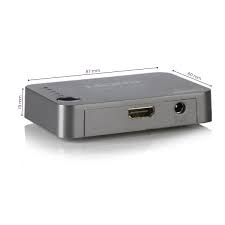
SPLIT312 - Television MARMITEK - Free user manual and instructions
Find the device manual for free SPLIT312 MARMITEK in PDF.


| Product Type | Active HDMI Splitter |
| Brand | MARMITEK |
| Model | SPLIT312 |
| HDMI Input | 1 x HDMI (19-pin female, gold-plated) |
| HDMI Output | 2 x HDMI (19-pin female, gold-plated) |
| Supported Resolutions | 480i, 480p, 576i, 576p, 720p, 1080i, 1080p, 1920x1200 (PC) |
| Max. Pixel Frequency | 165 MHz |
| Max. Data Rate per Link | 1.65 Gbps |
| Max. Video Data Rate | 4.95 Gbps |
| HDMI Standards | HDMI 1.2a, HDCP 1.0/1.1 |
| Max. HDMI Cable Length | 15 m |
| Dimensions (HxWxD) | 86 x 44 x 16 mm |
| Weight | 42 g |
| Power Supply | External adapter: input 100-240 VAC, 50/60 Hz; output 5 VDC, 2 A |
| Ambient Temperature | 0 to +70 °C |
| Ambient Humidity | 10% to 85% |
| Housing Material | Plastic |
| Warranty | Manufacturer's warranty, repair by qualified personnel |
| Package Contents | Splitter, power adapter, user manual |
| Intended Use | Indoor, dry locations |
| Maintenance | Clean with a soft dry cloth. Do not use abrasive products. |
| Recycling | Do not dispose of with household waste. Follow local regulations. |
Frequently Asked Questions - SPLIT312 MARMITEK
User questions about SPLIT312 MARMITEK
0 question about this device. Answer the ones you know or ask your own.
Ask a new question about this device
Download the instructions for your Television in PDF format for free! Find your manual SPLIT312 - MARMITEK and take your electronic device back in hand. On this page are published all the documents necessary for the use of your device. SPLIT312 by MARMITEK.
USER MANUAL SPLIT312 MARMITEK
- To prevent short circuits, this product should only be used inside and only in dry spaces. Do not expose the components to rain or moisture. Do not use the product close to a bath, swimming pool etc.
- Do not expose the components of your systems to extremely high temperatures or bright light sources.
- In case of improper usage or if you have altered and repaired the product yourself, all guarantees expire. Marmitek does not accept responsibility in the case of improper usage of the product or when the product is used for purposes other than specified. Marmitek does not accept responsibility for additional damage other than covered by the legal product responsibility.
• This product is not a toy. Keep out of reach of children. - Do not open the product: the device may contain live parts. The product should only be repaired or serviced by a qualified expert.
- Only connect the adapter to the mains after checking whether the mains voltage is the same as the values on the identification tags. Never connect an adapter or power cord when it is damaged. In that case, contact your supplier.
1 INTRODUCTION
Congratulations on your purchase of the Marmitek Split312! This active HDMI splitter connects two HD screens (e.g. HDTV and HD projector) with one HDMI source (Blu-ray Player, HD set-top box, HD Game Console, etc.). In contrast to passive HDMI splitters, this is done without any signal or encryption loss and while retaining optimum image quality. It is also ideal for using in combination with an HDMI extender (e.g. to another room). The Split312 supports Full HD resolutions up to 1080p.
Marmitek products are manufactured with great care and are of the highest quality. Please read this manual carefully and follow the instructions to ensure you make the most of the opportunities offered by this product.
2 CONTENT
1x HDMI splitter
1X Power adapter
1x Usage instructions
3 INSTALLATION
- Connect the HDMI source to the Split312's 'input' via an HDMI cable (not supplied).
- Connect the two HDMI screens (HDTV or HD projector) to the Split312's 'output' via HDMI cables (not supplied).
- Connect the power adapter to the Split312 and plug into the socket.
Tip for installation:
Only use category 2 certified HDMI cables in order to retain image and sound quality. Do not use much force to connect or disconnect the HDMI cables otherwise they may become damaged.
4 USE
The maximum resolution that can be used is entirely dependent on the HDMI source and the connected HDMI screens. The resolution of the HDMI source must be set so that both HDMI screens support it. Check the instructions for the connected HDMI equipment to verify the maximum supported resolution and how this can be set.
Once all equipment is connected and set in the correct way, switch everything off and then on again. Select the correct HDMI input on your HDMI screen and you should then see the same signal on each screen, with the same resolution.
Tip for usage:
Ensure that the HDMI source and screens fully support the HDCP protocol in order to prevent any problems.
5 FREQUENTLY ASKED QUESTIONS
No (or bad) image and sound
If you see a bad image or no image at all after connecting the HDMI splitter, try to establish what the problem is by connecting your devices, one by one, to your screen (TV, monitor or projector). This will allow you to establish whether the problem lies in the HDMI sources, the HDMI cables, the HDMI splitter or the screen. HDMI equipment that has not been tested and certified by ATC (Authorized Test Centers) may cause image and sound problems.
- Check whether the Split312's power adapter is connected and plugged in;
• Use the highest quality HDMI certified cables (category 2 HDMI certified); - Do not use HDMI cables that are longer than specified in the technical data;
- Check whether the HDMI cables and/or connectors are damaged;
- Both the HDMI source as well as your screen must fully support HDMI;
- Check whether your HDMI sources and screen support HDCP (High-bandwidth Digital Content Protection).
Do you have a question that has not been answered here? Then have a look at www.marmitek.com
6 TECHNICAL DATA
Resolution
| Supported HDTV Resolutions | 480i, 480p, 576i, 576p, 720p, 1080i, 1080p |
| Supported PC Resolution (max.) | 1920x1200 |
| Maximum Pixel Frequency (max.) | 165MHz |
| Single link Bit Rate (max.) | 1.65Gbps |
| Video Data Rate (max.) | 4.95Gbps |
| Output Video | HDMI 1.2a + HDCP1.0/1.1 |
Inputs and outputs
| HDMI Input (19-pin female) | 1 HDMI (gold plated) |
| HDMI Output (19-pin female) | 2 HDMI (gold plated) |
| Maximum HDMI cable length | 15m |
Splitter housing
| Dimensions (HxWxD) | 86x44x16mm |
| Weight | 42g |
Environment
| Ambient temperature | +0 to +70°C |
| Ambient humidity | 10% up to 85% |
Power
| External power adapter | Input: 100-240VAC @50-60HzOutput: 5VDC @ 2A |
Specifications may be modified without prior notice.
7 ALSO AVAILABLE
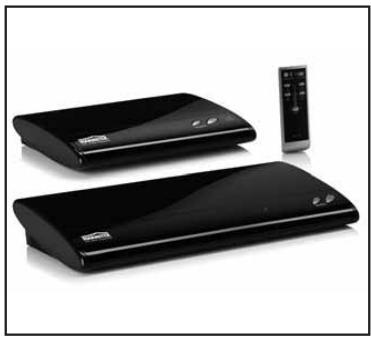
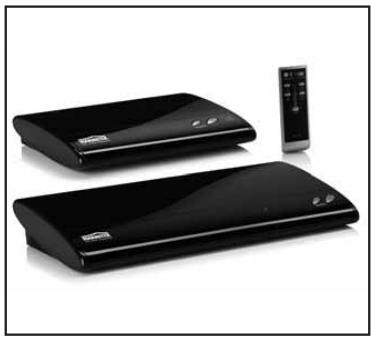
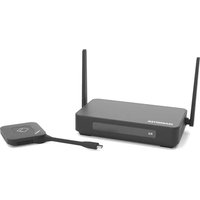
It is possible to transfer the signal over longer distances using a wire or wirelessly, to another room in your house, by expanding the Split312 with a MegaView61 or the GigaVideo800 HDMI.

MegaView61

GigaVideo800
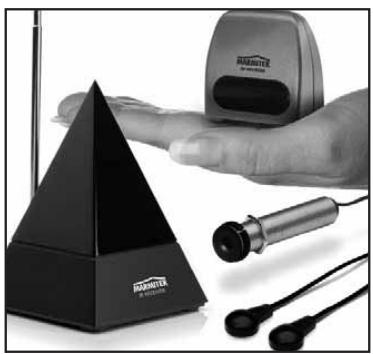
Infrared extension
Marmitek offers several products to operate your devices, even when these are placed in a closed cupboard or in a different room. This as well wired as wireless. More information about these so called infrared extenders can be found at www.marmitek.com.
Extra remote control
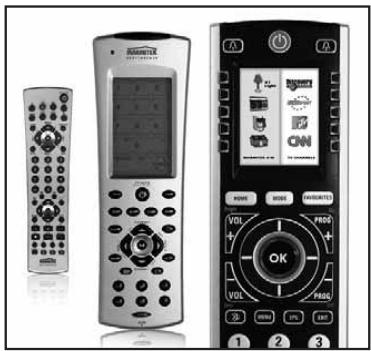
If you want to operate your device from various places in your home, or if you want to use just one single remote control for all your A/V devices, then make your choice from the complete range of Marmitek universal remote controls; EasyControl or EasyTouch. These replace almost every remote control you are using at the moment. More information about these so called universal remote controls can be found at www.marmitek.com.

Connecting multiple devices
You want to connect multiple A/V devices? With the Marmitek Connect series you can connect all your devices with just one cable, retaining quality. More information about this so called switchgear can be found at www.marmitek.com.


Environmental Information for Customers in the European Union
European Directive 2002/96/EC requires that the equipment bearing this symbol on the product and/or its packaging must not be disposed of with unsorted municipal waste. The symbol indicates that this product should be disposed of separately from regular household waste streams. It is your responsibility to dispose of this and other electric and electronic equipment via designated collection facilities appointed by the government or local authorities. Correct disposal and recycling will help prevent potential negative consequences to the environment and human health. For more detailed information about the disposal of your old equipment, please contact your local authorities, waste disposal service, or the shop where you purchased the product.
SICHERHEITSHINWEISE
Tipps zur Installation:
MegaView61

GigaVideo800


MegaView61
GigaVideo800
Rallonge infrarouge



MegaView61
GigaVideo800

Conectar varios aparatos

MegaView61

GigaVideo800
Prolunga ad infrarossi


VEILIGHEIDSWAARSCHUWINGEN
MegaView61

GigaVideo800
Infrarood verlenging
Extra afstandsbediening

DECLARATION OF CONFORMITY
Hereby, Marmitek BV, declares that this SPLIT312 ™ is in compliance with the essential requirements and other relevant provisions of the following Directives:
DIRECTIVE 2004/108/EC OF THE EUROPEAN PARLIAMENT AND OF THE COUNCIL of 15 December 2004 on the approximation of the laws of the Member States relating to electromagnetic compatibility
Directive 2006/95/EC of the European Parliament and of the Council of 12 December 2006 on the harmonisation of the laws of Member States relating to electrical equipment designed for use within certain voltage limits
Directive 2002/95/EC of the European Parliament and of the Council of 27 January 2003 on the restriction of the use of certain hazardous substances in electrical and electronic equipment


- 1 INTRODUCTION
- 2 CONTENT
- 3 INSTALLATION
- TIP FOR INSTALLATION
- 4 USE
- TIP FOR USAGE
- 5 FREQUENTLY ASKED QUESTIONS
- 6 TECHNICAL DATA
- 7 ALSO AVAILABLE
- INFRARED EXTENSION
- EXTRA REMOTE CONTROL
- CONNECTING MULTIPLE DEVICES
- ENVIRONMENTAL INFORMATION FOR CUSTOMERS IN THE EUROPEAN UNION
- SICHERHEITSHINWEISE
- TIPPS ZUR INSTALLATION
- RALLONGE INFRAROUGE
- CONECTAR VARIOS APARATOS
- PROLUNGA AD INFRAROSSI
- VEILIGHEIDSWAARSCHUWINGEN
- INFRAROOD VERLENGING
- EXTRA AFSTANDSBEDIENING
- DECLARATION OF CONFORMITY
Brand : MARMITEK
Model : SPLIT312
Category : Television