
TF591 - Television TELEFUNKEN - Free user manual and instructions
Find the device manual for free TF591 TELEFUNKEN in PDF.



| Product Type | DECT Cordless Phone |
| Brand | TELEFUNKEN |
| Model | TF591 |
| Main Power Source | AC Adapter (100-240 V) |
| Backup Power | 4 AA 1.5V batteries (LR6) |
| Display | LCD with icons |
| Directory Capacity | 50 contacts |
| Incoming Call List | 50 numbers |
| Outgoing Call List | 20 numbers |
| Memory Shortcut Keys | 2 keys (M1, M2) |
| Emergency Function | SOS button on base and pendant |
| Emergency Pendant | Water-resistant (IPx6), with SOS button |
| Speaker | Built-in hands-free |
| Voice Dialing | Digit announcement when dialing |
| Compatibility | Public analog telephone network or PBX extension |
| Warranty | 24 months |
| Manufacturer | SOPEG SAS (France) |
| Box Contents | Base, handset, cables, power supply, SOS pendant, necklace, wristband, user manual |
| Menu Language | French by default, multilingual |
| Maintenance | Clean with a damp cloth, avoid solvents |
Frequently Asked Questions - TF591 TELEFUNKEN
User questions about TF591 TELEFUNKEN
0 question about this device. Answer the ones you know or ask your own.
Ask a new question about this device
Download the instructions for your Television in PDF format for free! Find your manual TF591 - TELEFUNKEN and take your electronic device back in hand. On this page are published all the documents necessary for the use of your device. TF591 by TELEFUNKEN.
USER MANUAL TF591 TELEFUNKEN
RING VOLUME SETTING 37
OUTGOING AND INCOMING CALLS LIST5 37
DIRECT MEMORIES 38
PHONEBOOK 38
DISPLAY CONTRAST 39
VOICE DIAL 39
USE SOS BUTTON & SOS PENDANT 39
WARRANTY 42
AFTER-SALES SERVICE 42
SECURITYINSTRUCTIONS 42
DECLARATION OF CONFORMITY 43
INTRODUCTION
Congratulations on the purchase of your TELEFUNKEN TF591 COSI!
Please read this information before using the phone to make a better
use of it. We are not responsible for any damage due to your misunderstanding of this information and misacting.
If you need assistance to use the product, please join our after-sales service: assistance@sopeg.com
Package content
1 Base, 1 handset, 1 handset cable, 1 line cable, 1 power supply, 1 French T phone plug, 1 SOS pendant, 1 necklace for the pendant, 1 bracelet for the pendant, 1 user guide
Manufacturer information
SOPEG SAS
Parc Burospace 2,
Route de Gisy, BP24 91571 BIEVRES, France
Email: info@sopeg.com
Tel.: +33 160 13 0888
YOUR PHONE
N°
Symb.
Description
1
BOOK
Phonebook : press this button to access your saved contacts list
2
MENU
Press this key to access main menu of the phone
3
OK
OK key : press to confirm an action or save an entry
4

List of all incoming calls
| 5 | ▲ | UP key: press this key to move inside menus between different items |
| 6 | Booster button: in a call, press this button to increase the earpiece volume by 10 dB |

| 7 | Keypad | Main keypad with digits from 0 to 9 and symbols (* and #) serve to compose phone numbers or enter contact name in Phonebook |
| 8 | Call LED | This LED will blink during an incoming call ring. The LED stops blinking once the call is answered or stopped. |
| 9 | Display | Phone display (see icons explanations below) |
| 10 | REDIAL | Redial key serves to compose again last dialed phone number |
| 11 | FSH/ | In call: Flash function (default Flash time is 300ms). In menus: BACK function: press this key to go back to previous step inside any submenu. |
| 12 | X | DELETE: press this key to delete last entered digit or symbol. In Phonebook, press this key to delete a contact. |
| 13 | Outgoing calls: list of all dialed numbers | |
| 14 | DOWN key: press this key to move inside menus between different items | |
| 15 | SOS | SOS key: Long press for 3 seconds this key to start an emergency call |
| 16 | M1 M2 | Direct memory keys: register a favorite number on M1 or M2 key. Press this key to make a direct call to a stored number. |
| 17 | Loudspeaker: press this key to make or answer/stop a call in hands-free mode. | |
| 18 | LINE | Line cable socket |
19
DC
20


Power supply socket
Ring volume control key: slide to switch between High, Low, Silent levels
| 21 | Batteries | Battery compartment: you can use your phone without power supply (telephone line is working even during the power blackout). To fully use all functions (display backlight, etc.), you can insert 4 1.5V AA batteries as indicated in the compartment. |
| 22 | HANDSET | Handset cable socket |
| 23 | SOS | SOS button on pendant. Press this key for 1 second to start an emergency call |
| 24 | SOS LED | LED blinks when you press SOS key on your pendant |
PHONE DISPLAY
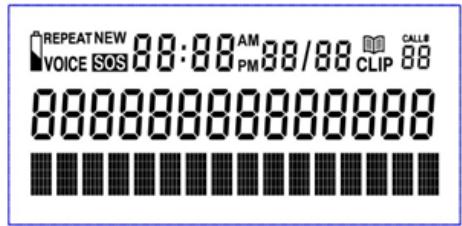
| Icon | DESCRIPTION |
| NEW | Shown when there is a new call or missed new call |
| RE-PEAT | Shown when there is 2 or more missed calls from the same number |
| VOICE | Shown when you activated Voiced keypad function |
| SOS | Shown when the SOS procedure is launched |
| Shown when the batteries are low (if the device is working on batteries) | |
| Shown when you consult your Phonebook | |
| TOT: | Shows total number of incoming calls |
| NEW: | Shows the number of new missed calls |
INSTALLATION
- Connect the power supply to ensure that the backlight function and other features are working correctly.
- Attach the phone spiral cord to handset and put spiral cord jack in the base.
- Attach the straight phone cord to the phone line jack.
- Lift the handset or press button to check the status; if there is a dialing tone, the installation was successful.
PHONE LANGUAGE
By default your phone is in French. To change the language:
- Press MENU key to access the main menu.
- Press key to scroll till LAngue. Press OK to enter Language menu.
- Press or keys till you see your language and press OK to select.
TIME AND DATE
The display shows time and date. You can set it manually:
- Press MENU key
- Press key to scroll till ENTER TIME/DATE. Press OK to enter the menu.
- Use or keys to select year. Press OK to validate.
- Use or keys to select month. Press OK to validate.
- Use or keys to select date. Press OK to confirm.
-
Use or keys to select hour. Press OK to confirm.
-
Use or keys to select minutes. Press OK to confirm.
- Press FSH/ key to exit the Main menu and return to Idle screen.
RECEIVE A CALL
The phone rings with an incoming call and the right Call LED starts
blinking. Lift the handset or press the button to answer the call.
To end a call, press again or pout the handset back on the base.
HANDSET VOLUME
Press booster button to increase handset volume. Press it again to reduce to default volume level.
MAKE A CALL
To make a call, lift the handset or press the button.
Dial the desired number, you will hear the dialing tone, then wait for a response. If you hear a busy tone, hang up or press the button to end the call.
You can dial the number first and then lift the handset or press button. While pre-dialing a number, use × key to delete the last entry.
LAST NUMBER REDIAL
If you want to make another call to last dialed number, lift the handset or press the button. Then, press the button REDIAL.
LOUDSPEAKER
Switch between the loudspeaker and handset mode while answering or
making a call. In handset mode, to switch to the loudspeaker, press the button and put the handset back on the base. In loudspeaker mode, to switch to the handset, just lift the handset up.
To end the call, put the handset back on the base.
RING VOLUME SETTING
Set the switch to the desired mode, select between High, Low volumes or Silent.
OUTGOING AND INCOMING CALLS LISTS
Outgoing calls list
Press to review the outgoing call register. The list can contain up to 20 last dialed numbers.
Press or keys to scroll through the numbers. Lift the handset or press the button to make a call to selected number.
Incoming calls list
Press to access the list of all incoming calls. Press or to scroll through the numbers. The phone can store up to 50 last incoming numbers.
Lift the handset or press the button to dial the number.
Long press for 3 seconds the MENU button to store number in the Phonebook.
Once the contact is copied to the memory, you can add name to this saved number:
- Press BOOK button to enter Phonebook.
- Use or keys to find the stored number.
- Long press MENU key for 3 seconds till you see EDIT shown on the display. Press OK key to confirm.
- Press OK again to confirm already stored number. Using the keypad, enter the name of the contact. Press OK to save the contact.
NOTE: If there are no calls on these lists, the display shows NO CALLS. Once reaching the last number of a list, the display shows END OF LIST.
Press shortly key to delete an entry from Incoming or Outgoing calls list. Long press to delete all entries (about 3 seconds). Press OK to confirm your choice.
DIRECT MEMORIES
Your phone has 2 direct memory keys (M1 and M2): you can store 1 favorite number on each key and call it directly by pressing M1 or M2 button.
To store a number, long press M1 or M2 button. Display shows STORE NUMBER. Enter the number you want to store and press
OK to confirm.
PHONEBOOK
You can save up to 50 contacts in the phonebook.
Add new contact
- Press BOOK to enter the Phonebook.
- Press MENU button to add new contact. The display shows STORE NUMBER.
- Type the phone number and press OK to confirm. Press to delete last digit, if you make a mistake.
- Enter the name of the contact using the keypad. Press OK to confirm. To search a contact in the Phonebook, press BOOK to enter the Phonebook.
Use or keys to go through the entries.
Edit a contact
Once in Phonebook, select a number you want to edit.
- Long press MENU key for 3 seconds till you see EDIT shown on the display. Press OK key to confirm.
- Edit the number and press OK again to confirm.
- Using the keypad, edit the contact name. Press × to delete symbols. Press OK to save the contact.
Delete contacts
- Select a contact in the Phonebook.
- Press × key to delete the selected contact. Press OK key to confirm the delete operation.
In the Phonebook, long press × key till you see DELETE ALL shown on the display. Press OK key to delete all entries.
DISPLAY CONTRAST
If you want to adjust the contrast of the display, press MENU button to access the main menu. Select LCD CONTRAST by pressing OK. Using or keys select the appropriate contrast level and press OK key. Press FSH/ key to exit the Main menu and return to the Idle screen.
VOICE DIAL
Your phone can pronounce the keypad digits (from 0 to 9 and * and # keys) when you compose a number.
To activate or deactivate this function:
- Press MENU key
- Press key till you see VOICE DIAL. Press OK to enter the menu.
- Press key again to select VOICE ON to activate the function or VOICE OFF to deactivate the function.
- Press FSH/ key to exit the Main menu and return to Idle screen.
USE SOS BUTTON & SOS PENDANT
Your phone has an SOS button for an emergency call. You have an emergency button on the base and on the pendant (remote control).
To activate the SOS call:
- Long press SOS button on the base for 3 seconds
- Or press SOS button on the pendant for 1 second
If an SOS call is launched, the SOS signal is launched by the base. Then, the phone will call automatically your emergency contacts one after another, till somebody answers.
Each dialing lasts 60 seconds. Within this time, the emergency person needs to answer a call and press 0 key to confirm the emergency call acceptance. The person will hear an emergency message explaining the procedure about pressing 0. This message will be also played in hands-free mode in your device.
Once the call is confirmed, you can speak to your contact in hands-free mode. The conversation is active during 2 minutes. 10 seconds before end of 2 first minutes, the phone will make a beep. You emergency contact has to press * key to continue the conversation for another 2 minutes, and so on.
If the * key is not pressed, the SOS call will stop, and the phone will call next emergency contact.
If the emergency contact presses # key or end the conversation, the whole SOS process will stop and will not continue to call another contact.
If you launched the SOS signal using the pendant and you are far from base, you won't be able to speak clearly to your contact. He will
be only informed about the emergency situation or maybe can hear you from far.
You need to inform your emergency contact, that he is a part of your emergency list.
To stop the SOS process, you can press again the SOS button on the pendant, press or pick up the handset.
Edit emergency contacts list
You can add up to 10 contacts to the Emergency list.
Add emergency contact
To add an emergency contact you have 2 options:
- From Phonebook:
Go to desired contact in the Phonebook
Long press SOS button on the base for 3 seconds till you see on the display shown COPY TO SOS
Press OK key to confirm
- In Emergency call menu:
Press MENU key
Press key and press OK key to select EMERGENCY CALL submenu.
When you see EMERGENCY NUMBER shown on the display, press OK key.
You can enter your first emergency contact. Press OK to save. Press to delete wrong entry.
Press key to go to next emergency number and repeat the operations.
Press FSH/ key to exit the Main menu and return to Idle screen.
Delete or edit a number from emergency list
- Go to EMERGENCY CALL menu and select the contact you want to delete or edit.
- Press OK key. You will enter the Edit mode.
- Press × key to delete some digits and edit the number. Press this key for several times to delete the number completely.
Once you have no more digits shown (number is empty), you can press OK key to confirm the deleting operation.
SOS PENDANT
The SOS pendant is certified IPx6. It means it is resistant to strong water jets. You can freely take a shower or wash your hands, without removing the pendant.
ATTENTION: it may be damaged if immersed completely into the water (up to 1 m depth) for some time.
Answer a call with SOS pendant
Apart from launching the emergency call, you can pick up a call with your pendant. If you have an incoming call, press the SOS button on the pendant to answer the call.
The phone will automatically accept the call in Loudspeaker mode. The sensitivity of the microphone is automatically increased to achieve better reception.
You can end the call by pressing again the SOS button on the pendant.
Pair new pendant
You can pair or disconnect supplied pendant with the phone.
To add a new pendant/reconnect your pendant or delete connected pendant:
- Press MENU key
- Use or keys to select PAIR NEW PENDANT menu. Press OK to enter.
- Press key to select between PAIR NEW PENDANT or DELETE DEVICE
- If you select DELETE DEVICE, press OK to confirm. All connected pendants will be deleted.
- If you select PAIR NEW PENDANT, the screen will show PAIRING. Long press SOS button on the pendant you want to connect, till the display shows DONE. The pendant is paired successfully.
This phone comes with a 24-month warranty, starting from the purchase date. For more information on the applicability of this warranty, please refer to our website:
http://www.telefunken-digital.fr/en/read/support-1.html#4
The TELEFUNKEN TF 591 COSI phone was put on the market for
sale for the first time in January 2016, in Europe.
AFTER-SALES SERVICE
In the event of a technical, contact our after-sales service: assistance@sopeg.com
Address
SC Tech
The mains adapter is the disconnect device between the product and mains power. The mains socket outlet must be close to the equipment and easily accessible.
When using your telephone, simple safety precautions should be followed to prevent any risk of fire, electric shock or any other accident. Follow all the warnings contained in this guide and on the telephone.
Do not use any liquid or aerosol cleaners; use a lint-free cloth.
Do not use the telephone in close proximity to water, for example sinks, baths, taps, swimming pools and so on. Unplug the phone from the outlet, and contact technical support in the following cases:
If the telephone has been dropped and some parts are broken.
If the telephone shows clear signs of change in its operation.
Use only LR-6 1.5V AA batteries.
Use of any other kind of battery may be dangerous. It might cause interference or damage to the phone. The manufacturer shall not be held liable for repairing or replacing the telephone if batteries of a type different than that described in this instruction.
Do not submerge batteries in water, and do not incinerate them. If you have a mains power failure, you can still use your base to make and receive te-
lephone calls. The phone will ring when you receive an incoming call in power failure mode but the display will not light up and the caller's details will not be stored in the calls list.
Use
This telephone is intended to be connected to a public analogue telephone network or to an analogue extension of an approved compatible PBX system.
Care and maintenance
Do not clean any part of your phone system with benzene, thinners or other solvent chemicals as this may cause permanent damage which is not covered by the Guarantee. When necessary, clean it with a damp cloth.
DECLARATION OF CONFORMITY
In accordance with Directives 2004/108/EC, 1999/5/EC, 2006/95/EC and 2011/65/EU this product complies with the essential requirements and other relevant provisions. You can request full certificate and declaration of conformity by sending an email to: assistance@sopeg.com


The symbol shown here and on the product means that the product is used as Electrical or Electronic Equipment and should not be disposed other household or commercial waste at the end of its working life. The state of Electrical and Electronic Equipment (WEEE) Directive (2002/96/EC) has been put in place to recycle products using best available recovery and cling techniques to minimize the impact on the environment, treat any hazardous substances and avoid the increasing landfill.
INTRODUZIONE 45
IL TELEFONO 45
DISPLAY DEL TELEFONO 47
INSTALLAZIONE 48
LINGUA DEL TELEFONO 48
ORA E DATA 49
RICEZIONEDI UNA CHIAMATA 49
VOLUME DEL RICEVITORE 49
CHIAMATA IN USCITA 49
RICOMPOSITIONE DELL'ULTIMO NUMERO 50
VIVAVOCE 50
- INTRODUCTION
- Package content
- Manufacturer information
- YOUR PHONE
- PHONE DISPLAY
- INSTALLATION
- PHONE LANGUAGE
- TIME AND DATE
- RECEIVE A CALL
- HANDSET VOLUME
- MAKE A CALL
- LAST NUMBER REDIAL
- LOUDSPEAKER
- RING VOLUME SETTING
- OUTGOING AND INCOMING CALLS LISTS
- Outgoing calls list
- Incoming calls list
- DIRECT MEMORIES
- PHONEBOOK
- Add new contact
- Edit a contact
- Delete contacts
- DISPLAY CONTRAST
- VOICE DIAL
- USE SOS BUTTON & SOS PENDANT
- To activate the SOS call:
- Edit emergency contacts list
- Add emergency contact
- Delete or edit a number from emergency list
- SOS PENDANT
- Answer a call with SOS pendant
- Pair new pendant
- AFTER-SALES SERVICE
- Address
- Use
- Care and maintenance
- DECLARATION OF CONFORMITY
Brand : TELEFUNKEN
Model : TF591
Category : Television