
XDOM RMML - Electronic module EDOBE - Free user manual and instructions
Find the device manual for free XDOM RMML EDOBE in PDF.


| Product type | Electronic module (micro radio receiver for lighting control) |
| Brand | EDOBE |
| Model | XDOM RMML |
| Power supply | Mains 230 V AC (phase and neutral required) |
| Maximum power | Check on device (not specified in the manual) |
| Radio frequency | Compatible with ebode home range (not specified) |
| Dimensions | Compact, hides in lighting point or behind a socket |
| Weight | Very light (a few grams) |
| Main functions | Remote on/off via transmitter or remote control; programming with multiple transmitter storage; programming LED indicator |
| Installation | To be recessed in ceiling or behind a socket; requires phase and neutral; deploy antenna |
| Compatibility | All ebode home products range (transmitters and remote controls) |
| Safety | Cut power at the circuit breaker before installation; do not open (risk of electric shock); no user-serviceable parts |
| Maintenance and cleaning | No special maintenance; avoid moisture and extreme temperatures |
| Spare parts and repairability | Not user-repairable; contact a professional repairer |
Frequently Asked Questions - XDOM RMML EDOBE
User questions about XDOM RMML EDOBE
0 question about this device. Answer the ones you know or ask your own.
Ask a new question about this device
Download the instructions for your Electronic module in PDF format for free! Find your manual XDOM RMML - EDOBE and take your electronic device back in hand. On this page are published all the documents necessary for the use of your device. XDOM RMML by EDOBE.
USER MANUAL XDOM RMML EDOBE
Receiver Micro Appliance Module
User guide 6
Bedienungsanleitung 8
Gebruiksaanwijzing 10
Anvandermanual 12
Guideutilisateur 14
Guia del uso 16
Manual do'utilizar 18
Manuale per l'utente 20

General Security Note
For carefree and safe use of this product, please read this manual and safety information carefully and follow the instructions. Technical manipulation of the product or any changes to the product are forbidden, due to security and approval issues.
Please take care to set up the device correctly - consult your user guide. WARNING: Do Not Open! Risk of Electrical Shock. Voltages in this equipment are hazardous to life. No user-serviceable parts inside. Refer all servicing to qualified service personnel.
Important: the product must be used according the instructions in this manual and is not suitable for other purposes.
Please avoid the following: strong mechanical wear and tear, high temperature, strong vibrations, and high humidity.
Please also respect the additional security notes in the various user guide chapters. To ensure correct set up please read the manual and security notes carefully.

The Micro Receiver allows the remote control of incandescent, halogen, low-voltage, energy-saving or LED lights.
- The Micro Receiver is inconspicuously concealed at the light fixture (overhead light, wall lamp, etc.) or behind a power socket.
- It installs in just minutes.
- It's compatible with all ebode radio home automation devices. Visit the site www.ebodeelectronics.eu.
DESCRIPTION
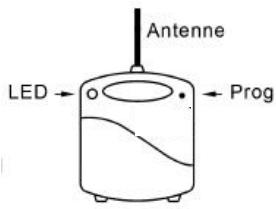
LED indicator (PROG) for programming or (RESET)

INSTALLATION
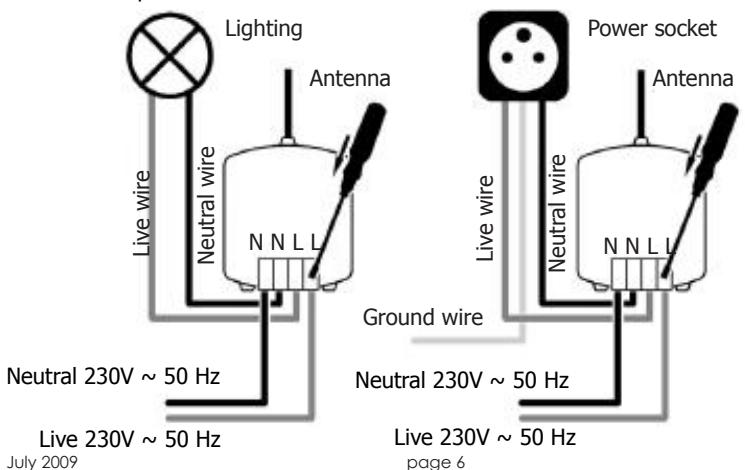
- The LIVE and the NEUTRAL wires are essential.
- For a remote-controlled socket verify the thickness of the back of the socket, add 25mm in order to define the minimum depth of the wall box.
Connect only one light to the socket without using multi-socket converters to avoid a cumulative power drain.
Do not connect more lights as the total permitted amount of wattage allows.
1. CAUTION: Shut off power to the circuit in the electrical panel.
- With the aid of a screwdriver press on the top of the terminal board and insert the cables (for the light fixture see diagram 1, for the power socket see diagram 2). Then verify the connections by pulling lightly on the wires.
- Pull out the antenna as far as you can for better reception.

PROGRAMMING
The Micro Transmitter commands must be recognized in order to add the Micro Receiver to a different installation from the original or to one with interference from a nearby system.
- Proceed to make a "Reset". Press down and hold the button in the (PROG) opening with a paper clip until the LED lights up GREEN, then release it. The LED should flash YELLOW: the Micro Receiver now has no code.
- With the paper clip, press down briefly in the (PROG) opening. The LED will flash GREEN and wait for a command from a Micro Transmitter or remote control switch.
- Press one of the buttons on the Micro Transmitter or the remote control switch: the Micro Receiver LED will stop blinking, confirming it has received the command. The programming is done!
REMARKS
The RMML Micro Receiver will remember as many Micro-Transmitters and remote control switches as necessary.

VERIFICATION
Verify On/Off switch operation.
You must wait about a second between each On / Off command.
When changing the battery, the registered code will be retained by the Micro Transmitter.
Troubleshooting - please check FAQ and technical support on
www.ebodeelectronics.eu