
YAS-101 - Soundbar YAMAHA - Free user manual and instructions
Find the device manual for free YAS-101 YAMAHA in PDF.



| Product Type | Soundbar |
| Brand | YAMAHA |
| Model | YAS-101 |
| Dimensions (with feet) | 890 × 107 × 120.5 mm (W × H × D) |
| Weight | 4.2 kg |
| Power Supply | 220-240 V AC, 50/60 Hz |
| Power Consumption | 22 W (standby < 0.5 W) |
| Output Power (effective) | Front L/R: 24 W + 24 W (1 kHz, 1% THD, 6 Ω) Subwoofer: 48 W (100 Hz, 1% THD, 3 Ω) |
| Output Power (maximum) | Front L/R: 30 W + 30 W (1 kHz, 10% THD, 6 Ω) Subwoofer: 60 W (100 Hz, 10% THD, 3 Ω) |
| Speakers | Front: 2 × 6.5 cm cone (suspension type) Subwoofer: 2 × 7.5 cm cone (bass reflex type) |
| Frequency Response | Front: 150 Hz to 20 kHz (-10 dB, stereo mode) Subwoofer: 50 Hz to 150 Hz (-10 dB) |
| Audio Features | AIR SURROUND XTREME, Clear Voice, UniVolume, surround/stereo modes, audio delay control, external subwoofer |
| Audio Inputs | 2 × optical (TV, BD/DVD), 1 × coaxial (STB) |
| Outputs | 1 × subwoofer, 1 × system connection (subwoofer power switching) |
| Supplied Accessories | Remote control, wall mount template, optical cable (1.5 m), AAA batteries (×2), spacers (×2) |
| Cleaning | Dry, clean cloth; do not use chemical solvents |
| Safety | Do not expose to water, do not open the casing, unplug during storms, respect ventilation gaps |
| Repairability | Do not attempt to repair yourself; contact a Yamaha authorized service center |
| General Information | Dolby Digital, DTS Digital Surround, Pro Logic II technology; Yamaha brand |
Frequently Asked Questions - YAS-101 YAMAHA
User questions about YAS-101 YAMAHA
0 question about this device. Answer the ones you know or ask your own.
Ask a new question about this device
Download the instructions for your Soundbar in PDF format for free! Find your manual YAS-101 - YAMAHA and take your electronic device back in hand. On this page are published all the documents necessary for the use of your device. YAS-101 by YAMAHA.
USER MANUAL YAS-101 YAMAHA
Front Surround System
Caution: Read this before operating your unit.
1 To assure the finest performance, please read this manual carefully. Keep it in a safe place for future reference.
2 Install this unit in a well ventilated, cool, dry, clean place - away from direct sunlight, heat sources, vibration, dust, moisture, and/or cold. For proper ventilation, allow the following minimum clearances.
Top: 5cm (2 in)
Rear: 5cm (2 in)
Sides: 1cm 3/8 in
3 Locate this unit away from other electrical appliances, motors, or transformers to avoid humming sounds.
4 Do not expose this unit to sudden temperature changes from cold to hot, and do not locate this unit in an environment with high humidity (i.e. a room with a humidifier) to prevent condensation inside this unit, which may cause an electrical shock, fire, damage to this unit, and/or personal injury.
5 Avoid installing this unit where foreign objects may fall onto this unit and/or this unit may be exposed to liquid dripping or splashing. On the top of this unit, do not place:
- Other components, as they may cause damage and/or discoloration on the surface of this unit.
- Burning objects (i.e. candles), as they may cause fire, damage to this unit, and/or personal injury.
- Containers with liquid in them, as they may fall and liquid may cause electrical shock to the user and/or damage to this unit.
6 Do not cover this unit with a newspaper, tablecloth, curtain, etc. in order not to obstruct heat radiation. If the temperature inside this unit rises, it may cause fire, damage to this unit, and/or personal injury.
7 Do not plug in this unit to a wall outlet until all connections are complete.
8 Do not operate this unit upside-down. It may overheat, possibly causing damage.
9 Do not use force on switches, knobs and/or cords.
10 When disconnecting the power cable from the wall outlet, grasp the plug; do not pull the cable.
11 Do not clean this unit with chemical solvents; this might damage the finish. Use a clean, dry cloth.
12 Only voltage specified on this unit must be used. Using this unit with a higher voltage than specified is dangerous and may cause fire, damage to this unit, and/or personal injury. Yamaha will not be held responsible for any damage resulting from use of this unit with a voltage other than specified.
13 To prevent damage by lightning, keep the power cable and outdoor antennas disconnected from a wall outlet or the unit during a lightning storm.
14 Do not attempt to modify or fix this unit. Contact qualified Yamaha service personnel when any service is needed. The cabinet should never be opened for any reasons.
15 When not planning to use this unit for long periods of time (i.e. vacation), disconnect the AC power plug from the wall outlet.
16 Be sure to read the "Troubleshooting" section on common operating errors before concluding that this unit is faulty.
17 Before moving this unit, press to set this unit in standby mode, and disconnect the power supply cable from the wall outlet.
18 Condensation will form when the surrounding temperature changes suddenly. Disconnect the power supply cable from the outlet, then leave the unit alone.
19 Install this unit near the wall outlet and where the AC power plug can be reached easily.
20 The batteries shall not be exposed to excessive heat such as sunshine, fire or like.
21 Secure placement or installation is the owner's responsibility. Yamaha shall not be liable for any accident caused by improper placement or installation of speakers.
WARNING
TO REDUCE THE RISK OF FIRE OR ELECTRIC SHOCK,DO NOT EXPOSE THIS UNIT TO RAIN OR MOISTURE.
As long as this unit is connected to the AC wall outlet, it is not disconnected from the AC power source even if you turn off this unit by . In this state, this unit is designed to consume a very small quantity of power.
(Power key)
Turns on the power of this unit or sets it to the standby mode.
For U.K. customers
If the socket outlets in the home are not suitable for the plug supplied with this appliance, it should be cut off and an appropriate 3 pin plug fitted. For details, refer to the instructions described below.
Note
The plug severed from the mains lead must be destroyed, as a plug with bared flexible cord is hazardous if engaged in a live socket outlet.
Special Instructions for U.K. Model
IMPORTANT
THE WIRES IN THE MAINS LEAD ARE COLOURED IN ACCORDANCE WITH THE FOLLOWING CODE:
Blue: NEUTRAL
Brown: LIVE
As the colours of the wires in the mains lead of this apparatus may not correspond with the coloured markings identifying the terminals in your plug, proceed as follows:
The wire which is coloured BLUE must be connected to the terminal which is marked with the letter N or coloured BLACK. The wire which is coloured BROWN must be connected to the terminal which is marked with the letter L or coloured RED.
Making sure that neither core is connected to the earth terminal of the three pin plug.
CONTENTS
Supplied items. 2
Front panel 2
Placing. 3
Connection 4
Operation. 6
Enjoying sound with your preference...... 7
Additional Information 8
Operation indicators of the unit 11
Troubleshooting 12
Specification 14
What you can do with this unit
- Enjoy high quality surround sound (AIR SURROUND XTREME)............ 7
- Enjoy clear dialogue and narration (Clear voice) 7
- Maintain a consistent volume level between different channels, programs, commercials. (UniVolume) 7
- Operate the unit by the TV's remote control (TV remote control learning). 9
About this manual
- In this manual, operations that can be performed using either the front panel buttons or the remote control are explained using the remote control.
- indicates a tip for your operation. Notes contain important information about safety and operating instructions.
- This manual is produced prior to production. Design and specifications are subject to change in part as a result of improvements, etc. In case of differences between the manual and the product, the product has priority.
Notes on remote controls and batteries
- Do not spill water or other liquids on the remote control.
- Do not drop the remote control.
-
Do not leave or store the remote control in the following places:
-
places of high humidity, such as near a bath
- places of high temperatures, such as near a heater or a stove
- places of extremely low temperatures
-
dusty places
-
Do not expose the remote control sensor of this unit to direct sunlight or lighting such as inverted fluorescent lamps.
-
If the batteries grow old, the effective operation range of the remote control decreases considerably. If this happens, replace the batteries with two new ones as soon as possible.
-
Do not use old batteries together with new ones.
- Do not use different types of batteries (such as alkaline and manganese batteries) together. Read the packaging carefully as these different types of batteries may have the same shape and color.
- Exhausted batteries may leak. If the batteries have leaked, dispose of them immediately. Avoid touching the leaked material or letting it come into contact with clothing, etc. Clean the battery compartment thoroughly before installing new batteries.
- Do not throw away batteries with general house waste. Dispose of them correctly in accordance with your local regulations.
- Keep batteries away from children. If a battery is accidentally swallowed, contact your doctor immediately.
- When not planning to use the remote control for long periods of time, remove the batteries from the remote control.
- Do not charge or disassemble the supplied batteries.
Supplied items
Before assembly and connecting, make sure you have received all of the following items.

Main unit × 1
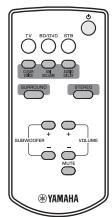
Remote control × 1

Mounting template × 1
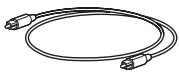
Optical cable × 1 (1.5 m (4.9 ft))
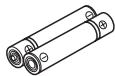
Battery × 2 (AAA, R03, UM4)

Spacer × 2 (for attaching to a wall)
Front panel
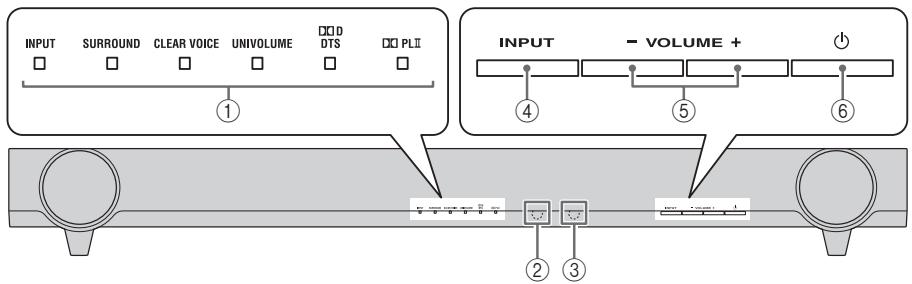
① Indicators
Light up to show the system condition. (P. 11)

The indicators automatically become darker if the unit is left turned on for 5 seconds without any operation being performed. (Auto dimmer function)
② Remote control sensor
Receives infrared signals from the remote control of this unit.
③ TV remote control sensor
Receives infrared signals from the TV remote control.
④ INPUT
Selects an input source you want to listen to. (P.6)
⑤ VOLUME -/+
Controls the volume of the unit. (P. 8)
(6) (Power)
Turns on the unit, or sets it to standby mode.
Placing
Installation: illustrated examples
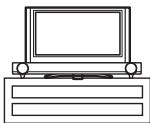
Example 1
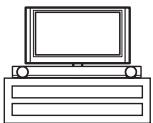
Example 2
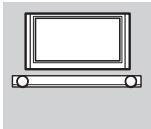
Example 3
Example 1: Unit beneath TV
Example 2: Unit without stand beneath TV (P.9)
Example 3: Wall mounting
Notes
- Do not place the unit on/under any other components such as BD player in a pile. The vibration of the unit may cause system failure, etc. in other components.
- Depending on your installation environment, connections to external components such as TV or BD player can be done before installing the unit. We recommend that you temporarily place and arrange all components in order to decide which procedure is best done first.
- When you clean the unit, use a clean, dry and soft cloth (such as cloth for glasses).
- Do not touch the grille on the front and bottom of the unit.
- Place the unit away from your TV more than 50mm ( 2^ ) so as not to damage your TV with rear panel of the unit. The brackets on the rear of the unit are removable.
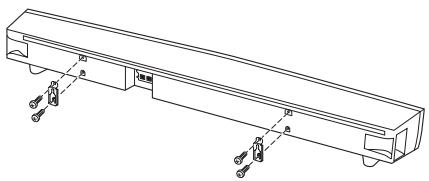
Attaching the unit to a wall
You can attach the unit to a wall using the brackets on the rear of the unit.
When installing the unit on a wall, all installation work must be performed by a qualified contractor or dealer. The customer must never attempt to perform this installation work. Improper or inadequate installation could cause the unit to fall, resulting in personal injury.
1 Attach the supplied mounting template on a wall and mark the holes of the mounting template.
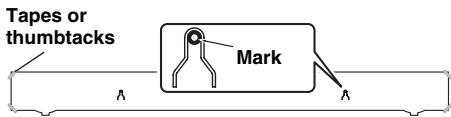
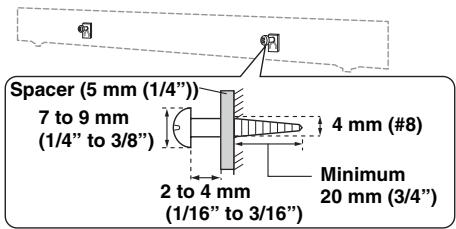
2 Remove the mounting template and then install the commercially available screws and the supplied spacers at the marks.
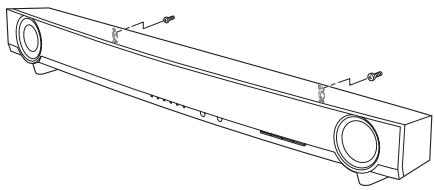
3 Hang the unit on the screws using the brackets on the rear of the unit.
Notes
- Do not attach the unit to a wall that is made of weak materials such as plaster or veneered woods. Doing so may cause the unit to fall.
- Use commercially available screws that can support the weight of the installation.
- Make sure you use specified screws to attach the unit. Using clamps other than specified screws, such as short screws, nails, or two-sided tape, may cause the unit to fall.
- When connecting the unit, fix the cables in place where they will not become loose. If your foot or hand accidentally gets caught on a loose cable, the unit may fall.
- After attaching the unit, check that the unit is fixed securely. Yamaha will bear no responsibility for any accidents caused by improper installations.
Connection
- Do not connect the power cable until all connections are completed.
- Do not use excessive force when inserting the cable plug. Doing so may damage the cable plug and/or terminal.
Connecting a TV
The unit plays the audio output from your TV.
Connect input components such as a BD player, etc., to your TV first and check the components play properly before connecting to the unit. See the manuals of your TV and BD player, etc., for details.
After that, connect the unit to your TV as the illustration below.
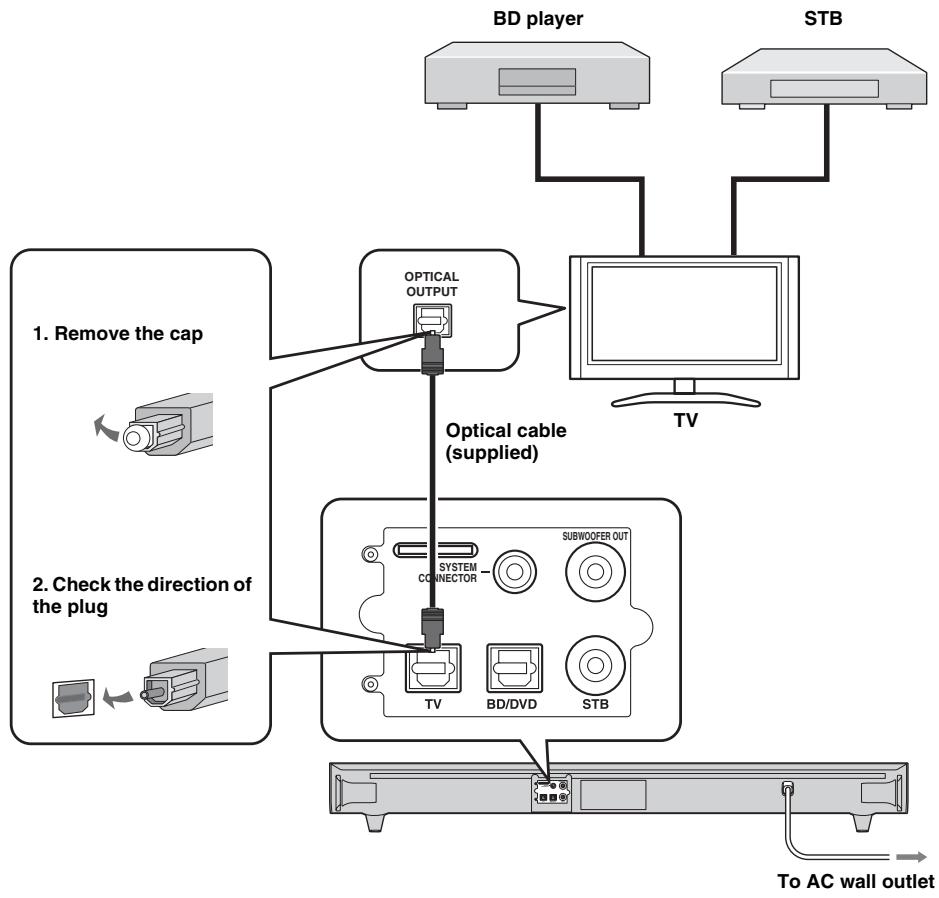
Setting your TV
As connections are completed, set your TV as below before operation.
- Set the volume of the TV to minimum.
- If applicable, set the audio output of your TV's built-in speakers to off.

Alternative connections
Connect the input components (BD player, STB, etc) to the unit directly in the following cases.
- When the unit does not play the sound output from the components connected to your TV (P. 4).
- When your TV does not have any audio input jacks to connect input components, such as a BD player, etc.
Refer to "Using an external subwoofer" (P. 8) for details on the use of an external subwoofer and appropriate settings of the unit.
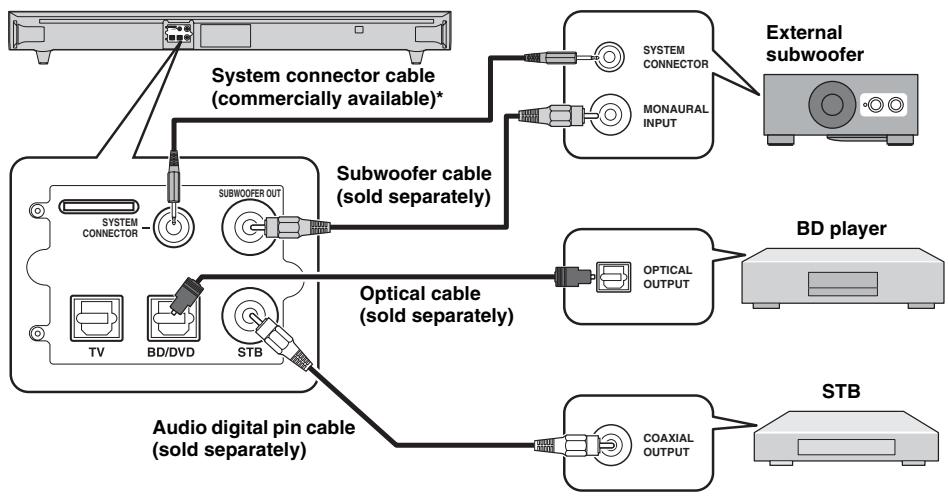
- If connecting an external Yamaha subwoofer, use the cable supplied with the subwoofer to enable synchronous on/off switching of the unit and subwoofer.
Operation
Once you have finished all cable connections and remote control operation, follow the procedure below to start basic playback operation.
Remote control
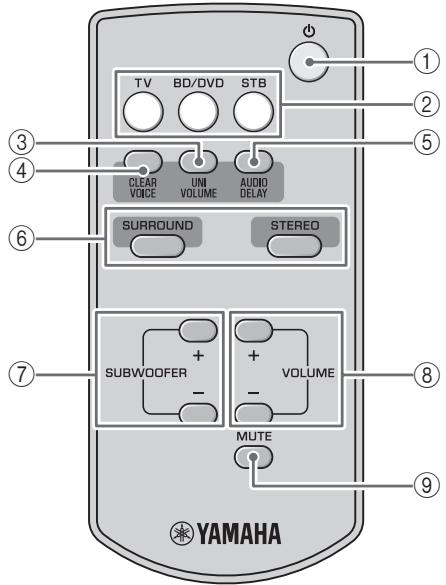
① (Power): Turns on the unit, or sets it to standby mode.
② Input buttons: Select the input source you want to listen to.
③ UNIVOLUME:Turns UniVolume mode on and off.(P.7)
④ CLEAR VOICE: Turns Clear voice mode on and off. (P. 7)
⑤ AUDIO DELAY: Turns the audio delay adjusting mode on and off. (P. 8)
⑥ SURROUND/STEREO: Switch surround/stereo mode. (P. 7)
⑦ SUBWOOFER +/-: Adjust the subwoofer volume. (R P. 8)
⑥ VOLUME +/-: Adjust the volume. (P. 8)
MUTE: Switches mute mode on and off. (P.8)
Installing the batteries
Before installing batteries or using the remote control, make sure that you read precautions on the remote control and batteries in "Notes on remote controls and batteries" (P. 1).
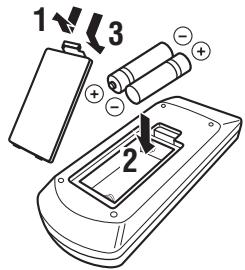
Operation range
Use the remote control within 6m (20 ft) of the main unit and point it toward the remote control sensor.
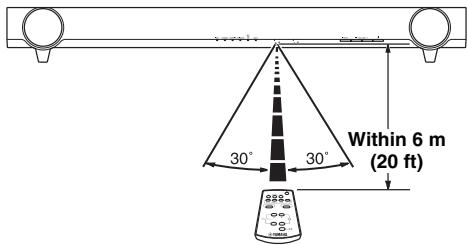
Basic playback operation
1 Turn your TV on.
2 Press the TV button to switch the input of the unit to "TV."
The unit plays the TV sound. The INPUT indicator lights up in green. (C P. 11)

3 Switch the input of your TV if you use components such as a BD player.
- When you play back components such as a BD player connected to the audio input jack of the unit.
1 Switch the video input of your TV to the video source such as a BD player.
2 Press the BD/DVD or STB button to switch the input of the unit.
The color of INPUT indicator depends on the selected input. (E P. 11)
3 Start playback.

For information on the external component, refer to the instruction manual for the product.
Enjoying sound with your preference
Switching stereo/surround sound
Playback in surround sound: You can enjoy a realistic sound effect using Yamaha's exclusive AIR SURROUND XTREME.
Playback in stereo sound: An extended sound is achieved for a 2 channel source.
| Surround | Stereo |
| SURROUND SUNROUND Green | STEREO SURROUND No light |
Automatic volume level adjustment (UniVolume)
While watching the TV, compensate the excessive volume differences to make it easier to hear during the following cases.
- When switching the channel
- When a TV program changed to commercial
- When one program is finished and another program started

On/Off
UNIVOLUME

Green
Hear narration or dialogue from your TV more clearly (Clear voice)
This function makes dialogue in movies, TV dramas or play-by-play broadcasting clear to listen to.

On/Off
CLEAR VOICE

Green
Adjust the volume level
Press VOLUME + / - to adjust the volume level.
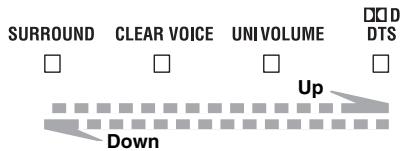
The color of DDTDS indicator changes depending on the adjustable range. Green indicates a lower volume level, orange a moderate level, and red a higher level.
Note
Note that when the DDT indicator is red, the volume is set to a higher level. Excessive sound may damage your hearing or bother others.

To turn off the volume temporarily, press MUTE.
To resume the volume, press MUTE again or press VOLUME + / -

Adjust the subwoofer level
Press SUBWOOFER + / - to adjust the bass level.
The color of DDTDS indicator changes depending on the bass level. Green indicates a minus level, orange a standard level (default value is 0), and red a plus level.
Audio delay control
You can use this function to delay sound to synchronize with a lagging video image.
1 Press and hold AUDIO DELAY more than 3 seconds to enter adjustment mode.


Flashes in green (P. 11)
2 Press SUBWOOFER +/- to adjust the delay time. (+ increases the delay time)

Make the delay time longer

Make the delay time shorter
The color of DDTDS indicator changes depending on the adjustable range. Green indicates a shorter delay time, orange a medium delay, and red a longer delay.
3 Press AUDIO DELAY to exit the adjustment mode.

The adjustment mode is canceled if the unit is left for 20 seconds without any operation being performed.
Additional Information
Using an external subwoofer
Although the unit has a subwoofer built-in, you can use commercially available powered subwoofer of your choice. Refer to "Alternative connections" (P. 5).
1 Set the unit to standby mode.
2 Press both the VOLUME - button and button of the main unit, release the button first, then release the VOLUME - button.
This unit is turned on when switching between the built-in subwoofer and external subwoofer.
The SURROUND indicator lights up as the following illustration. Check if the setting is correct. (P. 11)
| Built-in subwoofer | External subwoofer | |
| The SURROUND indicator (for 2 seconds after the unit is turned on) | SURROUND | SURROUND |
| Green | No light |
- The default setting is playback of the built-in subwoofer.
- You can verify the current setting by turning the unit on again from standby mode.
Note
You cannot use the built-in subwoofer and the external subwoofer simultaneously.
Operation by the TV remote control is difficult (with unit beneath/under TV)
TV remote control operation may be difficult if the unit hides the sensor of your TV when beneath or under the TV. Try the two solutions below and see whether this solves the problem.
① Move the unit in all directions.
② Remove the stands to lower the height of the unit.
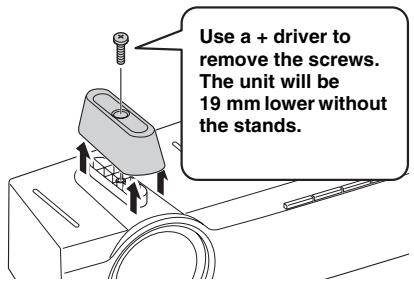
Note
Keep the stands and screws in a safe place for future use.
Using TV remote control signal transmission function
If you cannot solve the problem by the suggestions above, follow the procedure below and use the TV remote control signal transmission function, which transmits the TV remote control signal received at the front of the unit to the remote control sensor of your TV through the IR flasher at the rear of the unit.
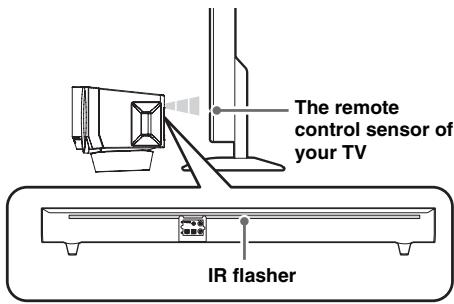
1 Set the unit to standby mode.
2 Press both the VOLUME + button and button of the main unit, release the button first, then release the VOLUME + button.
The unit is turned on when switching the TV remote control signal transmission function on/off. The CLEAR VOICE indicator lights up as the following illustration. Check if the setting is correct. (P. 11)
| On | Off | |
| The CLEAR VOICE indicator (for 2 seconds after the unit is turned on) | CLEAR VOICE □ No light | CLEAR VOICE ■ Green |
- The default setting is off.
- You can verify the current setting by turning the unit on again from standby mode.
Notes
- Move the unit in all directions again if TV remote control remains difficult.
- The TV remote control signal transmission function is enabled even if the unit is in standby mode.
Operate the unit by TV remote control (TV remote control learning function)
You can use the TV remote control solely to operate by having the unit learn the TV remote control operations. You can operate the following functions by TV remote control.
Volume down
Volume up
Power on/standby mode

Some TV remote controls may not control these functions. Use the remote control supplied with the unit in this case.
1 Set the unit and TV to standby mode.
2 Press both the INPUT button and button of the main unit, release the button first, then release the INPUT button.
The unit enters the remote control learning mode.
INPUT

Flashes in red
3 Press the button below of the main unit to select the operation you want the unit to learn.
| Operation you want the unit to learn | The button of the unit | The Indicator flashes in green |
| Volume down | VOLUME - | ☐ ☐ ☐ ☐ ☐ |
| Volume up | VOLUME + | ☐ ☐ ☐ ☐ ☐ ☐ |
| Power on/standby mode | ◎ | ☐ ☐ ☐ ☐ ☐ ☐ |
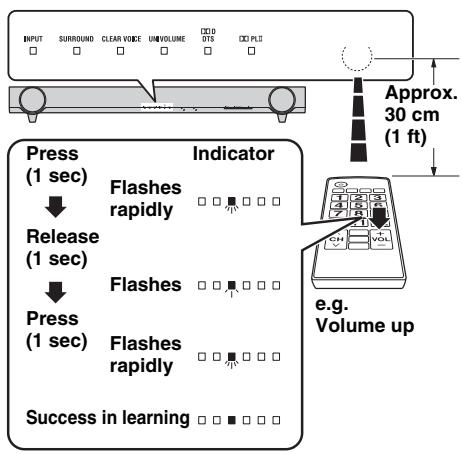
4 Point your TV remote control at the remote control sensor and press the respective button twice or three times until the indicator changes from flashing green to lit green.
Fault in learning
The UNIVOLUME, CLEAR VOICE and SURROUND indicators flash in green simultaneously for about 3 seconds.
5 Repeat steps 3 and 4 to make the unit learn the other operations.
6 Press the button of the main unit for more than 3 seconds to finish the remote control learning mode.
Release the button of the main unit when all the indicators light up in green. The unit enters standby mode.
Notes
- The unit will automatically set to standby mode if the unit in the remote control learning mode is left turned on for 5 minutes without any operation being performed.
- If learning fails, try again with your TV turned off. Note that screen glare may disturb TV remote control learning.
Removing all learned TV remote control operations
1 Set the unit to standby mode.
2 Press both the INPUT button and button of the main unit, release the button first, then release the INPUT button.
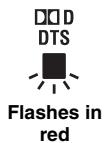
3 Press the INPUT button of the main unit again for more than 3 seconds.
4 Release the INPUT button of the main unit when DDD DTS indicator flashes.
Press the button of the main unit for more than 3 seconds to finish the remote control learning mode, or to have the unit learn operations of another TV remote control.
Resetting the unit
Should the unit freeze for any reason, this may be remedied by initiating the factory settings.
1 Set the unit to standby mode.
2 Press and hold the button of the main unit for more than 3 seconds.
All the indicator flashes in green.

3 Release the button of the main unit.
Operation indicators of the unit

The six indicators are placed in the above order, and their color and appearance are symbolically represented as below.
Lights up in green : Lights up in red : Lights up in orange : No light : Flashes in green : Flashes in red
Indication immediately after turning on the unit
Immediately after turning on the unit, the indicators show the state of the unit as below.
| Playback of the subwoofer (P. 8) | TV remote control signal transmission function (P. 9) | Indicators |
| Built-in subwoofer | Off | |
| External subwoofer | Off | |
| Built-in subwoofer | On | |
| External subwoofer | On |
Indication of the setting mode
The indicators show the setting mode as below.
| Setting mode | Indicators |
| Audio delay control (P. 8) | * |
| TV remote control learning (P. 9) | * |
- These indicators light up according to the state.
Normal indication
| INPUT | SURROUND | CLEAR VOICE | UNIVOLUME | D&D DTS | D'OPL II |
| : TV | : Surround playback | : Clear voice on | : UniVolume on | : Dolby Digital | : Surround playback of 2ch stereo signal input |
| : BD/DVD | : PCM | ||||
| : STB | : Stereo playback | : Clear voice off | : UniVolume off | : DTS Digital Surround | : Stereo playback: Surround playback of surround signal input |
| : Stand-by | : Mute | ||||
Troubleshooting
Refer to the chart below should the unit not function properly. If the problem you are experiencing is not listed below, or if the instruction below does not help, set the unit to the standby mode, disconnect the AC power supply cable, and contact the nearest authorized Yamaha dealer or service center. Check the below first.
1 The AC power supply cable of the unit, TV and external components (such as BD player) are firmly connected to the AC wall outlet.
2 The power supply of the unit, TV and the external components (such as BD player) are turned on.
3 All cables are firmly connected to their respective jacks on each component.
| Problem | Cause | Solution | See page |
| Power turns on but immediately shuts off. | The power cable may be connected improperly. | Make sure the power cable is plugged into the outlet firmly. | 4 |
| The unit may have received a strong electrical shock, such as from a lightening bolt or excessive static electricity. | Set the unit to standby mode, and then disconnect the power cable. Wait for about 30 seconds, connect the power cable, and then turn the unit on again. | — | |
| The unit has an auto-sleep function, which will automatically set to standby mode if the unit is left turned on for 12 hours without any operation being performed. | — | ||
| The speakers make no sound. | The volume may be set to minimum. | Adjust the volume level. | 8 |
| The mute function may be activated. | Press MUTE on the remote control to cancel the mute function and adjust the volume. | 8 | |
| The input source or input setting may be incorrect. | Select the correct input source or input setting. | 7 | |
| Surround effect is not achieved. | A surround mode is not selected. | Press SURROUND on the remote control to play back the source in surround effect. | 7 |
| No bass / The external subwoofer makes no sound. | The volume of the subwoofer channel may be set to minimum level. | Adjust the volume level of the subwoofer. | 8 |
| Opposite setting of subwoofer is selected. | Select collect setting of subwoofer. | 8 | |
| The source does not contain low frequency signals. | — | ||
| The cable between the unit and the subwoofer not connected when selecting playback of the external subwoofer. | Connect the unit and the external subwoofer by using a subwoofer pin cable. | 5 | |
| The volume level decreases without any operation. | The unit controls its volume within a certain level to prevent the next playback from sudden output at excessive volume. | Reset the volume. | 8 |
| This unit does not operate properly. | The unit may receive a strong electrical shock, such as from a lightening bolt or excessive static electricity, or drop in power supply. | Set the unit to standby mode, and then disconnect the power cable. Wait for about 30 seconds, connect the power cable, and then turn on the unit again. | — |
| A digital or high-frequency equipment produces noises. | The unit may be placed close to digital equipment or high-frequency equipment. | Place the unit away from such equipment. | — |
| The remote control does not operate the unit. | The unit may be outside the remote control operation range. | The operation range for the remote control of the unit is within 6 m (20 ft). | 6 |
| The remote control sensor of the unit may be exposed to direct sunlight or other lighting. | Change the lighting or reposition the unit. | — | |
| The batteries may be worn out. | Replace the batteries. | 6 | |
| The volume of the unit and TV increases simultaneously. | Your TV itself received the signal from TV remote control, having learned the operation of the unit. | Set the volume of your TV to minimum, or set the audio output of your TV built-in speaker to off. | — |
| Adjust the volume by using the remote control of the unit. | 8 |
Contact your nearest authorized Yamaha dealer or service center if the following problem occurs.
| Problem | Cause | Solution | See page |
| The volume, subwoofer and audio delay time is not adjustable. | The adjustment has reached the maximum or minimum. | 8 | |
| The unit does not learn the operation of TV remote control. | The remote control sensor of the unit may be exposed to direct sunlight or lighting. | Reposition the unit. | — |
| The screen glare of TV disturbs the remote control signal. | Disconnect the power cable and perform the remote control learning operation again. | — | |
| The batteries of TV remote control may be worn out. | Replace the batteries. | — | |
| The button of the unit was not pressed long enough for the remote control learning operation. | Press the button of TV remote control in the order “press 1 second” → “release 1 second” → “press 1 second” | 9 | |
| The TV remote control is not available for remote control learning. | Use the remote control of the unit. | 9 | |
| The TV remote control is outside of the operation range. | Point your TV remote control towards the remote control sensor of the unit keeping a distance of 30 cm (1 ft) between them. | 9 | |
| The unit does not enter the remote control learning mode. | Operate after checking that the INPUT indicator is flashing in red. | 9 | |
| The power state of the unit and of your TV is opposite. (For example, though your TV is on, the unit is in standby mode.) | The power state of the unit and of your TV is opposite from the beginning. | Press the power button of TV remote control to set your TV and the unit to standby mode after pressing the power button of your TV itself and of the unit to set both your TV and the unit to on. | 9 |
| The TV remote control is not working even if you use the TV remote control signal transmission function. | The unit and TV are too close/far from one another. | Try to use the TV remote control signal transmission function again after repositioning the IR flasher of the unit and the remote control sensor of your TV. | 9 |
| Try to use the TV remote control signal transmission function again after adjusting the height of the unit by removing or attaching its stands. | 9 | ||
| Something is between the unit and your TV. | Remove the obstruction. | — | |
| The TV remote control signal transmission function is not activated. | Restart the unit and check the indicator status. | 9 | |
| The TV remote control is not compatible with the TV remote control signal transmission function. | Place the unit (without the stands, for example) so as not to hide the remote control sensor of your TV. | 9 | |
| You cannot use 3D glasses. | The unit obstructs the 3D glasses transmitter of your TV. | Check the position of 3D glasses transmitter of your TV by referring to the manual of your TV, and move the unit to the position where there is no obstruction. | — |
| The picture on your TV screen becomes blurred or distorted. | The unit is too close to your CRT TV. | Move the unit away from your TV. | — |
| Problem | Cause | Solution | See page |
| The power of the unit immediately shuts off, and the INPUT indicator flashes. | The protection circuit is activated. | — |
Specification
Amplifier section
- Minimum RMS Output Power
Front Left and Right (1 kHz, 1% THD, 6 Ω) 24 W + 24 W
Subwoofer (100Hz,1% THD, 3) 48 W
Maximum Power
Front Left and Right (1 kHz, 10% THD, 6 Ω)
30 W + 30 W
Subwoofer (100 Hz, 10% THD, 3 Ω)
60 W
Speaker section
Type
Front speaker.. Acoustic suspension type/ Non-magnetic shielding type Subwoofer. Bass reflex type/ Non-magnetic shielding type
- Driver
Front speaker 6.5 cm (2-1/2 in) cone × 2 Subwoofer 7.5 cm (3 in) cone × 2
Impedance
Front speaker 6Ω Subwoofer 3Ω
Frequency Response (-10 dB, Stereo mode)
Front speaker 150 Hz to 20 kHz Subwoofer 50 Hz to 150 Hz
AIR SURFACE
This system employs new technologies and algorithms that make it possible to achieve 7-channel surround sound with only front speakers, and without using wall reflections.
DOLBY DIGITAL
Manufactured under license from Dolby Laboratories. Dolby, Pro Logic and the double-D symbol are trademarks of Dolby Laboratories.
Input Jacks
Optical. 2 (TV,BD/DVD)
Coaxial 1(STB)
Output Jacks
- Subwoofer 1
- System Connector (for subwoofer power interlock)...... 1
General
Power Supply [U.S.A.and Canada models].AC 120 V,60 Hz [Taiwan model]AC 110 V,60Hz [Other models]AC 220-240 V,50/60 Hz
Power Consumption 22 W
- Standby Power Consumption. Less than 0.5 W
- Dimensions (W × H × D) With stands. 890 × 107 × 120.5 ~mm (35-1/8 × 4-1/4 × 4-3/4 in)
Weight. 4.2 kg (9.3 lbs.)
- Specifications are subject to change without notice.

dtst
Digital Surround
"DTS" and "DTS Digital Surround" are registered trademarks of DTS, Inc.
Univolume
"UniVolume" is a trademark of Yamaha Corporation.
Information for Users on Collection and Disposal of Old Equipment and Used Batteries
These symbols on the products, packaging, and/or accompanying documents mean that used electrical and electronic products and batteries should not be mixed with general household waste.
For proper treatment, recovery and recycling of old products and used batteries, please take them to applicable collection points, in accordance with your national legislation and the Directives 2002/96/EC and 2006/66/EC.

By disposing of these products and batteries correctly, you will help to save valuable resources and prevent any potential negative effects on human health and the environment which could otherwise arise from inappropriate waste handling.
For more information about collection and recycling of old products and batteries, please contact your local municipality, your waste disposal service or the point of sale where you purchased the items.

[Information on Disposal in other Countries outside the European Union]
These symbols are only valid in the European Union. If you wish to discard these items, please contact your local authorities or dealer and ask for the correct method of disposal.
Note for the battery symbol (bottom two symbol examples):
This symbol might be used in combination with a chemical symbol. In this case it complies with the requirement set by the Directive for the chemical involved.
Example 3: installation murale
Remarques

Activation/désactivation

UNIVOLUME

Activation/désactivation

CLEAR VOICE
Alternative Anschlüsse
[Modell for Taiwan]AC 110 V,60Hz
[Övrigamodeller]AC220-240V,50/60Hz
- Effektforbrukning. 22 W
- Effektforbrukning i vilolage.... Mindre an 0,5 W
- Mått (B × H × D)
Med fotter. 890× 107× 120,5mm
$$ (\mathfrak {p}. 9) \tag {p.9} $$
Voorbeeld 3: muurmontage