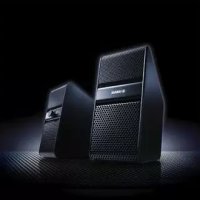
NX50 - Soundbar YAMAHA - Free user manual and instructions
Find the device manual for free NX50 YAMAHA in PDF.



| Product type | Soundbar / Powered speaker |
| Brand | YAMAHA |
| Model | NX50 |
| Color | Black (probably) |
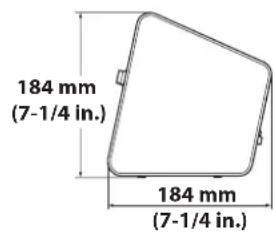
| Dimensions (H x W x D) | 184 mm x 83 mm x (not specified) |
| Weight (per speaker) | Right speaker: 1.1 kg, Left speaker: 0.9 kg |
| Power supply | AC adapter 12 V DC, 1.5 A (supplied) |
| Power consumption | 13 W (operation), ≤ 0.5 W (standby) |
| Input connectors | 2 × 3.5 mm stereo mini jack |
| Output connector | 1 × 3.5 mm stereo mini jack (headphones) |
| Physiological correction function | Boosts bass at low volume |
| Automatic standby | After approx. 30 minutes without audio signal |
| Supplied accessories | AC adapter, 3.5 mm mini-jack cable (2 m) |
| Maintenance and cleaning | Dry, clean cloth; do not use solvents |
| Safety | Surge protection, automatic standby shutdown |
| Repairability | Refer to a qualified technician; do not open |
Frequently Asked Questions - NX50 YAMAHA
User questions about NX50 YAMAHA
0 question about this device. Answer the ones you know or ask your own.
Ask a new question about this device
Download the instructions for your Soundbar in PDF format for free! Find your manual NX50 - YAMAHA and take your electronic device back in hand. On this page are published all the documents necessary for the use of your device. NX50 by YAMAHA.
USER MANUAL NX50 YAMAHA
Plays a variety of contents with high-quality sound.
You can enjoy a variety of contents with high-quality sound by connecting to external devices such as computers or TVs.
Loudness control
The Loudness control function of the speakers allows you to enjoy rich bass tone sounds even at low volumes.
Auto-standby
When no sound is input for a period of time, the speakers go to standby mode automatically.
Since you do not have to turn on/off the power every time, you can save energy.
Aesthetically neutral design
Solid and stylish metal grill design in a compact size that will fit into a variety of home environments.
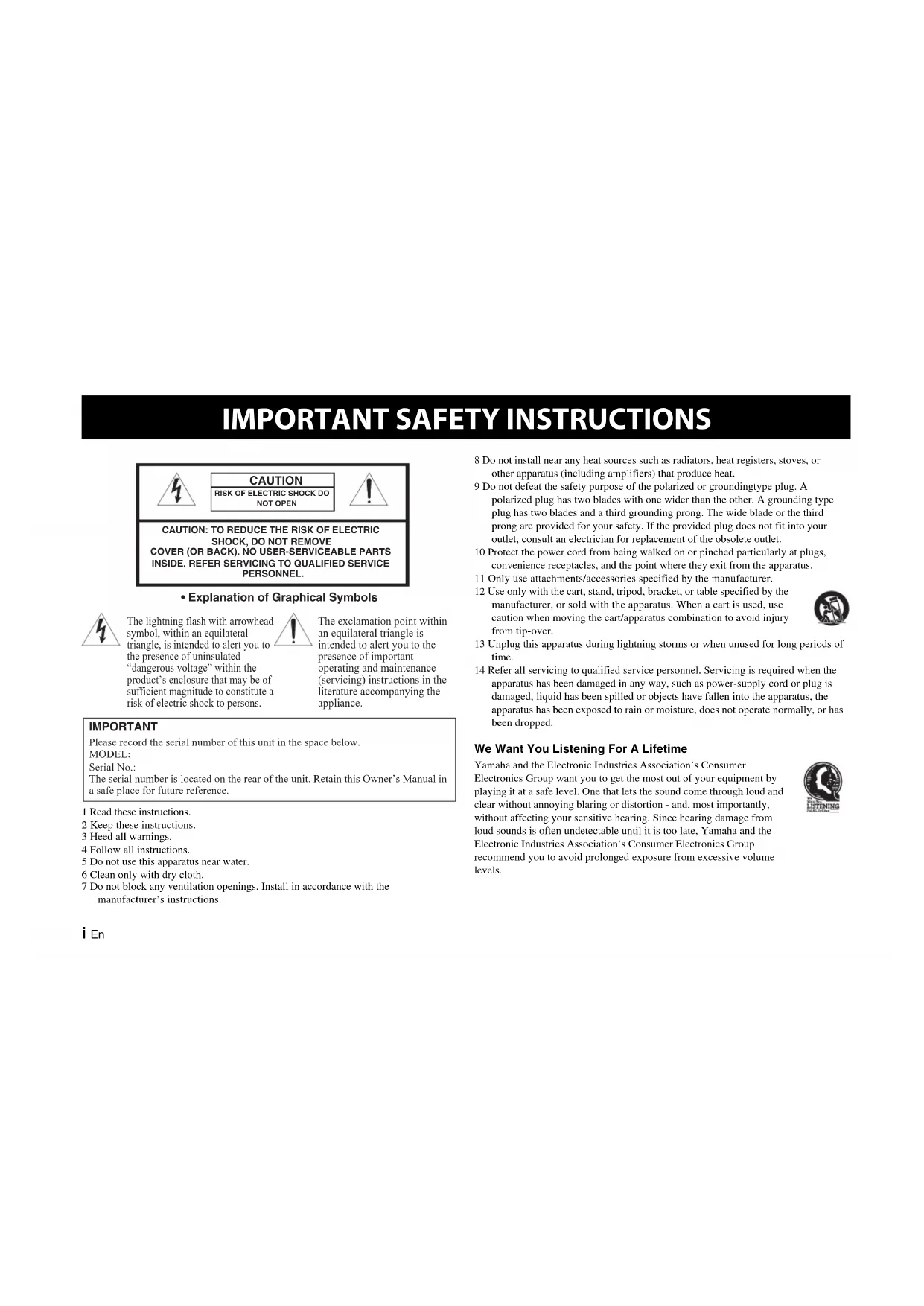
IMPORTANT SAFETY INSTRUCTIONS

CAUTION
RISK OF ELECTRIC SHOCK DO NOT OPEN

CAUTION: TO REDUCE THE RISK OF ELECTRIC SHOCK, DO NOT REMOVE COVER (OR BACK). NO USER-SERVICEABLE PARTS INSIDE. REFER SERVICING TO QUALIFIED SERVICE PERSONNEL.
- Explanation of Graphical Symbols

The lightning flash with arrowhead symbol, within an equilateral triangle, is intended to alert you to the presence of uninsulated "dangerous voltage" within the product's enclosure that may be of sufficient magnitude to constitute a risk of electric shock to persons.

The exclamation point within an equilateral triangle is intended to alert you to the presence of important operating and maintenance (servicing) instructions in the literature accompanying the appliance.
IMPORTANT
Please record the serial number of this unit in the space below.
MODEL:
Serial No.:
The serial number is located on the rear of the unit. Retain this Owner's Manual in a safe place for future reference.
1 Read these instructions.
2 Keep these instructions.
3 Heed all warnings.
4 Follow all instructions.
5 Do not use this apparatus near water.
6 Clean only with dry cloth.
7 Do not block any ventilation openings. Install in accordance with the manufacturer's instructions.
8 Do not install near any heat sources such as radiators, heat registers, stoves, or other apparatus (including amplifiers) that produce heat.
9 Do not defeat the safety purpose of the polarized or groundingtype plug. A polarized plug has two blades with one wider than the other. A grounding type plug has two blades and a third grounding prong. The wide blade or the third prong are provided for your safety. If the provided plug does not fit into your outlet, consult an electrician for replacement of the obsolete outlet.
10 Protect the power cord from being walked on or pinched particularly at plugs, convenience receptacles, and the point where they exit from the apparatus.
11 Only use attachments/accessories specified by the manufacturer.
12 Use only with the cart, stand, tripod, bracket, or table specified by the manufacturer, or sold with the apparatus. When a cart is used, use caution when moving the cart/apparatus combination to avoid injury from tip-over.
13 Unplug this apparatus during lightning storms or when unused for long periods of time.
14 Refer all servicing to qualified service personnel. Servicing is required when the apparatus has been damaged in any way, such as power-supply cord or plug is damaged, liquid has been spilled or objects have fallen into the apparatus, the apparatus has been exposed to rain or moisture, does not operate normally, or has been dropped.
We Want You Listening For A Lifetime
Yamaha and the Electronic Industries Association's Consumer Electronics Group want you to get the most out of your equipment by playing it at a safe level. One that lets the sound come through loud and clear without annoying blaring or distortion - and, most importantly, without affecting your sensitive hearing. Since hearing damage from loud sounds is often undetectable until it is too late, Yamaha and the Electronic Industries Association's Consumer Electronics Group recommend you to avoid prolonged exposure from excessive volume levels.


FCC INFORMATION (for US customers)
1 IMPORTANT NOTICE : DO NOT MODIFY THIS UNIT! This product, when installed as indicated in the instructions contained in this manual, meets FCC requirements. Modifications not expressly approved by Yamaha may void your authority, granted by the FCC, to use the product.
2 IMPORTANT: When connecting this product to accessories and/or another product use only high quality shielded cables. Cable/s supplied with this product MUST be used. Follow all installation instructions. Failure to follow instructions could void your FCC authorization to use this product in the USA.
3 NOTE : This product has been tested and found to comply with the requirements listed in FCC Regulations, Part 15 for Class "B" digital devices. Compliance with these requirements provides a reasonable level of assurance that your use of this product in a residential environment will not result in harmful interference with other electronic devices.
This equipment generates/uses radio frequencies and, if not installed and used according to the instructions found in the users manual, may cause interference harmful to the operation of other electronic devices.
Compliance with FCC regulations does not guarantee that interference will not occur in all installations. If this product is found to be the source of interference, which can be determined by turning the unit "OFF" and "ON", please try to eliminate the problem by using one of the following measures: Relocate either this product or the device that is being affected by the interference.
Utilize power outlets that are on different branch (circuit breaker or fuse) circuits or install AC line filter/s. In the case of radio or TV interference, relocate/reorient the antenna. If the antenna lead-in is 300 ohm ribbon lead, change the lead-in to coaxial type cable.
If these corrective measures do not produce satisfactory results, please contact the local retailer authorized to distribute this type of product. If you can not locate the appropriate retailer, please contact Yamaha Corporation of America A/V Division 6600 Orangethorpe Ave., Buena Park, CA 90620.
The above statements apply ONLY to those products distributed by Yamaha Corporation of America or its subsidiaries.
FCC CAUTION
Change or modifications not expressly approved by the party responsible for compliance could void the user's authority to operate the equipment.
COMPLIANCE INFORMATION STATEMENT (DECLARATION OF CONFORMITY PROCEDURE)
| Responsible Party | Yamaha Corporation of America A/V Division | Yamaha Canada Music Ltd. |
| Address | 6600 Orangethorpe Avenue, Buena Park, CA 90620, USA | 135 Milner Avenue, Toronto, Ontario, MIS 3R1, Canada |
| Telephone 1-7 | 14-522-9011 1-416-298-1311 | |
| Type of Equipment | Powered Speaker | |
| Model Name NX-50 | ||
- This device complies with Part 15 of the FCC Rules and RSSGen of IC Rules.
- Operation is subject to the following two conditions: 1) this device may not cause harmful interference, and 2) this device must accept any interference received including interference that may cause undesired operation of this device.
See the "Troubleshooting" section at the end of this manual if interference to radio reception is suspected.
NOTICE
This equipment has been tested and found to comply with the limits for a Class B digital device, pursuant to part 15 of the FCC Rules. These limits are designed to provide reasonable protection against harmful interference in aresidential installation. This equipment generates, uses and can radiate radio frequency energy and, if not installed and used in accordance with the instructions, may cause harmful interference to radio communications. However, there is no guarantee that interference will not occur in a particular installation. If this equipment does cause harmful interference to radio or television reception, which can be determined by turning the equipment off and on, the user is encouraged to try to correct the interference by one or more of the following measures:
– Reorient or relocate the receiving antenna.
- Increase the separation between the equipment and receiver.
- Connect the equipment into an outlet on a circuit different from that to which the receiver is connected.
- Consult the dealer or an experienced radio/TV technician for help.
This equipment compiles with FCC/IC radiation exposure limits set forth for uncontrolled equipment and meets the FCC radio frequency (RF) Exposure Guidelines in Supplement C to OET65 and RSS-102 of the IC radio frequency (RF) Exposure rules. This equipment has very low levels of RF energy that it deemed to comply without maximum permissive exposure evaluation (MPI). But it is desirable that it should be installed and operated with at least 20 cm and more between the radiator and person's body (excluding extremities: hands, wrists, feet and ankles).
This transmitter must not be co-located or operated in conjunction with any other antenna or transmitter.
Caution: Read this before operating your unit.
To assure the finest performance, please read this manual carefully. Keep it in a safe place for future reference.
1 Install this unit in a well ventilated, cool, dry, clean place – away from direct sunlight, heat sources, vibration, dust, moisture, and/or cold. For proper ventilation, allow the following minimum clearances.
Top: 5 cm
Rear: 5 cm
Sides: 5 cm
2 Locate this unit away from other electrical appliances, motors, or transformers to avoid humming sounds.
3 Do not expose this unit to sudden temperature changes from cold to hot, and do not locate this unit in an environment with high humidity (i.e. a room with a humidifier) to prevent condensation inside this unit, which may cause an electrical shock, fire, damage to this unit, and/or personal injury.
4 Avoid installing this unit where foreign objects may fall onto this unit and/or this unit may be exposed to liquid dripping or splashing. On the top of this unit, do NOT place:
- Other components, as they may cause damage and/or discoloration on the surface of this unit.
– Burning objects (i.e. candles), as they may cause fire, damage to this unit, and/or personal injury.
- Containers with liquid in them, as they may fall and liquid may cause electrical shock to the user and/or damage to this unit.
5 Do not cover this unit with a newspaper, tablecloth, curtain, etc. in order not to obstruct heat radiation. If the temperature inside this unit rises, it may cause fire, damage to this unit, and/or personal injury.
6 Do not operate this unit upside-down. They may overheat, possibly causing damage.
7 Do not use force on switches, knobs, and/or cords.
8 When disconnecting the power cable from the wall outlet, grasp the AC plug; do not pull the cord.
9 Do not clean this unit with chemical solvents; this might damage the finish. Use a clean, dry cloth.
10 Only the voltage specified on this unit must be used. Using this unit with a higher voltage than specified is dangerous and may cause fire, damage to this unit, and/or
personal injury. Yamaha will not be held responsible for any damage resulting from use of this unit with a voltage other than that specified.
11 Do not attempt to modify or fix this unit. Contact qualified Yamaha service personnel when any service is needed. The cabinet should never be opened for any reason.
12 When not planning to use this unit for long periods of time (i.e. when going on vacation), disconnect the power cable from the AC wall outlet.
13 Be sure to read the "TROUBLESHOOTING" section regarding common operating errors before concluding that the unit is faulty.
14 Before moving this unit, disconnect the power cable from the wall outlet.
15 Be sure to use the AC adaptor supplied with this unit. Using an AC adaptor other than the one provided may cause fire or damage to this unit.
16 Install this unit near the wall outlet and where the power cable can be reached easily.
17 For added protection for this product during a lightning storm, or when it is left unattended and unused for long periods of time, unplug it from the wall outlet. This will prevent damage to the product due to lightning and power-line surges.
18 Secure placement or installation is the owner's responsibility. Yamaha is not liable for accidents caused by improper placement or installation of speakers.
WARNING
TO REDUCE THE RISK OF FIRE OR ELECTRIC SHOCK, DO NOT EXPOSE THIS UNIT TO RAIN OR MOISTURE.
There is a chance that placing this unit too close to a CRT-based (Braun tube) TV set might impair picture color. Should this happen, move this unit away from the TV set.
This unit is not disconnected from the AC power source as long as it is connected to the wall outlet, even if this unit itself is turned off. In this state, this unit is designed to consume a very small quantity of power.
FOR CANADIAN CUSTOMERS
This Class B digital apparatus complies with Canadian ICES-003.
Precautions
Please read the following operating precautions before use:
- Use the AC adaptor designed specifically for this unit only. Yamaha is not responsible for damage caused by using other power adaptors.
- Do not apply pressure or force the control knobs of this unit, or place heavy items on the cabinet.
- Avoid outputting from test disks, electrical musical instruments, or from extremely loud or distorted input. It may cause a malfunction of the speakers.
- This unit may cause picture distortion when placed close to a computer monitor or television. In this case, move the unit away from them.
- Keep this unit away from magnetic media such as floppy disks and tapes. Otherwise the data on the media may become corrupted.
- Remove the AC adaptor from the wall outlet immediately if any problem is found.
Contents
Controls and functions....1
Connections 3
Troubleshooting....4
Specifications....4
Supplied accessories
Before assembly and connecting, make sure you have received all of the following items.
- AC adaptor × 1
- 3.5 mm stereo mini plug cable (2.0 m) × 1
Controls and functions
Front panel
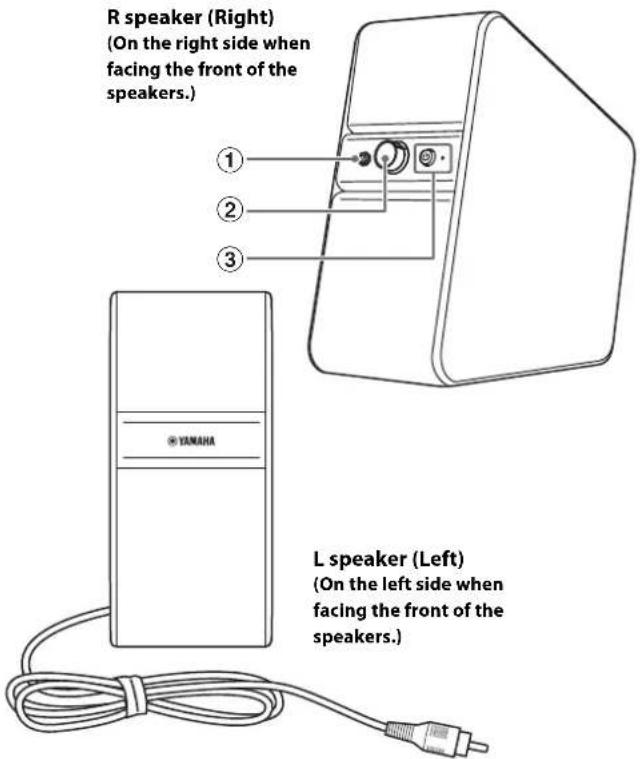
①Headphones connector (3.5 mm stereo mini jack)
Use for a headphones connection.
[Non-Text]
When a headphones connection is made, no sound is output from the speakers.
Notes
To protect your hearing, make sure that the volume is low before headphones are used.
- Do not use headphones with a loud volume for a long time. Otherwise, your hearing may be damaged.
- Make sure that the volume of the audio devices is at minimum before headphones are connected. A sudden loud sound may damage your hearing.
②VOL (volume) control
Controls the volume of both speakers and headphones.
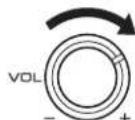
The volume becomes louder as the VOL control is rotated to the right, and quieter as it is rotated to the left.
Loudness control
The Loudness control function of the speakers allows you to enjoy rich bass tone sounds even at low volumes.
It automatically corrects the sound volume level from the speakers to allow you to hear the best possible sounds.
When you use the speakers connected to an external device, such as your TV, computer, portable player, etc., adjust the output sound level as follows.
1 After you connect the speakers to an external device, turn on the power of the speakers and then rotate the VOL (volume) control to the 2 o'clock position (right illustration).
2 Adjust the volume of the external device to its loudest output level, without annoying blaring or distortion. For details about external devices, see their instruction manuals.
3 Rotate the VOL control of the speakers to adjust the volume to the desired level.
③ (power)/indicator (LED)
When you press ⏻ (power), the speakers will turn on and the indicator will light up. Also, the auto-standby mode will be available.
Note
Even when the speakers are turned off or are in standby mode, they consume a small amount of electricity.
Viewing the ⏻ (power) button from the side...
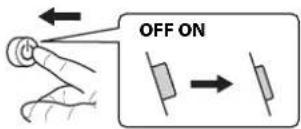
Status indicator (LED)
● No light ○ Light
| Sound signal | + (power) off | + (power) on |
| Present | ● | ○ |
| Not present | ● | ○→●After about 30 minutes |
Auto-standby
This unit has a function that automatically activates standby mode (power save mode) when this unit is turned on and no audio signal is input or when the connected device is playing at a low volume for a certain amount of time (about 30 minutes). In standby mode, the indicator light goes off.
When a connected device is played while the speakers are in standby mode, the speakers activate automatically and sound is output. When ⏻ (power) is pressed again, the speakers turn off.
Notes
- The time before entering standby mode is only a guide. It varies depending on the usage environment.
- If the sound from a connected device is too low, the speakers may not activate. In this case, turn up the volume of the connected device.
- If you are using devices, such as mobile phones, which emit electromagnetic waves near the speakers, the speakers may activate by themselves, or not enter standby mode.
Perform the following procedure to exit standby mode.
1 Turn up the output level of the connected device.
2 Rotate the VOL (volume) control of this unit and adjust to the desired sound level.
Rear panel
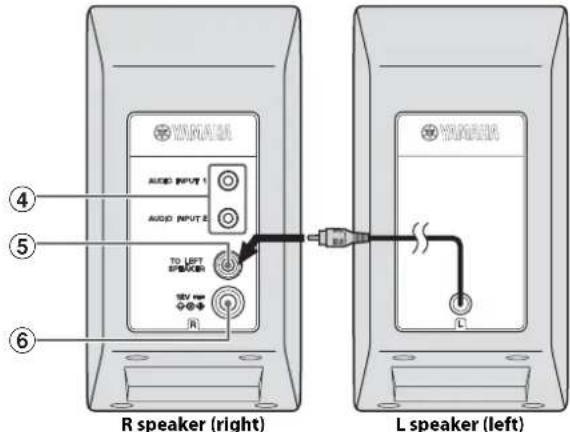
④AUDIO INPUT 1/2 (input connectors)
Connects with external devices, such as portable players, using the supplied 3.5 mm stereo mini plug cable.
⑤TO LEFT SPEAKER
Connects with a cable from the L speaker (left) through this connector.
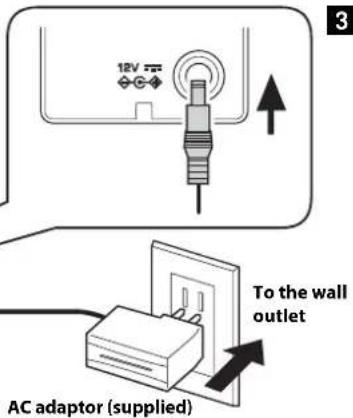
⑥12V (DC 12V)
Make sure you use the supplied AC adaptor.
Connections
- Make sure you connect the power cord only after all other connections are made.
- For details about external devices, see their instruction manuals.
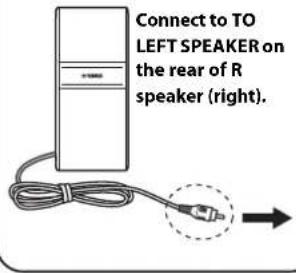
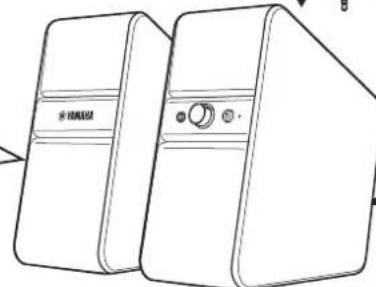
1 Connect the cable from the L speaker (left) at the rear, to the TO LEFT SPEAKER of the R speaker (right).
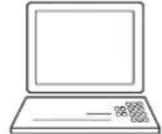
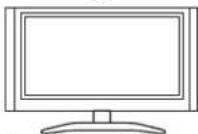
2 Connect to external devices, such as portable players or computers, through input connectors AUDIO INPUT 1/2 using the supplied 3.5 mm stereo mini plug cable.
3 Connect the supplied AC adaptor (DC12V) to the wall outlet.

Multi-Source Mix
When sounds through both AUDIO INPUT 1/2 are detected at the same time, sounds are mixed automatically and output from the speakers or headphones. For example, you can listen to news on TV and music on a portable player at the same time.
2
Portable player

PC
TV
3.5 mm stereo mini plug cable (supplied)
1
L speaker (left)
natural_image
Line drawing of two rectangular electronic devices with control buttons and a circular indicator (no text or symbols)L speaker (left) R speaker (right)
Connect to AUDIO INPUT 1/2 on the rear of R speaker (right).
Troubleshooting
Refer to the table below if the unit does not operate properly. If the problem you are experiencing is not listed below, or if the instruction below does not help, turn off the unit, disconnect the power cable, and contact the nearest authorized Yamaha dealer or service center.
| Symptoms Causes Remedies | ||
| No sound is output from either of the speakers, or the sound is too quiet. | The AC adaptor is disconnected from the wall outlet.The (power) is not turned on.Connections are faulty.(Or the connections are incomplete.)The volume of the speakers set to minimum.The sound from the connected device is too quiet.Headphones are connected.(No sound comes from the speakers when headphones are connected.) | Connect the AC adaptor to the wall outlet properly.Turn on the (power).(The indicator lights up.)Check that the connections are made correctly.Turn the VOL control to the right to increase the volume.Increase the volume of the connected device.Disconnect the headphones from the speakers. |
| The sound is distorted. | The sound is too loud. | Lower the volume of the connected device. |
| Noise is heard. | Connections are faulty.(Or the connections are incomplete.)The output connector has a bad connection.External noise is picked up.Power-supply noise is picked up. | Check that the connections are made correctly.Check that the stereo mini jack and stereo mini plug cable are not dirty.If they are dirty, clean them.Make sure that devices which emit electromagnetic waves, such as mobile phones, wireless appliances, microwaves or inverter lighting equipment, are not near the speakers.Change the source of power supply by directly connecting the AC adaptor to the wall outlet, etc. |
* If VOL (volume) stays at maximum after the ⏻(power) is turned off, the slight sound may be heard from the headphones connected to the speakers.
Specifications
Input connector
Headphone output connector
Power voltage/Frequency
U.S.A. and Canada models: AC 120 V, 60 Hz
Other models: AC 100 to 240 V, 50/60 Hz
Power consumption
13 W (speaker)
Power consumption when powered off
0.5 W or less
AC adaptor
U.S.A., Canada and Taiwan models:
MU18-D120150-A1 (DC 12V, 1.5A)
Asia model:
MU18-D120150-C5 (DC 12V, 1.5A)
Weight
Right speaker: 1.1 kg (2.4 lbs)
Left speaker: 0.9 kg (2.1 lbs)*
* Including speaker cable (2.0 m)
Dimensions
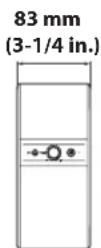
Specifications are subject to change without notice.
PRÉCAUTIONS CONCERNANT LA SÉCURITÉ

CAUTION
RISK OF ELECTRIC SHOCK DO NOT OPEN

ATTENTION : POUR RÉDUIRE LES RISQUES D'INCENDIE ET DE DÉCHARGE ELECTRIQUE, NE PAS RETIRER LE COUVERCLE (OU LE PANNEAU ARRIÈRE). AUCUNE PIÈCE INTERNE NE PEUT ÊTRE CHANGÉE PAR L'UTILISATEUR. POUR L'ENTRETIEN, S'ADRESSER À UN PERSONNEL QUALIFIÉ..
natural_image
Line drawing of a rectangular device with a knob and control panel (no text or symbols)Altavoz R (derecho)

© 2012 Yamaha Corporation
YAMAHA CORPORATION
Printed in China ZE06420-2

- Plays a variety of contents with high-quality sound.
- Loudness control
- Auto-standby
- Aesthetically neutral design
- IMPORTANT SAFETY INSTRUCTIONS
- CAUTION
- - Explanation of Graphical Symbols
- IMPORTANT
- We Want You Listening For A Lifetime
- FCC INFORMATION (for US customers)
- FCC CAUTION
- NOTICE
- Caution: Read this before operating your unit.
- WARNING
- FOR CANADIAN CUSTOMERS
- Precautions
- Contents
- Supplied accessories
- Controls and functions
- Front panel
- ①Headphones connector (3.5 mm stereo mini jack)
- Notes
- ②VOL (volume) control
- When you use the speakers connected to an external device, such as your TV, computer, portable player, etc., adjust the output sound level as follows.
- ③ (power)/indicator (LED)
- Note
- Viewing the ⏻ (power) button from the side...
- Status indicator (LED)
- Rear panel
- Connections
- Multi-Source Mix
- Troubleshooting
- Specifications
- Input connector
- Headphone output connector
- Power voltage/Frequency
- Power consumption
- Power consumption when powered off
- AC adaptor
- Weight
- PRÉCAUTIONS CONCERNANT LA SÉCURITÉ
Brand : YAMAHA
Model : NX50
Category : Soundbar