
A4 COMFORT FASTSTARTER - Laminator GEHA - Free user manual and instructions
Find the device manual for free A4 COMFORT FASTSTARTER GEHA in PDF.



| Product type | Laminator |
| Brand | GEHA |
| Model | A4 COMFORT FASTSTARTER |
| Maximum format | A4 |
| Film thickness | 80 - 125 microns |
| Maximum document thickness | 0.3 mm |
| Laminating speed | Approx. 250 mm/min |
| Warm-up time | Approx. 1 minute |
| Number of rollers | 2 |
| Supply voltage | 220-240 V, 50 Hz |
| Rated current | 2.7 A |
| Power consumption | 600 W max |
| Weight | 1.35 kg |
| Anti-jam system | ABS lever (Anti-Jam System) |
| Operating indicator light | Red (heating) / Blue (ready) |
| Use without carrier | Yes (direct insertion) |
| Warranty | 24 months |
| Cleaning | Soft cloth, unit cooled and unplugged |
| Repairs | By qualified personnel only |
| Disposal | Do not dispose with household waste (recycling center) |
Frequently Asked Questions - A4 COMFORT FASTSTARTER GEHA
User questions about A4 COMFORT FASTSTARTER GEHA
0 question about this device. Answer the ones you know or ask your own.
Ask a new question about this device
Download the instructions for your Laminator in PDF format for free! Find your manual A4 COMFORT FASTSTARTER - GEHA and take your electronic device back in hand. On this page are published all the documents necessary for the use of your device. A4 COMFORT FASTSTARTER by GEHA.
USER MANUAL A4 COMFORT FASTSTARTER GEHA
Congratulations on purchasing this laminator. With it you can create a water and air-tight seal to cover your favourite photos, letters, documents and other thin objects up to A4-size. Please observe the information given in these operating instructions and keep them in a safe place for future reference.
IMPORTANT SAFETY NOTES
-
Carefully read these operating instructions in full.
-
Be careful not to touch hot surfaces.
-
Never immerse the power cable, plug, etc. in water or any other liquids. Otherwise, there is a risk of electric shock.
-
Be particularly careful if the device is used by children or if children are close by when the machine is in use.
-
Unplug the device when it is not required and before cleaning it. Let the appliance cool down before cleaning it.
-
Do not use the appliance if the power cable or plug are damaged, the appliance appears to be malfunctioning or is damaged in any way.
-
There is a risk of injury if accessories not recommended or supplied by the manufacturer are used.
-
Do not use the appliance outdoors.
-
Only use the appliance for the purpose for which it is intended.
-
Do not laminate anything that contains metal or conductive material.
-
The appliance should be connected as directly as possible to an easily accessible socket.
-
Keep the power cable short to prevent an untidy cable from becoming a trip hazard. If you use an extension lead, make sure that:
a) The electrical rated output given for the extension lead at least corresponds to the rated output of the appliance.
b) The extension lead is not hanging over the side of the table or cabinet so that people cannot pull on it or trip over it.
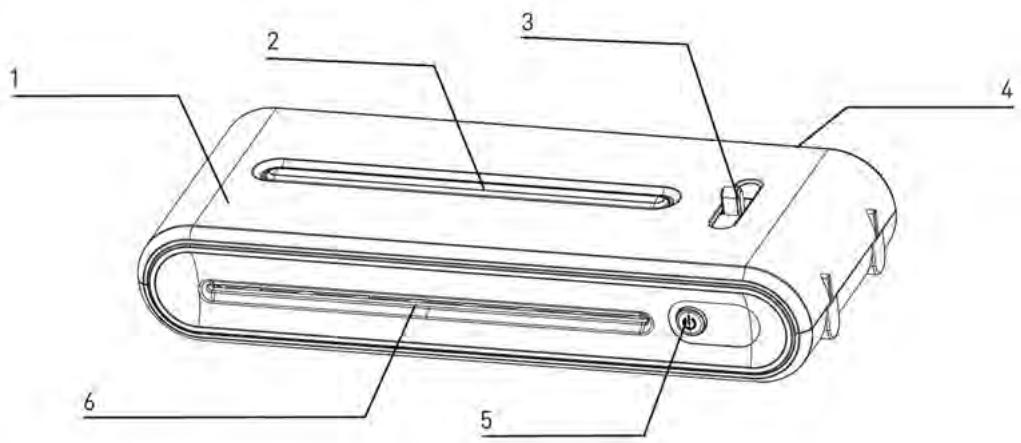
1 Upper housing
2 Operating status display
3 Anti-blocking system (ABS) lever
4 Film exit
5 ON/OFF switch
6 Insertion slot for laminating pouches
- We advise against laminating photos you have developed yourself.
- Photos must be dry before being laminated.
- Do not laminate any thick or heavy documents as these might get stuck in the laminator.
- The laminator permanently connects the laminating film with the item being laminated. The laminating film cannot be removed later.
-
We advise against laminating collector items which you might want to later remove from the laminating film. It is not permitted to laminate coins and thicker objects with this appliance.
-
Switch on the appliance by pressing the ON/OFF switch.
- The operating status display is red. The appliance is ready for operation when the operating status display is blue. Warming up takes about a minute.
- Centre the item to be laminated into the laminating pouch (thickness of up to 125 m ). Make sure that the document or picture is as close as possible to the sealed edge. The use of a carrier is not required for this laminator.
- Guide the sealed edge of the laminating pouch into the middle of the insertion slot keeping it as straight as possible.
- Remove the laminated item from the back of the appliance after lamination.
- Certain types of paper are not laminated uniformly and seem slightly dull or cloudy. In such cases you can improve the quality of the lamination by putting the laminated document through the laminator a second time.
- If the item being laminated has jammed in the machine, push back the ABS lever and pull the item out manually.
CLEANING AND CARE
- Keep you hands and the power cable away from hot parts during and after lamination. Let the appliance completely cool down before cleaning it.
- Never immerse the appliance in water.
- Only use a soft cloth to clean the appliance.
- Never clean the appliance with abrasive powder, scrapers or wire combs.
- Never open the appliance yourself. Otherwise, there is a risk of fire and electric shock. There are no parts in the appliance that can be maintained by the user. Repairs must always be carried out by trained specialists.
TECHNICAL DATA
Voltage: 220-240 V, 50 Hz
Current: 2.7 A
Power consumption: max. 600 W
Film thickness max.: 80-125 micrometres
Max.doument size: A4
Warm-up time: approx. 1 minute
Lamination speed: approx. 250mm/min.
Max. document thickness: 0.3 mm
Weight: 1.35 kg
Laminating rollers: 2
DISPOSAL
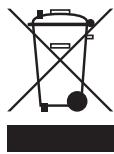
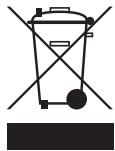
The symbol with the crossed-out rubbish bin means that electrical appliances may not be disposed of in normal household waste.
Please take this appliance to an approved collection station for environmentally friendly disposal.
GUARANTEE
Your appliance comes with a 24-month guarantee.
Make sure you keep the sales receipt and original packaging.
If you encounter any problems with your appliance, please contact your dealer.
INTRODUZIONE
Aaall 1alalgal -jglge- aiaaaill allaiyaiyaiyaiyaiyaiyaiyaiyaiyaiyaiyaiyaiyaiyaiyaiyaiyaiyaiyaiyaiyaiyaiyaiyaiyaiyaiyaiyaiyaiyaiyaiyaiyaiyaiyaiyaiyaiyaiyaiyaiyaiyaiyaiyaiyaiyaiyaiyai
j 1000000000000000000000000000000000000000000000
4.1
J 2
.(ABS) a.sall c.b.c i.e.3
aiaial gall 4
111111111111111.5
1 1 1 1 1 1 1 1 1 1 1 1 1 6
A
.
a a a a a a a a a a a a a a a a a a a a a a
i 1
Gg 1
a.sla
JyIJI Juaill Cie ge baiuily Aysll Jauuui 1
2g 1
Aisllnniyipgdddgdld
1bgsj j 1slej gao aiaSall ddo (jioo 125gda)
JyI 1
aaiin aiai iiaii 4
alil 100
a aal 00 g g gaaagaaagaaagaaagaaagaaagaaagaaagaaagaaagaaagaaagaaagaaagaaagaaagaaagaaagaaagaaagaaagaaagaaagaaagaaagaaagaaagaaagaaagaaagaaagaaagaaagaaagaaagaaagaaagaaagaa
Jiaai jai jie Juaaall aii o Jiaill aia
ailll gssal aySlal 1hct gaaol yle bally pa aySall jda aiaai al rall gail juaai il .7
Jaaiaioll 8 jil
a
auee joeelil 1y/aleill aeol elilalllj
ailll lalll lalld jy ailll
ai slall jil gwl glal u
btaocuoljusabjgall
aii slal 1iil jll gaiu o lal all oai jol sio
Jus Jus Jus Jus Jus Jus Jus Jus Jus Jus Jus Jus Jus Jus
laaii
aiee
50/240-220
2.7
a#l b1,600
125-80
S ACD = S COD + S_ CDA
i 1
1250
0.3
:
y j 111 111 111 111 111 111 111 111 111 111
aiai aiey jieaoalil oaiall yjll 1srrnlll llae!
- a. 2.
1jw24 4iwl jw sdo
ailll lllllllllllllllllllllllllllllllll
Consum energetic: max. 600 W
Grosimea max. a foliei: 80-125 micrometri
Brand : GEHA
Model : A4 COMFORT FASTSTARTER
Category : Laminator