
86096046 laminator - Laminator GEHA - Free user manual and instructions
Find the device manual for free 86096046 laminator GEHA in PDF.


| Product type | Hot and cold laminator |
| Brand | Geha |
| Model | 86096046 laminator |
| Pouch size | Up to A4 (max 230 x 330 mm) |
| Pouch thickness | 60 to 250 microns |
| Laminating technology | Heating rollers |
| Adjustable temperature | Yes, with hot/cold selection |
| Laminating speed | Approximately 300 mm/min |
| Warm-up time | Approximately 3 to 5 minutes |
| Dimensions | Approximately 450 x 160 x 90 mm |
| Weight | Approximately 1.5 kg |
| Power supply | 220-240 V, 50/60 Hz |
| Power consumption | 120 W |
| Reverse function | Yes, to unjam a pouch |
| Automatic shut-off | Yes, in case of overheating |
| Cleaning | Clean the rollers with a soft cloth after use |
| Maintenance | Regularly dust the ventilation slots |
| Safety | Standby function after 30 minutes of inactivity |
| Spare parts | Replacement rollers available |
| Repairability | Repairability index: 6.2/10 (according to Geha) |
| Included accessories | Instruction manual and test pouch |
| Warranty | 2 years |
Frequently Asked Questions - 86096046 laminator GEHA
User questions about 86096046 laminator GEHA
0 question about this device. Answer the ones you know or ask your own.
Ask a new question about this device
Download the instructions for your Laminator in PDF format for free! Find your manual 86096046 laminator - GEHA and take your electronic device back in hand. On this page are published all the documents necessary for the use of your device. 86096046 laminator by GEHA.
USER MANUAL 86096046 laminator GEHA
LAMINATOR
Home & Office
A3 Basic
Laminierfolien Laminating Pouches

GARANTIE
Congratulations on your purchase of the laminator. Now you can protect your favourite photos, recipe cards, letters and legal size documents as well as other types of thin objects up to A3 size in a waterproof, airtight seal. Follow the instructions for proper use and keep this book for future reference.
IMPORTANT SAFETY NOTES
- Read all instructions.
- Do not touch hot surfaces.
- To protect from risk of electrical hazards, do not immerse cord, plugs, etc. of the appliance in water or other liquid.
- Closely supervise if necessary when any appliance is used by, or close to, children.
- Unplug from the outlet when not in use and before cleaning. Allow to cool before putting on or taking off parts, and before cleaning the appliance.
- Do not operate any appliance with a damaged cord or plug or after the appliance malfunctions, or has been damaged in any manner. Return the appliance to the nearest authorised service facility.
- The use of accessory attachments not recommended or sold by the appliance manufacturer may cause injuries.
- Do not use outdoors.
- Do not use appliance for other than intended use.
- Turn the laminator off when not in use for prolonged periods of time.
- The socket-outlet should be installed near the equipment and should easily be accessible.
- Do not laminate sheets containing metal or conductive materials.
-
A short power cord is provided with this appliance to reduce hazards resulting from becoming entangled in, or tripping over, a longer cord. Extension cords may be used if care is exercised in their use. If an extension cord is used, the following must apply:
a. The marked electrical rating should at least be as high as the electrical rating of the appliance.
b. The extension cord should not drop over the counter top or table top where it can be pulled on by children or tripped over accidentally. -
We do not recommend laminating any type of self-developing photo.
- Any photo to be laminated must be dry before processing.
- Do not laminate any documents that appear thick or heavy, as they will get stuck in the laminator. If this occurs, please contact your local service centre for servicing.
- This product bonds the laminate sleeve to the items processed. It is a permanent seal and cannot be removed.
- We do not recommend laminating any collector's items of value or any item you may wish to remove at a later date. Do not attempt to laminate coins or thicker items.


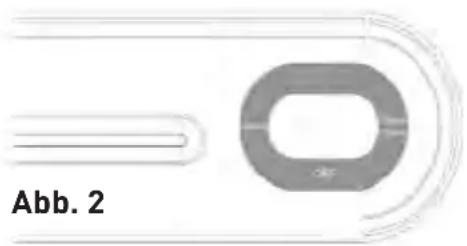
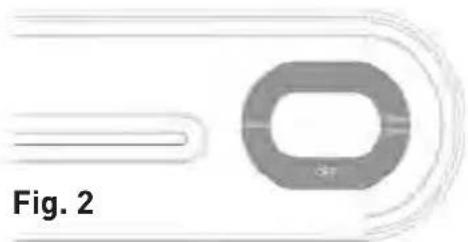
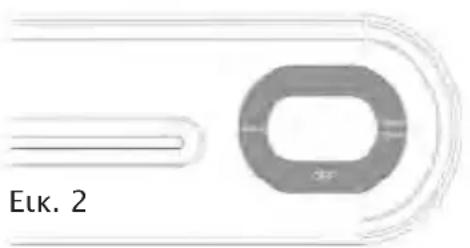
- Activate the device by pushing the sliding switch to the right or left, depending on the temperature required for the actual pouch thickness (fig. 2). The red indicator light is on.
- When the blue light comes on, the machine is ready for hot pouches lamination (fig. 1). The warm-up time takes approx. 3-5 minutes.
-
Place the item to be laminated into the laminating sleeve, centring it within the sleeve. Please make sure your document or picture is positioned as close to the sealed edge as possible.
-
The laminator does not require the use of a carrier in order to operate.
-
The laminator can laminate pouches from 80 microns to 125 microns. It works with most types of heat-sealing laminating pouches.
-
Insert the sealed edge of the laminating sleeve straight into the CENTRE of the laminator opening.
-
Remove the sleeve from the rear of the machine after is has stopped moving.
- Some types of paper do not laminate evenly, or appear somewhat cloudy. In such cases, the lamination can be fed through the machine a second time and the lamination process may be repeated.
- If there is a jam, please press the ABS button located on the top of the machine (fig. 1). The laminator will stop then. Please pull out the laminating pouches with one hand slowly.
CARE AND CLEANING
Only authorised service teams should perform any servicing other than cleaning and user maintenance. Do not immerse in water.
To reduce the risk of fire or electrical shock, do not remove the base. No user serviceable parts are inside. Repair should be done by authorised service personnel only.
- Keep your hands and the cord away from hot parts of the appliance during operation.
- Never clean with scrubbing powders or hard implements.
- Wipe clean with a soft cloth.
TECHNICAL DATA
Voltage 220-240 V, 50 Hz
Current 1.0 A
Power max. 250 W
Film thickness 80-125 microns
Max. document size A4
Warm-up time approx. 3-5 mins
Laminating speed approx. 300 mm/min
Max. document thickness 0.6 mm
DISPOSAL
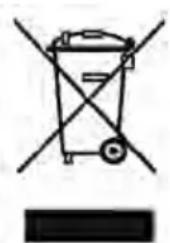
The crossed out wheelie bin symbol on this product is to remind you that electrical products should not be disposed of with household waste.
Please dispose of in a responsible manner at an approved waste or recycling facility.
WARRANTY
The warranty period for your appliance is 24 months.
It is essential that you retain your proof of purchase and the original packaging.
Should any problem arise with your appliance, please contact your dealer.
INTRODUZIONE

GARANTÍA

GARANTIE

GARANTIE
الشكل ٢

ГАРАНТИЯ

GARANTI
ΕΓΓΥΗΣΗ

GARANTI
GARANTIE

GWARANCJA

保修
您的机器保修期为24个月。
请您务必保管好购买凭证和原厂包装。
如果对机器有问题,请向您的经销商咨询。

Brand : GEHA
Model : 86096046 laminator
Category : Laminator