
EXECUTIVE ELECTROL - Electric projection screen DA-LITE - Free user manual and instructions
Find the device manual for free EXECUTIVE ELECTROL DA-LITE in PDF.

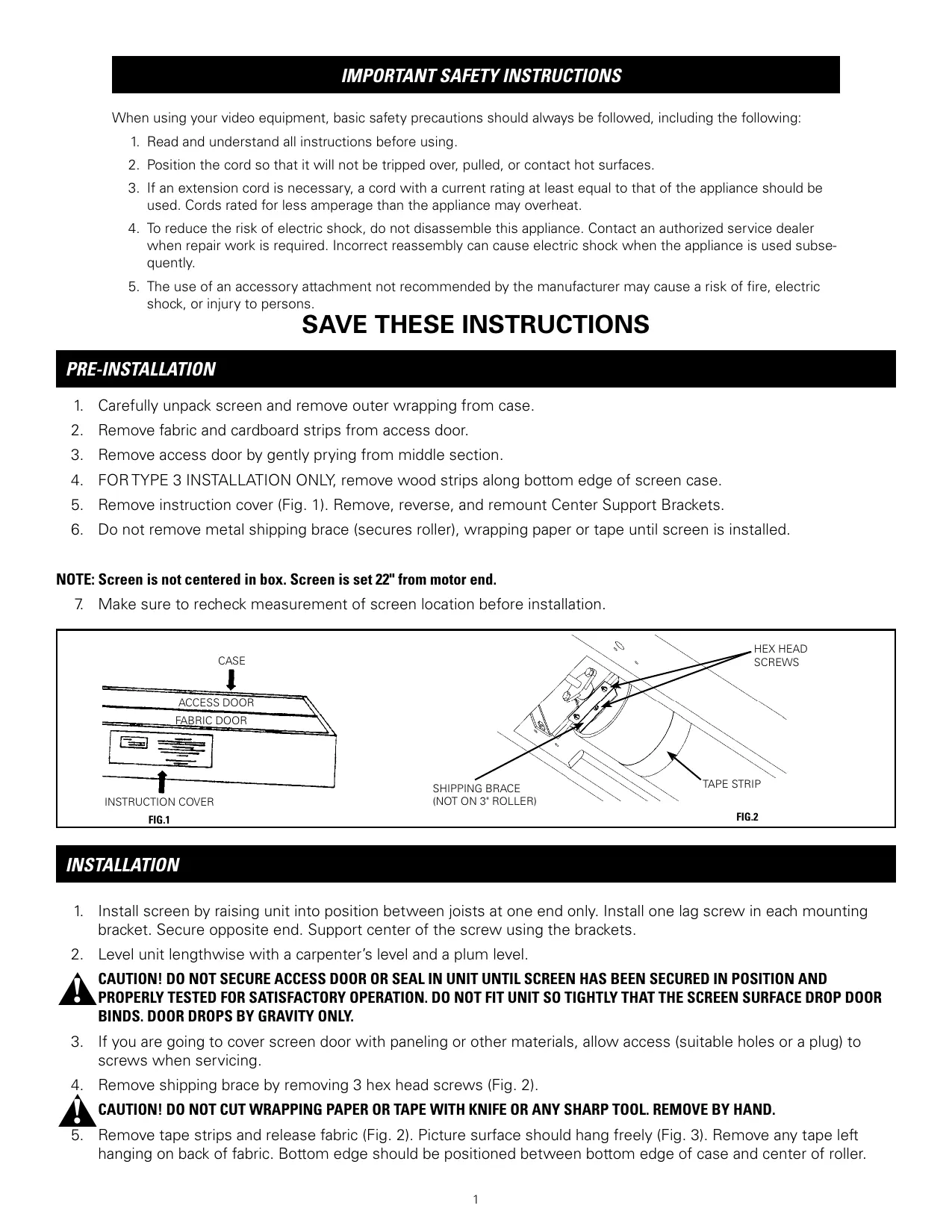

| Brand | DA-LITE |
| Model | EXECUTIVE ELECTROL |
| Product Type | Motorized electric projection screen |
| Power Supply | 240 V, 50/60 Hz |
| Motor | Built-in electric motor with thermal protection |
| Descent Adjustment | By limit screw (Down limit knob), adjustable step by step |
| Shutter Synchronization | Automatic via limit switches |
| Housing Dimensions | Variable depending on screen size (up to 3 m wide) |
| Weight | Variable depending on model |
| Shutter Material | Projection fabric (type not specified) |
| Housing Color | White (can be painted according to installation) |
| Installation Type | Recessed in ceiling (Types 1, 2, 3) |
| Power Cable | Standard length, may require suitable extension |
| Thermal Protection | Automatic shutdown in case of overheating (thermal overload) |
| Warranty | 1 year limited (parts and labor) |
| Spare Parts | Access cover, switches, solenoid, motor, capacitor |
| Repairability | Call a Da-Lite authorized technician |
| Maintenance and Cleaning | Clean fabric with a soft, dry cloth; do not use solvents |
| Safety | Do not disassemble the unit; use a grounded outlet; follow local electrical codes |
| Usage | Indoor only |
| Included Accessories | Wall switch (standard or 240 V) |
| Options | Low voltage control (LVC) optional |
| Standards | Compliant with Canadian Electrical Code (CEC) and US National Electrical Code (NEC) |
| Country of Origin | United States (Da-Lite Screen Company, Indiana) |
Frequently Asked Questions - EXECUTIVE ELECTROL DA-LITE
User questions about EXECUTIVE ELECTROL DA-LITE
0 question about this device. Answer the ones you know or ask your own.
Ask a new question about this device
Download the instructions for your Electric projection screen in PDF format for free! Find your manual EXECUTIVE ELECTROL - DA-LITE and take your electronic device back in hand. On this page are published all the documents necessary for the use of your device. EXECUTIVE ELECTROL by DA-LITE.
USER MANUAL EXECUTIVE ELECTROL DA-LITE
The Da-Lite Difference.

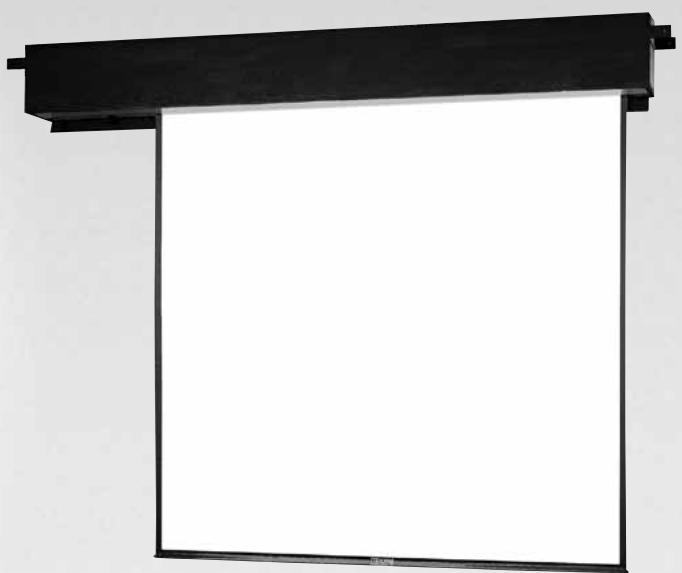
Instruction Book for EXECUTIVE® ELECTROL®

DA-LITE SCREEN COMPANY, INC.
3100 North Detroit Street
Post Office Box 137
Warsaw, Indiana 46581-0137
Phone: 574/267-8101
800-622-3737
Fax: 574/267-7804
http://www.da-lite.com
e-mail: info@da-lite.com
IMPORTANT SAFETY INSTRUCTIONS
When using your video equipment, basic safety precautions should always be followed, including the following:
- Read and understand all instructions before using.
- Position the cord so that it will not be tripped over, pulled, or contact hot surfaces.
- If an extension cord is necessary, a cord with a current rating at least equal to that of the appliance should be used. Cords rated for less amperage than the appliance may overheat.
- To reduce the risk of electric shock, do not disassemble this appliance. Contact an authorized service dealer when repair work is required. Incorrect reassembly can cause electric shock when the appliance is used subsequently.
- The use of an accessory attachment not recommended by the manufacturer may cause a risk of fire, electric shock, or injury to persons.
SAVE THESE INSTRUCTIONS
PRE-INSTALLATION
- Carefully unpack screen and remove outer wrapping from case.
- Remove fabric and cardboard strips from access door.
- Remove access door by gently prying from middle section.
- FOR TYPE 3 INSTALLATION ONLY, remove wood strips along bottom edge of screen case.
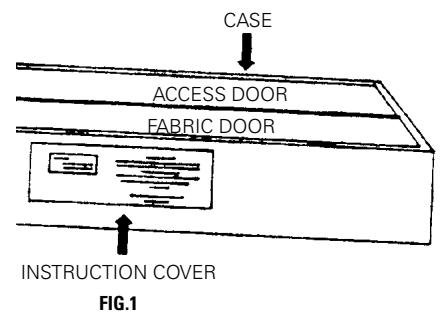
- Remove instruction cover (Fig. 1). Remove, reverse, and remount Center Support Brackets.
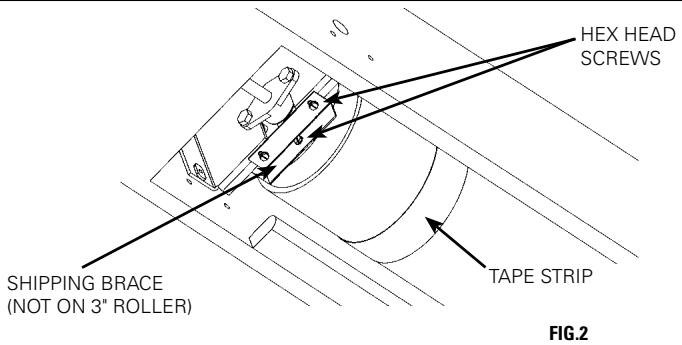
- Do not remove metal shipping brace (securs roller), wrapping paper or tape until screen is installed.
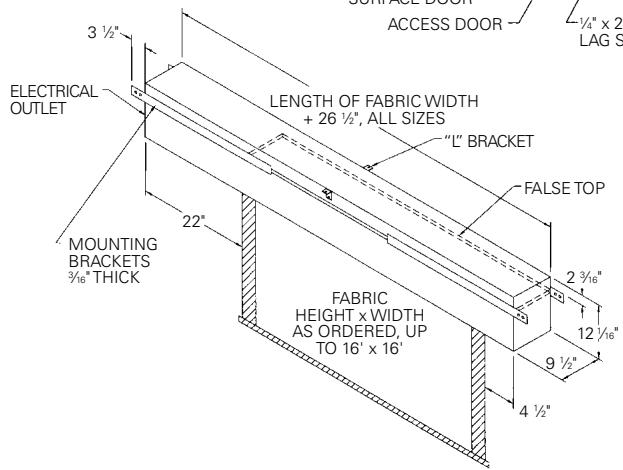
NOTE: Screen is not centered in box. Screen is set 22^ from motor end.
- Make sure to recheck measurement of screen location before installation.
INSTALLATION
- Install screen by raising unit into position between joists at one end only. Install one lag screw in each mounting bracket. Secure opposite end. Support center of the screw using the brackets.
- Level unit lengthwise with a carpenter's level and a plum level.

CAUTION! DO NOT SECURE ACCESSOR SEAL IN UNIT UNTIL SCREEN HAS BEEN SECURED IN POSITION AND PROPERLY TESTED FOR SATISFACTORY OPERATION. DO NOT FIT UNIT SO TIGHTLY THAT THE SCREEN SURFACE DROP DOOR BINDS. DOOR DROPS BY GRAVITY ONLY.
- If you are going to cover screen door with paneling or other materials, allow access (suitable holes or a plug) to screws when servicing.
- Remove shipping brace by removing 3 hex head screws (Fig. 2).

CAUTION! DO NOT CUT WRAPPING PAPER OR TAPE WITH KNIFE OR ANY SHARP TOOL. REMOVE BY HAND.
-
Remove tape strips and release fabric (Fig. 2). Picture surface should hang freely (Fig. 3). Remove any tape left hanging on back of fabric. Bottom edge should be positioned between bottom edge of case and center of roller.
-
Install electrical hook up that applies to your unit. Unit should be installed by a qualified electrician.
NOTE: Must be installed in accordance with the requirements of the Local Building Codes, the Canadian Electrical Code (CEC), CAN/CSA C22.1 and the National Electric Code (NEC), NFPA 70. - Test installation by carefully running picture surface "up" and "down" several times. Be prepared to stop screen.
- Make sure picture surface, when rolled down, has a full wrap around roller. No part of roller should be exposed. Fabric door and picture surface will drop simultaneously when switch is pressed "down". Door will close simultaneously with picture surface as picture surface rolls into case.
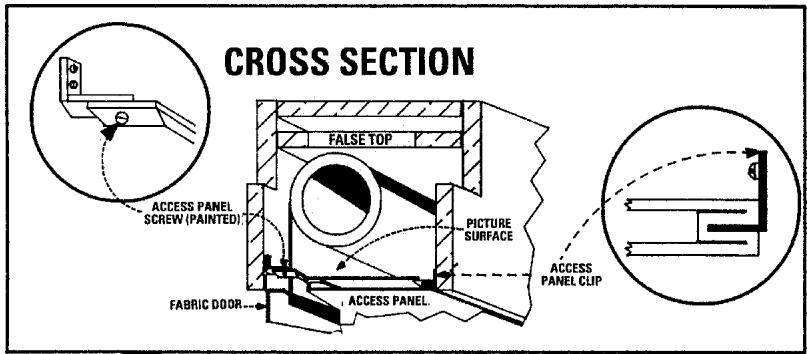
FIG.3
NOTE: If picture surface is hanging out of case approximately 12^ , a wrap of the picture surface has been lost from around the roller; see, "Restoring Roller Wrap".
ACCESS DOOR INSTALLATION
- Press switch "down" so that fabric door opens (Fig. 3).
- Remove screws (2) located on each bumper bracket.
NOTE: The access door is slotted on one edge, permitting the grooved section to fit over the support clips on inside of case.
- Place access panel so groove can be pushed over clips. Holes in access panel brackets should align with bumper bracket holes.
- Replace screws.
- Make sure there is approximately 3 16 clearance around access door. Keep paint, plaster, tile or mastic out of hinge. Fit access panel so it can be removed for maintenance.
SCREEN ADJUSTMENT
The picture surface drop, and the opening and closing of the fabric door, are controlled automatically by limit switches which have been preset at Da-Lite. When the picture surface is moving upward, it is controlled by a limit switch that shuts off when the door closes. To adjust for more or less picture drop (viewing area), proceed in the following manner:
SCREEN UNROLLED IN "DOWN" OR "BOTTOM" POSITION.
NOTE: Limit switch knob labeled DOWN controls point of picture surface in bottom position. Limit switch knob labeled DOOR controls the synchronization of the door opening or closing. Do not adjust!
MORE SCREEN DROP
- Place operating switch in "down" position.
- When the screen stops, turn the "down" limit knob one turn at a time clockwise, until the desired picture surface position is attained. Test by raising picture surface approximately two feet, then lower again.
Repeat until desired picture surface position is attained.

CAUTION! WHEN PICTURE SURFACE IS IN "BOTTOM" POSITION, DO NOT ADJUST FOR MORE THAN 3" OF ADDITIONAL DROP. DO NOT ALLOW ANY PART OF THE ROLLER TO BECOME EXPOSED.
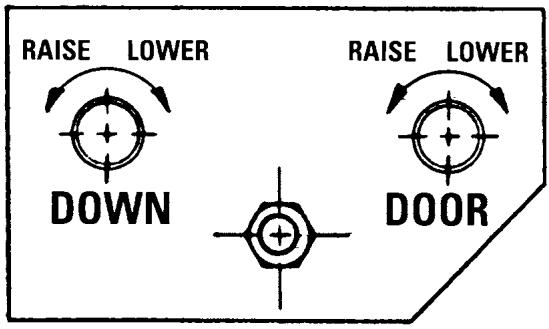
LESS SCREEN DROP
- Raise picture surface approximately two feet above desired level.
- Place operating switch in "off" position.
- Turn the "down" limit knob one turn at a time counter-clockwise.
- Place operating switch in "down" position. Repeat steps 2 and 3 until desired position is attained.
CAUTION! DO NOT ATTEMPT TO RESTORE A LOST WRAP BY ADJUSTING LIMIT SWITCHES!
- Run fabric all the way down.
- Run fabric up and stop just before door closes.
- Remove the access panel (2 screws, Fig. 3).
- Two people with clean hands must carefully grasp the slat pocket at each end.
- Gently lift fabric up and ease it over the top of the roller.
CAUTION! BE CAREFUL NOT TO CREASE OR DAMAGE FABRIC.
- Additional wraps must be restored if screen surface continues to hang beyond bottom of case.
- Test screen by running fabric up and down several times.
- Replace access panel.
EXECUTIVE ELECTROL INSTALLATION
SUGGESTED METHODS OF INSTALLATION
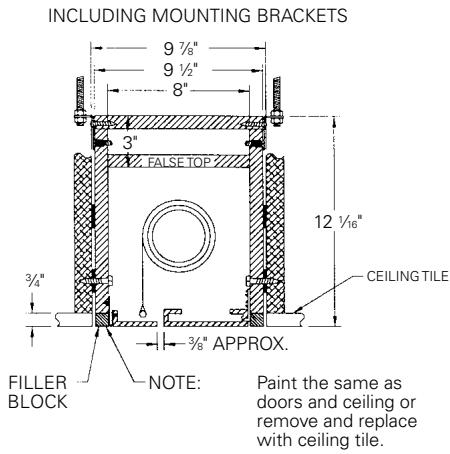
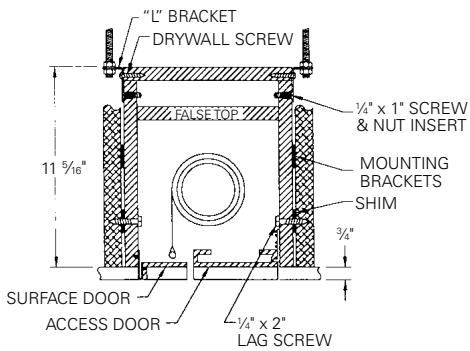
TYPE 1 & 2
Offset mounting, recessed above ceiling, for plaster, dry wall or paneling. Door painted same finish as ceiling.
Allow 1/8 min. clearance all around surface door.
TYPE 1 & 2
Flush mounting, recessed above ceiling. For use with 1/4 max. paneling or installation in existing ceiling using molding around door.
TYPE 3
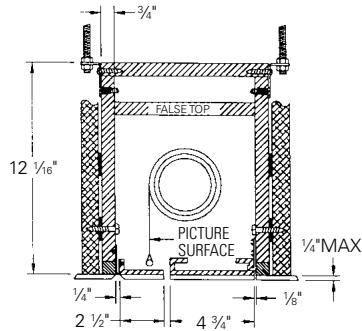
Allow 14 min. clearance all around surface door.
Extended mounting, recessed above ceiling. For use with acoustical or other ceiling tile 12 thick laid over door.
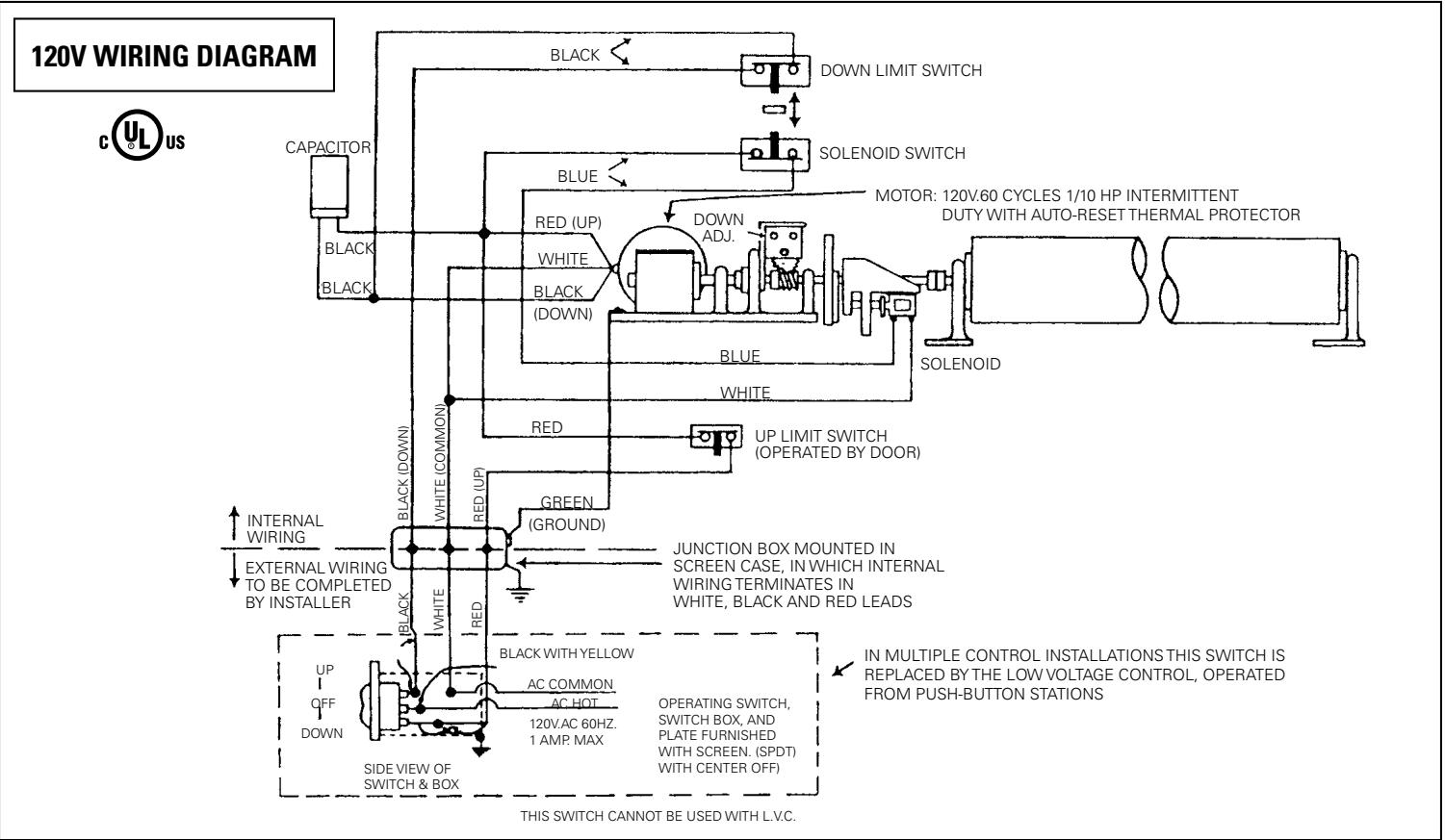
240 VOLT WIRING DIAGRAM
FOR STANDARD WALL SWITCH:
Da-Lite offers two styles of 240 volt wall switches for standard operation. Please see wiring diagram included in wall switch box included with screen.
| SYMPTOM | CAUSE | SOLUTION |
| 1. Screen will not operate or will not go "down". Motor does not hum. | (a) Blown fuse.(b) Tripped circuit breaker.(c) Improper wiring to operating switch.(d) Improper wiring to junction box in screen. | (a) Replace fuse.(b) Reset circuit breaker.(c) Tighten all loose wire connec-tions. Correct any improper con-nectons. Check for power. "Down" Position Check for power across black and white leads. "Up" Position Check for power across red and white leads.(d) "Down" Position Check for power at black and white leads. "Up" Position Check for power at red and white leads. |
| NOTE: Use low voltage control (LVC) electrical checklist for 3-button control. | ||
| Defective wall switch. | Shut power "off" at breaker. Remove wall switch and check for broken or loose connection. Replace if defective. | |
| Defective LVC unit.(e) Thermal overload tripped (exces-sive overheating).(f) Burned out motor winding.(g) Defective limit switch. | Check LVC electrical checklist.(e) Let motor cool down for 15 min-utes. Try again.(f) Disconnect motor leads and check for continuity between black and white wires for "down" position. Check for continuity be-tween red and white wires for "up" position. Replace gear motor if either combination shows an open circuit.(g) Disconnect "down" limit switch from circuit. Check for continuity. Switches are normally closed and open on contact. Replace if de-fective. | |
| 2. Motor hums. | (a) Temporary fabric binding.(b) Shipping bracket not removed.(c) Defective capacitor. | (a) With power "off," turn roller by hand to free binding.(b) Remove shipping bracket and wooden wedge.(c) Replace capacitor |
| 3. Screen will not move "up."Motor does not hum.Motor hums. | (a) No power between red and white leads in junction box.Check LVC. See above.(b) Thermal overload tripped (acts as a breaker).(c) Burned out motor winding.(d) Temporary fabric binding.(e) Burned out capacitor.(f) Broken wire or loose connection in "up" position (red and white leads). | (a) Check fuse. Reset circuit breaker.Correct improper wiring.(b) Let motor cool for 15 minutes. Try again.(c) Check for power between red and white motor leads. Replace motor if there is power.(d) With power "off," turn roller by hand to free binding.(e) Replace capacitor.(f) Secure connection or replace wire. |
| 4. Screen starts upward and door closes immediately shutting off motor. | (a) Defective solenoid limit switch.Solenoid pin not retracting.(b) Defective solenoid. | (a) Manually retract pin a few times.(b) Check for power to the solenoid terminals. If there is power, replace solenoid.Yes check blue wire between solenoid switch and solenoid. It is either crimped or broken. Repair or replace. |
| 5. Fabric door does not fully open.Screen runs.NOTE: Remember, door must open by gravity. | (a) Door binding. Plaster, paint or adhesive can cause the hinge to stick.(b) Case may be put into a bind during installation.(c) Inadequate clearance around the fabric door on new installations. | (a) Clean hinge and apply oil.(b) Tighten or loosen lag screws located on back of case.(c) Provide adequate clearance. |
| 6. Clicking noise in each downward revolution. | (a) Non-energized solenoid.NOTE: There should be three clicks. | (a) Check for power to solenoid.(b) Replace solenoid. |
| 7. Loud buzzing noise. | (a) Solenoid not fully retracting. | (a) Check for foreign object caught in solenoid. Remove object. Tighten 4 mounting screws.Check for pin binding. |
| 8. Door closes on fabric, leaving 15" to 20" left hanging out. | (a) Lost roller wrap. | (a) See installation instructions. |
TROUBLESHOOTING
| SYMPTOM | CAUSE | SOLUTION |
| 9. Screen jammed. Will not operate, motor hums, door open, closing mechanism detached from door. | (a) Closing mechanism detached from door, allowing it to jam into box. | (a) After securing fabric to roller, loosen set screws on motor gear and manually rotate solenoid assembly back over top of roller into position, then reattach door. Match flats on motor drive shaft to gear set screws and tighten. |
| 10. Scraping or grinding noise. | (a) If metal shipping bracket is left attached to screen, it may be rubbing on motor end of roller. | (a) Remove shipping brace. |
| 11. Gear noise. | (a) Gear may need light weight grease. | (a) Apply light weight grease. |
| 12. Incorrect down limit switch setting. | (a) Lost roller wrap. (b) Limit switch out of adjustment. | (a) See installation instructions. (b) See door closure and timing instructions. |
| 13. Door closes and screen continues to run upward. | (a) Door limit out of adjustment. (b) Door limit switch is shorted. | (a) Loosen nut holding limit switch. Rotate adjusting position, then secure. (b) Repair short or replace limit switch. |
LIMITED ONE YEAR WARRANTY ON DA-LITE PRESENTATION PRODUCTS
Da-Lite Screen Company, Inc. warrants its products to the original purchaser only, to be free from defects in materials and workmanship for a period of one (1) year from the date of purchase by the original purchaser provided they are properly operated according to Da-Lite's instructions and are not damaged due to improper handling or treatment after shipment from the factory.
This warranty does not apply to equipment showing evidence of misuse, abuse or accidental damage, or which has been tampered with or repaired by a person other than authorized Da-Lite personnel.
Da-Lite's sole obligation under this warranty shall be to repair or to replace (at Da-Lite's option) the defective part of the merchandise. Returns for service should be made to your Da-Lite dealer. If it is necessary for the dealer to return the screen or part to Da-Lite, transportation expenses to and from Da-Lite are payable by the purchaser and Da-Lite is not responsible for damage in shipment. To protect yourself against damage or loss in transit, insure the product and prepay all transportation expenses.
THIS WARRANTY IS IN LIEU OF ALL OTHER WARRANTYES, EXPRESS OR IMPLIED, INCLUDING WARRANTYES
AS TO FITNESS FOR USE AND MERCHANT ABILITIES. Any implied warranties of fitness for use, or merchantability, that may be mandated by statute or rule of law are limited to the one (1) year warranty period. This warranty gives you specific legal rights, and you may also have other rights, which vary from state-to-state. NO LIABILITY IS ASSUMED FOR EXPENSES OR DAMAGES RESULTING FROM INTERRUPTION IN OPERATION OF EQUIPMENT, OR FOR INCIDENTAL, DIRECT, OR CONSEQUENTIAL DAMAGES OF ANY NATURE.
In the event that there is a defect in materials or workmanship of a Da-Lite product, you may contact our Sales Partners at PO Box 137, Warsaw, IN 46581-0137, (574) 267-8101, (800) 622-3737.
IMPORTANT: THIS WARRANTY SHALL NOT BE VALID AND DA-LITE SHALL NOT BE BOUND BY THIS WARRANTY IF THE PRODUCT IS NOT OPERATED IN ACCORDANCE WITH DA-LITE'S WRITTEN INSTRUCTIONS.
Keep your sales receipt to prove the date of purchase and your original ownership.
- The Da-Lite Difference.
- IMPORTANT SAFETY INSTRUCTIONS
- SAVE THESE INSTRUCTIONS
- PRE-INSTALLATION
- NOTE: Screen is not centered in box. Screen is set 22^ from motor end.
- INSTALLATION
- CAUTION! DO NOT SECURE ACCESSOR SEAL IN UNIT UNTIL SCREEN HAS BEEN SECURED IN POSITION AND PROPERLY TESTED FOR SATISFACTORY OPERATION. DO NOT FIT UNIT SO TIGHTLY THAT THE SCREEN SURFACE DROP DOOR BINDS. DOOR DROPS BY GRAVITY ONLY.
- CAUTION! DO NOT CUT WRAPPING PAPER OR TAPE WITH KNIFE OR ANY SHARP TOOL. REMOVE BY HAND.
- ACCESS DOOR INSTALLATION
- SCREEN ADJUSTMENT
- MORE SCREEN DROP
- LESS SCREEN DROP
- CAUTION! DO NOT ATTEMPT TO RESTORE A LOST WRAP BY ADJUSTING LIMIT SWITCHES!
- CAUTION! BE CAREFUL NOT TO CREASE OR DAMAGE FABRIC.
- EXECUTIVE ELECTROL INSTALLATION
- SUGGESTED METHODS OF INSTALLATION
- VOLT WIRING DIAGRAM
- FOR STANDARD WALL SWITCH:
- TROUBLESHOOTING
- LIMITED ONE YEAR WARRANTY ON DA-LITE PRESENTATION PRODUCTS
Brand : DA-LITE
Model : EXECUTIVE ELECTROL
Category : Electric projection screen