
BOARDROOM ELECTROL - Electric projection screen DA-LITE - Free user manual and instructions
Find the device manual for free BOARDROOM ELECTROL DA-LITE in PDF.

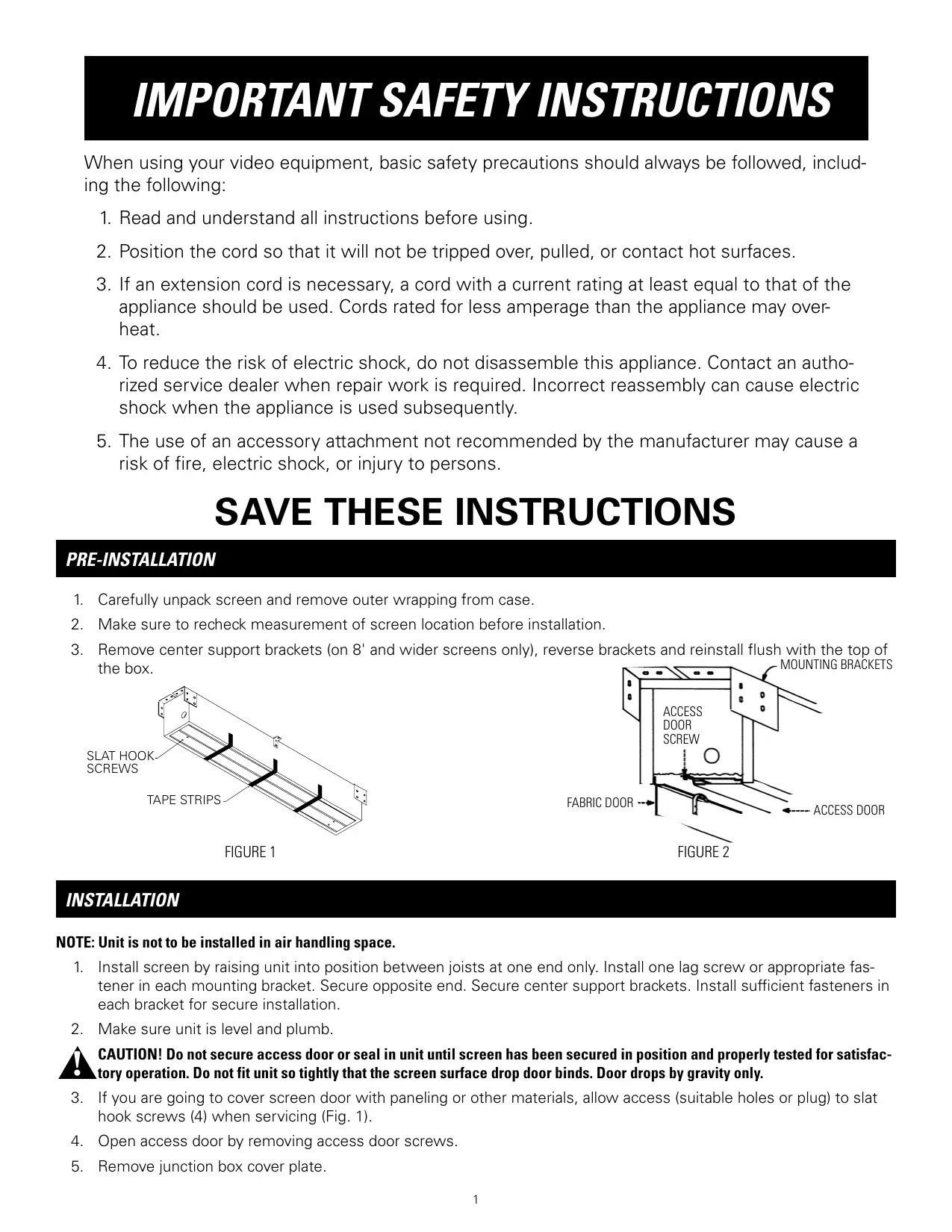

| Product Type | Recessed electric projection screen |
| Brand | DA-LITE |
| Model | BOARDROOM ELECTROL |
| Housing dimensions (W x D x H) | Variable depending on screen width (up to 3.66 m for wide models) |
| Weight | Approximately 15 to 30 kg depending on size |
| Power supply | 120 V or 220-240 V, 50/60 Hz |
| Maximum power consumption | 1.5 A (120 V) / 0.75 A (240 V) |
| Motor type | Sealed tubular motor with integrated brake |
| Duty cycle | 1 min on / 3 min off |
| Projection surface | Textile vinyl screen fabric with black top border (0 or 5 cm) |
| Gain factor | Approximately 1.0 (matt surface) |
| Viewing angle | 160° horizontal / 80° vertical |
| Main functions | Manual control via wall switch (120/240 V), optional low voltage control (VPI, SCB-100) |
| Installation | Recessed in ceiling, different methods depending on ceiling type (Methods A-D) |
| Maintenance and cleaning | Clean the screen fabric with a soft dry cloth; avoid any chemical products |
| Safety | Thermal protection, automatic limit stop, door microswitch |
| Spare parts and repairability | Sealed motor not repairable; replacement by a certified professional |
| Warranty | 1 year parts and labor (excluding damage due to misuse) |
| Supplied accessories | Wall switch, mounting brackets, hardware |
| Operating temperature | 10°C to 40°C |
Frequently Asked Questions - BOARDROOM ELECTROL DA-LITE
User questions about BOARDROOM ELECTROL DA-LITE
0 question about this device. Answer the ones you know or ask your own.
Ask a new question about this device
Download the instructions for your Electric projection screen in PDF format for free! Find your manual BOARDROOM ELECTROL - DA-LITE and take your electronic device back in hand. On this page are published all the documents necessary for the use of your device. BOARDROOM ELECTROL by DA-LITE.
USER MANUAL BOARDROOM ELECTROL DA-LITE
The Da-Lite Difference.

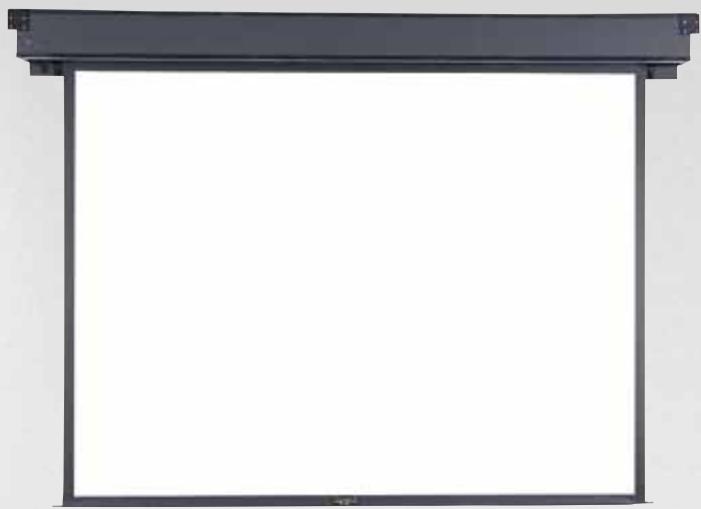
Instruction Book for BOARDROOM ELECTROL®

DA-LITE SCREEN COMPANY, INC.
3100 North Detroit Street
Post Office Box 137
Warsaw, Indiana 46581-0137
Phone: 574-267-8101
800-622-3737
Fax: 574-267-7804
Toll Free Fax: 877-325-4832
www.da-lite.com
e-mail: info@da-lite.com
IMPORTANT SAFETY INSTRUCTIONS
When using your video equipment, basic safety precautions should always be followed, including the following:
- Read and understand all instructions before using.
- Position the cord so that it will not be tripped over, pulled, or contact hot surfaces.
- If an extension cord is necessary, a cord with a current rating at least equal to that of the appliance should be used. Cords rated for less amperage than the appliance may overheat.
- To reduce the risk of electric shock, do not disassemble this appliance. Contact an authorized service dealer when repair work is required. Incorrect reassembly can cause electric shock when the appliance is used subsequently.
- The use of an accessory attachment not recommended by the manufacturer may cause a risk of fire, electric shock, or injury to persons.
SAVE THESE INSTRUCTIONS
PRE-INSTALLATION
- Carefully unpack screen and remove outer wrapping from case.
- Make sure to recheck measurement of screen location before installation.
- Remove center support brackets (on 8' and wider screens only), reverse brackets and reinstall flush with the top of the box.
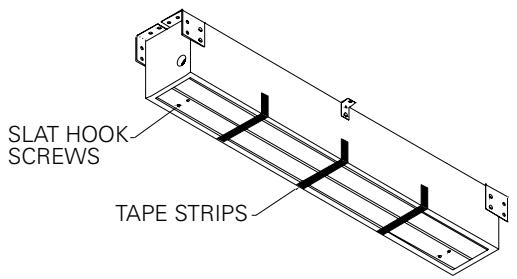
FIGURE 1
INSTALLATION
NOTE: Unit is not to be installed in air handling space.
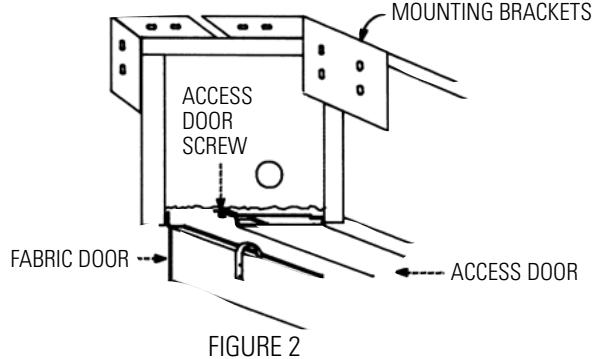
- Install screen by raising unit into position between joists at one end only. Install one lag screw or appropriate fastener in each mounting bracket. Secure opposite end. Secure center support brackets. Install sufficient fasteners in each bracket for secure installation.
- Make sure unit is level and plumb.
CAUTION! Do not secure access door or seal in unit until screen has been secured in position and properly tested for satisfactory operation. Do not fit unit so tightly that the screen surface drop door binds. Door drops by gravity only.
- If you are going to cover screen door with paneling or other materials, allow access (suitable holes or plug) to slat hook screws (4) when servicing (Fig. 1).
- Open access door by removing access door screws.
- Remove junction box cover plate.
BOARDROOM ELECTROL INSTALLATION
- Remove switch assembly (boxed, located at pin end of fabric).
CAUTION! Do not cut wrapping paper or tape with knife or any sharp tool. Remove by hand.
- Pull orange string to remove wrapping paper.
- Install electrical hook up that applies to your unit. Standard installation is for a single 120VAC or 240VAC wall switch to control the screen. Optional Control units may have been ordered. Refer to additional instructions for the external VPI, external low voltage control and SCB-100. Refer to the appropriate wiring diagram for your screen.
NOTE: Screen has been internally wired at DA-LITE. Wiring designated "external" is completed by installer conforming to local and national codes.
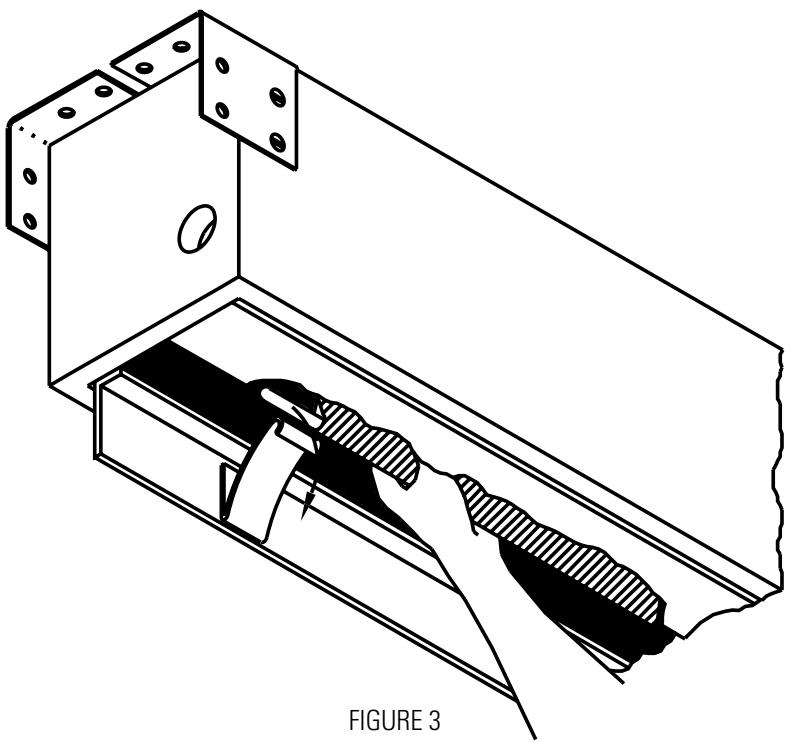
- Lower picture surface approximately 4 - 6 so that the slat will rest on top of the slat hooks. Guide slat past hooks by gently pulling fabric forward (Fig. 3). Do not bend hooks.
- Test installation by carefully running picture surface up and down 2-3 times. Be prepared to stop screen. Standard Duty Cycle: 1 MIN. ON / 3 MIN. OFF.
- Run the picture surface upward. The surface door will automatically close when the picture surface rolls into the case. The ends of the slat will catch the two hooks on the surface door and pull the door closed. When the door closes, a limit switch is tripped and the motor shuts off.
CAUTION! Excessive continuous operation may cause overheating.
- Run picture surface downward until picture surface door fully opens.
- Install junction box cover plate.
- Close access door and reinstall screws at each end of access door.
CAUTION! Do not attempt to restore a lost wrap by adjusting limit switches. Allow one-eighth of an inch (1/8") clearance around surface door. Make sure door does not bind. Check hinges. Paint or tile cement will interfere with free operation. Gravity drops door.
- Complete installation by painting and finishing to suit your needs. Finish to allow access door to be removed if necessary.
120V WIRING DIAGRAM

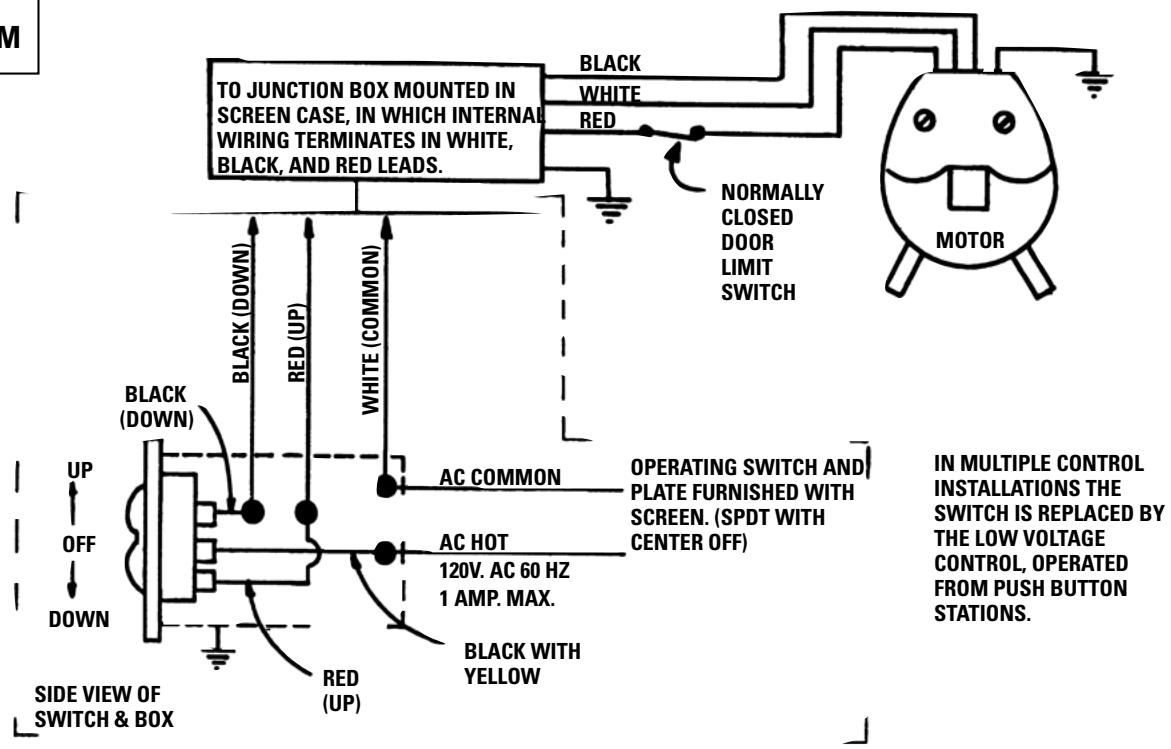
THIS SWITCH CANNOT BE USED WITH L.V.C.
NOTE: A SINGLE SWITCH CANNOT BE USED TO OPERATE MORE THAN ONE SCREEN. CONTACT THE FACTORY FOR FURTHER INFORMATION.
SCREEN ADJUSTMENT FOR 120V SCREENS
Surface travel is stopped automatically in the fully opened and closed positions by limit switches that are properly adjusted at Da-Lite. Should it be necessary to adjust for more or less drop of picture, proceed in the following manner:
NOTE: Use a screw driver or 5/32" allen wrench to make adjustments.
MORE SCREEN DROP
- Place operating switch in "down" position.
- When the screen stops, turn the white "down" limit knob (Fig.4) one-quarter turn counterclockwise. Test by raising picture surface approximately two feet, then lower again. Repeat until desired picture surface position is attained.
LESS SCREEN DROP
- Raise picture surface approximately two feet above desired level.
- Place operating switch in "off" position.
- Turn the white "down" limit knob (Fig.4) one-quarter turn clockwise. Test by raising picture surface approximately two feet, then lower again. Repeat until desired picture surface position is attained.
CAUTION! Do not adjust for more drop than what was ordered. At least 1-1/2 wraps of fabric must remain on the roller. This screen comes standard with 0'' or 2'' black at the top. See the specification data sheet for details.
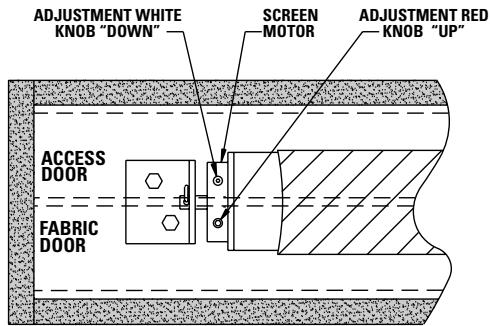
FIGURE 4
240 VOLT WIRING DIAGRAM FOR STANDARD WALL SWITCH:
Da-Lite offers two styles of 240 volt wall switches for standard operation. Please see wiring diagram included in wall switch box included with screen.
SCREEN ADJUSTMENT FOR 220/240V SCREENS
Surface travel is stopped automatically in the fully opened and closed positions by limit switches that are properly adjusted at Da-Lite. Should it be necessary to adjust for more or less drop of picture, proceed in the following manner:
NOTE: Use a screw driver or 5/32" allen wrench to make adjustments.
MORE SCREEN DROP
- Place operating switch in "down" position.
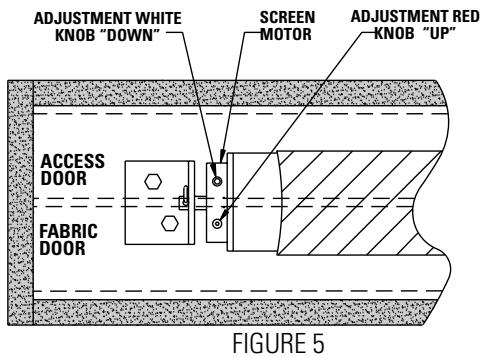
- When the screen stops, turn the white "down" limit knob (Fig.5) one-quarter turn counterclockwise. Test by raising picture surface approximately two feet, then lower again. Repeat until desired picture surface position is attained.
LESS SCREEN DROP
- Raise picture surface approximately two feet above desired level.
- Place operating switch in "off" position.
- Turn the white "down" limit knob (Fig.5) one-quarter turn clockwise. Test by raising picture surface approximately two feet, then lower again. Repeat until desired picture surface position is attained.
CAUTION! Do not adjust for more drop than what was ordered. At least 1-1/2 wraps of fabric must remain on the roller. This screen comes standard with 0" or 2" black at the top. See the specification data sheet for details.
Select installation method according to ceiling type.
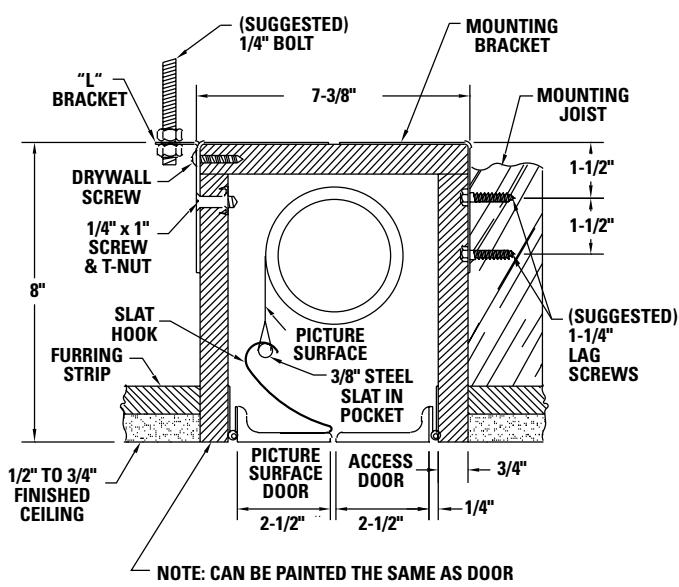
METHOD A
Offset mounting, recessed above ceiling. For plaster, dry wall, tile or paneling. Doors and bottom of case painted same finish as ceiling.
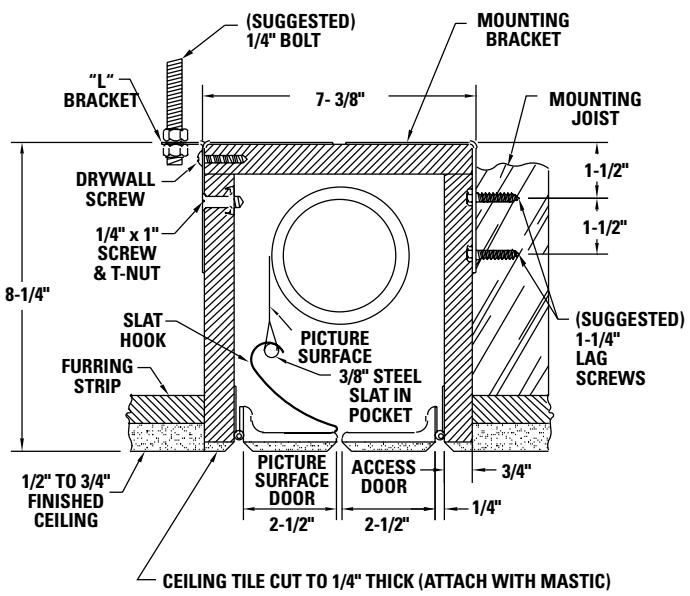
METHOD B
Offset mounting, recessed above ceiling. May be adapted for 1 / 2" to 3 / 4" ceiling, but cut to 1 / 4" thick under doors and screen case.
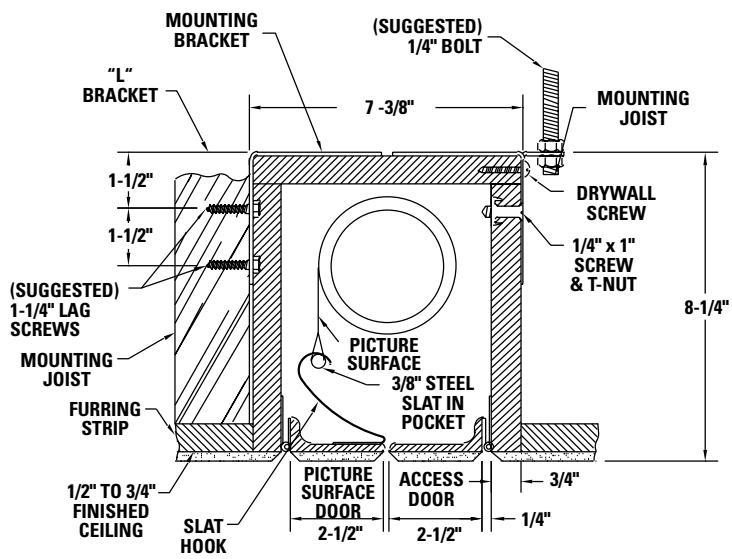
METHOD C
Flush mounting, recessed above ceiling. May be adapted for 1 / 4" paneling for ceiling and doors.
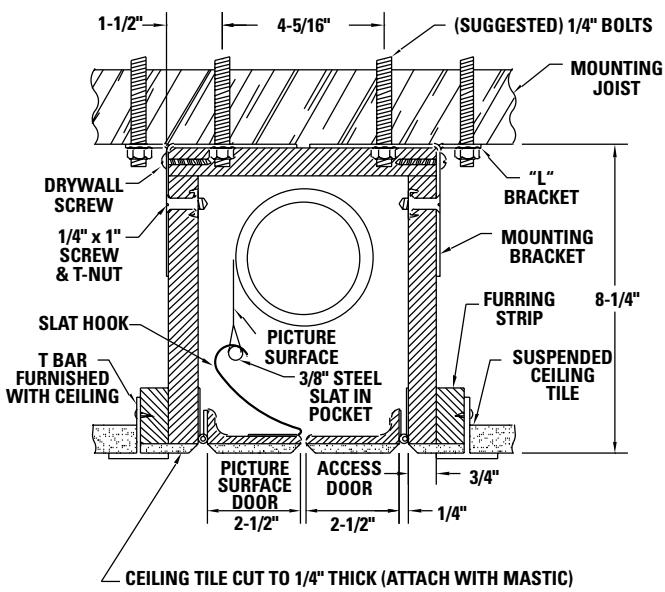
METHOD D
Flush mounting, recessed above ceiling. For use with dropped ceiling. May also be adapted for use with acoustical or other ceiling 1 / 2'' to 3 / 4'' thick but cut to 1 / 4'' thick under doors and screen case.
TROUBLESHOOTING
Visit www.da-lite.com/products/tutorials.php to find installation and troubleshooting tutorials. You will also find a link to Live Chat for interactive support and you can contact us by email at info@da-lite.com or by phone at (800) 622-3737 or (574) 267-8101 with any troubleshooting questions.
| SYMPTOM | CAUSE | SOLUTION |
| 1. Screen will not operate or will not go "down."Motor does not hum. | (a) Blown fuse.(b) Tripped circuit breaker.(c) No power to operating switch or junction box.(d) Insufficient line voltage (must be at least 115V or 220V, depending on motor type).Power at junction box(e) Thermal overload tripped.(f) Broken wire in the "down" position.(g) Defective motor, limit switch or capacitor.(h) Capacitor burned out. | (a) Replace fuse.(b) Reset circuit.(c) Check above. Tighten all loose wire connections. Recheck wiring. See installation instructions.(d) Correct line voltage. "Down" PositionCheck for power across black and white leads.(e) Let motor cool down for 15 minutes. Try again.(f) Check for continuity.(g) Replace motor assembly. NOTE: Motor is a sealed assembly.(h) Replace motor assembly. |
| 2. Screen will not move upward.Motor does not hum. | (a) Blown fuse.(b) Tripped circuit breaker.(c) No power to operating switch or junction box.(d) Insufficient line voltage (must be at least 115V or 220V, depending on motor type).(e) Open door micro switch.Power at junction box(f) Thermal overload tripped.(g) Broken wire in the "up" position.(h) Defective motor, limit switch or capacitor.(i) Capacitor burned out. | (a) Replace fuse.(b) Reset circuit breaker.(c) Check above. Tighten all loose wire connections. See above. "Up" PositionCheck for power across red and white leads.(d) Correct line voltage.(e) Replace micro switch.(f) Let motor cool down for 15 minutes. Try again.(g) Check for continuity.(h) Replace motor assembly. NOTE: Motor is a sealed assembly.(i) Replace motor assembly. |
| 3. Door will not open | (a) Hinge is bound or has a foreign substance on it which does not allow it to open by gravity.(b) Slat hooks catch on access door. | (a) Check installation to free door.Clear any foreign substance; i.e., paint or plaster from hinge.(b) Adjust slat hooks. Door can be opened by removing four screws holding slat hooks to door. Access should be provided to these screws during and after installation. |
TROUBLESHOOTING
| SYMPTOM | CAUSE | SOLUTION |
| 4. Door does not close tightly. | (a) “Up” limit switch in motor is out of adjustment. | (a) NOTE: This switch is not normally used when operating screen. Motor automatically shuts off if fabric does not close fabric door. If adjustment allows motor to shut off too soon, it will leave fabric door open. Adjust black limit switch clockwise (towards +). |
| 5. “Down” limit switch incorrect. | (a) “Down” limit switch out of adjustment. | (a) See installation instructions. |
| 6. Noise. NOTE: Screen will operate with a low-pitched hum. | (a) Squeaking, rubber end plug rubbering on motor. (b) Grinding. Foreign object in screen rubbing on roller or fabric. (c) Gear noise. | (a) Center roller in case. (b) Remove. (c) Replace motor assembly. |
| 7. Coasting. | (a) Defective brake. | (a) Replace motor assembly. |
| 8. Roller displaced from mounting bracket. | (a) Pin end slipped out of nylon bearing | (a) Remove pin end mounting. Realign motor in tube. Reattach pin end. |
| 9. Fabric door hangs down on one end. | (a) Slat hooks not formed equally. (b) Crooked pocket. | (a) Bend slat hook slightly or apply tape to end of slat where door hangs. Build slat up enough to close door. (b) If not corrected by applying above, replace fabric. |
| 10. Fabric hangs crooked or is rubbing on slat hook. | (a) Screen not installed properly. (b) Fabric has backed up inside case. (c) Fabric is damaged. | (a) Check for level and plumb. (b) Adjust “down” limit switch slowly until roller is exposed and wrinkle comes out, then readjust for proper drop. (c) Replace fabric. |
LIMITED ONE YEAR WARRANTY ON DA-LITE PRESENTATION PRODUCTS
Da-Lite Screen Company, Inc. warrants its products to the original purchaser only, to be free from defects in materials and workmanship for a period of one (1) year from the date of purchase by the original purchaser provided they are properly operated according to Da-Lite's instructions and are not damaged due to improper handling or treatment after shipment from the factory.
This warranty does not apply to equipment showing evidence of misuse, abuse or accidental damage, or which has been tampered with or repaired by a person other than authorized Da-Lite personnel.
Da-Lite's sole obligation under this warranty shall be to repair or to replace (at Da-Lite's option) the defective part of the merchandise. Returns for service should be made to your Da-Lite dealer. If it is necessary for the dealer to return the screen or part to Da-Lite, transportation expenses to and from Da-Lite are payable by the purchaser and Da-Lite is not responsible for damage in shipment. To protect yourself against damage or loss in transit, insure the product and prepay all transportation expenses.
THIS WARRANTY IS IN LIEU OF ALL OTHER WARRANTYES, EXPRESS OR IMPLIED, INCLUDING WARRANTY AS TO FITNESS FOR USE AND MERCHANT ABILITIES. Any implied warranties of fitness for use, or merchantability, that may be mandated by statute or rule of law are limited to the one (1) year warranty period. This warranty gives you specific legal rights, and you may also have other rights, which vary from state-to-state. NO LIABILITY IS ASSUMED FOR EXPENSES OR DAMAGES RESULTING FROM INTERRUPTION IN OPERATION OF EQUIPMENT, OR FOR INCIDENTAL, DIRECT, OR CONSEQUENTIAL DAMAGES OF ANY NATURE.
In the event that there is a defect in materials or workmanship of a Da-Lite product, you may contact our Sales Partners at PO Box 137, Warsaw, IN 46581-0137, (574) 267-8101, (800) 622-3737.
IMPORTANT: THIS WARRANTY SHALL NOT BE VALID AND DA-LITE SHALL NOT BE BOUND BY THIS WARRANTY IF THE PRODUCT IS NOT OPERATED IN ACCORDANCE WITH DA-LITE'S WRITTEN INSTRUCTIONS.
Keep your sales receipt to prove the date of purchase and your original ownership.
- THE DA-LITE DIFFERENCE
- DA-LITE SCREEN COMPANY, INC
- IMPORTANT SAFETY INSTRUCTIONS
- SAVE THESE INSTRUCTIONS
- PRE-INSTALLATION
- INSTALLATION
- NOTE: UNIT IS NOT TO BE INSTALLED IN AIR HANDLING SPACE
- CAUTION! DO NOT SECURE ACCESS DOOR OR SEAL IN UNIT UNTIL SCREEN HAS BEEN SECURED IN POSITION AND PROPERLY TESTED FOR SATISFACTORY OPERATION. DO NOT FIT UNIT SO TIGHTLY THAT THE SCREEN SURFACE DROP DOOR BINDS. DOOR DROPS BY GRAVITY ONLY
- BOARDROOM ELECTROL INSTALLATION
- 120V WIRING DIAGRAM
- SCREEN ADJUSTMENT FOR 120V SCREENS
- MORE SCREEN DROP
- LESS SCREEN DROP
- 240 VOLT WIRING DIAGRAM FOR STANDARD WALL SWITCH
- SCREEN ADJUSTMENT FOR 220/240V SCREENS
- TROUBLESHOOTING
- LIMITED ONE YEAR WARRANTY ON DA-LITE PRESENTATION PRODUCTS
Brand : DA-LITE
Model : BOARDROOM ELECTROL
Category : Electric projection screen