AP5TAQ - Motherboard AOPEN - Free user manual and instructions
Find the device manual for free AP5TAQ AOPEN in PDF.


| Product Type | Motherboard |
| Brand | AOPEN |
| Model | AP5TAQ |
| Chipset | Intel 430TX |
| CPU Socket | Socket 7 |
| Supported Processors | Intel Pentium (P54C, P55C) and compatibles |
| Memory Types | FPM, EDO, SDRAM |
| Number of DIMM Slots | 2 |
| Expansion Slots | PCI, ISA |
| Connectors | PS/2, USB, parallel, serial, IDE, floppy |
| Power Supply | ATX |
| Power Management | APM, ACPI |
| Protection | 3.3V overcurrent protection, CPU thermal protection |
| Special Features | Ultra DMA/33, USB, Plug and Play |
| BIOS | Flash ROM |
Frequently Asked Questions - AP5TAQ AOPEN
User questions about AP5TAQ AOPEN
0 question about this device. Answer the ones you know or ask your own.
Ask a new question about this device
Download the instructions for your Motherboard in PDF format for free! Find your manual AP5TAQ - AOPEN and take your electronic device back in hand. On this page are published all the documents necessary for the use of your device. AP5TAQ by AOPEN.
USER MANUAL AP5TAQ AOPEN
Frequently Asked Question

Note: FAQ may be updated without notice. If you cannot find the information that you need in this appendix, visit our WWW home page, (address: http://www.aopen.com.tw) and check the FAQ area and other new information.
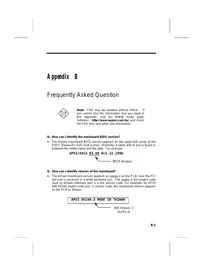
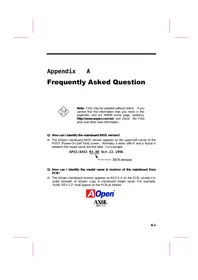
Q: How can I identify the mainboard BIOS version?
A: The AOpen mainboard BIOS version appears on the upper-left corner of the POST (Power-On Self Test) screen. Normally, it starts with R and is found in between the model name and the date. For example:

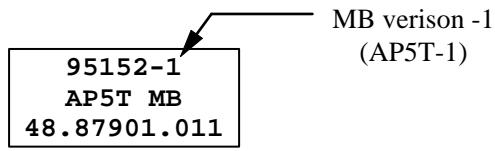
Q: How can I identify version of the mainboard?
A: The AOpen mainboard version appears as ppppp-x on the PCB, near the PCI slot and is enclosed in a white bordered box. The ppppp is the project code used by AOpen internally and -x is the version code. For example, for AP5T with 95152 project code and -1 version code, the mainboard version appears on the PCB as follows:
Q: Why the AOpen mainboards (MB) do not have cache module expansion slot?
A: Faster CPU speed requires more difficult and complex MB timing design. Every trace and components delay must be taken into consideration. The expansion cache slot design will cause 2 or 3ns delay in PBSRAM timing, and the extended trace length to the cache module through the golden finger will further delay the timing by 1 or 2ns. This may result in unreliable system once the cache module and slot becomes worn. All AOpen MBs support 512KB PBSRAM onboard. For better performance (around 3% higher than 256KB), we strongly recommend you to use 512KB onboard. Otherwise, reliable 256KB is better than unreliable 512KB with cache module. AOpen is the first company to promote this concept since the fourth quarter of 1995.
Q: What is MMX?
A: MMX is the new single-line multiple-instruction technology of the new Intel Pentium PP/MT (P55C) CPU. A new Pentium Pro CPU (Klamath) with MMX technology is also expected to be released soon. The MMX instructions are specifically useful for multimedia applications (such as 3D video, 3D sound, video conference). The performance can be improved if applications use these instructions. All AOpen MBs have at least dual power onboard to support PP/MT, it is not necessary to have special chipset for MMX CPU.
Q: What is USB (Universal Serial Bus)?
A: USB is a new 4-pin serial peripheral bus that is capable of cascading low/medium speed peripherals (less than 10Mbit/s) such as keyboard, mouse, joystick, scanner, printer and modem/ISDN. With USB, the traditional complex cables from back panel of your PC can be eliminated.
You need the USB driver to support USB device(s). AOpen MBs are all USB ready, you may get latest BIOS from AOpen web site (http://www.aopen.com.tw). Our latest BIOS includes the keyboard driver (called Legacy mode), that simulates USB keyboard to act as AT or PS/2 keyboard and makes it possible to use USB keyboard if you don't have driver in your OS. For other USB devices, you may get the drivers from your device vendor or from OS (such as Win95). Be sure to turn off "USB Legacy Support" in BIOS "Chipset Setup" if you have another driver in your OS.
Q: What is P1394?
A: P1394 (IEEE 1394) is another standard of high-speed serial peripheral bus. Unlike low or medium speed USB, P1394 supports 50 to 1000Mbit/s and can be used for video camera, disk and LAN. Since P1394 is still under development, there is no P1394 device currently available in the PC market. Also, there is no chipset that can support P1394. Probably in the near future, a card will be developed to support P1394 device.
Q: What is SMBus (System Management Bus, also called I2C bus)?
A: SMBus is a two-wire bus developed for component communication (especially for semiconductor IC). It is most useful for notebook to detect component status and replace hardware configuration pin (pull-high or pull-low). For example, disabling clock of DIMM that does not exist, or detecting battery low condition. The data transfer rate of SMBus is only 100Kbit/s, it allows one host to communicate with CPU and many masters and slaves to send/receive message. The SMBus may be used for jumpless mainboard, the components which support SMbus are not ready yet, we will keep eyes on it.
Q: What is FCC DoC (Declaration of Conformity)?
A: The DoC is new certification standard of FCC regulations. This new standard allows DIY component (such as mainboard) to apply DoC label separately without a shielding of housing. The rule to test mainboard for DoC is to remove housing and test it with regulation 47 CFR 15.31. The DoC test of mainboard is more difficult than traditional FCC test. If the mainboard passes DoC test, that means it has very low EMI radiation and you can use any kind of housing (even paper housing). Following is an example of DoC label. Currently, AOpen AX65/AP57/AP5T/AX5T had passed DoC test.

Q: What is PBSRAM (Pipelined Burst SRAM)?
Frequently Asked Questions
A: For Pentium CPU, the Burst means reading four QWord (Quad-word, 4x16 = 64 bits) continuously with only the first address decoded by SRAM. The PBSRAM will automatically send the remaining three QWord to CPU according to predefined sequence. The normal address decoding time for SRAM is 2 to 3 clocks. This makes the CPU data read timing of four QWord to be at least 3-2-2-2 and a total of 9 clocks if traditional asynchronous SRAM is used. However, with PBSRAM, there is no need to decode address for rest three Qword. Therefore, data read timing can be 3-1-1-1, that is equivalent to 6 clocks and is faster than asynchronous SRAM.
Q: What is EDO (Extended Data Output) memory?
A: The EDO DRAM technology of EDO is actually very similar to FPM (Fast Page Mode). Unlike traditional FPM that tri-states the memory output data to start the pre-charge activity, EDO DRAM holds the memory data valid until the next memory access cycle, that is similar to pipeline effect and reduces one clock state.
Q: What is SDRAM (Synchronous DRAM)?
A: The SDRAM is a new generation DRAM technology that allows DRAM to use the same clock as the CPU host bus (EDO and FPM are asynchronous and do not have clock signal). The idea is the same as "Burst" (refer to the previous Q & A). It requires only one clock for the 2nd, 3rd, and 4th QWord (for example, 5-1-1-1 compares with EDO 5-2-2-2). The SDRAM comes in 64-bit 168-pin DIMM (Dual-in-line Memory Module) and operates at 3.3V. Note that some old DIMMs are made by FPM/EDO and only operate at 5V. Do not confuse them with SDRAM DIMM. AOpen is the first company to support dual-SDRAM DIMMs onboard (AP5V), from Q1 1996.
Q: Can SDRAM DIMM work together with FPM/EDO SIMM?
A: The FPM/EDO operate at 5V while SDRAM operates at 3.3V. The current MB design provides different power to DIMM and SIMM but connects the data bus together. If you combine SIMM and DIMM, the system will still work fine; however, only temporarily. After a few months, the SDRAM 3.3V data input will be damaged by 5V FPM/EDO data output line. Therefore, we strongly NOT recommend DIMM and SIMM combined together. There is one exception, if your SDRAM supports 5V tolerance (such as TI or Samsung), which accepts 5V signal at 3.3V operating power, you can combine them.
| Manufacturer | Model | Suggested CAS Latency | 5V Tolerance |
| Time | |||
| Samsung | KM416511220AT-G12 | 2 | Yes |
| NEC | D4S16162G5-A12-7JF | 2 | No |
| Hitachi | HM5216805TT10 | 2 | No |
| Fujitsu | 81117822A-100FN | 2 | No |
| TI | TMX626812DGE-12 | 2 | Yes |
| TI | TMS626812DGE-15 | 3 | Yes |
| TI | TMS626162DGE-15 | 3 | Yes |
| TI | TMS626162DGE-M67 | 3 | Yes |
Q: What is Bus Master IDE (DMA mode)?
A: The traditional PIO (Programmable I/O) IDE requires the CPU to involve in all the activities of the IDE access including waiting for the mechanical events. To reduce the workload of the CPU, the bus master IDE device transfers data from/to memory without interrupting CPU, and releases CPU to operate concurrently while data is transferring between memory and IDE device. You need the bus master IDE driver and the bus master IDE HDD to support bus master IDE mode. Note that it is different with master/slave mode of the IDE device connection. For more details, refer to section 2.3 "Connectors".
Q: What is 3.3V Over-current Protection?
A: The Over-current Protection was very popular implemented on the Baby AT or ATX +5V/+12V switching power supply. It is very useful to prevent accident short circuit when you install the mainboard, HDD, add-on cards into housing. But unfortunately, the new generation CPU and chipset use 3.3V or 2.8V voltage which has regulator to transfer 5V to 3.3V/2.8V, and makes 5V over-current protection useless. AOpen TX mainboard AP5T/AX5T with switching regulator onboard support 3.3V (Vcpuio, chipset, PBSRAM, SDRAM) and 2.8V (CPU Vcore) over-current protection, in conjunction with 5V/12V power supply provide the full line over-current protection.
Q: What is CPU Thermal Protection?
A: The higher speed of CPU, the more heat dissipation need to be taking into consideration. If user does not use correct fan for the CPU cooling, it is highly possible the CPU can over heat and causing system unstable. AOpen AP5T/AX5T/AX6F has special thermal detection circuit under the CPU, and slow down the CPU speed as well as warning when temperature is high then a predefined temperature. (Normally, 55 degree C.)
Q: What is the difference between AP5T-1, AP5T-2 and AP5T-3?
A: For the convenience of over-clocking user, AP5T-2 adds jumper (JP5) for 75/83.3MHz external CPU bus clock. All the circuit and components remain unchanged (including clock generator). The user set clock to 75/83.3MHz is taking his own risk, and is probably to have system unstable behavior. There are also more features implemented on AP5T-3.
| Item | AP5T-3 | AP5T-2 | AP5T-1 |
| Support 75/83.3MHz | Yes | Yes | No |
| Onboard Power Regulator | Switching | Linear | Linear |
| 3.3V, 2.8V/2.9V Over-current protection | Yes | No | No |
| CPU Thermal Protection | Yes | No | No |
Q: What is the Ultra DMA/33?
A: This is the new specification to improve IDE HDD data transfer rate. Unlike traditional PIO mode, which only uses the rising edge of IDE command signal to transfer data, the DMA/33 uses both rising edge and falling edge. Hence, the data transfer rate is double of the PIO mode 4 or DMA mode 2. (16.6MB/s x2 = 33MB/s).
The following table lists the transfer rate of IDE PIO and DMA modes. The IDE bus is 16-bit, which means every transfer is two bytes.
| Mode | Clock per 33MHz PCI | Clock count | Cycle time | Data Transfer rate |
| PIO mode 0 | 30ns | 20 | 600ns | (1/600ns) x 2byte = 3.3MB/s |
| PIO mode 1 | 30ns | 13 | 383ns | (1/383ns) x 2byte = 5.2MB/s |
| PIO mode 2 | 30ns | 8 | 240ns | (1/240ns) x 2byte = 8.3MB/s |
| PIO mode 3 | 30ns | 6 | 180ns | (1/180ns) x 2byte = 11.1MB/s |
| PIO mode 4 | 30ns | 4 | 120ns | (1/120ns) x 2byte = 16.6MB/s |
| DMA mode 0 | 30ns | 16 | 480ns | (1/480ns) x 2byte = 4.16MB/s |
| DMA mode 1 | 30ns | 5 | 150ns | (1/150ns) x 2byte = 13.3MB/s |
| DMA mode 2 | 30ns | 4 | 120ns | (1/120ns) x 2byte = 16.6MB/s |
| DMA/33 | 30ns | 4 | 120ns | (1/120ns) x 2byte x2 = 33MB/s |
Q: What is the performance of Ultra DMA/33? Do we need special driver?
A: You need driver to activate DMA/33, there are now driver from INTEL or you can use driver in the Windows 95 Memphis, which can recognize South Bridge PIIX4.
We got the mass production sample Quantum Fireball ST1.6A, following are the test result.
MB : AOpen AP5T
CPU : P54C-200 Mhz
DRAM : 16MB * 2 (FP-7)
VGA : AOpen PV60
CDROM : AOpen CD-920E (20X)
OS : Win95 OSR2
| Model | OS/Driver | Mode | Winbench97 Disk Winmark (Business) | Winbench97 Disk Winmark (High End) |
| Quantum Fireball 1.2G | Windows 95 OSR2 | PIO mode 4 | 717 | 2150 |
| Quantum Fireball 1.2G | Windows 95 OSR2 + INTEL PIIX4 driver | DMA mode 2 | 822 | 3050 |
| Quantum ST1.6A | Windows 95 OSR2 | PIO mode 4 | 853 | 2630 |
| Quantum ST1.6A | Windows 95 OSR2 + INTEL PIIX4 driver | DMA/33 | 1040 | 4020 |
Q: What is PnP (Plug and Play)?
A: In the past, the IRQ/DMA and memory or I/O space of add-on cards are normally set manually, i.e., by jumper or by proprietary utility. The user has to check the user's guide for the correct setting. Sometimes, resource conflict occurs and this leads to unstable system. The PnP specification suggests a standard register interface for both BIOS and OS (such as Win95). These registers are used by BIOS and OS to configure system resource and prevent any conflicts. The IRQ/DMA/Memory will be automatically allocated by PnP BIOS or OS.
Currently, almost all the PCI cards and most ISA cards are PnP compliant. If you are still using a Legacy ISA card that cannot support PnP, set the corresponding resource (IRQ/DMA/memory) to ISA in the BIOS "PCI/PnP Setup".
Q: What is ACPI (Advanced Configuration & Power Interface) and OnNow?
A: The ACPI is new power management specification of 1997 (PC97). It intends to save more power by taking full control of power management to operating system and not through BIOS. Because of this, the chipset or super I/O chip needs to provide standard register interface to OS (such as Win97) and provides the ability for OS to shutdown and resume power of different part of chip. The idea is a bit similar to the PnP register interface.
ACPI defines momentary soft power switch to control the power state transition. Most likely, it uses the ATX form factor with momentary soft power switch. The most attractive part of ACPI for desktop user is probably the "OnNow" feature, an idea from notebook. This feature allows you to
immediately resume to your original work without the long time waiting from bootup, entering Win95 and running Winword. The AX5T with Intel TX chipset can support ACPI.
Q: What is ATX Soft Power On/Off and Momentary Switch?
A: The Soft Power On of the ATX specification means to provide a standby current for special circuit to wait for wakeup event when main power is off. For example, Infrared wakeup, modem wakeup, or voice wakeup. Currently, the most simple usage is to provide standby current for power switch circuit so that power switch can turn on/off the main power through soft power control pin. The ATX power specification does not mention anything about the power switch type. You can use toggle or momentary switch, note that ACPI specification requires momentary switch for power state control. All the AOpen ATX MBs support momentary switch and AX5T/AX58/AX6L support modem wakeup (Modem Ring-On).
Soft Power Off means to turn off system through software, Windows 95 Shutdown function can be used to verify if your mainboard supports soft power off. AOpen AX5T/AX58/AX6F/AX6L support soft power off.
Q: What is the Modem Wake Up?
A: With the help ATX soft power On/Off and Suspend to Hard Drive, it is possible to have system totally power off (The traditional green PC suspend mode does not really turn off the system power supply), and wakeup to automatically answer a phone call such as answering machine or to send/receive fax. You may identify the true power off by checking fan of your power supply. Both external box modem and internal modem card can be used to support Modem Wake Up, but if you use external modem, you have to keep the box modem always power-on. AOpen AX5T/AX58 and internal modem card implement special circuit (patent applied) and make sure the modem card works properly without any power. We recommend you choose AOpen modem card (F56 or MP56) for Modem Wake Up applications.
Q: What is the AGP (Accelerated Graphic Port)?
A: AGP is a PCI-like bus interface targeted for high-performance 3D graphic. AGP supports only memory read/write operation and single-master single-slave one-to-one only. The AGP uses both rising and falling edge of the 66MHz clock and produces 66MHz x 4byte x 2 = 528MB/s data transfer rate. The AOpen AX6L MB are designed to support AGP via the new Intel Klamath LX chipset.
Q: Which Pentium chipset has the best performance?
A: The performance difference of chipset depends on what kind of DRAM they use and the DRAM timing they support. (They all use PBSRAM, so that the difference is very little at 2nd level cache.)
The following table lists the read timing of current available chipsets. The four digital represents the clocks needed for 1st-2nd-3rd-4th QWord. Notice that the Intel HX + EDO or SIS 5571+ EDO are almost the same as VX + SDRAM and the TX + SDRAM has the best performance among Pentium chipsets. Please note AP57 does not support SDRAM.
| P5 Chipset | Model | PBSRAM | FPM | EDO | SDRAM |
| Intel 430FX | AP5C/P | 3-1-1-1 | 7-3-3-3 | 7-2-2-2 | NA |
| Intel 430VX | AP5VM/AP5V | 3-1-1-1 | 6-3-3-3 | 6-2-2-2 | 6-1-1-1 |
| Intel 430HX | AP53/AP5K/AX53 | 3-1-1-1 | 6-3-3-3 | 5-2-2-2 | NA |
| Intel 430TX | AP5T/AX5T | 3-1-1-1 | 6-3-3-3 | 5-2-2-2 | 5-1-1-1 |
| SIS 5571 | AP57 | 3-1-1-1 | 5-3-3-3 | 4/5-2-2-2 | (6/7-1-1-1) |
| SIS 5582 | AP58/AX58 | 3-1-1-1 | 5-3-3-3 | 4/5-2-2-2 | 6/7-1-1-1 |
Q: What is the memory performance improvement of TX chipset?
A: Following is the compare table of TX+SDRAM, VX+SDRAM, TX+EDO, HX+EDO and VX+EDO.
CPU : Pentium PP/MT (P55C) 200MHz
DRAM :16MB EDO or SDRAM
HDD : Quantum Fireball 1280AT
VGA : AOpen PV60 S3 Trio64V+ 800x600x256 Small font
OS :Windows95OSR2
| Chipset | Model | DRAM | Timing | Winstone9 6 |
| Intel 430VX | AP5VM | EDO | 6-2-2-2 | 86.1 |
| Intel 430HX | AP53/AP5K | EDO | 5-2-2-2 | 86.8 |
| Intel 430TX | AP5T/AX5T | EDO | 5-2-2-2 | 87.3 |
| Intel 430VX | AP5VM/AP5V | SDRAM | 6-1-1-1 | 86.6 |
| Intel 430TX | AP5T/AX5T | SDRAM | 5-1-1-1 | 87.7 |
Q: Does Pentium or Pentium Pro MB support Deturbo mode?
A: The Deturbo mode was originally designed to slow down CPU speed for old applications (especially old games). It uses programming loop to wait or delay special event. This programming method is considered very bad since the delay of loop highly depends on the CPU speed and the application fails at high-speed CPU. Almost all new applications (including games) use RTC or interrupt to wait event. There is no need for Deturbo mode now. The Turbo switch is now used as Suspend switch. However, some MBs still support Turbo/Deturbo function via keyboard. You can set the system to Deturbo by pressing Ctrl Alt - . To back to Turbo mode, press Ctrl Alt + . Note that the Deturbo mode has been removed in new MBs since these require more code space in Flash ROM.
Q: Power Management Icon does not appear in the Windows 95 Control Panel even though the APM under BIOS Setup is enabled.
A: This problem occurs if you did not enable the APM function before you install Windows 95. If you have already installed Windows 95, re-install it after the BIOS APM function is enabled.
Q: Why does the system fail to go into suspend mode under Win95?
A: This problem may be caused by your CDROM settings. The CDROM Auto Insert Notification of Win95 is default enabled, the system will continue to monitor your CDROM, auto-execute application when a CD diskette is loaded, and prevents the system from entering into suspend mode. To resolve this, go into Control Panel → System → Device Manager → CDROM → Setting, and disable the "Auto Insert Notification" function.
Q: What is Windows 95 Registry?
A: The functions of Windows 95 Registry and the Windows 3.1 INI files are almost the same. Both store the hardware and software configurations. The only difference is that Registry is a database while INI is text file. You can run REGEDIT.EXE to further understand the Registry structure. Checking and studying the structure of this file will help you solve some configuration problems.
Q: How can I eliminate the "?" marks presented under Device Manager after installing Win'95 on TX or LX based system?
A: Although your system will still work fine with this "?" exist. We received many requests about how to eliminate it. AOpen software team spends few weeks to develop an utility AOchip.exe for convenience of Win95 users. It is very user friendly and can be used on any TX or LX motherboard, not limited to AOpen AP5T/AX5T/AX6L. You are welcome to distribute it, if you like it, simply say thanks to our software team. Note that you need USB driver for USB devices to work properly, which is expected to be implemented on Win'98.
Q: Why are there question marks or "standard IDE controller" presented under Device Manager after installing Win'95 on TX or LX based system?
A: Intel has introduced 430TX or 440LX chipset with latest feature of "ACPI", "USB" & "Ultra DMA/33". Since these devices are so new that Win'95 did not anticipate to support them on Aug. of '95 which Win'95 initially is being released. To eliminate, you may run AOchip.exe developed by AOpen software team. Drivers for above new features are expected to be implemented in Windows'98.
Q: How to install Windows 95 USB driver?
A: If you are Win'95 OSR 2.0 user (.950B, shows "PCI Universal Serial Devices"), you may obtain USBSUPP.EXE from Microsoft or your OEM system provider for installing Microsoft USB supplement which will create "USB Supplement to OSR2" in the list of Add/Remove program tool under Control Panel. After above installation, please run AOchip.exe provided by AOpen to create USB Controller under Device Manager.
If you are Win'95 OSR 2.1 user, only AOchip.exe installation is necessary.
If you are Win'95 retail user (.950 or .950A), there is no direct upgrade path available from Microsoft at this moment. It is expected to be implemented under Windows'98.
Q: Which version of the Windows '95 that I am using?
A: You may determine the version of Windows '95 by following steps.
- Double click "System" in "Control Panel".
- Click "General".
- Look for "System" heading & refer to following,
4.00.950 Windows 95
4.00.950A Windows 95 + Service Pack or OEM Service Release 1
4.00.950B OEM Service Release 2 or OEM Service Release 2.1
If you are running OSR 2.1, you may tell it from by checking "USB Supplement to OSR2" in the list of installed program of Add/Remove program tool under Control Panel, and checking for version 4.03.1212 of the Ntkern.vxd file in the Windows\System\Vmm32 folder.
Q: When can we have real jumperless mainboard?
A: PnP had achieved the goal of jumperless add-on card, but true jumperless mainboard still has some technical concerns. For example, CPU clock and voltage do not have standard interface. Currently, the so called jumperless mainboard is actually depends on the BIOS to detect or manually set the CPU clock and voltage. If the setting is wrong, it will cause system unstable or damage after long time use. The other disadvantage is, because some of the jumper setting information is stored in CMOS, if the battery is lost or BIOS setup is accidentally changed, end user (or distributor) may need to open the housing and check the CPU again.
Most of all, you need a start voltage to boot CPU and go into BIOS for jumperless setting. 2.85V may be OK for P55C and K6-166, but minimum voltage of K6-233MHz is 3.1V, it can not boot if user plugs K6-233 onto current jumperless mainboard.
We probably need to wait after the mature of SMbus, if CPU and clock generator and other ICs are all SMbus compliance. Chipset can then detect and report the system configuration right after power on. Then we can have true jumperless mainboard.
Q: What is LDCM (LAN Desktop Client Manager)?
A: This is a software of Intel. The major goal is to provide an easy way for corporate network administrator to monitor the status of all the clients (workstation). You need at least DMI BIOS for LDCM. AOpen BIOS is also DMI ready but unfortunately, Intel LDCM needs Intel network card to work properly. It is obviously not suitable for home user to pay LDCM extra cost.
Q: What is ADM (Advanced Desktop Manager)?
A: This is a desktop client and server management software developed by AOpen. It is similar as Intel LDCM with some improvement. ADM is not only for corporate network management, it can also be used as system status monitoring utility, for example, CPU fan, thermal and system voltage monitoring.
| Features | ADM 2.0 | LDCM 3.0 |
| VGA card | No limitation | Only ATI |
| Network card | No limitation | Only Intel |
| Support DMI BIOS 2.0 | Yes | Yes |
| Support Win95 | Yes | Yes |
| Support Win NT | No (will be supported on ADM 2.1) | Yes |
| Real-Time CPU/Memory Utilization Monitoring | Yes | No |
| Multi-Machine Monitoring on One Screen | Yes | No |
| Remote Management Protocol | Standard SNMP protocol | Intel proprietary RAP protocol |
| Standard SNMP Trap | Yes (so that can work with standard software such as HP Open View) | No |
| Remote File Transfer | No | Yes |

- FREQUENTLY ASKED QUESTION
- Q: HOW CAN I IDENTIFY THE MAINBOARD BIOS VERSION
- Q: HOW CAN I IDENTIFY VERSION OF THE MAINBOARD
- Q: WHAT IS P1394
- Q: WHAT IS SMBUS (SYSTEM MANAGEMENT BUS, ALSO CALLED I2C BUS)
- Q: WHAT IS FCC DOC (DECLARATION OF CONFORMITY)
- FREQUENTLY ASKED QUESTIONS
- Q: WHAT IS EDO (EXTENDED DATA OUTPUT) MEMORY
- Q: WHAT IS SDRAM (SYNCHRONOUS DRAM)
- Q: CAN SDRAM DIMM WORK TOGETHER WITH FPM/EDO SIMM
- Q: WHAT IS BUS MASTER IDE (DMA MODE)
- Q: WHAT IS 3.3V OVER-CURRENT PROTECTION
- Q: WHAT IS CPU THERMAL PROTECTION
- Q: WHAT IS THE DIFFERENCE BETWEEN AP5T-1, AP5T-2 AND AP5T-3
- Q: WHAT IS THE ULTRA DMA/33
- Q: WHAT IS THE PERFORMANCE OF ULTRA DMA/33? DO WE NEED SPECIAL DRIVER
- Q: WHAT IS PNP (PLUG AND PLAY)
- Q: WHAT IS ACPI (ADVANCED CONFIGURATION & POWER INTERFACE) AND ONNOW
- Q: WHAT IS ATX SOFT POWER ON/OFF AND MOMENTARY SWITCH
- Q: WHAT IS THE MODEM WAKE UP
- Q: WHAT IS THE AGP (ACCELERATED GRAPHIC PORT)
- Q: WHICH PENTIUM CHIPSET HAS THE BEST PERFORMANCE
- Q: WHAT IS THE MEMORY PERFORMANCE IMPROVEMENT OF TX CHIPSET
- Q: DOES PENTIUM OR PENTIUM PRO MB SUPPORT DETURBO MODE
- Q: POWER MANAGEMENT ICON DOES NOT APPEAR IN THE WINDOWS 95 CONTROL PANEL EVEN THOUGH THE APM UNDER BIOS SETUP IS ENABLED
- Q: WHY DOES THE SYSTEM FAIL TO GO INTO SUSPEND MODE UNDER WIN95
- Q: WHAT IS WINDOWS 95 REGISTRY
- Q: HOW CAN I ELIMINATE THE "?" MARKS PRESENTED UNDER DEVICE MANAGER AFTER INSTALLING WIN'95 ON TX OR LX BASED SYSTEM
- Q: WHY ARE THERE QUESTION MARKS OR "STANDARD IDE CONTROLLER" PRESENTED UNDER DEVICE MANAGER AFTER INSTALLING WIN'95 ON TX OR LX BASED SYSTEM
- Q: HOW TO INSTALL WINDOWS 95 USB DRIVER
- Q: WHEN CAN WE HAVE REAL JUMPERLESS MAINBOARD
- Q: WHAT IS LDCM (LAN DESKTOP CLIENT MANAGER)
- Q: WHAT IS ADM (ADVANCED DESKTOP MANAGER)
Brand : AOPEN
Model : AP5TAQ
Category : Motherboard