
IMAGE X10I - Earphones KLIPSCH - Free user manual and instructions
Find the device manual for free IMAGE X10I KLIPSCH in PDF.



| Brand | Klipsch |
| Model | IMAGE X10i |
| Product Type | In-ear headphones |
| Connector Type | 3.5 mm stereo plug |
| Cable Length | 1.2 m (estimated) |
| Weight | 10 g per earbud (estimated) |
| Power | None (passive headphones) |
| Main Features | Stereo listening, 3-button remote, built-in microphone |
| Compatibility | iPod, iPhone, BlackBerry (compatible models) |
| Box Contents | Earbuds, 5 pairs of Contour ear tips, cleaning tool, carrying case |
| Ear Tips | Single flange (3 sizes) and double flange (2 sizes) |
| Maintenance | Cleaning with alcohol wipe and cleaning tool |
| Safety | Moderate volume, do not use while driving |
| Warranty | 2 years (United States and Canada) |
| Spare Parts | Contour ear tips (all sizes) |
| Repairability | Repair or replacement by Klipsch under warranty |
| Manufacturer Website | www.klipsch.com |
Frequently Asked Questions - IMAGE X10I KLIPSCH
User questions about IMAGE X10I KLIPSCH
0 question about this device. Answer the ones you know or ask your own.
Ask a new question about this device
Download the instructions for your Earphones in PDF format for free! Find your manual IMAGE X10I - KLIPSCH and take your electronic device back in hand. On this page are published all the documents necessary for the use of your device. IMAGE X10I by KLIPSCH.
USER MANUAL IMAGE X10I KLIPSCH
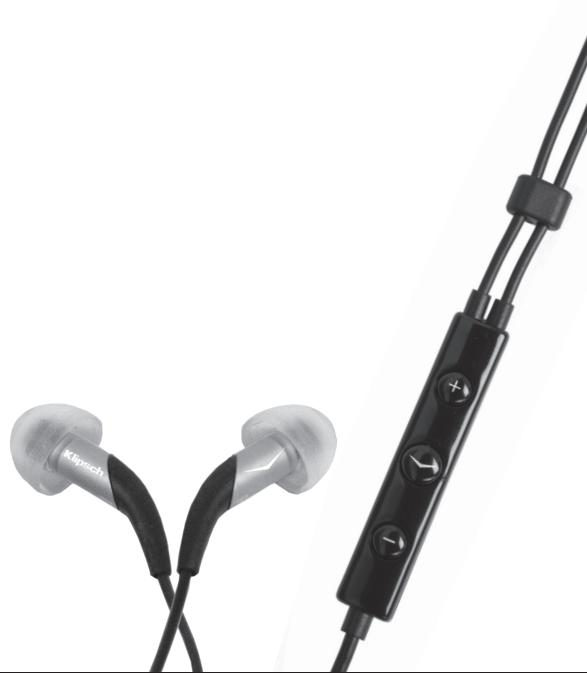
Image X10i Headphones + 3-Button Remote
Owner's Manual
Thank You
Thank you for purchasing the Klipsch Image X10i headset. The X10i is a very special headset, that with proper care, will last you for years to come. The X10i combines decades of Klipsch audio knowledge with a revolutionary 3 button music/phone control and Apple technology inside. The Klipsch team hopes you enjoy your purchase. Let us know at www.klipsch.com/forums.
Important Safety Information
1) If you hear ringing or experience pain or discomfort in your ears during or after using any in-ear audio product, that is a sign you are listening too loud. When your ears are exposed to high volumes (in excess of 85dB) for over an hour, you may be permanently damaging your hearing.
2) Turn down your listening device's volume to zero before you insert the Klipsch headphones and turn on the device. Once you have the headphones in, gradually increase the volume to a comfortable, moderate volume.
3) Clean your headphones with an antiseptic wipe frequently to avoid wax buildup. This improves the acoustic quality of your headphones.
4) NEVER operate a motor vehicle while listening to or wearing your headphones. Not only dangerous, it is illegal in many places.
5) NEVER operate heavy machinery while listening to or wearing your headphones.
6) We don't recommend you use the headphones while riding a bicycle, running, or walking in heavy traffic areas. If you do, do not fully insert the headphones into your ear and listen at a lower volume so you can hear ambient noise.
Listen Responsibly
The Occupational Safety Health Administration (OSHA) has issued headache usage recommendations for maximum daily exposure and sound pressure levels (measured in decibels (dB)). A decibel is a unit of measure of sound, and decibels increase exponentially as sound gets louder. For example, conversational speech is typically around 60dB, and a rock concert in a stadium is often about 110dB.
OSHA Guidelines for Noise Exposure Limits
| Sound Pressure Level | Recommended Maximum Exposure Per Day |
| 90dB | 8 Hours |
| 95dB | 4 Hours |
| 100dB | 2 Hours |
| 105dB | 1 Hour |
| 110dB | 30 Minutes |
| 115dB | 15 Minutes |
| 120dB | Avoid as damage may occur |
Compatibility

Made for iPod

Works with iPhone
*Remote and mic supported by iPod Nano (4th gen), Classic (120GB), Touch (2nd gen), iPhone 3GS and
newer, but not all Blackberry. Remote supported by iPod Shuffle (3rd gen).
Requires software v. 1.0.3 for iPod Nano (4th gen), 2.0.1 for Classic (120GB), and 2.2 or later for Touch (2nd gen). Support for Blackberry varies by model. Subject to change.
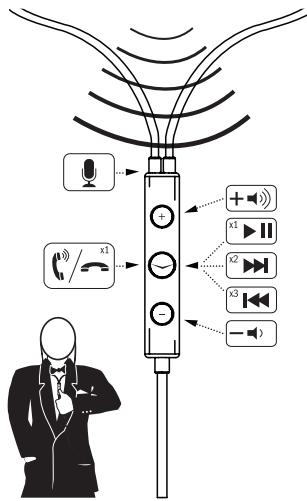
Headset Controls
Using the Klipsch Headphones
Out of the box, the Klipsch headphones are fitted with the medium-sized gels. You can make adjustments later if the fit isn't perfect.
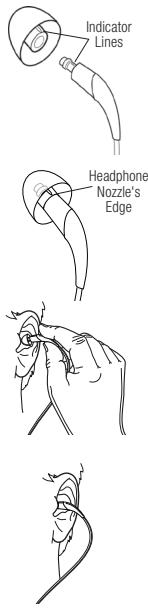
Ensure that the indicator marks in the ear gel and nozzle line up.
Important: Securely press the ear gel onto the headache nozzle. The ear gel locks into place over the nozzle and should seat firmly against the nozzle's edge.
The left headphone is inscribed with an "L" and the right headphone is inscribed with an "R".
Now slide the oval gel into the ear to create a seal in your ear canal. You should hear very muffled ambient noise and your own voice should sound louder to you. A good seal ensures good bass response.
If you do not feel that the Klipsch headphones are fitting comfortably inside your ear canals at this point, skip ahead to the next section "Selecting the Right Contour Ear Gels."
Locate the 3.5mm stereo plug at the end of the audio cord and insert it into your audio device. With the volume turned low, start playing music on your player and slowly increase the volume to a comfortable setting.
Selecting the Right Contour Ear Gels
Your new Klipsch Headphone package contains five sets of our patent-pending Contour ear gels. Our research has indicated that almost 60% of users will prefer the single-flange, medium-sized gel, so that set is affixed to the headphones in the box. There are three sizes of single flange ear gels (small, medium, and large) and two sizes of double flange ear gels (small and large).
Beyond fitting the headphone in your ear, the ear gel channels sound and forms a seal in your ear canal that allows the headphone to deliver a full range of audio frequencies. The flanges affect not only fit and comfort, but sound quality as well.
Single Flange Ear Gels
The single flange ear gels are general purpose gels. Most people will probably prefer these for everyday use. For example, if you

Single Flange
are going to ride a bicycle you should choose a single flange ear gel and wear it very loose in the ear so that you do not block ambient noise, such as other cyclists, cars, or other hazards.
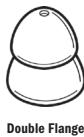
Double Flange Ear Gels
The double flange ear gels can assist those with harder to fit ears because of their shape. They can also offer a tighter seal (more isolation) for even better acoustic quality, and are more secure in the ear, and may be better suited to physical activity (other than the kind that occurs in traffic). For example, you might choose double flange ear gels if you are a passenger on an airplane and want to block out as much ambient noise as possible.
Changing the Contour Ear Gels
Start by removing the medium-sized gels currently on your headphones. With your thumb and index finger, squeeze the ear gel and pull it off the ear nozzle with a slight twisting action. Select your ear gel. There is an indicator line on the fitting inside the gel which lines up with an indicator line on the headphone's ear nozzle. Press the ear gel onto the headphone nozzle. The gel locks into place over the nozzle, but still rotates so you can further customize the fit to your ears. Using the steps in the last section, take them for a test listen. Repeat the whole process until you find the gels that fit best.
Care and Cleaning
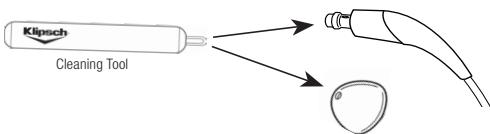
The ear gels and nozzle must be kept clean to prevent wax buildup which will have an adverse effect on your listening experience. Simply clean the surface of the ear gels with an alcohol wipe and use the included cleaning tool to remove wax from the ear gels and nozzle.
Troubleshooting
Visit klipsch.com/support/faqs
Warranty - U.S. and Canada
Klipsch warrants to the original retail purchaser that the headphones shall be free against defects in materials or workmanship in the Product's headphone external shell or in its headphone internal components for a period of two (2) years, from the date of purchase, if it is properly used and maintained. If this product proves defective in either material or workmanship, Klipsch, at its option, will (a) repair the product, or (b) replace the product, at no charge for parts or labor. If the product model is no longer available and cannot be repaired effectively or replaced with an identical model, Klipsch at its sole option may replace the unit with a current model of equal or greater value. To obtain a repair or replacement under the terms of this warranty, please contact our customer service group at 1-800-KLIPSCH. You will be required to submit a copy of the original receipt via fax or email. The receipt must reflect that you are the original purchaser, the product was bought from an authorized Klipsch retailer, and the product is still within warranty. You will be issued a return authorization number (RA#) and asked to ship the defective product, together with proof of purchase and RA#, prepaid insured to the following address: Klipsch
- 137 Heamstead #278 - Hope, AR 71801. Freight collect shipments will be refused. Risk of loss or damage in transit is to be borne by the purchaser. Once Klipsch receives the defective product, a repair or replacement will be initiated.
Limitations:
- This limited warranty does not cover failure of the product resulting from misuse, abuse, accident, neglect, mishandling, or wear from ordinary use or environmental deterioration.
- This limited warranty does not cover consequential damage to other components including headphone cable, adaptor jack, cleaning tool, airplane adaptor, additional ear tips, large or small carrying case. No such other components of or accessories of the Product are covered by this limited warranty. In addition, this limited warranty does not apply to any non-Company hardware product or any software; even if package is sold with the Product.
- This limited warranty is null and void for products altered or missing serial numbers and for products not purchased from an authorized dealer.
- This limited warranty terminates if you sell or otherwise transfer this product to another party.
THIS WARRANTY GIVES YOU SPECIFIC LEGAL RIGHTS. YOU MAY ALSO HAVE OTHER RIGHTS, WHICH CAN VARY FROM STATE TO STATE, JURISCICTION TO JURISCICTION AND COUNTRY TO COUNTRY. KILPSCH'S RESPONSIBILITY FOR MAL FUNCTIONS AND DEFECTS IN HARDWARE IS LIMITED TO REPLACEMENT OR REPAIR AS SET FORTH IN THIS WARRANTY STATEMENT. FOR US AND CANADIAN CUSTOMERS, KILPSCH DISCLAIMS ALL EXPRESS AND IMPLIED WARRANTYES FOR THE PRODUCT, INCLUDING BUT NOT LIMITED TO ANY IMPLIED WARRANTYES OF MERCHANTABILITY AND FITNESS FOR A PARTICULAR PURPOSE. KILPSCH DOES NOT ACCEPT LIABILITY FOR SPECIAL, INDIRECT, CONSEQUENTIAL OR INCIDENTAL DAMAGES, INCLUDING WITHOUT LIMITATION, ANY LIABILITY FOR THIRD PARTY CLAIMS AGAINST YOU FOR DAMAGES OR FOR PRODUCT NOT BEING AVAILABLE FOR USE. THE MAXIMUM LIABILITY FOR WHICH KILPSCH MAY BE RESPONSIBLE WILL BE NO MORE THAN THE AMOUNT YOU PAID FOR THE PRODUCT THAT IS THE SUBJECT OF THE CLAIM. SOME STATES, JURISCICTIONS OR COUNTRIES DO NOT ALLOW THE EXCLUSION OF CERTAIN IMPLIED WARRANTYES OR CONDITIONS, LIMITATIONS ON HOW LONG AN IMPLIED WARRANTY OR CONDITION LASTS, AND/OR THE EXCLUSION OR LIMITATION OF SPECIAL, INDIRECT, INCIDENTAL OR CONSEQUENTIAL DAMAGES, SO THE ABOVE LIMITATION OR EXCLUSION MAY NOT APPLY TO YOU.
Warranty Outside the U.S. and Canada
The Warranty on this product if it is sold to a consumer outside of the United States and Canada shall comply with applicable law. To obtain any applicable warranty service, please contact the dealer from which you purchased this product, or the distributor that supplied this product.
Product Registration
Register your product online at www.klipsch.com/register
- Klipsch will keep you up-to-date on new products and promotions
- Your personal information will never be resold
- This registration information is not used for warranty purposes.
Please retain your receipt for warranty claims.
Klipsch
3502 Woodview Trace
Indianapolis, IN 46268-1104
1-800-KLIPSCH
klipsch.com
©2010 Klipsch Group, Inc. All rights reserved.
Patents Pending.
"Made for iPod" and "Works with iPhone" means that an electronic accessory has been designed to connect specifically to iPod or iPhone, respectively, and has been certified by the developer to meet Apple performance standards.
Apple is not responsible for the operation of this device or its compliance with safety and regulatory standards.
iPod is a trademark of Apple Inc., registered in the U.S. and other countries.
iPhone is a trademark of Apple Inc., registered in the U.S. and other countries.
The remote and mic are supported by iPhone 3GS, iPod nano (4th and 5th generation), iPod touch (2nd generation) and iPod classic (120GB/ 160GB).
The remote is supported by iPod shuffle (3rd generation). Requires latest iPod software.
Merci
©2010 Klipsch Group, Inc. All rights reserved.
Patents Pending.
Gracias
©2010 Klipsch Group, Inc. All rights reserved.
Patents Pending.
谢谢

Bkndhbi cDnHMI
Phiemc
BbDAtbB YUHbE BKJIADLIUI CQHMIM DHAJIEM M BCTABITX IH OCHEN HNEIOTHO B UYLI, TAK TCHOBI JPM 3OM HE BNOKIOPOBAIC OKDYKAIOUII YUM, HANDPMEK, OT DpyTNB EBOONIENCTOB, ABTOMOINNI INI DpyNX NAOCTOHEN.
UHbIe BknaDbIuN C DByMaΦlaHcAmN
UyHbIe BkNlBdIiIN CdbYMaF hIaHcAMM MGYr OKa3aTbC rIPOE3bIMTM, KOMY TpyDIO NOOBpaBt BkNlBdIiIN IJRA CBOWIX UyHey IN3-3A IX QOOpMb.
Takme BkNlBdIiIN TAKKe OBeCNEHbIAIBOT LyHsye UYPNTOHRe (BoJIeNE HAdKHeHyIOI3OJIuIO) PnI yUHsEM AkyCTIECKM KAcHETBE N BoJee HADKeHNO YdePKBaIBaTOC BYUxh; OHm NYOT BbTy DObHcEe PnI F3UHcEckOy kAHTBIVGCTN (KpOME CUYaAEVB HINTEHCMBHO DORoPQHOrO DIIbIKeHN).

Bknaabibic
deymaanuamnn
HapnIMep, Bby MOjEe BbOpBaTy uHbIe BkLnBdUm C dByMg PJIaNcAmu npri nOJe Ha cAmoTe, KOrJa Bby XOTIne B MAKCImaMbHO B03MOKHOI CTeEH N3abNOKMOPObAtb OKpyKaIOUINI yM.
3aMeHa KOHTypHbIX yuHbIX BKnAbIiWei
CnEytuHbCoCHTnBkNAdhIe CpeDHeRoPA3MePepaYCTAHOBENHbIXHa HauHINKxAk. BoNtHMmU Kx4aTeBtHbMn PabLcMMrO CoMmTEy UhuoBKnAdhIu n CTnHITe ETo c HakoehNtHu, npm TOrn CneKrNaOBOPaBHra eTo. BByeBpTe dpyroTu yhoHKnBkDaH. Hu BCTBeK BHTpyr BKnAdhIu MeIMCeT hNtHKATOPHRA NInH, KOTOpYHO HADo CBmETCb T m INdKATOPHn LInmH eH a HakoehNtKe HauHINkA. HacadnTe yhoHKnBkDaH Ha HakoehNtK HauHINkA. BkNtBuIco OeJNcKOM BCTaHET Ho MecTo h AakoehNtKe, HO npm TOn OH MO Kootet NOBAPaBHbCt, YTO IO3BONlBAM PuJe pncIOcOBMbY cTPOIeTBK a BuaIM u. CnEya ONcAnHIO sIoR, npnbEeHNHomy B npdeIeCTbUoIeMaZdene, npOBepBe b CbIbMMObTb. BTOptorTe BEcB oNcAnHbNpocecc DoTex nop, noka He noDopepe Te lyuue BCero PoXdoAaime BKNAdhIu.
yXoI nOuInCTka
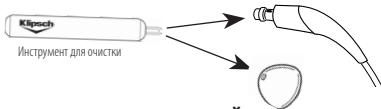
YuHbIe BkNAdBbIu HnAkoHeYNHmK DOnJXbIcOePckTaCBy B NCTOM BIDe, C TEM YTOb6blpeD0TATBtNb HaKoJIeNNEy UHIOH cepB, KOTOPA Oka3bVbaET HeNaIopnIpyTHoe BnIAHmHE Na CbIbMMoCTb. IIOpeRxHOCTb yUHbIX BkNAdBbIeMooKetB bIbO OHmEHa C NOMIoBk pONITAHbIX CNPTOM CanTeKToI pONiPrkN, a TAKCe K c NOMIoBk BxOJdAeB R BO KOMNIKT NOCTABKIM INCHPTyMeHNTa DnyAuaENHeYuOH cepB m3 YUHbIX BkNAdBbIeMn HKOHeYNHKOB.
YcTpaHHeHne HncnPaBHoTei
klipsch.com/support/faqs
TapaHTn3a npedeJAMCUHa KaHabi
FapamHnMaHaDaHnHoeI3eDnme, npdoaHnOeNtpeb6TeNIO, hXoJdAeMcy3a npednAmm CIIIAu KaHAdi, doJxHnAOTBe4Tbpe6OBaHnM pinnMeHnMOr 3aKOHdAteBCTBa. IJa oBeceNeHnnaIIOBO pRIMENIMO rapaTAMHOIgO BOcJIyKBMHA HPOCMCB43aBcC dIINepOM, yKOTOPOro 6blIO pIIOBpTeHO 3TO I3eDnme, INC pIpePITnMIeM OTTOBOM TropBIM — NOCATUkOM 3TOI3eDnma.
3aerntprnyte Baun pOduKT ha caiye www.klipsch.com/register