
RY5300 - Vacuum Cleaner ROYAL - Free user manual and instructions
Find the device manual for free RY5300 ROYAL in PDF.



| Product Type | Canister Vacuum Cleaner |
| Brand | ROYAL |
| Model | RY5300 |
| Power Supply Voltage | 120 V ~ 60 Hz |
| Dust Bag Type | Disposable |
| Automatic Nozzle Adjustment | Yes |
| Corner Cleaning Function | Yes |
| Headlight | 15-20 W Bayonet Bulb |
| Brush Roll Belt | Replacement recommended every 6 months |
| Exhaust Filter | Ref. 1-231F13-000 |
| Dust Compartment Filter | Ref. 1-231LG1-000, washable |
| Motor Thermal Protection | Yes (overheat thermostat) |
| Grounding Required | Yes |
| Included Accessories | Extension wand, crevice tool, dusting brush |
| Maintenance | Regular cleaning of brush roll, bag and filter replacement |
| Warranty | Limited warranty (see manual) |
Frequently Asked Questions - RY5300 ROYAL
User questions about RY5300 ROYAL
0 question about this device. Answer the ones you know or ask your own.
Ask a new question about this device
Download the instructions for your Vacuum Cleaner in PDF format for free! Find your manual RY5300 - ROYAL and take your electronic device back in hand. On this page are published all the documents necessary for the use of your device. RY5300 by ROYAL.
USER MANUAL RY5300 ROYAL
Upright Vacuum Cleaner Owner's Manual
- Let us help you put your vacuum together or answer any questions, call: 1-800-321-1134 (USA & Canada)
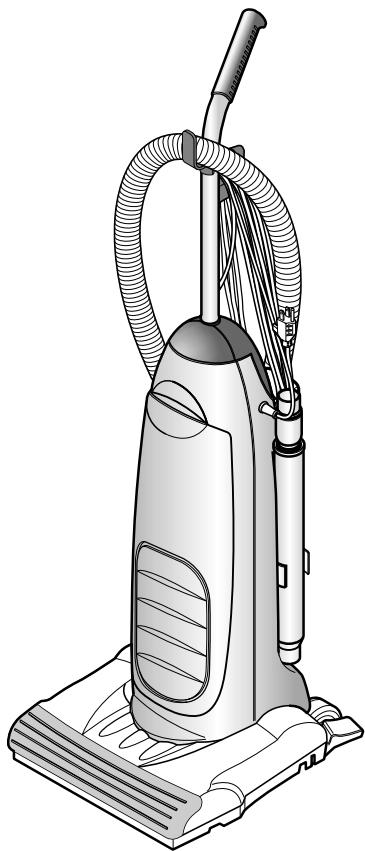
PLEASE READ THIS MANUAL THROUGHLY AND CAREFULLY BEFORE OPERATING THE CLEANER LIRE CE GUIDE ATTENTIVEMENT AVANT DE FAIRE FONCTIONNER L'ASPIRATEUR
Cleaner assembly may include small parts, Small parts can present a choking hazard.
For quick reference, please record your vacuum information below.
Model#:
Mfg.Code:
(Mfg. code located an the lower backside of cleaner)
CONSUMER INFORMATION 3
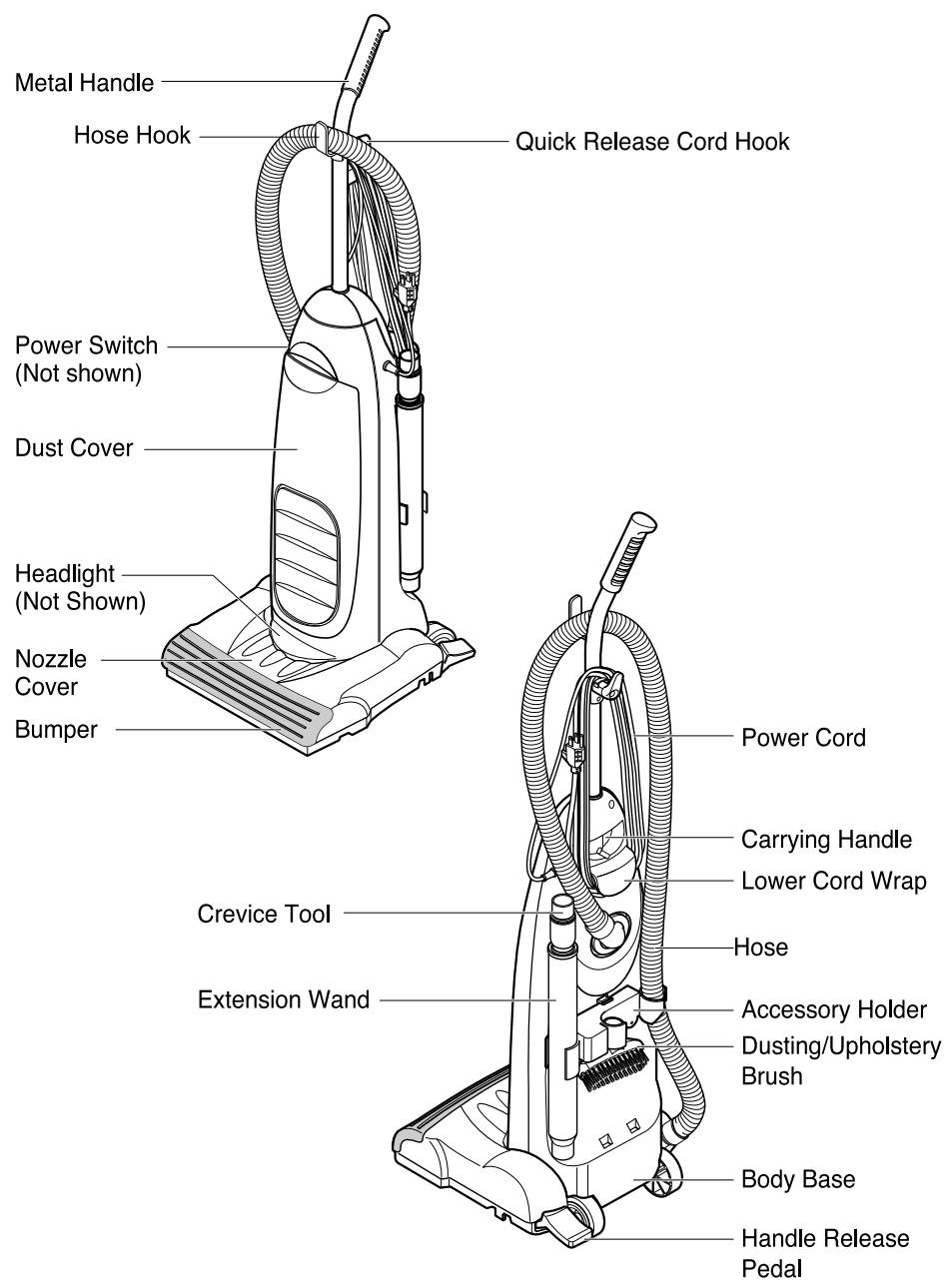
CLEANER DESCRIPTION 5
ASSEMBLING CLEANER 6
-STEP1.UNPACKCARTON 6
-STEP2.ASSEMBLEHANLDE
-STEP3.ASSEMBLE CORD
- STEP 4. ATTACH TOOLS
-STEP5.ASSEMBLEHOSE 8
SPECIAL FEATURES 9
- Automatic Adjusting Nozzle 9
- Edge Cleaning Feature 9
OPERATION 10
- Important Safety Tips 10
- On/Off Switch 10
- Handle Positions 10
-Transporting Cleaner 11
-Using the Cord Hook 11
-Using Attachments 12
REMOVING CLOGS 13
REPLACEMENT INSTRUCTIONS 14
- Replacing the Head Light Bulb 14
- Removing/Installing the Bottom Plate 14
- Replacing Belt and/or Brushroll 15
- Replacing Exhaust Filter 16
- Replacing Filter Bag 17
- Dust Compartment Filter 17
MAINTENANCE 18
- Cleaning Brushroll 18
BEFORE REQUESTING SERVICE 19
LIMITED WARRANTY
To the consumer, Royal Appliance Mfg. Co. warrants this vacuum cleaner to be free of defects in material or workmanship commencing upon the date of the original purchase. Refer to your vacuum cleaner carton for the length of warranty and save your original sales receipt to validate start of warranty period.
If the vacuum cleaner should become defective within the warranty period, we will repair or replace any defective parts free of charge. The complete machine must be delivered prepaid to any ROYAL® Authorized Sales & Warranty Service Station. Please include complete description of the problem, day of purchase, copy of original sales receipt and your name, address and telephone number. If you are not near a Warranty Station, call the factory for assistance at USA & Canada: 1-800-321-1134. Use only genuine Royal® replacement parts.
The warranty does not include unusual wear, damage resulting from accident or unreasonable use of the vacuum cleaner. This warranty does not cover brushes, flat belts, filters and bulbs. This warranty does not cover unauthorized repairs. This warranty gives you specific legal rights and you may also have other rights (Other rights may vary from state to state in the USA).
IMPORTANT SAFETY INSTRUCTIONS
When you use an appliance, basic precautions should always be followed, including the following:
- READ ALL INSTRUCTIONS BEFORE USING THIS APPLIANCE
- ALWAYS FOLLOW THESE SAFETY INSTRUCTIONS
DO NOT LEAVE CLEANER UNATTENDED - WARNING - FULLY ASSEMBLE CLEANER BEFORE OPERATING
- WARNING - THE CORDS, WIRES AND/OR CABLES SUPPLIED WITH THIS PRODUCT CONTAINS CHEMICALS, INCLUDING LEAD OR LEAD COMPOUNDS, KNOWN TO THE STATE OF CALIFORNIA TO CAUSE CANCER AND BIRTH DEFECTS OR OTHER REPRODUCTIVE HARM. WASH HANDS AFTER USING.
WARNING:TO REDUCE THE RISK OF FIRE, ELECTRIC SHOCK OR INJURY:
- Do not leave appliance when plugged in. Unplug from outlet when not in use and before servicing.
- Do not use outdoors or on wet surfaces.
- Do not allow to be used as a toy.Close attention is necessary when used by or near children.
- Use only as described in this manual.Use only manufacturer's recommended attachments.
- Do not use with damaged cord or plug. If appliance is not working as it should, has been dropped, damaged, left outdoors, or dropped into water, return it to a service center for inspection. Call 1-800-321-1134 for the nearest service center.
- Do not pull or carry by cord, use cord as a handle, close a door on cord, or pull cord around sharp edges or corners. Do not run appliance over cord.
- Keep cord away from heated surfaces.
- Do not unplug by pulling on cord. To unplug, grasp the plug, not the cord.
- Do not handle plug or appliance with wet hands.
- Do not put any object into openings. Do not use with any opening blocked; keep free of dust, lint, hair and anything that may reduce air flow.
- Keep hair, loose clothing, fingers, and all parts of body away from openings and moving parts.
- Turn off all controls before unplugging.
- Use extra care when cleaning on stairs.
- Do not use to pick up flammable or combustible liquids, such as gasoline, or use in areas where they may be present.
- Look on your vacuum cleaner and follow all label and marking instructions.
- Do not use an extension cord with this cleaner.
- Keep end of hose, wands and other openings away from your face and body.
- Keep your hands, feet, hair and clothing away from moving parts; especially the revolving brush.
- Do not use the vacuum cleaner without dust bag and/or filters in place.
- Do not pick up anything that is burning or smoking, such as cigarettes, matches, or hot ashes.
- Connect to a properly grounded outlet only. See Grounding Instructions.
SAVE THESE INSTRUCTIONS
NOTE: RETURN WARRANTY CARD TO REGISTER YOUR CLEANER
MAINTENANCE:
WARNING: TO REDUCE THE RISK OF PERSONAL INJURY-UNPLUG CLEANER BEFORE SERVICING.
Proper maintenance of your cleaner will assure continued effective cleaning performance.
- Always use genuine Royal® replacement parts.
- Change paper bag frequently.
- WARNING: Do not use any sharp objects to clean out hose since they could cause damage to the hose.
- Occasionally remove brushroll and clean debris from end caps to keep brush rotating smoothly.
GROUNDING INSTRUCTIONS
This appliance must be grounded. If it should malfunction or breakdown, grounding provides a path of least resistance for electric current to reduce the risk of electric shock. This appliance is equipped with a cord having an equipment-grounding-conductor and grounding plug. The plug must be inserted into an appropriate outlet that is properly installed and grounded in accordance with all local codes and ordinances.
WARNING: Improper connection of the equipment-grounding conductor can result in a risk of electric shock. Check with a qualified electrician or service person if you are in doubt as to whether the outlet is properly grounded. Do not modify the plug provided with the appliance-if it will not fit the outlet, have a proper outlet installed by a qualified electrician.
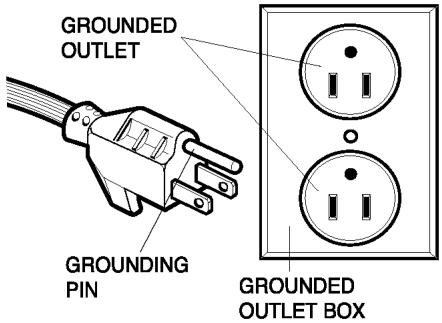
This appliance is for use on a nominal 120-volt circuit and has a grounding attachment plug that looks like the plug illustrated in the sketch above. Make sure that the appliance is connected to an outlet having the same configuration as the plug. No adapter should be used with this appliance.
Thermal protector: This vacuum cleaner has a special thermostat that protects the vacuum cleaner in case of motor overheating. If the cleaner suddenly shuts off, turn off the switch and unplug the vacuum cleaner. Check the vacuum cleaner for a possible source of overheating such as a full bag, a blocked hose or clogged filter. If these conditions are found, fix them and wait at least 30 minutes before attempting to use the vacuum cleaner. After the 30 minutes period, plug the vacuum cleaner back in and turn on the switch. If the vacuum cleaner still does not run, contact a qualified electrician.

WARNING
Electrical Shock Hazard
Do not plug into the electrical supply until the assembly is complete.
Failure to do so could result in electrical shock or injury.
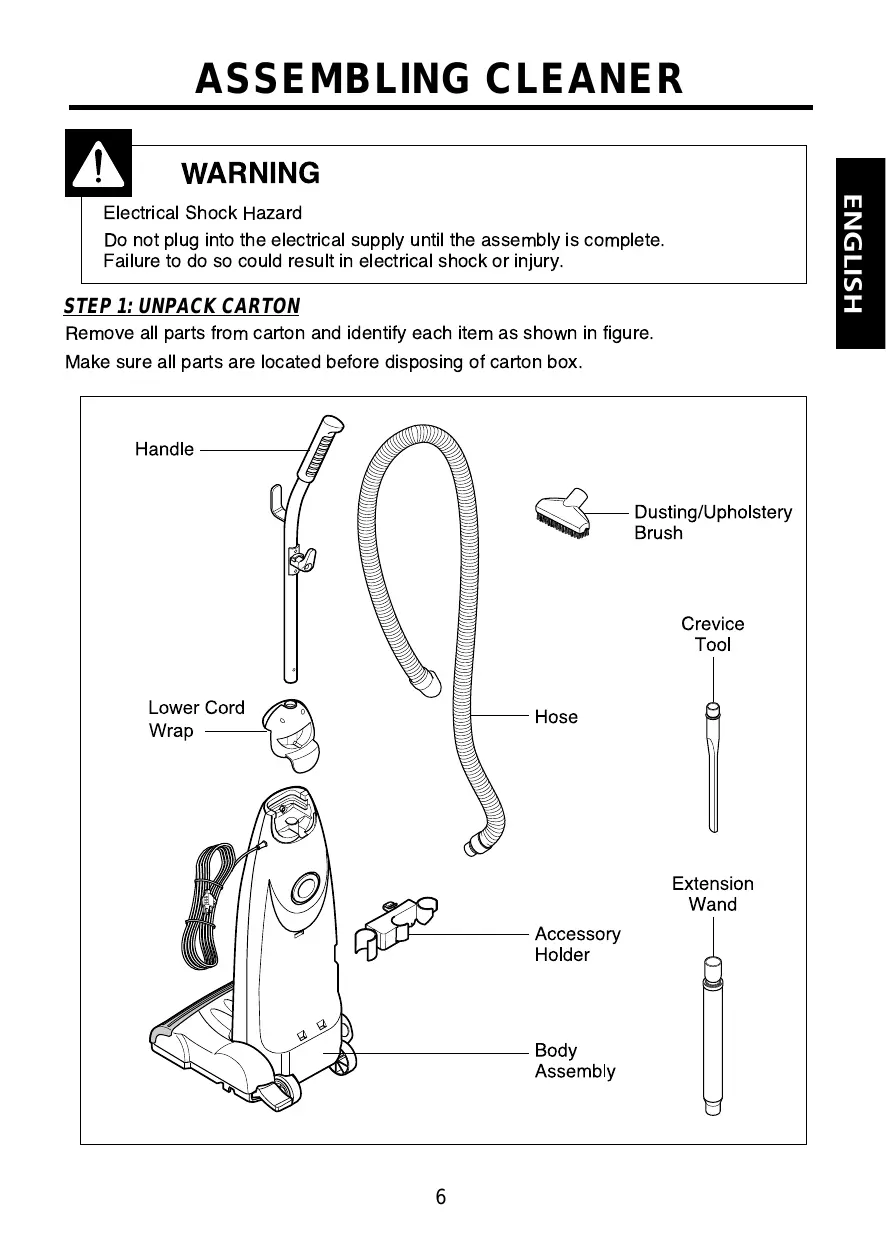
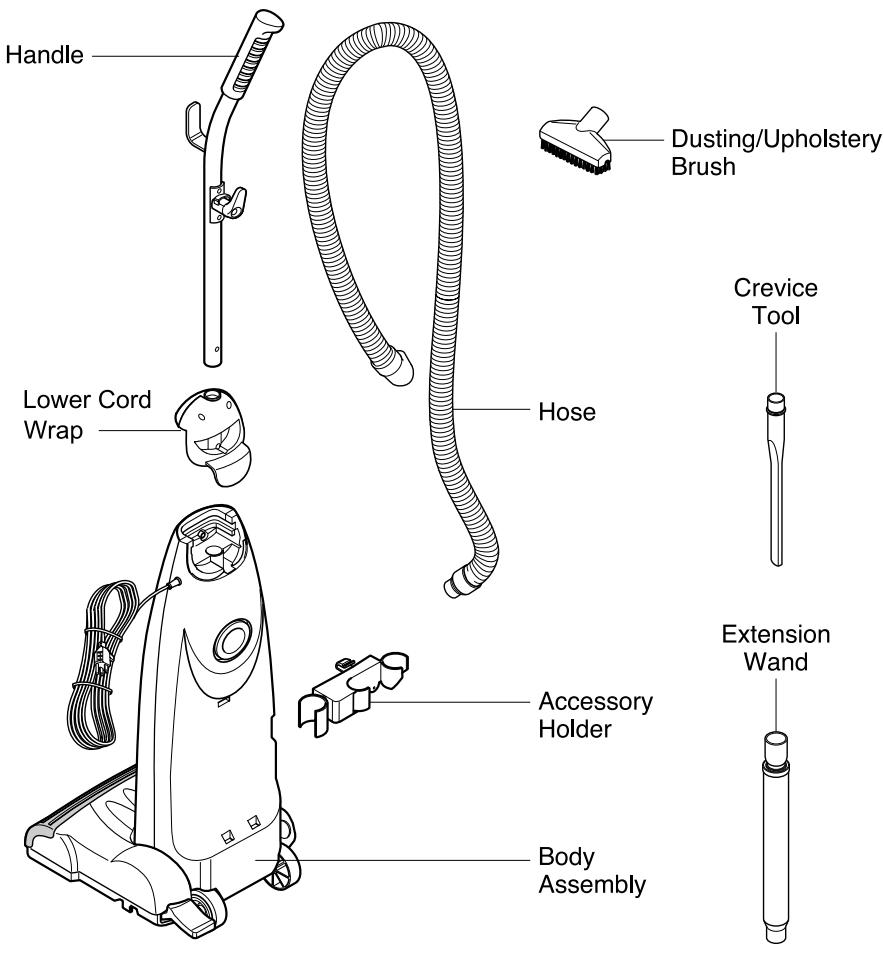
STEP 1: UNPACK CARTON
Remove all parts from carton and identify each item as shown in figure.
Make sure all parts are located before disposing of carton box.

WARNING
Electrical Shock Hazard
Do not plug into the electrical supply until the assembly is complete.
Failure to do so could result in electrical shock or injury.
STEP 2: ASSEMBLE HANDLE
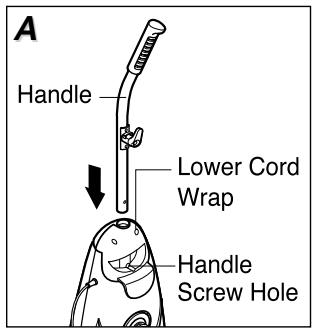
Attach lower cord wrap to body base. Position the handle as shown.
Slide the handle into the opening at the top of the lower cord wrap.(Fig. A) Insert the screw into the handle screw hole.
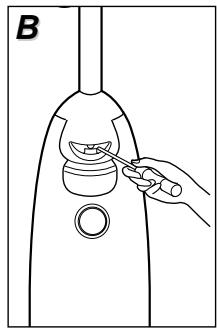
Using a screwdriver, tighten the screw.(Fig. B)
STEP 3: ASSEMBLE CORD
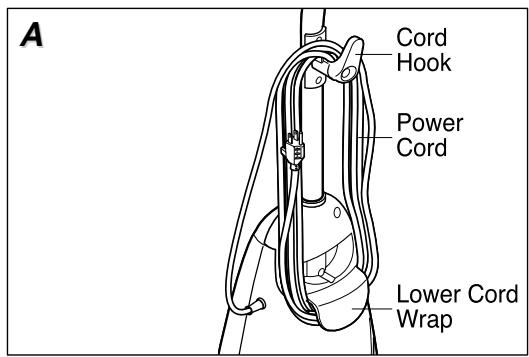
Make sure the quick release cord hook is in the upright position.
Wrap the power cord around the quick release cord hook and lower cord retainer, and then lock the power cord plug onto the power cord.(Fig. A)
STEP 4: ATTACH TOOLS
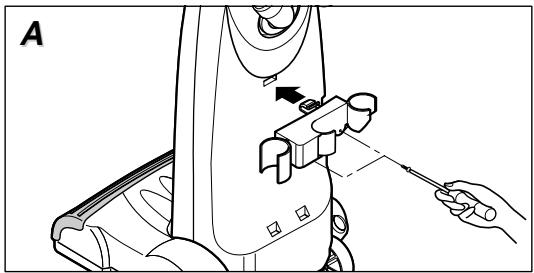
Insert the tab of accessory holder into the groove at the rear of the body, and snap the hook into the upper groove, and screw it on the columns which are on the back of the body base.(Fig. A)
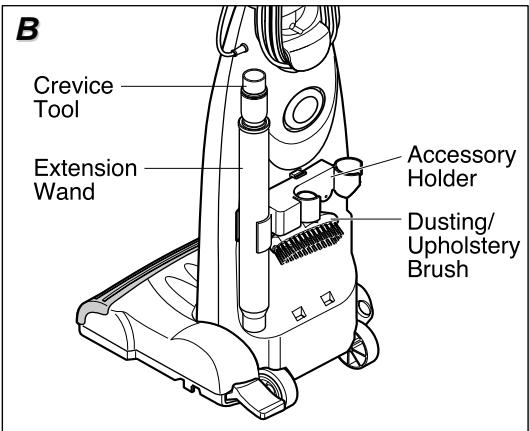
Attach the extension wand on the left side of accessory holder.

WARNING
Electrical Shock Hazard
Do not plug into the electrical supply until the assembly is complete.
Failure to do so could result in electrical shock or injury.
Slide the crevice tool into the extension wand.
Place the dusting brush on the top of the accessory holder.(Fig. B)
STEP 5: ASSEMBLE HOSE
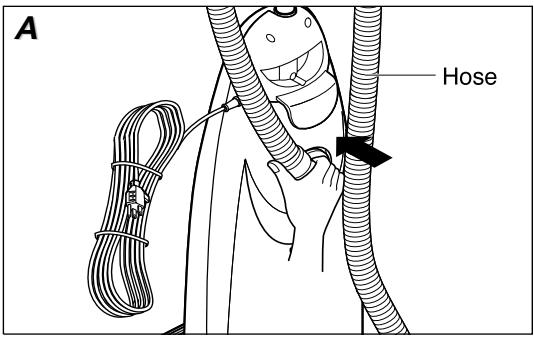
Insert the hose collar into the opening at the rear of the body until it snaps. (Fig. A)
Place hose on hose hook, located on the front of the handle.
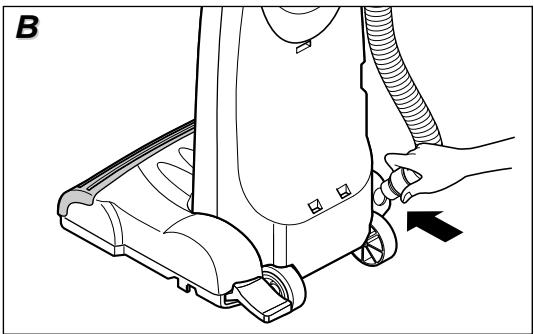
Insert another hose collar into the lower part of the body. (Fig. B)
Attach the hose on the right side of accessory holder.
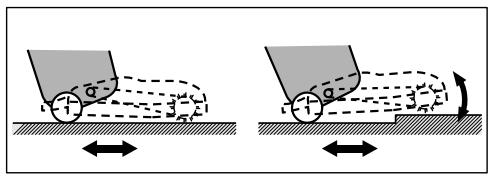
Automatic Adjusting Nozzle
Your upright vacuum cleaner is designed with an automatic adjusting nozzle. No manual adjustments are required. The height of nozzle is instantly and automatically adjusted to any carpet pile height.
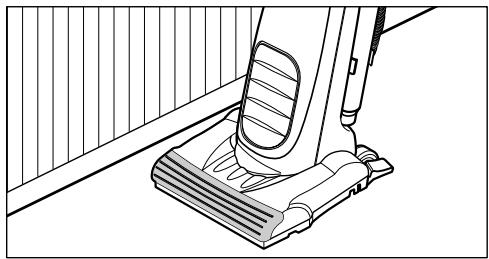
Edge cleaning provides for improved cleaning of carpets near walls and furniture.

WARNING
Personal Injury and Product Damage Hazard
- DO NOT plug in if switch is in the ON position. Personal injury or damage could occur.
- DO NOT use outlets above counters. Damage to items in surrounding area could occur.
Important Safety Tips
Before you plug in your vacuum cleaner, make sure that the voltage indicated on the rating label of the vacuum cleaner is the same as your local supply.
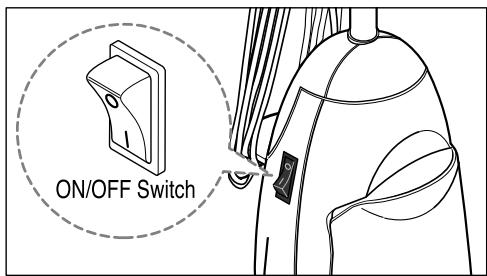
On/Off Switch
Plug the power cord to operate cleaner.
I is marked on ON position.
0 is marked on OFF position.
If the vacuum cleaner stops automatically, always turn off the switch and unplug the unit before checking.
Handle Positions
The handle may be adjusted to any position required.
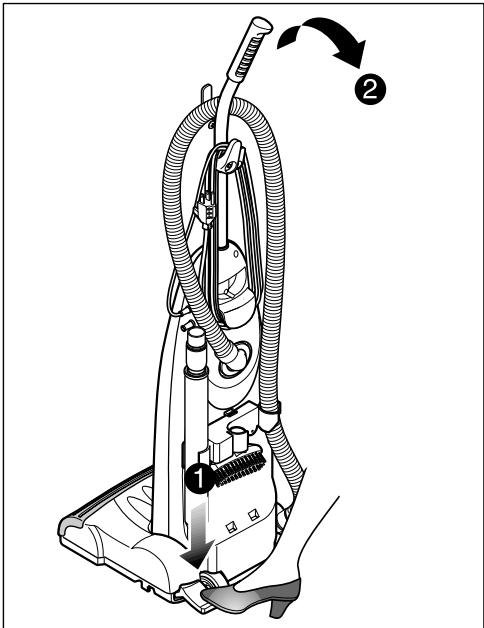
Step on the handle release pedal. The handle is released to move up and down freely. Adjust the body to any position required.
When cleaning under furniture, parallel position may be used. To get to the parallel position, press handle release pedal again.
To store vacuum or use attachments, set the handle to the upright position.

WARNING
Personal Injury and Product Damage Hazard
- DO NOT plug in if switch is in the ON position. Personal injury or damage could occur.
- DO NOT use outlets above counters. Damage to items in surrounding area could occur.
Transporting Cleaner
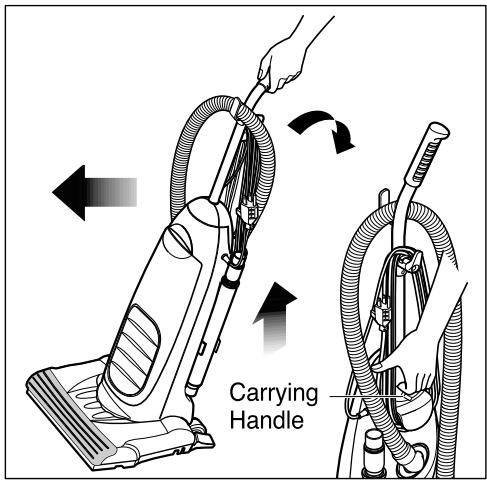
To move your vacuum cleaner from room to room, put the handle in upright position, tilt the vacuum cleaner back on its rear wheels, and push forward.
The cleaner can also be moved by lifting it, from the carrying handle as shown.
Using the Cord Hook
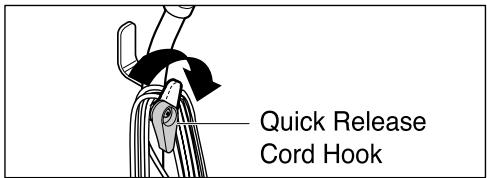
To release the power cord, rotate the quick release cord hook downward and the entire power cord will drop off the hook for immediate use.
Do not unplug the cord by pulling on the cord. Grasp the plug head and pull to unplug the vacuum cleaner.
Return the quick release cord hook to the upright position before attempting to rewind the cord.

WARNING
Personal Injury and Product Damage Hazard
- DO NOT plug in if switch is in the ON position. Personal injury or damage could occur.
- DO NOT use outlets above counters. Damage to items in surrounding area could occur.
Using Attachments
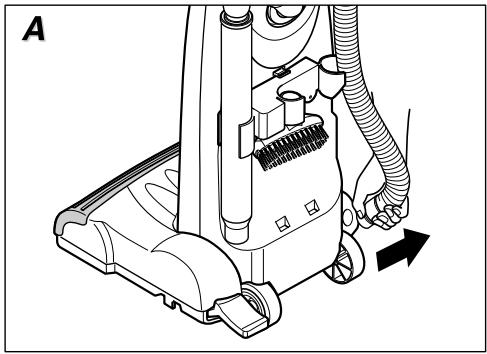
Remove the lower end of hose from the vacuum cleaner by pulling out the hose collar. (Fig. A)
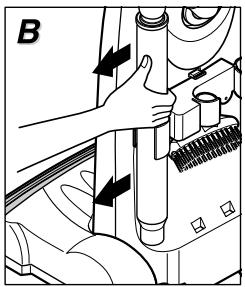
Remove the extension wand from its storage position.(Fig. B)
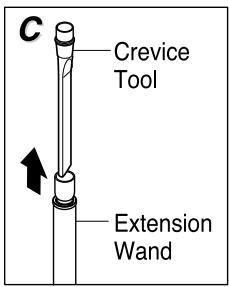
Slide the crevice tool out of the extension wand.(Fig. C)
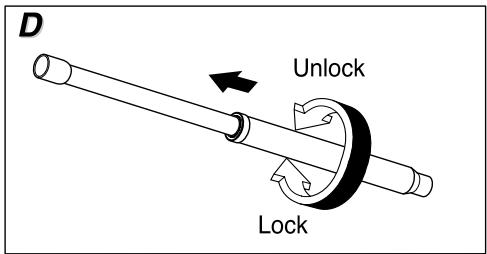
Turn the lower extension wand to the UNLOCK position. (Fig. D)
Extend the wand to its full length.
Turn the lower wand to LOCK position.(Fig. D)
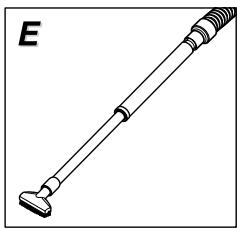
Attach the extension wand onto the hose collar.(Fig. E)
Attach crevice tool or dusting brush onto the end of extension wand.
Crevice tool and dusting brush will also fit on the hose collar.
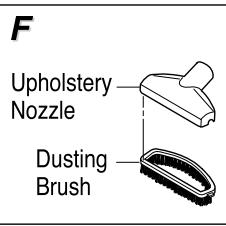
The dusting brush has two options. When the front brush is removed, the remaining part can be used as an upholstery nozzle.(Fig. F)

CAUTION
When using attachments, be careful not to overextend the hose. This could cause the vacuum cleaner to tip over.

WARNING
Electrical Shock or Personal Injury Hazard
Disconnect electrical supply before servicing or cleaning the unit. Failure to do so could result in electrical shock or personal injury from the vacuum cleaner suddenly starting.
If the vacuum cleaner does not seem to have adequate suction, first check for full bag and dust chamber.
If the filter bag and dust chamber are free of clogs, check the hose and extension wand.
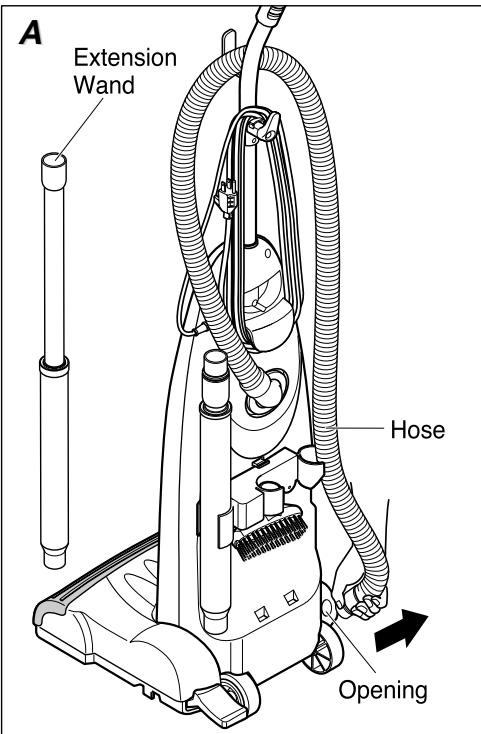
Visually inspect the hose and the opening of the nozzle cover into which the hose is inserted.(Fig. A)
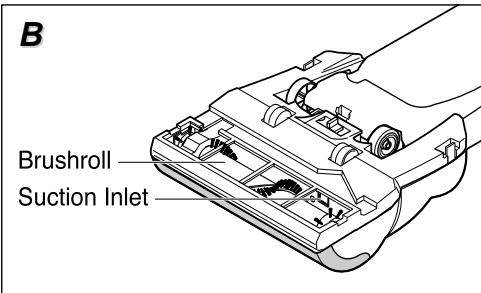
If the clog still exists, make sure to turn the vacuum cleaner off and unplug the power cord. Turn the vacuum cleaner over to expose the underside. Check the brushroll area and suction inlet.(Fig. B)
Return the vacuum cleaner to the upright position before plugging into the electrical outlet.

WARNING
Electrical Shock or Personal Injury Hazard
Disconnect electrical supply before servicing or cleaning the unit. Failure to do so could result in electrical shock or personal injury from the vacuum cleaner suddenly starting.
Replacing the
Head Light Bulb
Before replacing any parts, disconnect the vacuum cleaner from the electrical outlet.
Place the handle to parallel position.
(Fig. A)
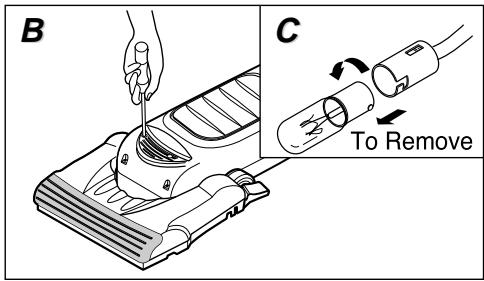
Unscrew and remove the light cover.
(Fig. B)
To remove old bulb, push it in toward bulb socket while turning counter-clockwise, then remove.(Fig. C)
Use a bayonet base bulb having the rating of 15~20W. To install a new bulb, push it in toward the bulb socket and turn it clockwise.
Replace the light cover and secure it with screws.
Removing/Installing the Bottom
Plate
Before replacing any parts, disconnect the vacuum cleaner from the electrical outlet.
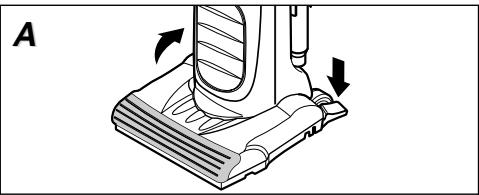
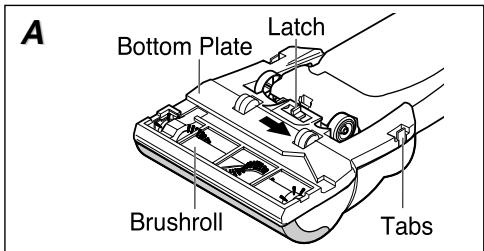
To remove the bottom plate, slide latch as shown in the figure.(Fig. A)
DO NOT UNSCREW.
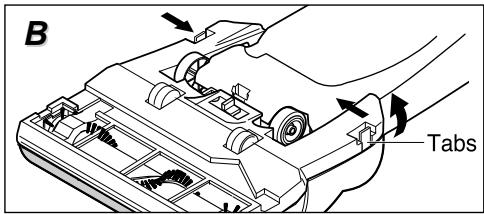
Pushing the locking tabs toward the center of the vacuum, pull the bottom plate away from the nozzle housing.(Fig. B)
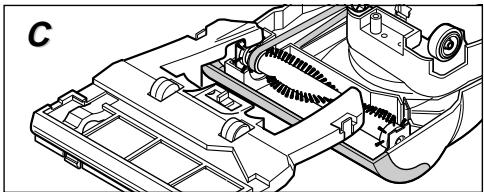
To install the bottom plate, hook the front end of bottom plate into the slots on the front of nozzle.(Fig. C)
Press the bottom plate until the locking tabs snap into place then slide the latch to secure.

WARNING
Electrical Shock or Personal Injury Hazard
Disconnect electrical supply before servicing or cleaning the unit. Failure to do so could result in electrical shock or personal injury from the vacuum cleaner suddenly starting.
Replacing Belt and/or Brushroll
For replacement belts call 1-800-321-1134 for belt style 12.
Check the belt and brushroll frequently. When the belt and/or brushroll is broken or worn out, replace a new one. Belt should be replaced every 6 months.
Turn the unit over and remove the bottom plate as described in Removing/Installing the bottom plate section.
To remove the belt or brushroll, grasp both ends of brushroll and lift it slowly. Remove the belt from brushroll pulley and motor shaft.
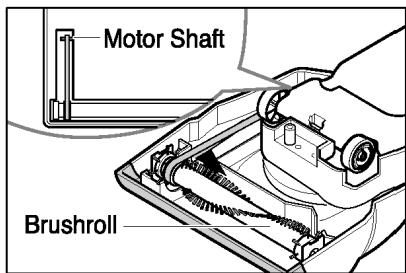
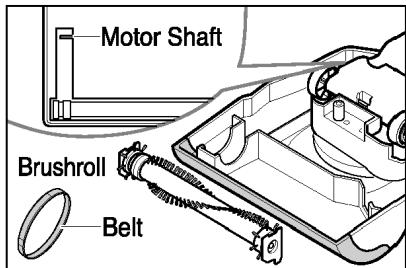
Loop the new belt around the motor shaft and brushroll pulley.
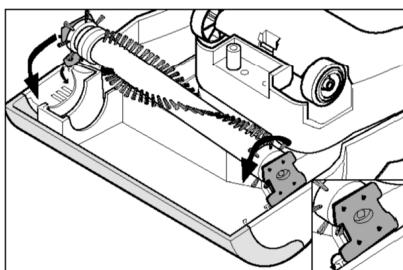
Rest the brushroll endcaps on grooves as shown.
Roll brushroll forward, replacing it into the nozzle head.
After installing the brushroll, turn it by hand making sure that the belt is not twisted or pinched and all parts turn freely.
Replace the bottom plate as described in
Removing/Installing the bottom plate section.

WARNING
Personal Injury Hazard
Be careful when removing the brushroll as the belt tension is high.
Failure to do so could result in personal injury from the brushroll releasing quickly and snapping away.
Replacing Exhaust Filter
For replacement filters call 1-800-321-1134.
Exhaust filter part #1-231F13-000, dust
compartment filter part #1-231LG1-000.
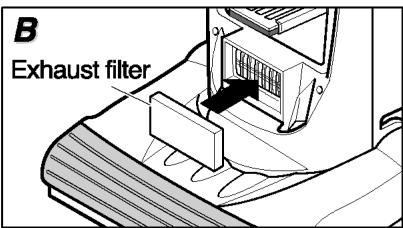
This exhaust filter should be replaced after every third bag change.
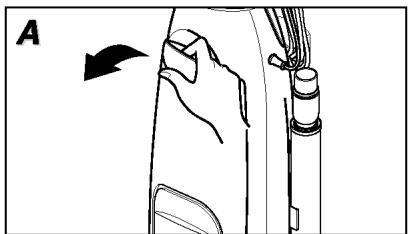
Pull outward on the dust cover grip to remove dust cover. (Fig. A)
Replace exhaust filter and (Fig. B)
close the dust cover.

WARNING
Electrical Shock or Personal Injury Hazard
Disconnect electrical supply before servicing or cleaning the unit. Failure to do so could result in electrical shock or personal injury from the vacuum cleaner suddenly starting.
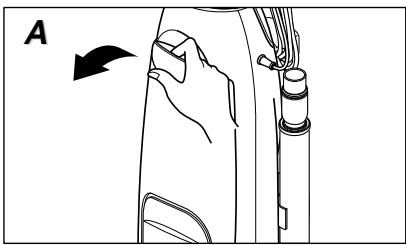
Replacing Filter Bag
Check the filter bag from time to time. When excessive dirt accumulates, your cleaner may not operate effectively.
If the vacuum cleaner does not seem to have adequate suction, check the filter bag.
DISCONNECT THE CLEANER FROM THE ELECTRICAL OUTLET.
Pull the dust cover grip forward and remove the dust cover from the cleaner.(Fig. A)
Grasp the filter bag collar and pull it out.
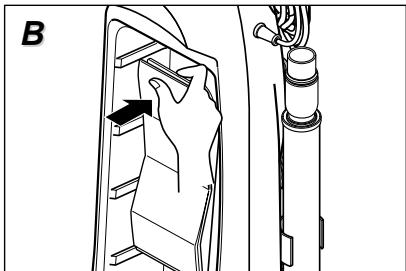
Attach a new filter bag onto the filter bag holder holding the filter bag collar and pushing back as shown in the figure.(Fig. B) Tuck the bottom of the bag under.
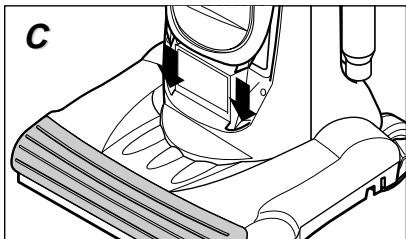
Insert the tabs on the bottom of dust cover into the grooves on the dust compartment.(Fig. C)
Rotate the dust cover up into the closed position and press it until the hook snaps into place.
Dust Compartment Filter
The secondary filter is located inside the dust compartment. When installing or changing the filter bag, always check the secondary filter. When the secondary filter becomes dirty, remove the filter and clean by shaking off or brushing off over trash container.
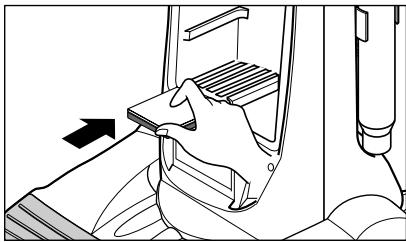
To remove or replace this filter, open the dust cover and pull it out from the bottom of dust compartment.
To install filter, slide this filter back into place. It should be fully inserted into the projections of the bottom of dust compartment.

WARNING
Electrical Shock or Personal Injury Hazard
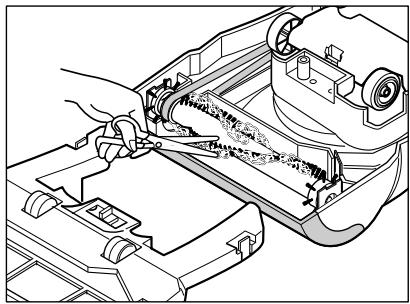
Disconnect electrical supply before servicing or cleaning the unit. Failure to do so could result in electrical shock or personal injury from the vacuum cleaner suddenly starting.
Cleaning Brushroll
In order to keep the cleaning efficiency high, clean the brushroll frequently.
Make sure to unplug the unit.
Turn the unit over on the floor. If necessary, remove bottom plate as described in Removing/ Installing the bottom plate section.
Remove the entangled materials, such as carpet pile, lint, threads, hair, etc.
Review this chart to find out a possible solution if a minor problem occurs. Any service needed, other than those described here, should be performed by an authorized service center.

WARNING
Electrical Shock Hazard
Disconnect electrical supply before servicing or cleaning the unit. Failure to do so could result in electrical shock or personal injury.
| Problem | Possible cause | Possible solution |
| Cleaner won't run. | 1. Not firmly plugged in 2. No voltage in wall outlet 3. On/Off switch not turned on 4. Broken fuse 5. Thermal protector operated | 1. Plug in firmly. 2. Check fuse or breaker. 3. Push On/Off switch. 4. Ask authorized service center. 5. Refer to page 4. |
| Cleaner won't pick up. | 1. Broken or worn belt 2. Worn brushroll bristles 3. Full or clogged filter bag 4. Hole in hose 5. Dust cover improperly installed 6. Belt not installed on motor shaft | 1. Replace belt. 2. Replace brushroll. 3. Change filter bag. 4. Replace hose. 5. Properly install 6. Install belt on motor shaft. |
| Dust escapes the filter bag. | 1. Filter bag improperly installed 2. Torn filter bag | 1. Properly install filter bag. 2. Replace filter bag. |
ANY OTHER SERVICING SHOULD BE DONE BY AN AUTHORIZATION SERVICE REPRESENTATIVE CUSTOMER SERVICE (1-800-321-1134)
In the event that further assistance is required, see your Yellow Pages for an authorized Royal® Dealer. Costs of any transportation to and from any place of repair are to be paid by the owner. The service parts used in this unit are easily replaced and readily available from an authorized Royal® Dealer or retailer. Always identify your cleaner by the model number and manufacturing code when requesting information or ordering replacement parts. (The model number appears on the bottom of the cleaner.)
TABLE DES MATIÈRES
Courroie style 12, ref. 3-910340-001.