
MCS 130 - Speaker BOSTON ACOUSTICS - Free user manual and instructions
Find the device manual for free MCS 130 BOSTON ACOUSTICS in PDF.


| Product Type | 5.1 Multi-Channel Speaker System |
| Brand | BOSTON ACOUSTICS |
| Model | MCS 130 |
| Dimensions (LCR) | 352 x 127 x 103 mm (H x W x D) |
| Dimensions (Surround) | 214 x 140 x 102 mm |
| Dimensions (Subwoofer) | 349 x 419 x 419 mm |
| Weight (LCR) | 2.27 kg |
| Weight (Surround) | 1.36 kg |
| Weight (Subwoofer) | 14.15 kg |
| Frequency Response (LCR) | 110 Hz – 20 kHz |
| Frequency Response (Surround) | 120 Hz – 20 kHz |
| Frequency Response (Subwoofer) | 40 – 150 Hz |
| Sensitivity | 88 dB [2.8 V at 1 m] |
| Nominal Impedance | 8 ohms |
| Crossover Frequency | 2,700 Hz |
| Amplifier Power (Subwoofer) | 200 W RMS with BassTrac® circuit |
| Magnetic Shielding | MagnaGuard® |
| Power Supply | Mains (Subwoofer) |
| Maintenance | Clean with a dry cloth; check connections once a year |
| Safety | Double insulation, do not expose to water, respect polarity |
| Warranty | 5 years (mechanical), 1 year (electrical) |
| Accessories Included | Speaker wires (12 m and 4.6 m), subwoofer cable (4.6 m), feet, rubber bumpers |
| Mounting Options | Tabletop or wall mounting (keyhole slots on back) |
| Compatibility | Dolby Digital, DTS, Dolby Pro Logic; speakers set to "Small" |
Frequently Asked Questions - MCS 130 BOSTON ACOUSTICS
User questions about MCS 130 BOSTON ACOUSTICS
0 question about this device. Answer the ones you know or ask your own.
Ask a new question about this device
Download the instructions for your Speaker in PDF format for free! Find your manual MCS 130 - BOSTON ACOUSTICS and take your electronic device back in hand. On this page are published all the documents necessary for the use of your device. MCS 130 by BOSTON ACOUSTICS.
USER MANUAL MCS 130 BOSTON ACOUSTICS
5.1 Surround Speaker System
Espanol
Horizon MCS 130
Sistema de Altavoces
Surround 5.1
Italiano
Horizon MCS 130
Sistema surround 5.1
Deutsch
MCS 130
5.1 Surround
Laufsprechersystem
Français
Horizon MCS 130
IMPORTANT SAFETY INSTRUCTIONS

This symbol found on the apparatus indicates hazards arising from dangerous voltages.

This symbol found on the apparatus indicates the user should read all safety statements found in the user manual.

This symbol found on the apparatus indicates double insulation.
- Read these instructions.
- Keep these instructions.
- Heed all warnings.
- Follow all instructions.
- Do not use this apparatus near water.
- Clean only with dry cloth.
- Do not block any ventilation openings. Install in accordance with the manufacturer's instructions.
- Do not install near any heat sources such as radiators, heat registers, stoves, or other apparatus (including amplifiers) that produce heat.
- Do not defeat the safety purpose of the polarized or grounding type plug. A polarized plug has two blades with one wider than the other. A grounding-type plug has two blades and a third grounding prong. The wide blade or the third prong is provided for your safety. If the provided plug does not fit into your outlet, consult an electrician for replacement of the obsolete outlet.
- Protect the power cord from being walked on or pinched particularly at plugs, convenience receptacles, and the point where they exit from the apparatus.
- Only use attachments/accessories specified by the manufacturer.
- Unplug this apparatus during lightning storms or when unused for long periods of time.
- Refer all servicing to qualified service personnel. Servicing is required when the apparatus has been damaged in any way, such as power-supply cord or plug is damaged, liquid has been spilled or objects have fallen into the apparatus, the apparatus has been exposed to rain or moisture, does not operate normally, or has been dropped.
- Maintain a minimum distance of 2'' (50mm) around the front, rear, and sides of the apparatus for sufficient ventilation. The ventilation should not be impeded by covering the ventilation openings or placing on or around the apparatus items such as newspapers, table-cloths, curtains, etc.
- No open flame sources, such as lighted candles, should be placed on the apparatus.

WARNING! To reduce the risk of fire or electrical shock, do not expose this apparatus to rain or moisture.

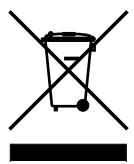
This symbol found on the apparatus indicates that the apparatus must be placed in a separate collection facility for electronic waste and not disposed with household waste.
- The apparatus shall not be exposed to dripping or splashing. No objects filled with liquids, such as vases, shall be placed on the apparatus.
- Either the power inlet connector on the rear of the apparatus or the power plug at the wall must remain accessible, to be able to disconnect power from the apparatus.
- To completely disconnect this apparatus from the AC Mains, disconnect the power supply cord plug from the AC receptacle.
- The mains plug of the power supply cord shall remain readily operable.

American Users:
Note: This equipment has been tested and found to comply with the limits for a Class B digital device, pursuant to part 15 of the FCC Rules. These limits are designed to provide reasonable protection against harmful interference in a residential installation. This equipment generates, uses, and can radiate radio frequency energy and, if not installed and used in accordance with the instructions, may cause harmful interference to radio communications. However, there is no guarantee that interference will not occur in a particular installation. If this equipment does cause harmful interference to radio or television reception, which can be determined by turning the equipment off and on, the user is encouraged to try to correct the interference by one or more of the following measures:
Reorient or relocate the receiving antenna.
- Increase the separation between the equipment and receiver.
- Connect the equipment into an outlet on a circuit different from that to which the receiver is connected.
- Consult the dealer or an experienced radio/TV technician for help.

Canadian Users
This class B digital apparatus complies with Canadian ICES-003.
| Specifications | LCR Speakers | Surround Speakers | Powered Subwoofer |
| Frequency Response: | 110Hz – 20kHz | 120Hz – 20kHz | 40 - 150Hz |
| Recommended Amplifier Power Range: | 10 - 150 watts | 10 - 150 watts | — |
| Sensitivity: | 88dB [2.8v at 1m] | 88dB [2.8v at 1m] | — |
| Nominal Impedance: | 8 ohms | 8 ohms | — |
| Crossover Frequency: | 2,700Hz | 2,700Hz | |
| Amplifier Output: | — | — | 200 watts RMS; BassTrac® circuitry eliminates distortion |
| Woofer: | — | — | 10" (254mm) DCD |
| Midrange: | Dual 3½" (89mm) copolymer DCD with Phase Plugs and MagnaGuard® | 3½" (89mm) copolymer DCD with Phase Plugs and MagnaGuard | — |
| Tweeter: | 1" (25mm) Kortec® Soft Dome | 1" (25mm) Kortec Soft Dome | — |
| Dimensions: (H x W x D) | 13½ x 5 x 4½" (352 x 127 x 103mm) | 8½ x 5½ x 4" (214 x 140 x 102mm) | 13¾ x 16½ x 16½" (349 x 419 x 419mm) |
| Weight: | 5 lbs (2.27kg) | 3 lbs (1.36kg) | 31¼ lbs (14.15kg) |
MCS 130 Introduction
Thank you for purchasing a Boston Acoustics Multi-Channel Speaker System. These speakers incorporate high-quality components that produce the famous Boston sound. The MCS 130 is ideally suited for use as a 5.1 channel solution in a high-quality home theater or music system. The MCS 130 is complete with everything you need for the typical speaker system including speaker wire, surround speakers, LCR (left, center and right), and a subwoofer. Please check out Bostonacoustics.com\placement for information on placing your speakers.
The MCS 130 speaker system delivers exceptionally articulate on-screen dialog, music, effects, and room filling bass from a small, sleek package. Compact driver placement and quality, system-specific crossovers assure a wide uniform dispersion for complete coverage of a listening room. All speakers also feature MagnaGuard® magnetic shielding which ensures the speaker's magnetic field does not interfere with the televisions picture.
Unpacking the System
Carefully unpack the system. If there is any sign of damage from transit, report it immediately to your dealer and/or delivery service. Keep the shipping carton and packing materials for future use.
Open the package and verify the following contents:
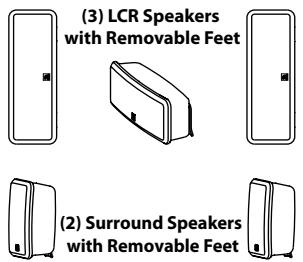
(3) LCR (left, center, right) speakers
(2) Surround speakers
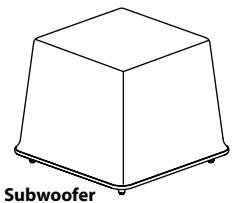
(1) Subwoofer
(2) 40^(12m) speaker wires
(3) 15^(4.6m) speaker wires
(1) 15^(4.6m) subwoofer cable
(2) Feet (for use with LCR speaker's horizontal use)
(2) Thumb screws
(4) Rubber bumpers (used for wall mounting)
Placement Options
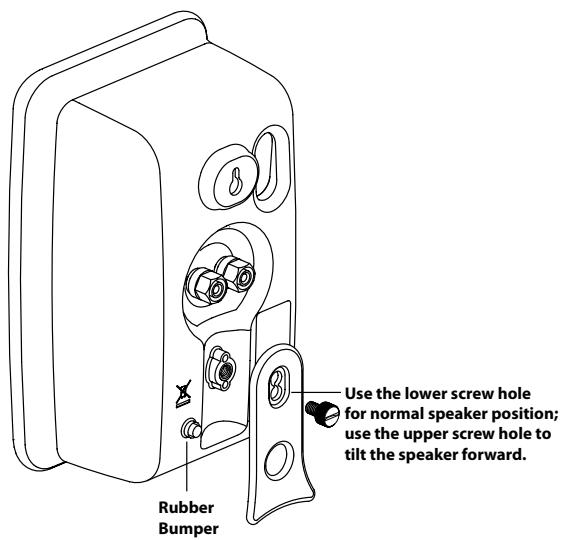
The MCS 130 LCR and surround speakers are easily placed on a tabletop or wall-mounted. The speakers are configured for tabletop use when you first unpack the system. Two LCR speakers will have one foot installed that will keep your speaker level when used in the vertical position. The other LCR speaker will have 2 feet installed for horizontal use as the center speaker. There are 2 sets of holes on each foot; by using the upper of the two holes, the speakers will have a slight forward angle for use on a high shelf. When the feet on the back of your speakers are removed, the speakers are easy to wall-mount.
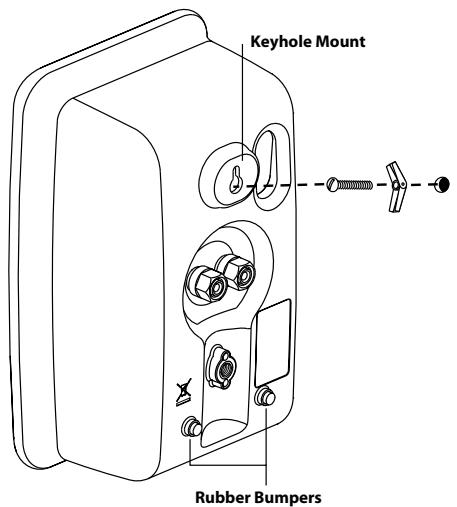
The MCS 130 LCR and surround speakers are designed to easily mount on the wall using the keyhole slot(s) on the back of the speaker. When mounting the speakers to the wall, use the supplied rubber bumpers. You must remove the attached foot to wall-mount your speakers. Remove the thumbscrew from the back of the foot. It is slotted for easy removal with a screwdriver or a coin.
The keyhole mounting option is similar to hanging a picture frame on a wall. Install a #8 screw (not included) into the sheetrock, making sure to go into a stud, and hang the speaker onto the screw head. If a stud is not available, a sheetrock anchor should be used to support the weight of the speaker. It is advisable to connect the speaker wire prior to wall-mounting.
NOTE: Because there are so many different kinds of surfaces on which the speakers could be mounted. There is no one type of fastener that we could supply that would work in all the possible situations. So taking into account the surface the speaker is being mounted on, acquire the appropriate type of fasteners. If you're not sure what type of fastener to use, take the mounting bracket to a friendly hardware store, tell them about the wall you're mounting the speaker on, and ask them to recommend an appropriate fastener. Keep in mind the weight of the speaker.
Speaker Connections
After your speakers are properly placed, you are ready to wire your system. First, turn off all system power. Use the speaker wire include with the system to make your connections. Please see the illustration below for guidance connecting the wires to the MCS 130 satellites and center channel.
For connection to your receiver please refer to its owner's manual.
Important!
To ensure the best performance observe polarities when making speaker connections, as shown in the illustration. Connect each + terminal on the back of the amplifier or receiver to the respective + (red) terminal on each speaker. Connect the - (black) terminals in the same way. If the connections are not made correctly it can cause poor bass response and imaging. Also, to avoid short circuits that may damage your equipment be careful not to let any of the bare wires touch each other.
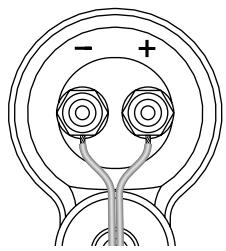
Be sure to maintain proper + and - polarity at all speaker wire connections.
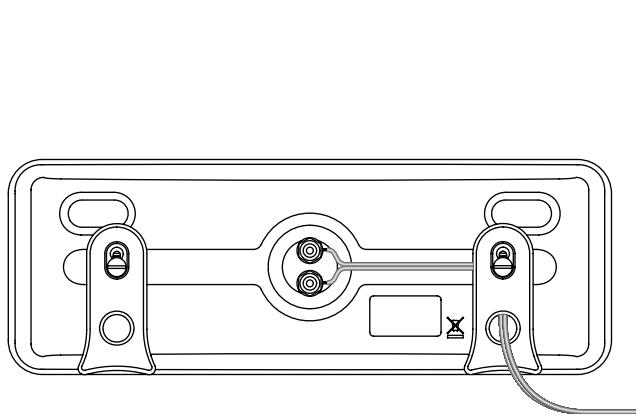
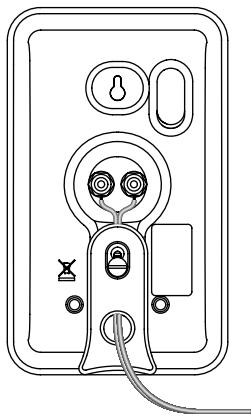
Speaker wires can be routed through the channels on the back of the speaker and the holes in the feet.
Subwoofer Connections
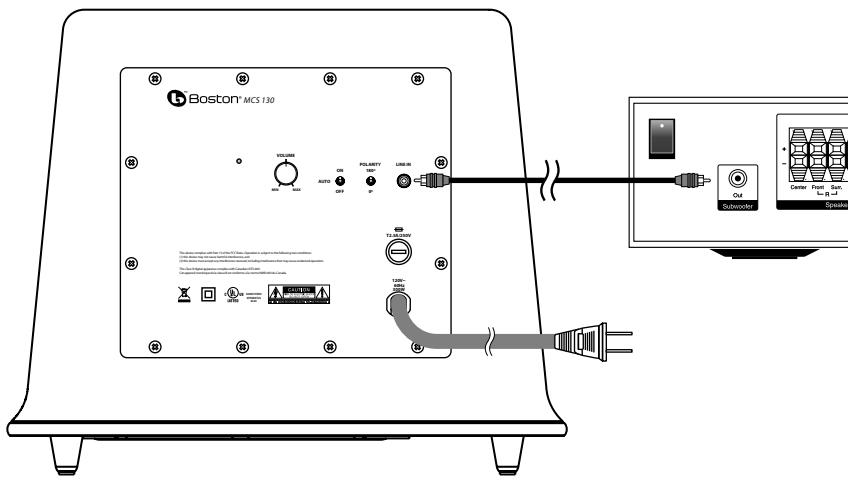
Turn off all power. Use the subwoofer cable included with your system to connect the subwoofer to your receiver's Subwoofer or LFE output. Connect the other end to the "Line In" on the back of the Subwoofer.
Subwoofer Controls
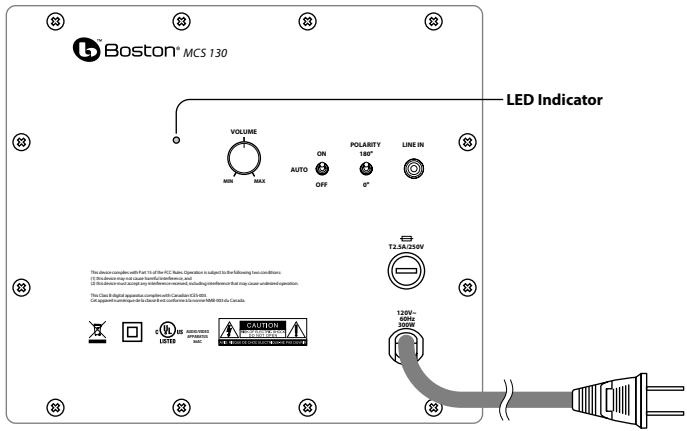
Power On/Auto/Standby
Plug the subwoofer AC cord into a wall outlet. We do not recommend using the outlets on the back of the receiver. Set the power switch to the desired setting.
OFF - The subwoofer is off and will not produce any sound. You may want to turn your subwoofer off if you will not be using it for some time or wish to conserve electricity.
AUTO - The subwoofer will power on whenever a signal is detected. If no signal is detected after several minutes, it will automatically enter the Standby mode.
ON - The subwoofer is always on.
An LED indicator next to the volume control indicates what mode the subwoofer is in.
OFF = The subwoofer is off
RED = STANDBY (No signal detected, Amp Off)
GREEN = ON (Signal detected, Amp On)
The subwoofer will automatically enter the Standby mode after several minutes when no signal is detected from your system. The subwoofer will then power ON instantly when a signal is detected.
Volume Control
Begin by adjusting the Subwoofer Volume Control to the 11 o'clock position. Further adjust the Subwoofer Volume Control until you hear a match in volume between the main speakers and subwoofer. Ideally, bass response should not overpower the room but rather be adjusted so there is a natural blend across the entire musical range.
Polarity Control
Selects regular (0^) or inverted (180^) polarity for the subwoofer. Set this switch to the position that provides the fullest, most dynamic bass when auditioned from the primary seating position. The effect of polarity will be most audible on low-frequency percussion instruments or music with a continuously repeating bass line, and may not produce a dramatic change at all.
Operation
When using the MCS 130 in a Dolby® Digital or DTS™ home theater system, make sure all speakers are set to "Small". When using the system in a Dolby Pro Logic® home theater system, make sure the receiver's center channel mode is set to "Normal."
Some receivers/processors offer different setup options for each source or surround mode (e.g., CD-stereo, videotape, Dolby Digital, Dolby Pro Logic). In each case, follow your equipment's instructions to ensure that the subwoofer output is turned on and that the speakers are set to "Small" in each mode.
If your receiver has adjustable crossover settings, we recommend the subwoofer crossover be set at 120Hz.
Refer to the owner's manual for your AV receiver for any additional recommendations on system operation.
Maintenance and Service
All wiring connections should be inspected and cleaned or remade at least once a year.
If a problem does occur, make sure that all connections are properly made, secure and clean. If a problem occurs in one loudspeaker, rewire that speaker in a different location within the system. Should the problem persist in this speaker the problem is within the speaker. If the speaker sounds fine in the new position it is a strong indication of a more in depth issue with the electronics in the system. In the event that your MCS 130 ever needs service, contact your local Boston Acoustics dealer or visit www.bostona.com for a list of dealers in your area.
If your subwoofer does not play, check that all the connectors on the cables are making proper contact and that the AC plug connected to a "live" receptacle.
Limited Warranty
Boston Acoustics warrants to the original purchaser of our MCS 130 system that it will be free of defects in materials and workmanship in its mechanical parts for a period of 5 years from the date of purchase. The warranty period for the electrical components of MCS 130 is 1 year.
Your responsibilities are to install and use them according to the instructions supplied, to provide safe and secure transportation to an authorized Boston Acoustics service representative, and to present proof of purchase in the form of your sales slip when requesting service.
Excluded from this warranty is damage that results from abuse, misuse, improper installation, accidents, shipping, or repairs/ modifications by anyone other than an authorized Boston Acoustics service representative.
This warranty is limited to the Boston Acoustics product and does not cover damage to any associated equipment. This warranty does not cover the cost of removal or reinstallation. This warranty is void if the serial number has been removed or defaced. This warranty gives you specific legal rights, and you may also have other rights which vary from state to state.
If Service Seems Necessary
First, contact the dealer from whom you purchased the product. If that is not possible, write to:
Boston Acoustics, Inc.
300 Jubilee Drive
Peabody, MA 01960 USA
Or contact us via e-mail at:
support@bostona.com
We will promptly advise you of what action to take. If it is necessary to return your MCS 130 to the factory, please ship it prepaid. After it has been repaired, we will return it freight prepaid in the United States and Canada.
For EU Customers Only
This symbol found on the product indicates that the product must not be disposed of with household waste. Instead, it may be placed in a separate collection facility for electronic waste or returned to a retailer when purchasing similar product. The producer paid to recycle this product. Doing this contributes to reuse and recycling, minimizes adverse effects on the environment and human health and avoids any fines for incorrect disposal.
Boston Acoustics continually strives to update and improve its products. The specifications and construction details are subject to change without notice.
Boston Acoustics, Inc.
300 Jubilee Drive
Peabody, MA 01960 USA
This class B digital apparatus complies with Canadian ICES-003.
Boston Acoustics, Inc.
300 Jubilee Drive
Boston Acoustics, Inc.
300 Jubilee Drive
Peabody, MA 01960 USA
Boston Acoustics, Inc.
300 Jubilee Drive
Peabody, MA 01960 USA
Ellerkontaktaossviae-postpàadress:
support@bostona.com
Boston Acoustics, Inc.
300 Jubilee Drive
Peabody, MA 01960 USA
- Surround Speaker System
- Espanol
- Italiano
- Deutsch
- Français
- IMPORTANT SAFETY INSTRUCTIONS
- American Users:
- Canadian Users
- MCS 130 Introduction
- Unpacking the System
- Placement Options
- Speaker Connections
- Important!
- Subwoofer Connections
- Subwoofer Controls
- Power On/Auto/Standby
- Volume Control
- Polarity Control
- Operation
- Maintenance and Service
- Limited Warranty
- If Service Seems Necessary
- For EU Customers Only
Brand : BOSTON ACOUSTICS
Model : MCS 130
Category : Speaker