
MM4D - Studio Monitor YORKVILLE - Free user manual and instructions
Find the device manual for free MM4D YORKVILLE in PDF.


| Product Type | Amplified monitoring speaker |
| Brand | YORKVILLE |
| Model | MM4D |
| Number of Input Channels | 4 (channels 1-4) |
| Microphone Inputs | Balanced XLR on channels 1-4 |
| Line Inputs | 1/4" TRS jack on channels 1-3; stereo RCA on channel 4 |
| Output Power | 150 W at 4 ohms, 100 W at 8 ohms |
| Equalization | Bass (80 Hz) and treble (12 kHz) per channel, +/- 15 dB |
| Built-in Effects | Digital echo with repeat and delay controls |
| Outputs | Main Out / Amp In (1/4" TRS), Tape Out (RCA) |
| Auxiliary Input | Tape In (RCA) |
| Voltage Selector | 120V/60Hz or 230V/50Hz |
| Power Consumption | 1.0 A @ 120 VAC / 0.5 A @ 240 VAC |
| Protection | Clipping LED |
| Cooling | Built-in fan |
| Dimensions (W x H x D) | 22.85 x 45 x 15.25 cm |
| Weight | 9.7 kg (19.2 lb) |
| Cabinet Material | Rugged cabinet (wood/plywood) |
| Cleaning | With a dry cloth only |
| Warranty | 2 years (electronics) / 10 years (cabinet), transferable |
| Warranty Coverage Countries | Canada and United States |
| Manufacturer Website | www.yorkville.com |
Frequently Asked Questions - MM4D YORKVILLE
User questions about MM4D YORKVILLE
0 question about this device. Answer the ones you know or ask your own.
Ask a new question about this device
Download the instructions for your Studio Monitor in PDF format for free! Find your manual MM4D - YORKVILLE and take your electronic device back in hand. On this page are published all the documents necessary for the use of your device. MM4D by YORKVILLE.
USER MANUAL MM4D YORKVILLE
with Digital Effects
TYPE: YS1038
OWNER'S MANUAL
MANUEL DE L'UTILISATEUR
IMPORTANT SAFETY INSTRUCTIONS

This lightning flash with arrowhead symbol, within an equilateral triangle, is intended to alert the user to the presence of uninsulated "dangerous voltage" within the product's enclosure that may be of sufficient
magnitude to constitute a risk of electric shock to persons.
The exclamation point within an equilateral triangle is intended to alert the user to the presence of important operating and maintenance (servicing) instructions in the literature accompanying the appliance.

Instructions pertaining to a risk of fire, electric shock, or injury to a person
CAUTION: TO REDUCE THE RISK OF ELECTRIC SHOCK, DO NOT REMOVE COVER (OR BACK).
NO USER SERVICEABLE PARTS INSIDE.
REFER SERVICING TO QUALIFIED SERVICE PERSONNEL.
Read Instructions: The Owner's Manual should be read and understood before operation of your unit. Please, save these instructions for future reference and heed all warnings.
Clean only with dry cloth.
Packaging: Keep the box and packaging materials, in case the unit needs to be returned for service.
Warning: To reduce the risk or fire or electric shock, do not expose this apparatus to rain or moisture. Do not use this apparatus near water!
Warning: When using electric products, basic precautions should always be followed, including the following:
Power Sources
Your unit should be connected to a power source only of the voltage specified in the owners manual or as marked on the unit. This unit has a polarized plug. Do not use with an extension cord or receptacle unless the plug can be fully inserted. Precautions should be taken so that the grounding scheme on the unit is not defeated. An apparatus with CLASS I construction shall be connected to a Mains socket outlet with a protective earthing ground. Where the MAINS plug or an appliance coupler is used as the disconnect device, the disconnect device shall remain readily operable.
Hazards
Do not place this product on an unstable cart, stand, tripod, bracket or table. The product may fall, causing serious personal injury and serious damage to the product. Use only with cart, stand, tripod, bracket, or table recommended by the manufacturer or sold with the product. Follow the manufacturer's instructions when installing the product and use mounting accessories recommended by the manufacturer. Only use attachments/accessories specified by the manufacturer
Note: Prolonged use of headphones at a high volume may cause health damage on your ears.
The apparatus should not be exposed to dripping or splashing water; no objects filled with liquids should be placed on the apparatus.
Terminals marked with the "lightning bolt" are hazardous live; the external wiring connected to these terminals require installation by an instructed person or the use of ready made leads or cords.
Ensure that proper ventilation is provided around the appliance. Do not install near any heat sources such as radiators, heat registers, stoves, or other apparatus (including amplifiers) that produce heat.
No naked flame sources, such as lighted candles, should be placed on the apparatus.
Power Cord
Do not defeat the safety purpose of the polarized or grounding-type plug. A polarized plug has two blades with one wider than the other. A grounding type plug has two blades and a third grounding prong. The wide blade or the third prong are provided for your safety. If the provided plug does not fit into your outlet, consult an electrician for replacement of the obsolete outlet. The AC supply cord should be routed so that it is unlikely that it will be damaged. Protect the power cord from being walked on or pinched particularly at plugs. If the AC supply cord is damaged DO NOT OPERATE THE UNIT. To completely disconnect this apparatus from the AC Mains, disconnect the power supply cord plug from the AC receptacle. The mains plug of the power supply cord shall remain readily operable.
Unplug this apparatus during lightning storms or when unused for long periods of time.
Service
The unit should be serviced only by qualified service personnel. Servicing is required when the apparatus has been damaged in any way, such as power-supply cord or plug is damaged, liquid has been spilled or objects have fallen into the apparatus, the apparatus has been exposed to rain or moisture, does not operate normally, or has been dropped.
SUIVEZ TOUTES LES INSTRUCTIONS
We at Yorkville Sound are confident that the new MM4D will be a wonderful addition to your sound reinforcement arsenal. This manual contains information to help you get the maximum performance from your MM4D, please take the time to read it over.
Features
- XLR microphone inputs on all 4 channels.
- 14 -inch TRS line level inputs on channels 1 through 3.
- Dual-RCA input built-in channel 4 for easy hookup for CD-Players and Cassette Decks.
- Amplifier delivers 150 watts of power (150 W @ 4-ohms).
- Effects level controls on all 4 channels with a Master level control at the final stage.
- Customizable Built-in Effects with Repeat and Delay controls.
- All channels have Hi and Lo equalization controls.
- RCA Tape In/Out.
- 1/4-inch TRS Amp In / Line Out
- Voltage select switch for easy selection of 120V or 230V operation.
Rugged enclosure
Fan cooled


1/4-inch Phone Plug

1/4-inch T.R.S. Phone Plug

XLR Plug


Input Channnels
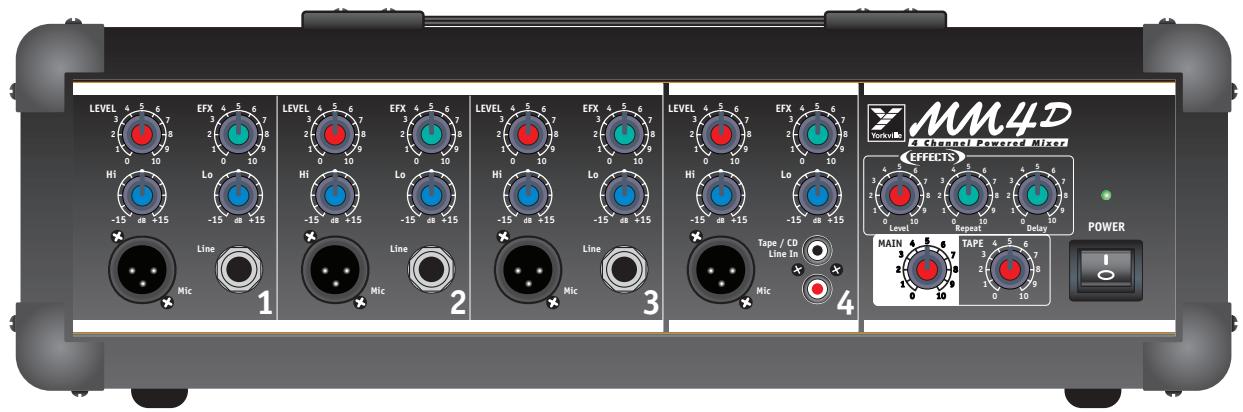
1. Power Switch and LED
The power LED above the power switch will illuminate when the MM4D is turned on.
2. Mic & Line Inputs
All channels of the MM4D have balanced XLR microphone inputs for use with low-impedance microphones.
In addition, channels 1 through 3 also feature 14 -inch TRS input jacks and will accept line level, high-impedance signals from synthesizers, (unbalanced) microphones, electric pianos etc.
TRS (Tip = 0 ^ irc, Ring = - 1 8 0 ^ irc, Sleeve = Gnd)
For convenience, channel 4 includes a dual-RCA line-level input instead of the 1/4 -inch jack. Stereo signals from CD-Players or tape decks are easily used with the MM4D (stereo sources are electronically summed into a mono signal when plugged into the dual-RCA jacks).
NOTE: Do not connect signals to both inputs on any one channel simultaneously. Use either the unbalanced or the balanced input on any one channel, but not both. Connecting to both inputs on one channel will cause improper operation of the input circuit.
3. Channel LEVEL Controls
Use the individual Level controls to adjust the comparative volumes of each channel.
4. Channel EFX Send Controls
The amount of Echo can be adjusted for individual channels by using the EFX control. A master Echo Level control adjusts the total amount of effect at the final stage in the mixing bus.
5. Built-In Effects
The digital Effects, built into the MM4D, are extremely versatile. Adjusting the Repeat and Delay settings produce excellent delay, reverb and echo effects. The Repeat control adjusts the amount of time the effect lasts while the Delay control adjusts the speed.
6. Channel Hi and Lo Controls
Each channel of the MM4D uses Lo and Hi shelving equalization centered at 80Hz (Lo) and 12kHz (Hi).
The EQ controls have a +/- 15 dB boost/cut range providing greater versatility for shaping the input signal's tone. Signals remain unchanged when the controls are set to the center (or "0") position (a flat equalization setting).
7. MAIN Level Control
The MAIN level adjusts the overall output volume of the MM4D. Signals from channels 1 through 4 and Tape In jack are routed through to the main mixing bus.
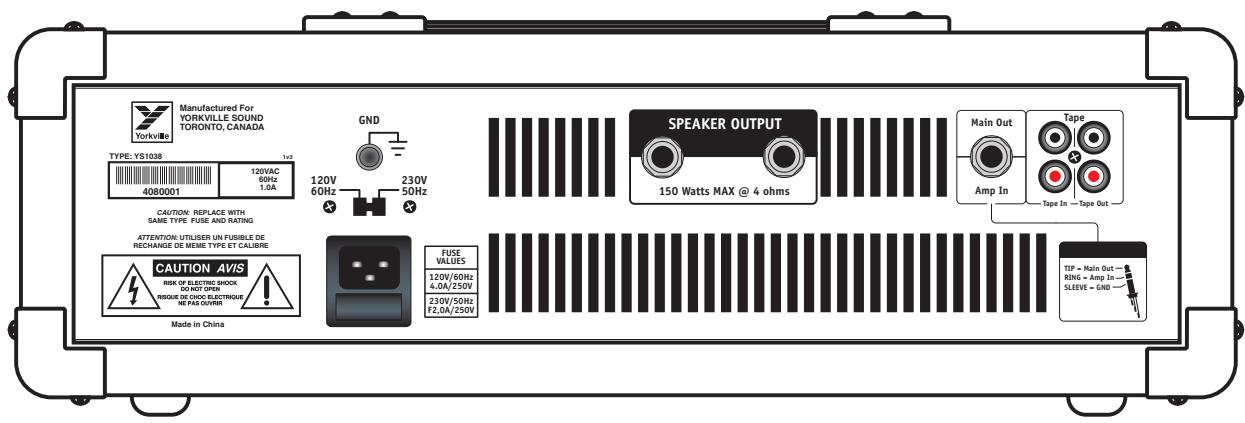
8. Main Out / Amp In TRS Jack
When a 14 -inch TRS phone plug is inserted into the Main Out / Amp In jack, the MM4D's connection from the main mixing bus to the MM4D's power amplifier is interrupted. (The signal path going from the MM4D's mixer to the internal amplifier is broken.)
It is possible to feed another power amplifier with the MM4D's mix signal while the MM4D's power amplifier could be used for other purposes. Connect the Main Out to an auxiliary power amplifier's input directly. An external source can use the MM4D's power amplifier by plugging into the Amp In.


Depending on the wiring and configuration of the 1/4 -inch TRS plug, this jack is used as an insert point allowing direct access to the MM4D's mixer output and internal 150-watt power amplifier with one jack. This allows the use of outboard gear such as external graphic equalizers, or other signal-processing devices.
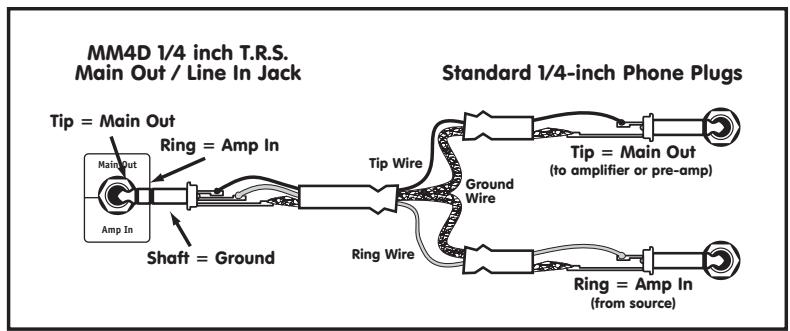
Main Out / Line In

Tip = Main Out / Ring = Amp In / Sleeve = Ground
To summarize, the MAIN OUT and AMP IN jacks can be used as a post-mix effects loop or a signal-processing patch. The MAIN OUT (Tip) can serve as a main mix output, and AMP IN (Ring) can be used as an auxiliary input to the internal power amplifier.
9. Tape In / Tape Out
The left and right channel audio signals passing through the MAIN gain control connect to the Tape Out RCA jacks on the rear panel. Audio signals connected to the Tape In, on the rear panel mounted RCA jacks pass through the TAPE gain control onto the main mixer left and right audio busses routed to the MAIN gain control.
10. Speaker Output Jacks and Power Amplifier
The MM4D power amplifier delivers 150-watts into a 4-ohm load. There are two speaker output jacks on the rear panel of the MM4D. You may connect an 8-ohm speaker to each jack, or connect one 4-ohm speaker.
Caution: Do not overload the unit with speaker loads less than 4-ohms, as this will degrade performance and reliability.
11. AC Voltage Selector Switch
The MM4D was designed to operate with 120V / 60Hz power or 230V / 50Hz . Select proper voltage before plugging unit into main AC power.
12. AC Power Connector and Fuse Holder
The fuse-holder is integrated into the standard IEC AC power cord receptacle. Always replace the fuse with the same type and rating. If the fuse continuously blows, turn unit off and have it checked out a by a qualified service technician.
SPECIFICATIONS
Model MM4D
Number of Channels 4
Mono Channel EQ 2 band shelving
Channel Effects Digital Echo
Inputs XLR (bal) Channels 1-4
Inputs (1/4-inch) Channels 1-3
Inputs RCA (unbalanced) Channel 4 - Tape In / Out
Internal Effects Digital Echo - Repeat/Delay controls
Effects Send Yes
Effects Return Yes
Effects Return to Main Yes
Record Outputs Tape Out with level control
Max Gain to Line Out - Mic Input (dB) + 44
Max Gain to Line Out - Line Input (dB) + 24
Main Outputs (Line Level) 1/4-inch
Outputs - Amp A - 1/4-inch Jacks 2
Mixer - Frequency Response (Tone and EQ Flat, +/- 2 dB 20 Hz - 20 kHz
Amp A - Power Output @ 8 ohms (0.1% THD, 1 kHz) 1
Amp A - Power Output @ 4 ohms
THD-1kHz less th
THD - 20 Hz - 20 kHz less than 0.1%
Typical Crosstalk -1 kHz (dB) -65
Power Consumption
Protection Clip LED
Cooling Fan
Dimensions (DWH, inches) 9 × 17.75 × 6
Dimensions (DWH, cm) 22.85 x 45 x 15.25
Weight (lbs/kg) 19.2 / 9.7

Introduction

1/4-inch T.R.S. Phone Plug

XLR Plug


Cannaux d'Entrées
Pointe = Main Out / Bague = Amp In / Manchon = Masse

Yorkville's two and ten-year unlimited warranty on this product is transferable and does not require registration with Yorkville Sound or your dealer. If this product should fail for any reason within two years of the original purchase date (ten years for the wooden enclosure), simply return it to your Yorkville dealer with original proof of purchase and it will be repaired free of charge. This includes all Yorkville products, except for the YSM Series studio monitors, Coliseum Mini Series and TX Series Loudspeakers.
Freight charges, consequential damages, weather damage, damage as a result of improper installation, damages due to exposure to extreme humidity, accident or natural disaster are excluded under the terms of this warranty. Warranty does not cover consumables such as vacuum tubes or par bulbs. See your Yorkville dealer for more details. Warranty valid only in Canada and the United States.
Garantie Illimitée
Niagara Falls, New York
14305 USA
Voice: (716) 297-2920
Fax: (716) 297-3689

Quality and Innovation Since 1963
Printed in China
Manual-Owners-mm4d-00-1v3 dot March 24/2009
- OWNER'S MANUAL
- MANUEL DE L'UTILISATEUR
- IMPORTANT SAFETY INSTRUCTIONS
- Power Sources
- Hazards
- Power Cord
- Service
- SUIVEZ TOUTES LES INSTRUCTIONS
- Features
- Input Channnels
- Power Switch and LED
- Mic & Line Inputs
- Channel LEVEL Controls
- Channel EFX Send Controls
- Built-In Effects
- Channel Hi and Lo Controls
- MAIN Level Control
- Main Out / Amp In TRS Jack
- Tape In / Tape Out
- Speaker Output Jacks and Power Amplifier
- AC Voltage Selector Switch
- AC Power Connector and Fuse Holder
- SPECIFICATIONS
- Introduction
- Cannaux d'Entrées
- Garantie Illimitée
- Quality and Innovation Since 1963
Brand : YORKVILLE
Model : MM4D
Category : Studio Monitor