
CR5 - Studio Monitor YORKVILLE - Free user manual and instructions
Find the device manual for free CR5 YORKVILLE in PDF.


| Product Type | Monitoring Power Amplifier |
| Brand | YORKVILLE |
| Model | CR5 |
| Dimensions (W x D x H) | 28 cm x 48 cm x 13 cm |
| Weight | 10.25 kg (22.5 lb) |
| Power Consumption | 400 W typical, 720 W max |
| Output Power (continuous, 1 kHz, 0.1% THD) | 170 W x 2 (8 Ω), 250 W x 2 (4 Ω), 525 W (bridge 8 Ω) |
| Frequency Response | 30 Hz - 20 kHz (±1 dB) |
| Input Impedance | 20 kΩ balanced, 10 kΩ unbalanced |
| Sensitivity | 1.4 V RMS (gain 27 dB) |
| Signal-to-Noise Ratio | < -104 dB (unweighted) |
| Operating Modes | Stereo, Mono, Bridge |
| Limiter | Switchable between peak (output) and average (pushed) |
| Protection | Short circuit, thermal, DC |
| Cooling | Passive convection (fanless) |
| Input Connectors | XLR / ¼" Combo Jack and barrier strip |
| Output Connectors | Heavy-duty binding posts (banana, spade, bare wire) and ¼" jack |
| Rack Mounting | 3U (standard 19") |
| Exterior Finish | Baked black painted aluminum |
| Warranty | 2 years (parts and labor), 10 years (cabinet), transferable |
| Maintenance | Clean exterior with a dry cloth; ensure adequate ventilation around heat sinks |
| Safety | Do not expose to water or flames; use a polarized plug; do not block ventilation |
Frequently Asked Questions - CR5 YORKVILLE
User questions about CR5 YORKVILLE
0 question about this device. Answer the ones you know or ask your own.
Ask a new question about this device
Download the instructions for your Studio Monitor in PDF format for free! Find your manual CR5 - YORKVILLE and take your electronic device back in hand. On this page are published all the documents necessary for the use of your device. CR5 by YORKVILLE.
USER MANUAL CR5 YORKVILLE
IMPORTANT SAFETY INSTRUCTIONS

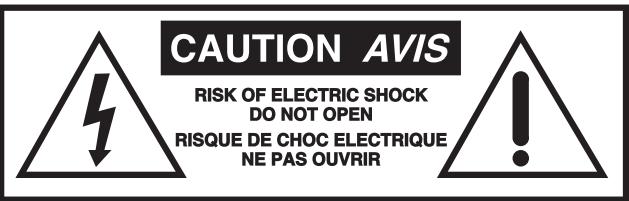
INSTRUCTIONS PERTAINING TO A RISK OF FIRE, ELECTRIC SHOCK, OR INJURY TO PERSONS
CAUTION:
TO REDUCE THE RISK OF ELECTRIC SHOCK, DO NOT REMOVE COVER (OR BACK).
NO USER SERVICEABLE PARTS INSIDE.
REFER SERVICING TO QUALIFIED SERVICE PERSONNEL.
Read Instructions
The Owner's Manuals should be read and understood before operation of your unit. Please, save these instructions for future reference.
Packaging
Keep the box and packaging materials, in case the unit needs to be returned for service.
Warning
When using electric products, basic precautions should always be followed, including the following:
Power Sources
Your unit should be connected to a power source only of the voltage specified in the owners manual or as marked on the unit. This unit has a polarized plug. Do not use with an extension cord or receptacle unless the plug can be fully inserted. Precautions should be taken so that the grounding scheme on the unit is not defeated.
Hazards
Do not place this product on an unstable cart, stand, tripod, bracket or table. The product may fall, causing serious personal injury and serious damage to the product. Use only with cart, stand, tripod, bracket, or table recommended by the manufacturer or sold with the product. Follow the manufacturer's instructions when installing the product and use mounting accessories recommended by the manufacturer.
The apparatus should not be exposed to dripping or splashing water; no objects filled with liquids should be placed on the apparatus.
Terminals marked with the "lightning bolt" are hazardous live; the external wiring connected to these terminals require installation by an instructed person or the use of ready made leads or cords.
Ensure that proper ventilation is provided around the appliance.
No naked flame sources, such as lighted candles, should be placed on the apparatus.
Power Cord
The AC supply cord should be routed so that it is unlikely that it will be damaged. If the AC supply cord is damaged DO NOT OPERATE THE UNIT.
Service
The unit should be serviced only by qualified service personnel.
INSTRUCTIONS RELATIVES AU RISQUE DE FEU, CHOC ÉLECTRIQUE, OU BLESSURES AUX PERSONNES
AVIS:
AFIN DE REDUIRE LES RISQUE DE CHOC ELECTRIQUE, N'ENLEVEZ PAS LE COUVERT (OU LE PANNEAU ARRIERE)
NE CONTIENT AUCUNE PIECE EPARABLE PAR L'UTILISATEUR.
CONSULTEZ UN TECHNICIEN QUALIFIE POUR L'ENTRETIENT
Your new CR5 power amplifier is designed and built to provide years of trouble free performance. The CR5 is capable of powering studio monitors quietly (with ultra quiet passive cooling) as well as sound reinforcement loudspeakers (plenty of headroom under the hood). Like all Yorkville Sound amplifiers, it is designed to be rugged and reliable in all applications. The limiter has two modes of operation which maintains the clarity of mid-range signals, but also provides thumping bass notes. Generous output current capability along with low distortion and high headroom performance guarantee the sonic integrity of the CR5 power amplifier.
Since the CR5 has been designed and manufactured by Yorkville Sound, each unit undergoes rigorous Quality Assurance tests. Each circuit is tested by sophisticated computer controlled equipment (which is capable of identifying any deviation from the design center parameters). The final tests include a temperature cycled burn-in period.
Inputs
Unbalanced Inputs
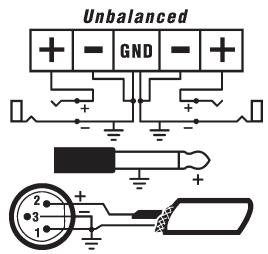
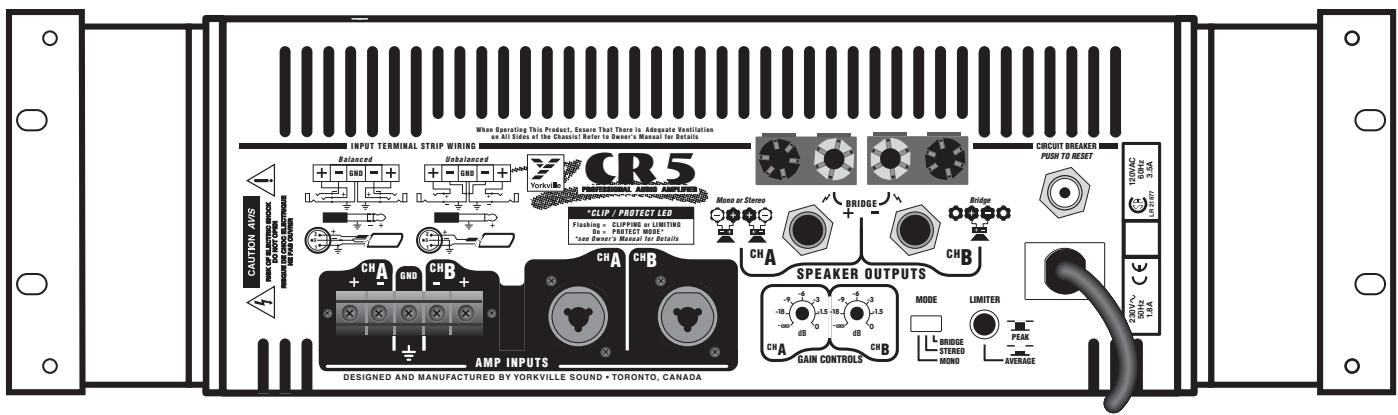
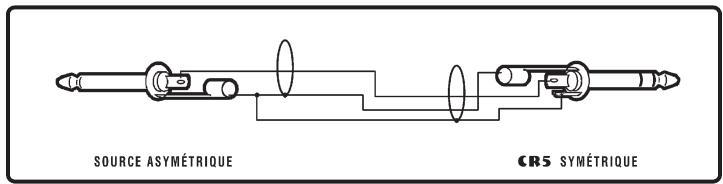
The Combi-jack and terminal strip can be used to connect an unbalanced signal to the CR5. Follow the directions in figure 2 & 3 for the various unbalanced connections. If possible, always use balanced cables as they will reduce the possibility of noise entering the sound system. If unbalanced cables must be used keep the length of the cable as short as possible to minimize the amount of noise entering the sound system.
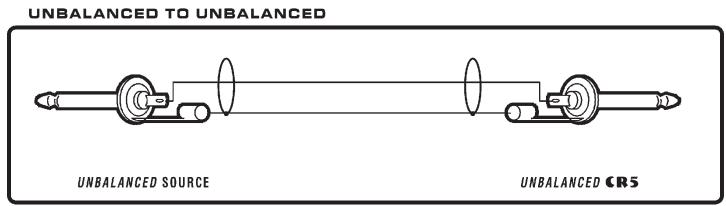
figure 2
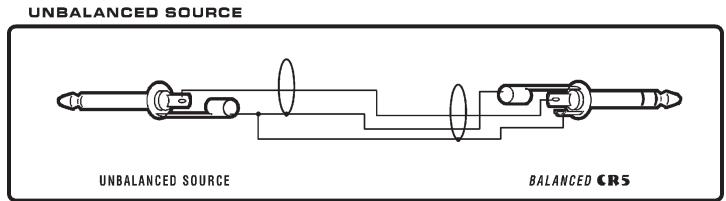
figure 3
Balanced Inputs
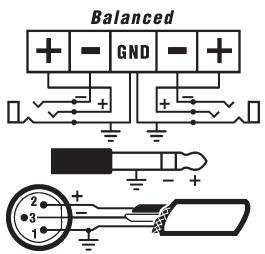
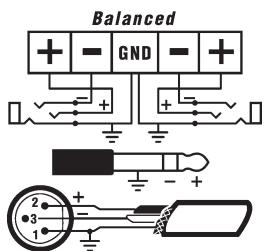
The CR5 has high quality balanced inputs with hum rejection. Three types of balanced input connectors are available. The Combi-jack input will accept a standard 1/4'' TRS (stereo) phone plug or an XLR plug for balanced operation. The tip of the 1/4'' TRS (stereo) phone plug and pin 2 of the XLR plug are the positive (hot) connections. A terminal strip input allows for a direct wired connection for installation applications. Use a forked lug for a #6 screw to connect the input wires to the barrier strip. Follow the directions in figure 4 & 5 (on the following page) for the various balanced connections. We recommend using balanced connections wherever possible to ensure that the system is noise free.
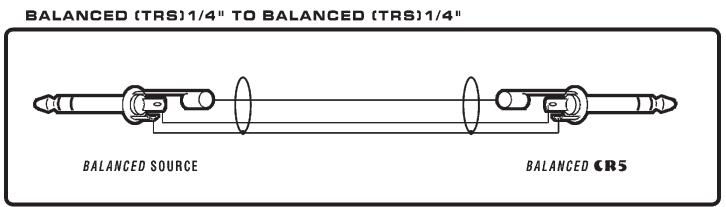
figure 4
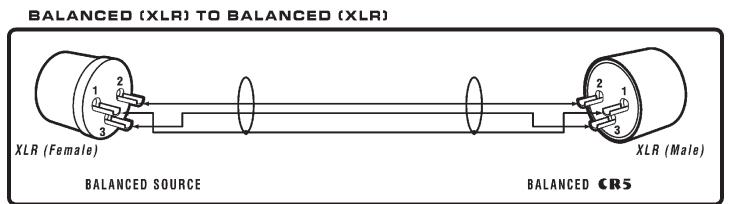
figure 5
Mono Operation
The CR5 can also be operated in mono by switching the mode switch to mono and connecting the input signal to either the A or B input jack. This signal will be sent to both amplifiers. Each amplifier's audio level will be controlled by its corresponding gain control. You can use the remaining input jacks to "loop through" to another amplifier or a piece of sound equipment.
Stereo Operation
The CR5 may be operated in stereo by switching the mode switch to stereo and connecting the "left / right" stereo input signal to the A and B input jacks. Each gain control will adjust the audio level for its corresponding amplifier channel. The input jacks for each channel are wired in parallel so that the unused connector can be used to send the input signal to another amplifier or piece of sound equipment.
Bridged Operation
The CR5 may be operated in bridged mode by switching the mode switch to bridge and connecting the input signal to either the A or B input jack. Channel A's gain control is used to adjust the audio signal level. The loudspeaker load is connected across the two red binding posts with the positive lead of the loudspeaker wire connected to the red channel A binding post.
Outputs
Two types of output connectors are on the output of the CR5. Heavy duty binding posts accept a banana plug, forked lug or bare wire connection. When the amplifier is used in stereo or mono mode, connect the loudspeaker to the red and black binding post with the positive wire from the loudspeaker connecting to the red binding post and the negative wire to the black binding post. For bridged mode operation the speaker load is connected across the two red binding posts with the positive lead of the speaker wire connected to the red channel A binding post. The diagrams on the sidebar show the different loudspeaker wiring configurations. The other connector is a 1/4 " phone jack for quick setups and teardowns. Use a mono 1/4 " phone plug with the tip of the plug wired to the positive connector and the sleeve of the phone plug wired to the negative connector of the loudspeaker.
The CR5 delivers up to 250 watts per channel into a 4 ohm loudspeaker. Wiring two 8 ohm speakers to one channel will look like a 4 ohm loudspeaker to the amplifier and each 8 ohm loudspeaker will receive 125 watts. In bridge mode the CR5 drives up to 500 watts into an 8 ohm loudspeaker. Don't put anything less than an 8 ohm loudspeaker load across the speaker terminals in bridge mode or the amplifier may go into protection.
Gain Controls
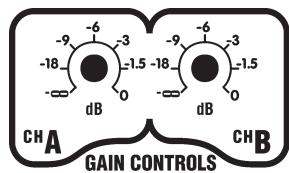
The CR5's gain controls are located on the back of the amplifier. This prevents tampering with the gain controls when the amplifier is rack mounted. The gain controls are calibrated in dB (decibels), corresponding to the audio voltage present at the speaker output jacks. Where many amplifiers are used in an installation, the gain controls scaled in dB allow the user to precisely set the audio output level of one CR5 amplifier channel relative to the other CR5 amplifier channels. This only works if the amplifiers are receiving the same amplitude of input audio signal. The 0db or "full" position of the gain control refers to 31.6 volts RMS (which equals 250 watts into 4 ohms) on the output of the amplifier when a 1.4 volt RMS voltage is present at the input jacks. Placing the gain control in the -3dB position with 1.4 volt RMS voltage present at the input jacks will result in a 22.3 volt signal (which equals 125 watts into 4 ohms) at the speaker output.
Limiter
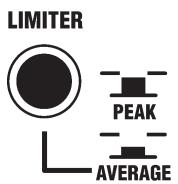
The limiter switch located on the back panel of the amplifier changes the mode of the limiter. When the limiter switch is in the "peak" position, the limiter acts as a peak limiter with a short decay time. This allows the bass thumps in music to drive the output of the amplifier into clipping for the duration of the thump, but will not heavily clip a continuous signal like someone screaming into a microphone. When the limiter switch is in the "average" position the release time of the limiter is extended and the limiter acts more like a leveler. This mode is useful for public address applications where the full headroom of the amplifier is utilized and the quality of the voice is maintained by using the soft clipping feature of the limiter.
Short Circuit Protection
The CR5 is fully protected against all possible passive loudspeaker load conditions. It can operate with a "dead" short continuously without damage (however, we don't recommend that you short your CR5 "just for fun"). Shorts create a lot of stress on the output devices. If a short is present on the output of the amplifier with a signal passing through the amplifier then the protect LED will illuminate and the amplifier will go into "sleep mode" turning off the audio signal passing through the amplifier. After 8 seconds, the amplifier will allow the signal to pass through the amplifier and check to see if the short has been removed. If the short is still present the amplifier will go through the sleep mode cycle again. If the short has been removed, the amplifier will continue to drive the speaker. The output protection will allow the output of the amplifier to drive up to 35 degrees of phase shift at 4 ohms or a load impedance of 3 ohms with no phase shift.
Cooling & Thermal Protection
Passive cooling (this means that there isn't any fan in the amplifier) was chosen for this design to provide years of maintenance free operation. In dusty locations dirt may settle on the heatsinks. If the amplifier is permanently installed in a location the heatsinks must be cleaned regularly.
When operating the CR5 care should be taken to allow adequate cooling around the heatsink fins along the sides of the chassis and not to block the ventilation holes in the top and bottom covers of the chassis. The CR5 was designed to run cool under normal operating conditions, but restricting the airflow around or through the amplifier could cause the amplifier to thermally shutdown.
If the temperature on the heatsinks of the CR5 exceeds the safe operation temperature, then the amplifier will shutdown illuminating both protection LED's and turn off the audio signal to the speaker output jacks until the heatsink temperature drops to a safe level.
Rack Mounting
The CR5 was designed to mount into a standard 19 rack. Care must be taken to provide adequate ventilation around the amplifier. Here are some tips to ensure that the CR5 will have adequate cooling when mounted into a rack:
- Leave a blank rackspace above and below the amplifier when stacking equipment into the rack.
- If several CR5s are stacked in a rack, in addition to the tip above, provide fan forced cooling from the bottom of the rack up through the amplifier stack.
The rack itself should have adequate ventilation to the outside air. Leave the front and back of the rack as open as possible. If fans are used, draw the air in through the bottom front of the rack, drive the air up through the amplifiers, allowing the air to vent out through the top back section of the rack.
Clip / Protection LED's
The clip/protection LEDs on the front panel will blink to visibly indicate any signal excursion beyond the dynamic headroom of the amplifier. The clip/protection LEDs will remain on when the amplifier goes into its protection mode. The CR5 will go into protection for one of three reasons:
- The power switch of the amplifier has just been turned on or off.
- The amplifier has a shorted speaker load on the output of the amplifier.
- The temperature on the heatsinks of the CR5 exceeds the safe operation temperature.
Specifications
Continuous Power: (Both Channels Driven, 1 KHz, 0.1% THD)
8-ohms 170 Watts (x2)
4-ohms 250 Watts (x2)
8-ohms Bridged 525 Watts
Burst Power: (Both channels driven, 10m Sec of 1KHz, 0.1% THD)
8-ohms 220 Watts (x2)
4-ohms 425 Watts (x2)
8-ohms Bridged 850 Watts
Frequency Response: ±1 dB 30Hz - 20 KHz
Hum and Noise: < -104 dB (unweighted)
Distortion: <0.015% THD (typ, 1 KHz 4-ohms)
<0.15% THD(typ, 20 Hz - 20KHz, 4-ohms)
Slew Rate: >20 V/uSec
Damping Factor: >300
Crosstalk: < -80 dB 1 KHz
< - 65 dB 20Hz - 20 KHz
Input Impedance: 20 kohms Balanced
10 kohms Unbalanced
Input Sensitivity: 1.4 (27dB gain) VRMS Sine
Mode Rejection (CMRR): 54 dB minimum / 66 dB typical (at 60 Hz)
Modes: Stereo / Mono / Bridge
Power Consumption: 400 Watts (typ), 720 W (max)
Protection: DC, Load, Thermal
Limiter: Selectable Peak or Average
Cooling: Passive Convection
Input Connectors: Terminal Strip and XLR / 1/4 Phone (TRS) Combi-Jack
Transformer: Toroidal
Rack Space: 3 Spaces
Size: 28cm× 48cm× 13cm (DWH)
11 in x 19 in x 5.25 in (DWH)
Exterior Finish: Baked, Black Painted Aluminum
Weight: 22.5 lbs. 10.25 Kg
Introduction
SOURCE ASYMétrIQUE
figure 3
Entrees Asymetriques
Distortion: <0.015% THD (typ, 1 KHz 4-ohms)
<0.15% THD (typ, 20 Hz - 20KHz, 4-ohms)
Topaqation: >20 V/uSec
Vitesse de propagation:
11 in x 19 in x 5.25 in (PLH)
Yorkville's two and ten-year unlimited warranty on this product is transferable and does not require registration with Yorkville Sound or your dealer. If this product should fail for any reason within two years of the original purchase date (ten years for the wooden enclosure), simply return it to your Yorkville dealer with original proof of purchase and it will be repaired free of charge. This includes all Yorkville products, except for the YSM Series studio monitors, Coliseum Mini Series and TX Series Loudspeakers.
Freight charges, consequential damages, weather damage, damage as a result of improper installation, damages due to exposure to extreme humidity, accident or natural disaster are excluded under the terms of this warranty. Warranty does not cover consumables such as vacuum tubes or par bulbs. See your Yorkville dealer for more details. Warranty valid only in Canada and the United States.
Garantie Illimitée
Niagara Falls, New York
14305 USA
Voice: (716) 297-2920
Fax: (716) 297-3689

- IMPORTANT SAFETY INSTRUCTIONS
- INSTRUCTIONS PERTAINING TO A RISK OF FIRE, ELECTRIC SHOCK, OR INJURY TO PERSONS
- CAUTION
- READ INSTRUCTIONS
- PACKAGING
- WARNING
- POWER SOURCES
- HAZARDS
- POWER CORD
- SERVICE
- INSTRUCTIONS RELATIVES AU RISQUE DE FEU, CHOC ÉLECTRIQUE, OU BLESSURES AUX PERSONNES
- AVIS
- INPUTS
- UNBALANCED INPUTS
- BALANCED INPUTS
- MONO OPERATION
- STEREO OPERATION
- BRIDGED OPERATION
- OUTPUTS
- GAIN CONTROLS
- LIMITER
- SHORT CIRCUIT PROTECTION
- COOLING & THERMAL PROTECTION
- RACK MOUNTING
- CLIP / PROTECTION LED'S
- SPECIFICATIONS
- INTRODUCTION
- ENTREES ASYMETRIQUES
- GARANTIE ILLIMITÉE
Brand : YORKVILLE
Model : CR5
Category : Studio Monitor