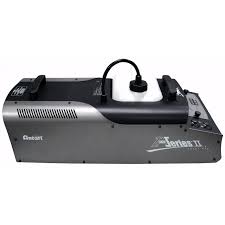
ANTARI X FAZER X-310 - Smoke machine BEGLEC - Free user manual and instructions
Find the device manual for free ANTARI X FAZER X-310 BEGLEC in PDF.


| Product Type | Smoke Machine |
| Brand | BEGLEC |
| Model | ANTARI X FAZER X-310 |
| Dimensions (L x W x H) | 635 x 275 x 281 mm |
| Weight | 20.5 kg |
| Power Supply | AC 100-240 V, 50-60 Hz |
| Heater Power | 1000 W |
| Maximum Smoke Output | 980 m³/min (3500 ft³/min) |
| Output Pressure | 0.686 bar |
| Pre-heating Time | 12 minutes |
| Tank Capacity | 2.5 litres |
| Fluid Consumption | 45 min/L at 100% output, 2 h/L at 30% output |
| Compatible Remote Controls | X-10 (wired 10 m), X-20 (DMX), X-30 (wireless 50 m) |
| Remote Control Functions | Volume control, duration, intervals, fan, heater, LCD display, settings memory |
| Smoke Output Temperature | Approximately 300 °C |
| Safety Zone Around Nozzle | 50 cm minimum for flammable materials |
| Required Ventilation Space | 60 cm all around and above |
| Recommended Maintenance | Every 40 hours: clean with a mixture of distilled water/white vinegar (80/20) |
| Recommended Fluid | Approved smoke fluid, non-toxic and non-flammable |
| Included Accessories | X-10 remote control, mounting bracket |
| Usage | Indoor use only |
Frequently Asked Questions - ANTARI X FAZER X-310 BEGLEC
User questions about ANTARI X FAZER X-310 BEGLEC
0 question about this device. Answer the ones you know or ask your own.
Ask a new question about this device
Download the instructions for your Smoke machine in PDF format for free! Find your manual ANTARI X FAZER X-310 - BEGLEC and take your electronic device back in hand. On this page are published all the documents necessary for the use of your device. ANTARI X FAZER X-310 by BEGLEC.
USER MANUAL ANTARI X FAZER X-310 BEGLEC
Congratulations on the purchase of your new ANTARIX Fazer
Introduction
Thank you for choosing an ANTARI X Fazer. You now own a rugged and powerful state-of-the-art machine. Prior to use, we suggest that you carefully read all of the instructions. By following the suggestions found in this user manual, you can look forward to the reliable and satisfactory performance of your ANTARI Fog Machine for years to come.
Please follow these operation, safety and maintenance instructions to ensure a long and safe life for your fog machine.
Cautions
Risk of electric shock. Disconnect the appliance from the electric supply before removing the cover.
Note: there are no user serviceable parts inside.
Important Safeguards
Danger of Electric Shock
Keep this device dry.
For inside use only. Not designed for outside use.
For the 110V models, use 3-prong grounded electrical outlet only. Prior to use take care to determine that the unit is installed at the rated voltage.
Always unplug your ANTARI Fog Machine before filling its tank.
Keep fog machine upright.
Unplug the machine when not in use.
This machine is not water- or splash-proof. If moisture, water, or fog liquid gets inside the housing, immediately unplug the unit and contact a service technician or your ANTARI dealer before using it again.
No user serviceable parts inside. Refer to your ANTARI dealer or other qualified service personnel.
Danger of Burns
For adult use only. Never leave the unit running unattended.
Never aim the output nozzle directly at people.
Fog machine output area is very hot. Avoid coming within 60~cm of the output nozzle during operation.
Locate the fog machine in a well-ventilated area. Never cover the unit's vents. In order to guarantee adequate ventilation, allow a free air space of at least 20~cm around the sides and top of the unit.
Never aim the output nozzle at open flames.
If the supply cord is damaged, it must be replaced by manufacturer or its service agent or similarly qualified personnel in order to avoid a hazard.
The output nozzle becomes very hot during operation (300^) . Keep flammable materials at least 50~cm away from the nozzle.
Always allow your ANTARI X Fazer to cool down before attempting to clean or service it.
Danger of Explosion
Never add flammable liquids of any kind (oil, gas, perfume) to the fog liquid.
Use only the high-quality, water-based ANTARI fog liquid. Other fog liquids may cause clogging or "spitting".
Always make sure there is sufficient liquid in the fog liquid tank. Operating this unit without liquid will cause damage to the pump as well as over-heating of the heater.
If your ANTARI Fog Machine fails to work properly, discontinue use immediately. Drain all fog liquid from the tank, pack the unit securely (preferably in the original packing material), and return it to your ANTARI dealer for service.
Always drain tank before mailing or transporting this unit.
Never drink fog liquid. If it is ingested, call a doctor immediately. If fog liquid comes in contact with skin or eyes, rinse thoroughly with water.
Important:
Pay attention to all warning labels and instructions printed on the exterior of your ANTARI X Fazer.
Unpacking & Inspection
Open the shipping carton and verify that all equipment necessary to operate the system has arrived intact.
Before beginning initial setup of your ANTARI Fog Machine, make sure that there is no evident damage caused by transportation. In the event that the unit's housing or cable is damaged, do not plug it in and do not attempt to use it until
after contacting your ANTARI dealer for assistance.
Setup
Remove all packing materials from shipping box. Check that all foam and plastic padding is removed, especially in the nozzle area.
Place fog machine on a flat surface and remove fog liquid tank cap.
Fill with only ANTARI Fog Fluid. ANTARI X Fazer only works with uncontaminated ANTARI Fog Fluid. Other fluids may cause spitting and serious clogging problem and could result in the production of an unhealthful fog. The use of other fluids voids the warranty of the ANTARI X Fazer. When filled, place cap back on liquid tank.
Firmly attach the control module cable to the connector inside the rear chamber of the machine.
WARNING:
Use of any fluid other than ANTARI fog fluid or modification or attempted to unauthorized repair of the X Fazer will immediately invalidate the warranty.
Operation
The plug is positioned that the plug is accessible when used machine.
Plug power cord into a grounded electrical outlet. Turn power switch on rear of unit to "ON" position. Warm-up is complete when the display on control module shows "Ready to Fog."
To emit fog, press the appropriate button on the control module for the desired length of time.
The control unit's display will cycle "Warming up" and "Ready to Fog" as the machine re-heats to the proper operating temperature.
When the fluid is running low, the LED inside the tank chamber starts blinking for two minutes and then stop operation to protect the pump from running dry..
Always monitor liquid level to prevent interrupted operation.
For further information on operating your ANTARI X Fazer, see the section titled, "Control Module Operation" on page 4.
Caution: "Visibility during operation is reduced"
If your model includes a mounting bracket designed for overhead installation, it may be installed at floor level or suspended overhead. If the unit is to be mounted using the bracket, it is important that the fog does not shoot directly at
any one's face. Whatever installation method you choose, do not allow the unit to have more than a 15 degree angle of inclination.
Important: Always monitor tank fluid level as you are fogging. Running a fog machine with no fluid can permanently damage the unit.
If you experience low output, pump noise or no output at all, unplug immediately. Check fluid level, the external fuse, control module connection, and power from the wall. If all of the above appears to be O.K., plug the unit in again. If fog does not come out after holding the control module button down for 30 seconds, check the hose attached to the tank to make sure there is fluid going through the hose. If you are unable to determine the cause of the problem, do not simply continue pushing the control module button, as this may damage the unit. Return the machine to your ANTARI dealer immediately.
Control Module Operation
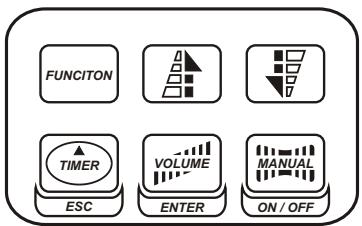
X-10: 10 meter wired multi-function remote control module with 5-pin XLR connector for ANTARI X Series models X-310, X-510, X-515, X-530. Its interface allows the operator to customize fog machine functions by adjusting fogging duration, interval and volume. Its LCD displays current operating parameters, which are automatically stored in non-volatile memory, allowing the machine to be powered down without losing function settings. Instructions below:
- Via the Function key, you can adjust the desired settings. Pressing the Function key will cycle through different options including Volume, Timer, Heat & Fan. The Enter (Volume) Key is used to select the desired option. To adjust fog output volume setting, simply go into Volume option. Adjust the volume percentage (within the range of 1% to nonstop burst) by means of Up / Down keys. To adjust timer setting, go into Timer option. Cycle through Interval (within the range of 1 to 900 seconds), Duration (within the
range of 1 to 200 seconds), and Volume (within the range of 1% to nonstop burst) by means of Up / Down keys. Use Enter (Volume) Key to select each option and make changes as desired. To turn off the heater and fan, go into Heat & Fan option. Use Enter (Volume) Key to confirm the selection. Use On/Off (Manual) Key to turn it on.
- Always press Enter(Volume) key to confirm setting.
- Press ESC(Timer) key to exit current menu level and move to an upper( previous) level.
- Press the Timer key to activate the timer function. The display shows the adjusted interval and the device counts the seconds down to "0". After that, the fog emission is triggered at the volume adjusted under "Timer"Option. The duration depends on the settings adjusted under "Duration". If you wish to deactivate the timer function, press the Timer key once more.
- Press the Volume key for immediate triggering of the fog emission at the volume adjusted under "Volume" Option. Press the Volume switch once more in order to stop the fog emission.
- Press the Manual key for immediate triggering of the fog emission at 100% volume. Let the Manual key loose in order to stop the fog emission.
- When in standby mode, press On/Off key to reactive the machine.
X-20II: DMX Interface module. Please refer to the section on Page 5 titled X-20II DMX Module Settings.
X-30: All the X-10 features plus wireless capability. Wireless operation is possible up to a distance of 50 meters. The address can be set from 0 to 8, which means total 9 different units can be controlled separately or in any combination desired. Press function to cycle to RF mode to select desired address number. Make sure the address setting on the X-30 matches the address setting on the transmitter. There are two buttons on the transmitter. Blue one is to emit fog and Red one is to stop the operation.
ANTARI X-20II DMX Module Settings
| Value | Function |
| 0 - 5 | OFF |
| 6 - 249 | Volume Control(5% - 95%) |
| 250 - 255 | Maximum Volume Output (100%) |
On X Fazer such as X-510, X-515 and X-530, X-20II uses only 1 channel to control volume output operation. On X Fazer such as X-310, X-20II uses 2 channels to control both
fog volume and fan volume. Whatever channel you select on the unit, the channel next to it will be selected automatically for fan volume control. Each channel has a value range of 0 to 225. Timer functions such as duration and interval can be programmed using the DMX controller or the DMX control software being used by lighting and effects operator.
If Channel has a value from 0 to 5, the unit is OFF.
Between the values 6 to 249 the volume of fog output is regulated. With 6 being the minimum volume of fog produced and 249 approaching the maximum. The volume output rises as the DMX value is increased.
If Channel has a value from 250 TO 255, the machine will operate at maximum output.
Note: In the example above, if the machine were assigned the DMX address of 124, Channel would correspond to DMX address 124.
In general, ANTARI X Fazer with X-20II DMX Module conform to the following performance specifications:
1.Average Operating temperature = 250^
2.X Fazer can maintain maximum output for 60 seconds or more
Maintenance
Do not allow the fog liquid to become contaminated. Always replace the caps on the fog liquid container and the fog machine liquid tank immediately after filling.
After every 40 hours of continuous operation, it is recommended to run a cleaning solution composed of 80% distilled water and 20% white vinegar through the system to prevent the accumulation of particulate matter in the heating element. The recommended cleaning regimen is as follows:
- Empty all fog fluid from machine. Add cleaning solution to tank. Plug unit in and begin warm up.
- Run unit in a well-ventilated area until tank is empty.
3.Cleaning is now complete. Refill with fog liquid.
Note: All fog machines are prone to clogging due to the thick consistency of fog fluid and the high temperature at which it vaporizes. However, a properly maintained fog machine should provide years of reliable use.
Clean with a dry cloth only. Store dry.
Cleaning your fog machine regularly will help reduce costly parts replacement and repair charges.
Performance Notes
It is recommended that you set the Fan output at 100% and Fog Volume output at 15 - 20% . With such setting, you will have continuous output of very fine haze effect
Whenever enormous effect is required, press Manual key to emit fog at 100% output instantly.
For quiet operation, lower down Fan output as desired.
All fog machines have a recycling period after long bursts when the machine will shut itself down for a short period in order to heat up again. During this time, no fog can be produced.
Specifications
| MODELS | X-310 |
| POWER | AC100V/120V/230V/240V, 50-60Hz |
| HEATER | 1,000W |
| OUTPUT | 3,500cu.ft/min |
| OUTPUT PRESSURE | 0.686bar |
| HEAT UP TIME | 12Min |
| FLUID CONSUMPTION RATE | 45Min./Liter, 2 Hrs./Liter (100% Output, 30% Output) |
| TANK CAPACITY | 2.5Liter |
| WEIGHT | 20.5kg |
| DIMENSIONS(mm) | L635 W275 H281 |
Please read and save these instructions
LIMITED WARRANTY
ANTARI Lighting and Effect Ltd. warrants to the original purchaser that the ANTARI X Fazer will be free from original defects in workmanship and material for a period of six months from the date of purchase. During the warranty period, machines will be repaired or replaced at the option of ANTARI or its designated dealer.
The warranty does not extend to any parts of the ANTARI X Fazer that have been subject to misuse or accident. Neither does the warranty cover any ANTARI X Fazer that has been opened, modified or repaired other than by ANTARI or its designated dealer. The warranty will not apply if procedures described in the Instruction Manual are not followed. It is the user's obligation to clean and maintain the ANTARI X Fazer according to these instructions, and to follow acceptable practices for handling electrical devices with heating elements.
NOTE: USE OF ANY FLUID OTHER THAN ANTARI FOG FLUID WILL VOID WARRANTY.
FAZER
MACHINE A FUMEE X-310
NOTICE D'UTILISATION
For current product information visit Antari at:www.antari.com For information requests please contact us at:sales@antari.com