 EasyManual
 DB 709 - Iron WHITE & BROWN - Free user manual and instructions
Find the device manual for free DB 709 WHITE & BROWN in PDF.


User questions about DB 709 WHITE & BROWN
0 question about this device. Answer the ones you know or ask your own.
Ask a new question about this device
Download the instructions for your Iron in PDF format for free! Find your manual DB 709 - WHITE & BROWN and take your electronic device back in hand. On this page are published all the documents necessary for the use of your device. DB 709 by WHITE & BROWN.
USER MANUAL DB 709 WHITE & BROWN
Congratulations for having chosen this WHITE & BROWN product, and thank you for trusting us. For your comfort and safety, your appliance has been checked at every step of manufacturing and has successfully gone through all our tests of quality. WHITE & BROWN creates original products to please you, as far as design and easiness to use are concerned in order to give you complete satisfaction.
CAUTION
Read all these instructions carefully before using this product.
- Make sure that the voltage rating on the type plate corresponds to your main voltage.
- Never leave the appliance unsupervised when in use.
- Keep out of children and irresponsible people.
- Only use the appliance for domestic purposes and in the way indicated in these instructions.
- Never immerse the product in water or any other liquid for any reasons. Do not use this appliance near a water point.
- Do not use outside.
- Unplug the appliance before cleaning or replacement of any pieces. Never move or range the appliance by pulling the cord.
- Do not allow the power cable to come into contact with the soleplate of the iron or hot surfaces of the appliance.
- Do not touch the hot surfaces of the appliance. Aiming the steam jet at people is dangerous and should be avoided.
- From time to time, check the cord for damages. Never use the appliance if cord or appliance shows any sign of damage.
- All interventions made by a non-qualified person can be dangerous; in this case guarantee conditions would cancel. As all electrical products, a competent electrician must repair it.
Special recommendations:
- Remove the plug from the socket before filling the iron with water or pouring out the remaining water after use.
- Before using the first time, remove any sticker or protective foil from the soleplate. Clean the soleplate with a soft cloth.
- The iron may smoke slightly when switched for the first time. After a short while, however, this will cease.
- Do not put vinegar or other descaling agents into the water tank.
- Do not use chemically descaled water.
THE MANUFACTURER WILL NOT ASSUME ANY RESPONSIBILITY IN CASE OF NON ADHERENCE TO THESE INSTRUCTIONS. SAVE THIS USER MANUAL CAREFULLY.
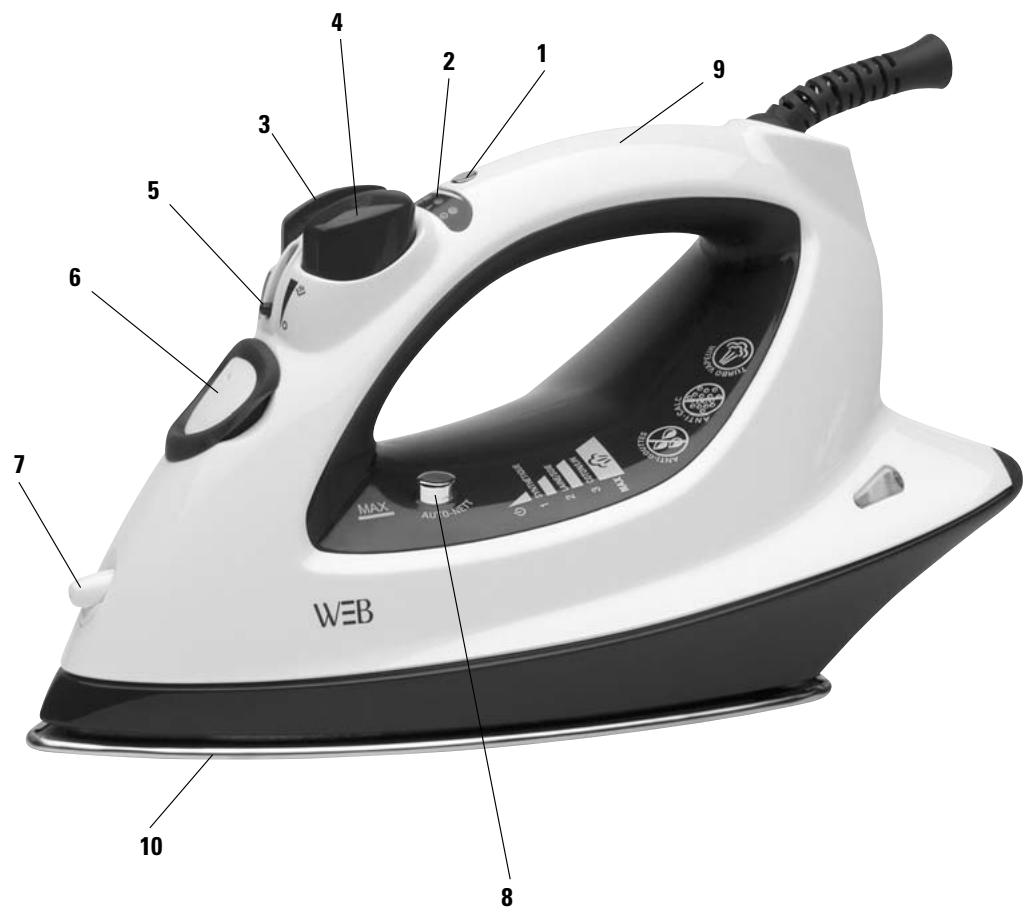
GENERAL DESCRIPTION
- Thermostat control button
- Thermostat light indicator
- Spray button
- Super steam button
- Variable steam button
- Anti-scale tank cap
- Spray nozzle
- Self-cleaning key
- Handle
- Soleplate
FILLING WITH WATER
- Unplug the appliance.
- Set the variable steam button (5) to position 0.
- Open the tank by removing the anti-scale cap.
- Fill with normal tap water.
- Replace the cap to shut the tank.
SETTING THE TEMPERATURE
- Stand the iron upright.
- Plug the appliance.
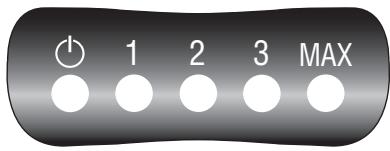
The red indicator is on (2). - Press the temperature control key (1) until desired ironing temperature.
- The selected light indicator temperature is flashing green. When the temperature is reached, the indicator lights continuously.
- It flashes and stays on from time to time during ironing.
DRY IRONING
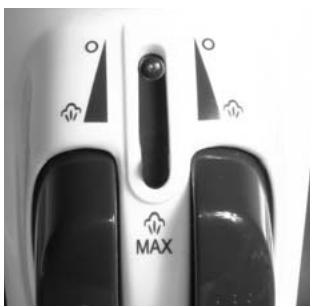
- Turn the variable steam button (5) to the position of no steam (0).
STEAM IRONING
- Set the temperature control (1) to position 2 or 3 or MAX for moderate steam or maximum steam.
- If a too low temperature has been selected, water may leak from the soleplate.
- Ensure that there is enough water in the water tank.
- Stand the iron on its heel.
- Insert the mains plug into the wall socket.
- Wait for the thermostat light indicator goes off.
- Set the variable steam button (5) to adjust the steam :
《0》 Dry ironing (without steam)
- Ensure that there is enough water in the water tank.
- By pressing button (4) an intense jet of steam is emitted from the soleplate.
- To prevent water leaking from the soleplate, do not keep the steam control button depressed for more than 5 seconds.
SPRAY SETTING
- Ensure that there is enough water in the water tank.
- The laundry can be damped down by pressing the spray button a couple of times (3), at any temperature.
ANTI-SCALE CARTRIDGE
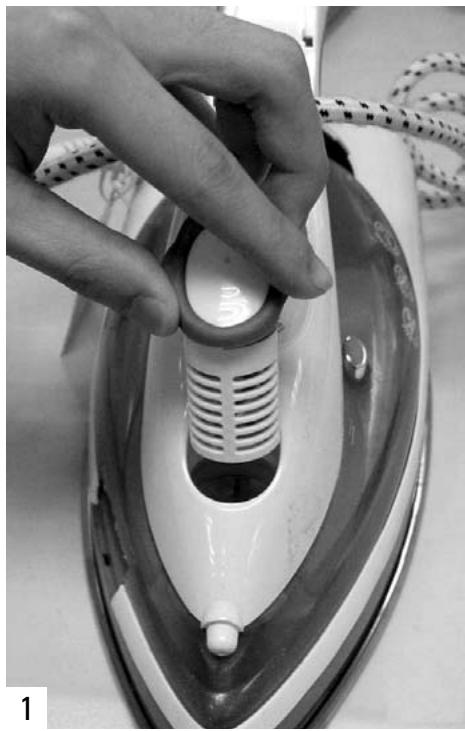
- The cap of the tank is including an anti-scale cartridge. This cartridge is to be replaced regularly.
Proceed as follow :
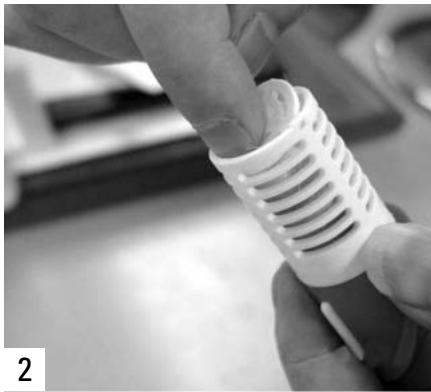
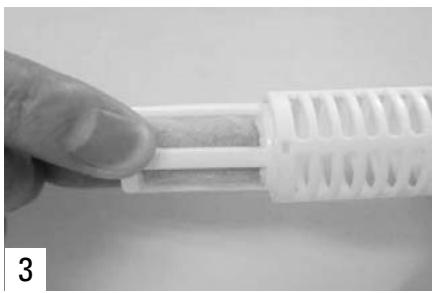
SELF CLEANING
In order to remove lime and dust particles, the self-cleaning system should be used at least once a month.
- Fill the water tank with fresh water.
- Set the variable steam button (5) to no steam position (0).
- Insert the mains plug into the wall socket.
- Set the temperature control knob (1) to the maximum temperature.
- Wait until the light indicator (2) goes off and steam iron has reached the preset temperature.
- Remove the plug from the wall socket.
- Hold the steam iron horizontally over a sink.
- Turn the variable steam button (5) to max position. Hot water and steam will be emitted from the soleplate. Swing the steam iron lightly to and fro to allow lime and dust particles to come out.
- When the water tank is empty, release the self cleaning button.
- Stand the steam iron upright and insert the plug into the wall socket to let the steam iron heat up again.
- Move the steam iron over a clean cotton cloth to clean the soleplate and let remaining water on the plate evaporate.
CLEANING
Self-cleaning is sufficient for the usual service. It must be done at least once a month. It is also convenient to clean the appliance as following.
- Unplug the mains from the wall socket and let the steam iron cool down.
- Scale and other residue can be wiped off with a damp cloth.
- From time to time, clean the inside of the water tank filling with water and shaking. Then pour the water out.
STORAGE
- Unplug the mains from the wall socket.
- Pour any remaining water out of the water tank.
- Set the steam knob (5) to no steam position (0).
- Stand the iron upright and let it cool down sufficiently.
Notice DB 709 electro ouvert 21/12/05 13:55 Page 15
WEB
06/05 - V1