
XF71407DG - Washing machine NEW POL - Free user manual and instructions
Find the device manual for free XF71407DG NEW POL in PDF.


| Product type | Washing machine |
| Brand | NEW POL |
| Model | XF71407DG |
| Dimensions (W x H x D) | 59.5 x 85.0 x 55.0 cm |
| Maximum load | 7 kg (cotton), 3.5 kg (synthetic), 1.5 kg (wool) |
| Maximum spin speed | 1400 rpm |
| Water pressure | 0.05 MPa - 1 MPa |
| Power supply | See rating plate |
| Programs | Cotton (30°-90°), Synthetic (30°-60°), Delicate (30°-40°), Wool (30°-40°), Hand wash, Quick, Daily, Rinse, Drain and spin |
| Optional functions | Prewash, Energy wash start, Extra rinse, Anti-crease, Delay start (1-16 h) |
| Display | Cycle duration, wash phases, error code |
| Technology | Easy Logic: automatic load recognition |
| Anti-unbalance control | Yes, speed reduction or spin cancellation in case of imbalance |
| Safety | Door lock during cycle, unlock after 2 minutes of stop |
| Maintenance | Regular filter cleaning, drum cleaning, descaling |
| Repairability | Spare parts available (belt, seals, pump, etc.) |
| Sound pressure | Not specified |
Frequently Asked Questions - XF71407DG NEW POL
User questions about XF71407DG NEW POL
0 question about this device. Answer the ones you know or ask your own.
Ask a new question about this device
Download the instructions for your Washing machine in PDF format for free! Find your manual XF71407DG - NEW POL and take your electronic device back in hand. On this page are published all the documents necessary for the use of your device. XF71407DG by NEW POL.
USER MANUAL XF71407DG NEW POL
"STOP" SUL PROGRAMMATORE:

VOCE: Ha efectuado un reset + beep-beep (sonido)
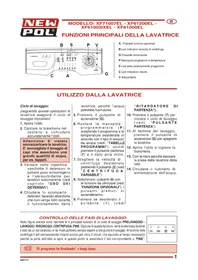
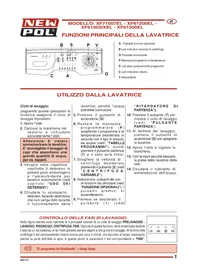
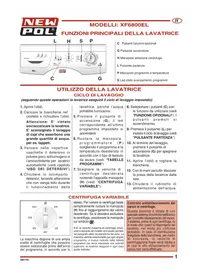
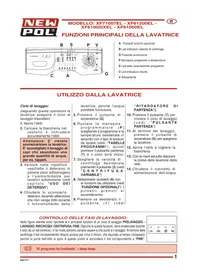
MAIN FUNCTIONS OF THE WASHING MACHINE
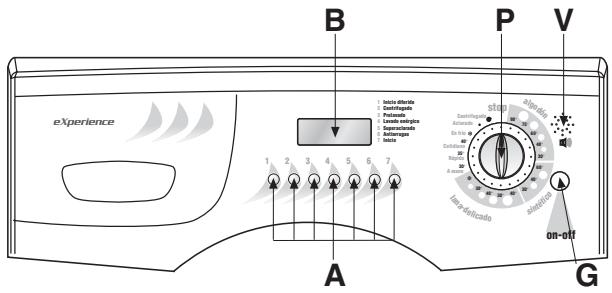
A Optional function buttons
B Display
G On/Off button
P Program and temperature knob
V Loud speaker
USING THE WASHING MACHINE
Wash cycle:
(follow these instructions and the washing machine will run the selected wash cycle)
- Open the door.
- Load the washing in the drum and close the door securely.
Warning: Do not overload the washing machine. It is not advisable to wash items that absorb large quantities of water such as carpets.
- Add a low-suds detergent and softener designed for automatic washing machines in the respective compartments of the detergent dispenser (see chapter "USE OF DETERGENTS).
-
Close the detergent drawer. Do not open the drawer while the machine is working as this may cause water to spill out.
-
Press the On/Off button (G).
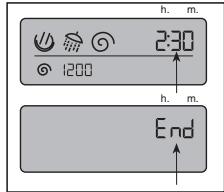
- Rotate the programmer knob (P) to select the required program and temperature according to the type of fabric to wash (see: "PROGRAM TABLES"), then press the start button (7) and the cycle will start. N.B. Once the programmer knob has been set, the display will automatically show the duration of the selected cycle in minutes, together with the symbol corresponding to the phase at which the wash cycle will start. As the program is being executed, this symbol will change to indicate the current wash phase. On completion of the wash program, the word END will be displayed.
- Select the required spin speed by pressing button (2) (see
"VARIABLE SPIN".
- Select the (A) buttons with the functions required (see "OPTIONAL FUNCTIONS"). The buttons pressed will light-up, and the time indicated on the display will vary according to the functions selected.
- Press button (1) if required (see "DELAYED START").
- Press button (7) to start the wash cycle.
- At the end of the wash, press the On/Off button (G) to switch off the washing machine.
- Open the door and remove the washing.
- With dry hands, unplug the washing machine from the mains supply.
- Close the water feed valve.
ON/OFF BUTTON:
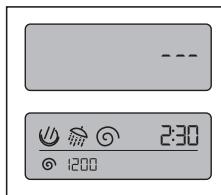
Press the button to switch on the washing machine. The display will light up and three flashing lines will appear if the programmer
knob is in position "0" (otherwise, the duration of the selected program and functions will appear).
VARIABLE SPIN:

VOCE: Sin centrifugado
- Values may vary according to the model
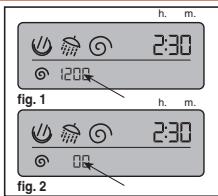
The machine offers a wide selection of spin speeds that can be selected before starting the wash program. To change the spin speed, simply press button (2) until the value required is displayed; (fig. 1). If the spin is to be excluded, press the button until the spin symbol itself appears on the display together with "00" (fig. 2).
N.B. the maximum spin speed will vary according to the model and is indicated on the washing machine display. The maximum spin speed that can be selected for each
program is that indicated automatically when the wash program is selected.
Spin load imbalance control:
This washing machine is equipped with a special electronic control system for correctly balancing the wash load.
Prior to each spin, the system ensures that the washing is evenly distributed in the drum. If the washing is not evenly distributed, the final spin speed is reduced, and if the load is very unbalanced, the spin is not effected.

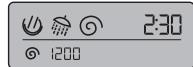
The display can be used to monitor the progress of the selected wash program. At the end of the wash cycle, all the symbols will disappear and the word "END" will appear.
The washing machine is effecting the pre-wash or main wash.
The washing machine is effecting the rinse cycle.
The washing machine is effecting the spin cycle.
DISPLAY AND DURATION OF THE WASH CYCLE:
At each program position selected with knob (P), the display will indicate the corresponding spin speed, the wash phase and the cycle duration time. The time display will reduce as the cycle progresses to arrive at zero on completion of the program. At this point, the word "END" will appear on the display. The washing can now be removed from the machine.
N.B. In the cotton programs, the duration of
the wash cycle is purely indicative, in that this can depend on a number of factors such as the temperature and pressure of the feed water and the quantity of washing loaded in the drum. During the wash, the machine's electronics will automatically modify the time necessary to complete the selected wash on the basis on these factors. This will produce the best wash performance in the shortest time period.
DELAYED START:

VOCE: El programa se inicia al cabo de : 1 hora 2 horas, 3 horas, 4 , 5, 6, 7 ,8, 9, 10, 11,12,13,14, 15,16 horas * Values may vary according to the model
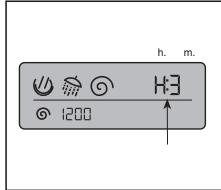
The washing machine is equipped with a function that allows the start of the wash to be delayed for up to a maximum of 16 hours. Each time button (1) is pressed, the number of hours from 1 to 16 that the washing machine will wait until starting the wash cycle is displayed (e.g. H.3 indicates that the wash
cycle will start in three hours' time). After pressing button (7) the washing machine will automatically start the wash cycle after the preset delay period.
START BUTTON:

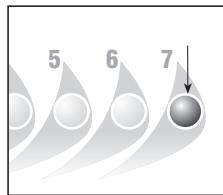
After all the operations described in points 1 to 10 of paragraph "WASH CYCLE" have been carried out, pressing this button will start the wash cycle.
When the button is pressed, it will light up after approximately 2-3 seconds to indicate that the wash program has started.
"STOP" ON PROGRAMMER:

VOCE: Ha efectuado un reset + beep-beep (sonido)
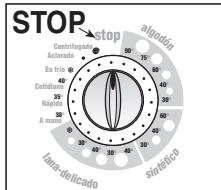
The stop function resets the washing machine.
If, for any reason, you want to change the wash program or add more washing to the load during the wash cycle, simply place the programmer knob in position "STOP" (3 lines will flash on the display and the "START" button light will go out).
Then re-position the knob on the new program and press the "START" button.
Warning!! only use this function if strictly necessary and then only if the program to reset has not been running for more than 3 minutes. Before opening the door after a reset, wait 2 minutes for the locking mechanism to release.
OPTIONAL FUNCTIONS
If one of the following buttons is selected, it will light up. If a function button has been pressed by mistake or is no longer required, the option can be cancelled by simply re-pressing the button.
PREWASH:

VOCE: Prelavado
Press this button to obtain a short prewash of maximum temperature 40^ and approximately 10 minutes duration. This function can only be used with "COTTON, SYNTHETIC and DAILY" programs.
Button 3 will light up.
NB: Pressing this button for 3 seconds enables/disables the voice function

When this button is pressed, the washing machine will run a wash cycle at the set temperature, though with a longer duration.
The button is enabled for the "COTTON" and "SYNTHETICS" programs.
EXTRA RINSE:

VOCE: Superclarado
The washing machine has been designed to reduce water consumption to a minimum. In very soft water areas, or in the case where
detergent residues are noticed at the end of the wash cycle, pressing this button will add one more rinse to the program.
ANTI-CREASE:

Antiarrugas
When this button is pressed, at the end of the wash cycle, the items loaded in the washing machine will continue to rotate for a further thirty minutes to reduce creasing. With this function enabled, the spin speed is 800 rpm. The function cannot be activated for the "WOOL" program.
NB. The use of this function depends on the type of programme selected. Consequently, if the wash programme does not include this function, the button cannot be enabled (see "PROGRAMME TABLE").
Prewash

3
Energetic wash

4
Extra rinse

5
Anti crease

6
PROGRAMME TABLES
| PROGRAMMER KNOB | WASH TEMPERATURE | SYMBOL | FABRIC TYPE | DISPENSER COMPARTMENTS | BUTTONS ENABLED | ||||
| Prewash | Energetic wash | Extra rinse | Anti crease | ||||||
| Algodon 90° para blanco muy sueio | COTTON | 90° | 90° | Heavily soiled white cotton fabrics with organic stains. | 2+1 | ||||
| Algodon 75° para blanco normal | COTTON | 75° | 75° | Sheets, shirts, tablecloths, towels that are resistant and heavily soiled | 2+1 | ||||
| Algodon 60° para colores resistentes | COTTON * | 60° | 60° | For shirts, tablecloths, towels that are resistant and normally soiled | 2+1 | ||||
| Algodon 40° para colores delicados | COTTON | 40° | 40° | White and coloured fabrics that are resistant and heavily soiled | 2+1 | ||||
| Algodon 30° para lavado economico | COTTON | 30° | 30° | Delicate coloured fabrics that are lightly soiled | 2+1 | ||||
| Sintético 60° para cargas mixtas | SYNTHETICS | 60° | 60° | Colourfast synthetic fabrics that are heavily soiled | 2+1 | ||||
| Sintético 40° para blancos resistentes | SYNTHETICS | 40° | 40° | Colourfast synthetic fabrics that are normally soiled | 2+1 | ||||
PROGRAMME TABLES
| PROGRAMMER KNOB | WASH TEMPERATURE | SYMBOL | FABRIC TYPE | DISPENSER COMPARTMENTS | BUTTONS ENABLED | ||||
| Prewash | Energetic wash | Extra rinse | Anti crease | ||||||
| Sintético 30° para colores delicados | SYNTHETICS | 30° | 30° | Delicate coloured synthetic fabrics that are lightly soiled | 211 | ● | ● | ● | ● |
| Delicado 40° para cortinas | DELICATES | 40° | 40° | Delicate cotton, viscous and mixed delicate fabrics | 211 | ○ | ○ | ○ | ● |
| Delicado 30° para poliester | DELICATES | 30° | 30° | Delicate cotton, viscous and mixed delicate fabrics | 211 | ○ | ○ | ○ | ● |
| Lavado lana 40° | WOOL ★★★ | 40° | Machine washable wool | 211 | ○ | ○ | ○ | ○ | |
| Lavado seda 30° | WOOL | 30° | 30° | Machine washable wool | 211 | ○ | ○ | ○ | ○ |
| Lavado frio para tejidos delicados | WOOL | COLD | — | Machine washable wool | 211 | ○ | ○ | ○ | ○ |
| Lavado a mano 30° | HAND WASH | 30° | Hand washable fabrics | 211 | ○ | ○ | ○ | ○ | |
| Rápido 35° | QUICK WASH | 35° | 35° | Delicate cotton, viscous and mixed delicate fabrics lightly soiled | 211 | ○ | ○ | ○ | ○ |
| Diario 40° | DAILY WASH | 40° | 40° | Delicate cotton fabrics, delicate coloureds that are lightly soiled | 211 | ● | ○ | ● | ● |
| Lavado frio | COLD WASH COLD | COLD | — | Delicate fabrics | 211 | ○ | ○ | ● | ● |
| Aclarados | RINSES | — | — | To rinse and refresh the washing | 211 | ○ | ○ | ● | ○ |
| Vaciado y centrifugado | DRAIN AND SPIN | — | — | Drain and final spin | 211 | ○ | ○ | ○ | ● |
FUNCTION ENABLED FUNCTION DISABLED 1 OPTIONAL WITH PREWASH BUTTON PRESSED
Reference programme for energy classification purposes according to standard EN 60456
** Reference program for pure new wool.
"EASY LOGIC" TECHNOLOGY
The electronic washing machine is equipped with a special system that automatically recognises the amount of washing loaded in the drum. The machine can thus regulate the amount of water to use for the wash and proportion the wash
time accordingly, thus saving water, time and energy. In the case where the amount of washing is less than the maximum recommended load (see technical characteristics table), the quantity of water used for the
wash will be reduced by 2 litres for each kg less of washing. In the case of a half-load or less, the machine will automatically carry out one rinse less than programmed. N.B. This function is only activated for cotton programmes.
TECHNICAL CHARACTERISTICS
| MODELLO → | XF81208DG | XF81408DG | XF71207DG | XF71407DG | |
| Dimensions: | Width cm.: | 59.5 | 59.5 | 59.5 | 59.5 |
| Height cm.: | 85.0 | 85.0 | 85.0 | 85.0 | |
| Depth cm.: | 57.0 | 57.0 | 55.0 | 55.0 | |
| Maximum recommended load: | 8 Kg | 8 Kg | 7 Kg | 7 Kg | |
| 4 Kg | 4 Kg | 3,5 Kg | 3,5 Kg | ||
| 2 Kg | 2 Kg | 1,5 Kg | 1,5 Kg | ||
| Max. spin: (rpm) | 1200 | 1400 | 1200 | 1400 | |
| Water pressure: | min. 0,05 MPa - max. 1 MPa | ||||
| Max. absorbed power/Electrical connection | see plate with technical feature | ||||
"STOP" EN EL PROGRAMADOR:

VOCE: Ha efectuado un reset + beep-beep (sonido)
TECNOLOGÍA "EASY LOGIC"
FONCTIONS OPTIONNELLES
- "STOP" SUL PROGRAMMATORE:
- MAIN FUNCTIONS OF THE WASHING MACHINE
- USING THE WASHING MACHINE
- Wash cycle:
- ON/OFF BUTTON:
- VARIABLE SPIN:
- VOCE: Sin centrifugado
- DISPLAY AND DURATION OF THE WASH CYCLE:
- DELAYED START:
- START BUTTON:
- "STOP" ON PROGRAMMER:
- OPTIONAL FUNCTIONS
- PREWASH:
- VOCE: Prelavado
- EXTRA RINSE:
- VOCE: Superclarado
- ANTI-CREASE:
- Antiarrugas
- PROGRAMME TABLES
- "EASY LOGIC" TECHNOLOGY
- "STOP" EN EL PROGRAMADOR:
- TECNOLOGÍA "EASY LOGIC"
- FONCTIONS OPTIONNELLES
Brand : NEW POL
Model : XF71407DG
Category : Washing machine