
BP 603 - Digital blood pressure monitor IBP - Free user manual and instructions
Find the device manual for free BP 603 IBP in PDF.


| Product Type | Digital Arm Blood Pressure Monitor |
| Brand | IBP |
| Model | BP 603 |
| Measurement System | Oscillometric (Real Fuzzy technology) |
| Display | Liquid Crystal Display (LCD) |
| Measurement Range (pressure) | 30 - 280 mmHg |
| Measurement Range (pulse) | 40 - 200 beats/min |
| Accuracy (pressure) | ± 3 mmHg |
| Accuracy (pulse) | ± 4 % |
| Memory | 60 measured values with date and time |
| Power Supply | 4 alkaline batteries 1.5 V, type AA |
| Dimensions (L x W x H) | 135 x 115 x 63 mm |
| Weight (without batteries) | Approx. 390 g |
| Arm Circumference | 23 - 33 cm (rigid cuff) |
| Operating Temperature | +10 °C to +40 °C |
| Storage Temperature | -20 °C to +50 °C |
| Classification | Medical device (CE, directive 93/42/EEC) |
| Warranty | 24 months (manufacturing defects) |
| Maintenance and Cleaning | Soft damp cloth, no thinner or alcohol |
| Main Functions | Automatic measurement, memory 60 values, alarm, WHO display, arrhythmia detection |
Frequently Asked Questions - BP 603 IBP
User questions about BP 603 IBP
0 question about this device. Answer the ones you know or ask your own.
Ask a new question about this device
Download the instructions for your Digital blood pressure monitor in PDF format for free! Find your manual BP 603 - IBP and take your electronic device back in hand. On this page are published all the documents necessary for the use of your device. BP 603 by IBP.
USER MANUAL BP 603 IBP
Digital blood pressure monitor for readings on the upper arm
1 introduction 2
2 preliminary remarks 3
3 about blood pressure 3.1 blood pressure values 4-5
3.2 what is "Hypertension" (High Blood Pressure) and why is it harmful? 6
3.3 measures affecting your blood pressure positively 6
3.4 how to obtain accurate readings 7
4 the unit / accessories 8
5 display / icons 9
6 battery installation / battery replacement 10
7 setting the date and time 11
8 setting the alarm 12
9 making a blood pressure measurement 9.1 attaching the wrist cuff 13-14
9.2 the right measuring position 14
9.3 the measuring method 15-17
9.4 the WHO display 18
10 the memory function 19
11 an error is displayed 20-22
12 other important notes 23
13 specifications 24
guarantee 25
1 introduction
dear customer,
we are glad that you have decided for this blood pressure monitor. The product you have bought is state of the art, of highest quality and has many advanced features. The device measures the upper arm blood pressure both rapidly and extremely accurately, and avoids the need to constrict the blood supply to the arm for long periods. If the upper arm is covered by a thin shirt or blouse, the arm cuff can be placed over the garment. The device is ideal for regular blood pressure checking. Because the device has a memory, which can store 60 values, you can easily track changes and notify your doctor in good time if problems are detected. The unit is determined for household use and should be used by adult persons only.
important notes !
Please read this Instruction Manual carefully to know your blood pressure monitor. Then the monitor will give you many years of smooth service and supply measuring data of high accuracy. Only your physician can interpret your blood pressure values. If you suffer from cardiac arrhythmia, always discuss the blood pressure values with your doctor. If you have questions about blood pressure for which you do not find an answer in this booklet, also consult your doctor.
The right to technical modifications is reserved.
preliminary remarks 2
- This Blood Pressure Monitor complies with the European regulations and bears the CE mark "CE 0197".
- This Blood Pressure Monitor bears the CE (conformity) label for notinvasive Blood Pressure Monitors to show that it conforms with the EU Council Directive (EN 1060-1 / EN 1060-3) for notinvasive Blood Pressure Monitors. It also confirms with the EU Council Directive "93/42/EEC of 14th June 1993 on Medical Products", and the EU Council Directive "89/336/EEC for electromagnetic compatibility.
- ibp hereby confirms that the product delivered together with this Instruction Manual complies with this Directive. The appropriate conformity declaration is available with ibp.
- To ensure accurate measurements, the Blood Pressure Monitor must receive a technical check up every 2 years. Inspection is also required when the blood pressure data supplied by the monitor are obviously off-range. If you have any questions about these checks, please contact our Customer Services Department (address on the warranty certificate).
CE 0197
the "Real Fuzzy" measuring technology
This Blood Pressure Monitor uses trends-setting "Real Fuzzy" Technology to detect your blood pressure. With one touche of a button, the device will automatically start to inflate and determine your blood pressures by analyses of your pressure oscillations. The device inflates only until the upper value is reached. The ideal sleeve pressure is obtained from the systolic blood pressure and the size of the arm. Arm pains are thus eliminated and incorrect readings due to a wrongly inflated sleeve are prevented.
3 about blood pressure
More than half the number of people suffering from high blood pressure are unaware of it. The most common cause of death in today's society is from diseases that are directly related to the problem of high blood pressure. This Blood Pressure Monitor allows you to measure your blood pressure at home. If your blood pressure is off limits, the monitor helps you to keep it under constant watch. Remember only your physician can interpret your blood pressure values. Never venture self-diagnosis or self-treatment. The blood pressure is the measure of the force which the heart needs to pump the blood through the circulatory system and supply the vital organs of our body. The higher the pressure, the harder the heart must work.
3.1 blood pressure values
Typical normal blood pressure as recommended:
| hypotension |
| normalless |
| borderline |
| hypertension |
| systolic blood pressure |
| less than 105 mmHg |
| less than 140 mmHg |
| 140 - 160 mmHg |
| more than 160 mmHg |
| diastolic blood pressure |
| less than 60 mmHg |
| less than 90 mmHg |
| 90 - 95 mmHg |
| over 95 mmHg |
If the blood transport system is inot functioning normally, the blood pressure can be higher than normal. High blood pressure can damage vital organs, such as the heart, the brain or muscles.
about blood pressure 3
Remember that only the physician can interpret your blood pressure values. Never venture self-diagnosis or self-treatment. We recommend you to discuss your blood pressure values with your physician. He can advise you on any measures that may be good to take.
The blood pressure is changing constantly. You should not be frustrated by two or three bad readings, and don't fly into high spirits if a few readings are good. The blood pressure changes during the day as during the month. It is also influenced by the time of year and the temperature. Monitor your blood pressure regularly and keep a full record of all readings. This allows you to make a competent judgment.
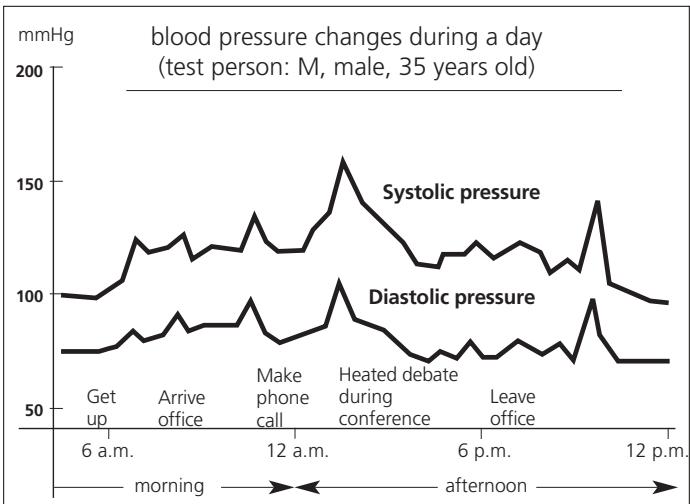
3 about blood pressure
3.2 what is "Hypertension" (High Blood Pressure) and why is it harmful?
If parts of the blood transport system are constricted, diseased or in any way not functioning normally, the blood pressure can be higher than normal. High blood pressure can damage vital organs, such as the brain or the heart.
3.3 measures affecting your blood pressure positively
If your blood pressure is high or you want to avoid high blood pressure, your lifestyle should generally be conducive to this goal.
Existing diseases:
Strictly follow the instructions of your doctor to treat existing diseases e.g., diabetes, gout, disturbed lipid metabolism, etc.)
Nutrition:
Reduce overweight. Use little salt with your food, avoid food with lots of fat.
Smoking, drinking:
No smoking! Consume only little alcohol and coffee.
Sport activities:
If advised by your doctor after an examination, practice stamina sports (jogging, swimming). Avoid sports involving strength, do not try your limits!
3.4 how to obtain accurate readings
The blood pressure is constantly changing throughout a day. The changes are caused by psychic and physical factors, such as anxiety, exercise, smoking, caffeine and stress. Because it is changing, the blood pressure should always be measured at the same time of day, when your body is relaxed. It is the physician's responsibility to interpret the readings and analyze your physical condition. It is important that you consult your physician regularly. He will tell you your normal blood pressure and what you should take care of.
here are a few helpful tips to obtain accurate readings:
- Wait one hour before measuring the blood pressure after a substantial meal.
- Do not smoke or drink alcohol before measuring the blood pressure.
- You should not do physical work one hour before taking a reading.
- It is important that you relax. Try to take 15 minutes rest before the reading.
- Do not take measurements if you are under stress or tension.
- Take the blood pressure reading at normal body temperature, not when you feel cold or hot.
- When the monitor is stored at very low temperature (near freezing), keep it at a warm place at least for 1 hour before using it.
- Wait about 5 minutes before making the next pressure measurement.
4 the unit / accessories
identification of the unit
accessories included are instruction manual with warranty, batteries and keeping bag (without ill.)
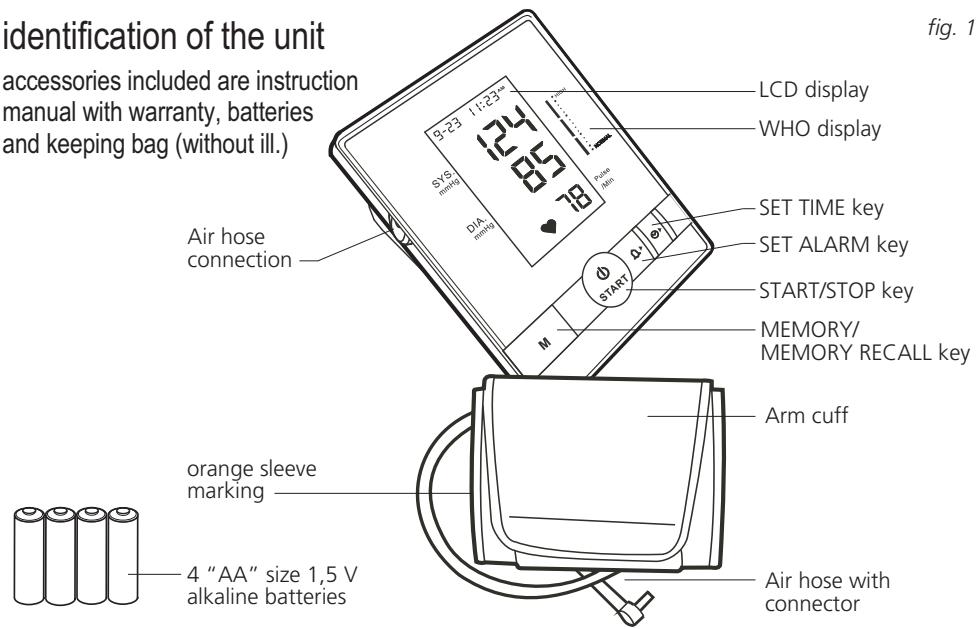
fig. 1
the display / icons 5
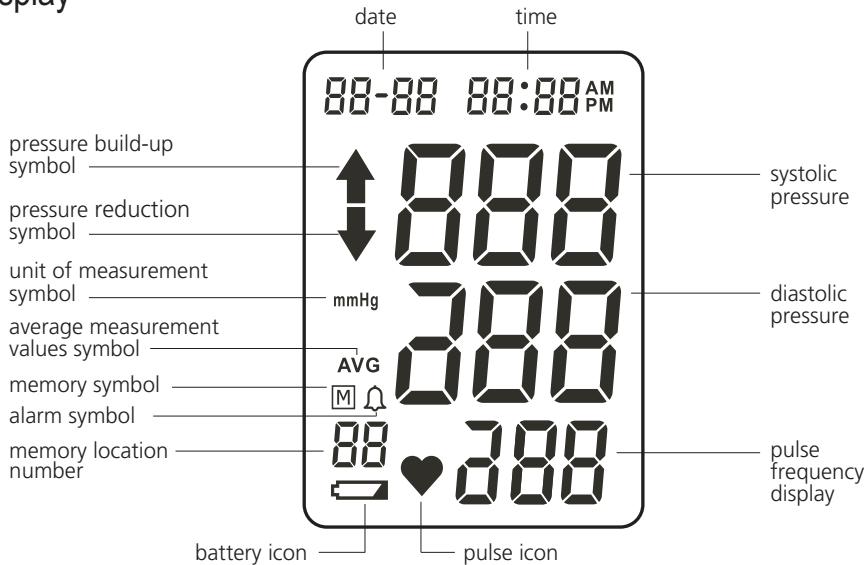
display
fig. 2
6 battery installation / replacement
battery installation / battery replacement
The enclosed batteries must be fitted before use. The battery cover is on the bottom side of the unit. Push it open and remove it. Insert the 4 supplied "AA" size, 1.5V alkaline batteries as shown here. Ensure correct polarity according to the indication inside the compartment. Replace the battery cover by clicking in the bottom hooks first, then push in the top end of the battery door. Replace all the batteries when the battery replacement sign appears on the LCD display, or when the LCD display is blank after you switch on the unit.
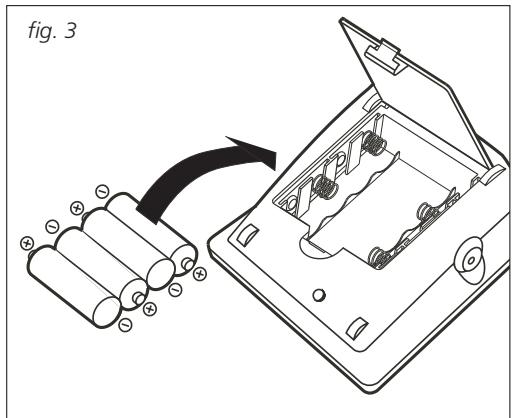
notes:
As the supplied batteries are for test only, they may be discharged earlier than batteries you buy in the store. Replace the batteries all of them the same time.
Batteries are hazardous waste. Do not dispose them together with the household garbage. Remove the batteries when the unit is not used for a long time.
Battery safety
-
Keep away from children!
-
Do not short-circuit!
instructions:
-
Not rechargeable!
-
Do not throw into fire!
setting the date and time 7
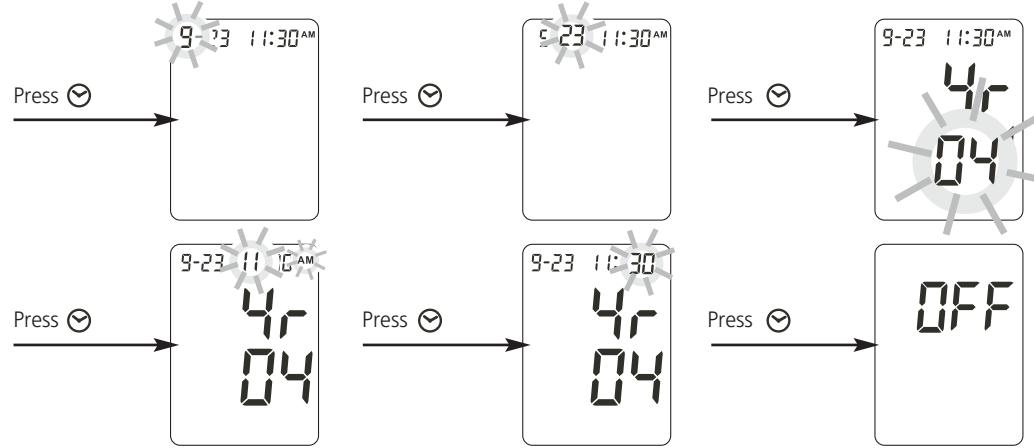
- Press the SET TIME key to enter date and time setting mode. Initially the input display area will flash for the month.
- To enter the figures for the month, press the MEMORY key M until the number of the month you require appears. To confirm, press the SET TIME key again.
- Repeat stages 1 and 2 to enter day, hour and minute in succession.
8 setting the alarm
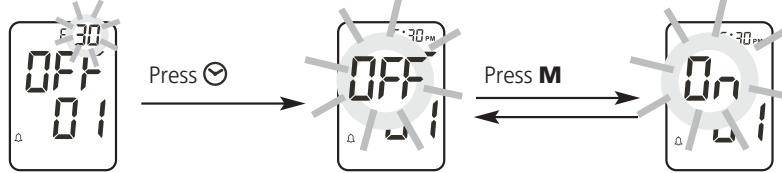
- Press the SET ALARM key to enter alarm setting mode
- You can select 3 memory locations. Press the SET ALARM key as often as you require until you select the desired memory location.

- To set the alarm timer, press the SET TIME key . Next, set the time required as described in Chapter 7 on page 11. To conclude the time setting procedure, press the SET TIME key again.
- To switch the alarm timer on or off, simply press the MEMORY key M after you have set the time required
making a blood pressure measurement 9
9.1 attaching the wrist cuff
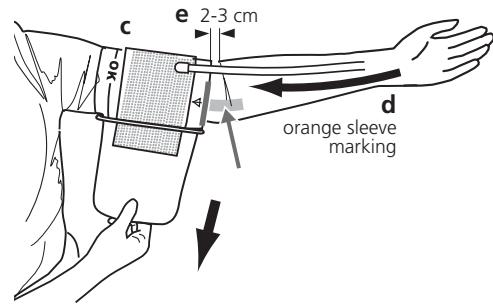
a) Before using, insert the connector of the air hose into the air hose connection of the unit (a). The blood pressure monitor is used as a desktop/tabletop unit.
b) Insert the end of the sleeve through the metal strap so that the sleeve acquires a tunnel shape (b).
c) Put your left arm through the cuff loop (c). Position the orange sleeve marking at the middle of the arm, in line with your middle finger (d). Tighten the cuff by pulling the end of the cuff.
d) Turn your left palm upward and place the edge of the arm cuff at approximately 2 to 3 cm above the inner side of the elbow joint (e).
e) If the cuff is not pulled tight you get wrong measure values.
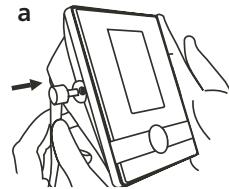
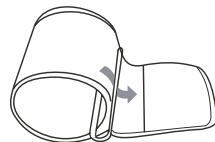
fig. 4
b
9 making a blood pressure measurement
f) Sit in a comfortable position, with your feet flat on the floor. The room should be at an agreeable temperature. Wait at least 5 minutes before taking a measurement.
g) If you cannot place the cuff around your left arm and the blood pressure measurement is not possible on the left arm, place the cuff around the right arm. Always take your measurements on the same arm.
9.2 the right measuring position
- Have yourself on a seat in a comfortable position, breathe deeply several times and relax.
- To get a correct picture of the blood pressure changes during the day, make the measurements at home daily at the same time.
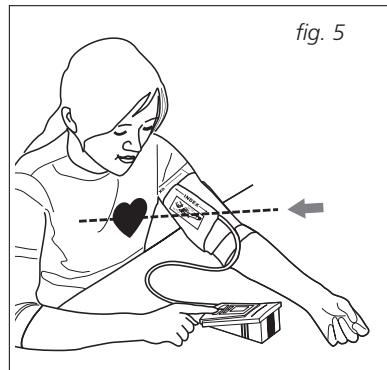
- To make sure that you obtain a correct measurement, position your arm as shown in the illustration opposite. Place your elbow on the table or other suitable support and hold the cuff so that the cuff is at the same level as the heart.
- Record the values and show them to your physician for assessment.
making a blood pressure measurement 9
9.3 the measuring method
a) Place the cuff around your arm as described on pages 13 and 14.
b) Start the Monitor by pressing the START/STOP key (START).
c) When the START/STOP key is pressed, all digits will light up (see fig. 6). This is a check of the display functions which is complete after about 1 second. The last reading taken will appear in the display (fig. 7).
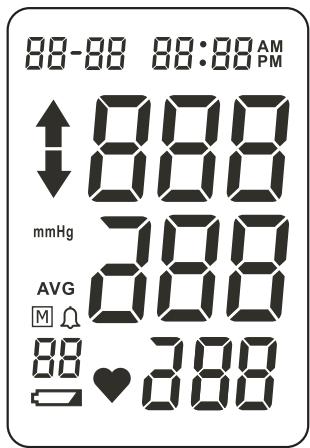
fig. 6
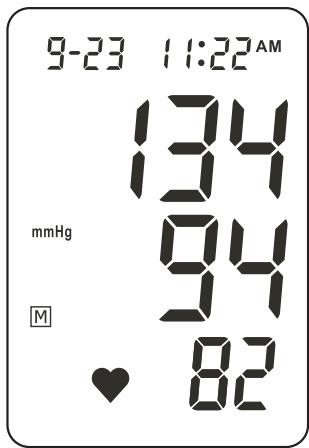
fig. 7
9 making a blood pressure measurement
d) The unit is ready for use. The unit will automatically start to inflate slowly to measure your blood pressure. During inflation, the pressure build-up symbol will appear in the display (fig 8).
e) If the cuff pressure is low, the unit interrupts the measuring and increases the cuff pressure to an acceptable level. When pressure reaches to the proximity of your systolic blood pressure, the monitor will exhaust cuff pressure. The pressure build-up symbol in the
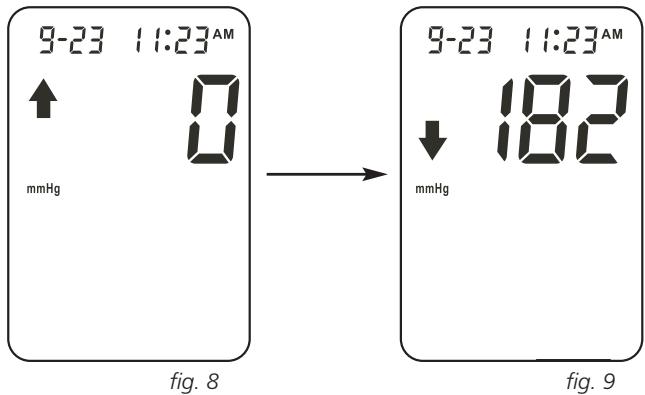
display will disappear; in its place the pressure reduction symbol will now appear.
f) As the pump reaches the starting pressure, measuring starts. While measuring, do not move the cuff or your arm or hand muscles, don't speak. The cuff will deflate automatically. While the unit determines your pulse frequency, the pulse symbol will flash.
making a blood pressure measurement 9
f) Once the reading is complete, both the systolic and the diastolic blood pressure, along with the pulse value, will automatically appear in the display. The Memory symbol blinks briefly. Then it will automatically display and save one's systolic, diastolic, and pulse in the Memory. Up to 60 memories can be saved in the Memory Zone.
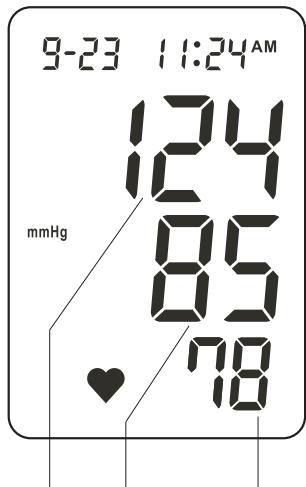
fig. 10
Systolic Diastolic Pulserate
9 making a blood pressure measurement
9.4 the WHO display
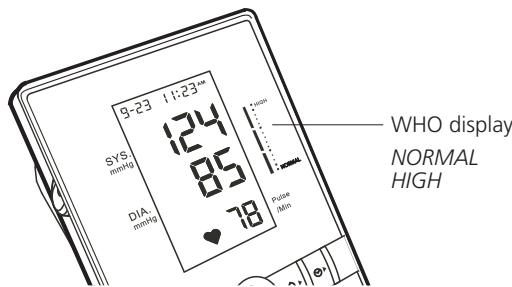
The standards for determining blood pressure, regardless of age, are defined by the World Health Organisation (WHO) in the adjacent table.

fig. 11
Your blood pressure monitor BP 603 has a display on the right, which conforms to the WHO standards.
In accordance with the reading, the level of your current blood pressure is represented as a column
a) You can store your blood pressure reading up to 60 times (blood pressure and pulse) along with the date and time in the memory. The measurement values are stored automatically. Should 60 measurement values already be stored in the memory and a new value is added, the oldest value is deleted.
b) To retrieve the stored values, press the MEMORY key M. The average value is indicated in the display. If you press the MEMORY key M again, the last measurement data stored will be displayed. Each further press of the MEMORY key M indicates in numerical order, from 1 to 60, the measurement values previously obtained each time.
c) If you press the SET TIME key , the values stored will be displayed in reverse order.
d) You have the facility to delete all the data stored. Switch off the unit and hold down the MEMORY key M until the display shows "Clr."

fig. 12
note: The data in the memory will not be lost even when the Blood Pressure Monitor is switched off. Replacing the batteries will not affect the memory. Date and time will possibly need to be reset.
11 an error is displayed
| Error | Fault/Cause | Solution/Explanation |
| After switching on the unit, the display fails to show anything. | There are no batteries inserted or they have been inserted incorrectly or they are totally empty. | Insert batteries, check the position of the batteries or replace them with new ones. |
| The change-battery symbol appears. | The batteries are almost empty or they are completely empty. | Replace all four batteries with new ones. |
| Batteries may react to frost with a weaker flow of current. | Place the batteries for a short time in a warm place and start again. | |
| The operating time is growing shorter. | You are perhaps failing to use alkaline batteries. | Use alkaline batteries. |
| No measurement data is displayed after the reading has been taken. | The voltage of the batteries is extremely low. | Replace all four batteries with new ones. |
| Dubious readings are displayed that deviate strongly from the average values. | You have not adopted the correct position. | Adopt the correct position (see Ch. 9.2, p. 14). |
| Blood pressure will deviate from time to time. |
an error is displayed 11
| Error | Fault/Cause | Solution/Explanation |
| The pulse frequency is higher or lower than the average value. | You have moved your arm or body briefly during the reading or you have spoken. | Do not move while the reading is being taken. Do not talk. |
| You have taken the reading immediately after physical exertion. | Do not take any reading immediately after physical exertion. | |
| The unit switches off automatically. | This is built into the system. | Press the START/STOP key again and re-take the reading. |
| The unit continues to pump up while the reading is being taken. | This is normal. If the user's blood pressure that is being measured is higher than the initial value of the sleeve pressure, the unit will automatically continue to pump. The pressure build-up will occur in stages of 20 mmHg, until a suitable pressure for the reading has been reached. | |
| The sleeve is not correctly fitted or is not tight enough. | Fit the sleeve correctly (see Ch. 9.1, pp. 13-14). |
11 an error is displayed
Error codes:
Err 0.: No pulse or the pulse measured is too low.
Err 1.: The sleeve is not airtight or the pressure build-up is too slight.
Err 2.: The systolic value cannot be obtained.
Err 3.: The sleeve pressure is too high.
Err 4: The diastolic value cannot be recorded or is outside the measuring range.
Err 5.: The pressure reduction occurs too quickly.
Err 6.: The pressure reduction occurs too slowly.
Err 7.: The systolic value is outside the measuring range.
Err 8.: The sleeve pressure is outside the measuring range.
Err 9.: The sleeve pressure is insufficient, although highest point of the pressure build-up has already been reached.
other important notes 12
- The unit contains high-precision assemblies. Therefore avoid extreme temperatures, humidity, direct sunlight. Do not give strong shock. Do not try to open the blood pressure monitor. This will destroy the calibrated factory settings.
- Protect from ingress of dust.
- Do not bend the preformed cuff inside out. Clean the blood pressure computer body and the cuff carefully with a slightly damp, soft cloth. Do not press. Do not wash the cuff or use chemical cleaner on it. Never use thinner, alcohol or petrol as cleaner.
- Leaky batteries can damage the unit. Remove the batteries when the unit is not used for a long time.
- Do not press the Start key when the cuff is not placed around the arm.
- The unit is determined for household use and should be used by adult persons only.
- You should not use any tool to open the device nor should you attempt to adjust anything inside the device. If you have any problems, please contact the Service Centre.
- For users diagnosed with common arrhythmia (atrial or ventricular premature beats or atrial fibrillation), diabetes, poor circulation of blood, kidney problems, or for users suffered from stroke, or for unconscious users, the device might not be suitable for use.
13 specifications
Model
Measuring method
Indicator
Measuring range
Measuring resolution
Pressure build-up
Pressure release
Deflation
Power source
Memory
Working temperature
Storage temperature
Hard cuff
Dimension (measuring unit)
Weight
:BP603
: oscillometric method
:LCD
30 - 280 mmHg (blood pressure)
: 40 - 200 pulse/min. (pulse rate)
: ± 3 mm Hg (blood pressure)
: ± 4 % (pulse rate)
automatic pressure build-up by pump
automatic pressure release by valve system
: automatic deflation valve
: 4 x 1.5V high capacity or alkaline batteries size “AA”
60 measuring values
+ 10 °C to + 40 °CHumidity: 15 - 95 % RH max.
- 20°C to +50 °C
humidity: 15 - 95 % RH max.
for wrist circumference between 23 - 33 cm (9" - 13")
: appr. 135 (l) x 115 (w) x 63 (h) mm
: appr. 390 grams (without batteries)
GUARANTEE
Your Blood Pressure Monitor was checked to ensure its faultless quality before despatch. Please send the appliance for checking or repair together with the purchase document or receipt and the description of the faults and/or of the desired check to the adress below.
From the date of purchase (date of the purchase document) rapairs will be carried out free of charge for 36 months, if your appliance should be defective due to a production or material fault.
The guarantee does not cover any damage occurring as a result of faulty operation, improper treatment, storage and care or unusual influences. All further claims as well as damages shall likewise be excluded.
Should you have any reason to avail yourself of the warranted services under the guarantee, send the appliance with the guarantee documents to the customer service department:
ibp International Business Products Limited
6 Newfield Court
West Houghton
Bolton BL5 3 SA England
Phone: +44 (0) 19 42 - 81 96 95
Distributed by: sano health care products Pvt. Ltd. ibp group
Corporate Office: 28 • Lansdown Terrace, 1st Floor • Kolkata - 700 026
Phone No: +91 33 2465 0383-85
Manufactured by: AVITA Corporation, Taipei, Taiwan
chere cliente, cher client,
13 specifications techniques
NORMAL = tension normal
HIGH = tensión alta
- introduction
- dear customer,
- important notes !
- preliminary remarks 2
- the "Real Fuzzy" measuring technology
- about blood pressure
- blood pressure values
- about blood pressure 3
- what is "Hypertension" (High Blood Pressure) and why is it harmful?
- measures affecting your blood pressure positively
- Existing diseases:
- Nutrition:
- Smoking, drinking:
- Sport activities:
- how to obtain accurate readings
- here are a few helpful tips to obtain accurate readings:
- the unit / accessories
- identification of the unit
- the display / icons 5
- battery installation / replacement
- battery installation / battery replacement
- notes:
- setting the date and time 7
- setting the alarm
- making a blood pressure measurement 9
- attaching the wrist cuff
- making a blood pressure measurement
- the right measuring position
- the measuring method
- the WHO display
- an error is displayed
- an error is displayed 11
- Error codes:
- other important notes 12
- specifications
- GUARANTEE
- chere cliente, cher client,
- specifications techniques
Brand : IBP
Model : BP 603
Category : Digital blood pressure monitor