
PW-4130M 1300VA MNGT UPS - UPS TRUST - Free user manual and instructions
Find the device manual for free PW-4130M 1300VA MNGT UPS TRUST in PDF.


User questions about PW-4130M 1300VA MNGT UPS TRUST
0 question about this device. Answer the ones you know or ask your own.
Ask a new question about this device
Download the instructions for your UPS in PDF format for free! Find your manual PW-4130M 1300VA MNGT UPS - TRUST and take your electronic device back in hand. On this page are published all the documents necessary for the use of your device. PW-4130M 1300VA MNGT UPS by TRUST.
USER MANUAL PW-4130M 1300VA MNGT UPS TRUST
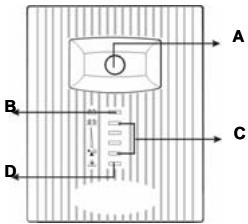
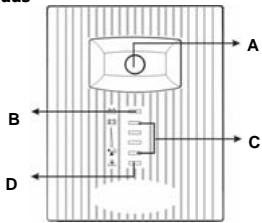
A: On/Off switch
B: Use AC power: steady green Use battery power: flashing green
C: Use AC power: indicating load level Use battery power: indicating battery capacity
D: Fault indicator
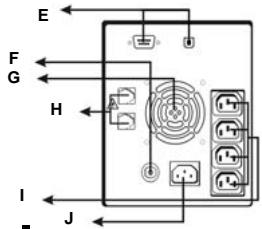
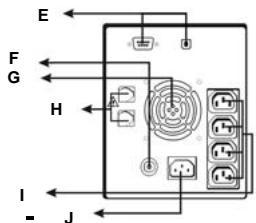
E: Serial and USB port connection
F: Circuit breaker
G:Cooling fan
H: Modem/Phone line surge protection
I: AC output
J: AC input
LED indicators and audible alarms description
| Indicator | Sound | Output | Charging | Description | What to do? |
| - | - | No | Yes | UPS is off | Turn the UPS on for use. |
| - | A beep every 2 seconds | 230 V | Yes | Battery abnormal | Replace battery. |
| B Green - Steady | - | 230 V | Yes | Normal use | - |
| B Green - Flashing | A beep every 10 seconds | 230 V | No | Use battery power | Save your data and turn off your computer. |
| B Green - Flashing quickly | Beep every second | 230 V | No | Battery almost empty | Save your data immediately and turn off your computer. |
| D Red - ON | Keep beeping | No | No | UPS overload | Disconnect some devices and reset circuit breaker. Turn off the UPS and wait for 2 minutes. Then turn it on. |
| Battery low voltage | Do not connect a load. Charge the battery for 8 hours or replace the battery. | ||||
| Internal error | Contact dealer please. |
Installation
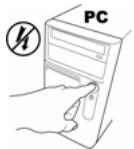
Computer off
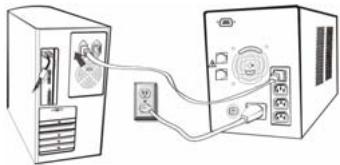
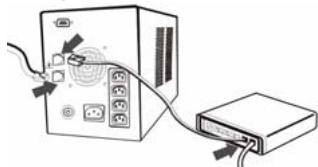
Connect loop though power cable
Connect AC power cable
UPS is being charged
Recommend to charge 8 hours before using battery power!
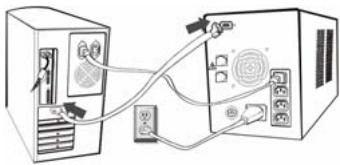
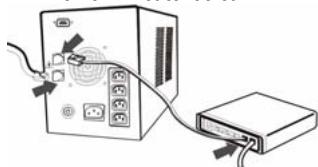
Connect serial cable or USB cable
(you need to be administrator for USB detection)
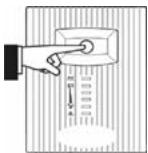
Turn on UPS
5
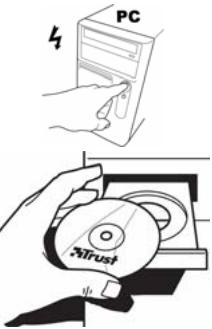
Computer on
UK
6
Install software
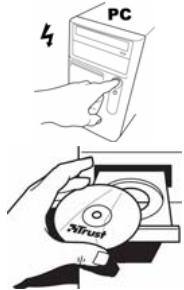
Place CD-ROM in PC
7
Read manual
Install software
8
InstallAnywhere will guide you through the installation of Winpower.
It is strongly recommended that you quit all programs before continuing with this installation.
Click the Next button to proceed to the next screen. If you want to change something on a previous screen, click the Previous button.
You may cancel this installation at any time by clicking the 'C cancel' button.
Previous
Next
Next
9
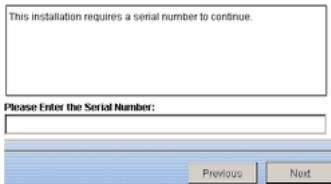
Input: 511C1-01220-0100-478DF2A
type in exactly the same
Next
Follow onscreen instructions to Finish Restart system when finish
10
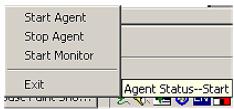
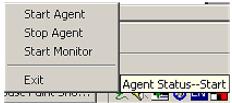
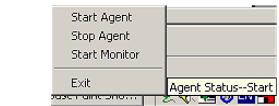
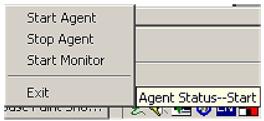
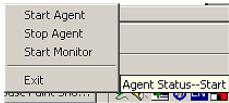
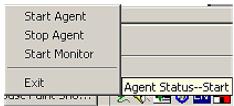
Right click the icon on task bar Start Monitor
11

UPS is detected automatically (You need to be Administrator for USB detection)
12
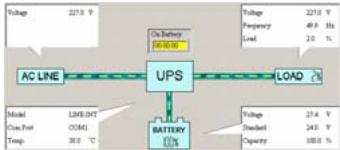
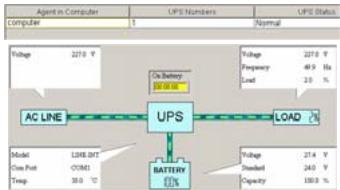
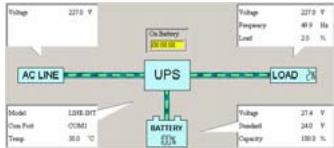
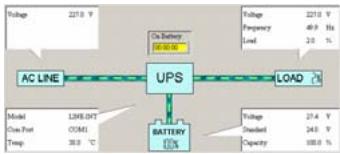
Click on ⑨ till no more Click on LINE-INT to see UPS status
Read manual on CD for details
Finish
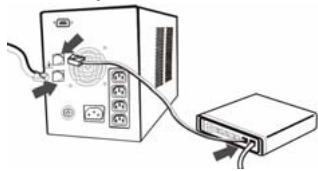
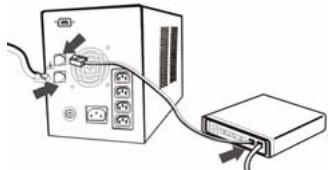
Phone line protection
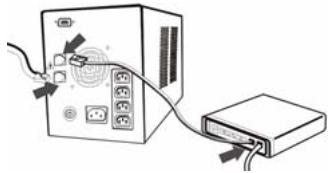
Connect incoming phone line to 'IN'
Connect a phone cable from 'OUT' to a modem
UPS does not provide dial-up function!
Reminders
Fully discharge then recharge the battery every 3 month for longer battery life.
The backup time of the UPS depends on the connected devices and battery condition.
The batteries have self-discharge characteristic. It might happen that the battery capacity is already low just out of box. Please charge the UPS for 8 hours before using its power.
If UPS cannot be found in software, please read appendix D in manual on CD.
Reset circuit breaker: (1) disconnect some devices on UPS; (2) push it back.
Replace battery : in case it is necessary,
| Disconnect power | Open front panel | Remove cover | Extract wires on battery Replace battery in |
| Technical specification | ||
| Type of UPS | Line-Interactive UPS | |
| Output capacity | 1300VA/600 W | |
| Input | 230 VAC | |
| Voltage range | 170 ~ 280 VAC | |
| Frequency | 47-63 Hz | |
| Output | 230 VAC | |
| Frequency | 50 o 60 Hz | |
| Freq. regulation | +/- 1 Hz | |
User's manual
| Surge current protection [J] | Max. 150 | |
| Maximum surge current [Amp] | 6,500 A | |
| Transfer time (typical) | Less than 3 ms | |
| Battery | Battery type & number | CSB GP1270(F2), 12V/ 7AH |
| 2 pieces | ||
| Backup time (min.) | 38 ~ 70 | |
| Charge time | 8 hours to 90% after full discharge | |
| Surroundings | Working surroundings | 0 – 40°C, 0-90% relative humidity |
| Sound level | < 40 dB | |
| Weight | 13.8 kg | |
Safety
- Warning: This product contains sealed lead-acid battery(s).
May release toxic materials into the environment when not disposed properly.
Must be recycled properly. Contact your local government.
Short circuit of the battery(s) may cause burns, fire or explosion.
Do not disassemble, puncture or expose to high temperatures. Acid and toxic materials might be released, causing injury.
This UPS generates leakage current less than 0.5mA please use in comfort. - The sum of the leakage current of the UPS and its connected equipments must not exceed 3.5mA .
- Do not open or repair this device.
- Disconnect the power plug from the mains supply before cleaning the device.
- Keep this device away from liquids, such as water.
- Do not use this device in combination with non-computer related items, such as medical equipment, microwave ovens, vacuum cleaners, etc.
- Make sure the UPS is placed on a firm surface, such as your desk or the floor.
- ALWAYS use the UPS with an earthed plug socket.
- Do not connect a multiple socket to the UPS.
- Never cover the UPS to avoid overheating. Keep the UPS out of the reach of heat sources, such as the sun, heaters, etc.
- The outputs may have a high voltage, even when the device is turned off.
- Keep the UPS at least 20~cm from your monitor.
- Do not expose the battery to a naked flame. This may cause the battery to explode.
- Never drill holes into the battery.
- The battery must not be opened or damaged. If the battery is opened or damaged, electrolyte may be released, which is harmful to skin, eyes and the environment.
- When the battery is empty, ask your local authority where you can dispose of it.
- The fan in UPS may get dusty after using a while, please remove the AC input power and turn off the UPS then use a soft brush gently clean off the dust for better ventilation of the UPS and longer product life.
- Do not insert any object into the fan while it's spinning which may lead to the broken of the fan, or damage of the UPS, or damage of the object being inserted.
Produktinformationen
Install software
Read manual
Registration + online support
www.trust.com
8
InstallAnywhere will guide you through the installation of Winpower.
It is strongly recommended that you quit all programs before continuing with this installation.
Click the Next button to proceed to the next screen. If you want to change something on a previous screen, click the Previous button.
You may cancel this installation at any time by clicking the 'Cancel' button.
Previous
Next
9
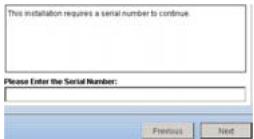
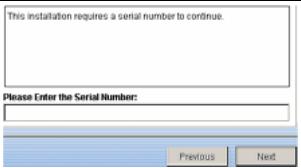
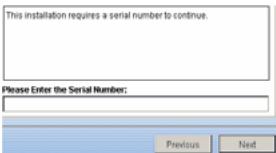
This installation requires a serial number to continue.
Please Enter the Serial Number:
Previous
Next
Weiter (Next).
Install software
Read manual
Registration + online support
www.trust.com
Install Anywhere will guide you through the installation of Winpower.
It is strongly recommended that you quit all programs before continuing with this installation.
Click the Next button to proceed to the next screen. If you want to change something on a previous screen, click the Previous button.
You may cancel this installation at any time by clicking the 'Cancel' button.
Previous
Next
9
This installation requires a serial number to continue.
Please Enter the Serial Number:

InstallAnywhere will guide you through the installation of Winpower. It is strongly recommended that you quit all programs before continuing with this installation.
Click the Next button to proceed to the next screen. If you want to change something on a previous screen, click the Previous button. You may cancel this installation at any time by clicking the 'Cancel' button.
PwV
1
This installation requires a serial number to continue.
Please Enter the Serial Number:
Previous
Next
Installare il software (Install software)
Avanti (Next)
Digitare: 511C1-01220-0100-478DF2A
Install software
Read manual
Registration + online support
www.trust.com
InstallAnywhere will guide you through the installation of Winpower
It is strongly recommended that you quit all programs before continuing with this installation.
Click the Next button to proceed to the next screen. If you want to change something on a previous screen, click the 'Previous' button.
You may cancel this installation at any time by clicking the 'Cancel' button.
图10-2
[Tab]
This installation requires a serial number to continue.
Please Enter the Serial Number:
Instale el software.
InstallAnywhere will guide you through the installation of Wingpower.
It is strongly recommended that you quit all programs before continuing with this installation.
Click the Next button to proceed to the next screen. If you want to change something on a previous screen, click the 'Previous' button
You may cancel this installation at any time by clicking the 'Cancel' button.
Pretou
1
9
This installation requires a serial number to continue.
Please Enter the Serial Number:
Previous
Next
Wprowadzi ciag: 511C1-01220-0100-478DF2A
Install software
Read manual
Registration + online support
www.trust.com
InstaSAnywhere will guide you through the installation of FPinpower
It is strongly recommended that you quit all programs before continuing with this installation:
Click the 'Next' button to proceed to the next screen. If you want to change something on a previous screen, click the 'Previous' button
"You may cancel this installation at any time by clicking the 'Cancel' button."
图1-2
Selecteer 'Install software'.
Selecteer 'Volgende' (Next).
Geef op: 511C1-01220-0100-478DF2A
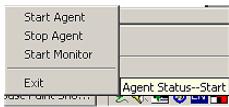
Selecteer 'Start Monitor'.
11

Install software
Read manual
Registration + online support
www.trust.com
InstallAnywhere will guide you through the installation of Wipower
It is strongly recommended that you quit all programs before continuing with this installation.
Click the 'Next' button to proceed to the red screen. If you want to change something on a previous screen, click the 'Previous' button.
You may cancel this installation at any time by clicking the 'Cancel' button.
图1-2
1
This installation requires a serial number to continue.
Please Enter the Serial Number:
| Agent in Computer | UPS Numbers | UPS Status |
| Computer | 1 | Normal |
Cologne CD-ROM no PC
Instale o software
Seguinte (Next)
Entrada
511C1-01220-0100-478DF2A

Install software
Read manual
Registration + online support
www.trust.com
8
InstallAnywhere will guide you through the installation of Winpower.
It is strongly recommended that you quit all programs before continuing with this installation.
Click the 'Next' button to proceed to the next screen. If you want to change something on a previous screen, click the 'Previous' button.
You may cancel this installation at any time by clicking the 'Cancel' button.
P
EykaataotnoTe to loiaikó
EnoEvO (Next)
9
10
11
12
Eiooo; 511C1-01220-0100-478DF2A
nλnKtpoloyioTeakpIboc auTo EnoEvO (Next)
AkoouoIeTIEOIOYIEcOTNV OBOVYIA OOKANOW
Enavekkivnote to ouotnua
Kavte 8eKi kIk oTo Eikovio O Tn ypaun Epyaonw
EniEeTe "Start Monitor"
To UPS 8a avixveute autouata
KavTE KIAK OTO O'UβOLo EWC TO TEAO
KAVTE KAI KTO LINE-INT YIA VA DEITE TIV KATAOTAON tou UPS
△iaβaσte to exyepidio oto CD yia λεπομépeic
Téloç
IpooTaia tnaepovikic ypaumic
SigmaOEtT NTV EIOEPOXoEVN TIAePovikn YpaunOTIN
SUVBcEva KaAdbio TnAepavou anoTO "OUT" OTO mOvTeJ
To UPS nepexi Ieitoupyia ouvoeonc, eow TnIeovou!
Ynevθμioει
Anopopte nIipoc Tn unatapia K eeneita enavaopotiet Tnv kde 3 mvec yia meyautepn diapkeia zwnc.
O epeepikoc xpovoctou UPS Eapntai an Tc ouvdepevec ouokeuekai nTnv katataon tncnatapiac.

Oi maatapiec diaTeoux xaapkntpiAtiko auto-anopoptianc, taoc n xwptikKoTtNa TNC matapiaoc va evai xanm kato tnv anooaukeoua tou npoiovtoc, Papaakaloue foptiotc to UPS vi 8 ope, npiv to xpojonoinoane Te y aeKtpiro pejuia.

Av μnopei va avixveuθe iTO UPS oTo loyioikó, diaβoTe TO napaptnμa D oTo eepidio tou CD.

EnavaoppaBpaxukkawtpa: (1) anoovdeote mepikec ouakeuec oTO UPS, (2) ouvdeote tic dva.

Avtikataotaon pnatapiac: oepinwn nou xpeiaetai,
| Anoaouδεοτe to ρεύμα | Avoiετε tov μπροστινό nivaka | Byáλετο Kaλωδia Tnç μηatapiac AvtikataoTnθe Tn μηatapia | Byáλετa Kaλωδia Tnç μηatapiac AvtikataoTnθe Tn μηatapia |
Install software
Read manual
Registration + online support
www.trust.com
Installer software
8
InstallAnywhere will guide you through the installation of Winpower.
It is strongly recommended that you quit all programs before continuing with this installation.
Click the Next button to proceed to the next screen. If you want to change something on a previous screen, click the Previous button.
You may cancel this installation at any time by clicking the "Cancel" button.
Previous
Next
Næste (Next)
9
Skriv: 511C1-01220-0100-478DF2A
A skriv pa nojagtig samme maje
Næste (Next)
(Du maste vara administrator for USB-identifering)
Satt pa UPS:en
5
Starta datorn
6
Install software
Read manual
Registration + online support
www.trust.com
Installera programvaran (Install software)
8
InstallAnywhere will guide you through the installation of Winpower.
It is strongly recommended that you quit all programs before continuing with this installation.
Click the Next button to proceed to the next screen. If you want to change something on a previous screen, click the 'Previous' button.
You may cancel this installation at any time by clicking the Cancel button.
Previous
Next
9
This installation requires a serial number to continue.
Please Enter the Serial Number:
Previous
Next
Nasta (Next)
Ange: 511C1-01220-0100-478DF2A
skriv exakt som ovan
Nasta (Next)
Install software
Read manual
Registration + online support
www.trust.com
IsndAanywhere will guide you through the installation of Ringpower
It is strongly recommended that you quit all programs before
continuing with this installation
Click the Tief button to proceed to the next screen if you want to
change something on a previous screen, click the Previous button
You may cancel this installation at any time by clicking the Cancel
图2
P
图
This installation requires a serial number to continue.
Please Enter the Serial Number:
Previous
Next
Telepitse a szoftvert
Tovabb (Next)
Bemenet: 511C1-01220-0100-478DF2A
| Agent in Computer | UPS Numbers | UPS Status |
| Computer | 1 | Normal |
Kattintson a jobe egergombbal a feladatsoron
talalhatóikonra
Install software
Read manual
Registration + online support
www.trust.com
8
InstallAnywhere will guide you through the installation of Winpower.
It is strongly recommended that you quit all programs before continuing with this installation.
Click the 'Next' button to proceed to the next screen. If you want to change something on a previous screen, click the 'Previous' button.
You may cancel this installation at any time by clicking the 'Cancel' button.
Previous
Next
9
Instalujte software
Dal'si (Next)
Zadejte: 511C1-01220-0100-478DF2A
Install software
Read manual
Registration + online support
www.trust.com
Nainstalujte softér
8
InstallAnywhere will guide you through the installation of Winpower.
It is strongly recommended that you quit all programs before continuing with this installation.
Click the Next button to proceed to the next screen. If you want to change something on a previous screen, click the 'Previous' button.
You may cancel this installation at any time by clicking the "Cancel" button.
Previous
Next
9
This installation requires a serial number to continue.
Please Enter the Serial Number:
Previous
Nord
Dalej (Next)
Zadajte: 511C1-01220-0100-478DF2A
Install software
Read manual
Registration + online support
www.trust.com
InstallAnywhere will guide you through the installation of Winpower.
It is strongly recommended that you quit all programs before continuing with this installation.
Click the 'Next' button to proceed to the next screen. If you want to change something on a previous screen, click the 'Previous' button.
You may cancel this installation at any time by clicking the "Cancel" button.
Previous
Next
9
This installation requires a serial number to continue.
Please Enter the Serial Number:
Previous
Next
Seuraava (Next)
Syöte: 511C1-01220-0100-478DF2A
Install software
Read manual
Registration + online support
www.trust.com
Installer programvaren
8
InstallAnywhere will guide you through the installation of Wingower.
It is strongly recommended that you quit all programs before continuing with this installation.
Click the Next button to proceed to the next screen. If you want to change something on a previous screen, click the Previous button.
You may cancel this installation at any time by clicking the "Cancel" button.
Velg Neste (Next)
9
This installation requires a serial number to continue.
Please Enter the Serial Number:
Angi: 511C1-01220-0100-478DF2A
10
skriv noyaktig likt
Velg Neste (Next)
| Agent in Computer | UPS Numbers | UPS Status |
| Computer | 1 | Normal |
Install software
Read manual
Registration + online support
www.trust.com
Yazlimi kurun (Install software)
InstallAnywhere will guide you through the installation of Winpower.
It is strongly recommended that you quit all programs before continuing with this installation.
Click the Next button to proceed to the next screen. If you want to change something on a previous screen, click the 'Previous' button.
You may cancel this installation at any time by clicking the Cancel button.
Previous
Next
9
This installation requires a serial number to continue.
Please Enter the Serial Number:
Previous
Next
Ileri (Next)
Aşaqidakini girin: 511C1-01220-0100-478DF2A
Hakmnte Ha KhoNky Danlee (Next)
BVeIeTe: 511C1-01220-0100-478DF2A
CNEJITE 3A TOHOCTbIO BBODa
Haxmnte Ha KhoNky Danee (Next)
3aBepuHTeYCTAHOBKY, BbIIOJIHbY Kka3aHnY, BbIIOBIMbHe HA Kp3N
Ito 3aBepuHnnepe3arpy3nte KOMnbIOTe
10
HakMMTE npABO KHONKO HA 3HAOK 3aDAH

B nahanen
Haxmte Ha Khonky Start Monitor
11

Pacno3HaBHeN I5I npOn3BDoNTcA BtOMaTnueckn
12
3aBepuTe npoucc HaxKaTneM Ha 3aHoc


IpoBepbTe coCTOJHHe N5n HaxaTneHa LINE-INT

O3HakmTbcTe C nIOp06bHM yKoBOcTBOM Ha NaKT-DiKce
YctaHOBka 3aBepueHa
3aunTa TelefoHHoIINHn
PdKnIOUHTe BxOJIaIyIO TeNcFOHHYIO IINHO K H3E4y IN'
CoaHInHe TeneΦoHHbM Ka6eHem rHe3do 'OUT' c MODEM

Функцю Habopa HOMepa N5П He 06cnyxmbaet!
He 3a6ydbre!

I npodlenia cpoka cnkykblakymytnota pa3pkaite n nepe3apkaite ero he pexe pa3a B 3 meca.
BvmaObseeneHHepeBbHO pHTAHnA 3aBNCIT OT nOdkIIOueHbIX K IbI yCTPOJBCTN tO cOCTOBHIA akyMjTporTa.
AkkymyTROP 06bnaeT aCnO6oBcHbO CamoparaRkBaTcB.EMKoCTb 3apJaHO BOHOAkkymyTROP MOKET OKa3aTbCA yue ChKHeHNOH.PIcTHynar K kcnPlyaTuauN I5F1, 3apJadte AkkyMmYTROP T B eueHHe8 aCoo
EUNI N5POTCYTCTBYETBnepeHnnporpaMMHOrO6eCneEHEN,03HaKoMbTeBcC npInnoKeHHEM D pykoBcTBa HA KOMNAKT-DiCKe.
NIObTOPHE BKNLOHcEH ABOMATHUeCKoR O npebbAten: (1) 0TOeDMHTE HECKNoBko UCTPOIcTB OT N5I; (2) HAKMNTHe HA KHOKNy PEPbBATeHa.
3aMeHa aKKyMnyToppa: npOn3BOUITcra No Mepe Heo6xOuMoocTn.
Mepbl npedoctoPOXHOCTN
BHHMaHHe! DaHHoe n3dene OchaueHo repMeTuHbIM (-n) CBHcOBO-KNCOTHbIM (-n) aKKyMylrTOpOM (-am).
HenaIeXaJaaYtINn3aunrMoKeT NOBLey 3a C6oB Bb6poc TOKCNHbIX BeueCTB B OKpyKaIOuy Cpey.
Co6IIOHeHne npabn nepepa60Kn 68a3aTeNbHO. 6oPaTntEcB 3a yka3aHnMn K MeCTbIM BlaCTaM.
KOPOTKoe 3amlykAnHe AKKyMylTOpA (-OB) UeBATo OXoRAMn, BO3HNKHOBeHmE NOKApO- INN B3PbBOONaCHOI CHTaUHNI.
3aIepaetcaTPOINBODHTpa360pky,PO6bHbATOBETCPYIONDBePraTBO3dEHTBNO B3cOKnEMTAPyT. Bb6pc KNCIOITTOKCHUNBHBEUECTBqpeBaT HAECEHEHM TPAMbI.
- Tok yteku daHHoro IBI coctabJre Mehee 0,5 MA, ycIOBna 3KcIIyatauN - KOMΦOpTHbIe.
CobokynbIKyTeuHKINIOKNIHcHNOKHeMyO6OpyDObAHnHeOnKeHpBeBbIaTb3,5MA.
PYKOBOIDCTBO NOJIb3OBATEJIA
He BCKpbBaIte Hn He nbTaIeTcB peMOHTnpoBaT yCTpOCTBO.
-Перед чькоустбвотКIOHTe shHyp nHTAHnOT pO3eTKN.
-ДерхиTe yCtpoIcTBO nOdaJIbIe OT BObl I npOuHx JnKIOKoCTe.
He np3yTIEcB.YCTPOBTRCBOMC.OOBPOYABAHENCMOTOPEHEBAJIETCRKOMNtBIOTePbHIMNAPINMep, CmeduHckO anapnATpND, MKNPOBOHNIbHMNEPAHM, PbIeJOCAMHmA T.N.
Pa3meaTe I6I TObko Ha TBepDoN nobepxHocTn, HapnpMepe, Ha pa6ooyem cToJe nnHa nOly.
- PodknoaIte N5n TOJbKO K 3a3eMneHHo p03eTke.
He npdknouaTe IVI K HeckoJIbKIM pO3eTKaM.
Ib36KaeHnepeBaHnue He hakpBaeIte IbI. Depknte I5I B ydaJIeHmN O TAKIX NCTOHNKOB TENla, KAK hapImep, coNeHne lyuN, oObrpeBeTNI t.n.t.
- BbIXoHbIe po3eTkn MOrY 6bITb IOD HanpJxKeHnEM dAke npN OTKIOUoyEHHom yCTpoiCTBe.
-ДерхиTe IБП на пасстони He MeHee 20 cm OT KOMnbIOTepHOrO MOHITopa.
- I36eraIte cOpnIKoCHOBENr aKKymyIaTopa C ORhem. 3To MOxET npNBecrN K B3pBbY aKKymyIaTopa.
He npocBepnBaIte B aKkymyIaTope OTBepctn.
HedonyCTMIO BCKpBbATb AKKyMylTOp IINI NIOBBePraTb ERO NOBPeXdENIM. BckpItbI INI NIOBpeXdENHHI kAKyMylTOp IOncEN BO3MOxNHOCTbIO pTOEeKINZeIKTpOIna, TQI OeBaTO TpABMOI KOxN IINI rnaI HaeceHNO yuepe6o OKyKaJnOeI cpeE.
3a CbeDnHmO n O npdKe yTINIaUIN cNOJIb30ABHHbIX AKKyMlyrTOB O6paAITecb K MECTbIM KOMNETHTbIM oprahAM.
B xode ekclnyatauHn IB1 BO3MOxHO 3aqr3AHHe BENTUATOPa bIbIO. OTOeHNHb IBOT nCTOHTNkA NITAHnepenHNO ToK aBykIoHv UcTPOCTBO, AKKyPATHo CMAXHTe pblM KMTbO IraYJUWHeHn BENTINLAMn npopDnHPO cPCK aNyK6b IB1
Cnneite 3a Tt, o6bIy Bo Bpaauoioiueh BENTHILTAPe H nonadann NocoptopONHne npmedTe, hTO pBeBaTo nOBpexkEnHem KAK BENTHILTApoe,Tak u CamorO INI, a TAKKE noanabero B bENTHILTAPe npmedHa.
Informaţii produs
A: Buton pornit/oprit
B: Folosire CA: verde continuus Folosire bacterie: verde intermittent
C: Folosire CA: indicator nivel incarcare Folosire baterie: indicator capacitate accumulator
D:Indicator defection
E: Port serial 日 USB
F: intrerupator circuit
G:ventilator racire
H: protectie supratensiune linie modem/telefon
I: iesire CA
J: intrare CA
Introduci CD-ul in PC
7
Install software
Read manual
Registration + online support
www.trust.com
8
InstallAnywhere will guide you through the installation of Winpower.
It is strongly recommended that you quit all programs before continuing with this installation.
Click the Next button to proceed to the next screen. If you want to change something on a previous screen, click the Previous button.
You may cancel this installation at any time by clicking the "Cancel" button.
Previous
Next
Instalare software
Continuare
Introduci: 511C1-01220-0100-478DF2A
tastati codul de mai sus
Continuare
Registration + online support
www.trust.com
InstallAnywhere will guide you through the installation of Winpower.
It is strongly recommended that you quit all programs before continuing with this installation.
8
Click the Next button to proceed to the next screen. If you want to change something on a previous screen, click the Previous button.
You may cancel this installation at any time by clicking the "Cancel" button.
Previous
Next
9
This installation requires a serial number to continue.
Please Enter the Serial Number:

10
11
| Agent in Computer | UPS Equipment | UPS Status |
| Computer | 1 | Normal |
UHCTaJInpaItecoΦTyepa
Happei
BbVeJeTe:511C1-01220-0100-478DF2A
Hannuete ro TOUHO NO CbIaNHaUN
Hanpei
KlnkBaIte Bbpxy ,doKaTo e Bb3MoXHO
KnIknHete Bbpxy LINE-INT,3a da BnDInTe cStatYca Ha UPS
A3a da ce 3ano3haete C noDpo6HocHTHe, npoetepbkoBOCTBTO Bbpy CD-TO
Kpa
3aunTa Ha TelefoHHata LHHN
Cbpxte BxOraata TeleohnHa NInHn KbM IN' Cbpxte TeleohnHa Ka6en OT OUT' KbM MoDEM
UPS He ochrypbaФнкцma 3a abTomatnHoyctahOBraHe Ha TelefoHHa Bpb3ka!
Hanomhme Bn:
Ha BCEKn 3 Meceua pa3peXdaIte 6aTePnra TdoKpaN i CneI TOBa aapeXdaIte, 3a da yDblnKtE Jxmbota.
Bpemeto, np3 KOrTO UPS oCnrypRABa pe3epBHa MOuHOCT, 3aBcNOT CbP3AHITE KbM HERO UCTPOCTBA N CbCTOHNTo Ha 6aTePnTa.
BatePHTNE IMAT cnooc6HocCTT a da ce camOpa3peXdat. Bb3MOXHO e kanaIHTb T ha 6ateprrta Bee da e cnAanl oue pni IxBaXdAHeTO OT anKobkata MOnr 3apeTe UPS B npOdbJxKeHne Ha 8 caca, npen da ro i3npol3Bate 3a zepKaHe.
Ako cofoepbT He moke da OTkpne UPS, moia npouetete npinoxeHne D KbM pboKOoDCTBTO Bbpx CDTO.
BkIOUeTe H3KIOUeTe npeKbcBaay Ha Beprata: (1) 3KIOUeTe HAKOY cTPOcTBa OT UPS-TO; (2) 36ytaTe ro hazad.
Cmehe6atepya:ako e Heo6xOIMo,
Install software
Read manual
Registration + online support
www.trust.com
安装软件
8
InstallAnywhere will guide you through the installation of Windpower.
It is strongly recommended that you quit all programs before continuing with this installation.
Click the Next button to proceed to the next screen. If you want to change something on a previous screen, click the Previous button.
You may cancel this installation at any time by clicking the 'C cancel' button.
Previous
Next
下一步
9
This Installation requires a serial number to continue.
10
Please Enter the Serial Number:
Previous
Next
输入:511C1-01220-0100-478DF2A
键入亦可
下一步
按屏幕指示完成操作
完成后重新启动系统
右键单击任务栏中的

图标
启动监视器
11

自动检测UPS
(只有管理员才能进行USB检测)
12
单击 ,直到不再显示
单击LINE-INT以查看UPS状态
请阅读CD中的手册来获取详细信息
完成
电话线保护
将电话线进线连接到IN
将电话线从'OUT'连接到调制解调器
UPS不具有拨号功能!
提示
Install software
Read manual
Registration + online support
www.trust.com
Namestite programsko opremo
8
InstallAnywhere will guide you through the installation of Winpower.
It is strongly recommended that you quit all programs before continuing with this installation.
Click the 'Next' button to proceed to the next screen. If you want to change something on a previous screen, click the 'Previous' button.
You may cancel this installation at any time by clicking the 'C cancel' button.
Previous
Next
Naprej
9
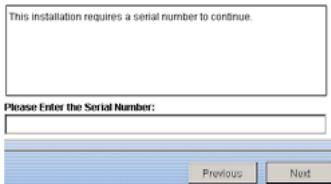
Vnesite: 511C1-01220-0100-478DF2A
Avtipkajte tocno takotok je napisano Naprej Za dokoncanje sledite navodilom na zasl Ko dokoncate ponovno zaenite system
10
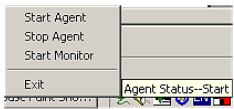
Z desnim gumbom kliknite ikono na opravilni vrstici
ZaZenite monitor
11

UPS se zazna avtomaticno (za zaznavanje USB morate biti administrator)
12

Kliknite na dokler ne izgine
Kliknite na LINE-INT, da bi videli stanje UPS
Za podrobnosti preberite navodila na CDju
Dokončanje
Zašcita telefonske linije
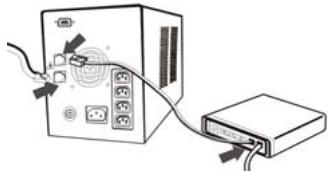
Povezite vchodnogo telefonsko linijo na IN'
Povezite telefonski kabel iz 'OUT' na modem
Registration + online support
Instalirajte softver.
8
InstallAnywhere will guide you through the installation of Winpower.
It is strongly recommended that you quit all programs before continuing with this installation.
Click the 'Next' button to proceed to the next screen. If you want to change something on a previous screen, click the 'Previous' button.
You may cancel this installation at any time by clicking the "Cancel" button.
sljedece
Previous
Next
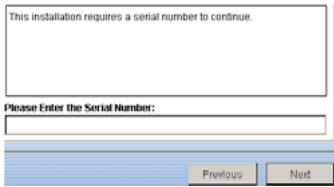
9
ulaz: 511C1-01220-0100-478DF2A