CONCETTO - Coffee machine GAGGIA - Free user manual and instructions
Find the device manual for free CONCETTO GAGGIA in PDF.



User questions about CONCETTO GAGGIA
0 question about this device. Answer the ones you know or ask your own.
Ask a new question about this device
Download the instructions for your Coffee machine in PDF format for free! Find your manual CONCETTO - GAGGIA and take your electronic device back in hand. On this page are published all the documents necessary for the use of your device. CONCETTO by GAGGIA.
USER MANUAL CONCETTO GAGGIA
CE 73/23, CE 89/336,
CE 92/31, CE 93/68
Noi:
GAGGIA S.p.A.
EC DECLARATION OF CONFORMITY
EC 73/23, EC 89/336,
EC 92/31, EC 93/68
We :
GAGGIA S.p.A.
declare under our responsibility that the product :
AUTOMATIC PROFESSIONAL COFFEE MACHINE
TIPO: CAP002 / CAP002A / CAP002B
to which this declaration relates is in conformity with the following standards or other normative documents :
-
Safety of household and electrical appliances - General requirements EN 60335-1 - 1994 + A11 / A12 / A13
-
Safety of household and electrical appliances - Part 2^ Particular requirements for appliances for heating liquids EN 60335-2-15 - Edit.1996
-
Safety of household and electrical appliances - Part. 2^ Particular requirements for coffee mills and coffee grinders EN 60335-2-33 - April 1990
-
Limits and methods of measurements of radio disturbance characteristics of electrical motor-operated and thermal appliances for households and similar purposes, electric tools and similar electric apparatus - EN 55014 - Edit. 1993
-
Electromagnetic compatibility (EMC) Part. 3^ Limits - Section 2 : Limits for harmonic current emissions (equipment input current ≤ 16A per phase) - EN 61000-3-2 - Edit. 1995
-
Electromagnetic compatibility (EMC)
Part 3^ : Limits - Section 3: Limitation of voltage fluctuations and flicker in low-voltage supply systems for equipment with rated current ≤ 16 A. EN 61000-3-3 Edit. 1995 -
Immunity requirements for household appliances, tools and similar apparatus. Product family standard EN 55104 - Edit. 1995
-
Electromagnetic compatibility (EMC)
Part 4^ : Testing and measurement technique.- Section 2: Electrostatic discharge immunity test. Basic EMC publication - EN 61000-4-2 Edit.1995 -
Electromagnetic compatibility (EMC)
Part 4^: Testing and measurement technique.- Section 4 : Electrical fast transient/burst immunity test
Basic EMC publication - EN 61000-4-4 Edit.1995 -
Electromagnetic compatibility (EMC) Part 4^ : Testing and measurement technique.- Section 5: Surge immunity test. EN 61000-4-5 Edit.1995
-
Electromagnetic compatibility (EMC)
Part 4^: Testing and measurement technique.- Section 6 : Immunity to conduced disturbance, inducted by radio-frequency fields. EN 61000-4-6 Edit.1996 -
Electromagnetic compatibility (EMC) Part 4^ : Testing and measurement technique.- Section 11: Voltage dips, short interruptions and voltage variations immunity tests. EN 61000-4-11 Edit.1994
following the provisions of the Directives :
EC 73/23, EC 89/336, EC 92/31, EC 93/68.
Robeco sul Naviglio
PREMessa
11 -PRIMA ACCENSIONE DELLA MACCHINA. 7
12- USO DELLA MACCHINA 7
11 - PRIMA ACCENSIONE DELLA MACCHINA
12 - USO DELLA MACCHINA

- This manual is an integral part of this machine and it must be kept in a handy place, in good conditions, for as long as the machine will be operating (including any transfer of ownership). It aims at giving the necessary information about a correct and safe use of this machine.
- In case of lost or deterioration of this brochure, please ask a copy to the Authorized customer Service Center, specifying the model and the year of construction of your machine.
- The Authorized Customer Service Centers, are also available for any technical explanation, information on its operation, technical assistance and spare parts supply.
- The subjects mentioned aim, in an exclusive way, at ensuring the proper use of the machine, in the safest way for users, the very machine and the environment. This is made through a simple diagnostics of troubles and anomalous functioning, and by carrying out some simple checks and maintenance operations, always respecting the precautions explained in the following pages and the current Safety and Health Regulations
- Before any intervention read very carefully and be sure to have completely understood the subject of this brochure.
If several persons use (individually) this machine, everyone must previously and very carefully study the Instruction Manual.
The manufacturer reserves the right to modify and improve the described models, without being bound to give any notice. - For any particular need contact the Distributor or your Country Importer (if any) or the Constructor.
- All the rights of this brochure are reserved to GAGGIA. Any copy or even partial divulgation, not expressly authorized in writing, are strongly forbidden.
CONTENTS
1-MACHINECOMPOSITION 26
2 - REFERENCE NOTES 27
2.1 Abbreviations 27
2.2 Editorial symbols 27
3-USER 27
4 - MAINTENANCE TECHNICIAN 27
5 - INTENDED USE OF THE MACHINE 27
6 - WARNINGS AND CARES 28
7 - GENERAL PRECAUTIONARY MEASURES 28
8 - INFORMATION ABOUT THE MACHINE 28
8.1 Identification data 28
8.2 Technical characteristics 28
8.3 Overall dimensions 28
8.5 Cappuccinatore Group (F. 4) 29
8.4 Brew group (F. 2) 29
9 - SAFETY DEVICES 29
9.1 Hot water and steam spouts
(except COFFEE setup) (F. 1) 29
9.2 Residual risks 29
10-INSTALLATION 30
10.1 Location notes 30
10.2 Positioning and water connection 30
10.3 Electric connection 30
10.4 Serial port connection 31
11-FIRST SWITCHING-ON 31
12-USE OF THE MACHINE 31
12.1 Machine statuses 32
12.2 Manual switching-on 32
12.3 Programmed automatic switching-on 32
12.4 Stand-by temporary switching-on 32
12.5 Control panel 33
12.6 Brewing buttons programming 34
12.7 Menu programmable functions 36
12.8 Cream adjustment 40
12.9 Grind adjustment 40
12.10 Display messages 41
12.11 Machine switching-off 41
13 - ROUTINE MAINTENANCE 42
13.1 Machine cleaning 42
14 - UNSCHEDULED MAINTENANCE 44
14.1 Jamming of the coffee grinder unit 44
15 -OUT OF SERVICE 45
16 -TROUBLES, CAUSES AND CURES 46
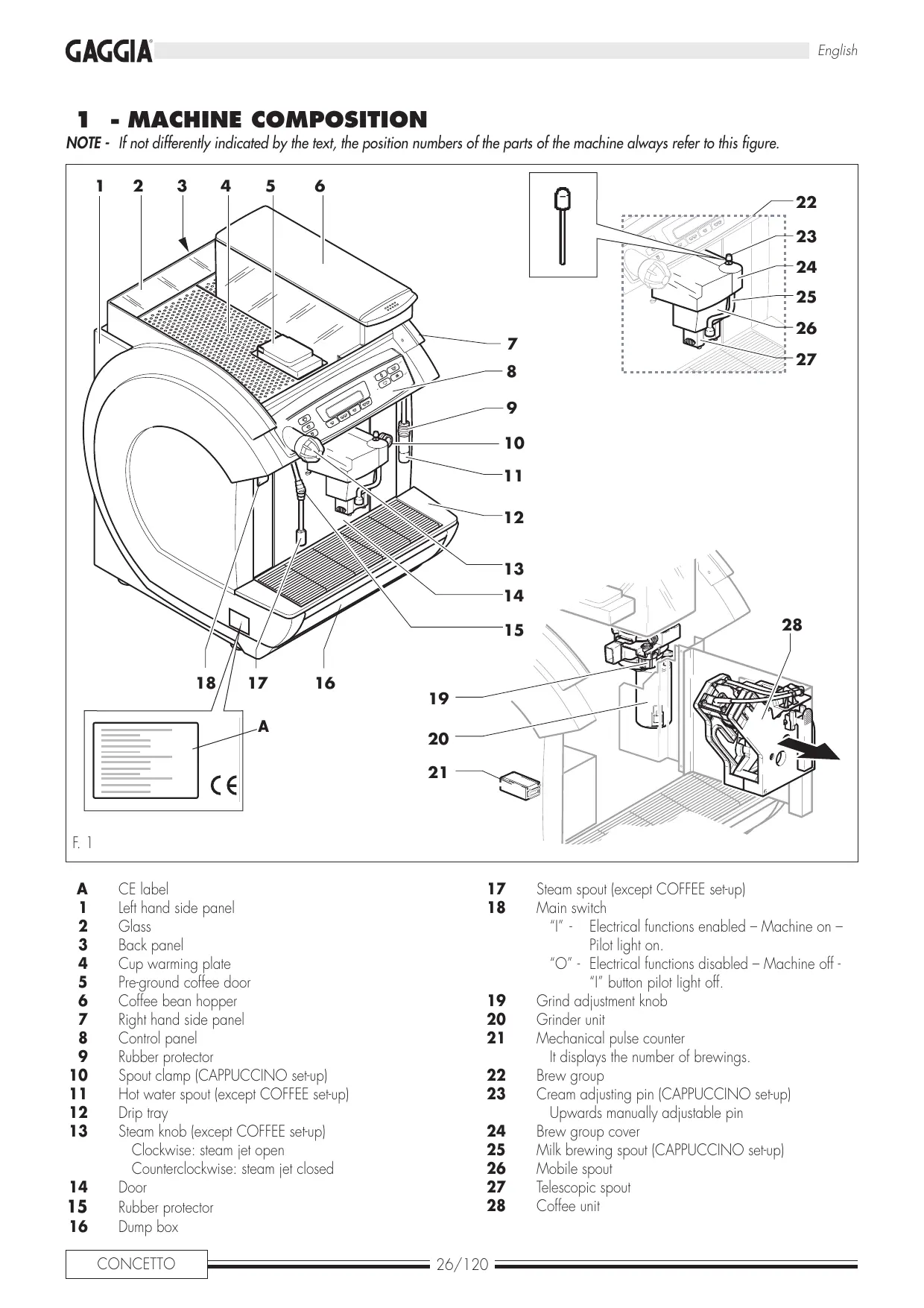
1 - MACHINE COMPOSITION
NOTE - If not differently indicated by the text, the position numbers of the parts of the machine always refer to this figure.
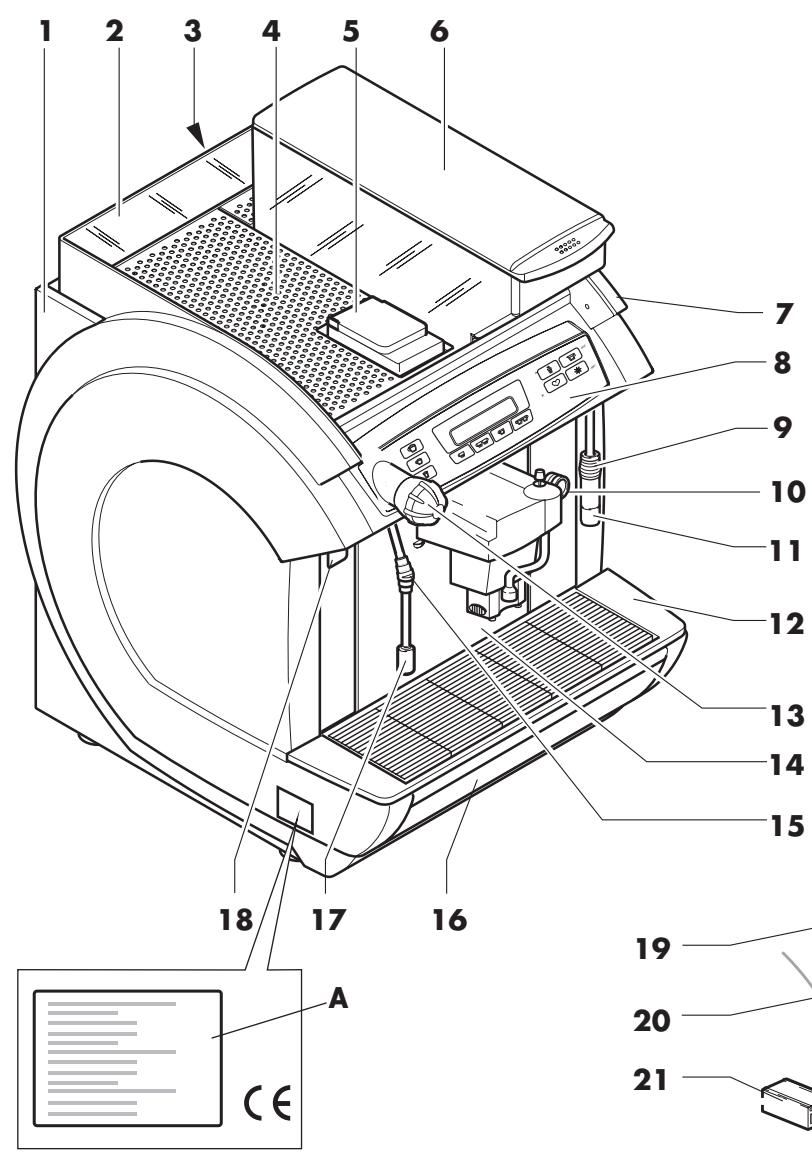
F. 1
A CE label
1 Left hand side panel
2 Glass
3 Back panel
4 Cup warming plate
5 Pre-ground coffee door
6 Coffee bean hopper
7 Right hand side panel
8 Control panel
9 Rubber protector
10 Spout clamp (CAPPUCCINO set-up)
Hot water spout (except COFFEE set-up)
12 Drip tray
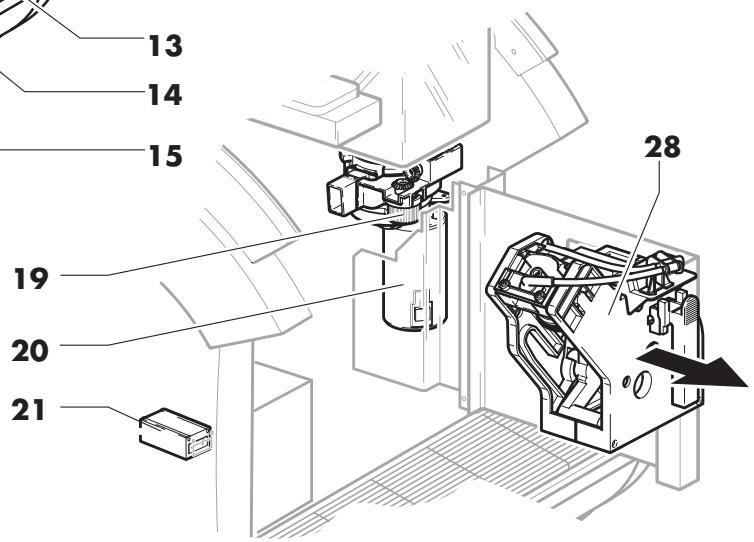
13 Steam knob (except COFFEE set-up)
Clockwise: steam jet open
Counterclockwise: steam jet closed
14 Door
15 Rubber protector
16 Dump box
17
Steam spout (except COFFEE set-up)
18
Main switch
"I" - Electrical functions enabled - Machine on - Pilot light on.
"O" - Electrical functions disabled - Machine off - "I" button pilot light off.
19
Grind adjustment knob
20
Grinder unit
21
Mechanical pulse counter It displays the number of brewings.
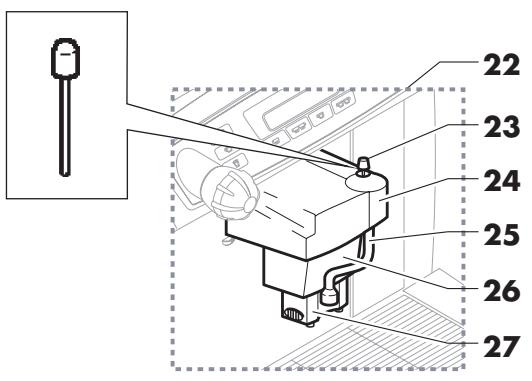
22
Brew group
23
Cream adjusting pin (CAPPUCCINO setup)
Upwards manually adjustable pin
24
Brew group cover
25
Milk brewing spout (CAPPUCCINO set-up)
26
Mobile spout
27
Telescopic spout
28
Coffee unit
2 - REFERENCE NOTES
2.1 Abbreviations
F. = Figure
P. = Page
Pr. = Paragraph
T. = Table
2.2 Editorial symbols
WARNING! Pay the utmost attention to the meaning of symbols. They are aimed at drawing the attention of the reader on technical notions or safety warnings. Therefore they have to be considered as real "memoranda". Refer to the list of symbols every time any doubt about their meaning arises.
| WARNING! - Information about the user's safety and the machine integrity. | |
| WARNING! - Operations that are potentially dangerous for the maintenance technician. | |
| IMPORTANT! - It draws the attention on a particularly important subject. | |
| Machine off - Operations to be done without power supply. | |
| User - Actions concerning the machine user. | |
| Maintenance technician - Operations strictly concerning personnel in charge of unscheduled maintenance or repairs. |
T. 1
3 - USER

-
The adult to whom the following operations are strictly reserved:
-
Operating, protecting and switching off the machine.
- Coffee beans supply.
- Brewing parameters adjustment.
- Grounds and liquids tray draining.
- External cleaning of the machine.

The use of this machine is strictly forbidden to children, teenagers and non self-sufficient persons.
4 - MAINTENANCE TECHNICIAN

-
Person in charge of the following operations:
-
Installation, machine starting, adjustment and setting up.
- Unscheduled maintenance, repairs and spare parts replacement.
5 - INTENDED USE OF THE MACHINE
-
The machines described in this manual have been designed, manufactured and protected for the automatic programmable brewing of the following beverages:
-
instantly-ground coffee bean-based;
- pre-ground coffee-based;
- milk and instantly-ground coffee bean-based (CAPPUCCINO setup).
- hot water and steam (except COFFEE setup) for beverage preparation and heating.
- hot milk (CAPPUCCINO setup).

The Manufacturer disclaims any responsibility for the improper use of the machine and any damage resulting. The improper use also implies the cancellation of any warranty.
6 - WARNINGS AND CARES
- In routine maintenance, never use detergents, diluents, solvents, etc...
- Cleaning has to be limited at parts of the machine being not powered and must be carried out with mild and biodegradable products. Moreover the main switch or the all-pole switch have to be on the "O"(OFF) position, or the plug has to be disconnected from the power point.
- The routine maintenance has to be carried out only by competent or adequately trained personnel, having the necessary psychophysical requirements, in the whole respect of the instructions mentioned below and according to the current Safety and Health Regulations.
- It is strictly forbidden to place and/or leave on the machine tools or anything which could potentially be prejudicial to the people safety and to the integrity of the machine.
- Changing and adjustments (even if slight) as well as the use of non original spare parts, release the Manufacturer from any responsibility for any type of damage and implies the cancellation of any warranty right.
- Use only drinking water.
- The milk to be used for the CAPPUCCINATORE must be put in a fridge at a temperature not over 4^ C ; do not leave it outside the fridge for more than 30 minutes.
- If the CAPPUCCINATORE is not used for more than an hour, carry out a cleaning cycle of the spouts before re-using.
To clean the spouts:
- immerse the milk supply tube in a container of water;
- press the milk key ;
- wait until the water has been dispensed.
PLEASE NOTE: Do not use hot water.
7 - GENERAL PRECAUTIONARY MEASURES
- Before operating the machine, be previously sure not to have any doubt about the contents of this manual. Non respecting the rules explained in it releases the Manufacturer from any responsibility for any type of injury to persons and/or damage to things.
- Keep this brochure for any further reference.
- Previously verify (in case of a new installation), the respect of the minimal regulations of safety, positioning and machine operating conditions, checking the environment conditions (temperature, humidity, light) and the suitability of the place of operation.
- Any damage to the electric power cord requires the intervention of the Technical Authorized Customer Service or of the maintenance technician.
- Do not use the machine on the outside.
- In case of bad functioning, always ask for the intervention of the maintenance technician.
- Do not use water jets to clean the machine.
8 - INFORMATION ABOUT THE MACHINE
8.1 Identification data
In the (A) plate the following identification data of the machine are mentioned:
Manufacturer and Cemarking
model
- serial number
manufacturing year
- mains electric voltage (V) and frequency (Hz)
- electrical power consumption (W)
number of phases of the electric line (PH)
- pressure allowed in the water network (MPa)
NOTE - In case of any request to the Authorized Customer Service Centers, model and serial number must be specified.
8.2 Technical characteristics
Mains voltage 230V/400V 2N
A-weighted sound pressur level is . below 70 dB
Length of the power cord 1,500 mm
Installed power
Mod.LUXE 3,250W
Mod. COFFEE 1,400 W
Mod. CAPPUCCINO 3,250 W
Water pressure 0.1÷0.8 MPa (1÷8 bar)
Weight kg 60
Bean hopper capacity. kg 2
NOTE - The machines can be programmed for any type of dosing. Most electric parts are powered by 24 Vdc.
8.3 Overall dimensions
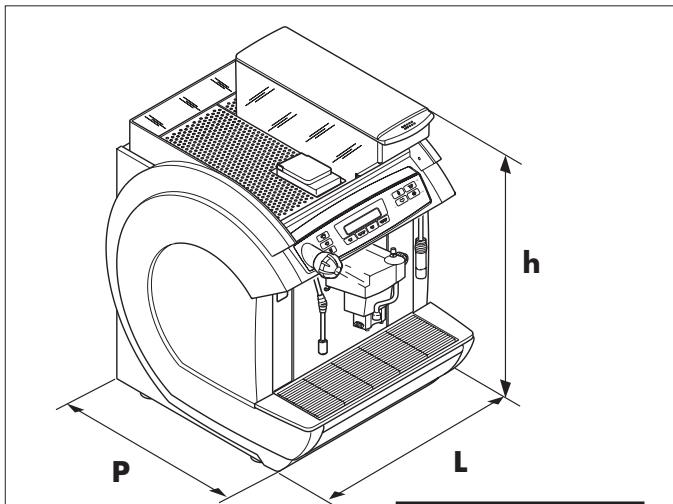
| L | P | h |
| 470 | 550 | 675 |
8.4 Brew group (F. 2)
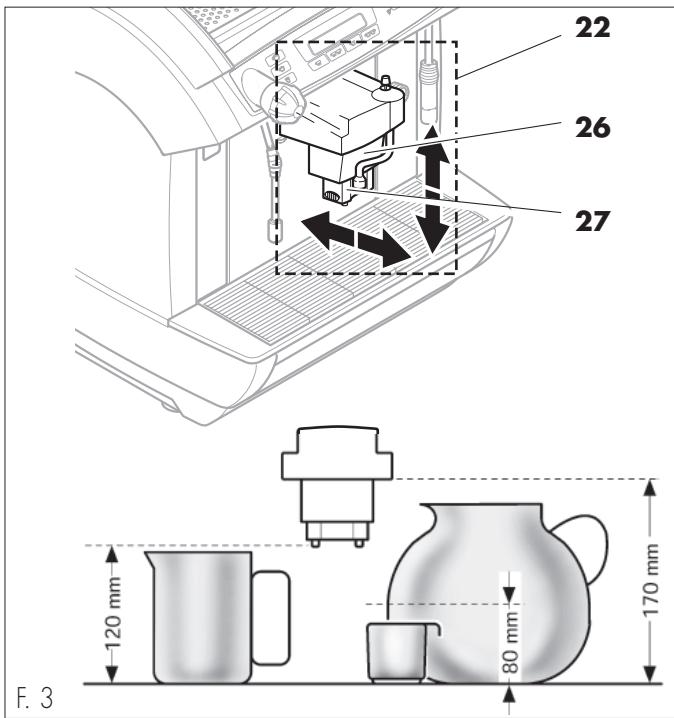
The position of this group (22) can be adjusted according to the height of the container used.
In fact the mobile spout (26) can be moved toward the outside and the telescopic spout upwards or downwards (27).
Many brewing heights can be thus obtained.
NOTE - If the container usually used is higher than 90 ~mm the spout can me moved downwards (26).
8.5 Cappuccinatore Group (F. 4)
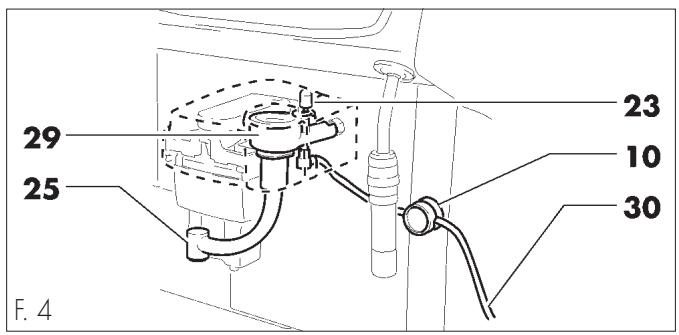
The cappuccinatore group, is composed of:
- milk suction tube (30);
spout clamp (10); - cappuccinatore group(29);
- cream adjusting pin (23);
adjustable brewing spout (25).
9 - SAFETY DEVICES
NOTE - The machines described in this brochure are in conformity with the specific current European Regulations and therefore all their potentially dangerous parts are protected.
- Any overpressure in the water plant that produces steam and hot water, is detected by 3 safety valves.
A thermostat avoids boilers overheating. - The position of the drip tray (12), of the dump box (16) and of the door (14), is controlled by 3 microswitches, which stop the machine if one of those parts is not correctly placed - the display will indicate which component is out of place.
- An electrical pulse counter and a mechanical one, record the number or brewings and allow to schedule the routine maintenance.
9.1 Hot water and steam spouts
(except COFFEE setup) (F. 1)
Steam spouts (17) and hot water spouts (11) are equipped with special rubber protectors (9 and 15) so that they can be grabbed and adjusted even when hot.
9.2 Residual risks

- The structural characteristics of the machines described in this brochure, do not protect the user from the direct steam or hot water spouts (except COFFEE set-up).
- Danger of burns - During hot water and steam brewing do not turn the spouts towards yourself or someone else. Grab the spout only by the respective anti-burns protectors (9 - 15).
Do not use containers that are not made of food materials.
10 - INSTALLATION
10.1 Location notes
- The machine has to be installed in a dry and protected place, at the following ambient temperature: 10^ - 40^ ; maximum humidity: 90% .
10.2 Positioning and water connection
NOTE - Check if the surface where the machine is installed has the adequate dimension and solidity to support the machine safely.
- Drill a hole in the support (A - F. 5).
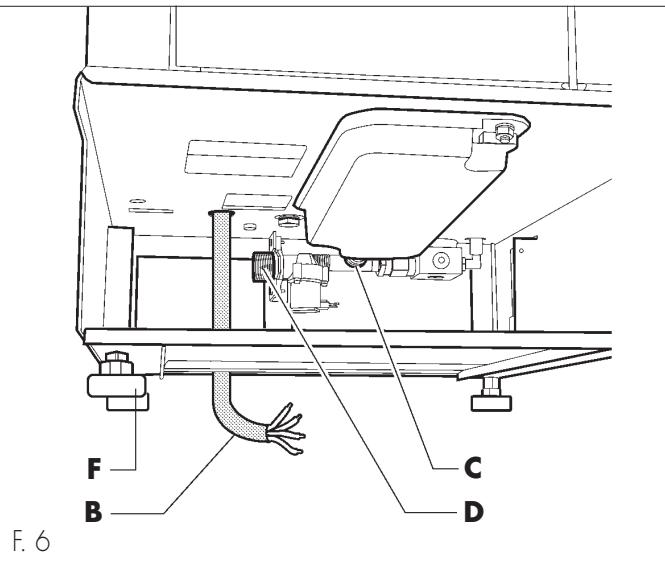
- Place the machine on the support and insert the electric power cord (B - F. 5) in the hole (A).
- Connect a drain tube to the coupling (C - F. 6) and fix it with a rack clamp.
- Connect (using tube and coupling made of food materials only) the machine to the drinking water network, through the coupling (D - F. 6).

We suggest supplying the machine with water treated with a descending device, above all in case of a high calcium and magnesium content (hard water).
- Place definitely the machine on the support (the circles E-F. 5, indicate the suitable position of the adjustable feet).
- Level off the machine using the adjustable feet (F - F. 6).
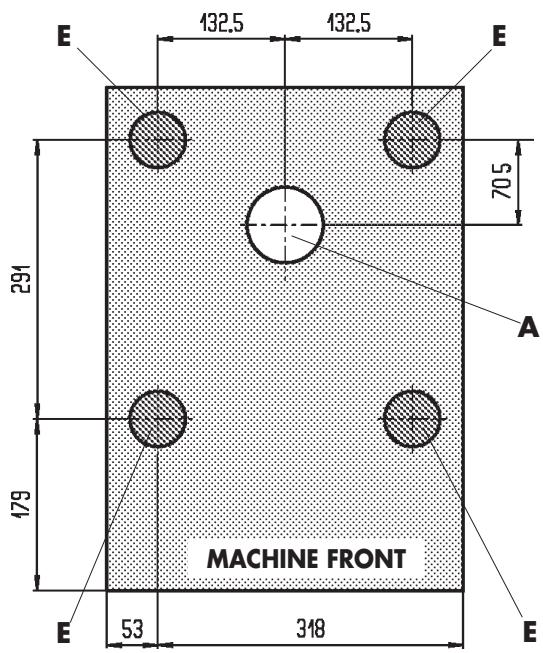
F. 5
10.3 Electric connection
NOTE - In case of plants with a 400 V two-phase current, use the two phases to supply the machine with 230 V single phase current (F. 7). As for the 230 V single-phase connection, require the special installation kit (code %1034.R09).
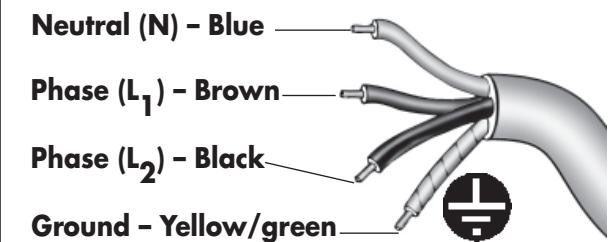
F. 7
Power cord type H07RNF section 4 × 2,5 ~mm^2
Connection of the two phase electric line plug 400 V2N~
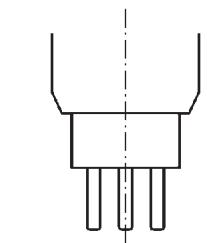
CH (Switzerland)
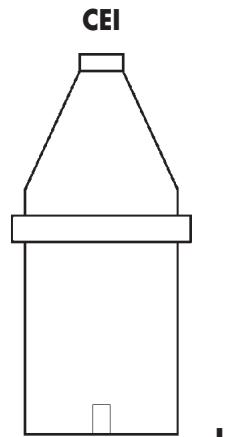
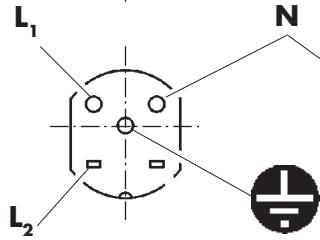
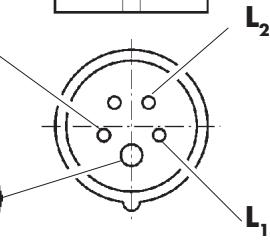
F. 8

Depending on the current regulations of the Country where the machine operates, the cable connecting the electric line has to be pre-set or equipped with an all-pole switch (with a minimum contact opening of 3 mm), (or with a plug in accordance with the same regulations).
The all-pole switch has to be adequate to the machine power consumption and must be able to intercept every voltage polarity.
- Check if the electric cables of the system are proportioned to the machine power consumption.

The connection point (electric plug or all-pole switch) must be located in an easily reachable place, in order to disconnect the machine from the electric line in case of need.
- Connect the cord (B - F. 6) to the electric network.
10.4 Serial port connection
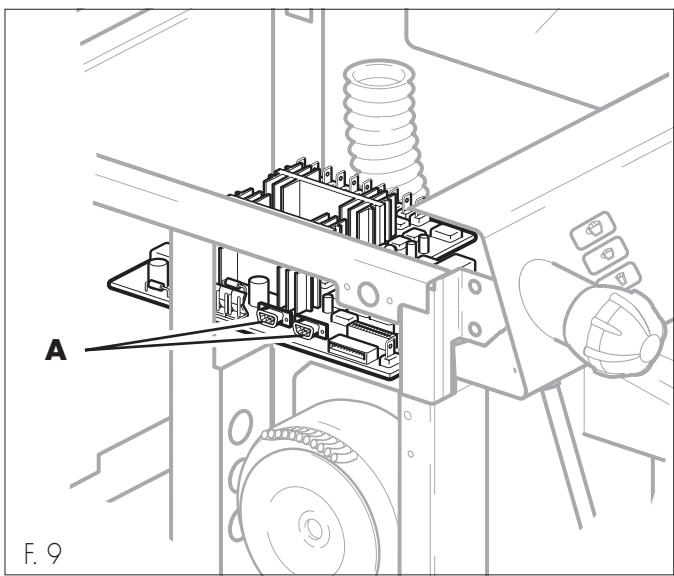
Through the serial port the machine can be connected to the AUTHORIZATION CUSTOMER SERVICE CENTER's equipment, for checks or programming operations (A - F. 9).
11 - FIRST SWITCHING-ON
- Fill the hopper (6) with the selected coffee beans blend.

Be sure the coffee does not contain foreign bodies which could be dangerous for grinders.
- Check if the removable components (12 and 16) are in the right position and if the door (14) is closed.
If they are not, when the machine is switched-on, the display will indicate which component is in the wrong position. - Turn the all-pole switch on "I".
- Switch on the machine through the switch (18); the message "WARMING UP" will be displayed.
-
When the message “READY FOR USE” is displayed :
-
Adjust the brew group (26 and 27) to obtain the suitable height depending on the container used (Pr. 8.4).
-
Place one or two containers under the brew group.
-
Select the beverage and press the corresponding button.

Although buttons are previously programmed on a standard base, check your beverage has the selected features. If not, they must be reprogrammed (Pr. 12.6).
12 - USE OF THE MACHINE

Read carefully this brochure until you get a good understanding of the machine, before starting to operate it.

After a long time of machine inactivity, read the previous paragraph "First switching-on" before re-operating the machine.
12.1 Machine statuses
With regard to the power supply, the machine can have the following statuses:
Off and electrically insulated
- Main switch (18) and all-pole switch on the "0" position (or plug disconnected).
Only the memory for the programmed data storing is enabled.
On
- Main switch (18) and all-pole switch on the "1" position (or plug connected).
- All the functions are enabled and the display (8a) is on.
In standby mode (machine switched off but not electrically insulated):
- Main switch (18) is on "1" position.
The following functions are enabled: “AUTOM. SWITCHING-ON”, “ANTI-FREEZING”, if selected, and “CLOCK”, as well as the display and the memory for the programmed data storing. - The display's backlight is off.
12.2 Manual switching-on
This switching-on is necessary when the machine is in the "off and electrically insulated" status (Pr. 12.1). Proceed as explained is Pr. 11 excluding, in case, the beverage brewing check.
12.3 Programmed automatic switching-on
The machine has to be on "STANDBY" and the function "AUTOM. SWITCHING-ON" has to be enabled.
The machine will automatically switch-on at the programmed time.
12.4 Stand-by temporary switching-on
Manual switching-on when the machine on "STANDBY".
Press and hold the button for 3 seconds.
The machine will automatically return on "STANDBY", 60 minutes after the last operation.
12.5 Control panel
The brewing buttons have to be pressed for less than 1 second.
It switches the machine temporarily on ("STANDBY")
and confirms the buttons (H - G) selection.
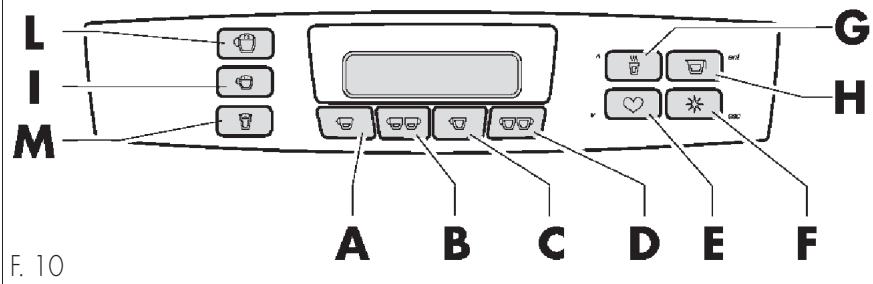
| COFFEE | Brewing obtained from instantly-ground coffee |
| 1 strong A coffee 2 strong B coffee 1 weak C coffee 2 weak D coffee | ·The definitions "Strong coffee" - "Weak coffee" mean two different levels of brewing. ·When sold, the machines are programmed on a standard base. |
| PREGROUND COFFEE | Brewing obtained from pre-ground coffee doses. |
| Strong E + A Weak E + C Light COFFEE | ·This brewing is programmed only for a single pre-ground coffee dose introduced instantly in the machine. |
| Light COFFEE | Brewing obtained from pre-ground coffee doses and instantly-ground coffee |
| Strong E + A Weak E + C COFFEE IN JUG | ·Press the button (once for "Pre-ground Coffee", twice for "Coffee light") and introduce one coffee dose through the door (5). ·To obtain light coffee, a small quantity of ground coffee will be added. |
| COFFEE IN JUG | Multiple automatic coffee brewing. |
| H 1-8 F * | ·Up to 8 brewings can be programmed in the same container, (max 2.5 liters). To set the number of brewings press the button repeatedly. The number of programmed doses will be displayed. After a 2.5 liter brewing, wait 2 minutes before programming a new brewing. |
| COFFEE WITH A DASH OF MILK | Brewing obtained from ground coffee and a small milk dose |
| (*) I (***) CAPPUCCINO | ·This beverage consists in instantly ground coffee and a small dose of hot milk. |
| (*) L (**) - (***) HOT MILK | Brewing obtained from hot milk and one ground coffee dose |
| (*) M (**) - (***) HOT WATER (except COFFEE setup) | ·This beverage consists in instantly ground coffee and hot milk. |
| G 1-8 F * | ·Up to 8 brewings in the same container can be programmed (max 1 liter). Push the button several times The number of programmed doses will be displayed. |
STEAM
(Except COFFEE setup)
- Immerse the spout (17) in the beverage to be heated.
- Turn the knob counterclockwise (13). When the required temperature is reached, close the knob (clockwise).

After every operation, clean the steam spout with a (damp and clean) cloth/sponge from the residues of the previously heated beverage.
() Before any brewing, place the milk suction tube (30 - F. 4) inside the milk container.
(^) (^*) Adjust the cream quantity using the pin (23 - F. 4) (Pr. 12.8).
12.6 Brewing buttons programming
The beverage quantities linked to the respective buttons, can be directly programmed by keypad.
To program and re-program the buttons follow these instructions:
- Switch on the machine and prepare it for the use
- Place the container under the selected spout
- Push and hold the button. The message “PROGRAMMING” will be displayed
- Release the button and set the dose to be brewed
( c c & & )
N.B.: Keys and can be preset for brewing beverages with any possible combination of milk and coffee. Please refer to an authorized customer service center to change default settings.
Here is the button programming scheme.
COFFEE
1 strong coffee

START

Brewing


STOP
to program the other coffees follow the above instructions via the following buttons:
2 strong coffees

1 weak coffee

and 2 weak coffees

COFFEE WITH A DASH OF MILK
m m n O


START
-Hold-
……>>
Brewing


STOP
M I L K

The message "PROGRAMMING"
will be displayed



START
-Hold-
……>>
Brewing


STOP
CAPPUCCINO
m m T O
APPUCCINO


START
-Hold-
Brewing


STOP
M L K




START
-Hold-
Brewing


STOP
HOT MILK

The message
"PROGRAMMING"
will be displayed


-Hold-

Brewing


STOP
COFFE IN JUG




START
-Hold-

Brewing


STOP
HOT WATER

-Hold-

START

Brewing


STOP
NOTE - This programming is only possible if the function "PROGRAMM. HOT WATER" is on the "ON" mode (Pr. 12.7.1).
12.7 Menu programmable functions
NOTE - The machine allows some adjustments and setting-ups through the menu programming, in order to meet all customer requirements.

During the programming the following buttons take on a different function from the one they usually have during the use of the machine
| ❤ | (programming access) | to enter the programming menu hold it for 5 sec. (the message: “PROGRAMMING” will be displayed); |
| (Enter) | to switch from one menu level to the following; to prepare a datum for the adjustment; to confirm a datum or a function; | |
| * | (Escape) | to cancel the non-confirmed adjustments; to go back to the previous level, up to the menu exit. |
| ❤ | (Down) | go to the following item in the same programming level; increase the value of the datum to be adjusted. |
| (Up) | go to the previous item in the same programming level; decrease the value of the datum to be adjusted. |
Some functions also enable the programming of one or more data (already programmed on standard figures).
To adjust the figures to be re-programmed:
- Select the function.
- Confirm the function through the button (Enter).
- The cursor will blink under the figure to be adjusted.
- Press the buttons (Up) or (Down) to adjust its value.
- Confirm the adjustment through the button (Enter).
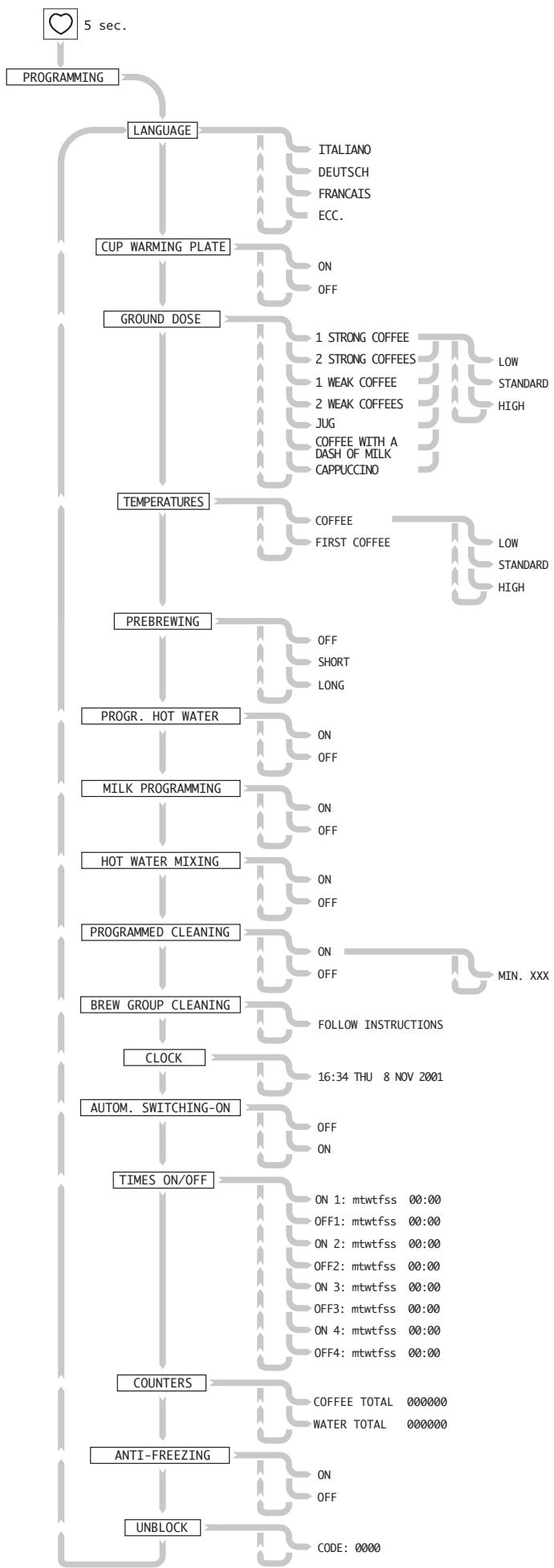
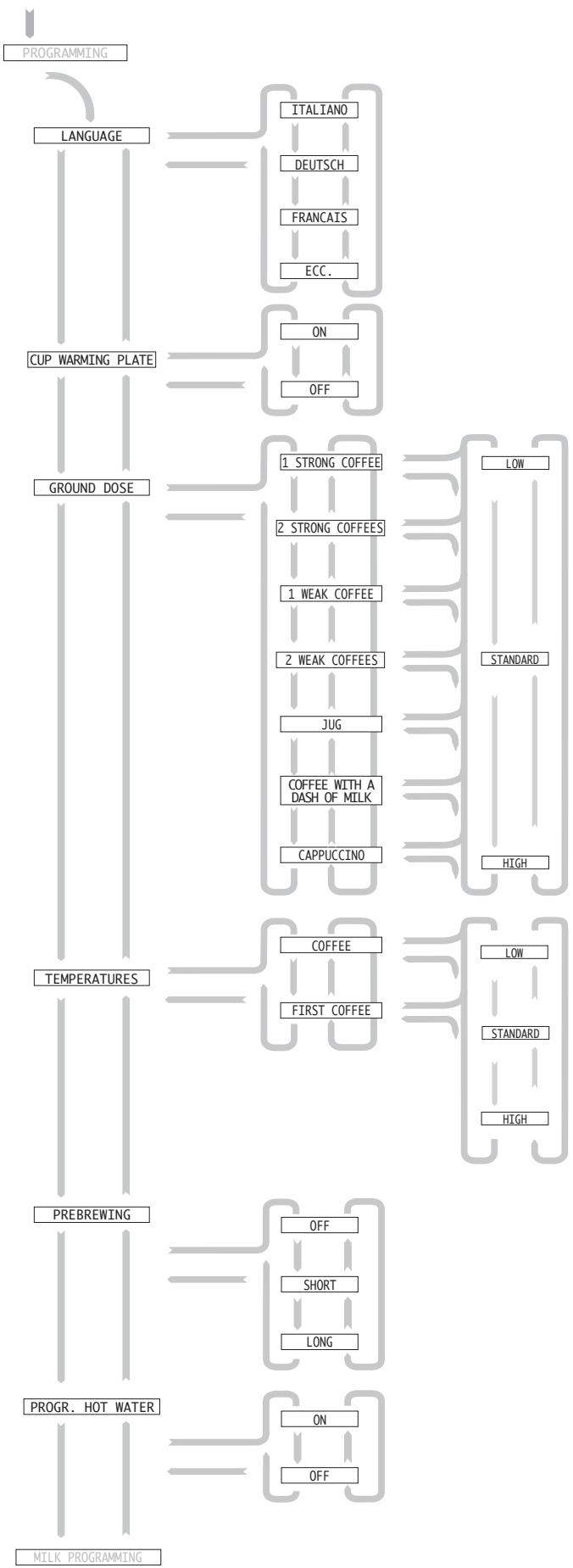
functions explanation
follows in the next page
12.7.1 Description of functions
LANGUAGE
- Language can be selected through the “LANGUAGE” menu.
CUP WARMING PLATE
- By selecting "ON", the cup warming plate is switched on together with the machine.
- By selecting "OFF", the cup warming plate remains off.
GROUND DOSE
The quantity of ground coffee, programmed during the installation, can be adjusted at every brewing.
- By selecting "LOW" or "HIGH", the dose is decreased or increased by 1g .
- By selecting "STANDARD", the machine will brew the dose initially programmed by the Maintenance Technician.
TEMPERATURES
The brewing temperature of water, programmed during the installation, can be adjusted at every brewing.
- By selecting "LOW" the temperature decreases by 3^ .
- By selecting "HIGH" the temperature increases by 3^ C .
- By selecting "STANDARD" the temperature will the one programmed by the Maintenance Technician.
NOTE - The temperature "first coffee" is selected at the first brewing, when the machine is switched on.
PREBREWING
This function allows a short dwell time during the first brewing phase. This can improve the quality of the coffee which, during the dwell, has the time to "infuse" into the first part of water received. Selecting:
- "OFF", no pre-brewing is performed.
- "SHORT", the "pre-brewing" programmed by the Maintenance Technician is performed.
- "LONG", the "pre-brewing" is extended by 1 sec.
PROGR. HOT WATER
This function enables to set the quantity of brewed hot water. By selecting:
- “ON”, the button 回回_回 (Pr. 12.6) can be programmed.
- “OFF”, the button cannot be programmed, therefore the quantity of hot water has to be manually adjusted.
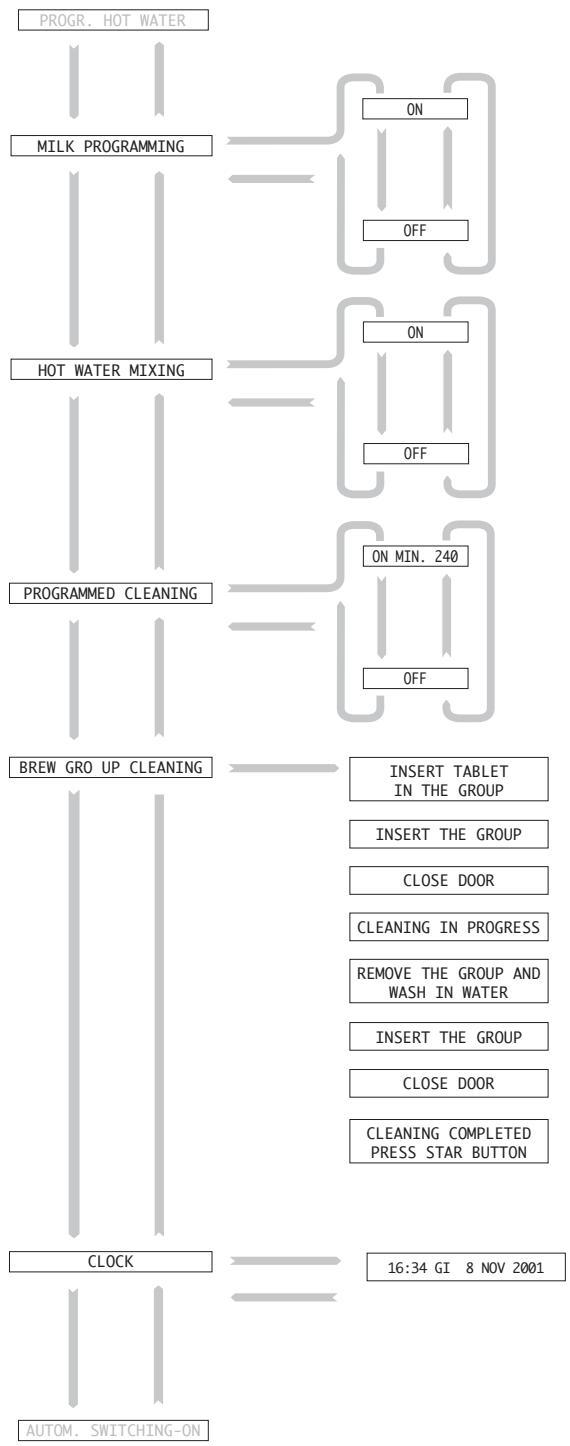
MILK PROGRAMMING
The milk quantity programming can be enabled by selecting:
- “ON”, the button (Pr. 12.6) is programmed.
- “OFF”, the button cannot be programmed, and the dose has to be manually adjusted.
HOT WATER MIXING
While the different types of beverages are brewed, the machine adds a certain amount of hot water, according to the programming. By selecting:
- "ON", the mixing is performed
- "OFF", NO hot water will be added to the beverage.
NOTE - If the function is disabled the programmed figures remain unchanged and ready to be used when the function is re-activated.
PROGRAMMED CLEANING
This function enables the brewing of a small hot water quantity (abt 5 cc), in order to avoid any deposits in the brew group. This cleaning starts automatically after the programmed time (20 ÷ 240 minutes), from the last coffee brewing. By selecting:
- "ON", the adjustment cursor blinks under the last right figure, and the value can be increased or decreased by 10 min; every adjustment must always be confirmed.
- "OFF", no cleaning is performed.
NOTE - During the cleaning, the message "PROGRAMMED CLEANING" will be displayed; cleaning can also be activated manually by holding the button * for 3 seconds.
BREW GROUP CLEANING
This function enables the cleaning of the brew group (28) using the provided tablets (for any information about tablets ask to an Authorized Customer Service Center).
Procedures:
The process begins from: "BREW GROUP CLEANING"
- Press ; on display: “INSERT TABLET IN THE GROUP”
- Remove the brew group; on display: "INSERT THE GROUP";
- Put the tablet inside the brew group and refit the group; on display: “CLOSE DOOR”.
- Close the door; on display: “CLEANING IN PROGRESS”. The cleaning cycle begins; at the end of the cycle the message on display will be “REMOVE THE GROUP AND WASH IN WATER”.
- Remove the brew group; on display: "INSERT THE GROUP".
- Wash the brew group in running water.
- Refit the brew group; on display: "CLOSE DOOR"
- Close the door; on display: “CLEANING COMPLETED. PRESS STAR BUTTON”;
Press to exit the menu definitely and make the machine ready to be used.
CLOCK
This function enables the clock and calendar setup.
- By selecting "CLOCK", the cursor blinks on the hours, that can thus be adjusted.
- After confirming the hour setting, the cursor moves on the next figure to be adjusted (the minutes, then the day, the month and finally the year).
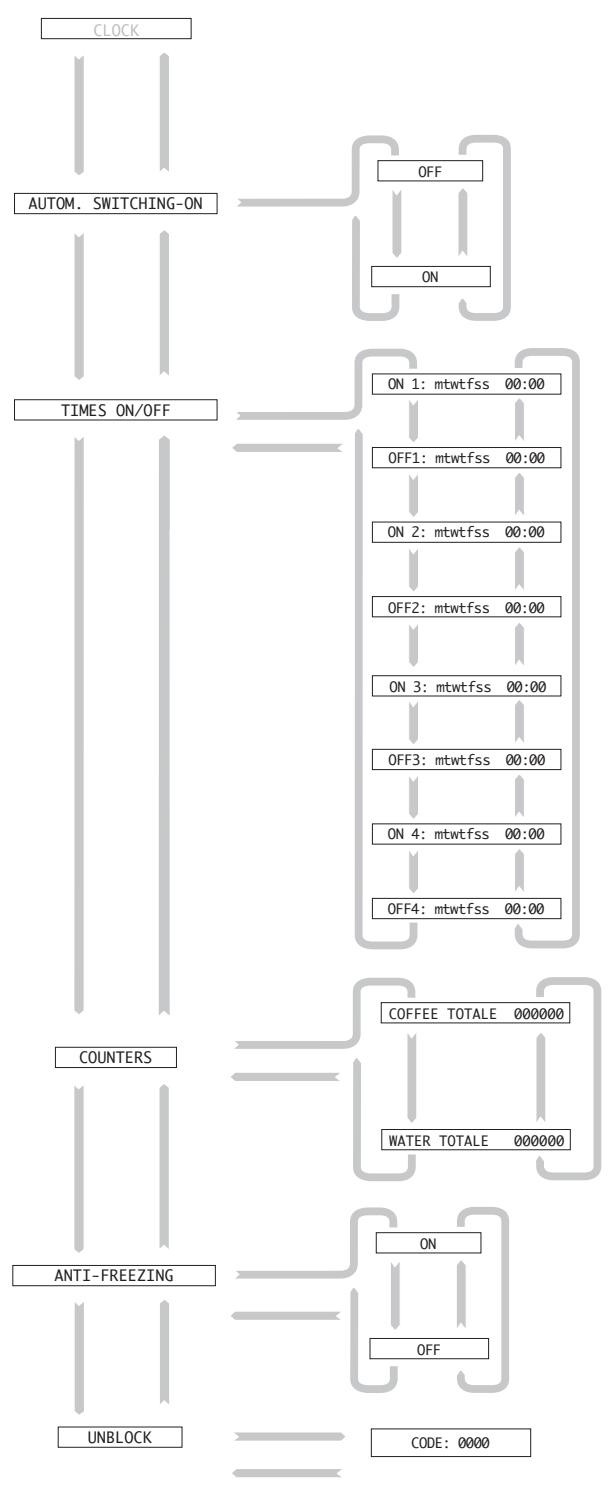
AUTOM. SWITCHING-ON
This function enables the programming of automatic switching-on and off of the machine, in two different time ranges, every day of the week. By selecting:
- “ON”, the function can be programmed.
- "OFF", the machine can only be switched on and off manually, through the main switch (18).
Any automatic switching-on and off times previously set, remain stored anyway.
- To program the time ranges and the days see the following function "TIMES ON/OFF".
NOTE - The automatic switching-on of the machine is possible only if the main switch (18) is on the "1" position.
TIMES ON/OFF
This function enables to program the automatic switching-on and off times over a whole week.
- By selecting "TIMES ON/OFF", the cursor blinks on the day to be modified.
- Enter the day, using the button (down), turning the small letter into a capital one.
- Remove the day from the setting, using the button (up), turning the capital letter into a small one.
- Confirm the adjustment.
To set the time use the same procedure followed to set the clock.
Example: the function explanation scheme shows a machine programming which schedules the machine switching-on at 08:00 and the switching-off at 18:00 from Monday to Friday. The switching-on at 09:00 and off at 12:30 on Saturday, and a stop over the whole Sunday.
COUNTERS
One of these two functions indicates the total number of coffee.
brewing cycles; the other indicates the number of hot water brewing
cycles.
If the automatic dosing of hot water is disabled (see "HOT WATER PROG." function), one cycle will be counted every time the electrovalve is switched-on.
NOTE - Both functions cannot be reset and are just reference functions.
ANTI-FREEZING
When the machine on "STANDBY" is exposed to low temperatures, the anti-freezing function is important to prevent the damages caused by icing-up in boilers. This function keeps the boilers temperature at the minimum value to prevent freezing.
- By selecting "ON", the function is enabled.
- By selecting "OFF", the function is disabled.
NOTE - This function can only be enabled if also function "AUTOM. SWITCHING-ON" is on and if the machine is on "STANDBY". When the function is enabled the message "ANTI-FREEZING" will be displayed.
UNBLOCK
This function enables to temporarily unblock the machine when the number of cycles programmed for maintenance and descaling has been reached. To get the unblock code refer to the firm that has installed the machine or that supplies maintenance. Then enter the code into the function:
- Select "UNBLOCK"; the cursor will blink under the first figure to be modified;
- enter the datum and confirm;
- after every confirmation, the cursor blinks under the following figure and goes on until the code is completed.
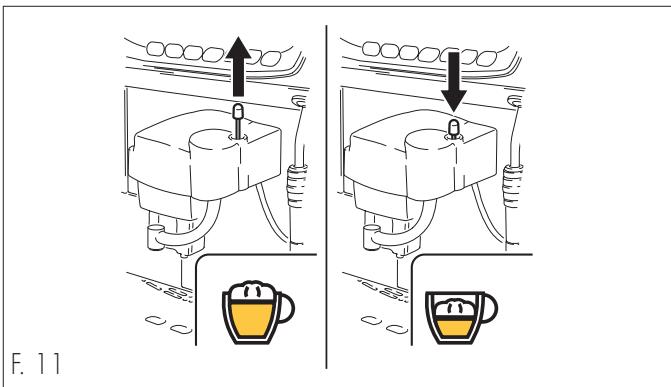
12.8 Cream adjustment
The quality of cream in beverages is proportional to the adjustment of the pin (F. 11).
- By lifting the pin, a higher quantity of cream is brewed.
- By lowering the pin, a lower quantity of cream is brewed.
12.9 Grind adjustment

Whatever the coffee blend is, a very fine grinding (notch on low values) increases the density, the cream quantity and the brewing time of the beverage. On the contrary a coarse grinding (notch on high values) decreases the density, the cream, as well as the brewing time.

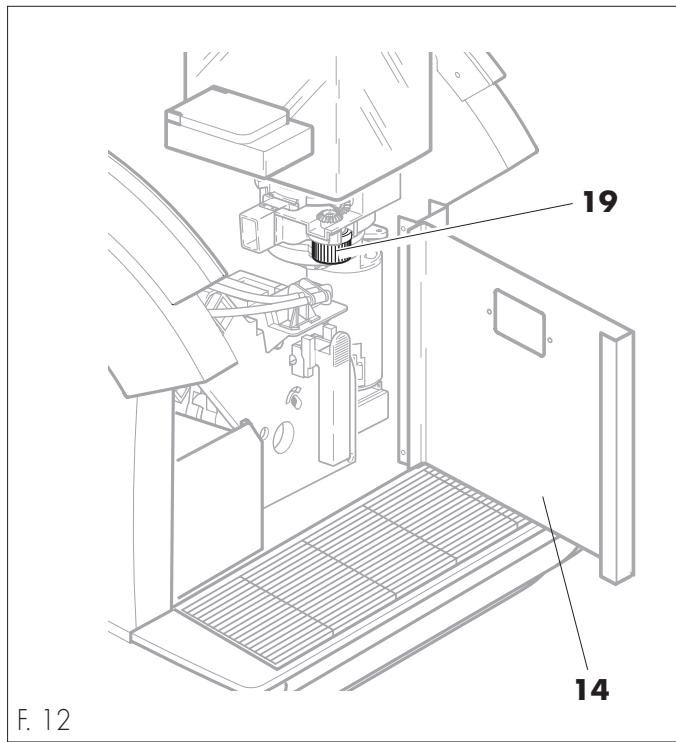
Do not turn the knob counterclockwise to the limit stop (19 - F. 12); this action causes the grinders tightening and the consequent machine block.
If any foreign body in the coffee blend should cause the block of grinders and the subsequent block of the machine(on display: "GRINDER ERROR"), refer to an Authorized Customer Service Center.
NOTE - The grinding is preset by the Manufacturer on standard values, but it can be adjusted in the following way:
- Open the door (14 - F. 12), turn the knob (19 - F. 12) anticlockwise to obtain a finer grinding (the notch moves onto lower values), and clockwise to obtain a coarser grinding (the notch moves onto higher values).
12.10 Display messages
NOTE - Here follows a list of alarm messages (in addition to those explained before) that can be displayed and the relative machine conditions.
STANDBY: the machine is switched off (the main switch is on "I") and the automatic switching-on/off functions enabled (Pr. 12.7.1).
ANTI-FREEZING: the machine is switched off (the main switch is on "I") and the function protecting boilers from icing-up is enabled (Pr. 12.7.1).
PROGRAMMED CLEANING: it is displayed when the machine is performing the automatic cleaning of the brew group (Pr. 12.7.1).
ADD COFFEE: the machine, during the grinding, detects the lack of coffee beans in the relative container (6).
FILL CIRCUIT: this message is displayed if the machine detects the lack of water in the boilers during a beverage brewing.
After checking if there is actually water in the supply network, press the button ( in the COFFEE version), until water comes out properly from the spout (11) and from the brew group (27). In the "COFFEE" version the water comes out only from the brew group
PROGRAMMING: it is displayed during the machine programming (Pr. 12.6).
REMOVE GROUNDS: it is displayed if the dump box (16) is almost full (the machine performed the programmed number of brewings). More brewings can anyway be performed.
OUT OF SERVICE - REMOVE GROUNDS: the dump box (16) is completely full (the machine performed the programmed number of brewings).
The machine is blocked and no more brewings can be performed until the dump box is emptied.
CLOSE DOOR: the door (14) is not properly closed.
INSERT BOX: the dump box (16) is not properly inserted.
INSERT DRIP TRAY: the drip tray (12) is not properly inserted.
INSERT GROUP: the brew group (28) is not properly inserted.
GROUP ERROR: the brew group (28) is not properly performing his working cycle; switch the machine off and call the AUTHORIZED CUSTOMER SERVICE CENTER.
PUMP ERROR: one of the pumps is damaged. Switch the machine off and call the AUTHORIZATION CUSTOMER SERVICE CENTER.
SENSOR ERROR 01: is displayed when a temperature sensor fails. Switch the machine off and call the AUTHORIZATION CUSTOMER SERVICE CENTER.
TEMPER. ERROR 01: is displayed when one of the boilers resistance is damaged. Switch the machine off and call the AUTHORIZED CUSTOMER SERVICE CENTER.
DESCALING: it is displayed when the machine needs a descending intervention, and after performing the programmed number of brewings. Switch the machine off and call the AUTHIZED CUSTOMER SERVICE CENTER.
The descending interventions are set on working cycles of the machine, and can be programmed by the maintenance technician.
MAINTENANCE: it is displayed when the machine needs maintenance and after performing the programmed number of brewings. Switch the machine off and refer to the AUTHORIZED CUSTOMER SERVICE CENTER.
The maintenance interventions are set on working cycles of the machine, and can be programmed by the maintenance technician.
12.11 Machine switching-off
Programmed automatic switching-off
This is possible when the function "AUTOM.SWITCHING-ON" (Pr. 12.7.1) is enabled and the function "TIMES ON/OFF" (Pr. 12.7.1) has been programmed.
At the programmed time the machine goes on "STANDBY".
Manual switching-off
This switching-off is necessary if the function "AUTOM. SWITCHING-ON" (Pr. 12.7.1) is not enabled.
It can be obtained by switching both the main switch (18) and the all-pole switch on the "0" position or by disconnecting the plug.
13 - ROUTINE MAINTENANCE

- In case of troubles, usually indicated on display, switch the machine immediately off, disconnect the power supply through the all-pole switch or by disconnecting the plug, and call the nearest CUSTOMER SERVICE.
- Before intervening with any type of maintenance or cleaning, disconnect the power supply through the main switch (18) and the all-pole switch(or disconnecting the plug).
- Any operation must be done when the machine is cool.
- Never perform any cleaning operation when the machine is on "STANDBY".
- Never wash any part of the machine in the dishwasher.
- Do not use direct water jets.
13.1 Machine cleaning
- The cleaning must be done every day and before an extended out-of-service times, in order to avoid the solidification of residues in containers, trays and brew groups.
- The removable parts of the machine which have to be cleaned, must be washed and rinsed in running water.
- To clean coatings, panels and the machine controls, use soft cloths moderately soaked in warm water.
- To clean the fixed parts and the very machine, use only cold or warm water, non-abrasive sponges and damp cloths.
- All the parts to be cleaned are easily reachable and do not require the use of any tool.

Routine maintenance and cleaning preserve and extend the machine efficiency and durability, as well as granting the respect of the hygienic standard regulations.
The machine automatically indicates when maintenance and descending operations are required. The exact number of brewings is indicated by the mechanical counter or by the machine display. If the Maintenance Technician fails to intervene, the machine could block.
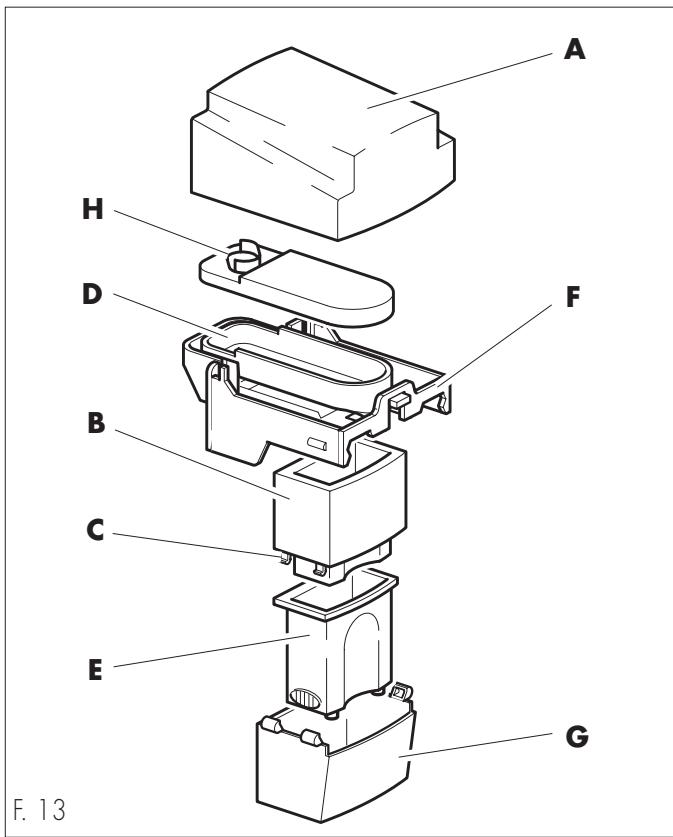
13.1.1 Brew group (F. 13)
Removable parts:
- upper protection panel (A), of the fixed brew group (F) can be pulled upwards;
- rubber gasket (H);
- mobile dispenser (G) can be pulled downwards;
- telescopic spout (E), can be removed from the brew group (G), after pressing the coupling teeth (C) of the inner unit (B).
Clean the metal conveyor (D) with a damp cloth or sponge, without removing it from the fixed brew group (F).

Danger of burns
The conveyor (D) is heated by an internal heating element; therefore wait for its cooling before cleaning it.
13.1.2 Brew group (F. 14)

Cleaning must be carried out with the group empty.
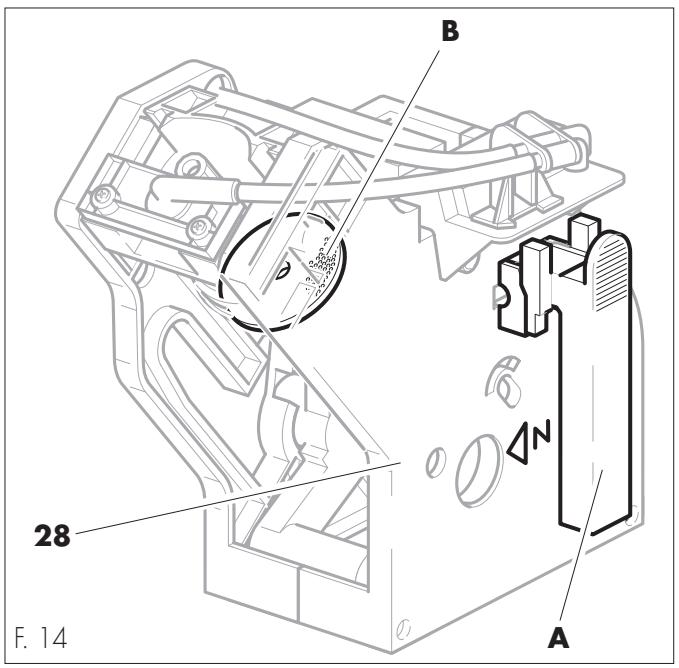
- Periodically clean the brew group using the special tablets (Pr. "12.7.1 Explanation of functions - CLEANING GROUP").
- Remove the brew group (28) pulling the appropriate handle (A) and pressing the button marked by "PRESS".
- Wash abundantly with warm water. Do not use detergents.
- Delicately scrape the upper filter (B) with a plastic coffee spoon.
13.1.3 Drip tray and relative grill
Remove the drip tray (12) from the machine and wash it with running water, paying particular attention to the grill.
13.1.4 Dump box
Remove the drip tray (12), remove the dump box (16) from its place and then wash it with running water.
13.1.5 Steam and hot water spouts
(except COFFEE setup)
Clean the spouts (11-17) with a non-abrasive damp o
If the nozzles are clogged the final section of the spouts can be unscrewed, and the nozzles can be cleared with a pin.
13.1.6 Cup warming plate
Use a non abrasive damp cloth to clean the cup warming plate (4).
13.1.7 Coffee bean hopper
Use a non abrasive damp cloth to clean the coffee bean hopper (6).
13.1.8 Cappuccinatore cleaning

Never clean the cappuccinatore when the machine is on "standby".
Every time the CAPPUCCINATORE is used, it must be cleaned in order to avoid the solidification of residues.
All the removable parts must be washed and rinsed in running water.
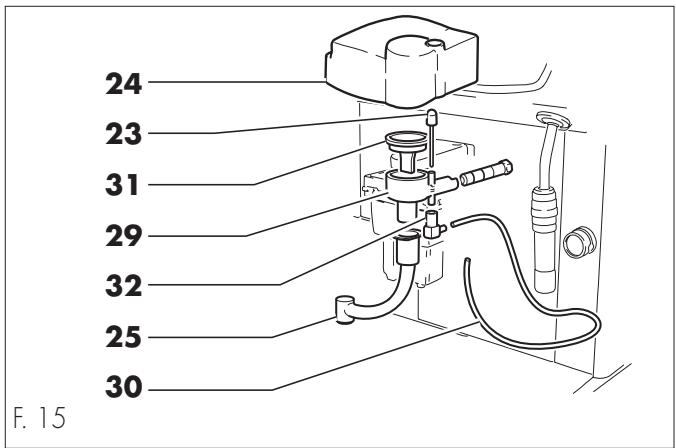
13.1.9 Cappuccino brew group (F. 15)
To clean each part of the cappuccinatore group separately, remove:
- upper protection panel (24), pulling it upwards;
- cream adjusting pin (23);
- air diffuser (31) from the cappuccinatore group, pulling upwards;
- cappuccinatore group (29) by pulling;
- joint (32) connecting the suction pipe to the cappuccinatore;
- adjustable brewing spout (25);
- milk suction tube (30).
14 - UNSCHEDULEDMAINTECTION
NOTE- Unscheduled maintenance includes every repairing or part replacing. The Maintenance Technician is the only person authorized to perform these operations.
14.1 Jamming of the coffee grinder unit
- A foreign body among the coffee beans can cause the grinders jamming and the subsequent machine block; the message "GRINDER ERROR" will be displayed.
- In this case open the coffee grinder unit (20) and remove the foreign body.
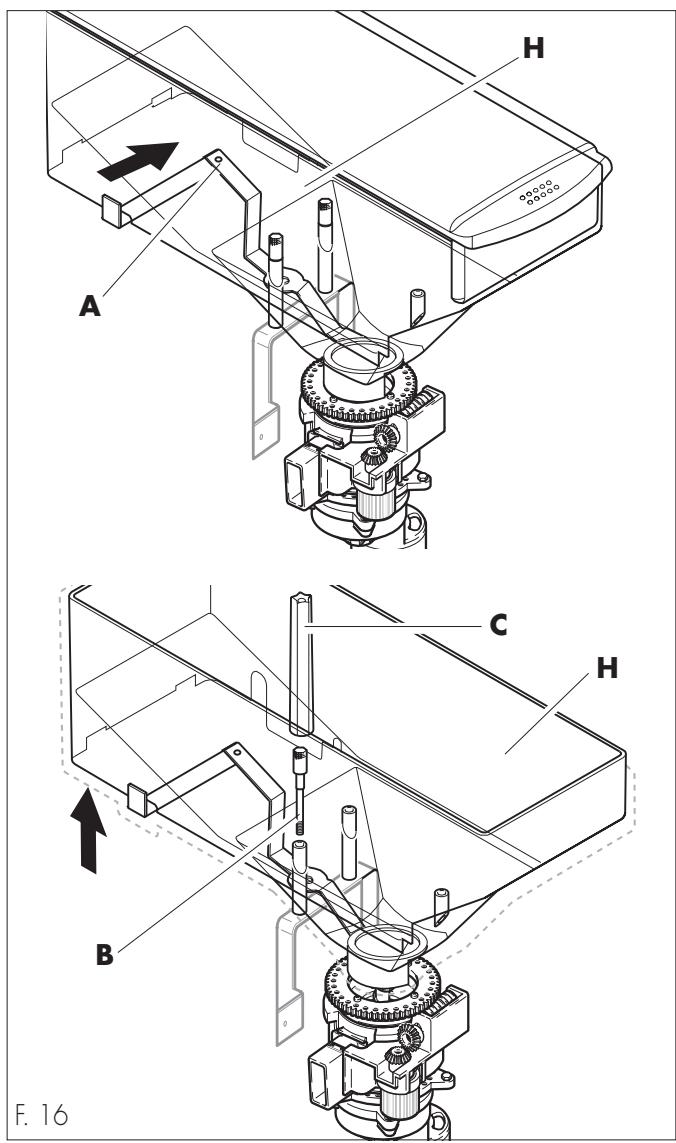
14.1.1 Grinding unit assembly/disassembly
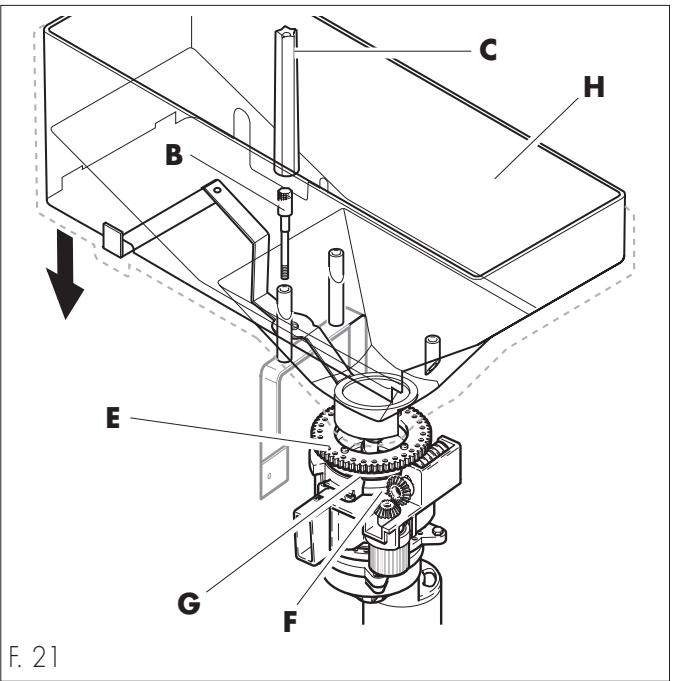
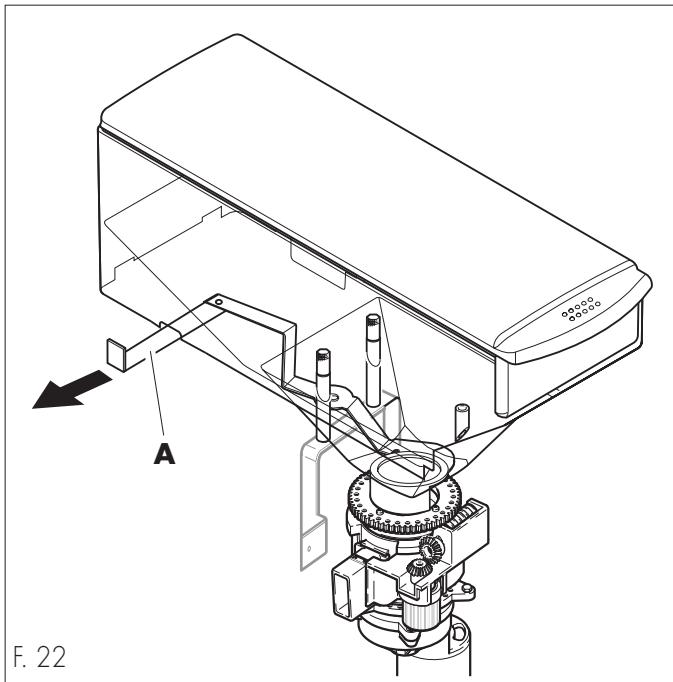
- Close the bean hopper (H) bulkhead (A)
- Remove the screws (B) from the container using the appropriate tool (C). Remove the container from the machine pulling upwards.
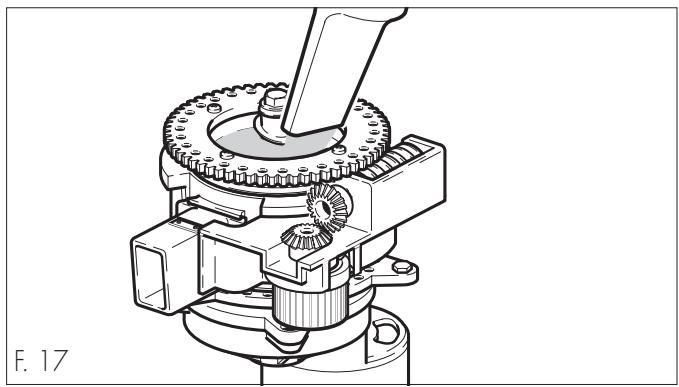
- Remove the coffee beans on the grinder's top with a vacuum cleaner.
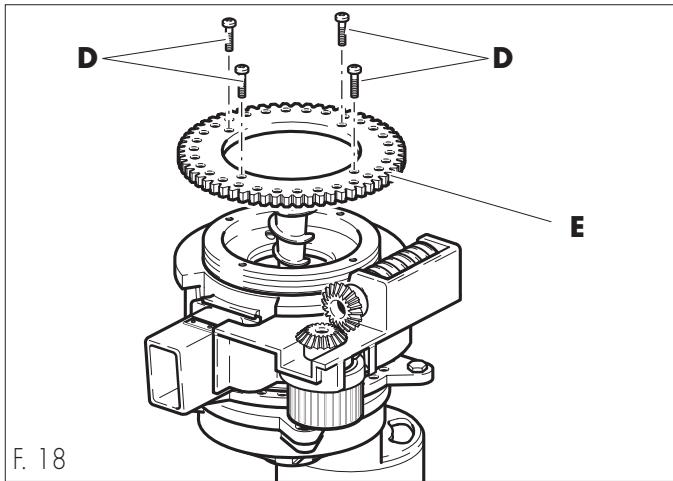
- Remove the screws (D).
- Remove the gearwheel (E).
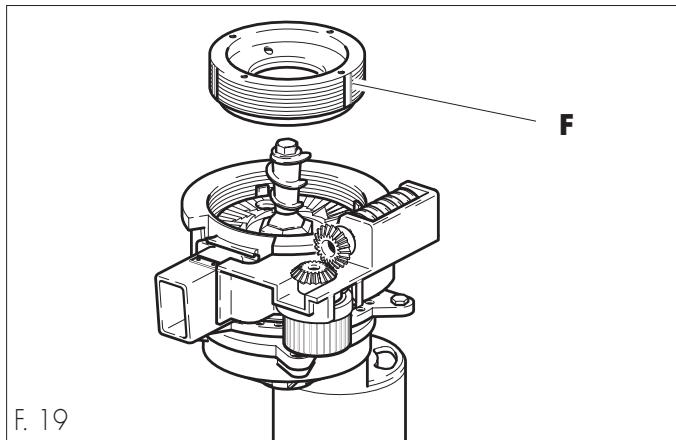
- Unscrew and remove the adjustment ring nut (F) and clean both grinders with a vacuum cleaner and a brush.
Check the grinder's degree of wear. In case of manifest damages, they must be replaced.
To re-assemble the coffee grinder unit, do as follows:
- Screw fully the adjustment ring nut (F), then unscrew it by 1/2 turn.
This 1/2 turn untightening of ring nut is necessary to avoid grinders jamming and damage.
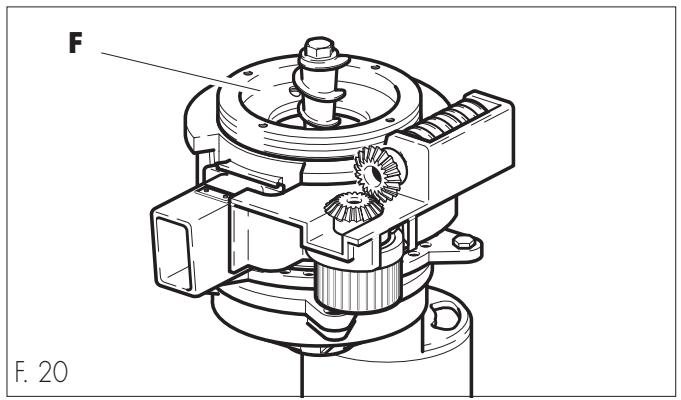
- Replace the gearwheel (E) and fix it tightening the screws (D).
- Replace the coffee bean hopper (H).
Be careful to place the gasket properly (G). It has to correctly engage with the gearwheel (E) and the ring nut (F).
Fix the container (H) tightening the screws (B) with the appropriate tool (C).
- Open the bulkhead (A).

Before re-operating the machine, a new grind adjustment is required.
15 - OUT OF SERVICE
In case you will put the machine out of service, disconnect the power and the water supply, empty the drip trays, boilers and piping and clean the machine (Pr. "13.1 Machine cleaning").
If the machine is scrapped, the different materials composing the machine have to be separated and disposed of according to their composition and to the current State regulations.
16 - TROUBLES, CAUSES AND CURES
Here is a list of the possible machine troubles.
The symbol 念 念 念 念 念 念 念 念 念 念 念 念 念 念 念 念 念 念 念 念 念 1 in the "cure" box means that the operation must be carried out by the Maintenance Technician only.
| TROUBLE | CAUSE | CURE |
| The machine does not start | No voltage | Check:- if the plug is connected |
| - if the all-pole switch (if any) is on | ||
| - the system fuses | ||
| - the electric connections | ||
| Display message:"DUMP BOX FULL" | Dump box full | Empty the dump box and reintroduce it properly |
| Grinder error | Coffee grinder unit blocked | Clean the coffee grinder (Pr. "14.1 Jamming of the coffee grinder unit") |
| Instead of coffee only water is brewed | The button selecting pre-ground coffee has been pressed but the relative container has not been filled with instant coffee. | Place the coffee dose in the relative hopper and restart the cycle |
| No water or steam supply | The steam/hot water spout's hole is clogged | Clean it with a thin needle |
| Coffee flows too rapidly | Grinding is too coarse | Set a finer grinding |
| Coffee flows too slowly | Grinding is too fine | Set a coarser grinding |
| Coffee is not hot enough | The cup has not been preheated | Preheat the cup on the cup warming plate |
| The machine has not yet reached the suitable temperature | Wait for the machine to reach the suitable temperature | |
| Coffee has not enough cream | The coffee blend is not appropriate, coffee is not fresh off the roasting, the coffee powder has been ground too finely or too coarsely. | Change the coffee blend or check its grinding (if pre-ground) |
| The machine requires too much time to warm up, the water quantity is reduced | The machine circuit is clogged by scale | Descale the machine |
| The brew group cannot be removed | The brew group is not in the right position (N) | Switch the machine on and off through the main switch |
| The brew group cannot be refit | The brew group is not in the right position (N) | Manually turn the group onto the standard position (N), matching the reference mark placed on the structure with the arrow N (F. 14) |
NOTES
VORWORT
Paragr. = Paragraphe
Tab. = Tableau