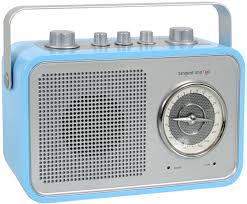
DAB 2 GO - Portable radio TANGENT - Free user manual and instructions
Find the device manual for free DAB 2 GO TANGENT in PDF.


| Brand | TANGENT |
| Model | DAB 2 GO |
| Product type | Portable radio |
| Weight (with power supply) | 1.528 kg |
| Power supply | 6 AA batteries (not included) or 12 V DC mains adapter (not included) |
| Speaker | 3-inch (7.62 cm) wide-range speaker |
| Output power | >5 Watt RMS @ 1% THD |
| Connectivity | 3.5 mm AUX IN, 3.5 mm headphone jack, 3.5 mm recording output, USB port, 12 V DC input |
| Antenna | External telescopic antenna included |
| Reception modes | DAB/DAB+, FM, AUX IN |
| Presets | 5 FM stations and 5 DAB/DAB+ stations |
| Display | 2-line 16-character LCD screen |
| Alarm | Wake-up function with snooze (7 minutes by default) |
| Battery charging | Charges NiMH/NiCad rechargeable batteries in ON or standby mode |
| Recommended batteries | AA NiMH (rechargeable) batteries |
| Carry handle | Integrated |
| Care and cleaning | Clean with a soft, dry cloth. Disconnect before cleaning. Do not use harsh cleaning products. |
| Safety | Do not expose to moisture, direct sunlight, dust, or extreme temperatures. Do not open the casing. Ensure adequate ventilation. |
| Spare parts and repairability | Repairs must be carried out by a qualified technician. Spare parts available on request. |
| General information | Manual available in multiple languages. Free download at notice-facile.com. |
Frequently Asked Questions - DAB 2 GO TANGENT
User questions about DAB 2 GO TANGENT
0 question about this device. Answer the ones you know or ask your own.
Ask a new question about this device
Download the instructions for your Portable radio in PDF format for free! Find your manual DAB 2 GO - TANGENT and take your electronic device back in hand. On this page are published all the documents necessary for the use of your device. DAB 2 GO by TANGENT.
USER MANUAL DAB 2 GO TANGENT
Contents 2
UK - USER MANUAL 3
Top panel 4
Front panel 5
Rear panel 6
Battery charging 7
Important notes on battery use 7
Menu Description 8
Specifications 9
UK - USER MANUAL
Important information
Congratulations on your new radio.
Please read this manual carefully to avoid malfunction and damage to the radio and to ensure that the radio will be a source of great pleasure to you for a very long time.
- Do not expose the radio to direct sunlight, high humidity, dirt, heavy vibration or extreme temperatures.
- Place the unit on a solid and plane surface.
- Make sure that there is sufficient ventilation around the radio. Do not place the unit on a soft surface such as a carpet. Make sure that there is sufficient of clearance behind the unit.
- Do not open the cabinet. Only qualified technicians are allowed access to the internal parts.
- Make sure that liquid and foreign matter cannot enter the unit.
- If service or repair is required, this must be carried out by qualified technicians.
- Unplug the unit in the following cases:
a. The mains plug or the mains cable is defective.
b. Foreign matter or liquid has entered the radio.
c. The unit cannot be operated properly.
d. The unit has fallen down or the cabinet has been damaged.
- Store this instruction manual carefully for future reference.
- Use a duster or a slightly damp, soft and non-fluffy rag to clean the radio.
- Do not use corrosive or strong cleaning agents. Make sure that no moisture penetrates the radio during cleaning. Unplug the unit before cleaning.
- Check that the mains voltage indicated on the AC-adaptor corresponds to the mains voltage that the unit is connected to.
- Unplug the unit if the radio is not to be used for a long time.
- Tangent has found that in situations where the supplied antenna is not used with the product, strong signals can interfere with normal performance.
Disclaimer
Despite extensive efforts we cannot guarantee that the technical data indicated are correct, complete and updated. We reserve the right to make technical changes without notice.
Top panel
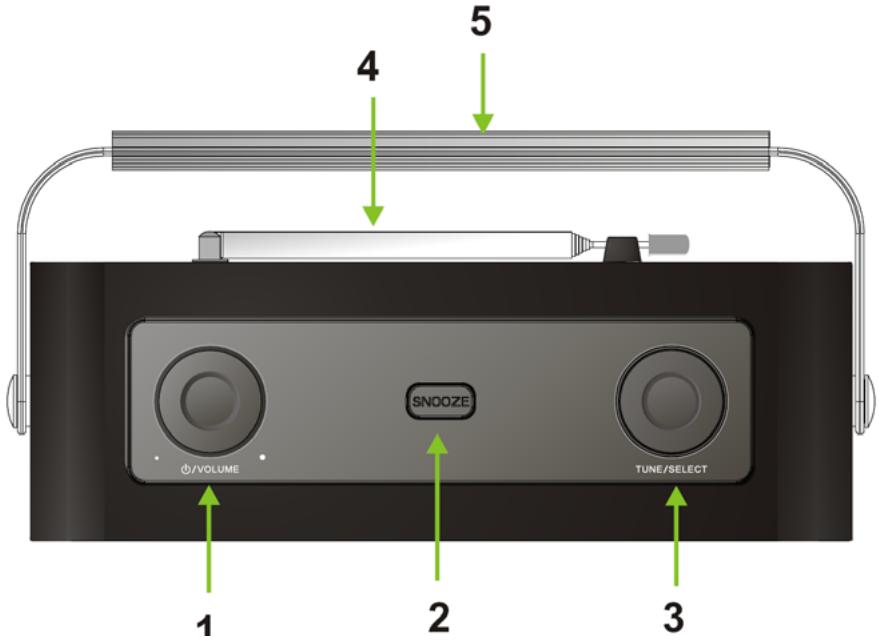
- VOLUME:
A. Turn this knob CW to increase the volume or CCW to decrease the volume.
B. This knob also controls the volume of headphones when connected.
C. Press this button to toggle the radio between ON and standby.
D. When an alarm is given, press to turn it off.
- SNOOZE: When an alarm is given, press this button to postpone it 7 minutes (default). While under SNOOZE function, the display of the radio will indicate Snooze, during this time, if you press any another button, snooze should be canceled.
- TUNE/SELECT: Turn this knob to browse options, and press this knob to confirm.
- EXTERNAL ANTENNA: The radio comes with a telescopic antenna. To improve FM reception, angle the antenna for best the reception.
- HANDLE: This handle designed for easy carry.
Front panel
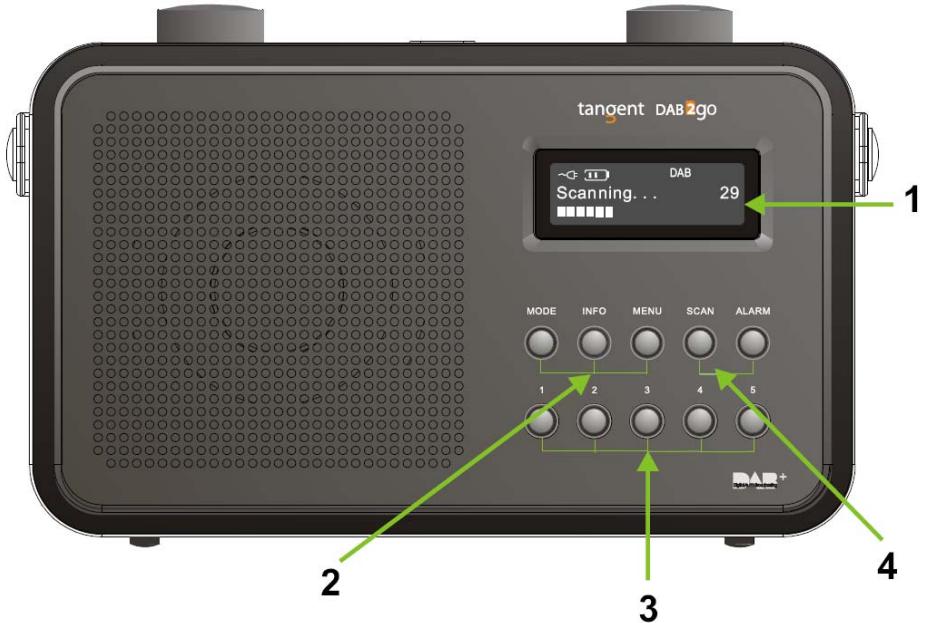
- DISPLAY SCREEN: 2x16 character LCD featuring special icons.
- MODE, INFO and MENU:
A. MODE: Press this button to shift between DAB/DAB+, FM and AUX IN. AUX IN is only featured when a plug is connected.
B. INFO: While receiving a broadcast signal, press this button to display queue information.
C. MENU: Press this button to access the menu.
- Preset buttons 1-5:
A. To store a station: press and hold one of the preset buttons 1-5, until the display states 'Preset # stored'.
B. To recall a stored station: press one of the preset buttons 1-5 to load the preferred station. Both FM and DAB/DAB+ have 5 individual presets.
- SCAN and ALARM:
A. SCAN: In DAB/DAB+ mode, press this button to make a quick scan; In FM mode, press this button to auto-scan.
B. ALARM: Press this button to set alarm.
Rear panel
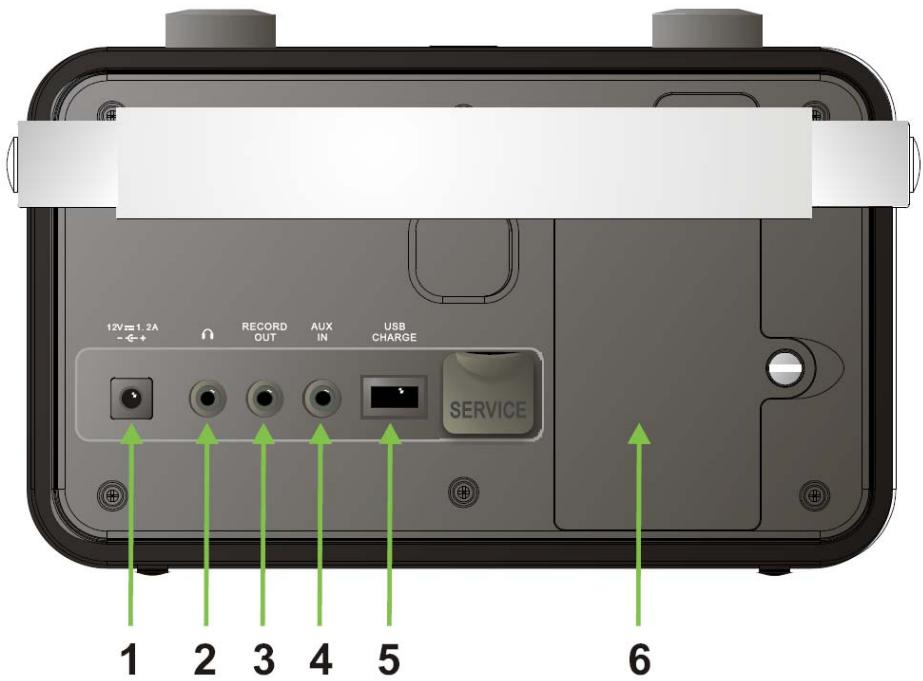
- 12V/1.2A: Use this input to connect the radio's DC power supply.
- HEADPHONE: Inserting a headset plug will turn off the internal speaker. The output for the headset is controlled by the volume knob.
- RECORD OUT: The radio can be used as a tuner by connecting it to an amplifier.
- AUX IN: Connect any stereo or mono audio source to this stereo input.
- USB CHARGE: Designed for charging USB devices including iPods.
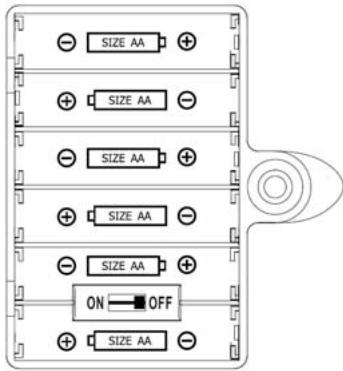
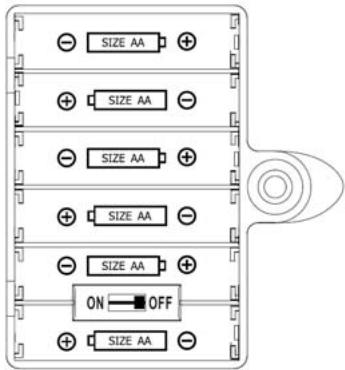
- BATTERY COMPARTMENT: Loosen the big screw on the right side of the battery lit using e.g. a coin. Install 6 pcs AA sized batteries in the compartment. Note: remember to install the battery correctly in the compartment. The negative end (-) of the battery must be placed with the end of the battery compartment with a spring. The positive end (+) of the battery must be placed with the end of the battery compartment without a spring.
Battery charging
This radio is able to charge rechargeable battery installed in the radios battery compartment. The radio can charge batteries in both ON and Standby mode. When the radio is charging on the batteries, the icon will show up. Once the charging is finished, the icon will be stated.
Please notice that it is normal for the included power supply and the battery compartment to become warm during charging.
Please notice that batteries are not included with the radio. The radio can use both normal Alkaline batteries, and rechargeable batteries (NiMH/NiCad).
Tangent recommends using NiMH batteries.
Warning: Do NOT connect the included power supply, when alkaline batteries are installed in the radio, and the charge switch is activated, this will damage your radio. Damage caused by faulty use of the radio is not covered by the warranty. It is set to OFF by default.
Important notes on battery use
- It normally takes at least 5 complete charge/recharge cycles before new rechargeable batteries are optimized for use, and the maximum playback time can be reached.
Always fully discharge the batteries, before charging the batteries again. This will lengthen the life time of your rechargeable batteries. - Remove all the batteries from the radio, if they are not used for an extended time period.
Always change the batteries when the radio is OFF. - Dispose of spent batteries according to your country's regulations.
- Do NOT mix battery types.
- The playback time can vary depending on the volume level, and battery type.
- The charging time can vary depending on battery type and battery condition.
- Do not burn the batteries. It will cause serious damage to the environment.
- Do not attempt to disassemble the batteries.
- If your rechargeable battery playback time decreases substantially, it is time to replace the batteries.
Menu Description
ALL MODES DAB MCCE FM MODE
Menu System


When DAB or FM is selected, associated DAB or FM menus comes first
Alarm Setting

Specifications
Model: Tangent DAB2go
Controls: Volume/Power knob, Tune/Select knob, MODE-, INFO-, MENU-, SCAN- and ALARM button and PRESET buttons 1-5
Speaker: 3" wide range speaker
Power Output: >5 Watt RMS@1% THD
Connections: 3,5mm jack for stereo analog audio Headphone output
3,5mm jack for stereo analog audio AUX input
3,5mm jack for stereo analog audio Record output
12 V DC input
USB Charge
Power: DC 12V/1.2A
Tuner bands FM (87,5-108,0MHz)
DAB/DAB+ (174 - 240MHz)
Dimensions: 243mm x 84mm x 148mm (W x H x D)
Weight: 1.528 Kg (Power supply and radio)
All specifications are subject to change without notice.
Table des matieres

When DAB or FM is selected, associated DAB or FM menus comes first
Alarm Setting

Alimentation: DC 12V/1.2A
Bandes Tuner FM (87,5-108,0MHz)
DAB/DAB+ (174 - 240MHz)
Dimensions: 243mm x 84mm x 148mm (W x H x D)
When DAB or FM is selected, associated DAB or FM menus comes first
Alarm Setting
| <Alarm> | <Alarm> | Same as Alarm | |||
| <Set Alarm> | <Set Time> | <Set Source> | |||
| <Set On> | <Set DAB> | <Set Repetition> | |||
| <Set Repetition> | <Set DAB> | <Set Once> | |||
| <Set Repetition> | <Set Once> | <Set Repetition> | |||
| <Set Repetition> | <Weekdays> | <Daily> | |||
| <Weekends> | <10> | ||||
Technische Daten
Model: Tangent DAB2go
Tuner-Bander FM (87,5-108,0 MHz)
DAB/DAB+ (174 - 240 MHz)
Abmessungen: 243 mm x 84 mm x 148 mm (W x H x D)

When DAB or FM is selected, associated DAB or FM menus comes first
Alarm Setting

Specifications
Model: Tangent DAB2go
Bediening: Volume/Power knop, Tune/Select knop, MODE-, INFO-, MENU-, SCAN- en ALARM toets en PRESET toetsen 1-5
[picture of the switch]
When DAB or FM is selected, associated DAB or FM menus comes first
Alarm Setting
| <Alarm> | <Alarm> | Same as Alarm | |||||||
| <Set Alarm> | <Set Time> | <Set Source> | <Set Repetition> | <Set Repetition> | <Set Repetition> | <Set Repetition> | <Set Repetition> | <Set Repetition> | <Volume> |
| <Set On> | <Set On> | <Set Time> | <Set DAB> | <Set DAB> | <Set DAB> | <Set DAB> | <Set DAB> | <Set DAB> | <Set DAB> |
| <Set Alarm> | <Set Alarm> | <Set Off> | <Set Source> | <Set Source> | <Set Source> | <Set Source> | <Set Repetition> | <Set Repetition> | <Set Repetition> |
| <OnOff> | <OnOff> | <OnOff> | <OnOff> | <OnOff> | <OnOff> | <OnOff> | <OnOff> | <OnOff> | <OnOff> |
Specificationer
Model: Tangent DAB2go
Knapper: Volume/Power-knap, Tune/Select-knap, MODE-, INFO-, MENU-, SCAN- og ALARM-knap og PRESET-knapper 1-5
Hojtaler: 3" fuldtonehojtaler
When DAB or FM is selected, associated DAB or FM menus comes first
Alarm Setting
| <Alarm> | <Alarm> | Same as Alarm | |||||||
| <Set Alarm> | <Set Time> | <Set Source> | <Set Repetition> | <Set Repetition> | <Set Repetition> | <Set Repetition> | <Set Repetition> | <Set Repetition> | <Volume> |
| <Eq. On> | <Eq. On> | <EG. 1200 | <EG. DAB> | <EG. Once> | <EG. Once> | <EG. Once> | <EG. Once> | <EG. 10 | <EG. 10 |
| <Set Alarm> | <Set Alarm> | <Set Source> | <Set Source> | <Set Source> | <Set Source> | <Set Repetition> | <Set Repetition> | <Set Repetition> | <Volume> |
| <Off> | <Off> | <Bluenze> | <Bluenze> | <Bluenze> | <Bluenze> | <Bluenze> | <Bluenze> | <Bluenze> | <Weekdays> |
Specificationer
- Preset painikkeet 1-5:
When DAB or FM is selected, associated DAB or FM menus comes first
Alarm Setting
| <Alarm> | <Alarm> | Same as Alarm | |||||||
| <Set Alarm> | <Set Time> | <Set Source> | <Set Repetition> | <Set Repetition> | <Set Repetition> | <Set Repetition> | <Set Repetition> | <Set Repetition> | <Volume> |
| <Set On> | <Set On> | <Set Time> | <Set DAB> | <Set DAB> | <Set DAB> | <Set DAB> | <Set DAB> | <Set DAB> | <Set DAB> |
| <Set Alarm> | <Set Alarm> | <Set Off> | <Set Source> | <Set Source> | <Set Source> | <Set Source> | <Set Repetition> | <Set Repetition> | <Set Repetition> |
| <OnOff> | <OnOff> | <OnOff> | <OnOff> | <OnOff> | <OnOff> | <OnOff> | <OnOff> | <OnOff> | <OnOff> |
Tekniset tiedot
Malli: Tangent DAB2go

When DAB or FM is selected, associated DAB or FM menus comes first
Alarm Setting


When DAB or FM is selected, associated DAB or FM menus comes first
Alarm Setting

Especificaciones
Modelo: Tangent DAB2go
Controles: Botón Volume/Power, Botón Tune/Select, MODE-, INFO-, MENU-, SCAN- y ALARM y botones de PRESET 1-5
Altavoz: Altavoz de amplia gama de 3"
Potencia de Salida: >5 Watt RMS@1% THD

When DAB or FM is selected, associated DAB or FM menus comes first
Alarm Setting

Especificações
Modelo: Tangent DAB2go
Controls: Botao Volume/Power, botao Tune/Select, MODE-, INFO-, MENU-, SCAN- e botao ALARM e botoes PRESET 1-5
Coluna: Coluna de longo alcance de 7,6 cm
THE OBJECTIVE OF EVERY TANGENT PRODUCT IS THAT FUNDAMENTALLY CORRECT DESIGN CAN PRODUCE A PRODUCT CAPABLE OF ACHIEVING EXCELLENT PERFORMANCE AND AFFORDABILITY.
www.tangent-audio.com
Item no.: 40629.01