JB913R - Electronic thermometer/hygrometer IROX - Free user manual and instructions
Find the device manual for free JB913R IROX in PDF.

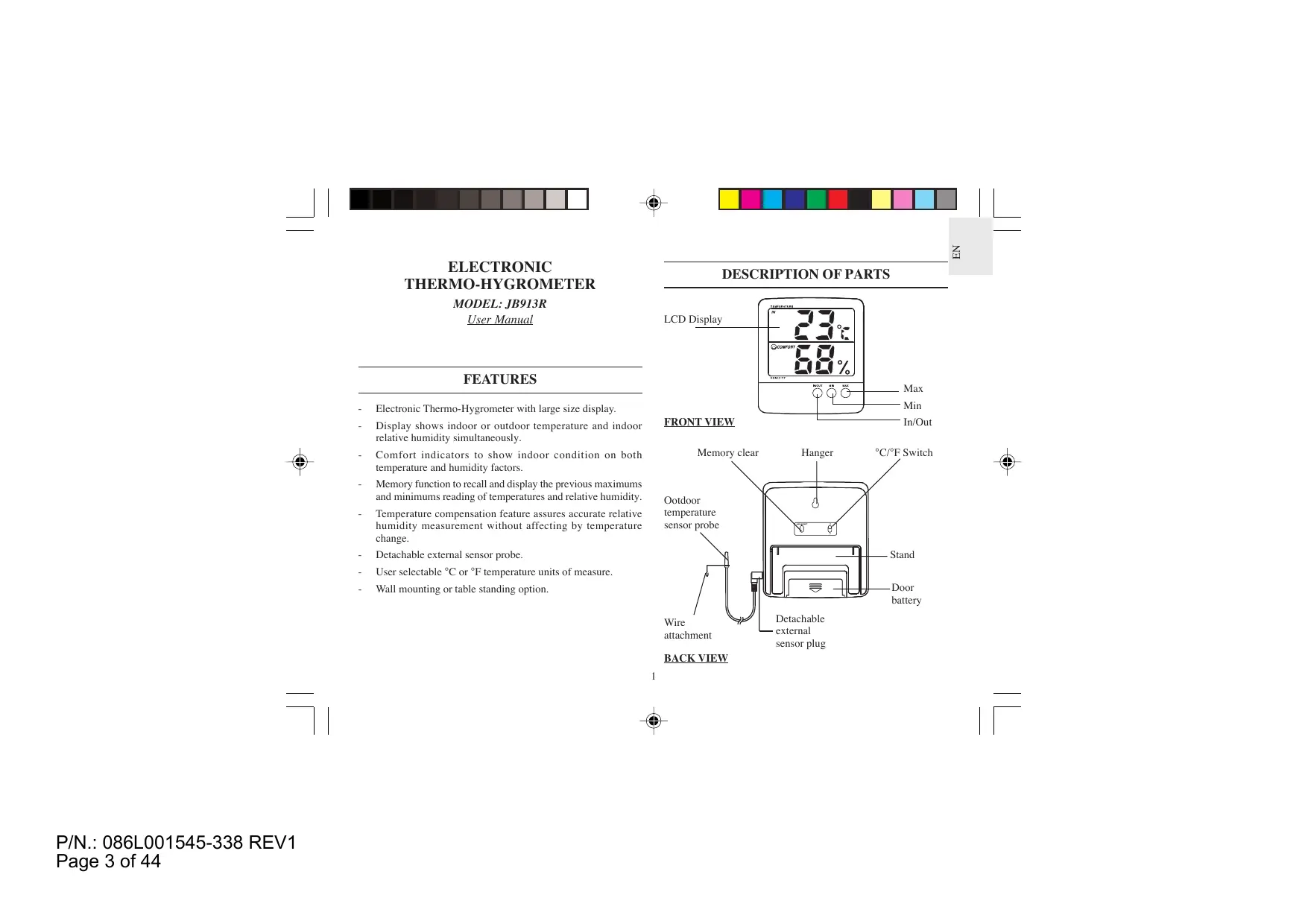


| Product Type | Electronic Thermometer / Hygrometer |
| Brand | IROX |
| Model | JB913R |
| Dimensions (L × W × H) | 117 × 107 × 20.5 mm |
| Weight (without battery) | 174 g |
| Power Supply | 1 UM-4 / AAA 1.5 V battery |
| Indoor Temperature Range | 0 °C to 50 °C (32 °F to 122 °F) |
| Outdoor Temperature Range (probe) | -50 °C to 70 °C (-58 °F to 158 °F) |
| Temperature Resolution | 1 °C (2 °F) |
| Relative Humidity Range | 25 % to 95 % RH at 25 °C (77 °F) |
| Humidity Resolution | 1 % RH |
| Probe Cable Length | 3 meters |
| Main Functions | Indoor/outdoor temperature display, relative humidity, min/max value recording, comfort indicator (Comfort/Humid/Dry), °C/°F selection |
| Low Battery Indicator | BATT icon displayed at the top right of the screen |
| Maintenance and Cleaning | Do not immerse, do not use abrasive or corrosive products. Clean with a soft, dry cloth. |
| Safety | Do not expose to shocks, dust, excessive heat, cold, or humidity. Use only new batteries of the recommended type. Do not mix new and used batteries. |
| Spare Parts and Repairability | No user-serviceable parts. Opening voids warranty. |
| General Information | Thermo-hygrometer with external wired probe. Digital display. Indoor comfort indicators. Min/max memory function. |
Frequently Asked Questions - JB913R IROX
User questions about JB913R IROX
0 question about this device. Answer the ones you know or ask your own.
Ask a new question about this device
Download the instructions for your Electronic thermometer/hygrometer in PDF format for free! Find your manual JB913R - IROX and take your electronic device back in hand. On this page are published all the documents necessary for the use of your device. JB913R by IROX.
USER MANUAL JB913R IROX
INSTALLING AND REPLACING OF BATTERY
The Thermo-Hygrometer uses one piece UM-4 or 'AAA' size battery (1.5V DC)
Follow these steps to install or replace the battery
- Slide the battery door in the direction of the arrow.
- Insert the battery as indicated by the polarity symbols (+ and -) marked inside the battery compartment.
- Replace the battery door.
Notes: After you install or replace the battery, it takes time for sampling once again both the temperature and humidity data. The display will show full segment for 1 to 2 seconds, then shows the updated temperature and humidity reading.
DISPLAY AND FUNCTIONS
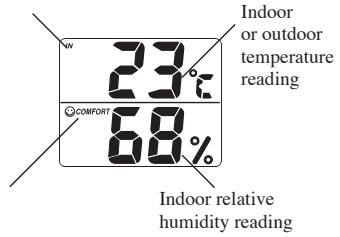
Indoor or outdoor temperature indicator
Comfort indicator

GENERAL OPERATION
This Thermo-Hygrometer will measure / display indoor temperature (the air temperature measured by the sensor built inside the unit) or outdoor temperature (the air temperature measured by the detachable external sensor probe) and indoor relative humidity (the relative humidity measured by the sensor built inside the unit).
It can be set to display the indoor/outdoor maximum or minimum temperature and indoor relative humidity recorded.
Note:
When the outdoor temperature is over the measuring range, flashing digit · 50^(^ C) / · 58^(^ F) appears on the display (below -50^/ -58^ ) or · 70^(^ C) / · 158^(^ F) appears on the display (above +70^ / + 158^ )
When the indoor temperature is over the operating range, it fades out on the display (below 0^ / + 32^ ) or blacks out on the display (above +50^ / + 122^ )
This Thermo-Hygrometer will continue to record the indoor / outdoor maximum, indoor / outdoor minimum temperature and humidity changes, whether displaying current, maximum or minimum temperature readings.




HOW TO SELECT THE INDOOR OR OUTDOOR TEMPERATURE DISPLAY
The unit can display the indoor temperature or outdoor temperature reading. To change displays between indoor and outdoor, press the [IN/OUT] button to update the temperature display.
Note:
The 'IN' indicator will be displayed whenever the temperature display relates to indoor temperature and the 'OUT' indicator will be displayed whenever the temperature display relates to outdoor temperature.
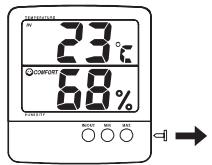
- Remove the protecting cap from the sensing port.
- Plug the external probe into the sensor jack and push the [IN/OUT] button to toggle to the outdoor display. The 'OUT' indicator appears from outdoor to indoor.
Push the [IN/OUT] button once to toggle the reading to the indoor display. The 'IN' indicator is displayed. (You may remove or keep the external sensor probe attached to the main unit.)
HOW TO RECALL / CLEAR STORED TEMPERATURE AND HUMIDITY MEMORIES
The Thermo-Hyrometer will automatically record the maximum / minimum temperature and relative humidity reading. You can recall / clear those readings as follows:
| Maximum | Button to press | Displays |
| Current temperature/ humidity | 23°C68% | |
| Recall the maximum temperature/ humidity | Press [MAX] button once | MAX 28°C MAX 78% (“MAX” indicator, maximum temperature and humidity displayed) |
| Clear the maximum temperature/ humidity | Press [MEMORY CLEAR] button once | MAX 23°C MAX 68% (display updates as the current temperature and humidity reading) |
| Return to current temperature/ humidity | Press [MAX] button once again, while maximum temperature and humidity is displayed | 23°C68% (“MAX” indicator disappears) |
3
E
| Maximum | Button to press | Displays |
| Current temperature/ humidity | 23°C68% | |
| Recall the minimum temperature/ humidity | Press [MIN] button once | MIN 18°C MIN 58% (“MIN” indicator, minimum temperature and humidity displayed) |
| Clear the minimum temperature/ humidity | Press [MEMORY CLEAR] button once | MIN 23°C MIN 68% (display updates as the current temperature and humidity) |
| Return to current temperature/ humidity | Press [MIN] button once again, while minimum temperature and humidity is displayed | 23°C68% (“MIN” indicator disappears) |
Occasionally clearing the memory will allow you to record maximum / minimum temperature / humidity at specified periods.


HOW TO READ THE RELATIVE HUMIDITY AND COMFORT INDICATORS
The unit shows the indoor relative humidity with such readings compensated by temperature. At the same time, the comfort indicators COMFORT, WET or DRY will tell you if the current indoor environment is comfortable, too wet or too dry. The comfort indicators will appear on the display when the following conditions are satisfied:
| Indicator Displays on the Unit | Temperature Range (Indoor) | Humidity Range | Shows that the Current Indoor Environment |
| COMFORT | 20°C to 25°C (68°F to 77°F) | 40% RH to 70% RH | Ideal range for both relative humidity and temperature |
| WET | Full Range | Over 70% RH | Contain excess moisture |
| DRY | Below 40% RH | Contain inadequate moisture | |
| No Indicator | Below 20°C (68°F) or Higher than 25°C (77°F) | 40% RH to 70% RH | No comment |
4



HOW TO SELECT THE TEMPERATURE UNITS OF MEASURE
The switch on the back of the Thermo-Hygrometer allows you to select between degrees Celsius and Fahrenheit. Set the switch to "C" for selecting Celsius and to "F" for selecting Fahrenheit.
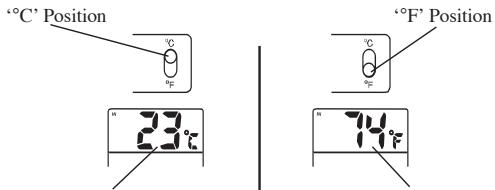
Reading in ^ C
Reading in ^
LOW BATTERY SIGNAL INDICATION
If battery power becomes low, the 'BATT' indicator will be displayed at the top right corner of the display. Replace the battery when the 'BATT' indicator is displayed.
HOW TO RESET THE UNIT
If your Thermo-Hygrometer does not operate properly, take out the battery from the unit for 4 to 5 seconds, then reinstall the battery.
MOUNTING THE OUTDOOR TEMPERATURE SENSOR PROBE
You can mount the outdoor temperature sensor probe by following steps:
- Drive a screw into the wall at the location you choose for the sensor probe to fix the wire attachment to the wall.
- Route the sensor probe cable through a window.
- Locate sensor probe into wire attachment.
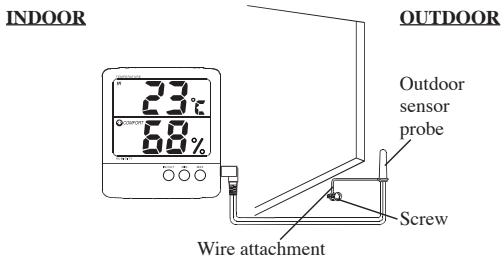
Note: Locate the sensor probe away from direct sunlight and heavy precipitation.

5

E
TABLE STAND AND WALL MOUNTING
Table Stand:
Flip out the plastic stand on the rear of the thermo-Hygrometer for table standing. Stand the Thermo-hygrometer on a flat surface.
Wall Mount:
Follow these steps to mount the Thermo-Hygrometer on a wall.
- Drive a screw into the wall at the location you choose until the head extends 3.5mm from the wall.
- Locate into the hanger slot on the back of the Thermo-Hygrometer until it locks into place.
Note: For accurate measurement, you should mount the Thermo-Hygrometer in an area where air can flow freely around it.
PRECAUTION
When handled properly, this unit is engineered to give you years of satisfactory service. Here are a few product care instructions:
- Do not immerse the unit in water. If the unit comes in contact with water, dry it immediately with a soft lint-free cloth.
- Do not clean the unit with alcohol containing detergent, abrasive or corrosive materials. Abrasive cleaning agents may scratch the plastic parts and corrode the electronic circuit.
- Do not subject the unit to excessive: force, shock, dust, temperature, or humidity. Such treatment may result in malfunction, a shorter electronic life span, damaged batteries, or distorted parts.

- Do not tamper with the unit's internal components. Doing so will terminate the unit's warranty and may cause damage. The unit contains no user-serviceable parts.
- Only use new batteries as specified in this instruction manual. Do not mix new and old batteries as the old batteries may leak.
- Read this instruction manual thoroughly before operating the unit.
SPECIFICATIONS
Operating temperature : 0^ to 50^ (32^ to +122^)
Temperature
measuring range (unit) : 0^ to 50^ (32^ to 122^)
(probe) -50^ to 70^ (-58^ to +158^)
Temperature resolution
(unit/probe) : 1^ (2^)
Humidity measuring range : 25 to 95% RH at 25^ (77^)
Resolution of humidity : 1% RH
Sensor wire length : 3 meter
Dimension : 117X107X20.5mm (HxWxD)
Weight : 174g (without battery)
6