
RSS-900 - Audio selector ROTEL - Free user manual and instructions
Find the device manual for free RSS-900 ROTEL in PDF.

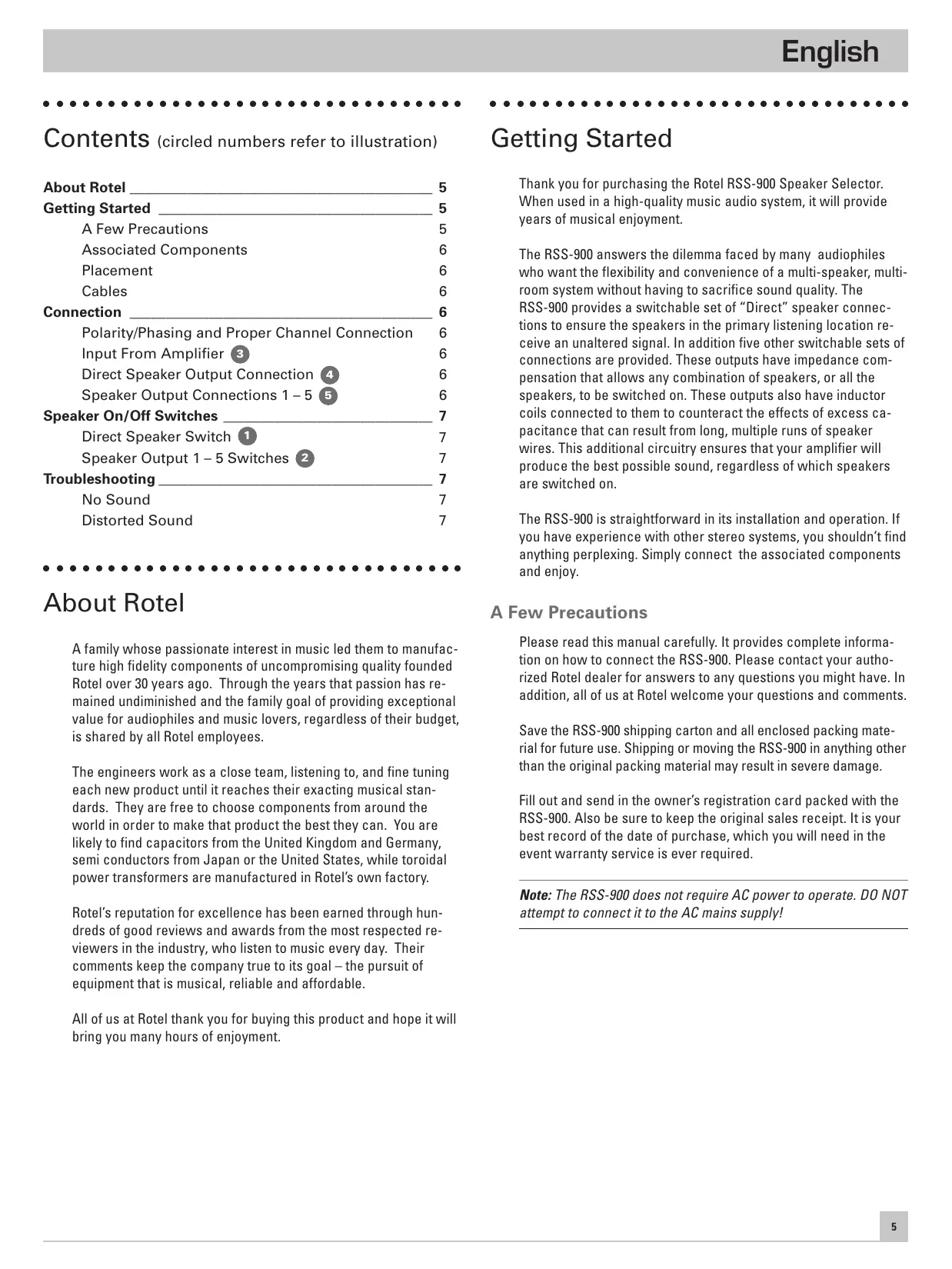


| Product Type | Passive audio selector for acoustic speakers |
| Brand | ROTEL |
| Model | RSS-900 |
| Number of speaker pairs supported | 6 (1 direct + 5 switched) |
| Minimum impedance supported by amplifier | 4 ohms per channel |
| Recommended maximum amplifier power | 200 watts per channel |
| Impedance compensation | Yes, on outputs 1 to 5 (induction coils) |
| Direct output | Without compensation circuit for optimal sound quality |
| Power supply | None (passive device, do not plug into mains) |
| Estimated dimensions (W x D x H) | 430 x 300 x 100 mm |
| Estimated weight | 5 kg |
| Housing material | Metal (steel or aluminum) |
| Color | Black or silver |
| Connection type | Binding posts for speaker cables |
| Recommended cable gauge (amplifier input) | 12 AWG minimum |
| Recommended cable gauge (speaker output) | Thin possible, but high quality recommended |
| Maintenance | Clean with a soft, dry cloth; do not use solvents |
| Safety | Do not open, do not expose to moisture, disconnect before handling |
| Warranty | Standard manufacturer warranty (warranty card included) |
| Country of manufacture | Designed and manufactured according to Rotel standards |
| Included accessories | User manual, warranty card |
| Recommended use | Multi-room or multi-speaker systems without quality loss |
Frequently Asked Questions - RSS-900 ROTEL
User questions about RSS-900 ROTEL
0 question about this device. Answer the ones you know or ask your own.
Ask a new question about this device
Download the instructions for your Audio selector in PDF format for free! Find your manual RSS-900 - ROTEL and take your electronic device back in hand. On this page are published all the documents necessary for the use of your device. RSS-900 by ROTEL.
USER MANUAL RSS-900 ROTEL
This symbol is to alert the user to the presence of uninsulated dangerous voltages inside the product's enclosure that may constitute a risk of electric shock.

This symbol is to alert the user to important operating and maintenance (service) instructions in this manual and literature accompanying the product.
WARNING:
There are no user serviceable parts inside. Refer all servicing to qualified service personnel.
WARNING:
To reduce the risk of fire or electrical shock, do not expose the unit to moisture or water. Do not allow foreign objects to get into the enclosure. If the unit is exposed to moisture, or a foreign object gets into the enclosure, immediately disconnect the power cord from the wall. Take the unit to a qualified service person for inspection and necessary repairs.
Read all the instructions before connecting or operating the unit. Keep this manual so you can refer to these safety instructions.
Heed all warnings and safety information in these instructions and on the product itself. Follow all operating instructions.
Clean the unit only with a dry cloth or a vacuum cleaner.
Keep the ventilation inlets on the unit unobstructed. For example, do not place the unit on a bed, sofa, rug, or similar surface that could block the ventilation slots. If the unit is placed in a bookcase or cabinet, there must be sufficient clearance around the unit and ventilation of the cabinet to allow proper cooling.
Keep the unit away from radiators, heat registers, stoves, or any other appliance that produces heat.
The unit must be connected to a power supply only of the type and voltage specified on the rear panel of the unit.
Immediately stop using the unit and have it inspected and/or serviced by a qualified service agency if:
- The power supply cord or plug has been damaged.
- Objects have fallen, or liquid has been spilled, into the unit.
The unit has been exposed to rain. - The unit shows signs of improper operation
- The unit has been dropped or damaged in any way
Place the unit on a fixed, level surface strong enough to support its weight. Do not place the unit on a moveable cart that could tip over.

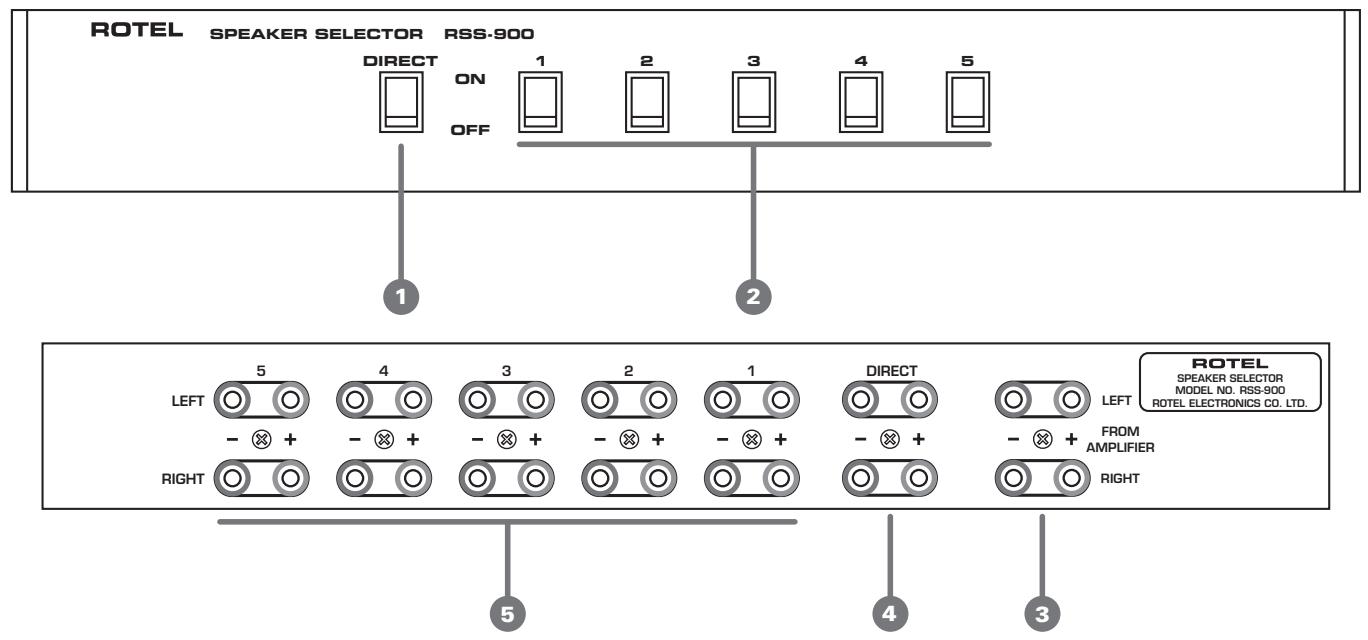
Figure 1: Controls and Connections Bedienelemente und Anschlüsse Commandes et branchements Controllie Collegamenti Controles y Conexiones De bedieningsorganen en aansluitingen
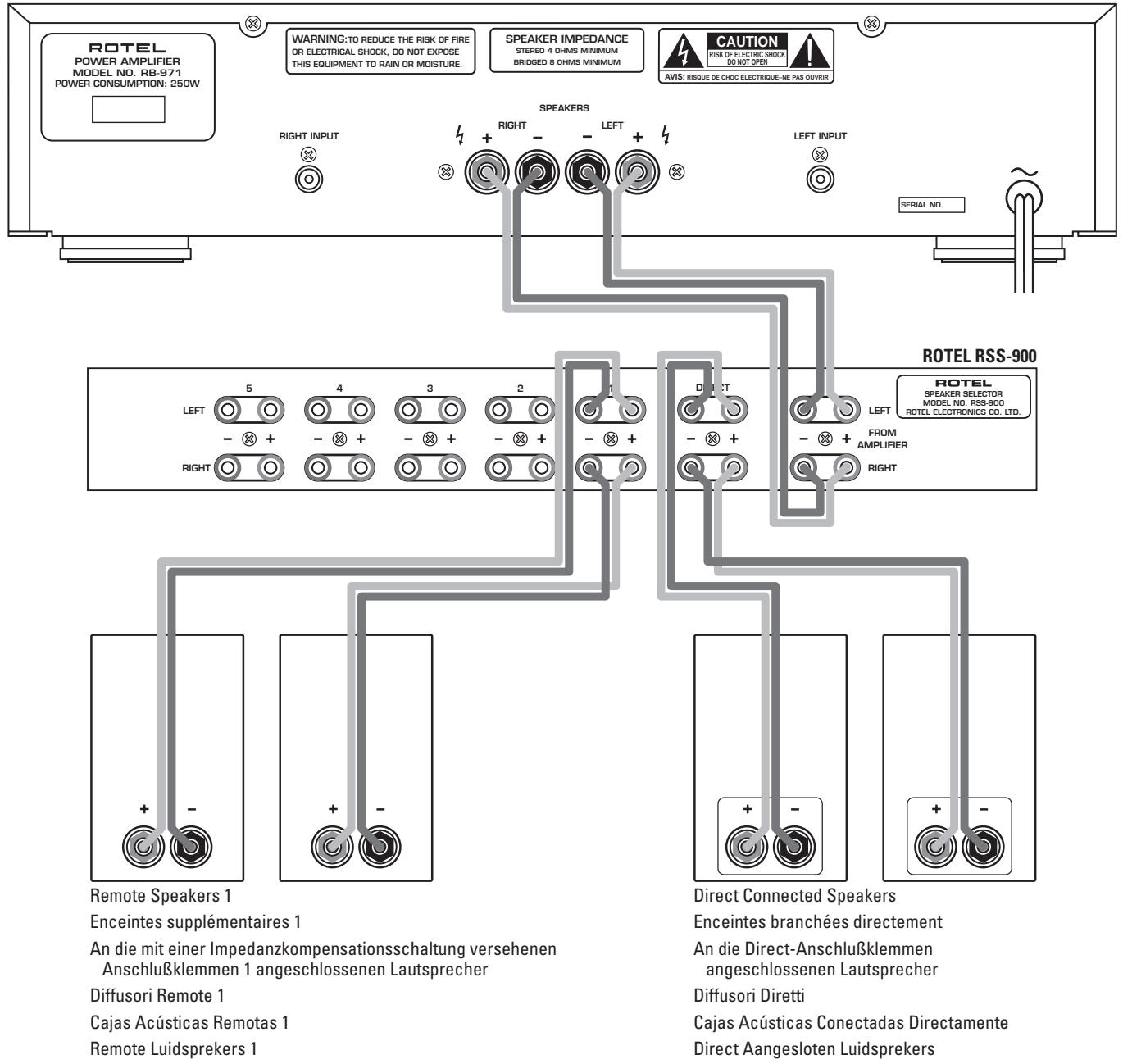
Figure 2: Typical Connections
Exemple-type de branchements
Typisches Anschlußdiagramm
Collegamenti Tipici
Ejempo Tipico de Conexion
De verbindingen
ROTEL BB-971
Contents (circled numbers refer to illustration)
About Rotel 5
Getting Started 5
A Few Precautions 5
Associated Components 6
Placement 6
Cables 6
Connection 6
Polarity/Phasing and Proper Channel Connection 6
Input From Amplifier 3 6
Direct Speaker Output Connection 4 6
Speaker Output Connections 1-5 6
Speaker On/Off Switches 7
Direct Speaker Switch 7
Speaker Output 1-5 Switches 2
Troubleshooting 7
No Sound 7
Distorted Sound 7
About Rotel
A family whose passionate interest in music led them to manufacture high fidelity components of uncompromising quality founded Rotel over 30 years ago. Through the years that passion has remained undiminished and the family goal of providing exceptional value for audiophiles and music lovers, regardless of their budget, is shared by all Rotel employees.
The engineers work as a close team, listening to, and fine tuning each new product until it reaches their exacting musical standards. They are free to choose components from around the world in order to make that product the best they can. You are likely to find capacitors from the United Kingdom and Germany, semi conductors from Japan or the United States, while toroidal power transformers are manufactured in Rotel's own factory.
Rotel's reputation for excellence has been earned through hundreds of good reviews and awards from the most respected reviewers in the industry, who listen to music every day. Their comments keep the company true to its goal – the pursuit of equipment that is musical, reliable and affordable.
All of us at Rotel thank you for buying this product and hope it will bring you many hours of enjoyment.
Getting Started
Thank you for purchasing the Rotel RSS-900 Speaker Selector. When used in a high-quality music audio system, it will provide years of musical enjoyment.
The RSS-900 answers the dilemma faced by many audiophiles who want the flexibility and convenience of a multi-speaker, multi-room system without having to sacrifice sound quality. The RSS-900 provides a switchable set of "Direct" speaker connections to ensure the speakers in the primary listening location receive an unaltered signal. In addition five other switchable sets of connections are provided. These outputs have impedance compensation that allows any combination of speakers, or all the speakers, to be switched on. These outputs also have inductor coils connected to them to counteract the effects of excess capacitance that can result from long, multiple runs of speaker wires. This additional circuitry ensures that your amplifier will produce the best possible sound, regardless of which speakers are switched on.
The RSS-900 is straightforward in its installation and operation. If you have experience with other stereo systems, you shouldn't find anything perplexing. Simply connect the associated components and enjoy.
A Few Precautions
Please read this manual carefully. It provides complete information on how to connect the RSS-900. Please contact your authorized Rotel dealer for answers to any questions you might have. In addition, all of us at Rotel welcome your questions and comments.
Save the RSS-900 shipping carton and all enclosed packing material for future use. Shipping or moving the RSS-900 in anything other than the original packing material may result in severe damage.
Fill out and send in the owner's registration card packed with the RSS-900. Also be sure to keep the original sales receipt. It is your best record of the date of purchase, which you will need in the event warranty service is ever required.
Note: The RSS-900 does not require AC power to operate. DO NOT attempt to connect it to the AC mains supply!
Associated Components
The RSS-900 is designed for use with amplifiers that can produce as much as 200 watts per channel. (See the information in the following section regarding ventilation.) The amplifier should be capable of handling 4 ohm impedance loads.
NOTE: If speakers that have a minimum impedance of less than 4 ohms are connected to the RSS-900 the impedance the amplifiers receives may be less than 4 ohms. Check the instruction manual for your speakers for this information. If you are unsure about whether or not a certain combination of speakers can safely be used with the RSS-900 and your amplifier consult your authorized Rotel dealer.
Placement
Place the RSS-900 on a firm flat surface where it will be free from excessive dust, heat or cold, moisture or high humidity, or exposure to direct sunlight. Do not allow any foreign objects to fall into the ventilation holes of the RSS-900.
Like many audio components that handle high-level signals, the RSS-900 produces some heat during normal operation. Do not place anything on top of the RSS-900 or allow the vent holes in the top of the cabinet to be blocked. There should be at least 3" (75mm) of room above the RSS-900 to allow for heat dissipation.
Cables
Because as many as 6 pairs of speakers may be connected to the outputs of the RSS-900, the wires from the amplifier output to RSS-900 input should be heavy gauge (12 AWG) speaker wire. Slightly lighter gauge wire may be used to connect the RSS-900 to the speakers. High quality, high performance wire will frequently improve the sound of a system. Consult your authorized Rotel dealer for advice about the best wires to use with your system.
Connection
Note: Turn off the power to all the components in the system before you make any signal connections.
Polarity/Phasing and Proper Channel Connection
The polarity — the positive/negative orientation — for every connection between the amplifier and the RSS-900, and between the RSS-900 and the speakers, must be consistent so all the speakers will be in phase. If the polarity of one connection is mistakenly reversed, bass output will be very weak and stereo imaging degraded. All wire is marked so you can identify the two conductors. There may be ribs or a stripe on the insulation of one conductor. The wire may have clear insulation with different color conductors (copper and silver). There may be polarity indications printed on the insulation. Identify the positive and negative conductors and be consistent with every connection.
Note: All speaker wire consists of many small strands of wire. When making connections to the terminals of the amplifier, the RSS-900, or the speakers, twist these strands into a tight bundle and secure all the wires in the terminal. There must not be any loose strands of wire from one terminal that could touch the other. This will cause a short circuit.
It is also very important to be sure that the left and right channels do not get reversed. Work carefully and be sure that the proper channels are connected at every amplifier, RSS-900 and speaker connection point.
Input From Amplifier 3
(See the connection diagram Figure 2)
Use heavy duty speaker wires to connect the output of the amplifier to the input of the RSS-900 as shown.
Direct Speaker Output Connection
Connect the speakers in your primary listening location to the output terminals labeled "Direct". These outputs do not have the impedance matching and capacitance control components that the other outputs (1-5) have. This provides you with the convenience of being able to turn the main speakers in your system on and off, while ensuring that the signal to them is not affected by extra circuitry.
Speaker Output Connections 1-5
Connect the secondary speakers in your system to the outputs labeled 1 through 5. These outputs have impedance matching and capacitance control components that allow the amplifier to safely drive any combination of speakers.
Speaker On/Off Switches
[See Figure 1 for switch identification.]
Direct Speaker Switch 1
This switch turn on and off the speakers connected to the Direct outputs. Push in the top of the rocker switch to turn the speaker on. Push in the bottom of the rocker switch to turn the speaker off.
Speaker Output 1 - 5 Switches
These switches turn on and off the speakers connected to the corresponding outputs. Push in the top of the rocker switch to turn on the speaker connected to that output. Push in the bottom of the rocker switch to turn off the speaker connected to the output.
Troubleshooting
Most difficulties in audio systems are the result of incorrect connections, or improper control settings. The RSS-900 is a passive device with no power supply or components that are likely to fail. If you encounter problems, it is probably the result of another component in the system. If the problem does involve the RSS-900 it is probably a matter of improper connections.
No Sound
If one or both channels is not producing sound, check to see if other speaker outputs are functioning properly. If the problem is isolated to one set of speakers it is probably the result of improper connections to the RSS-900 or the speakers.
If all the speaker sets in the system are experiencing the same problem check another signal source. If neither channel is producing sound check the tape monitor switches on the preamplifier (or integrated amplifier, or receiver) to be sure they are properly set. If the problem persists check the connections between the preamp and power amp (if appropriate) and the connections between the speaker outputs and the RSS-900 inputs. Be sure there are no loose strands of wire causing a short circuit between the connection terminals at either the amplifier outputs or the RSS-900 inputs.
Distorted Sound
There is almost nothing that involves the RSS-900 that could produce distorted sound. Such problems are almost certainly the result of problems elsewhere in the system. In rare instances a loose strand of speaker wire that is barely touching the other wire or terminal can cause an intermittent crackling noise. This is easy to check and eliminate as a possible source of the problem.
ATTENTION :
EEN LAATSTE WAARSCHUWING:
North Reading, MA 01864-2699
USA
Phone: +1 978-664-3820
Fax: +1 978-664-4109
Rotel Europe
Meadow Road
Worthing, West Sussex BN11 2RX
England
Phone: +44 1903-524-813
Fax: +44 1903-524-831
Rotel Deutschland
Kleine Heide 12
- WARNING:
- Contents (circled numbers refer to illustration)
- About Rotel
- Getting Started
- A Few Precautions
- Associated Components
- Placement
- Cables
- Connection
- Polarity/Phasing and Proper Channel Connection
- Input From Amplifier 3
- (See the connection diagram Figure 2)
- Direct Speaker Output Connection
- Speaker Output Connections 1-5
- Speaker On/Off Switches
- Direct Speaker Switch 1
- Speaker Output 1 - 5 Switches
- Troubleshooting
- No Sound
- Distorted Sound
- ATTENTION :
- EEN LAATSTE WAARSCHUWING:
Brand : ROTEL
Model : RSS-900
Category : Audio selector