CDX-1250 - CD Player GEMINI - Free user manual and instructions
Find the device manual for free CDX-1250 GEMINI in PDF.



| Product Type | Professional CD Player |
| Compatible Discs | Audio CD and CD-R (12 cm and 8 cm) |
| Anti-shock Memory | Yes |
| Audio Outputs | Stereo RCA and Balanced XLR |
| Auxiliary Input | 3.5 mm mini-jack (MP3) |
| Volume Control | MASTER rotary potentiometer |
| Jog Wheel | Search and Pitch Bend |
| Pitch Function | Adjustment ±12%, Pitch Bend ±16% |
| Display | Blue LCD screen, elapsed/remaining/total time |
| Loop Function | Loop and Reloop with stutter effect |
| Cue Function | Pre-listening and instant start |
| Playback Modes | Single, Continuous, Program, Repeat |
| Start-up Time | <0.03 second |
| Dimensions | 482.6 x 88.9 x 254 mm (19 x 3.5 x 10 inches) |
| Weight | 2.5 kg (5.5 lbs) |
| Power Supply | AC 115/230 V, 60/50 Hz (selectable) |
| Frequency Response | 20 Hz - 20 kHz |
| Harmonic Distortion | <0.05% |
| Signal-to-Noise Ratio | 85 dB |
| Output Level | 2.0 V RMS |
| Installation | 19" 2U Rack |
| Maintenance | Soft dry cloth, no solvents |
| Safety | Do not open, avoid water, use shielded cables |
| Replacement Parts | Use original or equivalent parts |
| Repairability | Entrust to a professional (after-sales service) |
Frequently Asked Questions - CDX-1250 GEMINI
User questions about CDX-1250 GEMINI
0 question about this device. Answer the ones you know or ask your own.
Ask a new question about this device
Download the instructions for your CD Player in PDF format for free! Find your manual CDX-1250 - GEMINI and take your electronic device back in hand. On this page are published all the documents necessary for the use of your device. CDX-1250 by GEMINI.
USER MANUAL CDX-1250 GEMINI
MANUEL D'INSTRUCTIONS
BEDIENUNGSHANDBUCH
FOR ENGLISH READERS
PARA LECTORES EN ESPANOL
UTILISATEURS FRANCAIS
FÜR DEutsche LESER
Page 2~Page 5
Págin6\~Págin9
Page 10~Page 13
Seite 14~Seite 17

PLEASE READ BEFORE USING APPLIANCE IMPORTANT WARNING AND SAFETY INSTRUCTIONS!







CAUTION: This product satisfies FCC regulations when shielded cables and connectors are used to connect the unit to other equipment. To prevent electromagnetic interference with electric appliances such as radios and televisions, use shielded cables and connectors for connections.
The exclamation point within an equilateral triangle is intended to alert the user to the presence of important operating and maintenance (servicing) instructions in the literature accompanying the appliance.
The lightening flash with arrowhead symbol, within an equilateral triangle, is intended to alert the user to the presence of uninsulated "dangerous voltage" within the product's enclosure that may be of sufficient magnitude to constitute a risk of electric shock to persons.
READ INSTRUCTIONS: All the safety and operating instructions should be read before the product is operated.
RETAIN INSTRUCTIONS: The safety and operating instructions should be retained for future reference.
HEED WARNINGS: All warnings on the product and in the operating instructions should be adhered to.
FOLLOW INSTRUCTIONS: All operating and use instructions should be followed.
CLEANING: The product should be cleaned only with a polishing cloth or a soft dry cloth. Never clean with furniture wax, benzine, insecticides or other volatile liquids since they may corrode the cabinet.
ATTACHMENTS: Do not use attachments not recommended by the product manufacturer as they may cause hazards.
WATER AND MOISTURE: Do not use this product near water, for example, near a bathtub, wash bowl, kitchen sink, or laundry tub; in a wet basement; or near a swimming pool; and the like.
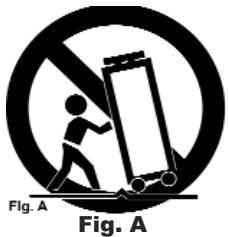
ACCESSORIES: Do not place this product on an unstable cart, stand, tripod, bracket, or table. The product may fall, causing serious injury to a child or adult, and serious damage to the product. Use only with a cart, stand, tripod, bracket, or table recommended by the manufacturer, or sold with the product. Any mounting of the product should follow the manufacturer's instructions, and should use a mounting accessory recommended by the manufacturer.
CART: A product and cart combination should be moved with care. Quick stops, excessive force, and uneven surfaces may cause the product and cart combination to overturn. See Figure A.
VENTILATION: Slots and openings in the cabinet are provided for ventilation and to ensure reliable operation of the product and to protect it from overheating, and these openings must not be blocked or covered. The openings should never be blocked by placing the product on a bed, sofa, rug, or other similar surface. This product should not be placed in a built-in installation such as a bookcase or rack unless proper ventilation is provided or the manufacturer's instructions have been adhered to.
POWERSOURCES: This product should be operated only from the type of power source indicated on the marking label. If you are not sure of the type of power supply to your home, consult your product dealer or local power company.
LOCATION: The appliance should be installed in a stable location.
NON-USE PERIODS: The power cord of the appliance should be unplugged from the outlet when left unused for a long period of time.
GROUNDING OR POLARIZATION:
-
If this product is equipped with a polarized alternating current line plug (a plug having one blade wider than the other), it will fit into the outlet only one way. This is a safety feature. If you are unable to insert the plug fully into the outlet, try reversing the plug. If the plug should still fail to fit, contact your electrician to replace your obsolete outlet. Do not defeat the safety purpose of the polarized plug.
-
If this product is equipped with a three-wire grounding type plug, a plug having a third (grounding) pin, it will only fit into a grounding type power outlet. This is a safety feature. If you are unable to insert the plug into the outlet, contact your electrician to replace your obsolete outlet. Do not defeat the safety purpose of the grounding type plug.
Power-CORD PROTECTION: Power-supply cords should be routed so that they are not likely to be walked on or pinched by items placed upon or against them, paying particular attention to cords at plugs, convenience receptacles, and the point where they exit from the product.
OUTDOOR ANTENNA GROUNDING: If an outside antenna or cable system is connected to the product, be sure the antenna or cable system is grounded so as to provide some protection against voltage surges and built-up static charges. Article 810 of the National Electrical Code, ANSI/NFPA 70, provides information with regard to proper grounding of the mast and supporting structure, grounding of the lead-in wire to an antenna discharge unit, size of grounding conductors, location of antenna-discharge unit, connection to grounding electrodes, and requirements for the grounding electrode. See Figure B.
Lightning: For added protection for this product during a lightening storm, or when it is left unattended and unused for long periods of time, unplug it from the wall outlet and disconnect the antenna or cable system. This will prevent damage to the product due to lightening and power-line surges.
POwER LInes: An outside antenna system should not be located in the vicinity of overhead power lines or other electric light or power circuits, or where it can fall into such power lines or circuits. When installing an outside antenna system, extreme care should be taken to keep from touching such power lines or circuits as contact with them might be fatal.
OVERLOADING: Do not overload wall outlets, extension cords, or integral convenience receptacles as this can result in a risk of fire or electric shock.
OBJECT AND LIQUID ENTRY: Never push objects of any kind into this product through openings as they may touch dangerous voltage points or short-out parts that could result in a fire or electric shock. Never spill liquid of any kind on the product.
SERVICING: Do not attempt to service this product yourself as opening or removing covers may expose you to dangerous voltage or other hazards. Refer all servicing to qualified service personnel.
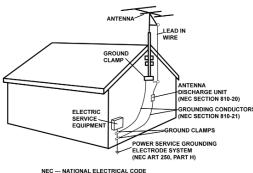
Fig.B
DAMAGE REQUIRING SERVICE: Unplug this product from the wall outlet and refer servicing to qualified service personnel under the following conditions:
- When the power-supply cord or plug is damaged.
- If liquid has been spilled, or objects have fallen into the product.
- If the product has been exposed to rain or water.
- If the product does not operate normally by following the operating instructions. Adjust only those controls that are covered by the operating instructions as an improper adjustment of other controls may result in damage and will often require extensive work by a qualified technician to restore the product to its normal operation.
- If the product has been dropped or damaged in any way.
- When the product exhibits a distinct change in performance, this indicates a need for service.
REPLACEMENT PARTS: When replacement parts are required, be sure the service technician has used replacement parts specified by the manufacturer or have the same characteristics as the original part. Unauthorized substitutions may result in fire, electric shock, or other hazards.
SAFETY CHECK: Upon completion of any service or repairs to this product, ask the service technician to perform safety checks to determine that the product is in proper operating condition.
WALL OR CEILING MOUNTING: The product should not be mounted to a wall or ceiling.
HEAT: The product should be situated away from heat sources such as radiators, heat registers, stoves, or other products (including amplifiers) that produce heat.
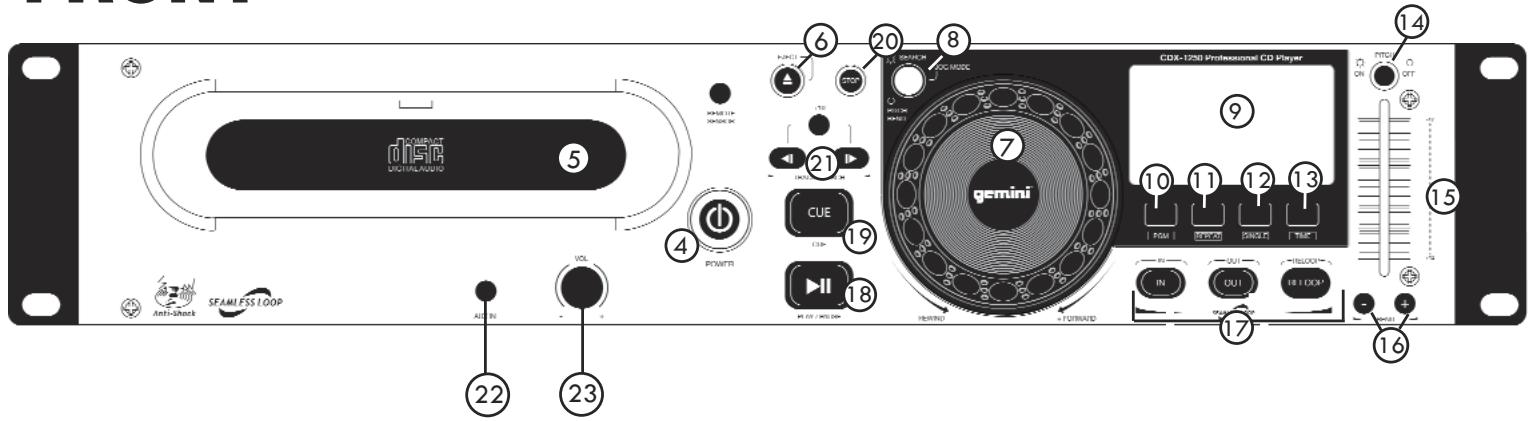
FRONT
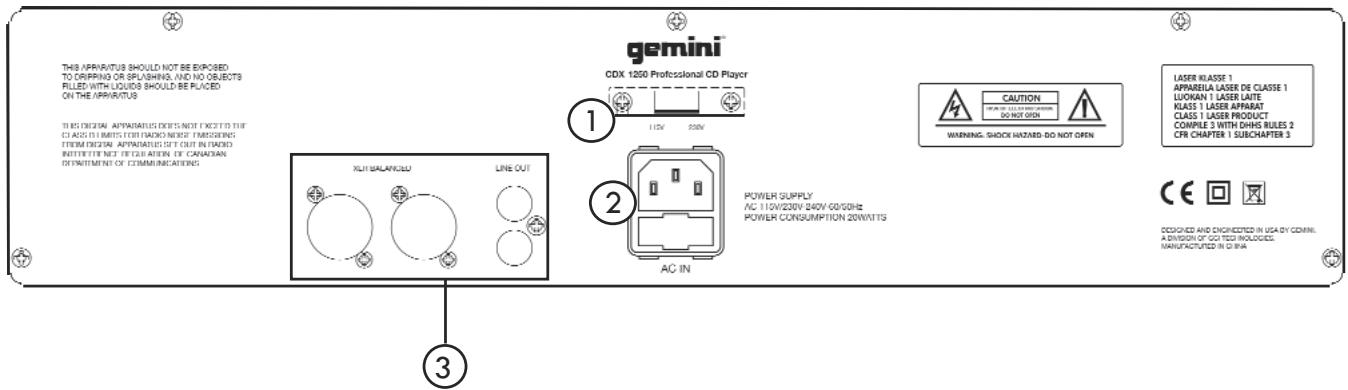
BACK
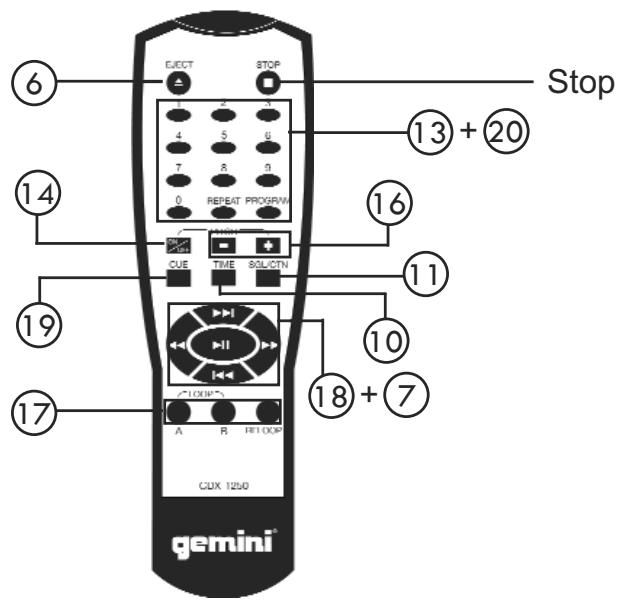
REMOTE
INTRODUCTION:
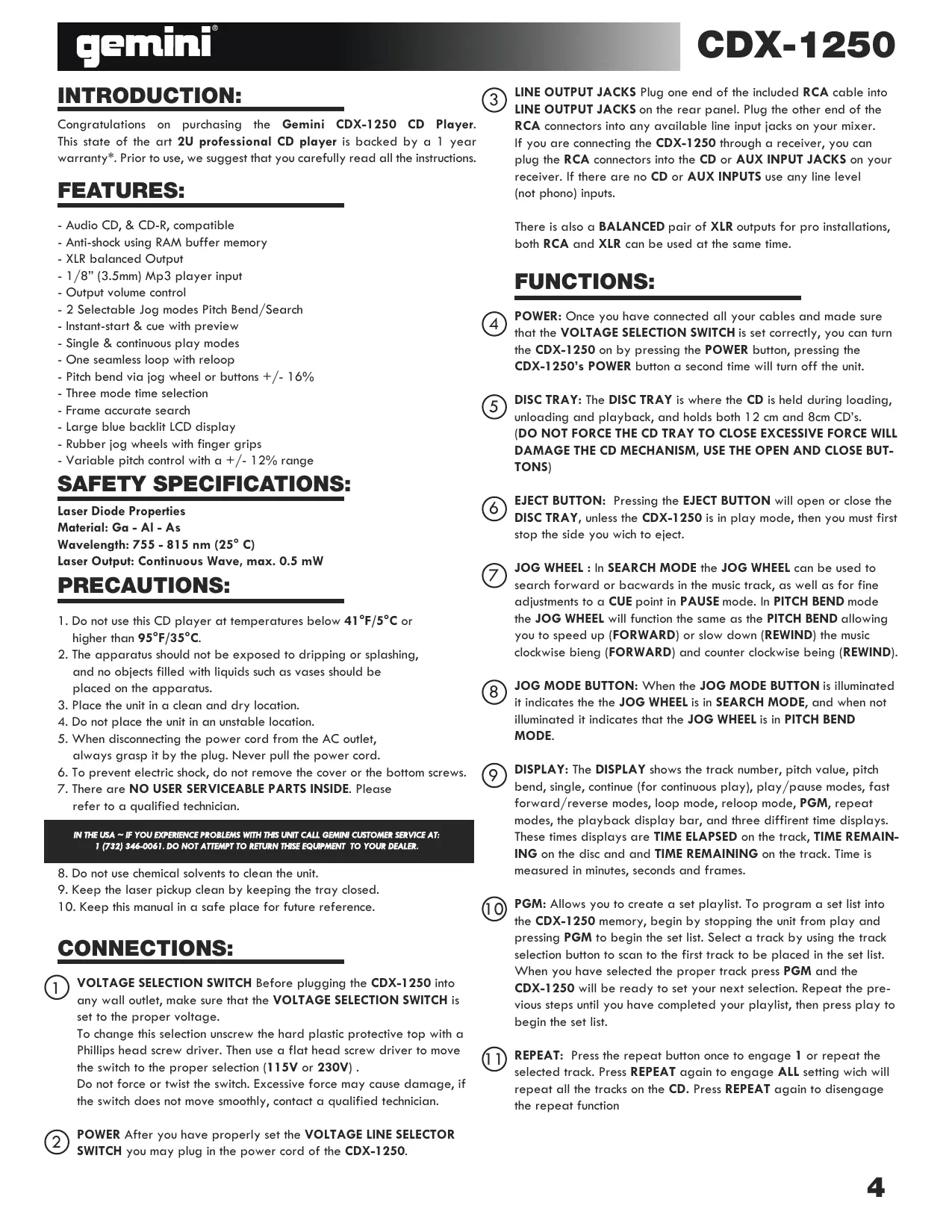
Congratulations on purchasing the Gemini CDX-1250 CD Player. This state of the art 2U professional CD player is backed by a 1 year warranty*. Prior to use, we suggest that you carefully read all the instructions.
FEATURES:
- Audio CD, & CD-R, compatible
- Anti-shock using RAM buffer memory
- XLR balanced Output
- 1/8" (3.5mm) Mp3 player input
- Output volume control
- 2 Selectable Jog modes Pitch Bend/Search
- Instant-start & cue with preview
- Single & continuous play modes
- One seamless loop with reloop
- Pitch bend via jog wheel or buttons +/- 16%
- Three mode time selection
- Frame accurate search
- Large blue backlit LCD display
- Rubber jog wheels with finger grips
- Variable pitch control with a + / - 12% range
SAFETY SPECIFICATIONS:
Laser Diode Properties
Material: Ga - Al - As
Wavelength: 755 - 815 nm (25° C)
Laser Output: Continuous Wave, max. 0.5 mW
PRECAUTIONS:
- Do not use this CD player at temperatures below 41^ / 5^ or higher than 95^ / 35^ .
- The apparatus should not be exposed to dripping or splashing, and no objects filled with liquids such as vases should be placed on the apparatus.
- Place the unit in a clean and dry location.
- Do not place the unit in an unstable location.
- When disconnecting the power cord from the AC outlet, always grasp it by the plug. Never pull the power cord.
- To prevent electric shock, do not remove the cover or the bottom screws.
- There are NO USER SERVICEABLE PARTS INSIDE. Please refer to a qualified technician.
IN THE USA ~ IF YOU EXPERIENCE PROBLEMS WITH THIS UNIT CALL GEMINI CUSTOMER SERVICE AT: 1 (732) 346-0061. DO NOT ATTEMPT TO RETURN THESE EQUIPMENT TO YOUR DEALER.
- Do not use chemical solvents to clean the unit.
- Keep the laser pickup clean by keeping the tray closed.
- Keep this manual in a safe place for future reference.
CONNECTIONS:
VOLTAGE SELECTION SWITCH Before plugging the CDX-1250 into any wall outlet, make sure that the VOLTAGE SELECTION SWITCH is set to the proper voltage.
To change this selection unscrew the hard plastic protective top with a Phillips head screw driver. Then use a flat head screw driver to move the switch to the proper selection (115V or 230V).
Do not force or twist the switch. Excessive force may cause damage, if the switch does not move smoothly, contact a qualified technician.
② POWER After you have properly set the VOLTAGE LINE SELECTOR SWITCH you may plug in the power cord of the CDX-1250.
LINE OUTPUT JACKS Plug one end of the included RCA cable into LINE OUTPUT JACKS on the rear panel. Plug the other end of the RCA connectors into any available line input jacks on your mixer. If you are connecting the CDX-1250 through a receiver, you can plug the RCA connectors into the CD or AUX INPUT JACKS on your receiver. If there are no CD or AUX INPUTS use any line level (not phono) inputs.
There is also a BALANCED pair of XLR outputs for pro installations, both RCA and XLR can be used at the same time.
FUNCTIONS:
4 POWER: Once you have connected all your cables and made sure that the VOLTAGE SELECTION SWITCH is set correctly, you can turn the CDX-1250 on by pressing the POWER button, pressing the CDX-1250's POWER button a second time will turn off the unit.
DISC TRAY: The DISC TRAY is where the CD is held during loading, unloading and playback, and holds both 12 cm and 8cm CD's. (DO NOT FORCE THE CD TRAY TO CLOSE EXCESSIVE FORCE WILL DAMAGE THE CD MECHANISM, USE THE OPEN AND CLOSE BUTTONS)
EJECT BUTTON: Pressing the EJECT BUTTON will open or close the DISC TRAY, unless the CDX-1250 is in play mode, then you must first stop the side you wish to eject.
JOG WHEEL: In SEARCH MODE the JOG WHEEL can be used to search forward or backwards in the music track, as well as for fine adjustments to a CUE point in PAUSE mode. In PITCH BEND mode the JOG WHEEL will function the same as the PITCH BEND allowing you to speed up (FORWARD) or slow down (REWIND) the music clockwise bieng (FORWARD) and counter clockwise being (REWIND).
JOG MODE BUTTON: When the JOG MODE BUTTON is illuminated it indicates the JOG WHEEL is in SEARCH MODE, and when not illuminated it indicates that the JOG WHEEL is in PITCH BEND MODE.
9 DISPLAY: The DISPLAY shows the track number, pitch value, pitch bend, single, continue (for continuous play), play/pause modes, fast forward/reverse modes, loop mode, reloop mode, PGM, repeat modes, the playback display bar, and three different time displays. These times displays are TIME ELAPSED on the track, TIME REMAINING on the disc and and TIME REMAINING on the track. Time is measured in minutes, seconds and frames.
10 PGM: Allows you to create a set playlist. To program a set list into the CDX-1250 memory, begin by stopping the unit from play and pressing PGM to begin the set list. Select a track by using the track selection button to scan to the first track to be placed in the set list. When you have selected the proper track press PGM and the CDX-1250 will be ready to set your next selection. Repeat the previous steps until you have completed your playlist, then press play to begin the set list.
11 REPEAT: Press the repeat button once to engage 1 or repeat the selected track. Press REPEAT again to engage ALL setting wich will repeat all the tracks on the CD. Press REPEAT again to disengage the repeat function
FUNCTIONS: (CONTINUED)

SINGLE: Pressing the SINGLE button engages SINGLE mode, in this mode the CDX-1250 will play one song and then stop. Pressing the SINGLE button again will then activate CONTINUOUS mode causing the unit to play continuously (after the last track, the unit will return to the first track of the disc and continue to play).

TIME: The TIME BUTTON switches the time display between three available sources, these three are TIME ELAPSED on the track, TIME REMAINING on the disc and and TIME REMAINING on the track. TIME ELAPSED indicates how much time has currently gone by since the play button was pressed, TIME REMAING ON DISC will count down the time remaining on the entire disc and TIME REMAINING ON TRACK counts down the time that is left before the end of the track.

PITCH: Pushing the PITCH button (the button will light up blue) activates the PITCH CONTROL SLIDE. The pitch or speed of the CD will change plus or minus 12% depending on the position of the PITCH CONTROL SLIDER. Push the PITCH button again to deactivate this mode.

PITCH CONTROL SLIDE: Moving the PITCH CONTROL SLIDE up or down will lower or raise the pitch percentage + or - 12%.

PITCH BEND: Pushing the PITCH BEND BUTTONS will automatically raise the pitch up to +16% or lower the pitch down to -16% from the existing pitch setting. Releasing the buttons will return the pitch to the original pitch setting. You can use this function to match the beat when mixing from one song to another

LOOP SECTION: A LOOP repeats the section between the entry point (IN) and the exit point (OUT). To set a loop while the unit is playing, start by pressing the IN BUTTON (it will light up) and when you reach the desired end loop point press the OUT BUTTON (it will also light up). The loop will continue playing until you press the OUT BUTTON again allowing the music to continue from that point on, to re-engage the loop you must press the RELOOP BUTTON. When you have released your loop the OUT BUTTON will turn OFF and the IN BUTTON will remain lit to indicate that your loop is stored in the CDX-1250 memory. Pressing the IN BUTTON again while the unit is playing will erase the previously saved loop while saving your new loop entry point. Press OUT to exit the loop and save a new complete loop. Press RELOOP to return to the beginning of the previously saved loop from normal play. Press RELOOP repeatedly to cause the loop to stutter.
NOTE: THE FIRST LOOP WILL HAVE A PAUSE AT THE EXIT POINT, WHILE ALL OTHERS WILL BE SEAMLESS.

PLAY/PAUSE: Each press of the PLAY/PAUSE BUTTON causes the operation to change from PLAY to PAUSE or from PAUSE back to PLAY. The PLAY/PAUSE BUTTON remains lit when in PLAY mode, while it blinks in PAUSE mode.

CUE: While the unit is playing and after the cue point has been programmed, pressing CUE will cause the CD player to enter the PAUSE mode (PLAY/PAUSE BUTTON blinks) at the programmed cue point (the CUE LED is lit). Holding down the CUE button changes the function to preview, and allows you to stutter start or play from the programmed CUE POINT Releasing the CUE button will return the CD to the preset CUE point.

STOP BUTTON: When pressed the STOP BUTTON stops the playback of the CD player.

TRACK SELECTION: The TRACK SELECTION buttons let you select the track to play. +10 allows you to scan through the track selection in increments of 10. TRACK SKIP allows you to scan through each track one at a time.
NOTE: ONCE YOU HAVE SKIPPED TO ANOTHER TRACK, YOU MAY NOT GO BACK TO YOUR PROGRAMMED CUE POINT. YOU MUST BEGIN YOUR CUE SELECTION OVER AGAIN, THE CUE WILL BE PRESET TO THE BEGINNING OF THE NEWLEY SELECTED TRACK.

AUX INPUT (MP3): This 1/8 (3.5mm) input accepts any line level source including MP3 players, Once a 1/8 (3.5mm) plug is inserted the audio from the CD Player is cancelled out and only the AUX INPUT SOURCE will be heard out of the main outputs.

MASTER OUTPUT ROTARY KNOB: The MASTER OUTPUT rotary knob adjusts the volume of the MAIN MASTER output.
TROUBLESHOOTING:
- If a disc will not play, check to see if the disc was loaded correctly (label side up). Also check the disc for excessive dirt, scratches, etc.
- If the disc turns but there is no sound, check the cable connections, if they are ok, check your amplifier or reciever.
-If the CD skips, check the CD for dirt or scratches. Do not assume that the CD player is defective. Many cd's are recorded out of spec and will skip on most or all CD players. Before sending the unit for repair, try playing a CD that you are sure plays properly.
SPECIFICATIONS:
GENERAL:
Type............Compact Disc Player
Disc Type............Standard Compact discs (12 cm & 8 cm)
Time Display..........Track Elapsed, Track Remain, or Total remain
Variable Pitch.. ± 12% Slider with Resume Switch
Pitch Bend.. ± 16% Maximum
Instant Start.......Within 0.03 seconds
Installation.....19" each
Dimensions.......Main unit: 19^ × 3.5^ × 10^ (482.6 x 88.9 x 254 mm)
Weight Per Unit.......Main unit: 5.5 lbs. (2.5 kg)
AUDIO SECTION:
Quantization. 1 Bit Linear/Channel, 3 Beam Laser Oversampling Rate. .8 Times Sampling Frequency. .44.1 kHz Frequency Response. .20 Hz to 20 kHz Total Harmonic Distortion. Less Than 0.05% Signal to Noise Ratio. .85 dB Dynamic Range. .85 dB Channel Separation. .85 dB (1 KHz) Output Level. .2.0 +/- 0.2V R.M.S. Power Supply. AC 115/230V, 60/50 Hz
SPECIFICATIONS AND DESIGN ARE SUBJECT TO CHANGE WITHOUT NOTICE FOR PURPOSE OF IMPROVEMENT.
FUNCTIONS: (CONTINUACION)

In the event that you need service on your Gemini product under warranty, simply write a letter describing the problem, along with your contact information. Make sure to enclose a copy of your receipt for proof of warranty information. A return number is not required. You will be responsible for shipping charges to Gemini UK, and Gemini UK will pay to return the unit to you if it is considered under warranty.
IN SPAIN
Save postage and register your product online at www.geminidj.com and automatically be registered for great prize giveaways!
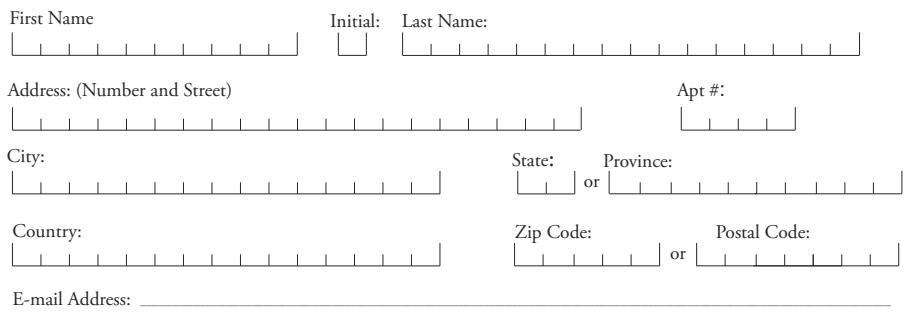
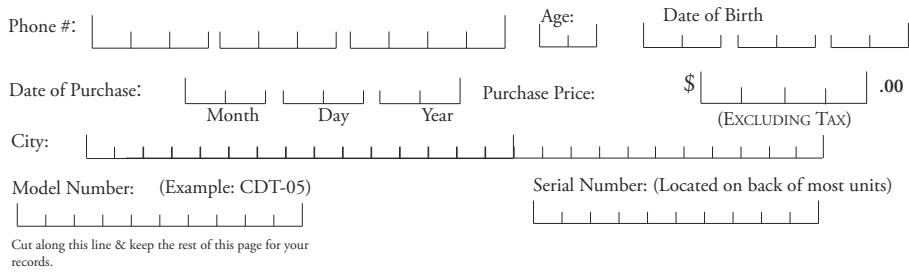
If you do not have internet access, fill out the form below and mail to the appropriate address listed at the right side of this page.
USA
GEMINI SOUND PRODUCTS
Worldwide Headquarters
1 Mayfield Ave
Edison, NJ 08837 USA
Tel: (732) 346-0061
Fax: (732) 346-0065
FRANCE
GCI TECHNOLOGIES S.A.R.L
1, Allee d'Effiat,
GEMINI SOUND PRODUCTS
Unit C4
Hazleton Industrial Estate, P08
9JU Waterlooville, UK
Tel: 087 087 00880
Fax: 087 087 00990
SPAIN
GEMINI SOUND PRODUCTS
S.A.
Rosello, 516
08026 Barcelona, Spain
Tel: 3493-436 37 00
Fax: 3493-347-6961
WARRANTY AND REPAIR:
All Gemini products are designed and manufactured to the highest standards in the industry. With proper care and maintenance, your product will provide years of reliable service.
LIMITED WARRANTY
A. Gemini warrants its products to be free from defects in materials and workmanship for One (1) year from the original purchase date.
Exceptions: Laser assemblies on CD Players, cartridges, and crossfaders are covered for 90 days.
B. This limited warranty does not cover damage or failure caused by abuse, misuse, abnormal use, faulty installation, improper maintenance or any repairs other than those provided by an authorized Gemini Service Center.
C. There are no obligations of liability on the part of Gemini for consequential damages arising out of or in connection with the use or performance of the product or other indirect damages with respect to loss of property, revenues, of profit, or costs of removal, installation, or reinstallation. All implied warranties for Gemini, including implied warranties for fitness, are limited in duration to One (1) year from the original date of purchase, unless otherwise
mandated by local statutes.
RETURN/REPAIR
A. In the U.S.A., please call our helpful Customer Service Representatives at (732)738-9003, and they will be happy to give you a Return Authorization Number (RA#) and the address of an authorized service center closest to you. B. After receiving an RA#, include a copy of the original sales receipt, with defective product and a description of the defect. Send by insured freight to: Gemini Sound Products Corp, and use the address provided by your customer service representative. Your RA# must be written on the outside of the package, or processing will be delayed indefinitely!
C. Service covered under warranty will be paid for by Gemini and returned to you. For non-warrantied products, Gemini will repair your unit after payment is received. Repair charges do not include return freight. Freight charges will be added to the repair charges.
D. On warranty service, you pay for shipping to Gemini, we pay for return shipping within the Continental United States. Alaska, Hawaii, Puerto Rico, Canada, Bahamas, and the Virgin Islands will be charged for freight.
E. Please allow 2-4 weeks for return of your product. Under normal circumstances your product will spend no more than 10 working days at Gemini. We are not responsible for shipping times.
IN THE USA: IF YOU EXPERIENCE PROBLEMS WITH THIS UNIT, CALL 1-732-346-0061 FOR GCI TECHNOLOGIES CUSTOMER SERVICE. DO NOT ATTEMPT RETURN THIS EQUIPMENT TO YOUR DEALER.
Parts of the design of this product may be protected by worldwide patents. Information in this manual is subject to change without notice and does not represent a commitment on the part of the vendor. GCI Technologies Corp. shall not be liable for any loss or damage whatsoever arising from the use of information or any error contained in this manual. No part of this manual may be reproduced, stored in a retrieval system or transmitted, in any form or by any means, electronic, electrical, mechanical, optical, chemical, including photocopying and recording, for any purpose without the express written permission of GCI Technologies Corp. It is recommended that all maintenance and service on this product is performed by GCI Technologies Corp. or its authorized agents. GCI Technologies Corp. will not accept liability for loss or damage caused by maintenance or repair performed by unauthorized personnel.