
HEARO 888 TITAN - Earphones AKG - Free user manual and instructions
Find the device manual for free HEARO 888 TITAN AKG in PDF.


| Product Type | Wireless headphones with transmitter |
| Brand | AKG |
| Model | HEARO 888 TITAN |
| Transmitter weight | Approx. 450 g |
| Headphone weight | Approx. 230 g (with batteries) |
| Transmitter power supply | 12 V DC, 300 mA via included mains adapter |
| Headphone power supply | 3 V DC (2 NiMh AAA rechargeable batteries) |
| Battery life of headphones | Approx. 5 hours (with NiMh batteries) |
| Transmission technology | Digital UHF (GFSK) |
| Frequency band | 434 / 864 / 914 MHz (LPD band) |
| Maximum range | Approx. 50 m |
| Bandwidth | 20 Hz - 24 kHz |
| Max. sound pressure level | >115 dB SPL |
| Distortion | <1% |
| Headphone type | Semi-open dynamic |
| Audio functions | IVA (Individual Virtual Acoustics), Dolby Surround Pro-Logic |
| Transmitter inputs | RCA jacks L/R, headphone output (3.5/6.3 mm jack) |
| Transmitter outputs | RCA jacks L/R (for loop or wired headphone) |
| Cleaning | Soft cloth dampened with water, avoid alcohol/gasoline |
| Safety instructions | Use supplied adapter, do not open, replace batteries with AAA, observe polarity |
| Warranty | 1 year (batteries and rechargeable batteries excluded) |
Frequently Asked Questions - HEARO 888 TITAN AKG
User questions about HEARO 888 TITAN AKG
0 question about this device. Answer the ones you know or ask your own.
Ask a new question about this device
Download the instructions for your Earphones in PDF format for free! Find your manual HEARO 888 TITAN - AKG and take your electronic device back in hand. On this page are published all the documents necessary for the use of your device. HEARO 888 TITAN by AKG.
USER MANUAL HEARO 888 TITAN AKG
User Instructions .p. 11
2.3 Dolby Surround Pro-Logic Decoder
3 Audio and Power Connections 14
3.1 Connecting the Transmitter to Your Audio Source 14
3.2 Connecting the Transmitter to AC Power 15
4 Operation. 15
4.1 Charging the Batteries inside the Headphones 15
4.2 Replacing Batteries 15
4.3 Setting Up the System 16
4.4 Mode Switch 16
4.5 PANorama Switch 16
4.6 CHARGE LED Status 17
4.7 Important Notes 17
5 Cleaning. 17
6 Troubleshooting 17
7 Specifications 19
8 Warranty Conditions 19
1 Precautions

Operate the headphones with two AAA size 1.2 V rechargeable (supplied) or 1.5 V dry batteries only.
Never try to charge dry batteries using the transmitter's charging feature. 1.2
Before charging the headphones batteries, always make sure that the batteries in the head- 1.3 phones are rechargeable types.
Dispose of spent dry or rechargeable batteries conforming to local waste disposal rules. 1.4 Never throw batteries into a fire.
Operate the transmitter with the supplied 12 VDC, 300mA AC adapter only. Check that the 1.5 AC voltage stated on the AC adapter is the same as that available in your country. Using the transmitter with a different AC adapter voids the warranty.
Always switch the headphones OFF after use. 1.6
Never try to open the headphone or transmitter case. Refer servicing to qualified service 1.7 personnel only.
Never place the equipment near heat sources such as radiators or electric heaters or 1.8 expose it to direct sunlight, excessive dust, humidity, rain, temperatures below freezing, or impacts.
Never use petroleum-based cleaners or paint thinners to clean the headphones or trans- 1.9 mitter.
If you do not use your headphones system for an extended period of time (e.g., when travel, disconnect the AC adapter from the AC outlet.
Also refer to section 4.7 Important Notes. 1.11
2.1 General Dear customer:
Thank you for purchasing an AKG product.
The HEARO 888 TITAN wireless headphone system is based on advanced UHF transmission technology and uses digital signal transmission for a wide dynamic range, minimum noise, and exceptional interference rejection. The IVA processor and the Dolby Surround Pro-Logic decoder provide optimum spatial reproduction for speech, music, TV and video sound, multimedia PC applications, and video games.
In order to make optimum use of the benefits of your HEARO 888 TITAN, please take a few minutes to read the instructions below carefully before operating the equipment.
Please keep the manual for future reference.
The HEARO 888 TITAN headphone system
- uses state-of-the-art UHF radio transmission technology;
- uses digital signal transmission for minimum noise, wider dynamic range, better high-frequency reproduction, lower distortion, and better interference rejection.
- connects to any audio, video, TV set, or PC with a headphones or line output;
- provides perfect sound reproduction, full mobility, and signal transmission through walls and ceilings over a distance of up to 165 feet (50 m);
- uses proprietary IVA technology for exceptionally realistic, three-dimensional listening;
- features an integrated Dolby Surround Pro-Logic decoder for perfect reproduction of hi-fi, TV, PC, or video sound in Dolby surround format;
- provides an analog line output for connecting an external headphones amplifier for hardwire headphones.
The HEARO 888 TITAN system is available for three different LPD frequency bands: 914 MHz for the US, 434 MHz and 864 MHz for various European countries (434 MHz version shown on the cover).
The HEARO 888 TITAN system lets you share your listening enjoyment with other persons. You can operate your transmitter with several digital headphones simultaneously. Make sure to use digital wireless headphones operating in the same UHF frequency band as the HEARO 888 TITAN.
2.2 IVA - Individual Virtual Acoustics
One drawback of headphone listening is the psychoacoustic phenomenon of "inside localization": the orchestra seems to play inside your head rather than in the room. AKG developed a binaural audio processing technique called IVA (Individual Virtual Acoustics) that models the way the head and pinnae change the arriving sound waves (ear matching function). Thus, the various sound sources will seem to be located outside your head even when you are using headphones.
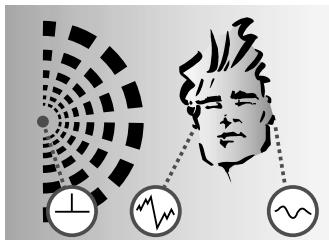
A: Natural hearing: Due to the effect of the head and pinnae, sound waves arriving at one ear differ from those arriving at the other. Amplitude and phase differences create a sense of spatial hearing.
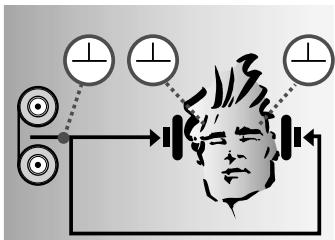
B: Listening through headphones: Amplitude and phase differences are eliminated. Sound sources are localized inside the head rather than in the room.
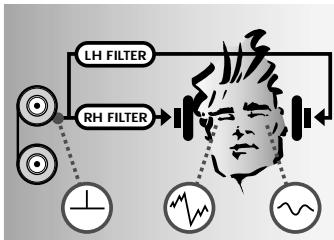
C: Listening through headphones with IVA processing: The ear matching function modifies the audio signals at the ears to resemble diagram A. This restores natural, spatial hearing.
The Dolby Surround Pro-Logic decoder integrated in the transmitter uses the stereo input signal to derive two additional signals, a center and a surround channel. The IVA circuitry generates from these signals a binaural signal equivalent to reproduction through five high quality loudspeakers (3 front, 2 rear speakers). This allows you to enjoy all the benefits of Dolby surround sound even through headphones.
2.3 Dolby Surround Pro-Logic Decoder
Your headphones system comprises the following components:
1 pair of headphones
1 transmitter with integrated battery charger
2 stereo connecting cables with gold plated connectors for linking the transmitter to your audio source: 1 RCA cable, 1 jack cable (mini jack to 2 x RCA connectors)
1 mini jack/1/4" jack adapter
1 AC adapter for powering the transmitter
2 1.2 V AAA size NiMh rechargeable batteries for powering the headphones (inside the headphones)
2.4 Unpacking
If anything is missing, contact your AKG dealer immediately.
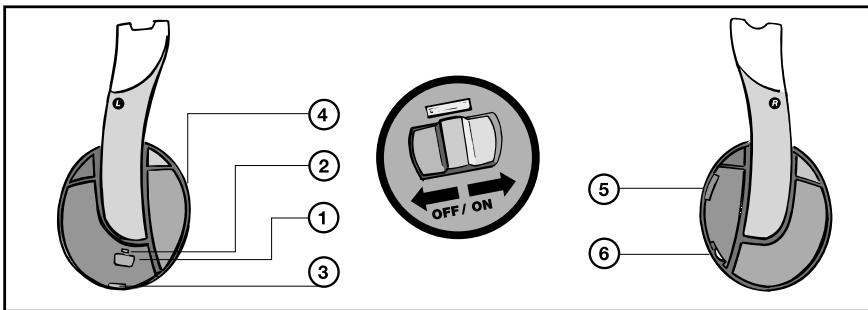
2.5 Controls
2.5.1 Headphones
- POWER switch
- Green POWER indicator LED
- Charging contacts
- Battery compartment (beneath the ear pad)
- TUNING: frequency fine tuning control
- VOLUME control
2.5.2 Transmitter
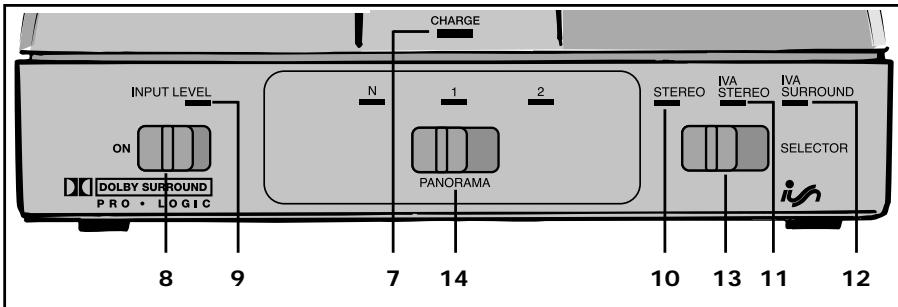
Front Panel
- CHARGE: This tri-color LED indicates charging and operating modes
- ON: Switches power to the transmitter ON and OFF (to the right).
-
INPUT LEVEL: This bi-color LED indicates the signal level at the transmitter input. When the level is in the optimum range, the LED will light green intermittently to constantly. When the input stage is overloaded, the LED will light red.
-
STEREO: This green LED lights to indicate the transmitter is in stereo mode.
- IVA STEREO: This green LED lights to indicate the IVA processor is switched in.
- IVA SURROUND: This green LED lights to indicate that both the Dolby Surround Pro-Logic decoder and the IVA processor are active.
- Mode switch: This three-position slide switch selects stereo, IVA, and Surround + IVA modes.
- PANorama: This three-step slide switch lets you adjust the apparent distance between the loudspeakers (stereo base) simulated by IVA processing. The PANorama switch has no effect in Stereo mode.
N: default setting ("Neutral")
1: Narrower stereo base than in position "N"
2. Wider stereo base than in position "N"
Rear Panel
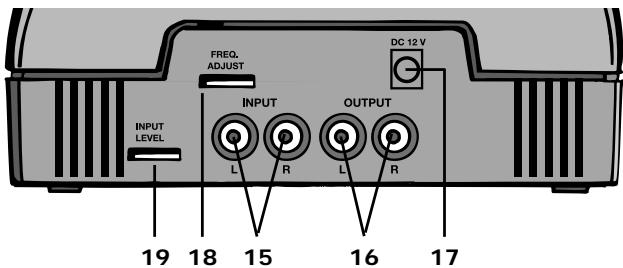
- INPUT L/R: Left and right RCA audio input jacks.
- OUTPUT L/R: Left and right RCA audio output jacks.
- DC 12 V: DC input jack for AC adapter
- FREQ. ADJUST: frequency tuning control
- INPUT LEVEL: This rotary control sets the input level to the IVA and Surround processors as well as the entire audio section. The RF section is modulated automatically by the digital signal transmission circuitry.
- Charging pins (see fig. 2)
3 Audio and Power Connections
3.1 Connecting the Transmitter to Your Audio Source
You may connect the transmitter either to a headphones output (mini jack or 1/4" jack), LINE, or REC outputs.
3.1.1 Connecting to a Headphones Output
- Before connecting the transmitter to your audio source, switch the audio source OFF.
- Referring to fig. 5, plug the red RCA connector (right channel) on the supplied jack cable into the red INPUT R socket (15) and the white RCA connector (left channel) into the white INPUT L socket (15) on the transmitter rear panel.
- Connect the stereo mini jack plug of the jack cable to the headphones output of your audio source (refer to fig. 6).
- If the headphones output on your equipment is a 1/4" jack, plug the supplied mini jack to 1/4" adapter jack onto the jack cable. Connect the adapter jack to the headphones output.
3.1.2 Connecting to a LINE or REC Output
- Before connecting the transmitter to your audio source, switch the audio source OFF.
- Use the supplied RCA cable to connect the white LINE OUT L or REC OUT L jack on your audio source to the white INPUT L jack (15) on the transmitter rear panel and the red LINE OUT R or REC OUT R jack to the red INPUT R jack (15).
3.1.3 Connecting to TAPE Inputs
By connecting your HEARO 888 TITAN to the "TAPE" or "PLAYBACK" inputs on your amplifier, you can enjoy IVA and surround sound through an extra part of wired headphones in addition to the wireless 'phones. Proceed as follows:
- Switch your audio source OFF.
- Use the supplied RCA cable to connect the white LINE OUT L or REC OUT L jack on
3 Audio and Power Connections
your audio source to the white INPUT L jack (15) on the transmitter rear panel and the red LINE OUT R or REC OUT R jack to the red INPUT R jack (15).
- Use another RCA cable (not supplied) to connect the white "TAPE IN" or "PLAYBACK IN" jack on the amplifier to the white OUTPUT jack (16) on the HEARO 888 TITAN rear panel and the red "TAPE IN" or "PLAYBACK IN" jack on the amplifier to the red OUTPUT jack (16) on the HEARO 888 TITAN rear panel.
- Connect your wired headphones to the headphones jack on your amplifier.
- Refer to the operating manual of your amplifier for instructions on how to listen to and disable the signal at the TAPE" or "PLAYBACK" input. On most amplifiers, you can push the "TAPE MONITOR" switch IN to listen to the processed signal and OUT to cut the processed signal.
In this mode, the loudspeakers will also reproduce the processed signal present at the Important: headphones output. Since IVA and/or surround processed signals are not loudspeaker compatible, mute the loudspeakers while listening through headphones. When listening over loudspeakers, cut the processed signal.
Important:
- Connect the cable on the supplied AC adapter to the DC 12 V jack (17) on the transmitter rear panel as shown in fig. 3.
- Check that the AC voltage stated on the AC adapter is the same as that available in your country. If it is, connect the AC adapter to a convenient AC outlet (see fig. 4).
3.2 Connecting the Transmitter to AC Power
4 Operation

In order to ensure the longest possible service life for the rechargeable batteries, we deliver 4.1 Charging the Batteries them uncharged. Therefore, charge the supplied batteries before first operating in the Headphones your headphones system.
The supplied batteries have been inserted into the headphones for your convenience.
If you operate the headphones on dry batteries, never try to charge the WARNING: batteries using the transmitter's charging feature. This would cause serious damage to your headphone system. Dispose of spent batteries conforming to local waste disposal rules.
- Use the POWER switch (1) to switch the headphones off. When the power is off, the POWER LED (2) will be dark.
- Slide the OFF/ON switch (8) on the transmitter to ON to switch the transmitter on. All front panel LEDs will flash momentarily.
- Referring to fig. 11, place the headphones on the transmitter such that the charging pins (20) on the transmitter (see fig. 2) will engage the charging contacts (3) on the bottom of the left-hand earphone.
The CHARGE LED (7) on the transmitter will light red to indicate that the batteries in the headphones are being charged. If signal is present at the transmitter audio input, the CHARGE LED (7) will light orange.
The batteries will be fully charged after approximately 14 hours. (The CHARGE LED (7) will continue lighting red.). You may leave the headphones on the transmitter for as long as you like without risking overcharge the batteries.
In order to maintain full battery capacity for as long as possible, discharge the batteries Important: completely about once a month:
Switch the headphones on and leave them outside the transmitter until the POWER LED (2) extinguishes.
Recharge the batteries.
Important:
The capacity of any rechargeable battery will decrease over time. If you feel that you need to recharge the supplied batteries more often than would be convenient, you may consider replacing the batteries with new AAA size 1.2 V rechargeable or 1.5 V alkaline dry batteries.
- Remove the ear pad from the left-hand earphone as shown in fig. 9.
- Remove the old batteries.
- Referring to fig. 10, insert the new batteries into the battery compartment (4). Make sure to align the batteries with the polarity marks inside the battery compartment.
4.2 Replacing Batteries
- Replace the ear pad on the earphone aligning the four pins on the ear pad with the matching openings in the earphone base plate.
4.3 Setting Up the System
- Remove the headphones from the transmitter.
- Switch ON the audio source to which the transmitter is connected.
- Slide the OFF/ON switch (8) on the transmitter to ON to switch the transmitter on. All front panel LEDs will flash momentarily.
Note that the transmitter will not switch on until it detects an audio signal at the INPUT L/R jacks (15). If audio signal is present at the transmitter input, the CHARGE LED (7) on the transmitter will light green.
Note: If no signal arrives at the transmitter input for approx. 3 minutes, the transmitter will automatically switch off and the CHARGE LED (11 will extinguish.
- Use the INPUT LEVEL control (19) on the transmitter rear panel to set the input level so that the front panel INPUT LEVEL LED (9) will light green intermittently or constantly and flash red only on the loudest signal peaks.
- Use the POWER switch (1) to switch the headphones ON. The green POWER LED (2) will light.
- Set the TUNING control (5) on the headphones such that you will hear the signal in the headphones clearly and free of interference.
If the signal remains weak or noisy, use the FREQ. ADJUST control (18) on the transmitter to select a different carrier frequency and set the TUNING control (5) again as described above.
Be sure not to rotate FREQ. ADJUST (18) all the way CW or CCW because optimum reception may not always be guaranteed at the ends of the frequency band.
7. Set the VOLUME control (6) on the headphones to the desired volume level.
Note: Beep sounds audible in the headphones mean that the received signal is too weak, the headphones receive no signal, or that the headphones are tuned to a different frequency than the transmitter. Move closer to the transmitter or repeat step 6 above..
4.4 Mode Switch (Fig. 1) The mode switch (13) lets you select the desired reproduction modes of your HEARO 888 TITAN.
The mode switch (13) has three positions:
Left: STEREO for standard stereo reproduction. The input signal is transmitted unchanged.
In stereo mode the green STEREO LED (10) will light.
We recommend STEREO mode for stereo music and speech reproduction.
Center: IVA STEREO. The IVA processor converts the stereo input signal to a binaural signal. The ear matching function provides a natural sonic perspective with no inside localization.
In IVA stereo mode the green IVA STEREO LED (11) will light.
We recommend IVA STEREO mode for 3-D music and speech listening.
Right: IVA SURROUND. The Dolby Surround Pro-Logic Decoder, in conjunction with the IVA processor, simulates five loudspeaker channels (front left, center, right and rear left and right) for surround sound in the headphones.
In IVA SURROUND mode the green IVA SURROUND LED (12) will light.
We recommend IVA SURROUND mode for radio drama, TV, PC applications, video, surround sound and pop music recordings.
4.5 PANorama Switch The PANorama switch (14) allows you to change the apparent stereo base of the loud-(Fig. 1) speakers simulated by IVA processing.
- Position "N" is the factory programmed default setting of the simulated stereo base.
- To decrease the stereo base, set the PANorama switch (14) to "1".
- To widen the stereo base, set the PANorama switch (14) to "2".
4.6 CHARGE LED Status
| If LED is... | Transmitter... |
| ...lighting green: | ...is connected to AC power and audio source, switched ON, and receives signal. Headphones are not on the transmitter, charging function is off. |
| ...lighting orange: | ...is connected to AC and audio source, switched ON, and receives signal. Headphones are on the transmitter, charging function is on. |
| ...lighting red: | ...has detected no signal for several minutes, headphones are on the transmitter, charging function is on. |
| ...dark: | ...has detected no signal for several minutes, headphones are not on the transmitter, charging function is off, OR ...is not connected to AC power or switched OFF. |
- Operating switches on or connecting the transmitter to your audio source may cause clicks which at high volume settings may affect your hearing. Therefore, be sure to set the VOLUME control on the headphones to minimum before switching between different sources (tuner, turntable, CD player, etc.) or connecting the transmitter.
- Listening over headphones at high volume levels, particularly over extended periods of time, may damage your hearing.
- Your HEARO 888 TITAN is a radio frequency device that conforms to the strict European and FCC standards. For physical reasons that are not related to the quality of the product, extremely strong interference sources may affect reception. In order to maintain interference-free listening pleasure, do not operate your HEARO 888 TITAN in the close vicinity of radio equipment, cellular telephones, or directly above TV or computer monitor picture tubes. The supplied connecting cables are long enough to allow the transmitter to be placed at a safe distance from interference sources. Interference caused by other users of the 914, 434, or 864 MHz LPD band are beyond AKG's control.
5 Cleaning

We recommend to clean the transmitter and headphones surfaces using a soft cloth moistened with water.
6 Troubleshooting

| Symptom | Possible Cause | Remedy |
| No sound. | 1. AC adapter is not connected to transmitter and/or AC outlet. | 1. Connect AC adapter to transmitter and/or AC outlet. |
| 2. Transmitter is OFF or not connected to audio source. | 2. Switch transmitter on or connect to audio source. | |
| 3. Connected audio source is switched off. | 3. Switch audio source on to feed signal to transmitter input. | |
| 4. Volume control on audio source is set too low. | 4. Increase audio source volume to the point that transmitter switches back on. | |
| 5. Batteries are low. | 5. Charge batteries. | |
| 6. Headphones are switched off. | 6. Switch headphones on. | |
| 7. Volume control on headphones/transmitter is at zero. | 7. Set volume control to desired level. | |
| CHARGE LED does not light. | 1. Transmitter is not connected to AC power. | 1. Connect transmitter to AC power. |
| 2. Batteries are not correctly aligned with polarity marks. | 2. Check orientation of batteries in battery compartment. | |
| 3. Headphones are incorrectly positioned on transmitter. | 3. Place headphones on transmitter correctly. | |
| 4. Headphones are ON. | 4. Switch headphones OFF. |
6 Troubleshooting
| Symptom | Possible Cause | Remedy. |
| Mono sound | 1. Connected audio source operates in mono mode. 2. Transmitter is not correctly connected to audio source. | 1. Switch audio source to stereo mode. 2. Check cable connection between transmitter and audio source. |
| Noise | 1. Transmitter and receiving frequencies are not identical. 2. Audio level at transmitter input is too low. 3. Input signal is noisy. 4. Batteries are low. | 1. Readjust TUNING control on head-phones or use FREQ ADJUST control on transmitter to select different carrier frequency and readjust TUNING control on head-phones. 2. Turn up audio source volume control and/or INPUT LEVEL control on transmitter. 3. Check audio source. 4. Charge batteries. |
| Distorted sound | 1. Audio level at transmitter input is too high. 2. Transmitter and headphones carrier frequencies do not match exactly. 3. Batteries are low. | 1. Turn down audio source volume control and/or INPUT LEVEL control on transmitter. 2. Use FREQ. ADJUST control on transmitter to change carrier frequency and readjust TUNING control on headphones. 3. Charge batteries. |
| Intermodulation noise | 1. Electrical appliances with poor interference protection. 2. Audio source or sound carrier defective. | 1. Switch off any "suspicious" appliances (if possible). 2. Check audio source or sound carrier. |
| Headphones receive unwanted transmitters | 1. A neighbor uses similar UHF headphones. | 1. Use FREQ. ADJUST control on transmitter to change carrier frequency and readjust TUNING control on headphones. |
| Overemphasized bass or treble range | 1. Bass or treble control settings on audio source. | 1. Readjust bass or treble controls. |
| Beep sounds heard in headphones | 1. Transmitter and headphones carrier frequencies do not match exactly. 2. No or weak reception. | 1. Use FREQ. ADJUST control on transmitter to change carrier frequency and readjust TUNING control on headphones. 2. Change listening position, move closer to transmitter. |
| Short reception dropouts (crackling) | 1. Headphones poorly tuned. 2. Interference from other equipment. 3. Signal too weak due to reception disturbances. | 1. Readjust TUNING control on headphones. 2. Use FREQ. ADJUST control on transmitter to change carrier frequency and readjust TUNING control on headphones. 3. Change listening position, move closer to transmitter. |
System Performance
| Modulation: | GFSK |
| Carrier frequency band: | 914, 864, or 434 MHz (LPD band) |
| Transmitter | |
| Power supply: | 12 VDC, 300 mA |
| Radiation angle: | 360° |
| Weight: | approx. 15.9 oz. (450 g) |
| Max. range: | approx. 165 ft. (50 m) |
| Headphones | |
| Power supply: | 3 VDC (2 x 1.2 V AAA size NiMh rechargeable batteries supplied) |
| Battery life: | approx. 5 hours (NiMh rechargeable batteries) |
| Frequency range: | 20 Hz to 24,000 Hz |
| Max. SPL: | >115 dB SPL |
| Weight: | approx. 8.1 oz. (230 g) |
| Distortion: | <1% |
| Type: | semi-open dynamic headphones |
8 Warranty Conditions

AKG warrants AKG products against evident defects in material and workmanship for a period of one year from the date of original purchase for use. This Warranty does not cover damage resulting from misuse or abuse, or lack of reasonable care, or inadequate repairs performed by unauthorized service centers. Performance of repairs or replacements under this Warranty is subject to submission of the sales slip. Shipment of defective items for repair under this Warranty will be at the customer's own risk and expense. This Warranty is valid for the original purchaser only.
This Warranty does not cover dry or rechargeable batteries.
Limited Warranty (valid in the United States only)
AKG warrants AKG products against evident defects in material and workmanship for a period of one year and agrees to repair or, at our option, replace any defective unit without charge for either parts or labor.
This Warranty does not cover dry or rechargeable batteries.
Important: This Warranty does not cover damage resulting from accident, misuse or abuse, lack of reasonable care, the affixing of any attachment not provided with the product, loss of parts, or connecting the product to any but the specified receptacles. This Warranty is void unless service or repairs are performed by an authorized service center. No responsibility is assumed for any special, incidental, or consequential damage. However, the limitation of any right or remedy shall not be effective where such is prohibited or restricted by law. Simply take or ship your AKG products prepaid to our service department. Be sure to include your sales slip as proof of purchase date. (We will not repair transit damage under the no-charge terms of this Warranty.)
Note: No other warranty, written or oral, is authorized by AKG Acoustics.
This Warranty gives you specific legal rights, and you may also have other rights which vary from state to state. Some states do not allow the exclusion or limitation of incidental or con-sequential damage or limitations on how long an implied warranty lasts, so the above exclusion and limitations may not apply to you.
2.2 Individual Virtual Acoustics (IVA)
2.3 Dolby Surround Pro-Logic Decoder
DECLARATION OF CONFORMITY
Document No.330 / 11 - 2002
replaces No. 211 / 12 - 2000
Type of Product: Wireless Dolby Surround Headphone Set
Brand, Model No.: HEARO 888 TITAN DIGITAL TRANSMITTER 434 MHz and HEARO 888 TITAN DIGITAL RECEIVER 434 MHz (including power supply)
Drawing-No.: 6000H08..
Manufacturer: AKG Acoustics GmbH A-1230 Wien, Lemböckgasse 21 - 25 AUSTRIA
We declare that the above mentioned product is in conformity with the following European Directive:
No. 99/5 EC;
Radio Equipment and
Telecommunications Terminal Equipment
The conformity is achieved by fulfilling the following European Standard(s):
EN 301489-9 V1.1.1; EN 300220-3 V 1.1.1; EN 60950:1992 + A1:1993 + A2:1993 + A3:1995 + A4:1997 + A11:1997
Product testing was carried out by:
TÜV Wien, Notified Body 0408
Deutschstrasse 10
1230 Wien, Austria
Manufacturer's Signature:
uuluaa
Managing Director
Dr. Hugo Lenhard-Backhaus
This declaration certifies the accordance with the above mentioned EC-Directive but does not assure certain attributes of the product.
- Dolby Surround Pro-Logic Decoder
- Precautions
- General Dear customer:
- The HEARO 888 TITAN headphone system
- IVA - Individual Virtual Acoustics
- Rear Panel
- Audio and Power Connections
- Connecting the Transmitter to Your Audio Source
- Connecting to a Headphones Output
- Connecting to a LINE or REC Output
- Connecting to TAPE Inputs
- Operation
- Setting Up the System
- Cleaning
- Troubleshooting
- Warranty Conditions
- Limited Warranty (valid in the United States only)
- Individual Virtual Acoustics (IVA)
- DECLARATION OF CONFORMITY
Brand : AKG
Model : HEARO 888 TITAN
Category : Earphones