
XP OFFICE 650 VA - UPS INFOSEC - Free user manual and instructions
Find the device manual for free XP OFFICE 650 VA INFOSEC in PDF.


User questions about XP OFFICE 650 VA INFOSEC
0 question about this device. Answer the ones you know or ask your own.
Ask a new question about this device
Download the instructions for your UPS in PDF format for free! Find your manual XP OFFICE 650 VA - INFOSEC and take your electronic device back in hand. On this page are published all the documents necessary for the use of your device. XP OFFICE 650 VA by INFOSEC.
USER MANUAL XP OFFICE 650 VA INFOSEC
To ensure this product is correctly installed and used in the right way, we highly advise you to read this user guide very carefully.
1. INTRODUCTION
This UPS range is specially designed for multimedia Personal Computers. Its light weight and compact design suit limited working environments. The XP range of UPS is equipped with boost and buck AVR to stabilize input voltage. It also has a built-in DC start function. This function enables the UPS to be started up without an AC power supply. Although it is a small UPS, it is equipped with Smart USB communication port to offer users more benefits. The software helps users monitor UPS status. The main features of XP UPS are listed below.
2. MAIN CHARACTERISTICS
- Microprocessor control guarantees high reliability
- Equipped with boost and buck AVR
Built-in USB Communication Port - Green Power Function for energy saving
DC Start Function - Auto restart during AC recovery
- Compact size, lightweight
- Provides modem / phone line surge protection
3. SAFETY INSTRUCTIONS - Security
The UPS unit uses potentially hazardous voltages. Do not take this equipment apart. It does not contain accessible components that can be repaired by users.
All repairs should be performed by qualified technicians only.
The UPS has its own internal power supply (battery). There is a risk that output sockets may still be live after the UPS has been disconnected from the mains power supply.
The UPS has been designed for power computers. It should not be used with power electronic equipment with inductive loads such as motors or fluorescent lights.
Do not connect any non-computer units to the UPS, such as medical equipment for artificial life handling, microwave, vacuum cleaner, etc.
Laser printers should not be connected to the UPS as they consume too much power.
Make sure that the power supply required does not exceed the capacity of the UPS. We recommend using an optimum power load equivalent to half or one third of the nominal power for longer backup time and battery life.
Do not leave any container with liquid on the UPS or close to it.
Unplug the UPS before proceeding to cleaning it. Do not directly apply any liquid detergent or sprays.
The UPS should not be used in a damp place, nor exposed to direct sunlight or heat-emitting sources. Do not cover the ventilation slots.
In case of emergency, switch the UPS to the "OFF" position and then unplug the power cord from the power socket to disable the UPS completely.
Should the UPS fail to operate correctly, please refer to section 11: Trouble Shooting.
4. STORAGE INSTRUCTIONS
The UPS should be stored with its battery fully recharged. Storage temperatures above 20^ should be avoided as this will significantly shorten battery life. The UPS should be recharged once every 3 months. This is done by leaving it connected to the mains power supply for 24 hours. Batteries kept in storage should be recharged every 3 months, failure to do so could result in battery damage.
5. AFTER SALES SERVICE
IMPORTANT!
When calling the After-Sales Department, please have the following information ready, it will be required regardless of the problem: UPS model, serial number and date of purchase.
Accurate description of the problem providing the following details: type of equipment powered by the UPS, indicator led status, alarm status, installation and environmental conditions.
You will find the technical information you require on your guarantee or on the identification plate on the back of the unit. If convenient you may enter the details in the following box.
| Model | Serial number | Date of purchase |
| ... XP Office |
! Please keep the original packaging. It will be required in the event the USP is returned to the After-Sales Department.
IMPORTANT :
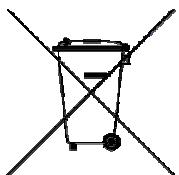
UPS are part of electronic and electric equipments category. At the end of their lives, they have to be collected separately.
6.DESCRIPTION
FRONT PANEL
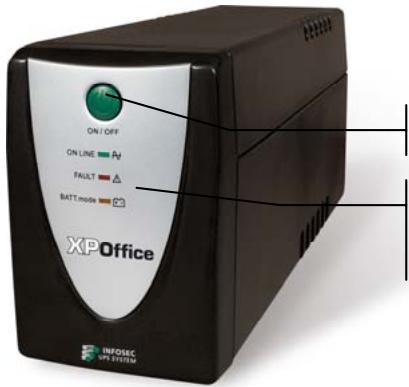
On/Off switch
Green led permanently on: AC mode
Flashing red led: Fault
Flashing yellow led: Battery mode
BACK PANEL
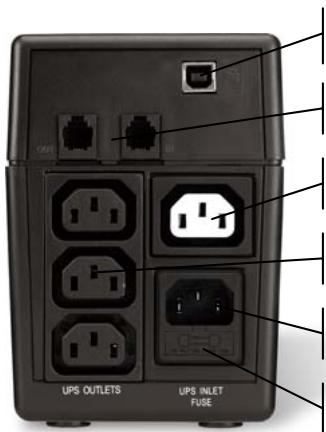
USB communication port
RJ11 Phone/Fax/Internet protected outlets
1 surge protected outlet
3 protected UPS outlets
Power supply socket
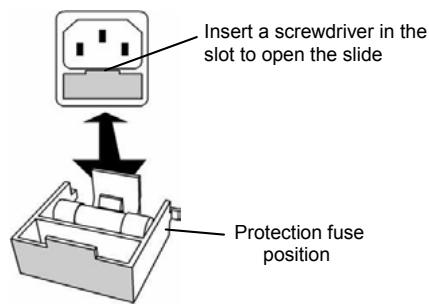
Fuse
FUSE REPLACEMENT
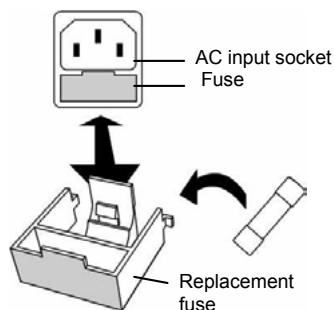
1. Checking
When you receive your equipment, open the packaging and check that your UPS has not been damaged. The packaging includes:
a UPS unit, 3 IEC output cables, 1 RJ11 cable, 1 communication interface cable (USB connector) and a user guide. In the event of damage, please submit a standard claim to the after-sales service department.
2. Charging the batteries
This unit is shipped from the factory with its internal battery fully charged, however, some charge may be lost during shipping and the battery should be recharged prior to use. Plug the unit into an appropriate power supply and allow the UPS to charge fully by leaving it plugged-in, with no load, for at least 8 hours.
3. Where to set up
The UPS has been designed to operate in a protected environment, at temperatures between 0^ and 40^ and at a humidity level ranging between 0% and 90% (no condensation).
Do not obstruct the ventilation slots. Install the unit in an environment which is free from dust, chemical vapours and conductors.
Moreover, in order to avoid any interference, keep the UPS at least 20cm away from the CPU (central processing unit).
4. Connection
Check on the identification plate at the back of the UPS that the power supply is compatible with network voltage and that the device is powerful enough to protect the given power load. Plug the UPS into a 2-pole, earthed outlet (use the original power cable of your computer or it is recommended to use a power cable 2P + E/CEE22/10A ). Then, use the 3 IEC cables to connect one computer-related device to each of the power outlets supplied on the back of the UPS. You can also connect a device that does not require backup time, such as a printer, to the surge protected and filtered outlet.
5. On/Off
To turn the UPS unit on, lightly press the power switch. To turn it off, press the power switch again.
6.DC Start
XP units are equipped with an integrated DC start function. To start the UPS in the absence of a power supply and with a full battery, press the button.
7. Power Saving Function
XP range is equipped with a Power Saving Function. If no load connects to the UPS, it will automatically shut down after 5 minutes to save energy during a power failure. The Power switch must be kept in the 'ON' position, otherwise, the UPS will be disabled and your equipment will not be protected during a power failure.
8.Free Download Software-USPurf Control
Go to the Web site: www.infosec.fr
8. COMPUTER INTERFACE
The USB interface at the back of the UPS may be connected to the computer. This port enables the computer to control the UPS status. The main functions are as follows:
- Transmission of a visual alarm in the event of power failure
- Automatic file closure prior to battery running out
-UPSshutdown
9. PROTECTION TELEPHONE/FAX/MODEM LINE
If you wish to protect a fax or a modem, connect the telephone cable from the wall outlet to the "IN" jack. Connect the telephone cable (provided) from the "OUT" jack to the fax or modem.
Caution: The telephone line lightning arrester could be rendered inoperable if improperly installed. This surge protection device is for indoor use only. Never install telephone wiring during a lightning storm.
Note: This connection is optional. It is not necessary to use this UPS.
10. BATTERY
The battery is the only UPS component which is not in permanent use. It has a useful life of approximately 3 to 5 years. However, frequent major discharges or exposure to temperatures over 20^ will shorten its life span. We therefore recommend that users recharge the battery once every 3 months when the unit is not in use in order to compensate for natural discharging. UPS backup time will depend on the powered load, as well as the age and condition of the batteries.
WARNING!
Batteries should always be replaced by qualified technicians. Batteries have a very high short circuit current: connection errors could cause electric arcs resulting in serious burns.
11. TROUBLE SHOOTING
Should the UPS fail to function correctly we recommend you perform the following tests before calling the Hot Line.
Check list:
Is the main switch in the "ON" position?
Is the UPS plugged into the mains power supply?
- Does the power supply fall within specified unit values?
- Has the fuse gone in the mains plug?
Is the UPS overloaded?
Is the battery flat or defective?
| SYMPTOM | POSSIBLE CAUSE | SOLUTIONS |
| No LED display on the front panel. | 1. Battery missing. | 1. Charge battery up to 8 hours. |
| 2. Faulty battery. | 2. Replace with the same type of battery. | |
| 3. Power switch was not pressed for at least 5 seconds. | 3. Press and Hold power switch for at least 5 seconds. | |
| Alarm buzzer beeps continuously when AC supply is normal. | 1. UPS overload. | 1. Verify that the load matches the UPS capability stipulated in the specifications. |
| In the event of power failure, reduced backup time. | 1. UPS overload or the connected equipment is defective. | 1. Remove some non-critical load. |
| 2. Flat battery. | 2. Recharge the battery by plugging the UPS in for 24 hours. | |
| 3. Battery defect due to high temperature operation environment, or improper operation to battery. | 3. Replace with the same type of battery. | |
| Mains normal but LED is flashing and beeping. | 1. Blown fuse. | 1. Replace the same type of fuse. |
| 2. Power cord is loose. | 2. Reconnect the power cord properly. | |
| 3. No mains power supply or UPS is not on. | 3. Check the power supply |
12. TECHNICAL SPECIFICATIONS
| 500 XP Office | 650 XP Office | 800 XP Office | 1000 XP Office | ||
| TECHNOLOGY | Technology | Line Interactive with Auto Voltage Regulation | |||
| Output form | Modified sine wave | ||||
| Protection | Discharge / Overcharge and overload protection+ fax/modem line protection | ||||
| Power | 500 VA | 650 VA | 800 VA | 1000 VA | |
| Power factor | 0.6 | 0.55 | 0.6 | 0.5 | |
| PHYSICAL | DimensionsW x D x H | 100 X 330 X 140 (mm) | |||
| Weight kg | 5 | 6 | 6,3 | 6,5 | |
| Output connectors | 3 UPS protected outlets (IEC type)1 surge protected outlet, 2 surge protected RJ11 | ||||
| INPUT | Voltage | [110-115-120 V] or [220 - 230 - 240 V] | |||
| Voltage range | [85 - 140 V] [162 - 290 V] | ||||
| Frequency | 50 - 60 Hz auto detection | ||||
| OUTPUT | Voltage | [110-115-120 V] or [220 - 230 - 240 V] | |||
| Regulation | +/- 10 % (battery mode) | ||||
| Frequency | 50 or 60 Hz | ||||
| BATTERY | Type | 12V/7AH x 1pc | 12V/7AH x 1pc | 12V/9AH x 1pc | 12V/9AH x 1pc |
| Backup time(depending on the load) | 10 mins | 20 mins | 22 mins | 25 mins | |
| Recharge time | 8 hours to 90 % after complete discharge | ||||
| FILTER | Spike protection | 125 Joules | |||
| ENVIRONMENT | Noise level | < 40 dB at 1 meter | |||
| Operating environment | 0°C - 40°C, 0 to 90% humidity rate(non condensing) | ||||
| INDICATOR | AC Mode | Green led permanently on | |||
| Battery Mode | Yellow led flashing | ||||
| Fault | Red led flashing | ||||
| AUDIBLE ARLARM | AC Mode | Sounding every 10 seconds | |||
| Battery replacement | Sounding every 2 seconds | ||||
| Low battery | Sounding every second until automatic stop | ||||
| Overload or defect | Every ½ second | ||||
| Fault | Continuously sounding | ||||
| INTERFACE | Communication port | USB | |||
| STANDARDS | Security / Standard | CE - ISO 9001 | |||
Instrukcja obslugi
8. Software Gratis to - USPurf Control
Vá ao portal: www.infosec.fr
PykoBoDCTBO noIb3OBaTeJIa
IpyaBnBHO yCTAHOBKIN 3KcnNyaTaUIN DaHHOR N3dJIIN HaCTOReTbHO peKOMeHNDyEM BHNMaTeJbHO pOuHTaTb HAcTOAue pyKOBoDCTBO NO 3KcnNyaTaUIN.
1. BBEDEHNE
3. YKA3AHN NO TEXHnke 6E30nACHOCTn
B DaHOM IVI npimHeTc npTeHuaJIbHO onaCHO HnnpJxHne. He pa3bpaTe yCTPOICTBO. OHO He COePjNT KOMNoHErTOB, NOJIeXaUx peMOHTy CINaMI NIOJIb3OBaTeJIeI.
Bce peMOHTHbI pa6oTbI DoJXHbI npOu3BOIDITbcr ToJIbKO KBaIINΦnUropOBaHHbIM TexHNueckm nepCOHaIOM.
IbI ObopyoBaoH CObCTBeHHbIM BHyTpeHHM NcTOUHNOM NITaHnA (aKKyMyJrTOPOM). IMeetc PnCK TORO, YTO pa3bEmbl MOrY 6bITb NOd HaprrKeHHem daxe nocne OTcoeDInHeHn IbI OT cTeu nepemehHoro Toka.
IbI npedHa3HaeH dIy nIaTnH yKOMbIoTePOB.Ero He cIeNyET IcNoIb3ObaTb C 3JIeKTPoHHbIMN yCTPOJCTBAMN C INHdYKTINBHOH Harpy3KOJ: DBiRaTeJIaMNI, fIyopeCzEHTNbIM NlaMnAmN i dp.
He nodknauTe K NbI He kOMnbIoTepeHoe o6OpyOBOaHne: MeiunHcKoe o6OpyOBOaHne IINCKycCTBeHHoro JxN3Heo6ecNeheHna, MIKPOBONHOBbl neu, nbJNEOCbI T.I.
He nodknoaTe K IVbI Ia3epHbI epHTepbl, TAK KA KOnn Notpe6JIOT CmUKOM MHOO 3Heprnn.
U6eHntecb, yTO nOTpe6IeMaI NOkNIOUeHHbIMN UCTPOINCTBAMM MOUHOCtB He npEbvIaET MoUHocTn I5I. Mbl peKOMeHNyEM NcONJb3OBA Tb ONTMaJIbHyO HarpY3ky B pa3Mepe NIOBnHb INI TpeTN OT HOMHaJIbHO MOnHOCtn UCTPOINCTBa dIg 6oJee npOdoJXHTelbHOrO BpemeHn ABTOHOMHO pa60TBI N 6oJIbUero Cpoka cIyK6bl aKKMyIPTopa.
He ctabte emkoctn C xuokotmHa IVI nn OkoJno HrO.
OTKnIouaIte I5Pi nepei ero ouHcTKoi. He npimHeJTe JnDKe MOUcne cpeIcTBA n cnpen.
IV5I HeJIb3Я IcNoJIb3OBAt b C NOMEUeHnX C BbICOKoB BlaXHOCTbIO, NOdBePraTb BO3DeIcCTBnIO nprAmoro CoIhNeuHOrO CBeta nIIN pa3MeUaTb OKOIO nCTouHnKOB TeIINa. He 3aKpbIbAaTE BeHTnIaIzUOHHbIe UeJIi.
B cnyuae abapinHoi cnTuayun, nepeKIOUHTe IVbI B noJooKeHne «BbIKI.» n 3aTeM BbIepHNte shHyp nITaHnI u3 po3ETkn dIy nonHoro OTKJIouHeHn I5II.
Пи Р� Даружени Нсправнося образитук pa3ду 11:Устраненье Нсправнося.
4. yka3AHnIO XPAHEHIO
IbI Heo6xOIMO xpaHntb c nonHOCTbIO 3apJxEHHbIM akKymyIaTOpOM. HeKeNaTeIbHO xpaHntb pIn TeMnePaTyPax Bblse 20^ TAK KAK 3To 3HaunTeJIbHO COKpaTIT cPOK cIyK6bl aKKymyIaTOPa. Heo6xOIMO nepe3apJxKaTb IbI KaXdIe 3 MecaIa. 3To ocUeCTBnAET nyTEM nOKnUChEny yctPoINCTBa K cETN nITAHnHa 24 Yaca. OTdeJIbHO xpaHnIeCeA aKKymyIaTOPbI Heo6xOIMO nepe3apJxKaTb KaXdIe 3 MecaIa. B IpOTNBom cIyae OHI MOrYt 6bl NobPexKJeHbl.
5. ПОСЛЕПОНДАЖhoe OБслжИBAHNE
BAKHO!
PpN o6paueHn B OTdeI NocIe npOaJxHOro O6cnyKuBaHn, NOXaIyIcTa, IMeIte HArToBe CLeDyUoSyU INΦOpMaunIO - OHa NOTpe6yTeCry He3aBVCmO OT pNo6JIeMbI: MoDeJIb I5Pi, cepNIhBi Homep n data pnpio6peTeHn.
ToHoe onncaHne npo6IeMbI, BkHoua CJIeMyUO HNΦOpMauHIO: TIN ObOpyIOBaHnIA, nOdkHueHHoro K IbI, cTaTyc CBeTOINOHDbIX INHdNKaTOPOB, cTaTyc 3ByKOBOrO CNHaJNa, ycNoBnA, B KOTOpbIX HaxODNTcYcTpoIcTBO.
Tpe6yEmyTo TexHnueckyo IHΦopMaunIO MOxHO oBHpYKInb Ha rapaHTmHOM TaIOnHe IINuDEHTnФkAuzHOHnTObJNcKe, pacNoLoXeHHo H a 3aDHe NCTeHKe yCTpOJTBA.ДЯBaWero yDo6CTBa MoKeTe yKa3aTb ee HIXke.
He 3akpbIbaiTe BeHTnIaIIOHHbIe IeJI. YcTaHaBJIbAIte yCTpoIcTBO B MceTe, rIe HET nbIIN, npoB XIMnuecknx CoeINHeHn IN TOKOpPOBoJxNxCpeI.
Kpome toro, nIy I36eJHn BO3NtHOBeHn Iomex pa3MeaTe IVbHa paCToHHn He MeHee 20 cm ot LIVy (UeHTpaJIbHorO npOecccopa).
4.Поклоченie
ПровьтЕ Даннble Ha ИдentиФикuaOnHNoT tablUnke Ha 3aДнeI cTeHKe I5Пи y6eintecb,чTo HnpanjxKeHne COOTBeTCTByET BaWeMy HnpanjxKeHIO CetN,a Hnpy3ka He npEByIshaet MOUHocTN yCTpoiCTBa. BkIIOuHTe I5ПВ 2-KoNTaKTHyO 3aZEmJIeHHyO po3EtKY (INcnoIb3yIte CeTEBOI shyp OT BaWero KOMNbIoTepa IInI peKOMeHdyEmbI Ka6eIb 2P+E/CEE22/10A).IocNe 3tOrO npn nomoOn 3 ka6eJe CTaNdapTa M3K noDcoEHNITe kaxdoe n3 KOMNbIoTePbIX yCTpoiCTB K COOTBeTCTByIOUeMy pa3beMy Ha 3aДнeI naHeJI N5П. Bbl TAKKe MoXeTe POnkIIOuHTb yCTpoiCTBO, He Tpe6yIOuee 6ecnepe6oHoro nITaHnI (HanpIMep, npInTep), K pa3beMy, 3aUssIeHHOMy OT nepenadOB HnpanjxKeHnI.
5.BkIIOueHne/BBIKIOueHne
6. Nyck OT NoctoHHoro Toka
YcTpoiCTBa XP ochaueHb BCToeHHoI cyHKuieN ycka ot nocToHHoro ToKa.ДЯ nycKa IV5P npO tcyTCTBn IITAHn B cTe N NOJIHOCTbIO 3apJKeHHOM aKKyMylrTOpe, hAXMITE 3Ty KONkY.
7.Функциэнeproc6epexeHn
8. KOMNbIOTEPHbI INHTEPΦEIC
IV5I MoKHO NODKIIOnuHTb KOMMbIoTepy npn NOMOUI INTEpeFeca USB, pa3beM KOtOporo pacnoJIOXKeH Ha 3aDHei CTeHKe yCTpoiCTBa. 3TOT nOPT no3BOJrE TynpaBJIaTb cTaTycom IV5I uepe3 KOMNbIoTeP. OChOBhIe FyHKcIIN CneDuOuIe:
-ПеретачыВИЗУАЛБОНСИнHAвСЛуЧЕОТКAZАпITАнЯ
- ABTomatnueckoe 3akpbItne faIIOB Do noHOn pa3pIkn aKkyMnyTopa
- BbIKJIIOUeHne IVI
9.3AUNTA JINHIN TELEΦOHA/ΦAKCA/MODEMA
EcIn Bbl XOTnTe 3aunTb fakc nIn MoEm, NODcoeHNHTe TeJefoHHb KabeIn OT HAcTeHHo P03ETKn K pa3bemy «IN». NODcoeHNHTe TeJefoHHb KabeIn (BXoIn T B KOMJIeKT NoCTaBkn) O T pa3bema «OUT» K fakcy nIn MoEmy.
BhImaHne:Pa3pIaHnK TelefoHHo JInHn IJr 3aunTbI OT rpo3OBbIX nepeHaPjKeHm MOKeT OTKNIOHTbcra Pn HnnpabINbHO YCTAHOBKe. 3TO yCTPOcTB0 3aunTbI OT nepenaoB HapjKeHn IpeDHa3HaueHo IJr NcNoJIb3OBAHn B NOMEeHn. HNKOrda He npoklaDbaiTe TelefoHHbIe Ka6eN B rpo3y.
Jus Jus jus Jus Jus Jus Jus Jus Jus Jus Jus Jus Jus Jus Jus Jus Jus Jus Jus Jus Jus Jus Jus Jus Jus Jus Jus Jus Jus Jus Jus Jus Jus Jus Jus Jus Jus Jus Jus Jus Jus Jus Jus Jus Jus
a 1
a jg j 100000000000000000000000000000000000000000000000000
aal aal al aal al al al al al al
. Iolai ay jlll al lal gai Jil 1al lal yal!
UPS
gai/(wslj)bla.9
pIIN"g 111111111111111111111111111111111111111111111111
i
UPS 1
.10
yjll j 1000. UPS 1000 yjll j 1000. J 1000 yjll j 1000.
i 1
Jc 12111111111111111111111111111111
L
142xwgljbsiws.11
aia 1
ailll jll lll lll
:
"ON"
UPS
UPS 1 j
Pall 1
| الإستعمال | الإستعمال | الإستعمال |
| .1 | .1 | .1 |
| .2 | .2 | .2 |
| .3 | .3 | .3 |
| .4 | .4 | .4 |
| .5 | .5 | .5 |
| UPS .1 | UPS .1 | .1 |
| .1 | .1 | .1 |
| .2 | .2 | .2 |
| .3 | .3 | .3 |
| .4 | .4 | .4 |
| .5 | .5 | .5 |
| .6 | .6 | .6 |
| .7 | .7 | .7 |
| .8 | .8 | .8 |
| .9 | .9 | .9 |
| .10 | .10 | .10 |
| .11 | .11 | .11 |
| .12 | .12 | .12 |
| .13 | .13 | .13 |
| .14 | .14 | .14 |
| .15 | .15 | .15 |
| .16 | .16 | .16 |
| .17 | .17 | .17 |
| .18 | .18 | .18 |
| .19 | .19 | .19 |
| .20 | .20 | .20 |
| .21 | .21 | .21 |
| .22 | .22 | .22 |
| .23 | .23 | .23 |
| .24 | .24 | .24 |
| .25 | .25 | .25 |
| .26 | .26 | .26 |
| .27 | .27 | .27 |
| .28 | .28 | .28 |
| .29 | .29 | .29 |
| .30 | .30 | .30 |
| .31 | .31 | .31 |
| .32 | .32 | .32 |
| .33 | .33 | .33 |
| .34 | .34 | .34 |
| .35 | .35 | .35 |
| .36 | .36 | .36 |
| .37 | .37 | .37 |
| .38 | .38 | .38 |
| .39 | .39 | .39 |
| .40 | .40 | .40 |
| .41 | .41 | .41 |
| .42 | .42 | .42 |
| .43 | .43 | .43 |
| .44 | .44 | .44 |
| .45 | .45 | .45 |
| .46 | .46 | .46 |
| .47 | .47 | .47 |
| .48 | .48 | .48 |
| .49 | .49 | .49 |
| .50 | .50 | .50 |
| .51 | .51 | .51 |
| .52 | .52 | .52 |
| .53 | .53 | .53 |
| .54 | .54 | .54 |
| .55 | .55 | .55 |
| .56 | .56 | .56 |
| .57 | .57 | .57 |
| .58 | .58 | .58 |
| .59 | .59 | .59 |
| .60 | .60 | .60 |
| .61 | .61 | .61 |
| .62 | .62 | .62 |
| .63 | .63 | .63 |
| .64 | .64 | .64 |
| .65 | .65 | .65 |
| .66 | .66 | .66 |
| .67 | .67 | .67 |
| .68 | .68 | .68 |
| .69 | .69 | .69 |
| .70 | .70 | .70 |
| .71 | .71 | .71 |
| .72 | .72 | .72 |
| .73 | .73 | .73 |
| .74 | .74 | .74 |
| .75 | .75 | .75 |
| .76 | .76 | .76 |
| .77 | .77 | .77 |
| .78 | .78 | .78 |
| .79 | .79 | .79 |
| .80 | .80 | .80 |
| .81 | .81 | .81 |
| .82 | .82 | .82 |
| .83 | .83 | .83 |
| .84 | .84 | .84 |
| .85 | .85 | .85 |
| .86 | .86 | .86 |
| .87 | .87 | .87 |
| .88 | .88 | .88 |
| .89 | .89 | .89 |
| .90 | .90 | .90 |
| .91 | .91 | .91 |
| .92 | .92 | .92 |
| .93 | .93 | .93 |
| .94 | .94 | .94 |
| .95 | .95 | .95 |
| .96 | .96 | .96 |
| .97 | .97 | .97 |
| .98 | .98 | .98 |
| .99 | .99 | .99 |