
SMART LINE 700 VA - Inverter INFOSEC - Free user manual and instructions
Find the device manual for free SMART LINE 700 VA INFOSEC in PDF.


User questions about SMART LINE 700 VA INFOSEC
0 question about this device. Answer the ones you know or ask your own.
Ask a new question about this device
Download the instructions for your Inverter in PDF format for free! Find your manual SMART LINE 700 VA - INFOSEC and take your electronic device back in hand. On this page are published all the documents necessary for the use of your device. SMART LINE 700 VA by INFOSEC.
USER MANUAL SMART LINE 700 VA INFOSEC
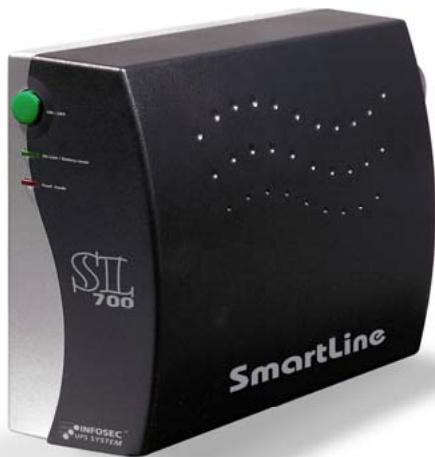
Smart Line 500, 700 & 1000
User's guide 2
Gebrauchsanweisung 11
Notice d'utilisation 20
Instrucciones de uso 29
Eeyεipidio xρησης 38
Manual do Utilizador 47
Hncmpykuua no 3KcnIyamaauu 56
PodrEcznik uzytkownika 65
E Juey j 74
To ensure good installation and maximum use of this product, we highly advise you to read this user's guide very carefully.
1. INTRODUCTION
This UPS range is specially designed for multimedia Personal Computers. Its light weight and compact design perfectly fit with limited working environments.
Smart Line is equipped with 2 or 3 secured outlets (depending on the model) which benefit from backup time for critical devices and 2 RJ11 surge protected outlets.
2. MAIN CHARACTERISTICS
2 or 3 secured outlets (depending on the model)
2 RJ11 surge protected outlets
- Tel/Fax/Modem line surge protection
- Up to 30 mn backup time (depending on the model and the connected load)
- Wide input voltage range
High frequency technology
- Microprocessor control guarantees high reliability
- Compact size, light weight
Easy to install and use
3. SAFETY INSTRUCTIONS - Security
Risk of Electric Shock:
The Smart Line unit is potentially using hazardous voltages. Do not take this equipment apart. It does not contain accessible components to be repaired by users.
All repairs should be performed by qualified technicians only.
The utility power outlet shall be near the equipment and easily accessible. To isolate Smart Line from AC input, remove the plug from the utility power outlet.
The mains socket outlet that supplies Smart Line shall be installed near the UPS and shall be easily accessible.
Smart Line has its own internal power supply (battery). There is a risk that output sockets may still be live after Smart Line has been disconnected from the mains power supply.
Install Smart Line in a temperature and humidity controlled indoor area free of conductive contaminants.
Smart Line should not be exposed to direct sunlight or heat-emitting sources. Do not cover the ventilation grills.
Disconnect Smart Line from AC power before cleaning it. Do not use product but only a damp cloth.
In case of emergency, switch Smart Line into off position and disconnect the product from the AC power.
When Smart Line is out of order, please refer to "trouble shooting" section and contact the hot line.
Connected products:
The sum of the leakage current of Smart Line and the connected equipment should not exceed 3.5mA .
Make sure that the connected load does not exceed the power of Smart Line : to ensure improved backup time and longer battery life, we recommend a load equivalent to 1/3 of nominal power.
Do not leave any container with liquid on the UPS or close to it.
Smart Line has been designed for personal computers. It should not be used with power electronic equipment with inductive loads such as motors or fluorescent lights.
Do not connect any household appliances such as microwave, vacuum cleaner, hair dryers to Smart Line, or any life-supporting system.
Due to excessive consumption, laser printers should not be connected to the UPS.
- About batteries:
Qualified technicians are recommended to change the battery.
Do not dispose of the battery in a fire as it may explode.
Do not open or mutilate the battery. Released electrolyte is harmful to the skin and eyes. It may be toxic.
Smart Line contains one/two large-capacity batteries. So the shell shall not be opened, otherwise such dangers as electric shock will be caused. If any overhaul or replacement of the battery is required, please contact the distributor.
Servicing of batteries should be performed or supervised by personnel knowledgeable of batteries and the required precautions. Keep unauthorized personnel away from batteries.
A battery can present a risk of electrical shock and high short circuit current. The following precautions should be observed by a qualified technician when working on batteries:
1) Remove watches, rings or other metal objects from the hand.
2) Use tools with insulated handles.
3) Disconnect charging source prior to connecting or disconnecting batteries terminal.
4) When replacing batteries, replace with the same type and number of the sealed lead-acid batteries.
4. STORAGE INSTRUCTIONS
Smart Line should be stored with its battery fully recharged. If Smart Line has to be stored for a long time, it is recommended to recharge the batteries (by connecting the utility power to UPS, switch "ON"), once a month for 24 hours to avoid a full battery discharge.
Do not keep or use Smart Line in any of the following environments:
✓ Any area with combustible gas, corrosive substance or heavy dust.
Any area with extraordinarily high or low temperature (above 40^ or below 0^ ) and humidity of more than 90% .
Any area exposed to direct sunshine or near any heating apparatus.
Any area with serious vibrations.
Outdoor.
In the event that there is fire occurring in the vicinity, please use dry-powder extinguishers. The use of liquid extinguishers may give rise to the danger of electric shock.
5. AFTER SALES SERVICE IMPORTANT!
When calling the After-Sales Department, please have the following information ready, it will be required anyway : product model, serial number and date of purchase.
Accurate description of the problem providing the following details : type of equipment powered by the Smart Line, indicator led status, alarm status, installation and environmental conditions.
You will find the technical information you require on your guarantee or on the identification plate on the back of the unit. If convenient you may write down the details in the following box.
| Model | Serial number | Date of purchase |
| Smart Line... |
! Please keep the original packaging. In case of return to the After-Sales Department, it will be required.
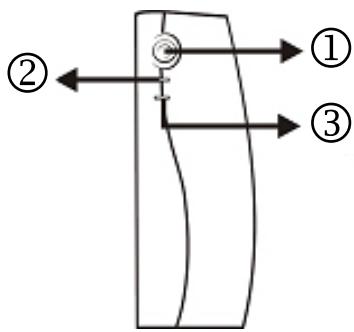
FRONT PANEL
1- Power Switch
2-UPS Status Indicator
AC Mode: Green Lighting
Battery Mode: Green Flashing
3- Fault LED: Red Flashing
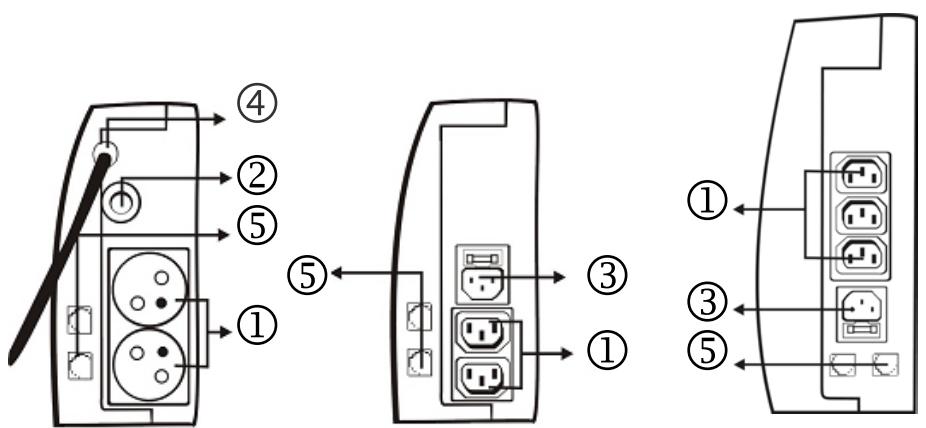
BACK PANEL
1- Secured outlets
2-Fuse
3- AC Input with AC fuse
4- AC Input
5-RJ11 connectors (Modem/Phone Line Surge Protection)
7. INSTALLATION AND OPERATION
1. Control
When you receive your equipment, open the packaging and check that your Smart Line has not been damaged.
The packaging includes : a Smart Line UPS, 1 RJ11 cable, 1 input cable (SL 500 / 700 FR), 2 IEC output cables (SL 500 / 700 IEC) / 3 IEC output cables (SL 1000 IEC) and a user's guide.
In case of damage, please submit a standard claim to the after-sales service.
2. Charging
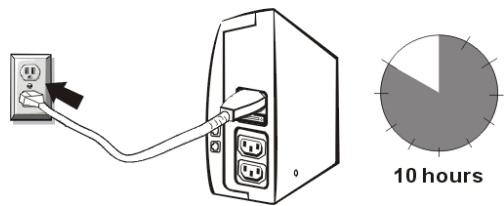
Smart Line is shipped from the factory with its internal battery fully charged, however, some charge may be lost during shipping and the battery should be recharged prior to use. Plug the unit into an appropriate power supply and allow the UPS to charge fully by leaving it plugged-in for at least 10 hours with no load (no electrical devices such as computers, monitors...) connected.
3. Place and installation
Smart Line has been designed to operate in a protected environment, at temperatures between 0^ C and 40^ C and at a rate of humidity ranging between 0% and 90% (no condensation).
Do not obstruct the ventilation grills. Install the unit in any protected environment that provides adequate airflow around the unit, and is free from excessive dust, corrosive fumes and conductive contaminants.
Moreover, in order to avoid any interference, keep Smart Line at least 20~cm away from the CPU (central processing unit).

4. Connection
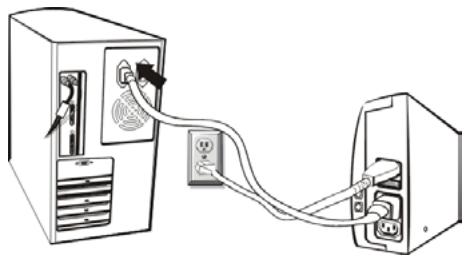
Plug Smart Line into a 2-pole, 3-wire grounded receptacle (use the original power cable of your computer). Then connect one computer-related device into each of the power receptacles supplied on the back of Smart Line.
5. Modem / Network Connection
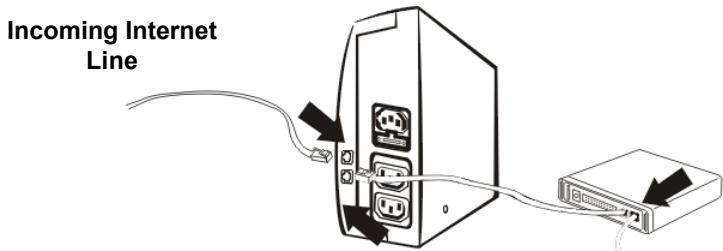
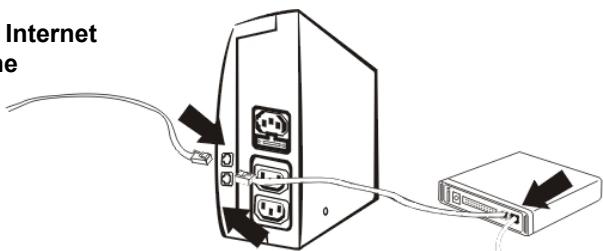
Plug incoming internet line into the "IN" socket at the back of Smart Line. Use one more Internet line cable and plug one end of the Internet line cable to the "OUT" socket at the back of Smart Line. Plug the other end to the modem input socket as shown.
6. Turn ON / Off
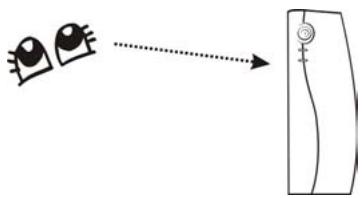
Press the switch of Smart Line for 1 second and the UPS turns into its normal state: the green light is ON and the beeper is OFF.
Then it performs a self-diagnosis (the beeper and the red and green indicator lights are ON) for several seconds.
At this time, user may turn on the PC and other loads.
Press the switch of Smart Line continuously for one second to turn OFF the UPS.
Note:
For the convenience of maintenance, please turn on Smart Line first before turning on the PC and the other loads, and turn off Smart Line after the connected loads are turned off.
8. BATTERY
The battery is the only UPS component which is not in permanent use. It has a product life of approximately 3 to 5 years. However, frequent major discharges or exposure to temperatures over 20^ will shorten its product life. We therefore recommend that users recharge the battery once a month when the unit is not in use in order to compensate for natural discharging. Smart Line backup functioning time will depend on the load powered, the age and the condition of the batteries.
WARNING!
Batteries should always be replaced by qualified technicians. Batteries have a very high short circuit current : connection errors could cause electric arcs resulting in serious burns.
9. TROUBLE SHOOTING
Should the UPS fail to function correctly we recommend you to perform the following tests before calling the Hot Line.
Check list :
Is the main switch in the « ON » position?
Is Smart Line plugged into a powered mains?
- Does the power supply fall within specified unit values?
- Has the fuse gone in the mains plug?
Is Smart Line overloaded?
Is the battery low or defective?
| SYMPTOM | POSSIBLE CAUSE | SOLUTIONS |
| No LED display on the front panel. | 1. Missing battery. | 1. Charge battery up to 8 hours. |
| 2. Battery defect. | 2. Replace with the same type of battery. | |
| 3. Power switch is not pressed. | 3. Press power switch again. | |
| When power failure, backup time is shorten. | 1. Overload of the UPS. | 1. Remove some non critical load. |
| 2. Battery voltage is too low. | 2. Charge battery 8 hours or more. | |
| 3. Battery defect due to high temperature operation environment, or improper operation to battery. | 3. Replace with the same type of battery. | |
| Mains normal but LED is flashing. | 1. Fuse is blown. | 1. Replace the same type of fuse. |
| 2. Power cord is loose. | 2. Reconnect the power cord properly. |
10. TECHNICAL SPECIFICATIONS
| SL 500 | SL 700 | SL 1000 | ||
| TECHNOLOGY | Technology | High Frequency (40 kHz) | ||
| Output form | Modified sinewave | |||
| Protection | discharge / overcharge and overload protection + fax modem line | |||
| Power | 450 VA | 650 VA | 1000 VA | |
| Power factor | 0,45 | 0,45 | 0,6 | |
| PHYSICAL | Dimensions W x D x H (mm) | 80 X 176,5 X 230 | 91 X 280 X 238 | |
| Weight kg | 3.1 | 3.3 | 6.5 | |
| Output connectors | 2 secured outlets 2 RJ11 surge protected outlets | 3 secured outlets 2 RJ11 surge protected outlets | ||
| INPUT | Voltage | 110 / 120 V or 220 / 230 / 240 V | 220 / 230 / 240 V | |
| Voltage range | 90-145 V / 170-270 V | 170-280 V | ||
| OUTPUT (Battery mode) | Voltage | 110 / 120 V or 220 / 230 / 240 V | 220 / 230 / 240 V | |
| Regulation | +/- 10 % | |||
| Frequency | 50 - 60 Hz + / - 1 Hz | |||
| BATTERY | Type | 12V/4.5AH x 1pc | 12V/7.2AH x 1pc | 12V/7AH or 12V/7.2 AH x 2pcs |
| Backup time (depending on the load) | 7 mn | 12 mn | 30 mn | |
| Recharge time | 10 hours to 90 % after complete discharge | |||
| ENVIRONMENT | Noise level | < 40 dB | ||
| Operating environment | 0° C - 40° C, 20 to 90 % relative humidity (non condensing) | |||
| INDICATOR | AC Mode | Green LED lighting | ||
| Battery Mode | Green LED flashing every 4 seconds | |||
| Low battery at battery mode | Green LED flashing every second | |||
| Fault | Red LED lighting | |||
| Battery charging at AC mode | Red LED flashing every 2 seconds for 30 seconds | |||
| Battery fault at AC mode (Vbat<12V) | Red LED flashing three times every 2 seconds | |||
| AUDIBLE ARLARM | Battery mode | Sounding every 4 seconds | ||
| Low battery at battery mode | Sounding every second | |||
| Fault | Continuously sounding | |||
| Battery charging at AC mode | Sounding every 2 seconds for 30 seconds | |||
| Battery fault at AC mode (Vbat<12V) | Sounding three times every 2 seconds | |||
| MANUFACTURING | Security / Standard | CE - ISO 9001 - PCT Certificate | ||
Gebrauchsanweisung
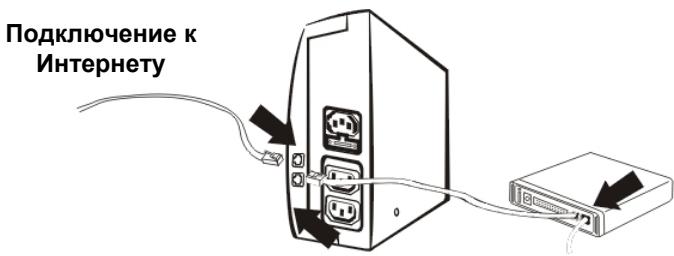
Tepeohnyo IHHIO NOKJIouaTb K pa3bemy "IN" Ha 3aJHei naHei Smart Line. NcnoIb3ObaTb NOCTabNeHHbI npOaBcuom shHyp dJa coeDInHeHnpa3bema "OUT" c TepeohOM/daKCOM/MoDEMOM.
6. BkJIIOUeHHe/OTKJIIOUeHHe
Дяв BKичeyня Smart line haxaMb Ha KhoNky BbyKlNoyTeTnI N depxKaTb cIeRka HaxaToB TeueHne 1 cekHybl: 3aropaetc 3eJeHa n lamnoquka.
3aTeM npi6Op B TeueHne HeCKoJIbKx CekyHn PpOu3BODiT ABTOHaRGocTKy (pa6oTaIOT 3ByKOBoI CNrHaJ, KpaCha n 3eJeHaj NaMNoUKN).
Incoming Internet Line
-6
(
:
-8
5 3
20
!
-9
:
| 8 -1 | -1 | |
| -2 | -2 | |
| -3 | -3 | |
| -1 | -1 | |
| 8 -2 | -2 | |
| -3 | -3 | |
| -1 | -1 | |
| -2 | -2 |
| SL 1000 | SL 700 | SL 500 | ||
| ( / 40) | ||||
| + / | ||||
| / 1000 | / 650 | / 450 | ||
| 0.6 | 0.45 | 0.45 | ||
| 238×280×91 | 230×176×80 | ( ) × : | ||
| 6.5 | 3.3 | 3.1 | ( ) | |
| 3 - RJ11 | - RJ11 | |||
| ( 240-230-220) ( 120-115-110) | ||||
| ( 270-170) ( 145-90) | ||||
| ( 240-230-220) ( 120-115-110) | ( ) | |||
| %10 -/+ | ||||
| 1 -/+ 60-50 | ||||
| 2 / 7 / 12 | 1 / 7 / 12 | 1 / 4.5 / 12 | ||
| 30 | 12 | 7 | ||
| %90 10 | ||||
| 40 | ||||
| ( ) %90 20 40 0 | ||||
| 4 | ||||
| 1 | ||||
| 30 2 | ||||
| 2 3 | ||||
| 4 | ||||
| 1 | ||||
| 30 2 | ||||
| 2 3 | ||||
| 9001 - CE | / | |||