CD 100 - CD Player JBSYSTEMS - Free user manual and instructions
Find the device manual for free CD 100 JBSYSTEMS in PDF.


User questions about CD 100 JBSYSTEMS
0 question about this device. Answer the ones you know or ask your own.
Ask a new question about this device
Download the instructions for your CD Player in PDF format for free! Find your manual CD 100 - JBSYSTEMS and take your electronic device back in hand. On this page are published all the documents necessary for the use of your device. CD 100 by JBSYSTEMS.
USER MANUAL CD 100 JBSYSTEMS
- Allow for sufficient heat dispersion when installed on a rack.
- Handle the power cord carefully. Hold the plug when unplugging the cord.
- Keep the set free from moisture, water and dust.
- Unplug the power cord when not using the set for a long period of time.
- Do not let foreign objects in the set.
- Do not let insecticides, benzene and thinner come in contact with the set.
- Never dissassemble or modify the set in any way.
Specifications
Power source. AC 230V, 50 Hz, 15W
Dimensions. 274 (D) x 216 (W) x 87 (H) mm
FUNCTIONS
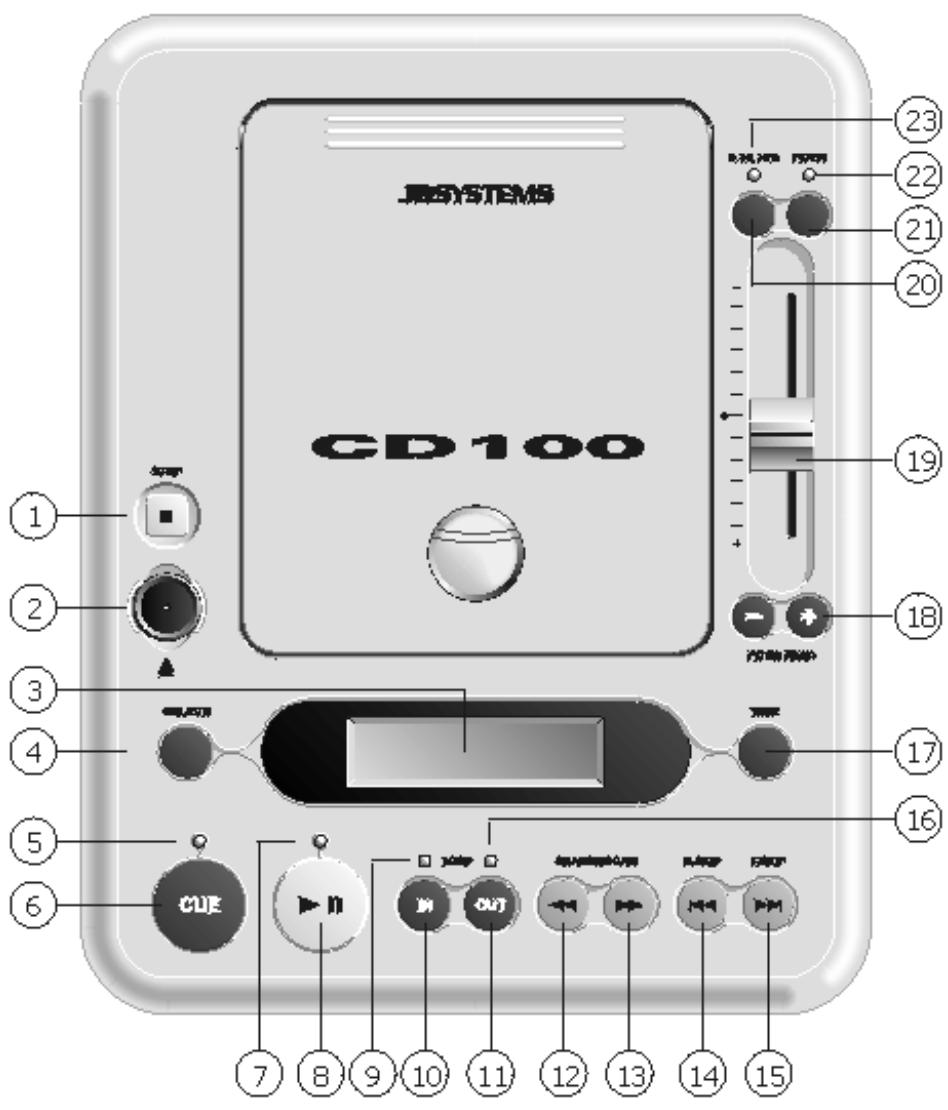
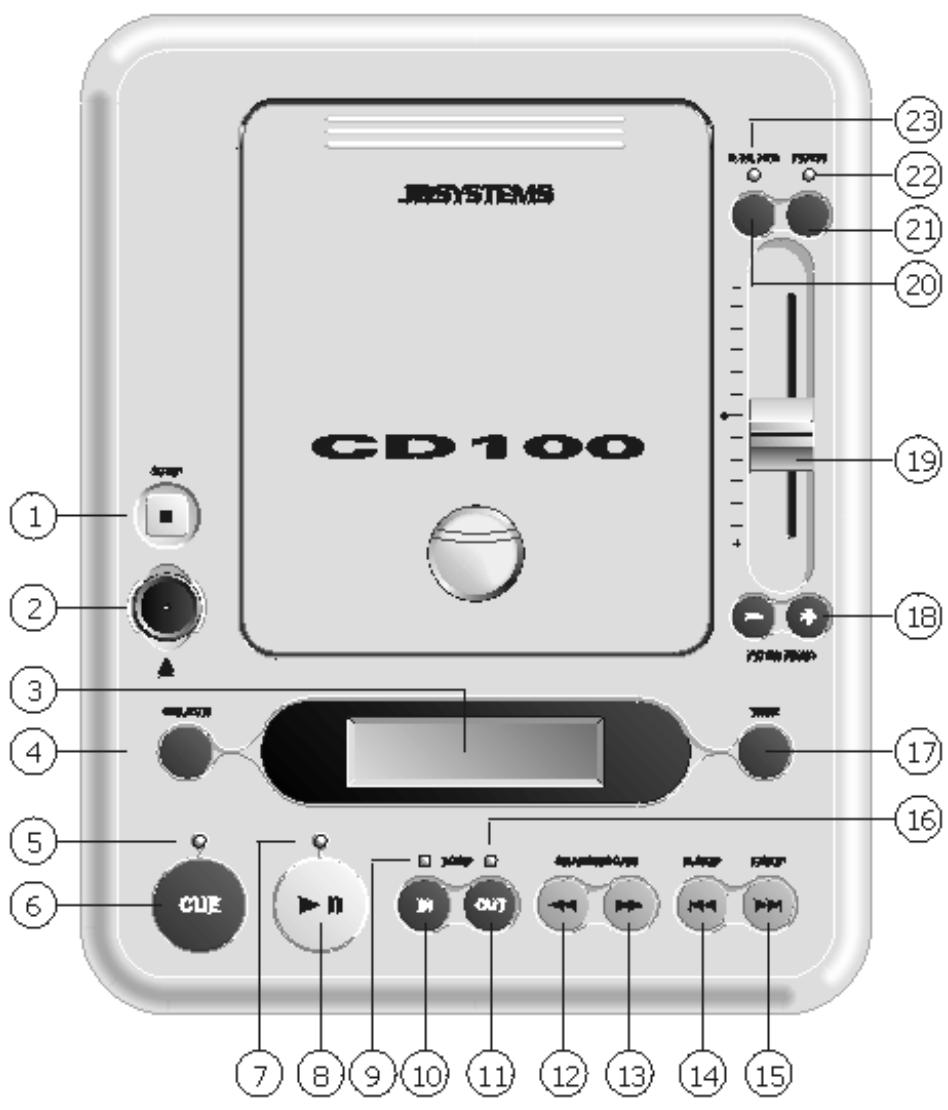
- STOP - Stops the CD.
- OPEN/CLOSE Press it to open and close the disc holder.
- LCD DISPLAY - Shows time (minutes, seconds, frame) and pitch information.
- SGL/CTN - Switches between Single or Continuous play modes.
- CUE INDICATOR
- CUE - Used to recall and preview the cue point.
- PLAY/PAUSE INDICATOR
- PLAY/PAUSE - Plays or pauses the CD.
- LOOP IN INDICATOR
- LOOP IN - This allows you to set the cue point without stopping the play back. This button sets the beginning of a loop.
- LOOP OUT - Used to set the ending when looping music. The player will start to loop continuously until you press this button again to exit.
12/13. << >>- Press the button to forward and backward frame. When you press the start button in pause mode a new cue point is set automatically. Scans forward or back through the current track. This unit features 3 scan speeds. Hold the << or >> button for a few seconds to change the scan speed. - B. SKIP - Use this button to go back to the beginning of the current track or to select a previous track for playing.
- F. SKIP - Use this button to go to the next CD track.
- LOOP OUT INDICATOR
- TIME - LCD display shows the remaining or elapsed time or the total remaining time.
- PITCH BEND - When this button is pressed the pitch is temporarily changed. Note: maximum pitch on this unit is 16% . If the pitch fader is already set to 16% , this function will not work.
-
PITCH FADER - Used to speed up or slow down the current track.
-
PITCH SELECT - Changes the pitch fader range between ± 8, 12 and 16% .
- PITCH - Turns pitch fader ON and OFF.
- PITCH INDICATOR
- PITCH SELECT INDICATOR
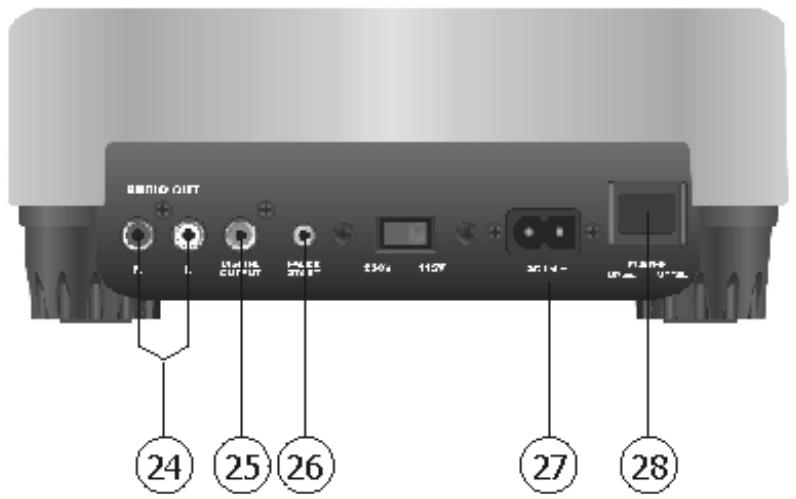
- AUDIO OUT - This stereo line output connects to the line input on any DJ mixer.
- DIGITAL OUTPUT - This coaxial (S/P DIF) digital output connects to any RCA S/P DIF input, as found on most standard computer sound cards or CD burners.
- FADER START - Connects to any DJ mixer equipped with a fader start input. This enables the user to start the CD from the cue point, using the mixer's cross or line fader, depending on the mixer.
- AC IN - This is the connection for the supplied power cable.
- POWER - This button is used to power the unit ON and OFF.
Avant l'usage
Dimensions. 274 (P) x 216 (L) x 87 (H) mm
FUNCTIONS