
V-MATE - Digital Video Recorder SANDISK - Free user manual and instructions
Find the device manual for free V-MATE SANDISK in PDF.


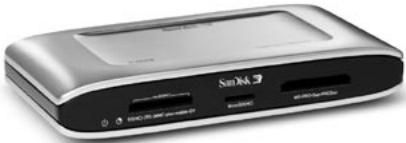
| Product Type | Memory Card Digital Video Recorder |
| Brand | SanDisk |
| Model | V-Mate |
| Supported Video Formats | MPEG-4 SP, H.263; MP4, 3GP, 3G2 files |
| Maximum Resolution | 640 x 480 pixels |
| Frames Per Second | Up to 30 fps |
| Compatible Memory Card Types | SD, SDHC, miniSD, miniSDHC, microSD, microSDHC, RS-MMC, MMCplus, MMCmobile, Memory Stick, Memory Stick PRO, Memory Stick Duo, Memory Stick PRO Duo |
| Input Connector | 3.5 mm jack for composite video and audio (L/R) |
| Output Connector | 3.5 mm jack for composite video and audio (L/R) |
| USB Port | USB mini B |
| Infrared Emitter | Yes (for set-top box control) |
| Power Supply | AC adapter included |
| Remote Control | Yes, with battery |
| Recording Scheduling | Up to 30 time slots |
| PC Compatibility | Windows 2000/XP, Mac OS 10.1.2+ |
| Interface Languages | Multilingual (adjustable) |
| TV System | NTSC/PAL (switch) |
| Included Accessories | AV cables (2x), USB cable, IR emitter cable, AC adapter, remote control, user guide |
| Warranty | 2 years |
| Manufacturing | China |
Frequently Asked Questions - V-MATE SANDISK
User questions about V-MATE SANDISK
0 question about this device. Answer the ones you know or ask your own.
Ask a new question about this device
Download the instructions for your Digital Video Recorder in PDF format for free! Find your manual V-MATE - SANDISK and take your electronic device back in hand. On this page are published all the documents necessary for the use of your device. V-MATE by SANDISK.
USER MANUAL V-MATE SANDISK
You may register your product at
www.sandisk.com/registration
and receive e-mail alerts about new firmware for
your V-Mate Video Memory Card Recorder!
Failure to register your product will NOT diminish the
rights you have under the product warranty.
English
Contents
Package Contents 2
Product Specification 2
System Requirements 2
Safety Instructions 2
Connecting V-Mate 3
Setting the V-Mate 4
Recording with the V-Mate* 5
Playing Video with the V-Mate 5
Playing recorded video on a PC 5
Troubleshooting 5
Worldwide BrandSetup Code List 6
Warranty 11
Congratulations
Congratulations on your purchase of the V-Mate Video Memory Card Recorder. Now you can easily record movies and TV programs on flash memory cards and play them back in a compatible playback device such as mobile phones, handheld game consoles, notebook PCs and more. Whenever you want, wherever you are! This user guide will instruct you on how to install and use your V-Mate.
* For home and personal use:
This product is intended to be used for recording and playback for your home and personal enjoyment. Copying and commercial distribution of this product is prohibited. The use of this product in any form without the written permission of the publisher or its rights holder will be considered as a breach of compliance with all copyright and applicable intellectual property laws remains the responsibility of the user of the product.
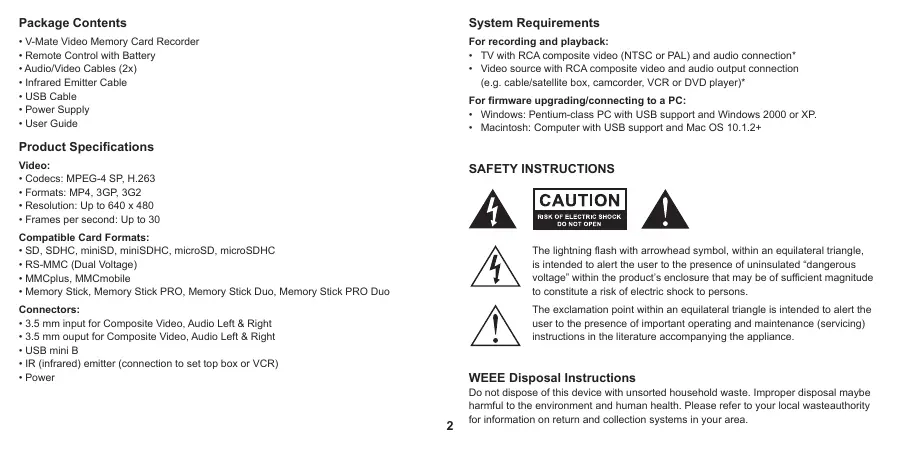
Package Contents
V-Mate Video Memory Card Recorder
Remote Control with Battery
Audio/Video Cables (2x)
Infrared Emitter Cable
USB Cable
Power Supply
- User Guide
Product Specifications
Video:
- Codesc: MPEG-4 SP, H.263
- Formats: MP4, 3GP, 3G2
Resolution: Up to 640 x 480 - Frames per second: Up to 30
Compatible Card Formats:
- SD, SDHC, miniSD, miniSDHC, microSD, microSDHC
- RS-MMC (Dual Voltage)
- MMCplus, MMCmobile
- Memory Stick, Memory Stick PRO, Memory Stick Duo, Memory Stick PRO Duo
Connectors:
- 3.5 mm input for Composite Video, Audio Left & Right
- 3.5 mm output for Composite Video, Audio Left & Right
- USB mini B
- IR (infrared) emitter (connection to set top box or VCR)
Power
System Requirements
For recording and playback:
- TV with RCA composite video (NTSC or PAL) and audio connection
Video source with RCA composite video and audio output connection (e.g. cable/satellite box, camcorder, VCR or DVD player)
For firmware upgrading/connecting to a PC:
- Windows: Pentium-class PC with USB support and Windows 2000 or XP.
Macintosh: Computer with USB support and Mac OS 10.1.2+
SAFETY INSTRUCTIONS

CAUTION
RISK OF ELECTRIC SHOCK DO NOT OPEN


The lightning flash with arrowhead symbol, within an equilateral triangle, is intended to alert the user to the presence of uninsulated "dangerous voltage" within the product's enclosure that may be of sufficient magnitude to constitute a risk of electric shock to persons.

The exclamation point within an equilateral triangle is intended to alert the user to the presence of important operating and maintenance (servicing) instructions in the literature accompanying the appliance.
WEEE Disposal Instructions
Do not dispose of this device with unsorted household waste. Improper disposal maybe harmful to the environment and human health. Please refer to your local wasteauthority for information on return and collection systems in your area.
Read these Instructions.
- Keep these Instructions.
Heed allWarnings. - Follow all instructions.
- Clean only with a damp cloth (unplug the power adapter before cleaning).
- Do not install near any heat sources such as radiators, heat registers, stoves, or other apparatus (including amplifiers) that produce heat.
- Do not defeat the safety purpose of the polarized or grounding - type plug. A polarized plug has two blades with one wider than the other. A grounding type plug has two blades and a third grounding prong. The wide blade or the third prong is provided for your safety. When the provided plug does not fit into your outlet, consult an electrician for replacement of the obsolete outlet.
- Protect the power cord from being walked on or pinched particularly at plugs, convenience receptacles, and the point where they exit from the apparatus.
- Only use attachments/accessories specified by the manufacturer.
- Unplug this apparatus during lightning storms or when unused for long periods of time.
- Refer all servicing to qualified service personnel. Servicing is required when the apparatus has been damaged in any way, such as power-supply cord or plug is damaged, liquid has been spilled or objects have fallen into the apparatus, the apparatus has been exposed to rain or moisture, does not operate normally, or has been dropped.
- Do not use near water (e.g. sink, bathtub, swimming pool, etc.).
Warning:
TO REDUCE THE RISK OF FIRE OR ELECTRIC SHOCK, DO NOT EXPOSE THIS APPLIANCE TO RAIN OR MOISTURE. DANGEROUS HIGH VOLTAGES ARE PRESENT INSIDE THE ENCLOSURE. DO NOT OPEN THE CABINET. REFER SERVICING TO QUALIFIED PERSONNEL ONLY.
Note:
Please consult the rating label at the bottom of the SanDisk V-Mate for power input and other safety information.
Connecting V-Mate
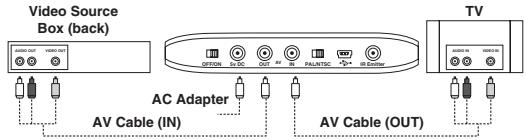
- Connect one audio/video cable to the composite video output and audio left/right output of an analog video source (e.g. cable/satellite box, camcorder, VCR or DVD player). The yellow plug should connect to Video Out, the red plug should connect to Audio Out (R), and the white plug should connect to Audio Out (L). Connect the 3.5mm connector on the other side of the cable to the AV in connection on the back of the V-Mate.
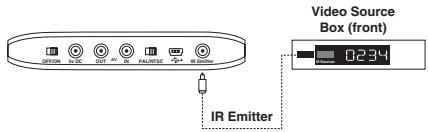
- If you are using a cable/satellite/terrestrial receiver box or VCR, connect the 3.5mm connector on the IR Emitter cable to the IR Emitter connector on the back of the V-Mate. The IR emitter will automatically power on/off and select channels at cable/ satellite/terrestrial receiver box or VCR during a scheduled recording. Remove the protective layer from IR emitter and stick the IR emitter next to the remote sensor of the cable/satellite/terrestrial receiver box or VCR. When attaching the IR emitter to the video source box, make sure to cover only a part of the IR Receiver window so that it will not block the IR signal coming from the remote control. To find the remote sensor on the video source box, consult its manual for more information.
- Connect the 2nd audio/video cable to the TV. On the TV, the yellow plug should connect to Video In, the red plug should connect to Audio In (R), and the white plug should connect to Audio In (L). Connect the 3.5mm connector on the other side of the cable to the AV Out connection on the back of the V-Mate.
-
Plug the Power Supply into the back of the V-Mate and plug the power supply into a power outlet.
-
Check the position of the NTSC/PAL switch on the back of the V-Mate. The selected position should match with the type of TV. Please consult the manual/specifications of the TV for details.
- Move the power switch on the back of the V-Mate into the ON position.
- Pull the plastic strip out of the remote control to activate the battery.
- Press the power button on the remote and the V-Mate will start up (the blue slot LEDs blink and the green power LED stays on).
- Turn on the TV and the video source box and change the input source on the TV. Depending on the TV, the input source may be called TV/Video, Input, or Source (consult the TV manual for more information). When the correct source is selected, you will see a message to insert a memory card. When the V-Mate is turned off (standby) from the remote control or on the back of the unit, the video signal from the video source box will be displayed on the TV screen. The V-Mate is now correctly connected
Setting the V-Mate
- Make sure a compatible memory card is inserted. Only insert one memory card at a time.
-
In the next screen set the date and time (accurate time and date settings are required for scheduled recordings). When the power supply is disconnected, the clock in the V-Mate will reset. When the V-Mate is turned on again, a message will come up requesting to set the clock. After the time is set, the main menu will appear.
-
In order to record a video recording file that is compatible with your playback device, you need to set the appropriate recording settings. You can do this manually or by selecting your playback device from a list. To select from a list, select SETTINGS and then RECORDING FORMAT. Select the appropriate category for you playback device, then its brand and finally its model number. Settings can be manually adjusted by selecting SETTINGS → RECORDING FORMAT → MANUAL SETTINGS. The following settings can be manually adjusted:
-
Quality (the higher the quality, the sharper the video)
- Format (different playback devices often work with different video formats)
- Resolution (the higher the resolution, the bigger the video width and height)
-
Frame rate (the higher the frame rate, the smoother the video runs)
-
In order to schedule recordings and to let the V-Mate record programs while you are not present, the Infrared Emitter needs to use an infrared code that is compatible with the cable/satellite/terrestrial receiver box or VCR.
A. Go to SETTINGS → IR EMITTER.
B. Select the Device Type of the video source box that is connected to the V-Mate.
C. Input the code associated with the device type and the device brand from the table in the back of this user guide. Check www.sandisk.com for the most recent list of infrared codes for video source boxes.
D. Run the test to make sure V-Mate communicates properly with your video source box.
- To adjust the Date and time, go to SETTINGS → Date & Time
- To change the language of the user interface, go to SETTINGS → Language
Recording with the V-Mate*
To record a video file, go to RECORD NOW in the main menu or press the record button on the remote control. The RECORD NOW screen will appear and shows a preview window. If the video source box is turned on, the preview window will show the video stream that comes from the source box. Press the record or OK button and the timer will start running, indicating that the video is being recorded. The LED indicator next to the slot in which a card is inserted is blinking indicating that data is being written to the card. DO NOT REMOVE THE CARD WHEN THE INDICATOR IS BLINKING AS IT MAY DAMAGE THE CARD AND CORRUPT THE VIDEO FILE. To stop a recording, press the Stop button.
During recording in 640× 480 resolution, there will be no preview window (in the other resolutions there is a preview window during recording). Instead the screen is black with "REC" displayed in the top left corner to indicate the V-Mate is recording. You can hear the audio. To see the video signal while recording in VGA resolution, you can setup a direct connection between the video source box (2nd AV output is required) and the TV (2nd AV input is required). This requires an extra AV cable (not included).
To schedule a recording, go to SCHEDULE RECORDING in the main menu and select a time slot (you can program a maximum of 30 time slots). With the cursor keys and the OK button set the date, channel, start time, stop time and the frequency (ONCE - for one time recording, DAY - for daily recording, WEEK - for weekly recording). If you program multiple time slots, make sure there is no overlap in the recording time. To delete a time slot, select the time slot and press the Delete button on the remote control.
After the recording has stopped and the indicator has stopped blinking, you may remove the card from the V-Mate and insert it in your playback device. Consult the manual of your playback device on how to insert a card and playback video files from the card.
Unauthorized recording of copyrighted materials may infringe on the rights of the copyright owners and violate copyright laws.
Playing video with the V-Mate
In addition to recording video files to playback on handheld devices, you can also play video on V-Mate that is recorded by the V-Mate itself. In the main menu select PLAY VIDEO and open a folder or select a video file. Press the Play button on the remote control to start the video file. To delete a video file, select it and press the Delete button on the remote control. To see more details about the video file properties, select it and press the Info button.
Playing recorded video on a PC
For playback on a PC, RealNetworks™ RealPlayer™ 10 or higher or Apple® QuickTime™ 6 or higher with the latest software updates is compatible with MPEG-4 ISO (.MP4) files.
Troubleshooting
For Frequently Asked Questions and other V-Mate support information, please go to our website at www.sandisk.com/retail/support.asp
For assistance by phone please toll free 866-SANDISK (866-726-3475) Monday through Friday, 6am till 6pm Pacific Standard Time.
Worldwide BrandSetup Code List
Setup Code For Cable Converters (including Cable/DVR combos)
ABC 0003,0008, 0237
Americast 0899
Austar 0276
Bell South 0899
Bestlink 0303
Birmingham Cable
Communications 0276
British Telecom 0003
Cable & Wireless 1068
Clearmaster 0883
ClearMax 0883
Coolmax 0883
Coship 1462
Daehan 0778
Daeryung 0008,0477, 0877,1877
Director 0476
France Telecom 0817
Galaxy 0008
GE 0237
Gehua 0476
General Instrument 0003,0276, 0476,0810
General
Instruments 0003,0276, 0476
GNI 1466
GoldStar 0144
Hamlin 0009,0273
Hongtian Jiangsu 1462
Hwalin 0303
Jerrold 0003,0276, 0476,0810
Jiuzhou 1445
Kabelvision 0003
KNC 0008
LG 0144
Macab 0817
Melita 0003
Memorex 0000
Motorola 0276,0476
0810, 1254
1376
Mr Zapp
MS 0303
Multitech 0883
Noos 0817
NTL 0003,0276
1060, 1068
Oak 0303
Ono 1068
Optus 0276,1060
Pace 0237,1060, 1068,1877
Panasonic 0000,0008, 0107
Paragon 0000
Philips 0317,0817, 1305
Pioneer 0144,0533, 0877,1877
Pulsar 0000
PVP Stereo
Visual Matrix 0003
Quasar 0000
RadioShack 0303,0883
Regal 0273,0279
Runco 0000
Sagem 0817
Salora 0000
Samsung 0000,0144, 0840,1060
Scientific Atlanta 0008,0237
0477.0877
1068, 1877
Skyworth 1464
Sony 1006
Starcom 0003
Supercable 0276
Supermax 0883
Taihan 0778
TCL 1445
Telewest 1068
Time Warner cable 1877
TongKook 0840
Torx 0003
Toshiba 0000
Trans PX 0276,0303
Tristar 0883
TS 0003,0303
United Cable 0003
US Electronics 0276
V2 0883
Viewmaster 0883
Vision 0883
Visiopass 0817
Vortex View 0883
Zenith 0000,0008, 0525,0899
Setup Code For Satellite Receivers (including Satellite/DVR combos)
@sat 1300
ABsat 0123
ADB 0642
AGS 0710
Akai 0200
Allsat 0200,1017, 1043
AlphaStar 0772
Ampere 0132
Amstrad 0132,0345
0795,0847
0863,0882.
1175
AntSat 1017, 1083
Arcon 1043, 1075
Arnion 1300
Asat 0200
AssCom 0853
Astacom 0710
Aston 0142
Astro 0173,1099
Atsat 1300
Aurora 0642,0879
Austar 0497,0642
0863,0879
Axiel 0710
Axis 1111
Bentley Walker 1017
Blaupunkt 0173
Boca 0132
Boston 0710
Brand Unknown 0132, 0299
British Sky
Broadcasting 0847,1175, 1847
BskyB 0847,1175
BT 0710
Canal Digital 0853
CanalSatellite 0853
Canal+ 0853
CanalSatellite 0853
Century 0856
Chaparral 0216
Cherokee 0123,0710
Chess 1085
CityCom 0299,1075, 1176
Colombia 0132
Columbia 0132
Comag 0132
Conrad 0132
Crossdigital 1109
Cryptovision 0795
Cyrus 0200
D-box 0723,0873
Daewoo 1111
Delfa 0863
Deltasat 1075
Digenius 0299
DigiQuest 0863
Digiturk 1076
DirecTV 0099,0247
0392,0566
0639,0724
0863,0879 0749,0819
0710 1076,1108
1111 1109,1142
1017 1392,1414
0173 1442,1639
0132 1640,1749
0710 1856
Discovery 0710
Diseqc 0710
Dish Network System
1847 0775,1005
0847,1175 1505,1775
0710 Dishpro 0775,1005
0853 1505,1775
0853 DMT 1075
0853 DNT 0200
0853 Dream Multimedia 1237
0856 DREAM
0216 multimedia.TV 1237
0123,0710 DStv 0642,0879
1085 DX Antenna 1530
Echostar 0167,0610
0775,0853.
0871,1005
1086, 1200
1505, 1775
Einhell 0132
Elta 0200
Emme Esse 0871
Engel 1017
Eurieult 0882
Europa 0863
Europhon 0132,0299
Eurosky 0132,0299
Expressvu 0775,1775
Force 1101
Force NO AS 1101
Fortec Star 1017, 1083
Foxtel 0497,0720
0879,1176
Fracarro 0871
Freesat 0882
FTEmaximal 0863
Fuba 0173,0299
Galaxis 0853,0863
0879,1101
1111
Garnet 1075
GE 0566
General Instrument 0869
General Instruments
0869
GF 1043
GF Star 1043
GOD Digital 0200
GOI 0775,1775
Gold Box 0853
Goldbox 0853
Goldvision 1017
Gradient 0099,0856
0887
| Grundig | 0173, 0345, | Kathrein | 0123, 0173, | Nokia | 0723, 0751, | Proton | 1535 | SL | 0132, 0299 | Tribo | 1075 |
| 0847, 0853, | 0200, 0249, | 0853, 0873, | QNS | 1402 | SM Electronic | 1200 | UEC | 0879 | |||
| 0879 | 1221 | 1023, 1223 | Quadral | 0710 | Smart | 0132, 0299, | UltimateTV | 1392, 1640 | |||
| Hanseatic | 1099 | Kenwood | 0853 | OctaTV | 1505 | Quelle | 0299 | 0882, 1101 | Uniden | 0722, 0724 | |
| Hirschmann | 0173, 0299, | Key West | 0132 | OnDigital | 0751 | Radiola | 0200 | Sony | 0639, 0847, | Unisat | 0132, 0200 |
| 0710, 0882, | Klap | 0710 | Optex | 1043 | RadioShack | 0869 | 0853, 1524, | Universum | 0173, 0299, | ||
| 1085, 1111 | Koscom | 1043 | Optus | 0879 | Radix | 0882 | 1639, 1640 | 1087, 1099 | |||
| Hisense | 1535 | Kreiling | 0249 | Orbitech | 1099 | RCA | 0143, 0392, | SR | 0132 | US Digital | 1535 |
| Hitachi | 0819, 1250 | Kreiselmeyer | 0173 | Origio | 0497 | 0566, 0855, | Star | 0887 | USDTV | 1535 | |
| HNE | 0132 | L&S Electronic | 0132, 1043 | OSAT | 0345 | 1392 | Star Choice | 0869 | Variousat | 0173 | |
| Hornet | 1300 | LaSAT | 0132, 0299 | Pace | 0200, 0497, | RFT | 0200 | Starlite | 0200 | Ventana | 0200 |
| HSnelt & Gretel | 0132 | LG | 1075, 1414 | 0720, 0795, | Roadstar | 0853 | Stream | 1847 | VH-Sat | 0299 | |
| HTS | 0775, 1775 | Lifesat | 0132, 0299, | 0847, 0853, | Saba | 0710 | Strong | 0132, 0853, | Visiosat | 0142, 0710 | |
| Hughes | 1043 | 0887, 1175 | Sagem | 0820, 1114, | 0879, 1300 | Viva | 0856 | ||||
| Network Syst | 0749 | Logix | 1017, 1075 | Packard Bell | 1111 | 1307 | Sunkai | 0123 | Voom | 0869 | |
| Hughes | Lorenzen | 0132, 0299 | Packsat | 0710 | Samsung | 0853, 0863, | Sunstar | 0132, 0642 | Wintel | 0299 | |
| Network Systems | 0749, 1142, | Luxo | 0345 | Palcom | 0299 | 1017, 1108, | Supernova | 0887 | Wintel | 0173, 0299 | |
| 1442, 1749 | Magnavox | 0722, 0724 | Panasat | 0615, 0879 | 1109, 1276 | SVA | 1456 | Worldsat | 0132, 0710 | ||
| Humax | 0863, 1176, | Manitata | 0132, 0710 | Panasonic | 0247, 0701, | Sat Control | 1300 | Teitelat | 1200 | XCOM | 0123 |
| 1406 | Manhattan | 1017, 1083 | 0847, 1527 | Setation | 1083 | TechniSat | 0200, 0863, | Xsat | 0123, 0847 | ||
| Huth | 0132, 1017, | Marantz | 0200 | Panda | 0173 | Schneider | 0710 | 1099 | Xtreme | 1300 | |
| 1075 | Maspro | 0173, 1530 | Patriot | 0132, 0710 | Schwaiger | 0132, 0863, | Technowelt | 0132 | Yes | 0887 | |
| Hyundai | 1075 | Matsui | 0173, 0710 | Paysat | 0724 | 1075, 1083, | Techsant | 1017 | Zehnder | 1075 | |
| I-Lo | 1535 | Maximum | 1075 | Philips | 0099, 0173, | 1111 | tekComm | 1017 | Zenith | 0856, 1856 | |
| ID Digital | 1176 | MediaSat | 0853 | 0200, 0710, | SCS | 0299 | Telecleri | 1043 | |||
| Indovision | 0887 | Medion | 0132, 0299, | 0722, 0724, | Sedea Electronique | 0132 | Telefanken | 0710 | |||
| Ingelen | 0882 | 1043, 1075 | 0749, 0853, | SEG | 1075, 1087 | Telestar | 1099 | ||||
| Innova | 0099 | Mega | 0200 | 0856, 0887, | Seleco | 0871 | Teves | 0132, 1300 | Aiwa | 1904, 1911 | |
| International | 0132 | Memorex | 0724 | 1076, 1114, | Serino | 0610 | Televisa | 0887 | |||
| Interstar | 1017 | Metz | 0173 | 1142, 1442, | Siemens | 0173 | Thomson | 0392, 0710, | Audiovox | 0180 | |
| InVideo | 0871 | Micromax | 0299 | 1749 | Silva | 0299 | 0820, 0847, | Broksonic | 1911 | ||
| IR | 0173 | Microstar | 1075 | Phonotrend | 0863, 1017, | SKY | 0099, 0847, | 0853, 1046 | Emerson | 0236, 1911 | |
| IrdeTo Technology | 0879 | Mitsubishi | 0749 | 1200 | 0856, 0887, | Tiko | FunaII | 1904 | |||
| ISkyB | 0887 | Morgan's | 0132, 0200 | Pioneer | 0853 | 1014, 1175, | Tivo | GE | 1917, 1922 | ||
| Itafel | 0871 | Motorola | 0856, 0869 | Planet | 0871 | 1847, 1856 | Tokai | 0200 | |||
| ITT Nokia | 0723, 0873 | Multichoice | 0642, 0879 | Preisner | 0132, 1101 | SKY Italia | 1847 | Toshiba | 0749, 0790, | Harley Davidson | 1904 |
| Jluzhou | 1450 | Myryad | 0200 | Premiere | 0853, 0873 | Sky Television | 1014 | 1285, 1530, | Hitachi | 1904 | |
| JOK | 0710 | Netsat | 0099, 0887 | Prima | 0795 | SKY+ | 1175 | 1749 | |||
| JVC | 0775, 1775 | Neuling | 0132 | Primacom | 1111 | Skymaster | 1075, 1085, | TPS | 0820, 1307 | Magnavo | 1904 |
| Kaon | 1300 | Next Level | 0869 | Profile | 0710 | 1200 | Triax | 0132, 0200, | Mitsubishi | 1917 | |
| KaTelco | 1111 | Nikko | 0200 | Proscan | 0392, 0566 | 7 | Skymax | 0200 | Orion | 1911 |
| RadioShock | 1904 | Aim | 0278 | Beaumark | 0240 | Craig | 0037, 0047, | Elta | 0072, 0078 | GEC | 0081 | |
| RCA | 1917, 1922 | Aiwa | 0000, 0037, | Beko | 0104 | 0072, 0040 | Emerex | 0032 | General | 0045 | ||
| Samsung | 1959 | 0209, 0348, | Bell & Howell | 0104 | Crown | 0037, 0072, | Emerson | 0000, 0002, | General Technic | 0348 | ||
| Sansui | 1904, 1911 | 0479 | Bestar | 0278 | 0278 | 0035, 0037, | Genexxa | 0104 | ||||
| Schneider | 1904 | Akai | 0037, 0041, | Black Diamond | 0642 | Curtis Mathes | 0035, 0041, | 0043, 0045, | Go Video | 0432 | ||
| Sears | 1904 | 0240, 0315, | Black Panther | 0278 | 0060, 0162 | 0072, 0121, | GoldHand | 0072 | ||||
| Sharp | 1917 | 0348, 0642 | Blaupunkt | 0081, 0162 | Cybernex | 0240 | 0184, 0209, | GoldStar | 0037, 0038, | |||
| Sony | 1904 | Akiba | 0072 | 0226 | CyberPower | 1972 | 0240, 0278, | 0209, 0225, | ||||
| Symphonic | 1904 | Akura | 0072 | Blue Sky | 0037, 0072, | Cyrus | 0081 | 0479 | 0226 | |||
| Teac | 1904 | Alba | 0000, 0072, | 0209, 0278, | Daewoo | 0045, 0046, | ESC | 0240, 0278 | Goodmans | 0000, 0037, | ||
| Thomas | 1904 | 0081, 0209, | 0348, 0642 | 0104, 0209, | Etzuko | 0072 | 0072, 0081, | |||||
| Zenith | 1904, 1911 | 0278, 0315, | Bondstec | 0072 | 0278, 0642 | Ferguson | 0000, 0041, | 0209, 0278, | ||||
| TV/DVD | 0348 | Brand Unknown | 0104, 0348 | Dansai | 0072, 0278 | 0278, 0320 | 0348, 0642 | |||||
| Combination (T) | Allorgan | Brandt Electronic | 0041 | De Graaf | 0042, 0046, | 0240, 0432 | Gradiente | 0000 | ||||
| Apex Digital | 1943 | America Action | 0278 | Brandt Electronicique | 0041 | 0048, 0081, | Finlandia | 0000, 0037, | Graetz | 0041, 0104, | ||
| Broksonic | 1935 | American High | 0035 | Braksonic | 0002, 0121, | Decca | 0000, 0041, | 0042, 0043, | 0240 | |||
| Bush | 0698, 1037 | 0479 | 0184, 0209, | 0067, 0081, | 0046, 0048, | Granada | 0000, 0037, | |||||
| Grundig | 1935 | Amstrad | 0000, 0072, | 0348, 0479 | 0209 | 0081, 0104, | 0042, 0046, | |||||
| Hitachi | 1960 | 0278 | 0000, 0072, | Deitron | 0278 | Finkelux | 0000, 0042, | 0104, 0226, | ||||
| Panasonic | 1941 | 0278 | 0081, 0209, | Dell | 1972 | 0081, 0104, | 0240 | |||||
| Philips | 1961 | Anam | 0037, 0162, | 0278, 0315, | Denko | 0072 | Firstline | 0037, 0043, | 0000, 0037, | |||
| RCA | 1948 | 0278 | 0348, 0642 | Denon | 0042 | 0045, 0072, | 0072, 0209, | |||||
| Sansui | 1935 | Anam National | 0162, 0226, | Calix | 0037 | Diamant | 0037 | 0209, 0278, | 0278 | |||
| Sylvania | 0171 | 1562 | Canon | 0035 | Diamond | 0348 | 0348 | Grundig | ||||
| Toshiba | 1935 | 0171 | 0278 | 0072, 0081, | ||||||||
| TV/VR/DVD | Anitech | 0072 | Carena | 0081, 0209 | DirectTV | 0739 | Fisher | 0226, 0320, | ||||
| Combination (T) | Ansonic | 0000 | Carrefour | 0045 | Domland | 0209 | 0347, 0348 | |||||
| Sharp | 1917 | ASA | 0037, 0081 | Casio | 0000 | 0081, 0278, | 0072, 0278 | 037, 0038, | ||||
| Toshiba | 1945 | Asha | 0240 | Cathay | 0278 | 0348 | Fuji | 0033, 0035 | 0240 | |||
| Audiobox | 1935 | 037, 0338 | CCE | 0072, 0278 | Dumont | 0000, 0081, | 0081, 0278, | 0240 | ||||
| Setup Code For VCRs (including DVRs) | AVP | CCE | 0072, 0041, | 0104 | Fujiitsu General | 0037 | Hazaz | |||||
| 0081, 0209 | ||||||||||||
| 0046, 0081 | ||||||||||||
| 0240 | ||||||||||||
| 0226, 0320, | ||||||||||||
| 0347, 0348 | ||||||||||||
| 0347, 0348 | ||||||||||||
| 0348 | ||||||||||||
| 0347, 0348 | ||||||||||||
| 0240 | ||||||||||||
| 0226, 0320, | ||||||||||||
| 0347, 0348 | ||||||||||||
| 0347, 0348 | ||||||||||||
| Cineeral | Elbe | Galaxis | 0278 | Hazaz | ||||||||
| Citizen | Eltech | Garrard | 0000 | Headquarter | ||||||||
| Citation | Elatech | Garrard | 0000 | Headquarter | ||||||||
| Cletronic | Electrohome | Garrard | 1972 | Hewlett Packard | ||||||||
| Colt | Electrophonic | GE | 0035, 0048, | Hi-Q | ||||||||
| Condor | Elin | 0240 | 0060, 0226, | |||||||||
| Elsay | 0072 | 0240, 0320 | ||||||||||
| Elan | 0240 | 0240, 0320 |
| Hinari | 0041, 0072, 0209, 0240, 0278 | ITV | 0037, 0278 | Logik | 0072, 0209, 0240 | Metz | 0037, 0081, 0162, 0226, 0320 | Nordmende | 0041, 0067, 0320 | Penney | 0035, 0037, 0038, 0042, 0240 |
| JBL | 0278 | ||||||||||
| Hisawa | 0209 | Jensen | 0041 | Lux May | 0072 | 0347, 1562 | 0347, 1562 | Northgate | 1972 | 0240 | |
| Hischito | 0045 | Joyce | 0000 | Luxor | 0043, 0046, 0047, 0048, 0049 | MGA | 0043, 0240 | NU-TEC | 0209 | Pentax | 0042 |
| Hitachi | 0000, 0037, 0041, 0042, 0046, 0081, 0089, 0240 | JVC | 0041, 0045, 0067, 0081, 1008 | LXI | 0104, 0315 | Micormay | 0348 | Oceanic | 0000, 0041, 0046, 0048, 0081, 0104 | Perdlo | 0000, 0035, 0038, 0072, 0209, 0226, 0479 |
| M Electronic | 0000, 0038 | Microsoft | 1972 | Okano | 0072, 0209, 0240, 0278 | 0209, 0226, 0479 | |||||
| Hornyphon | 0081 | Kaisui | 0072 | Magnasonic | 0278 | Migrgos | 0000 | 0000 | 0278, 0315, 0348 | Philips | 0000, 0035, 0081, 0226, 0618, 0739 |
| Howard Computers | 1972 | Karcher | 0081, 0278 | Magnavox | 0000, 0035, 0039, 0081, 0149, 0642 | Mind | 1972 | Olympus | 0035, 0226 | 0081, 0226 | |
| HP | 1972 | KEC | 0037, 0278 | 0149, 0642 | Mitsubishi | 0000, 0041, 0043, 0048, 0081, 0149, 0642 | Optimus | 0041, 0048, 0081, 0149, 0642 | 0642 | 0642 | |
| Hughes | 0042 | Kendo | 0072, 0209, 0278, 0315, 0348, 0642 | Magnin | 0240 | 0043, 0048, 0067, 0081, 0642 | 0043, 0048, 0067, 0081, 0642 | Optimus | 0037, 0048, 0104, 0162, 0226, 0479 | Phoenix | 0278 |
| Network Syst | 0042 | Phonola | 0081 | ||||||||
| Hughes | 0042 | Kenwood | 0038, 0041, 0067 | Manesth | 0045, 0072, 0081, 0209 | Motorola | 0035, 0048, 0000, 0240 | Orbit | 0072 | Pilot | 0037 |
| Network Systems | 0042, 0739 | Kenwood | 0038, 0041, 0067 | Marantz | 0035, 0038, 0081, 0209 | MTC | 0000, 0240 | Orion | 0002, 0121, 0184, 0209, 0348, 0479 | Pioneer | 0042, 0067, 0081, 0162 |
| Hysson | 0000, 0037, 0072, 0209, 0240 | KIC | 0000 | 0081, 0209 | Multitec | 0037 | 0037 | Orion | 0184, 0209, 0348, 0479 | Polk Audio | 0081 |
| Interfunk | 0278 | Kimari | 0047 | Mark | 0000, 0278 | Multitech | 0000, 0072 | Asoro | 0000, 0037, 0039, 0072 | Portland | 0278 |
| HI er | 0278, 0642 | Kloto | 0348 | Marta | 0037 | Murphy | 0000 | Orson | 0000, 0037, 0039, 0072 | Prinz | 0000 |
| iBURYPOWER | 1972 | KLH | 0072 | Master's | 0278 | Myriad | 0081 | Osaki | 0000, 0037, 0039, 0072 | Profilonic | 0081, 0240 |
| Imperial | 0000 | Kneissel | 0037, 0209, 0278 | Matsui | 0209, 0240, 0278 | NAD | 0104 | Osume | 0072 | Proline | 0000, 0278 |
| Ingorsoll | 0209, 0240 | Kendal | 0278, 0348 | Matsushita | 0278, 0348 | Naiko | 0642 | Osume | 0072 | 0320, 0642 | |
| Inno Hit | 0072 | Kodak | 0035, 0037 | Matsushita | 0035, 0162, 0226 | National | 0226 | Otake | 0209 | Proscan | 0600 |
| Interbuy | 0037, 0072 | Kolin | 0041, 0043 | Mediator | 0226 | Nebula Electronics | 0033 | Otto Versand | 0081 | Prosoco | 0278 |
| Interfunk | 0081, 0104 | Kolster | 0209 | Media Center PC | 1972 | NEC | 0035, 0037, 0039, 0072 | Pacific | 0000, 0348, 0642 | Prosonic | 0209, 0278 |
| Internal | 0278 | Korpel | 0072 | Mediator | 0081 | Nedleman | 0038, 0041, 0048, 0067, 0104, 0278 | Packard Bell | 1972 | Protec | 0072 |
| International | 0037, 0278, 0642 | Kuba | 0047 | Medion | 0209, 0348, 0642 | Nedleman | 0067, 0104, 0278 | Palladium | 0037, 0041, 0479 | ProVision | 0278 |
| Intervention | 0000, 0209, 0278 | Kuwa | 0226 | MEI | 0035 | Neckermann | 0081 | Neckermann | 0072, 0209, 0348 | Pulsar | 0039 |
| IR | 0041, 0042, 0479, 0485, 0495, 0572, 0581, 0642, 0642, 0642, 0642, 0642, 0642, 0642, 0642, 0642, 0642, 0642, 0642, 0642, 0642, 0642, 0642, 0642, 0728 | Lencio | 0278 | Meleonronic | 0000, 0037, 0038 | Nesco | 0000, 0072 | Palsonic | 0000, 0072, 0642 | Qisheng | 0600 |
| RadioShock | 0000, 0037 | Saville | 0240, 0278 | Sinudyne | 0081, 0209 | TCM | 0348 | Topline | 0348 | White |
| Radix | 0037 | SBR | 0081 | Smaragd | 0348 | Teac | 0000, 0037, | Toshiba | 0041, 0042, | Westinghouse |
| Randex | 0037 | Schaub Lorenz | 0000, 0041, | Sonic Blue | 0616 | 0041, 0072, | 0043, 0045, | 0278 | ||
| Rank | 0041 | 0104, 0315, | Sonneclair | 0072 | 0278, 0642 | 0067, 0081, | 0348 | |||
| Rank Arena | 0041 | 0348 | Sonlor | 0046 | Tec | 0072 | 0432, 1008, | XR-1000 | ||
| RCA | 0000, 0035, | Schneider | 0000, 0037, | Sontec | 0037 | Tech Line | 0072 | 1503, 1972 | 0072 | |
| 0042, 0048, | 0042, 0072, | 0081, 0240, | Sony | 0000, 0032, | Technics | 0035, 0081, | Totelevision | 0037, 0240 | Yamaha | |
| 0060, 0149, | 0278, 0348, | 0636, 1972 | TechniSat | 0348 | 0348 | Touch | 1972 | Yamishi | ||
| 0226, 0240, | 0642 | Soundwave | 0037, 0209, | Tecco | 0035, 0037, | Towada | 0072 | Yokan | ||
| 0320, 0880 | 0642 | Tradex | 0081 | Yoko | ||||||
| Realistic | 0000, 0035, | Scott | 0043, 0045, | 0348 | 0038, 0041, | Triad | 0278 | 0240 | ||
| 0037, 0046, | 0121, 0184 | Saangyong | 0072 | 0048 | Uher | 0240 | Zenith | |||
| 0047, 0048, | 0104 | Standard | 0278 | Tedelex | 0037, 0209, | Ultravox | 0278 | 0039, 0209, | ||
| 0104 | 0037, 0042, | Stern | 0278 | 0348 | Unilech | 0240 | 0479* | |||
| Reoc | 0348 | 0046, 0047, | STS | 0042 | Teknika | 0000, 0035, | United | 0348 | ZT Group | |
| ReplayTV | 0616 | 0104 | Sunkai | 0209, 0278, | 0037 | United Quick Star | 0278 | ZX | ||
| Rex | 0041 | Seaway | 0278 | 0348 | Telesavia | 0041 | Universum | 0041, 0037, | ||
| FRT | 0072 | SEG | 0072, 0081, | Sunstar | 0000 | Telefunken | 0041, 0209, | 0081, 0104, | 0278 | |
| Roadstar | 0037, 0072, | 0240, 0278, | Suntronic | 0000 | 0278, 0320, | 0209, 0240, | ||||
| 0081, 0240, | 0642 | Sunwood | 0072 | 0642 | 0348* | |||||
| 0278 | SEI | 0081 | Supra | 0037, 0278, | Telstar | 0037 | Vector | 0045 | ||
| Royal | 0072 | Sei-Sinudyne | 0081 | 0348 | Teletech | 0000, 0072, | Vector Research | 0038 | ||
| Runco | 0039 | Seleco | 0037, 0041 | Sylvania | 0000, 0035, | 0278 | Victor | 0041, 0067* | ||
| Saba | 0041, 0278, | Semivox | 0045, 0209 | Symphonic | 0043, 0081 | Tenosal | 0072 | Video Concepts | 0045 | |
| 0320 | Semp | 0045 | Symphonic | 0000 | Tensai | 0000, 0072, | Video Technic | 0000 | ||
| Saisho | 0209, 0348 | Sentra | 0072 | Systemax | 1972 | 0278 | Videomagic | 0037 | ||
| Salora | 0043, 0046, | Setron | 0072 | T+A | 0162 | Tevion | 0209, 0348, | Videosonic | 0240 | |
| 0104 | Sharp | 0037, 0048, | Tagar Systems | 1972 | 0642 | Viewsonic | 1972 | |||
| Sampo | 0037, 0048 | Shinco | 0209 | Taisho | 0209 | Texet | 0278 | Villain | 0000 | |
| Samsung | 0045, 0240, | Shinco | 0000 | Tandberg | 0278 | Thomas | 0000 | Wards | 0000, 0033, | |
| 0432 | Shinton | 0072, 0104 | Tandy | 0000, 0104 | Thomson | 0041, 0060, | 0035, 0038, | |||
| Sanky | 0039, 0048 | Shivaki | 0037 | Tashiko | 0000, 0037, | 0067, 0278, | 0039, 0042, | |||
| Sansei | 0048 | Shogun | 0240 | 0048, 0081, | 0320 | 0045, 0046, | ||||
| Sansui | 0000, 0041, | Siemens | 0037, 0046, | Tatung | 0240 | Thorn | 0037, 0041, | 0047, 0048, | ||
| 0067, 0072, | 0081, 0104, | 0104 | 0060, 0072, | |||||||
| 0209, 0348, | 0320, 0347 | 0081, 0149, | ||||||||
| 0479 | Siera | 0081 | 0048, 0067, | 0739, 1503 | 0240 | |||||
| Sanyo | 0046, 0047, | Silva | 0037 | 0811, 0209, | TMK | 0240 | Watson | 0081, 0642 | ||
| 0048, 0067, | 0278 | |||||||||
| 0104, 0209, | 0645, 0072, | |||||||||
| 0240, 0348 | 0348 |
Warranty
SanDisk warrants that this product will be free from material defects in design and manufacture and will substantially conform to the published specifications under normal use for two years from your date of purchase, subject to the conditions below. This warranty is provided to the original end user purchasing from SanDisk or an authorized reseller, and is not transferable. Proof of purchase may be required. This product must be used with memory cards that are compliant with the specifications of the CompactFlash Card Association, the SD Card Association, the MultiMediaCard Association, or Memory Stick, Memory Stick PRO, SmartMedia and xD-Picture Card requirements as applicable; use with any other product voids this warranty. SanDisk is not responsible for any failure or defect caused by any third party product or component, whether authorized or not. This warranty does not apply to any third party software or content provided with the product and you are responsible for all service and repair needed for such software. This warranty is void if the memory card is not used in accordance with the product and content instructions, or if it is damaged as a result of improper installation, misuse, unauthorized repair, modification or accident.
To obtain warranty service contact SanDisk at 1-866-SanDisk or send an email to: support@sandisk.com. You must return the product in tamper resistant packaging, freight prepaid, as instructed by SanDisk. You must obtain a tracking confirmation number, which you may be required to provide to SanDisk. SanDisk will, at its option, repair or replace the product with new or refurbished product of equal or greater capacity and functionality, or refund the purchase price. The warranty duration on replaced product will be that time period remaining on the original product. THIS CONSTITUTES SANDisk'S ENTIRE LIABILITY AND YOUR EXCLUSIVE REMEDY FOR BREACH OF THIS WARRANTY.
SanDisk does not warrant, and shall not be responsible for, any lost data or images contained in any product (including in any returned product), regardless of the cause of the loss. SanDisk's products are not warranted to operate without failure. SanDisk products should not be used in life support systems or other applications where failure could threaten injury or life. This warranty gives you specific legal rights, and you may also have other rights which vary by jurisdiction.
THE FOREIGNING IS SANDISK'S SOLE WARRANTY. SANDISK DISCLAIMS ALL OTHER EXPRESS AND IMPLIED WARRANTYES TO THE FULlest EXTENT PERMITTED BY
APPLICABLE LAW. THE IMPLIED WARRANTYES OF MERCHANTABILITY AND FITNESS FOR A PARTICULAR PURPOSE ARE LIMITED TO THE DURATION OF THE EXPRESS WARRANTY. SOME JURISDICTIONS DO NOT ALLOW LIMITATION ON HOW LONG AN IMPLIED WARRANTY LASTS, SO THE ABOVE LIMITATION MAY NOT APPLY TO YOU. IN NO EVENT SHALL SANDISK OR ANY AFFILIATED OR SUBSIDIARY COMPANY BE LIABLE UNDER ANY CIRCUMSTANCES FOR ANY DIRECT, INDIRECT, OR CONSEQUENTIAL DAMAGES, ANY FINANCIAL LOSS OR ANY LOST DATA OR IMAGE, EVEN IF SANDISK HAS BEEN ADVISED OF THE POSSIBILITY OF SUCH DAMAGE. SOME JURISDICTIONS DO NOT ALLOW THE EXCLUSION OR LIMITATION OF INCIDENTAL OR CONSEQUENTIAL DAMAGES, SO THE ABOVE LIMITATION OR EXCLUSION MAY NOT APPLY TO YOU. IN NO EVENT WILL SANDISK'S LIABILITY EXCEED THE AMOUNT PAID BY YOU FOR THE PRODUCT.
The information in this manual is subject to change without notice. SanDisk shall not be liable for technical or editorial errors or omissions contained herein, nor for incidental or consequential damages resulting from the furnishing, performance or use of this material. This documentation may not be copied, reproduced, translated or reduced to any electronic medium, in whole or in part, without prior written permission from SanDisk.
SanDisk, the SanDisk logo, and Store Your World in Ours are trademarks of SanDisk Corporation, registered in the United States and other countries. V-Mate is a trademark of SanDisk Corporation. The SD, miniSD, microSD, SDHC, miniSDHC, and microSDHC marks and logos are trademarks. SanDisk is an authorized licensee of the MultiMediaCard trademark. RS-MMC, MMCplus and MMC mobile are trademarks of MultiMediaCard Association. Memory Stick, Memory Stick PRO, Memory Stick DUO and Memory Stick PRO DUO are trademarks of Sony Corporation. PSP and PlayStation are registered trademarks or trademarks of Sony Computer Entertainment, Inc. (SCEI), RealNetworks and RealPlayer are trademarks or registered trademarks of RealNetworks, Inc. Apple and QuickTime are trademarks of Apple Computer Inc., registered in the U.S. and other countries. Other brand names mentioned herein are for identification purposes only and may be trademarks of their respective holder(s).
© 2006 SanDisk Corporation. All rights reserved.
Made in China
SanDisk
Headquarters: 1-408-801-1000
SanDisk Corporation
601 McCarthy Boulevard Mipitas, CA 95035
SanDisk International, Ltd.
Unit 100, Lakeside Drive Airside Business Park Swords, Co. Dublin, Ireland
SanDisk Shanghai
No. 85 Lou Shan Guan Rd.
Room 305B, Oriental Intl. Building
Shanghai, China 200336
SanDisk Limited (SDKK)
8F Nisso 15 Bldg. 2-17-19 Shin-Yokohama Kohoku-ku, Yokohama, Japan 222-0033
U.S. Tech Support: 1-866-SANDISK (726-3475)
Worldwide Tech Support: www.sandisk.com/techsupport
80-36-00585-Eng
In remembrance of Simon Wang 1977.09.12-2006.09.03 OEM Project Manager
- ENGLISH
- CONTENTS
- CONGRATULATIONS
- FOR HOME AND PERSONAL USE
- PACKAGE CONTENTS
- PRODUCT SPECIFICATIONS
- VIDEO
- COMPATIBLE CARD FORMATS
- CONNECTORS
- SYSTEM REQUIREMENTS
- FOR RECORDING AND PLAYBACK
- FOR FIRMWARE UPGRADING/CONNECTING TO A PC
- SAFETY INSTRUCTIONS
- CAUTION
- WEEE DISPOSAL INSTRUCTIONS
- READ THESE INSTRUCTIONS
- WARNING
- NOTE
- CONNECTING V-MATE
- SETTING THE V-MATE
- RECORDING WITH THE V-MATE
- PLAYING VIDEO WITH THE V-MATE
- PLAYING RECORDED VIDEO ON A PC
- TROUBLESHOOTING
- WORLDWIDE BRANDSETUP CODE LIST
- SETUP CODE FOR SATELLITE RECEIVERS (INCLUDING SATELLITE/DVR COMBOS)
- WARRANTY
- SANDISK
- SANDISK CORPORATION
- SANDISK INTERNATIONAL, LTD
- SANDISK SHANGHAI
- SANDISK LIMITED (SDKK)
Brand : SANDISK
Model : V-MATE
Category : Digital Video Recorder