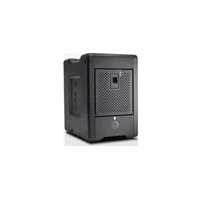
G-RAID SHUTTLE 4 - Hard Drive SANDISK - Free user manual and instructions
Find the device manual for free G-RAID SHUTTLE 4 SANDISK in PDF.


Pick your language and provide your email: we'll send you a specifically translated version.
| Product Type | External Hard Drive Enclosure (4-Bay) |
| Model | G-RAID SHUTTLE 4 |
| Brand | SanDisk |
| Dimensions (H x W x D) | Approx. 220 x 160 x 180 mm (8.7 x 6.3 x 7.1 in) |
| Weight | Approx. 3.5 kg (7.7 lbs) |
| Drive Bays | 4 x 3.5-inch or 2.5-inch SATA HDD/SSD (tool-less installation) |
| RAID Modes | RAID 0, RAID 1, RAID 5, RAID 10, JBOD, Span (configurable via switch or software) |
| Interface | Thunderbolt 3 (40 Gbps) and USB-C (10 Gbps) |
| Power Supply | External AC adapter (100-240V, 50/60 Hz, 90W) |
| Cooling | Built-in temperature-controlled fan and aluminum heatsink |
| Material | Aluminum alloy chassis with ventilation grilles |
| LED Indicators | Power, drive activity, and RAID status LEDs |
| Supported File Systems | HFS+, APFS, NTFS, exFAT, ext4 (depends on OS) |
| Compatibility | Mac and Windows (reformatting may be required) |
| Software Included | SanDisk G-RAID Manager (RAID configuration and monitoring) |
| Maintenance | Keep drive bays clean; use compressed air for vents; avoid moisture |
| Cleaning | Wipe exterior with a soft, dry cloth; do not use liquids or abrasives |
| Safety | Use only provided power adapter; ensure proper ventilation; do not block fan |
| Spare Parts / Repairability | User-replaceable drives and fan; other repairs by authorized service only |
| Warranty | 3-year limited warranty (standard) |
| Package Contents | G-RAID SHUTTLE 4 enclosure, Thunderbolt 3 cable, USB-C cable, AC adapter, quick start guide |
Frequently Asked Questions - G-RAID SHUTTLE 4 SANDISK
How do I set up the G-RAID SHUTTLE 4 for the first time?
Connect the enclosure to your computer using the included Thunderbolt 3 or USB-C cable. Plug in the power adapter and turn on the unit. Install drives into the tool-less bays, then use the G-RAID Manager software to configure the RAID mode (e.g., RAID 0 for speed or RAID 5 for redundancy).
Can I mix different drive capacities in the same array?
Yes, but the total capacity will be limited by the smallest drive in a RAID array (except JBOD or Span). For best performance, use identical drives.
Which RAID mode should I choose for data protection?
For a balance of performance and redundancy, select RAID 5 (requires at least three drives) or RAID 1 (mirroring, requires two drives). RAID 0 offers no protection.
Does the G-RAID SHUTTLE 4 work with Windows?
Yes, it is compatible with Windows (7, 8, 10, 11) but may require reformatting. Out of the box, it is pre-formatted for Mac (HFS+). Use Disk Management in Windows to reformat to NTFS or exFAT if needed.
How can I check the drive health and temperature?
Use the SanDisk G-RAID Manager software to monitor drive health, temperature, and RAID status. It also provides alerts for potential failures.
What should I do if the fan is loud or the enclosure overheats?
Ensure the ventilation grilles are not blocked and the fan is not obstructed. Clean dust using compressed air. If the problem persists, the fan may need replacement (contact support).
Can I use the G-RAID SHUTTLE 4 with an iPad or smartphone?
It may work with iPad Pro (USB-C) but requires external power. Smartphones generally cannot power the enclosure. Use a powered USB hub if needed.
How do I replace a failed drive in a RAID array?
Turn off the enclosure, remove the failed drive tray, insert a new drive of equal or larger capacity. Power on and use G-RAID Manager to rebuild the RAID array.
Is it possible to daisy-chain multiple G-RAID SHUTTLE 4 units?
Yes, via Thunderbolt 3 daisy-chaining. You can connect up to six devices (including displays) through a single Thunderbolt port.
What is the warranty period and how do I claim it?
The standard warranty is 3 years. To claim, contact SanDisk support with proof of purchase and serial number. Visit the official website for RMA process.
User questions about G-RAID SHUTTLE 4 SANDISK
0 question about this device. Answer the ones you know or ask your own.
Ask a new question about this device
No questions yet. Be the first to ask one.
Download the instructions for your Hard Drive in PDF format for free! Find your manual G-RAID SHUTTLE 4 - SANDISK and take your electronic device back in hand. On this page are published all the documents necessary for the use of your device. G-RAID SHUTTLE 4 by SANDISK.
USER MANUAL G-RAID SHUTTLE 4 SANDISK

Manual assistant
Powered by Anthropic
Waiting for your message
Product information
Brand : SANDISK
Model : G-RAID SHUTTLE 4
Category : Hard Drive