Sansa e200R Rhapsody - Mp3 player SANDISK - Free user manual and instructions
Find the device manual for free Sansa e200R Rhapsody SANDISK in PDF.


Pick your language and provide your email: we'll send you a specifically translated version.
| Product Type | MP3 Player |
| Brand | SanDisk |
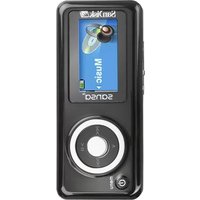
| Model | Sansa e200R Rhapsody |
| Storage Capacity | 4 GB internal flash |
| Display | 1.8-inch color LCD |
| Dimensions | 78 x 43 x 12 mm |
| Weight | 60 g (with battery) |
| Power Source | Built-in rechargeable lithium-ion battery |
| Battery Life | Up to 20 hours audio playback |
| Charging | USB charging via included cable |
| Audio Formats Supported | MP3, WMA, WAV, Audible |
| Additional Features | FM radio, voice recorder, photo viewer, microSD expansion slot |
| Connectivity | USB 2.0 |
| Rhapsody Compatibility | Full support for Rhapsody subscription and store |
| Care Instructions | Clean with dry cloth; avoid moisture and extreme temperatures |
| Safety Warnings | Do not disassemble; use only approved charger; keep away from children |
| Spare Parts & Repairability | Battery replaceable by service center; no user-serviceable parts |
| General Information | Release year: 2006; supports Rhapsody music service |
Frequently Asked Questions - Sansa e200R Rhapsody SANDISK
How do I transfer music to my Sansa e200R?
Connect the player to your computer via USB. It will appear as a removable drive. Drag and drop MP3 files into the Music folder. For Rhapsody subscribers, use the Rhapsody software to sync your library.
How do I reset my Sansa e200R if it freezes?
Press and hold the Power button for about 10 seconds until the device restarts. If that doesn't work, try sliding the Hold switch off and on, then repeat.
What is the battery life and how do I charge it?
The battery lasts up to 20 hours of audio playback. Charge via the included USB cable connected to a computer or USB wall charger. A full charge takes about 2 hours.
Can I expand the storage on the e200R?
Yes, the device has a microSD card slot under the battery cover. You can add up to 2 GB of additional storage (check for SDHC compatibility).
How do I use the FM radio?
From the main menu, select Radio. Use the << and >> buttons to scan stations. Press the center button to save a station. Presets can be accessed via the Options menu.
My e200R is not recognized by my computer. What should I do?
Ensure the player is turned on and not in 'MSC' or 'MTP' mode. Try a different USB port or cable. If using Windows, check Device Manager for drivers. You may need to update the firmware from the SanDisk website.
How do I create playlists on the device?
You can create playlists using the Rhapsody software or manually by creating an M3U file on your computer and copying it to the Playlists folder on the player.
What audio formats does the Sansa e200R support?
It supports MP3, WMA (including DRM-protected), WAV, and Audible audiobooks. Not compatible with AAC, FLAC, or OGG.
How do I record voice memos?
Go to Record in the main menu. Press the center button to start recording. Press again to stop. Files are saved as WAV and can be found in the Recordings folder.
Is the Sansa e200R compatible with Windows 10?
The device was designed for Windows XP/Vista but works with Windows 10 using the MTP mode. For drag-and-drop, switch to MSC mode in Settings. Compatibility may vary; consider using older Rhapsody software.
User questions about Sansa e200R Rhapsody SANDISK
0 question about this device. Answer the ones you know or ask your own.
Ask a new question about this device
No questions yet. Be the first to ask one.
Download the instructions for your Mp3 player in PDF format for free! Find your manual Sansa e200R Rhapsody - SANDISK and take your electronic device back in hand. On this page are published all the documents necessary for the use of your device. Sansa e200R Rhapsody by SANDISK.
USER MANUAL Sansa e200R Rhapsody SANDISK

Manual assistant
Powered by Anthropic
Waiting for your message
Product information
Brand : SANDISK
Model : Sansa e200R Rhapsody
Category : Mp3 player