
V-MATE - Enregistreur vidéo numérique SANDISK - Notice d'utilisation et mode d'emploi gratuit
Retrouvez gratuitement la notice de l'appareil V-MATE SANDISK au format PDF.

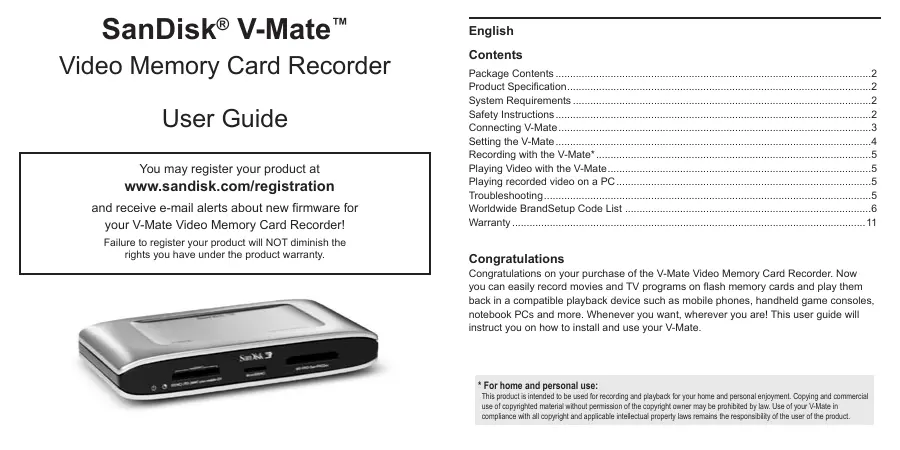

| Type de produit | Enregistreur vidéo numérique sur carte mémoire |
| Marque | SanDisk |
| Modèle | V-Mate |
| Formats vidéo supportés | MPEG-4 SP, H.263 ; fichiers MP4, 3GP, 3G2 |
| Résolution maximale | 640 x 480 pixels |
| Images par seconde | Jusqu'à 30 fps |
| Types de cartes mémoire compatibles | SD, SDHC, miniSD, miniSDHC, microSD, microSDHC, RS-MMC, MMCplus, MMCmobile, Memory Stick, Memory Stick PRO, Memory Stick Duo, Memory Stick PRO Duo |
| Connectique d'entrée | Prise 3.5 mm pour vidéo composite et audio (L/R) |
| Connectique de sortie | Prise 3.5 mm pour vidéo composite et audio (L/R) |
| Port USB | USB mini B |
| Émetteur infrarouge | Oui (pour contrôle de décodeur) |
| Alimentation | Adaptateur secteur inclus |
| Télécommande | Oui, avec pile |
| Programmation d'enregistrement | Jusqu'à 30 plages horaires |
| Compatibilité PC | Windows 2000/XP, Mac OS 10.1.2+ |
| Langues d'interface | Multilingue (réglable) |
| Système TV | NTSC/PAL (commutateur) |
| Accessoires inclus | Câbles AV (2x), câble USB, câble émetteur IR, adaptateur secteur, télécommande, guide utilisateur |
| Garantie | 2 ans |
| Fabrication | Chine |
FOIRE AUX QUESTIONS - V-MATE SANDISK
Questions des utilisateurs sur V-MATE SANDISK
0 question sur cet appareil. Repondez a celles que vous connaissez ou posez la votre.
Poser une nouvelle question sur cet appareil
Téléchargez la notice de votre Enregistreur vidéo numérique au format PDF gratuitement ! Retrouvez votre notice V-MATE - SANDISK et reprennez votre appareil électronique en main. Sur cette page sont publiés tous les documents nécessaires à l'utilisation de votre appareil V-MATE de la marque SANDISK.
MODE D'EMPLOI V-MATE SANDISK
SanDisk® V-Mate™
Enregistreur de cartes mémoire vidéo
Guide de l'utilisateur
Vous pouvez enregistrer votre produit sur
www.sandisk.com/registration
et recevoir des alertes par e-mail concernant les nouvelles versions du firmware de
votre enregistreur V-Mate Video Memory Card !
Le fait de ne pas enregistrer votre produit ne diminuera en rien
les droits que vous confère la garantie du produit.
Français
Sommaire
Contenu de l'emballage 2
Spécifications du produit 2
Configuration requise 2
Consignes de sécurité 2
Connexion du V-Mate 3
Réglage du V-Mate 4
Enregistrement avec le V-Mate* 5
Lecture vidéo avec le V-Mate 5
Lecture de vidéos enregistrées sur un PC 5
Dépannage 5
Liste mondiale des codes de configuration de marque 6
Garantie 11
Félicitations
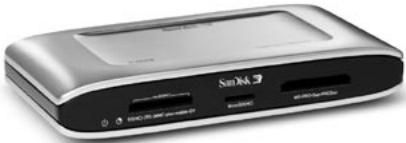
Félicitations pour l'achat de votre enregistreur de cartes mémoire vidéo V-Mate. Vous pouvez désormais enregistrer facilement des films et des émissions de télévision sur des cartes mémoire flash et les lire sur un appareil de lecture compatible tel que des téléphones mobiles, des consoles de jeux portables, des PC portables et plus encore. Quand vous voulez, où que vous soyez ! Ce guide de l'utilisateur vous expliquera comment installer et utiliser votre V-Mate.
* Pour un usage domestique et personnel :
Ce produit est destiné à être utilisé pour l'enregistrement et la lecture pour votre divertissement domestique et personnel. La copie et la distribution commerciale de ce produit sont interdites. L'utilisation de ce produit sous quelque forme que ce soit sans l'autorisation écrite de l'éditeur ou de son détenteur de droits sera considérée comme une violation de la conformité à toutes les lois sur le droit d'auteur et la propriété intellectuelle applicables, et reste la responsabilité de l'utilisateur du produit.
Contenu de l'emballage
Enregistreur de cartes mémoire vidéo V-Mate Télécommande avec pile Câbles audio/vidéo (x2) Câble émetteur infrarouge Câble USB Alimentation électrique - Guide de l'utilisateur
Spécifications du produit
Vidéo :
- Codecs : MPEG-4 SP, H.263
- Formats : MP4, 3GP, 3G2 Résolution : jusqu'à 640 x 480
- Images par seconde : jusqu'à 30
Formats de cartes compatibles :
- SD, SDHC, miniSD, miniSDHC, microSD, microSDHC
- RS-MMC (double tension)
- MMCplus, MMCmobile
- Memory Stick, Memory Stick PRO, Memory Stick Duo, Memory Stick PRO Duo
Connecteurs :
- Entrée 3,5 mm pour vidéo composite, audio gauche et droite
- Sortie 3,5 mm pour vidéo composite, audio gauche et droite
- USB mini B
- Émetteur IR (infrarouge) (connexion au décodeur ou au magnétoscope) Alimentation
Configuration système requise
Pour l'enregistrement et la lecture :
- Téléviseur avec connexion vidéo composite RCA (NTSC ou PAL) et audio. Source vidéo avec sortie vidéo composite RCA et audio (par exemple, décodeur câble/satellite, caméscope, magnétoscope ou lecteur DVD).
Pour la mise à jour du firmware / connexion à un PC :
- Windows : PC de type Pentium avec support USB et Windows 2000 ou XP. Macintosh : ordinateur avec support USB et Mac OS 10.1.2 ou version ultérieure.
CONSIGNES DE SÉCURITÉ

ATTENTION
RISQUE DE CHOC ÉLECTRIQUE - NE PAS OUVRIR


L'éclair avec une flèche à l'intérieur d'un triangle équilatéral est destiné à alerter l'utilisateur de la présence d'une « tension dangereuse » non isolée à l'intérieur du boîtier du produit, d'une amplitude suffisante pour constituer un risque de choc électrique pour les personnes.

Le point d'exclamation à l'intérieur d'un triangle équilatéral est destiné à alerter l'utilisateur de la présence d'instructions importantes d'utilisation et de maintenance (réparation) dans la documentation accompagnant l'appareil.
Instructions d'élimination DEEE
Ne jetez pas cet appareil avec les déchets ménagers non triés. Une élimination inappropriée peut être nocive pour l'environnement et la santé humaine. Veuillez consulter votre autorité locale de gestion des déchets pour plus d'informations sur les systèmes de retour et de collecte dans votre région.
Lisez ces instructions.
- Conservez ces instructions. Respectez tous les avertissements.
- Suivez toutes les instructions.
- Nettoyez uniquement avec un chiffon humide (débranchez l'adaptateur secteur avant le nettoyage).
- Ne pas installer à proximité de sources de chaleur telles que radiateurs, bouches de chaleur, poêles ou autres appareils (y compris les amplificateurs) qui produisent de la chaleur.
- Ne pas neutraliser la fonction de sécurité de la prise polarisée ou avec mise à la terre. Une prise polarisée a deux lames, l'une plus large que l'autre. Une prise avec mise à la terre a deux lames et une troisième broche de terre. La lame large ou la troisième broche est fournie pour votre sécurité. Si la prise fournie ne correspond pas à votre prise murale, consultez un électricien pour remplacer la prise obsolète.
- Protéger le cordon d'alimentation afin qu'il ne soit pas piétiné ou pincé, en particulier au niveau des fiches, des prises de courant et de l'endroit où il sort de l'appareil.
- Utiliser uniquement les accessoires spécifiés par le fabricant.
- Débrancher cet appareil pendant les orages ou lorsqu'il n'est pas utilisé pendant de longues périodes.
- Confier toute réparation à un personnel qualifié. Une réparation est nécessaire lorsque l'appareil a été endommagé de quelque manière que ce soit, par exemple si le cordon d'alimentation ou la fiche est endommagé, si du liquide a été renversé ou si des objets sont tombés dans l'appareil, si l'appareil a été exposé à la pluie ou à l'humidité, s'il ne fonctionne pas normalement ou s'il est tombé.
- Ne pas utiliser à proximité de l'eau (par exemple, évier, baignoire, piscine, etc.).
Avertissement :
POUR RÉDUIRE LES RISQUES D'INCENDIE OU DE CHOC ÉLECTRIQUE, N'EXPOSEZ PAS CET APPAREIL À LA PLUIE OU À L'HUMIDITÉ. DES TENSIONS DANGEREUSES SONT PRÉSENTES À L'INTÉRIEUR DU BOÎTIER. N'OUVREZ PAS LE BOÎTIER. CONFIEZ TOUTE RÉPARATION À UN PERSONNEL QUALIFIÉ.
Remarque :
Veuillez consulter l'étiquette d'évaluation au bas du SanDisk V-Mate pour connaître l'alimentation électrique et d'autres informations de sécurité.
Connexion du V-Mate
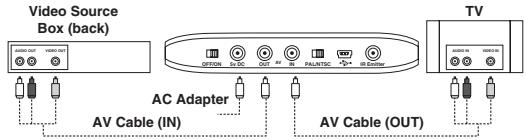
- Connectez un câble audio/vidéo à la sortie vidéo composite et aux sorties audio gauche/droite d'une source vidéo analogique (par exemple, décodeur câble/satellite, caméscope, magnétoscope ou lecteur DVD). La fiche jaune doit être connectée à la sortie vidéo, la fiche rouge à la sortie audio (R) et la fiche blanche à la sortie audio (L). Connectez le connecteur de 3,5 mm à l'autre extrémité du câble à la connexion d'entrée AV à l'arrière du V-Mate.
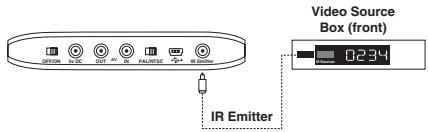
- Si vous utilisez un décodeur câble/satellite/terrestre ou un magnétoscope, connectez le connecteur de 3,5 mm du câble de l'émetteur IR au connecteur de l'émetteur IR à l'arrière du V-Mate. L'émetteur IR allumera/éteindra automatiquement et sélectionnera les chaînes sur le décodeur câble/satellite/terrestre ou le magnétoscope lors d'un enregistrement programmé. Retirez la couche protectrice de l'émetteur IR et collez-le à côté du capteur de télécommande du décodeur câble/satellite/terrestre ou du magnétoscope. Lors de la fixation de l'émetteur IR à la source vidéo, assurez-vous de ne couvrir qu'une partie de la fenêtre du récepteur IR afin de ne pas bloquer le signal IR provenant de la télécommande. Pour trouver le capteur de télécommande sur la source vidéo, consultez son manuel pour plus d'informations.
- Branchez le 2e câble audio/vidéo au téléviseur. Sur le téléviseur, la fiche jaune doit être connectée à l'entrée vidéo, la fiche rouge à l'entrée audio (R) et la fiche blanche à l'entrée audio (L). Connectez le connecteur 3,5 mm à l'autre extrémité du câble à la sortie AV à l'arrière du V-Mate.
- Branchez l'adaptateur secteur à l'arrière du V-Mate et branchez-le sur une prise de courant.
- Vérifiez la position de l'interrupteur NTSC/PAL à l'arrière du V-Mate. La position sélectionnée doit correspondre au type de téléviseur. Veuillez consulter le manuel ou les spécifications du téléviseur pour plus de détails.
- Mettez l'interrupteur d'alimentation à l'arrière du V-Mate sur la position ON.
- Retirez la bandelette en plastique de la télécommande pour activer la pile.
- Appuyez sur le bouton d'alimentation de la télécommande et le V-Mate démarrera (les LED bleues du logement clignotent et la LED verte d'alimentation reste allumée).
- Allumez le téléviseur et la source vidéo, puis changez la source d'entrée sur le téléviseur. Selon le téléviseur, la source d'entrée peut s'appeler TV/Video, Input ou Source (consultez le manuel du téléviseur pour plus d'informations). Lorsque la bonne source est sélectionnée, un message vous demandant d'insérer une carte mémoire s'affiche. Lorsque le V-Mate est éteint (en veille) à partir de la télécommande ou de l'arrière de l'appareil, le signal vidéo de la source vidéo s'affiche sur l'écran du téléviseur. Le V-Mate est maintenant correctement connecté.
Réglage du V-Mate
- Assurez-vous qu'une carte mémoire compatible est insérée. N'insérez qu'une seule carte mémoire à la fois.
- Sur l'écran suivant, réglez la date et l'heure (des réglages précis de date et d'heure sont nécessaires pour les enregistrements programmés). Lorsque l'alimentation est débranchée, l'horloge du V-Mate se réinitialise. Lorsque le V-Mate est rallumé, un message demande de régler l'horloge. Une fois l'heure réglée, le menu principal apparaît.
- Afin d'enregistrer un fichier vidéo compatible avec votre appareil de lecture, vous devez définir les paramètres d'enregistrement appropriés. Vous pouvez le faire manuellement ou en sélectionnant votre appareil de lecture dans une liste. Pour sélectionner dans une liste, choisissez RÉGLAGES puis FORMAT D'ENREGISTREMENT. Sélectionnez la catégorie appropriée pour votre appareil de lecture, puis sa marque et enfin son numéro de modèle. Les paramètres peuvent être ajustés manuellement en sélectionnant RÉGLAGES → FORMAT D'ENREGISTREMENT → RÉGLAGES MANUELS. Les paramètres suivants peuvent être ajustés manuellement :
- Qualité (plus la qualité est élevée, plus la vidéo est nette)
- Format (différents appareils de lecture fonctionnent souvent avec différents formats vidéo)
- Résolution (plus la résolution est élevée, plus la largeur et la hauteur de la vidéo sont grandes)
- Fréquence d'images (plus la fréquence d'images est élevée, plus la vidéo est fluide)
- Afin de programmer des enregistrements et de permettre au V-Mate d'enregistrer des programmes en votre absence, l'émetteur infrarouge doit utiliser un code infrarouge compatible avec le boîtier récepteur câble/satellite/terrestre ou le magnétoscope.
A. Allez dans RÉGLAGES → ÉMETTEUR IR. B. Sélectionnez le type d'appareil de la source vidéo connectée au V-Mate. C. Saisissez le code associé au type d'appareil et à la marque de l'appareil à partir du tableau à la fin de ce guide de l'utilisateur. Consultez www.sandisk.com pour la liste la plus récente des codes infrarouges pour les boîtiers de sources vidéo. D. Exécutez le test pour vous assurer que le V-Mate communique correctement avec votre boîtier de source vidéo.
- Pour régler la date et l'heure, allez dans RÉGLAGES → Date et heure
- Pour changer la langue de l'interface utilisateur, allez dans RÉGLAGES → Langue
Enregistrement avec le V-Mate*
Pour enregistrer un fichier vidéo, allez dans ENREGISTRER MAINTENANT dans le menu principal ou appuyez sur le bouton d'enregistrement de la télécommande. L'écran ENREGISTRER MAINTENANT apparaîtra et affichera une fenêtre d'aperçu. Si le boîtier de source vidéo est allumé, la fenêtre d'aperçu affichera le flux vidéo provenant du boîtier source. Appuyez sur le bouton d'enregistrement ou OK et le minuteur commencera à tourner, indiquant que la vidéo est en cours d'enregistrement. Le voyant LED à côté de l'emplacement dans lequel une carte est insérée clignote, indiquant que des données sont écrites sur la carte. NE RETIREZ PAS LA CARTE LORSQUE LE VOYANT CLIGNOTE, CAR CELA POURRAIT ENDOMMAGER LA CARTE ET CORROMPRE LE FICHIER VIDÉO. Pour arrêter un enregistrement, appuyez sur le bouton Arrêt.
Lors de l'enregistrement en résolution 640× 480, il n'y aura pas de fenêtre d'aperçu (dans les autres résolutions, il y a une fenêtre d'aperçu pendant l'enregistrement). À la place, l'écran est noir avec "REC" affiché dans le coin supérieur gauche pour indiquer que le V-Mate enregistre. Vous pouvez entendre l'audio. Pour voir le signal vidéo pendant l'enregistrement en résolution VGA, vous pouvez configurer une connexion directe entre la source vidéo (sortie AV 2 requise) et le téléviseur (entrée AV 2 requise). Cela nécessite un câble AV supplémentaire (non inclus).
Pour programmer un enregistrement, allez dans ENREGISTREMENT PROGRAMMÉ dans le menu principal et sélectionnez un créneau horaire (vous pouvez programmer un maximum de 30 créneaux). Avec les touches de curseur et le bouton OK, définissez la date, la chaîne, l'heure de début, l'heure de fin et la fréquence (ONCE - pour un enregistrement unique, DAY - pour un enregistrement quotidien, WEEK - pour un enregistrement hebdomadaire). Si vous programmez plusieurs créneaux, assurez-vous qu'il n'y a pas de chevauchement dans les heures d'enregistrement. Pour supprimer un créneau, sélectionnez-le et appuyez sur le bouton Supprimer de la télécommande.
Une fois l'enregistrement terminé et que le voyant a cessé de clignoter, vous pouvez retirer la carte du V-Mate et l'insérer dans votre appareil de lecture. Consultez le manuel de votre appareil de lecture pour savoir comment insérer une carte et lire les fichiers vidéo à partir de la carte.
L'enregistrement non autorisé de matériel protégé par le droit d'auteur peut porter atteinte aux droits des titulaires du droit d'auteur et violer les lois sur le droit d'auteur.
Lecture de vidéo avec le V-Mate
En plus d'enregistrer des fichiers vidéo pour les lire sur des appareils portables, vous pouvez également lire sur le V-Mate des vidéos enregistrées par le V-Mate lui-même. Dans le menu principal, sélectionnez LIRE VIDÉO et ouvrez un dossier ou sélectionnez un fichier vidéo. Appuyez sur le bouton Lecture de la télécommande pour démarrer le fichier vidéo. Pour supprimer un fichier vidéo, sélectionnez-le et appuyez sur le bouton Supprimer de la télécommande. Pour voir plus de détails sur les propriétés du fichier vidéo, sélectionnez-le et appuyez sur le bouton Info.
Lecture de vidéos enregistrées sur un PC
Pour la lecture sur un PC, RealNetworks™ RealPlayer™ 10 ou supérieur ou Apple® QuickTime™ 6 ou supérieur avec les dernières mises à jour logicielles est compatible avec les fichiers MPEG-4 ISO (.MP4).
Dépannage
Pour les questions fréquemment posées et d'autres informations de support V-Mate, veuillez consulter notre site Web à l'adresse www.sandisk.com/retail/support.asp
Pour une assistance par téléphone, veuillez appeler le numéro gratuit 866-SANDISK (866-726-3475) du lundi au vendredi, de 6 h à 18 h, heure normale du Pacifique.
Liste mondiale des codes de configuration de marque
Code de configuration pour les convertisseurs de câble (y compris les combinés câble/DVR)
ABC 0003,0008, 0237
Americast 0899
Austar 0276
Bell South 0899
Bestlink 0303
Birmingham Cable
Communications 0276
British Telecom 0003
Cable & Wireless 1068
Clearmaster 0883
ClearMax 0883
Coolmax 0883
Coship 1462
Daehan 0778
Daeryung 0008,0477, 0877,1877
Director 0476
France Telecom 0817
Galaxy 0008
GE 0237
Gehua 0476
General Instrument 0003,0276, 0476,0810
General
Instruments 0003,0276, 0476
GNI 1466
GoldStar 0144
Hamlin 0009,0273
Hongtian Jiangsu 1462
Hwalin 0303
Jerrold 0003,0276, 0476,0810
Jiuzhou 1445
Kabelvision 0003
KNC 0008
LG 0144
Macab 0817
Melita 0003
Memorex 0000
Motorola 0276,0476
0810, 1254
1376
Mr Zapp
MS 0303
Multitech 0883
Noos 0817
NTL 0003,0276
1060, 1068
Oak 0303
Ono 1068
Optus 0276,1060
Pace 0237,1060, 1068,1877
Panasonic 0000,0008, 0107
Paragon 0000
Philips 0317,0817, 1305
Pioneer 0144,0533, 0877,1877
Pulsar 0000
PVP Stereo
Visual Matrix 0003
Quasar 0000
RadioShack 0303,0883
Regal 0273,0279
Runco 0000
Sagem 0817
Salora 0000
Samsung 0000,0144, 0840,1060
Scientific Atlanta 0008,0237
0477.0877
1068, 1877
Skyworth 1464
Sony 1006
Starcom 0003
Supercable 0276
Supermax 0883
Taihan 0778
TCL 1445
Telewest 1068
Time Warner cable 1877
TongKook 0840
Torx 0003
Toshiba 0000
Trans PX 0276,0303
Tristar 0883
TS 0003,0303
United Cable 0003
US Electronics 0276
V2 0883
Viewmaster 0883
Vision 0883
Visiopass 0817
Vortex View 0883
Zenith 0000,0008, 0525,0899
Code de configuration pour récepteurs satellite (y compris combinés satellite/DVR)
@sat 1300
ABsat 0123
ADB 0642
AGS 0710
Akai 0200
Allsat 0200, 1017, 1043
AlphaStar 0772
Ampere 0132
Amstrad 0132, 0345
0795, 0847
0863, 0882
1175
AntSat 1017, 1083
Arcon 1043, 1075
Arnion 1300
Asat 0200
AssCom 0853
Astacom 0710
Aston 0142
Astro 0173,1099
Atsat 1300
Aurora 0642,0879
Austar 0497,0642
0863,0879
Axiel 0710
Axis 1111
Bentley Walker 1017
Blaupunkt 0173
Boca 0132
Boston 0710
Brand Unknown 0132, 0299
British Sky
Broadcasting 0847,1175, 1847
BskyB 0847,1175
BT 0710
Canal Digital 0853
CanalSatellite 0853
Canal+ 0853
CanalSatellite 0853
Century 0856
Chaparral 0216
Cherokee 0123,0710
Chess 1085
CityCom 0299,1075, 1176
Colombia 0132
Columbia 0132
Comag 0132
Conrad 0132
Crossdigital 1109
Cryptovision 0795
Cyrus 0200
D-box 0723,0873
Daewoo 1111
Delfa 0863
Deltasat 1075
Digenius 0299
DigiQuest 0863
Digiturk 1076
DirecTV 0099,0247
0392,0566
0639,0724
0863,0879 0749,0819
0710 1076,1108
1111 1109,1142
1017 1392,1414
0173 1442,1639
0132 1640,1749
0710 1856
Discovery 0710
Diseqc 0710
Dish Network System
1847 0775,1005
0847,1175 1505,1775
0710 Dishpro 0775,1005
0853 1505,1775
0853 DMT 1075
0853 DNT 0200
0853 Dream Multimedia 1237
0856 DREAM
0216 multimedia.TV 1237
0123,0710 DStv 0642,0879
1085 DX Antenna 1530
Echostar 0167,0610
0775,0853.
0871,1005
1086, 1200
1505, 1775
Einhell 0132
Elta 0200
Emme Esse 0871
Engel 1017
Eurieult 0882
Europa 0863
Europhon 0132, 0299
Eurosky 0132, 0299
Expressvu 0775, 1775
Force 1101
Force NO AS 1101
Fortec Star 1017, 1083
Foxtel 0497, 0720
0879, 1176
Fracarro 0871
Freesat 0882
FTEmaximal 0863
Fuba 0173, 0299
Galaxis 0853, 0863
0879, 1101
Garnet 1075
GE 0566
General Instrument 0869
General Instruments
0869
GF 1043
GF Star 1043
GOD Digital 0200
GOI 0775,1775
Gold Box 0853
Goldbox 0853
Goldvision 1017
Gradient 0099,0856
0887
| Grundig | 0173, 0345, | Kathrein | 0123, 0173, | Nokia | 0723, 0751, | Proton | 1535 | SL | 0132, 0299 | Tribo | 1075 |
| 0847, 0853, | 0200, 0249, | 0853, 0873, | QNS | 1402 | SM Electronic | 1200 | UEC | 0879 | |||
| 0879 | 1221 | 1023, 1223 | Quadral | 0710 | Smart | 0132, 0299, | UltimateTV | 1392, 1640 | |||
| Hanseatic | 1099 | Kenwood | 0853 | OctaTV | 1505 | Quelle | 0299 | 0882, 1101 | Uniden | 0722, 0724 | |
| Hirschmann | 0173, 0299, | Key West | 0132 | OnDigital | 0751 | Radiola | 0200 | Sony | 0639, 0847, | Unisat | 0132, 0200 |
| 0710, 0882, | Klap | 0710 | Optex | 1043 | RadioShack | 0869 | 0853, 1524, | Universum | 0173, 0299, | ||
| 1085, 1111 | Koscom | 1043 | Optus | 0879 | Radix | 0882 | 1639, 1640 | 1087, 1099 | |||
| Hisense | 1535 | Kreiling | 0249 | Orbitech | 1099 | RCA | 0143, 0392, | SR | 0132 | US Digital | 1535 |
| Hitachi | 0819, 1250 | Kreiselmeyer | 0173 | Origio | 0497 | 0566, 0855, | Star | 0887 | USDTV | 1535 | |
| HNE | 0132 | L&S Electronic | 0132, 1043 | OSAT | 0345 | 1392 | Star Choice | 0869 | Variousat | 0173 | |
| Hornet | 1300 | LaSAT | 0132, 0299 | Pace | 0200, 0497, | RFT | 0200 | Starlite | 0200 | Ventana | 0200 |
| HSnelt & Gretel | 0132 | LG | 1075, 1414 | 0720, 0795, | Roadstar | 0853 | Stream | 1847 | VH-Sat | 0299 | |
| HTS | 0775, 1775 | Lifesat | 0132, 0299, | 0847, 0853, | Saba | 0710 | Strong | 0132, 0853, | Visiosat | 0142, 0710 | |
| Hughes | 1043 | 0887, 1175 | Sagem | 0820, 1114, | 0879, 1300 | Viva | 0856 | ||||
| Network Syst | 0749 | Logix | 1017, 1075 | Packard Bell | 1111 | 1307 | Sunkai | 0123 | Voom | 0869 | |
| Hughes | Lorenzen | 0132, 0299 | Packsat | 0710 | Samsung | 0853, 0863, | Sunstar | 0132, 0642 | Wintel | 0299 | |
| Network Systems | 0749, 1142, | Luxo | 0345 | Palcom | 0299 | 1017, 1108, | Supernova | 0887 | Wintel | 0173, 0299 | |
| 1442, 1749 | Magnavox | 0722, 0724 | Panasat | 0615, 0879 | 1109, 1276 | SVA | 1456 | Worldsat | 0132, 0710 | ||
| Humax | 0863, 1176, | Manitata | 0132, 0710 | Panasonic | 0247, 0701, | Sat Control | 1300 | Teitelat | 1200 | XCOM | 0123 |
| 1406 | Manhattan | 1017, 1083 | 0847, 1527 | Setation | 1083 | TechniSat | 0200, 0863, | Xsat | 0123, 0847 | ||
| Huth | 0132, 1017, | Marantz | 0200 | Panda | 0173 | Schneider | 0710 | 1099 | Xtreme | 1300 | |
| 1075 | Maspro | 0173, 1530 | Patriot | 0132, 0710 | Schwaiger | 0132, 0863, | Technowelt | 0132 | Yes | 0887 | |
| Hyundai | 1075 | Matsui | 0173, 0710 | Paysat | 0724 | 1075, 1083, | Techsant | 1017 | Zehnder | 1075 | |
| I-Lo | 1535 | Maximum | 1075 | Philips | 0099, 0173, | 1111 | tekComm | 1017 | Zenith | 0856, 1856 | |
| ID Digital | 1176 | MediaSat | 0853 | 0200, 0710, | SCS | 0299 | Telecleri | 1043 | |||
| Indovision | 0887 | Medion | 0132, 0299, | 0722, 0724, | Sedea Electronique | 0132 | Telefanken | 0710 | |||
| Ingelen | 0882 | 1043, 1075 | 0749, 0853, | SEG | 1075, 1087 | Telestar | 1099 | ||||
| Innova | 0099 | Mega | 0200 | 0856, 0887, | Seleco | 0871 | Teves | 0132, 1300 | Aiwa | 1904, 1911 | |
| International | 0132 | Memorex | 0724 | 1076, 1114, | Serino | 0610 | Televisa | 0887 | |||
| Interstar | 1017 | Metz | 0173 | 1142, 1442, | Siemens | 0173 | Thomson | 0392, 0710, | Audiovox | 0180 | |
| InVideo | 0871 | Micromax | 0299 | 1749 | Silva | 0299 | 0820, 0847, | Broksonic | 1911 | ||
| IR | 0173 | Microstar | 1075 | Phonotrend | 0863, 1017, | SKY | 0099, 0847, | 0853, 1046 | Emerson | 0236, 1911 | |
| IrdeTo Technology | 0879 | Mitsubishi | 0749 | 1200 | 0856, 0887, | Tiko | FunaII | 1904 | |||
| ISkyB | 0887 | Morgan's | 0132, 0200 | Pioneer | 0853 | 1014, 1175, | Tivo | GE | 1917, 1922 | ||
| Itafel | 0871 | Motorola | 0856, 0869 | Planet | 0871 | 1847, 1856 | Tokai | 0200 | |||
| ITT Nokia | 0723, 0873 | Multichoice | 0642, 0879 | Preisner | 0132, 1101 | SKY Italia | 1847 | Toshiba | 0749, 0790, | Harley Davidson | 1904 |
| Jluzhou | 1450 | Myryad | 0200 | Premiere | 0853, 0873 | Sky Television | 1014 | 1285, 1530, | Hitachi | 1904 | |
| JOK | 0710 | Netsat | 0099, 0887 | Prima | 0795 | SKY+ | 1175 | 1749 | |||
| JVC | 0775, 1775 | Neuling | 0132 | Primacom | 1111 | Skymaster | 1075, 1085, | TPS | 0820, 1307 | Magnavo | 1904 |
| Kaon | 1300 | Next Level | 0869 | Profile | 0710 | 1200 | Triax | 0132, 0200, | Mitsubishi | 1917 | |
| KaTelco | 1111 | Nikko | 0200 | Proscan | 0392, 0566 | 7 | Skymax | 0200 | Orion | 1911 |
| RadioShock | 1904 | Aim | 0278 | Beaumark | 0240 | Craig | 0037, 0047, | Elta | 0072, 0078 | GEC | 0081 | |
| RCA | 1917, 1922 | Aiwa | 0000, 0037, | Beko | 0104 | 0072, 0040 | Emerex | 0032 | General | 0045 | ||
| Samsung | 1959 | 0209, 0348, | Bell & Howell | 0104 | Crown | 0037, 0072, | Emerson | 0000, 0002, | General Technic | 0348 | ||
| Sansui | 1904, 1911 | 0479 | Bestar | 0278 | 0278 | 0035, 0037, | Genexxa | 0104 | ||||
| Schneider | 1904 | Akai | 0037, 0041, | Black Diamond | 0642 | Curtis Mathes | 0035, 0041, | 0043, 0045, | Go Video | 0432 | ||
| Sears | 1904 | 0240, 0315, | Black Panther | 0278 | 0060, 0162 | 0072, 0121, | GoldHand | 0072 | ||||
| Sharp | 1917 | 0348, 0642 | Blaupunkt | 0081, 0162 | Cybernex | 0240 | 0184, 0209, | GoldStar | 0037, 0038, | |||
| Sony | 1904 | Akiba | 0072 | 0226 | CyberPower | 1972 | 0240, 0278, | 0209, 0225, | ||||
| Symphonic | 1904 | Akura | 0072 | Blue Sky | 0037, 0072, | Cyrus | 0081 | 0479 | 0226 | |||
| Teac | 1904 | Alba | 0000, 0072, | 0209, 0278, | Daewoo | 0045, 0046, | ESC | 0240, 0278 | Goodmans | 0000, 0037, | ||
| Thomas | 1904 | 0081, 0209, | 0348, 0642 | 0104, 0209, | Etzuko | 0072 | 0072, 0081, | |||||
| Zenith | 1904, 1911 | 0278, 0315, | Bondstec | 0072 | 0278, 0642 | Ferguson | 0000, 0041, | 0209, 0278, | ||||
| TV/DVD | 0348 | Brand Unknown | 0104, 0348 | Dansai | 0072, 0278 | 0278, 0320 | 0348, 0642 | |||||
| Combination (T) | Allorgan | Brandt Electronic | 0041 | De Graaf | 0042, 0046, | 0240, 0432 | Gradiente | 0000 | ||||
| Apex Digital | 1943 | America Action | 0278 | Brandt Electronicique | 0041 | 0048, 0081, | Finlandia | 0000, 0037, | Graetz | 0041, 0104, | ||
| Broksonic | 1935 | American High | 0035 | Braksonic | 0002, 0121, | Decca | 0000, 0041, | 0042, 0043, | 0240 | |||
| Bush | 0698, 1037 | 0479 | 0184, 0209, | 0067, 0081, | 0046, 0048, | Granada | 0000, 0037, | |||||
| Grundig | 1935 | Amstrad | 0000, 0072, | 0348, 0479 | 0209 | 0081, 0104, | 0042, 0046, | |||||
| Hitachi | 1960 | 0278 | 0000, 0072, | Deitron | 0278 | Finkelux | 0000, 0042, | 0104, 0226, | ||||
| Panasonic | 1941 | 0278 | 0081, 0209, | Dell | 1972 | 0081, 0104, | 0240 | |||||
| Philips | 1961 | Anam | 0037, 0162, | 0278, 0315, | Denko | 0072 | Firstline | 0037, 0043, | 0000, 0037, | |||
| RCA | 1948 | 0278 | 0348, 0642 | Denon | 0042 | 0045, 0072, | 0072, 0209, | |||||
| Sansui | 1935 | Anam National | 0162, 0226, | Calix | 0037 | Diamant | 0037 | 0209, 0278, | 0278 | |||
| Sylvania | 0171 | 1562 | Canon | 0035 | Diamond | 0348 | 0348 | Grundig | ||||
| Toshiba | 1935 | 0171 | 0278 | 0072, 0081, | ||||||||
| TV/VR/DVD | Anitech | 0072 | Carena | 0081, 0209 | DirectTV | 0739 | Fisher | 0226, 0320, | ||||
| Combination (T) | Ansonic | 0000 | Carrefour | 0045 | Domland | 0209 | 0347, 0348 | |||||
| Sharp | 1917 | ASA | 0037, 0081 | Casio | 0000 | 0081, 0278, | 0072, 0278 | 037, 0038, | ||||
| Toshiba | 1945 | Asha | 0240 | Cathay | 0278 | 0348 | Fuji | 0033, 0035 | 0240 | |||
| Audiobox | 1935 | 037, 0338 | CCE | 0072, 0278 | Dumont | 0000, 0081, | 0081, 0278, | 0240 | ||||
| Setup Code For VCRs (including DVRs) | AVP | CCE | 0072, 0041, | 0104 | Fujiitsu General | 0037 | Hazaz | |||||
| 0081, 0209 | ||||||||||||
| 0046, 0081 | ||||||||||||
| 0240 | ||||||||||||
| 0226, 0320, | ||||||||||||
| 0347, 0348 | ||||||||||||
| 0347, 0348 | ||||||||||||
| 0348 | ||||||||||||
| 0347, 0348 | ||||||||||||
| 0240 | ||||||||||||
| 0226, 0320, | ||||||||||||
| 0347, 0348 | ||||||||||||
| 0347, 0348 | ||||||||||||
| Cineeral | Elbe | Galaxis | 0278 | Hazaz | ||||||||
| Citizen | Eltech | Garrard | 0000 | Headquarter | ||||||||
| Citation | Elatech | Garrard | 0000 | Headquarter | ||||||||
| Cletronic | Electrohome | Garrard | 1972 | Hewlett Packard | ||||||||
| Colt | Electrophonic | GE | 0035, 0048, | Hi-Q | ||||||||
| Condor | Elin | 0240 | 0060, 0226, | |||||||||
| Elsay | 0072 | 0240, 0320 | ||||||||||
| Elan | 0240 | 0240, 0320 |
| Hinari | 0041, 0072, 0209, 0240, 0278 | ITV | 0037, 0278 | Logik | 0072, 0209, 0240 | Metz | 0037, 0081, 0162, 0226, 0320 | Nordmende | 0041, 0067, 0320 | Penney | 0035, 0037, 0038, 0042, 0240 |
| JBL | 0278 | ||||||||||
| Hisawa | 0209 | Jensen | 0041 | Lux May | 0072 | 0347, 1562 | 0347, 1562 | Northgate | 1972 | 0240 | |
| Hischito | 0045 | Joyce | 0000 | Luxor | 0043, 0046, 0047, 0048, 0049 | MGA | 0043, 0240 | NU-TEC | 0209 | Pentax | 0042 |
| Hitachi | 0000, 0037, 0041, 0042, 0046, 0081, 0089, 0240 | JVC | 0041, 0045, 0067, 0081, 1008 | LXI | 0104, 0315 | Micormay | 0348 | Oceanic | 0000, 0041, 0046, 0048, 0081, 0104 | Perdlo | 0000, 0035, 0038, 0072, 0209, 0226, 0479 |
| M Electronic | 0000, 0038 | Microsoft | 1972 | Okano | 0072, 0209, 0240, 0278 | 0209, 0226, 0479 | |||||
| Hornyphon | 0081 | Kaisui | 0072 | Magnasonic | 0278 | Migrgos | 0000 | 0000 | 0278, 0315, 0348 | Philips | 0000, 0035, 0081, 0226, 0618, 0739 |
| Howard Computers | 1972 | Karcher | 0081, 0278 | Magnavox | 0000, 0035, 0039, 0081, 0149, 0642 | Mind | 1972 | Olympus | 0035, 0226 | 0081, 0226 | |
| HP | 1972 | KEC | 0037, 0278 | 0149, 0642 | Mitsubishi | 0000, 0041, 0043, 0048, 0081, 0149, 0642 | Optimus | 0041, 0048, 0081, 0149, 0642 | 0642 | 0642 | |
| Hughes | 0042 | Kendo | 0072, 0209, 0278, 0315, 0348, 0642 | Magnin | 0240 | 0043, 0048, 0067, 0081, 0642 | 0043, 0048, 0067, 0081, 0642 | Optimus | 0037, 0048, 0104, 0162, 0226, 0479 | Phoenix | 0278 |
| Network Syst | 0042 | Phonola | 0081 | ||||||||
| Hughes | 0042 | Kenwood | 0038, 0041, 0067 | Manesth | 0045, 0072, 0081, 0209 | Motorola | 0035, 0048, 0000, 0240 | Orbit | 0072 | Pilot | 0037 |
| Network Systems | 0042, 0739 | Kenwood | 0038, 0041, 0067 | Marantz | 0035, 0038, 0081, 0209 | MTC | 0000, 0240 | Orion | 0002, 0121, 0184, 0209, 0348, 0479 | Pioneer | 0042, 0067, 0081, 0162 |
| Hysson | 0000, 0037, 0072, 0209, 0240 | KIC | 0000 | 0081, 0209 | Multitec | 0037 | 0037 | Orion | 0184, 0209, 0348, 0479 | Polk Audio | 0081 |
| Interfunk | 0278 | Kimari | 0047 | Mark | 0000, 0278 | Multitech | 0000, 0072 | Asoro | 0000, 0037, 0039, 0072 | Portland | 0278 |
| HI er | 0278, 0642 | Kloto | 0348 | Marta | 0037 | Murphy | 0000 | Orson | 0000, 0037, 0039, 0072 | Prinz | 0000 |
| iBURYPOWER | 1972 | KLH | 0072 | Master's | 0278 | Myriad | 0081 | Osaki | 0000, 0037, 0039, 0072 | Profilonic | 0081, 0240 |
| Imperial | 0000 | Kneissel | 0037, 0209, 0278 | Matsui | 0209, 0240, 0278 | NAD | 0104 | Osume | 0072 | Proline | 0000, 0278 |
| Ingorsoll | 0209, 0240 | Kendal | 0278, 0348 | Matsushita | 0278, 0348 | Naiko | 0642 | Osume | 0072 | 0320, 0642 | |
| Inno Hit | 0072 | Kodak | 0035, 0037 | Matsushita | 0035, 0162, 0226 | National | 0226 | Otake | 0209 | Proscan | 0600 |
| Interbuy | 0037, 0072 | Kolin | 0041, 0043 | Mediator | 0226 | Nebula Electronics | 0033 | Otto Versand | 0081 | Prosoco | 0278 |
| Interfunk | 0081, 0104 | Kolster | 0209 | Media Center PC | 1972 | NEC | 0035, 0037, 0039, 0072 | Pacific | 0000, 0348, 0642 | Prosonic | 0209, 0278 |
| Internal | 0278 | Korpel | 0072 | Mediator | 0081 | Nedleman | 0038, 0041, 0048, 0067, 0104, 0278 | Packard Bell | 1972 | Protec | 0072 |
| International | 0037, 0278, 0642 | Kuba | 0047 | Medion | 0209, 0348, 0642 | Nedleman | 0067, 0104, 0278 | Palladium | 0037, 0041, 0479 | ProVision | 0278 |
| Intervention | 0000, 0209, 0278 | Kuwa | 0226 | MEI | 0035 | Neckermann | 0081 | Neckermann | 0072, 0209, 0348 | Pulsar | 0039 |
| IR | 0041, 0042, 0479, 0485, 0495, 0572, 0581, 0642, 0642, 0642, 0642, 0642, 0642, 0642, 0642, 0642, 0642, 0642, 0642, 0642, 0642, 0642, 0642, 0642, 0728 | Lencio | 0278 | Meleonronic | 0000, 0037, 0038 | Nesco | 0000, 0072 | Palsonic | 0000, 0072, 0642 | Qisheng | 0600 |
| RadioShock | 0000, 0037 | Saville | 0240, 0278 | Sinudyne | 0081, 0209 | TCM | 0348 | Topline | 0348 | White |
| Radix | 0037 | SBR | 0081 | Smaragd | 0348 | Teac | 0000, 0037, | Toshiba | 0041, 0042, | Westinghouse |
| Randex | 0037 | Schaub Lorenz | 0000, 0041, | Sonic Blue | 0616 | 0041, 0072, | 0043, 0045, | 0278 | ||
| Rank | 0041 | 0104, 0315, | Sonneclair | 0072 | 0278, 0642 | 0067, 0081, | 0348 | |||
| Rank Arena | 0041 | 0348 | Sonlor | 0046 | Tec | 0072 | 0432, 1008, | XR-1000 | ||
| RCA | 0000, 0035, | Schneider | 0000, 0037, | Sontec | 0037 | Tech Line | 0072 | 1503, 1972 | 0072 | |
| 0042, 0048, | 0042, 0072, | 0081, 0240, | Sony | 0000, 0032, | Technics | 0035, 0081, | Totelevision | 0037, 0240 | Yamaha | |
| 0060, 0149, | 0278, 0348, | 0636, 1972 | TechniSat | 0348 | 0348 | Touch | 1972 | Yamishi | ||
| 0226, 0240, | 0642 | Soundwave | 0037, 0209, | Tecco | 0035, 0037, | Towada | 0072 | Yokan | ||
| 0320, 0880 | 0642 | Tradex | 0081 | Yoko | ||||||
| Realistic | 0000, 0035, | Scott | 0043, 0045, | 0348 | 0038, 0041, | Triad | 0278 | 0240 | ||
| 0037, 0046, | 0121, 0184 | Saangyong | 0072 | 0048 | Uher | 0240 | Zenith | |||
| 0047, 0048, | 0104 | Standard | 0278 | Tedelex | 0037, 0209, | Ultravox | 0278 | 0039, 0209, | ||
| 0104 | 0037, 0042, | Stern | 0278 | 0348 | Unilech | 0240 | 0479* | |||
| Reoc | 0348 | 0046, 0047, | STS | 0042 | Teknika | 0000, 0035, | United | 0348 | ZT Group | |
| ReplayTV | 0616 | 0104 | Sunkai | 0209, 0278, | 0037 | United Quick Star | 0278 | ZX | ||
| Rex | 0041 | Seaway | 0278 | 0348 | Telesavia | 0041 | Universum | 0041, 0037, | ||
| FRT | 0072 | SEG | 0072, 0081, | Sunstar | 0000 | Telefunken | 0041, 0209, | 0081, 0104, | 0278 | |
| Roadstar | 0037, 0072, | 0240, 0278, | Suntronic | 0000 | 0278, 0320, | 0209, 0240, | ||||
| 0081, 0240, | 0642 | Sunwood | 0072 | 0642 | 0348* | |||||
| 0278 | SEI | 0081 | Supra | 0037, 0278, | Telstar | 0037 | Vector | 0045 | ||
| Royal | 0072 | Sei-Sinudyne | 0081 | 0348 | Teletech | 0000, 0072, | Vector Research | 0038 | ||
| Runco | 0039 | Seleco | 0037, 0041 | Sylvania | 0000, 0035, | 0278 | Victor | 0041, 0067* | ||
| Saba | 0041, 0278, | Semivox | 0045, 0209 | Symphonic | 0043, 0081 | Tenosal | 0072 | Video Concepts | 0045 | |
| 0320 | Semp | 0045 | Symphonic | 0000 | Tensai | 0000, 0072, | Video Technic | 0000 | ||
| Saisho | 0209, 0348 | Sentra | 0072 | Systemax | 1972 | 0278 | Videomagic | 0037 | ||
| Salora | 0043, 0046, | Setron | 0072 | T+A | 0162 | Tevion | 0209, 0348, | Videosonic | 0240 | |
| 0104 | Sharp | 0037, 0048, | Tagar Systems | 1972 | 0642 | Viewsonic | 1972 | |||
| Sampo | 0037, 0048 | Shinco | 0209 | Taisho | 0209 | Texet | 0278 | Villain | 0000 | |
| Samsung | 0045, 0240, | Shinco | 0000 | Tandberg | 0278 | Thomas | 0000 | Wards | 0000, 0033, | |
| 0432 | Shinton | 0072, 0104 | Tandy | 0000, 0104 | Thomson | 0041, 0060, | 0035, 0038, | |||
| Sanky | 0039, 0048 | Shivaki | 0037 | Tashiko | 0000, 0037, | 0067, 0278, | 0039, 0042, | |||
| Sansei | 0048 | Shogun | 0240 | 0048, 0081, | 0320 | 0045, 0046, | ||||
| Sansui | 0000, 0041, | Siemens | 0037, 0046, | Tatung | 0240 | Thorn | 0037, 0041, | 0047, 0048, | ||
| 0067, 0072, | 0081, 0104, | 0104 | 0060, 0072, | |||||||
| 0209, 0348, | 0320, 0347 | 0081, 0149, | ||||||||
| 0479 | Siera | 0081 | 0048, 0067, | 0739, 1503 | 0240 | |||||
| Sanyo | 0046, 0047, | Silva | 0037 | 0811, 0209, | TMK | 0240 | Watson | 0081, 0642 | ||
| 0048, 0067, | 0278 | |||||||||
| 0104, 0209, | 0645, 0072, | |||||||||
| 0240, 0348 | 0348 |
Garantie
SanDisk garantit que ce produit sera exempt de défauts matériels de conception et de fabrication et qu'il sera substantiellement conforme aux spécifications publiées dans des conditions normales d'utilisation pendant deux ans à compter de votre date d'achat, sous réserve des conditions ci-dessous. Cette garantie est offerte à l'utilisateur final original qui achète auprès de SanDisk ou d'un revendeur agréé, et n'est pas transférable. Une preuve d'achat peut être requise. Ce produit doit être utilisé avec des cartes mémoire conformes aux spécifications de la CompactFlash Card Association, de la SD Card Association, de la MultiMediaCard Association, ou aux exigences Memory Stick, Memory Stick PRO, SmartMedia et xD-Picture Card, selon le cas ; l'utilisation avec tout autre produit annule cette garantie. SanDisk n'est pas responsable de toute défaillance ou défaut causé par un produit ou composant tiers, qu'il soit autorisé ou non. Cette garantie ne s'applique pas aux logiciels ou contenus tiers fournis avec le produit, et vous êtes responsable de tout service et réparation nécessaires pour ces logiciels. Cette garantie est annulée si la carte mémoire n'est pas utilisée conformément aux instructions du produit et du contenu, ou si elle est endommagée à la suite d'une installation incorrecte, d'une mauvaise utilisation, d'une réparation non autorisée, d'une modification ou d'un accident.
Pour obtenir un service de garantie, contactez SanDisk au 1-866-SanDisk ou envoyez un e-mail à : support@sandisk.com. Vous devez retourner le produit dans un emballage inviolable, port payé, comme indiqué par SanDisk. Vous devez obtenir un numéro de confirmation de suivi, que vous pourrez être tenu de fournir à SanDisk. SanDisk, à son choix, réparera ou remplacera le produit par un produit neuf ou remis à neuf de capacité et de fonctionnalité égales ou supérieures, ou remboursera le prix d'achat. La durée de garantie sur le produit remplacé sera la période restante sur le produit d'origine. CECI CONSTITUE L'INTÉGRALITÉ DE LA RESPONSABILITÉ DE SANDISK ET VOTRE RECOURS EXCLUSIF EN CAS DE VIOLATION DE CETTE GARANTIE.
SanDisk ne garantit pas et ne sera pas responsable de toute perte de données ou d'images contenues dans tout produit (y compris dans tout produit retourné), quelle que soit la cause de la perte. Les produits SanDisk ne sont pas garantis pour fonctionner sans défaillance. Les produits SanDisk ne doivent pas être utilisés dans des systèmes de maintien des fonctions vitales ou d'autres applications où une défaillance pourrait menacer des blessures ou la vie. Cette garantie vous donne des droits légaux spécifiques, et vous pouvez également avoir d'autres droits qui varient selon la juridiction.
CE QUI PRÉCÈDE CONSTITUE LA SEULE GARANTIE DE SANDISK. SANDISK DÉCLINE TOUTES AUTRES GARANTIES EXPRESSES ET IMPLICITES DANS TOUTE LA MESURE PERMISE PAR
DROIT APPLICABLE. LES GARANTIES IMPLICITES DE QUALITE MARCHANDE ET D'APTITUDE A UN USAGE PARTICULIER SONT LIMITEES A LA DUREE DE LA GARANTIE EXPRESSE. CERTAINES JURIDICTIONS N'AUTORISENT PAS LA LIMITATION DE LA DUREE D'UNE GARANTIE IMPLICITE, IL SE PEUT DONC QUE LA LIMITATION CI-DESSUS NE S'APPLIQUE PAS A VOUS. EN AUCUN CAS SANDISK OU TOUTE SOCIETE AFFILIEE OU FILIALE NE SAURAIT ETRE TENUE RESPONSABLE, EN QUELQUE CIRCONSTANCE QUE CE SOIT, DE DOMMAGES DIRECTS, INDIRECTS OU CONSECUTIFS, DE PERTES FINANCIERES OU DE PERTES DE DONNEES OU D'IMAGES, MEME SI SANDISK A ETE AVISE DE LA POSSIBILITE DE TELS DOMMAGES. CERTAINES JURIDICTIONS N'AUTORISENT PAS L'EXCLUSION OU LA LIMITATION DES DOMMAGES ACCESSOIRES OU CONSECUTIFS, IL SE PEUT DONC QUE LA LIMITATION OU L'EXCLUSION CI-DESSUS NE S'APPLIQUE PAS A VOUS. EN AUCUN CAS LA RESPONSABILITE DE SANDISK NE DEPASSERA LE MONTANT QUE VOUS AVEZ PAYE POUR LE PRODUIT.
Les informations contenues dans ce manuel sont sujettes a modification sans preavis. SanDisk ne saurait etre tenu responsable des erreurs techniques ou editoriales, ni des omissions contenues dans le present document, ni des dommages accessoires ou consecutifs resultant de la fourniture, de l'utilisation ou de la performance de ce materiel. Cette documentation ne peut etre copiee, reproduite, traduite ou reduite a un support electronique, en tout ou en partie, sans l'autorisation ecrite prealable de SanDisk.
SanDisk, le logo SanDisk et Store Your World in Ours sont des marques de commerce de SanDisk Corporation, enregistrees aux Etats-Unis et dans d'autres pays. V-Mate est une marque de commerce de SanDisk Corporation. Les marques et logos SD, miniSD, microSD, SDHC, miniSDHC et microSDHC sont des marques de commerce. SanDisk est un licencie autorise de la marque MultiMediaCard. RS-MMC, MMCplus et MMC mobile sont des marques de commerce de MultiMediaCard Association. Memory Stick, Memory Stick PRO, Memory Stick DUO et Memory Stick PRO DUO sont des marques de commerce de Sony Corporation. PSP et PlayStation sont des marques deposees ou des marques de commerce de Sony Computer Entertainment, Inc. (SCEI). RealNetworks et RealPlayer sont des marques de commerce ou des marques deposees de RealNetworks, Inc. Apple et QuickTime sont des marques de commerce d'Apple Computer Inc., enregistrees aux Etats-Unis et dans d'autres pays. Les autres noms de marques mentionnes dans le present document ne servent qu'a des fins d'identification et peuvent etre des marques de commerce de leurs detenteurs respectifs.
© 2006 SanDisk Corporation. Tous droits reserves.
Fabrique en Chine
SanDisk
Siege social : 1-408-801-1000
SanDisk Corporation
601 McCarthy Boulevard Mipitas, CA 95035
SanDisk International, Ltd.
Unit 100, Lakeside Drive Airside Business Park Swords, Co. Dublin, Irlande
SanDisk Shanghai
No. 85 Lou Shan Guan Rd. Room 305B, Oriental Intl. Building Shanghai, Chine 200336
SanDisk Limited (SDKK)
8F Nisso 15 Bldg. 2-17-19 Shin-Yokohama Kohoku-ku, Yokohama, Japon 222-0033
Assistance technique aux États-Unis : 1-866-SANDISK (726-3475)
Assistance technique mondiale : www.sandisk.com/techsupport
80-36-00585-Fr
En mémoire de Simon Wang 1977.09.12-2006.09.03 Chef de projet OEM
- SANDISK® V-MATE™
- ENREGISTREUR DE CARTES MÉMOIRE VIDÉO
- GUIDE DE L'UTILISATEUR
- FRANÇAIS
- SOMMAIRE
- FÉLICITATIONS
- POUR UN USAGE DOMESTIQUE ET PERSONNEL
- CONTENU DE L'EMBALLAGE
- SPÉCIFICATIONS DU PRODUIT
- VIDÉO
- FORMATS DE CARTES COMPATIBLES
- CONNECTEURS
- CONFIGURATION SYSTÈME REQUISE
- POUR L'ENREGISTREMENT ET LA LECTURE
- POUR LA MISE À JOUR DU FIRMWARE / CONNEXION À UN PC
- CONSIGNES DE SÉCURITÉ
- ATTENTION
- INSTRUCTIONS D'ÉLIMINATION DEEE
- LISEZ CES INSTRUCTIONS
- AVERTISSEMENT
- REMARQUE
- CONNEXION DU V-MATE
- RÉGLAGE DU V-MATE
- ENREGISTREMENT AVEC LE V-MATE
- LECTURE DE VIDÉO AVEC LE V-MATE
- LECTURE DE VIDÉOS ENREGISTRÉES SUR UN PC
- DÉPANNAGE
- LISTE MONDIALE DES CODES DE CONFIGURATION DE MARQUE
- CODE DE CONFIGURATION POUR RÉCEPTEURS SATELLITE (Y COMPRIS COMBINÉS SATELLITE/DVR)
- GARANTIE
- SANDISK
- SANDISK CORPORATION
- SANDISK INTERNATIONAL, LTD
- SANDISK SHANGHAI
- SANDISK LIMITED (SDKK)
Marque : SANDISK
Modèle : V-MATE
Catégorie : Enregistreur vidéo numérique