
DH 20 E - Dehumidifier ALPATEC - Free user manual and instructions
Find the device manual for free DH 20 E ALPATEC in PDF.


User questions about DH 20 E ALPATEC
0 question about this device. Answer the ones you know or ask your own.
Ask a new question about this device
Download the instructions for your Dehumidifier in PDF format for free! Find your manual DH 20 E - ALPATEC and take your electronic device back in hand. On this page are published all the documents necessary for the use of your device. DH 20 E by ALPATEC.
USER MANUAL DH 20 E ALPATEC
For your comfort and safety, ALPATEC has checked all the steps of manufacturing. The products have been made for you to enjoy their design and easiness to use.
ALPATEC, a complete range of air conditioners, coolers, fans and heaters for you to be completely satisfied.
CAUTION
PLEASE READ ALL THESE INSTRUCTIONS CAREFULLY BEFORE USING THIS APPLIANCE.
- Make sure that the voltage rating on the type plate corresponds to your main voltage. Any error in connecting the appliance invalidates the guarantee.
- Keep out of reach of children.
- Only use this appliance for domestic purposes and in the way indicated in these instructions. Never use for any other purposes.
- From time to time, check the cord. Never use the appliance if cord plug or appliance show any sign of damage.
- The cord length of this product has been selected to reduce the possibility of tangling in or tripping over a longer cord. If more cord length is needed, an extension cord may be used. Ensure not to let it dangle where someone could accidentally pull or trip over it.
- Do not place directly in front of heater or in direct sunlight as this could damage the appliance.
- Do not use the appliance outside.
- Never pull the cord to unplug or move the appliance.
- Unplug the appliance before cleaning or changing any pieces.
- Do never introduce metallic objects to avoid any risks of electrical shocks.
- Never use accessories that are not recommended or supplied by the manufacturer. It could constitute a danger for the user and could damage the appliance.
- Never repair the appliance yourself. All interventions made by a non-qualified person can be dangerous; in this case guarantee conditions would cancel. As all electrical products, a qualified electrician must repair
SPECIAL RECOMMENDATIONS
- Do not place any object onto the air outlet.
- When the appliance is in use you can have a window open if you wish but not all windows open widely.
- Keep insecticide spray and paint spray or any inflammable products away from the unit to protect the plastic casing and avoid electrical shocks.
- The rear of the unit can go quite close to the wall but leave at least 20cm gap.
- Do note place the appliance on soft or uneven ground in order to prevent it from leaking of making noise.
- Do not place the appliance on its side or back / front in storage or transport. If unit has been transported allow to stand for 2 hours before switching the unit on.
- Switch off and unplug the appliance when is not used for a long time.
THE MANUFACTURER WILL NOT ASSUME ANY RESPONSABILITY IN CASE OF NON ADHERENCE TO THESE INSTRUCTIONS.
SAVE THIS USER MANUAL CAREFULLY.
NAMES OF THE PARTS
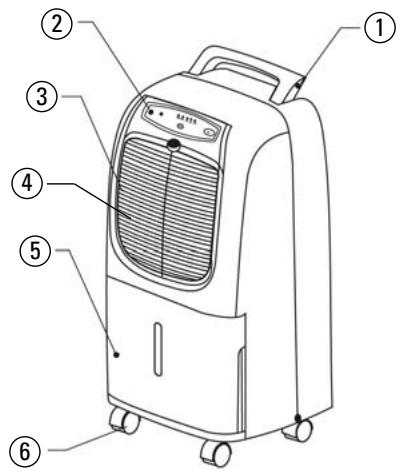
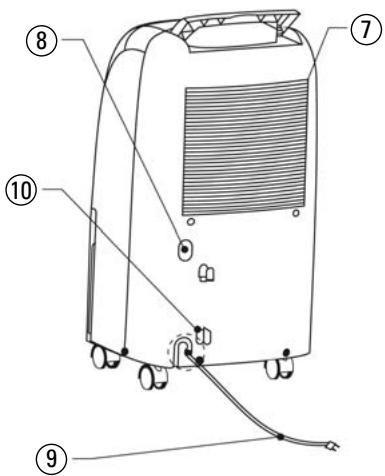
- Handle
- Control panel
Refer to instructions below
- Casters
- Air outlet
Outlet for dehumidified dry air
- Air inlet: intake of moist air
- Air filter : filter out dust and miscellaneous articles from the air sucked in
-
Water tank : when tank is full dehumidifier stops running
-
Drain hole
- Power cord
- Cord storage
CONTROL PANEL
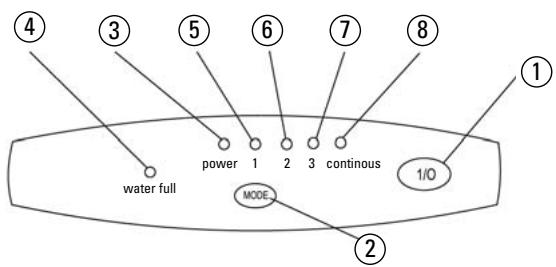
- On/off button
- Mode button: press this button to select the operating mode: continu 1 2 3 continu. The mode light indicator is switch on.
- Operating light indicator: When the power is connected, the operating light indicator blinks. This light indicator is on when dehumidifier is running, and it is off when it stops.
- Water full light indicator : this light indicator is switch on when the water tank is full or when it is not in right position.
- Mode 1 light indicator : the appliance runs to keep an hygrometry rate of 35% .
- Mode 2 light indicator : the appliance runs to keep an hygrometry rate of 50% .
- Mode 3 light indicator : the appliance runs to keep an hygrometry rate of 60% .
- CONTINU mode light indicator : the appliance runs in continuous dehumidification mode.
OPERATING INSTRUCTIONS
START OPERATION
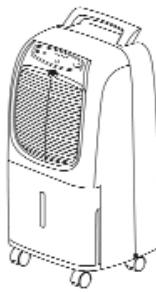
- Install the appliance on flat ground and keep a clearance at least 20~cm in the front of the unit.
- Plug the appliance. The operating light indicator blinks.
- Make sure the water tank is properly placed. If not, the water full light indicator is switch on.
- Press MODE button to select the operating mode. And press ON button to start dehumidification process.
- To stop the running, press OFF button, the RUN light indicator will switch off. You don't need to unplug the power cord except when the unit will be not use for a long time.
- If you switch the dehumidifier off for any reasons leave it 2 to 3 min before switching it on again. If the appliance does not come on after pressing ON button check that you have plugged the cord into the socket, and / or take the water tank out and in.
- Before moving the appliance, unplug the appliance and empty the water tank
Caution :
This dehumidifier has a 3 minutes circuit protector.
The compressor of the unit, therefore, will only begin to operate 3 minutes after the dehumidifier is switched on.
WHAT TO DO WHEN THE WATER TANK IS FULL
When the WATER FULL indicator is switch on the dehumidifier will stop working. Pull the bucket out by placing your hands on each side and pull it towards you. When you have emptied the tank place it in the appliance. It is now ready to carry on dehumidifying.
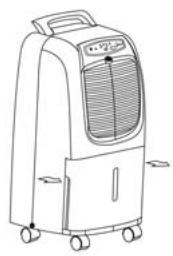
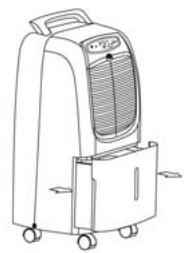
Caution: Always switch oo the appliance.
INSTRUCTIONS FOR CONTINUOUS DRAINAGE
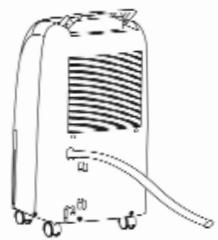
YOU MUST SWITCH OFF AND UNPLUG THE APPLIANCE OUT OF THE SOCKET. FOR A GOOD DRAINING OF WATER FOLLOW THE INSTRUCTIONS BELOW :
- Remove the plastic cover.
- Push the hose into the drain hole (a PVC hose).
- Remove the water tank, then push the hose onto the connector located inside of the hole. And reinsert the water tank.
- The other part of the hose must be placed in a container.
Caution : When adopting continuous drainage method, the drainage hose must be on level ground.
INSTALL THE FILTER
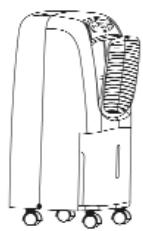
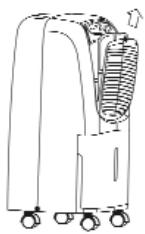
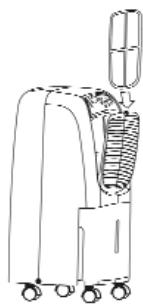
Switch off the appliance, open the air inlet from the notch above as shown.
It is recommended to check and clean the air filter every 2 weeks.
DEFROST
When operating in low temperatures (less than 12^ ) the surface of the evaporator will accumulate frost and affect the performance efficiency of the dehumidifier. When this happens the appliance will go into periodic defrost mode automatically. When defrost time is finished the appliance will run normally. The appliance can operate above 5^ . température supérieure à 5^ .
MAINTENANCE
For safety purposes, make sure that the power is on « OFF » position and the appliance is unplugged out of the socket before any maintenance, repairing or cleaning operation.
1. CLEANING OF OUTER CASE
- Clean the case with a soft and dry cloth.
- If the case has accumulated dust or is very dirty, use any mild household cleaner to remove any stubborn stains, then wipe with clean lightly dampened cloth.
- Avoid spraying water onto the unit as this could cause electric shock or short circuit.
2. CLEANING METHOD OF FILTER SCREEN
Clean the air filter screen every two weeks with vacuum cleaner or water and dry the filter before re-use.
TROUBLE SHOUTING
IF YOU DISCOVER THAT YOUR APPLIANCE HAS UNUSUAL SYMPTOMS PLEASE CHECK THE FOLLOWING FIRST :
| SYMPTOM | POSSIBLE CAUSE | PROBABLE SOLUTION |
| Fan and Compressor are dead | - No power or power supply voltage too low. - Plud damaged or power cord broken. - The water tank is full. - Could be in defrost mode. - Within 3 minutes protection time. | - Will return to normal after 3 minutes. - Contact the distributor or a qualified electrician. |
| Stop dehumidifying or low performance | - Filter is blocked. - Gas leakage. - Windows are open. | - Clean filter. - Contact the distributor or a qualified electrician. |
| Making unpleasant noise | - Uneven ground. - Filter is blocked. - Motor or compressor loose. | - Level as best you can. - Contact the distributor or a qualified electrician. - Normal, flow of liquid gas. |
| Continuous cooler frosted | - Filter is too dirty. - Defrost not working. | - Clean it. - Switch off. Contact the distributor or a qualified electrician. |
| Overflow of water | - Water tanks is leaking. - Breakdown of micro switch. | - Contact the distributor or a qualified electrician. |
If after checking the above, the unit still has problems contact the distributor or a qualified electrician.

Instructions on environment protection
Do not dispose of this product in the usual household garbage at the end of its life cycle; hand it over a collection point for the recycling of electrical and electronic appliances. The symbol on the product, the instructions for use or the packing will inform about the methods of disposal. The materials are recyclable as mentioned in its marking. By recycling or others forms of re-utilization of old appliances, you are making an important contribution to protect our environment. Please inquire at the community administration for the authorized disposal location.
ALPATEC
SOLUTIONS CLIMATIQUES

- CAUTION
- PLEASE READ ALL THESE INSTRUCTIONS CAREFULLY BEFORE USING THIS APPLIANCE.
- SPECIAL RECOMMENDATIONS
- THE MANUFACTURER WILL NOT ASSUME ANY RESPONSABILITY IN CASE OF NON ADHERENCE TO THESE INSTRUCTIONS.
- SAVE THIS USER MANUAL CAREFULLY.
- NAMES OF THE PARTS
- CONTROL PANEL
- OPERATING INSTRUCTIONS
- START OPERATION
- Caution :
- WHAT TO DO WHEN THE WATER TANK IS FULL
- INSTRUCTIONS FOR CONTINUOUS DRAINAGE
- INSTALL THE FILTER
- DEFROST
- MAINTENANCE
- CLEANING OF OUTER CASE
- CLEANING METHOD OF FILTER SCREEN
- TROUBLE SHOUTING
- IF YOU DISCOVER THAT YOUR APPLIANCE HAS UNUSUAL SYMPTOMS PLEASE CHECK THE FOLLOWING FIRST :
- Instructions on environment protection
- ALPATEC
Brand : ALPATEC
Model : DH 20 E
Category : Dehumidifier