GURU HP Transmitter - Radio transmitter SEAC - Free user manual and instructions
Find the device manual for free GURU HP Transmitter SEAC in PDF.


User questions about GURU HP Transmitter SEAC
0 question about this device. Answer the ones you know or ask your own.
Ask a new question about this device
Download the instructions for your Radio transmitter in PDF format for free! Find your manual GURU HP Transmitter - SEAC and take your electronic device back in hand. On this page are published all the documents necessary for the use of your device. GURU HP Transmitter by SEAC.
USER MANUAL GURU HP Transmitter SEAC
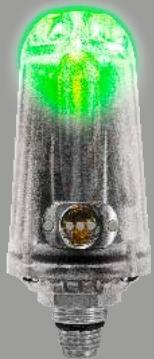


GURU HP Transmitter
User Manual
Made in Italy
Ver. 1.0
WARNING: requires a Seac GURU Dive Computer
IMPORTANT WARNINGS 4
GENERAL TRANSMITTER WARNINGS 4
WARNINGS (Transmitter) 5
Care and maintenance 6
Recharging the battery 7
PREPARING THE TRANSMITTER FOR THE DIVE 8
Mounting the Transmitter on the first stage 8
Turning on the Transmitter and checking battery status 9
Connecting the Transmitter to the GURU 10
Changing the Transmitter communications channel 11
TRANSMITTER DURING THE DIVE 12
BAR / Psi 12
RBT and TANK RESERVE 13
RBT during a no-decompression dive 13
RBT in a DECO dive 14
The color code during the dive: 15
The Transmitter after the dive 16
CERTIFICATE OF GUARANTEE 17
Congratulations on your purchase of this SEAC SCUBA diving device.
This SEAC computer Transmitter is a technologically advanced instrument that is the result of the most extensive research in the sector.
⚠ WARNING!
This is NOT THE GURU COMPUTER MANUAL!
The GURU Dive Computer manual is available on the website: www.seacsub.com.
⚠ WARNING!
Sufficient training is necessary to adequately understand the terminology used in this manual and certain functions of the device.
⚠ WARNING!
Periodically check the www.seacsub.com website for any updates to this manual.
The version of the manual (e.g. 1.0) is shown on the cover.
⚠ WARNING!
THE TRANSMITTER IS SOLD SEPARATELY FROM THE GURU DIVE COMPUTER.
IMPORTANT WARNINGS
GENERAL TRANSMITTER WARNINGS
⚠ WARNING!
You must read this user manual in full before using the SEAC device. Using the computer or one of its accessories incorrectly will void the warranty and can cause permanent damage to the computer and/or its accessories.
⚠ WARNING!
The dive computer IS NOT A SUBSTITUTE for diver training and should only be used by divers who have been properly trained.
⚠ WARNING!
Use of the wireless Transmitter IS NOT A REPLACEMENT for use of a submersible pressure gauge. In any case, you must always have a submersible pressure gauge. The wireless Transmitter might be subject to malfunction or interference with other probes. Even if the Transmitter is operating perfectly, you must still consult the pressure gauge frequently during the dive.
⚠ WARNING!
The SEAC computer and Transmitter are devices that are auxiliary to the dive. Therefore, divers must always carry an adequate table, a dive watch, and a pressure gauge so that they can perform their decompression if the unit should malfunction.
⚠ WARNING!
SCUBA diving entails risks related to decompression sickness, oxygen toxicity, and other dive-related risks. Even a careful reading of this manual and use of the device will not rule out potential dangers. Anyone unfamiliar with these risks or who does not knowingly accept them must not dive with a SEAC computer.
⚠ WARNING!
This is NOT THE MANUAL FOR THE SEAC COMPUTER. This is the manual for the Transmitter (considered an accessory of the computer). You must read the warnings provided in the manual for your SEAC computer before diving. The SEAC computer manual is available at www.seacsub.com.
WARNINGS (Transmitter)
⚠ WARNING!
DO NOT EXPOSE THE TRANSMITTER TO PRESSURES GREATER THAN 300 BAR (4351 Psi)
Maximum detectable pressure: 250 BAR (3625 Psi)
Maximum sustainable pressure: 300 BAR (4351 Psi)
The computer and Transmitter are NOT intended for PROFESSIONAL use.
The computer and Transmitter are intended strictly for use in sports (recreational or technical).
We advise against using them in professional or commercial dives, except as an additional tool to support the diver.
- Check the battery status before every dive, although if the Transmitter turns off during the dive it does not expose the operator to any risk. (WARNING: Remember that a pressure gauge is always mandatory on every tank you use!). We do not recommend diving with the Transmitter when it has less than 30% charge (red light).
- Before diving, always check that the Transmitter is intact and shows no signs of cracks or breakage, that the seals on the screws are intact, and that it has not been tampered with in any way. If this check fails, do NOT use the Transmitter.
- Do not expose the Transmitter to blows or drops. Never lift the tank by grasping the Transmitter, for any reason.
⚠ WARNING!
DO NOT USE the Transmitter unless it is in perfect condition! Using a Transmitter that is unsuitable for use for any reason - falls, tampering, etc. - puts the user at risk. It is the user's responsibility to ensure that the Transmitter is in perfect condition before connecting it to the first stage or using it in any way. Anyone unfamiliar with these risks or who does not knowingly accept them must not use the Seac Transmitter. If you have any questions about connecting the Seac Transmitter to the first stage or about the preventive safety checks that must be performed, ask your instructor.
Care and maintenance
- Keep your Transmitter clean and dry. Do not expose it to chemical agents, including alcohol.
Use only fresh water to clean your Transmitter, removing all saline deposits.
⚠ WARNING!
Only wash the Transmitter when it is connected to the first stage. Do NOT wash the Transmitter if the hole that connects with the first stage is not properly protected from the water.
When disassembled from the first stage, affix the protective cap on the Transmitter threads. To dry the Transmitter, leave it naturally in the shade. Do not use jets of cold or hot air.
- Do not expose the Transmitter directly to the sun or sources of heat higher than 50°C. Store it in a cool (5°C-25°C), dry place, making sure to put the protective cap on the threads.
- Do not attempt to open, modify, or repair the Transmitter yourself. Always contact SEAC.
- The warranty will be forfeited if the computer or the Transmitter are opened by an unauthorized service center.
- Do not place the computer or the Transmitter in a hyperbaric chamber.
- The GURU computer and the Transmitter are built to withstand use in sea water, but after the dive they must be rinsed thoroughly in fresh water and not exposed directly to sunlight or sources of heat to dry them.
- Check that there are no traces of humidity on the inside of the device.
⚠ WARNING!
Do not attempt to open the device for any reason. If you have problems, contact an authorized SEAC center, or contact SEAC directly. Breaking the seals on the device immediately and irreversibly voids all warranties on the product.
Recharging the battery
The SEAC Transmitter has a Li-Ion rechargeable battery with no memory effect. The battery time data provided can vary +/-15% depending on the ambient temperature.
⚠ WARNING!
Always fully charge the battery before using the computer the first time.
You can recharge the Transmitter by connecting it to a USB wall charger (not included) with the USB cable provided with the GURU. (The USB cable is not included in the Transmitter package.)

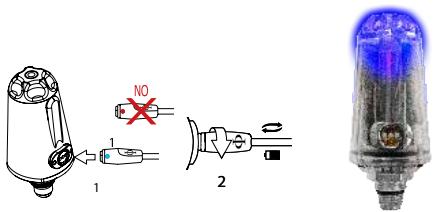
We recommend using a USB wall plug (like those for smartphones/tablets) for charging the Transmitter.
If you decided to use a USB port on a computer, make sure that the computer does not suspend power when it switches to stand-by mode. Charging the Transmitter from a computer is not recommended because the device might not charge fully.
The Transmitter has approximately 100 hours of diving battery time (this can vary +/-15% depending on temperature) or 2 years in standby (if the battery was fully charged before it was stored).
Even if the SEAC Transmitter's next-generation battery has no memory effect, we still recommend charging the battery completely. Average charging time is 3-5 hours depending on the residual charge level.
When charging, the SEAC transmitter activates the BLUE LED. The blue light switches off when charging is complete. Once the battery has charged, even if the device is left connected to electrical power, the Transmitter automatically interrupts the flow of power. If you leave the transmitter charging for longer than necessary, and leave it long enough that the Transmitter battery percentage drops below 95%, charging (and the blue light) will reactivate automatically to charge the battery back to 100%.
Nevertheless, we do not recommend leaving the Transmitter on the charger for more than 8 consecutive hours.
⚠ WARNING!
Don't leave the Transmitter with a completely dead battery for long periods (e.g. 1-2 months); this can damage the battery. The Transmitter memory records an alarm if it is left dead for long periods. This eventuality is not covered by the warranty. If you need to store the Transmitter for an extended period, first charge the battery fully and remember to recharge it from time to time.
PREPARING THE TRANSMITTER FOR THE DIVE
Mounting the Transmitter on the first stage
The Transmitter must be mounted on a High Pressure (HP) port on the regulator first stage.
High pressure ports are usually marked "HP". Check the manual for your regulator to identify the correct port.
Mount the Transmitter using the same method, care, and caution you would employ when mounting a high pressure hose connected to the pressure gauge. Assemble the Transmitter so that it does not interfere with the regulator hoses.
Always check that the sealing O-ring in the lower (threaded) part of the Transmitter is present, intact, clean, and properly lubricated. Immediately replace the O-ring whenever it is damaged (HP O-ring: 8.73 x 1.78 NBR 70).
⚠ WARNING!
If you do not know how to mount a device on a high pressure (HP) port, contact your instructor!
If the Transmitter is damaged, do NOT mount it on the regulator.

This image is only an example. The correct connection position on your first stage may differ.
Turning on the Transmitter and checking battery status
The Transmitter will turn on automatically as soon as it detects tank pressure.
To start the Transmitter, connect it to a tank and open the tank valve. We always recommend that you open the tank gradually. If you notice any gas leaking from any device mounted to the tank, close the tank.
⚠ WARNING!
If you do not know how to open a tank safely, contact your instructor!
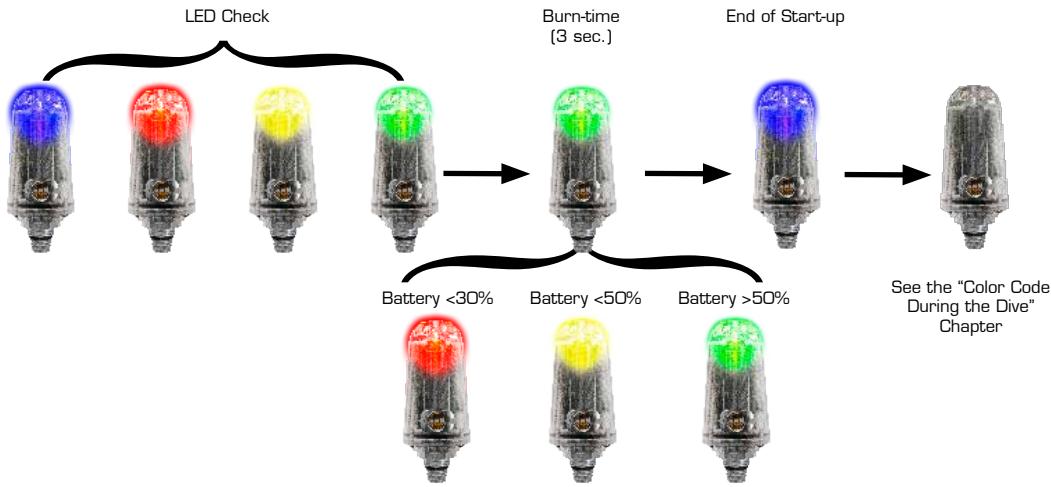
When starting up, the Transmitter performs an LED check, switching the LEDs on in sequence (Blue, Red, Yellow, Green). Afterward, it shows the battery status by switching on one of the three LEDs for 3 seconds, depending on the battery time left (see the image below). Finally, it confirms conclusion of the start-up phase with a blue flash.
Once the start-up phase is complete, the Transmitter begins to display the tank pressure using the Color Code system.


Connecting the Transmitter to the GURU
Once the Transmitter is turned on, access the TRANSMIT menu on the GURU by pressing the button on the bottom left of the watch screen and scrolling through the menu items.
To pair with the Transmitter for the first time, position the GURU approximately 20-30 cm from the Transmitter.
⚠ WARNING!
Placing the GURU too close to the Transmitter could prevent them from pairing correctly.

Press the B button to begin searching for the Transmitter (SRC). When pairing is complete, the Transmitter's TX ID will be displayed on the screen.
(Each Transmitter has 31 TX ID communications channels. The TX ID is assigned to the Transmitter randomly. You can change the Transmitter TX ID if there is interference with another Transmitter; see the dedicated section in this manual.)
To check that the GURU has paired correctly with the Transmitter, activate dive mode. Within 30 seconds, the tank pressure will be displayed in the lower right part of the screen (BAR). (The RBT value will only be displayed during the dive; see the dedicated section in this manual.)
Once paired, the GURU and Transmitter will connect automatically as soon as the GURU activates OC (Open Circuit) dive mode.
⚠ WARNING!
Using the Transmitter reduces the GURU's battery time to approximately 20 hours of dive time. Set the TX ID to "OFF" if you are not using the Transmitter.
Changing the Transmitter communications channel
If interference with other Transmitters occurs, you will need to change the communications channel (TX ID).
Each Transmitter has 31 channels. The channel is assigned randomly, and the channel assigned is saved to memory. It is not changed until the Transmitter's battery dies or you perform the following procedure to change the TX ID.
PROCEDURE:

Press the second stage purge button and completely drain all pressure from the Transmitter before it completes the start-up phase. Wait 30 seconds before turning the Transmitter on again.
After you change the TX ID, you will need to pair the devices again, after selecting the RESET command on the GURU.
Select RESET (the TX ID is set automatically to OFF). Then pair the devices again as described in the correct chapter in this manual.
TRANSMITTER DURING THE DIVE
BAR / Psi
The lower right part of the GURU screen will display the BAR value (PSI if Imperial units of measure are set). The BAR value indicates the pressure remaining in the tank.
The BAR value will be displayed about 30 seconds after the Transmitter is switched on. The BAR value is updated every 5 seconds. If data transmission is interrupted, or is unstable for more than 1 minute, the BAR value will be hidden ("—"). The BAR value will be restored as soon as communications are stable again for at least 1 minute.

RBT and TANK RESERVE
The RBT value (Remaining Bottom Time) is shown in the lower part of the GURU screen.
The RBT value is calculated based on the current breathing rate. The GURU may need from 2-5 minutes of diving in order to acquire sufficient data to calculate the RBT. Until a reliable RBT value is available, the RBT value is not displayed (“—”). The RBT value differs from person to person, even at the same depth and tank pressure.
RBT during a no-decompression dive
If the dive remains within the no-decompression limits, the RBT value indicates the anticipated time remaining - given the current depth and breathing rate - before the tank reaches reserve pressure (TANK RES, which can be set from the TRANSMITTER menu).
E.g. (If TANK RES. = 30 in the TRANSMITTER menu)
In a no-decompression dive, the RBT value will be "O" when there is 30 BAR of pressure left in the tank.
The TANK RES. (reserve) value can be changed from GURU's TRANSMITTER menu. The minimum value of TANK RES. is 10 BAR and the maximum is 50 BAR.
⚠ WARNING!
The RBT is a purely mathematic-statistical value based on the information acquired by the Transmitter. It cannot in any way anticipate behaviors that increase gas consumption such as overbreathing or similar.
It must be used solely and exclusively as a generic statistical indication. It cannot in any way replace proper dive planning or an awareness of your own physical and mental faculties.
Do not use the RBT value to extend the dive beyond the value established during planning. If you have any questions about how to correctly program a dive, contact your instructor.
RBT in a DECO dive
If anticipated mandatory deco stops are expected (warning: Safety Stops and Deep Stops are not considered mandatory safety stops), the RBT value indicates the remaining bottom time expected, given the current depth and breathing rate, so that once the mandatory deco stops are complete, the tank pressure will reach the reserve pressure (TANK RES, which can be set from the TRANSMITTER menu).
E.g. (If TANK RES. = 30 in the TRANSMITTER menu and dive with DECO stops)
In a DECO dive, the RBT value will be "O" when there is sufficient pressure left in the tank so that, if the ascent begins immediately and the correct speed and mandatory deco stops are respected (the Deep Stop is not considered a mandatory stop), there will be 30 BAR of pressure remaining once the final deco stop is complete.
The TANK RES. (reserve) can be changed from the TRANSMITTER menu. The minimum value of TANK RES. is 10 BAR and the maximum is 50 BAR.
⚠ WARNING!
The RBT is a purely mathematic-statistical value based on the information acquired by the Transmitter. It cannot in any way anticipate behaviors that increase gas consumption such as overbreathing or similar.
It must be used solely and exclusively as a generic statistical indication. It cannot in any way replace proper dive planning or an awareness of your own physical and mental faculties.
Do not use the RBT value to extend the dive beyond the value established during planning. If you have any questions about how to correctly program a dive, contact your instructor.
The color code during the dive:
The Transmitter has the special feature of being able to communicate the pressure remaining in your tank to your dive buddy or instructor.
⚠ WARNING!
Do not apply paints or solvents to the Transmitter. This can seriously damage the Transmitter (and invalidate the warranty).
Throughout the entire dive, the Transmitter will flash Green, Yellow, or Red, depending on the pressure remaining in the tank as follows:


The Transmitter after the dive
The Transmitter shuts off automatically 30 seconds after you close the tank and have drained the pressure remaining in the first stage.
⚠ WARNING!
Use only fresh water to clean your Transmitter, removing all saline deposits. Surfactants and solvents must be strictly avoided.
⚠ WARNING!
Only wash the Transmitter when it is connected to the first stage. Do NOT wash the Transmitter if the first stage connector hole is not properly protected against the water.
When disassembled from the first stage, put the protective cap on the Transmitter. Leave it to dry, shielded from the rays of the sun, and do not use jets of cold or hot air.
You can leave the Transmitter mounted on the first stage or remove it.
If you decide to leave it mounted, make sure it is not exposed to any blows. Refer to the Warnings and the "care and maintenance" chapter of this manual.
If you decide to disassemble the Transmitter, make sure you close its threaded connection hole using the special cap. (Refer to the manual for your regulator regarding how to protect the first stage HP hole.)

CERTIFICATE OF GUARANTEE
The warranty has a duration of 2 (two) years in accordance with current European regulations.
To exercise the warranty, you must display a copy of your proof of purchase upon request.
SEAC guarantees the correct operation of this product as described in this document.
The warranty herein can be exercised according to the conditions and limits expressly indicated below:
- The warranty has a duration of 2 (two) years starting from the time the product is purchased at a SEAC authorized dealer and requires no prior or subsequent formal validation.
- The warranty is acknowledged only to the original buyer of the product at a SEAC authorized dealer.
The warranty is strictly individual; it is not transferable to third parties unless previously and explicitly authorized by SEAC. - The warranty covers all damage to the device caused by malfunctions arising from factory defects. Each device is tested in a hyperbaric chamber before it is made available for purchase.
The warranty covers operating defects deriving from:
- Intrinsic defects caused by the use of materials considered unsuitable.
- Clear errors in the design, manufacturing, or assembling of the product or its components.
-
Incorrect or inadequate instructions and recommendations for use.
-
Any repairs, modifications, transformations, adjustments or tampering in general carried out on the finished product or parts of it that are not authorized in advance by SEAC or that are carried out by non-authorized personnel automatically and immediately void the warranty.
Breaking the seals immediately voids the warranty.
-
The warranty entitles you to assistance and free repair in the shortest possible time, or to a full free replacement of the product (at the sole discretion of SEAC) or parts of it whenever a malfunctioning defect specifically described in item 3 above is acknowledged by SEAC.
-
This warranty may also be exercised by shipping the product believed to be defective to SEAC. The authorized intermediary for this operation must be the SEAC dealer where the product was purchased. If this is not practically possible, solely upon authorization from SEAC, customers may by authorized to send the defective product to any other SEAC dealer or directly to SEAC itself.
In order to exercise the warranty, the product must be accompanied by proof of purchase in the form of a copy of the receipt or invoice (or other equivalent fiscal record showing the name of the authorized SEAC dealer from which the product was purchased as well as the date of purchase).
Whenever SEAC receives a product which:
- is not accompanied by proof of purchase having the above mentioned characteristics;
- is in such condition as to determine the termination of the warranty in accordance with the provisions of item 4 above;
- has defects resulting from external causes outside those specifically mentioned under item 3 above;
- has been used improperly and/or for uses other than those for which the product was designed;
- has clearly been damaged or deteriorated through intensive use or normal wear.
SEAC will not carry out any investigations on the product, and will advise the sender/authorized dealer.
If the sender still wishes an inspection to be performed, the sender will forward a request to SEAC within the subsequent fifteen working days; in this request he/she must expressly state that he/she is willing to bear all the costs relevant to said inspection (labor, spare parts if any, and shipping charges).
Failing this, SEAC will return the product at the expense and care of the recipient.
The warranty always excludes defects or imperfections deriving from:
- Improper use or excessive stress.
- Failure to follow the usage instructions.
- External agents, such as damage due to transport, blows or falls, atmospheric agents, natural phenomena, or chemical agents.
- Unauthorized personnel performing maintenance or repairs or opening the device.
- Pressure testing out of the water.
- Accidents while diving.
- Use other than that intended for the product, or other than that indicated in the instruction manual. The warranty does not cover depletion of batteries.
Repairs or replacements made during the warranty period do not imply any right to an extension of the warranty itself.
© 2017
Unauthorized reproduction prohibited, in whole or in part.
SEACSUB S.p.A.
seac
SEACSUB S.p.A.
Via D. Norero, 29
16040 S. Colombano Certenoli
(GE) Italy
Tel. +39 0185356301
Fax +39 0185356300
e-mail: seacsub@seacsub.com
www.seacsub.com
Seac USA Corp.
7925 NW 12th Street, Suite 229
Miami FL 33126
United States
Tel. +1 786 580 -3695
e-mail: seac.usa@seacsub.com
www.seacsub.com
seac®
Sea is calling


GURU HP Transmitter

CERTIFICAT DE GARANTIE
7925 NW 12th Street, Suite 229
Miami, FL 33126
USA
Tel. +1 786 580 -3695
E-Mail : seac.usa@seacsub.com
www.seacsub.com
seac®
Sea is calling


GURU HP Transmitter
Gebrauchsanweisung
MADE IN ITALY
Ver. 1.0
WARNUNGEN (Transmitter) 5
WARNUNGEN (Transmitter)
⚠️ WARNING!
SETZEN SIE DEN TRANSMITTER NICHT HÖHEREN DRÜCKEN ALS 300 BAR (4531 psi) AUS.

GARANTIEZERTIFIKAT
7925 NW 12th Street, Suite 229
Miami FL 33126
USA
Tel. +1 786 580 -3695
E-Mail: seac.usa@seacsub.com
www.seacsub.com
seac®
Sea is calling


GURU HP Transmitter

CERTIFICATO DI GARANZIA
7925 NW 12th Street, Suite 229
Miami FL 33126
United States
Tel. +1 (786) 580-3695
e-mail: seac.usa@seacsub.com
www.seacsub.com
seac®
Sea is calling


GURU HP Transmitter

CERTIFICADO DE GARANTÍA
7925 NW 12th Street, Suite 229
Miami FL 33126
United States
Tel. +1 (786) 580-3695
e-mail: seac.usa@seacsub.com
www.seacsub.com



- GURU HP TRANSMITTER
- IMPORTANT WARNINGS
- PREPARING THE TRANSMITTER FOR THE DIVE
- TRANSMITTER DURING THE DIVE
- CERTIFICATE OF GUARANTEE
- ⚠ WARNING
- GENERAL TRANSMITTER WARNINGS
- WARNINGS (TRANSMITTER)
- CARE AND MAINTENANCE
- RECHARGING THE BATTERY
- MOUNTING THE TRANSMITTER ON THE FIRST STAGE
- TURNING ON THE TRANSMITTER AND CHECKING BATTERY STATUS
- CONNECTING THE TRANSMITTER TO THE GURU
- CHANGING THE TRANSMITTER COMMUNICATIONS CHANNEL
- PROCEDURE
- BAR / PSI
- RBT AND TANK RESERVE
- RBT DURING A NO-DECOMPRESSION DIVE
- RBT IN A DECO DIVE
- THE COLOR CODE DURING THE DIVE
- THE TRANSMITTER AFTER THE DIVE
- SEAC
- SEAC®
- SEA IS CALLING
- CERTIFICAT DE GARANTIE
- WARNUNGEN (TRANSMITTER)
- ⚠️ WARNING
- GARANTIEZERTIFIKAT
- CERTIFICATO DI GARANZIA
- CERTIFICADO DE GARANTÍA
Brand : SEAC
Model : GURU HP Transmitter
Category : Radio transmitter