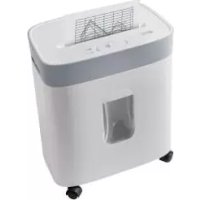
UAV 380 A1 CROSS CUT SHREDDER - Shredder UNITED OFFICE - Free user manual and instructions
Find the device manual for free UAV 380 A1 CROSS CUT SHREDDER UNITED OFFICE in PDF.



| Product Type | Cross-cut document shredder |
| Brand | UNITED OFFICE |
| Model | UAV 380 A1 |
| Supply Voltage | 220-240 V ~ 50 Hz |
| Rated Current | 1.8 A |
| Rated Power | 380 W |
| Protection Class | II |
| Waste Bin Capacity | 21 litres |
| Cut Type (paper) | Cross-cut, 4 × 18 mm particles |
| Security Level | 3 |
| Working Width | 223 mm |
| Max Capacity (80 g/m² paper) | 7 sheets |
| Credit Card Destruction | Yes, 1 card at a time |
| CD/DVD Destruction | Yes, 1 CD at a time |
| Continuous Operation Time (CO Time) | 3 minutes |
| Auto Start/Stop | Yes, by paper detection |
| Reverse Function | Yes, in case of jam |
| Overheat Protection | Auto shut-off |
| Transparent Bin for Plastics | Yes, removable |
| Cleaning | Slightly damp cloth, mild detergent |
| Warranty | 3 years |
Frequently Asked Questions - UAV 380 A1 CROSS CUT SHREDDER UNITED OFFICE
User questions about UAV 380 A1 CROSS CUT SHREDDER UNITED OFFICE
0 question about this device. Answer the ones you know or ask your own.
Ask a new question about this device
Download the instructions for your Shredder in PDF format for free! Find your manual UAV 380 A1 CROSS CUT SHREDDER - UNITED OFFICE and take your electronic device back in hand. On this page are published all the documents necessary for the use of your device. UAV 380 A1 CROSS CUT SHREDDER by UNITED OFFICE.
USER MANUAL UAV 380 A1 CROSS CUT SHREDDER UNITED OFFICE
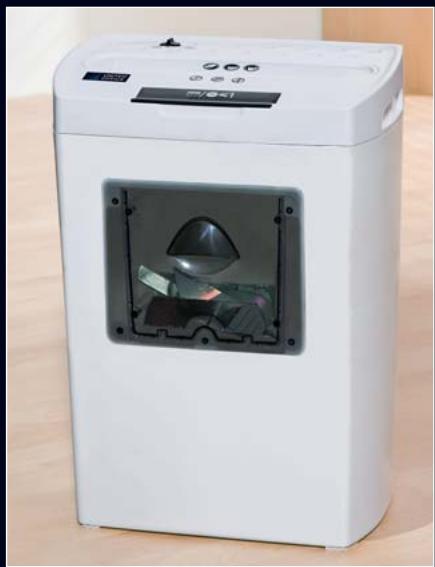
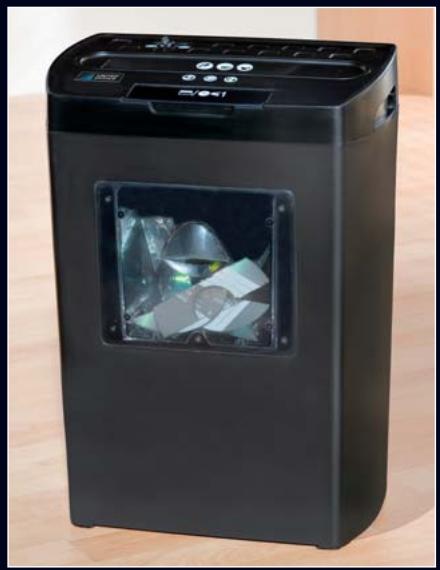
Cross Cut Shredder UAV 380 A1
| Intended Use | 2 |
| Important safety instructions | 2 |
| Technical data | 3 |
| Items supplied | 3 |
| Appliance description | 3 |
| Commissioning | 3 |
| Operation | 3 |
| Emptying the waste container | 4 |
| Cleaning | 5 |
| Disposal | 5 |
| Warranty & Service | 5 |
| Importer | 6 |
| Troubleshooting | 6 |
Read the operating instructions carefully before using the appliance for the first time and preserve this booklet for later reference. Pass the manual on to whomsoever might acquire the appliance at a later date.
CROSS CUT SHREDDER
Intended Use
This Shredder is intended exclusively for the shredding of paper, credit cards and CD's. All other usages or modifications are regarded as contrary to the operating instructions and contain a considerable risk of accidents.
Important safety instructions
The following safety instructions must always be complied with when using electrical appliances:
- Do not place the appliance in close vicinity to sources of heat and water source.
- Do not use the appliance close to inflammable or explosive materials and/or ignitable gases or in dusty environments.
- Do not use the appliance outdoors.
To avoid potentially fatal electric shocks:
- Should the power cable or the plug become damaged, arrange for it/them to be repaired by authorised specialists or Customer Services as soon as possible.
- Arrange for damaged or malfunctioning appliances to be inspected and/or repaired by a qualified specialist or the Customer Service Department as soon as possible.
- Do not expose the appliance to rain and never use it in a humid or wet environment.
- Ensure that the power cable never becomes moist or wet during operation.
To avoid the risk of personal injury:
- The Shredder should be used by only one person at a time.
- Never leave the appliance unsupervised during use.
- Keep loose clothing, long hair and jewelry etc well away from the cutter opening.
NEVER place your fingers into the cutter opening - NEVER place a finger into the central hole of a CD when you are feeding it into the appliance.
- Keep pets away from the appliance. They could injure themselves.
- This appliance is not intended for use by individuals (including children) with restricted physical, physiological or intellectual abilities or deficiencies in experience and/or knowledge unless they are supervised by a person responsible for their safety or receive from this person instruction in how the appliance is to be used.
- The packaging material can be a source of danger for children. Dispose of the material immediately after unpacking or keep it in a safe place not accessible to children.
- Lay the power cable in such a way that no one can tread on or trip over it.
Tips for safety:
- Place the appliance in the immediate vicinity of an electrical power socket. Do not use an extension cable. Ensure that the appliance and the power socket are easily and quickly accessible in the event of an emergency.
- Never overburden the appliance. The paper shredder is designed for brief operating periods.
- In cases of danger, immediately remove the electrical plug from the socket.
- NEVER use the shredder for tasks for which it was not designed.
Always be attentive! Always pay attention to what you are doing and act with common sense. Never use the appliance when you are distracted or don't feel well.
Technical data
Mains voltage: 220-240 V ~ 50Hz
Nominal current: 1,8 A
Rated output: 380 W
Protection class: II
Collector container: 21 liters
Cutting process
for Paper: Crosscut, 4× 18 mm particles Safety Level 3
Working width: 223 mm
CO Time: 3 minutes
CO Time
The C.O. Time (Continuous Operation) details how long an appliance may be used without the motor overheating and being damaged. After the appliance has run for for this period it must be switched off until the motor has cooled itself down.
Items supplied
Cross Cut Shredder
Operating Instructions
Appliance description
Cutter attachment
Switch
3 Cutter opening for CD/Credit cards
Cutter opening for paper
Large waste receptacle (Paper)
6 Power cable
7 Small waste receptacle (transparent) / Viewing window
Commissioning
- First of all, place the cutter attachment ① onto the large waste receptacle ⑤ so that the power cable ⑥ is located at the rear, i.e. on the closed side.
- Slide the small waste receptacle ⑦ for plastics in the opening on the front side of the large waste receptacle ⑤.
- Connect the paper shredder to a power socket.
Operation
Switching the appliance on:
- Place the switch ② to the position Ⓞ for shredding.
Inserting paper:
- Insert paper from above and in portrait format into the cutter opening for paper ④.
The motor starts automatically and switches itself off automatically if no further paper is inserted. You can shred up to 7 sheets (80g / m^2 paper) at the same time.
Note: Regularly remove any residue in the cutting blades with a suitable object, for example, with forceps. Ensure that the power plug is disconnected.
Inserting credit cards:
- Open the safety flap over the cutter opening for CD/Credit cards ③.
- Insert the credit card from above into the middle of the CD/Credit card cutter opening ③. You can only shred one credit card at a time. ALWAYS insert them into the CD/Credit card cutter opening ③ with the broad side leading. If you do not, the magnetic strip will not be destroyed.
① Note: Always insert the credit card into the middle of the cutter opening ③. If you do not, the shredding process will not start!
Note: Should you need to be absolutely sure that the information on the magnetised strip has been irrevocably destroyed, insert the credit card into the middle of the cutter opening for paper 4. Take note that the waste will then fall into the large collection container 5. If need be, empty if first, so as to ensure an easier separation of paper and plastic waste..
Inserting a CD:
Warning!: NEVER place a finger into the central hole of a CD when you are feeding it into the appliance.
- Insert the CD from above into the middle of the CD/Credit card cutter opening ③. You can only shred one CD at a time.
Clearing a material blockage:
-
Press and hold the switch ② in position ↑ should the item to be shredded become jammed. The appliance now goes into reverse and the material to be shredded is returned.
-
Place the switch ② into position (OFF) as soon as the jammed item is returned.
Switching the appliance off:
To switch the appliance off, move the switch 2 into the middle position (OFF).
Emptying the waste container
- Empty the waste container 5/7 regularly.
- Dispose of the waste material in an environmentally responsible manner.
Emptying the large waste container (Paper)
Important: Remove the power plug from the wall socket to avoid an unintended starting of the appliance.
- Remove the cutter attachment ① from the large waste container ⑤.
- Remove the small waste container ⑦ at the front of the large waste container ⑤, so that it does not fall out.
- Empty the large waste container ⑤ and then put everything back together again.
Emptying the small waste container (Plastic)
- Remove the small waste container ⑦ from the front of the large waste container ⑤ to empty it.
- Replace it after emptying it.
Notice regarding overheating of the appliance:
If it overheats, the appliance switches itself off automatically.
Important: Remove the power plug from the wall socket to avoid an unintended starting of the appliance.
To switch the appliance off, move the switch 2 into the middle position (OFF).
- Empty the waste containers ⑤ / 7
- Allow the appliance to cool down.
- Reinsert the power plug into the socket.
- Switch the appliance on, in that the switch 2 is placed in the position .
Cleaning
Danger! Always remove the power plug before cleaning the appliance. There is a risk of electric shock!
Warning!! The cutters in the appliance are very sharp! Risk of personal injury!
- Empty the waste containers ⑤ / 7 regularly.
- Clean the waste containers ⑤ / 7 and the cutter attachment ① with a lightly moistened cloth and, if required, with a mild detergent.
- Remove possible residues in the cutter openings 3 / 4 with a suitable object. Ensure that the appliance is unplugged before commencing this!
- Regularly remove any residue in the cutting blades with a suitable object, for example, with forceps. Ensure that the power plug is disconnected.
Disposal

Do not dispose of the appliance in your normal domestic waste. This product is subject to the European guideline 2002/96/EC.
Dispose of the appliance through an approved disposal centre or at your community waste facility. Observe the currently applicable regulations. In case of doubt, please contact your waste disposal centre.

Dispose of all packaging materials in an environmentally responsible manner.
Warranty & Service
The warranty for this appliance is for 3 years from the date of purchase. The appliance has been manufactured with care and meticulously examined before delivery. Please retain your receipt as proof of purchase. In the event of a warranty claim, please make contact by telephone with our Service Department. Only in this way can a post-free despatch for your goods be assured.
The warranty covers only claims for material and manufacturing defects, but not for transport damage, for wearing parts or for damage to fragile components, e.g. buttons or batteries. This product is for private use only and is not intended for commercial use. The warranty is void in the case of abusive and improper handling, use of force and internal tampering not carried out by our authorized service branch. Your statutory rights are not restricted in any way by this warranty.
The warranty period will not be extended by repairs made under warranty. This applies also to replaced and repaired parts. Any damage and defects extant on purchase must be reported immediately after unpacking the appliance, at the latest, two days after the purchase date. Repairs made after the expiration of the warranty period are subject to payment.
GB DES UK LTD
Tel.: 0871 5000 700 (£ 0.10 / minute)
e-mail: support.uk@kompernass.com
IE Kompernass Service Ireland
Standard call rates apply. Mobile operators may vary.
e-mail: support.ie@kompernass.com
Cyt Kompernass Service Cyprus
Tel.: 80094401
e-mail: support.cy@kompernass.com
Importer
KOMPERNASS GMBH
BURGSTRASSE 21
44867 BOCHUM, GERMANY
www.kompernass.com
Troubleshooting
If the material to be shredded jams:
This means that you have attempted to feed too much material into the appliance
(max. 7 sheets 80g / m^2 paper, max. 1 credit card, max. 1 CD/DVD).
-
Place the switch ② in position ↑ should the item to be shredded become jammed. The appliance now goes into reverse and the material to be shredded is returned.
-
Place the switch 2 in position (OFF), as soon as the jammed item is returned.
If the appliance suddenly ceases operation:
This means that the appliance has overheated and the automatic safety cut-out has activated itself.
Important: Remove the power plug from the wall socket to avoid an unintended starting of the appliance
To switch the appliance off, move the switch 2 into the middle position (OFF).
- Allow the appliance to cool down.
- Reinsert the power plug into the socket.
- Switch the appliance on, in that the switch 2 is placed in the position .
If the appliance doesn't allow itself to be switched on:
- Check that the plug is correctly connected to a wall socket.
Try out a different wall socket. - The appliance is probably defective. Have the appliance checked by qualified specialists.
When the appliance is switched on, however, the shredding process will not start:
- The appliance has overheated and triggered the automatic safety switch-off.
Important: Remove the power plug from the wall socket to avoid an unintended starting of the appliance.
To switch the appliance off, move the switch 2 into the middle position (OFF).
- Allow the appliance to cool down.
- Replace the power plug into the socket.
- Switch the appliance on, in that the switch 2 is placed in the position .
The cutter attachment 1 is not correctly placed.
- Place the cutting attachment ① in the correct position.