DIABLO 100/TWIN/TRIPLE/QUATTRO - Wireless intercoms TOPCOM - Free user manual and instructions
Find the device manual for free DIABLO 100/TWIN/TRIPLE/QUATTRO TOPCOM in PDF.


User questions about DIABLO 100/TWIN/TRIPLE/QUATTRO TOPCOM
0 question about this device. Answer the ones you know or ask your own.
Ask a new question about this device
Download the instructions for your Wireless intercoms in PDF format for free! Find your manual DIABLO 100/TWIN/TRIPLE/QUATTRO - TOPCOM and take your electronic device back in hand. On this page are published all the documents necessary for the use of your device. DIABLO 100/TWIN/TRIPLE/QUATTRO by TOPCOM.
USER MANUAL DIABLO 100/TWIN/TRIPLE/QUATTRO TOPCOM
The CE symbol indicates that the unit complies with the essential requirements of the R&TTE directive.
The features described in this manual are published with reservation to modifications.
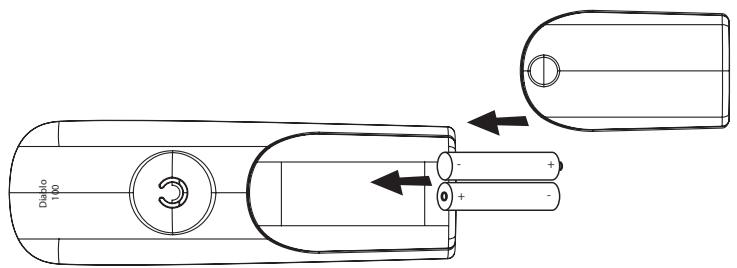
Only use the charger plug supplied. Do not use other chargers, as this may damage the battery cells. Only insert rechargeable batteries of the same type. Never use ordinary, non-rechargeable batteries. Insert rechargeable batteries so they connect to the right poles (indicated in the battery
compartment of the handset).
Do not touch the charger and plug contacts with sharp or metal objects.
The operation of some medical devices may be affected.
The handset may cause an unpleasant buzzing sound in hearing aids.
Do not place the basic unit in a damp room or at a distance of less than 1.5 m away from a water
Do not place the basic unit in a damp room or at a distance of less than 1.5 m away from a water source. Keep water away from the handset.
- Do not use the telephone in environments where there is a risk of explosions.
- Dispose of the batteries and maintain the telephone in an environment-friendly manner.
- As this telephone cannot be used in case of a power cut, you should use a mains-independent telephone for emergency calls, e.g. a mobile phone. This telephone was reasonable batteries. You have to dispose of the batteries in an environ
- This telephone uses rechargeable batteries. You have to dispose of the batteries in an environment friendly manner according to your country regulations.
Disposal of the device (environment) At the end of the product lifecycle, you should not throw this product into the normal household garbage but bring the product to a collection point for the recycling of electrical and electronic equipments. The symbol on the product, user guide and/or box indicate this.
Some of the product materials can be re-used if you bring them to a recycling point. By reusing some parts or raw materials from used products you make an important contribution to the protection of the environment. Please contact your local authorities in case you need more information on the collection points in your area.
Cleaning
Clean the telephone with a slightly damp cloth or with an anti-static cloth. Never use cleaning agents or abrasive solvents.
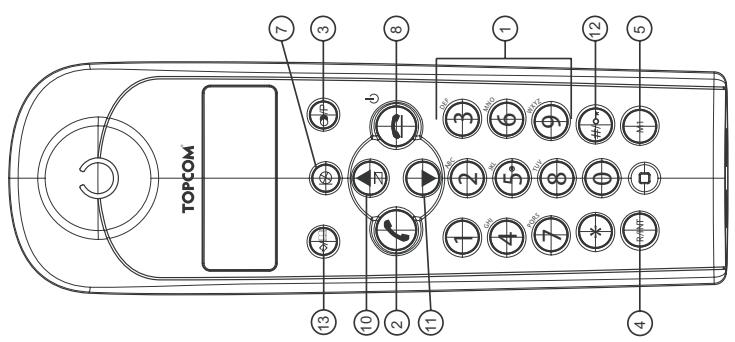
1 Buttons (see folding page for the picture)
- Numerical buttons
- Off -hook button
- Redial / Paus
- Flash R/ INT
- Direct memory button M1
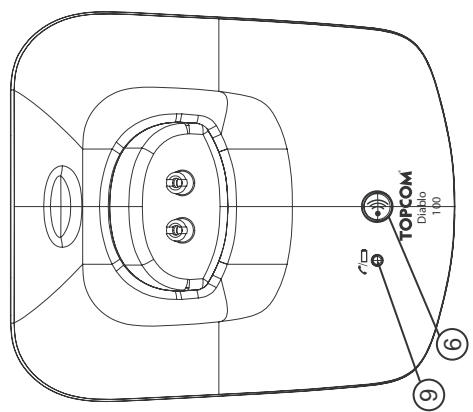
- Paging button (to retrieve
- Mute button
- On hook button
- Charge indicator/ On line (LED)
- Call log/Scroll Up /
- Scroll Down
- Key lock 一
2 Display
| You are online INT = Internal communication EXT = External communication | ▲ | There are more digits on the left | |
| New numbers in call list | ▲ | There are more digits on the right | |
| Rechargeable battery level indicator | ↔ | Program mode | |
| The antenna indicates the quality of reception The antenna blinks when the handset is out of range! | ○○ | There are new messages in your voice mail | |
| Microphone is muted | - x - | x = handset number | |
| Memory records are being retrieved or set up | hh:mm | Time: hh = hours, mm = minutes | |
| The keypad is locked | ▲ | Answered calls Unanswered calls | |
3 Installation
Plug one end of the phone cable into the phone unit and the other end into the telephone line wall socket. Connect the small plug of the AC adaptor to the phone and the other end of the adapter cable to the electric socket.
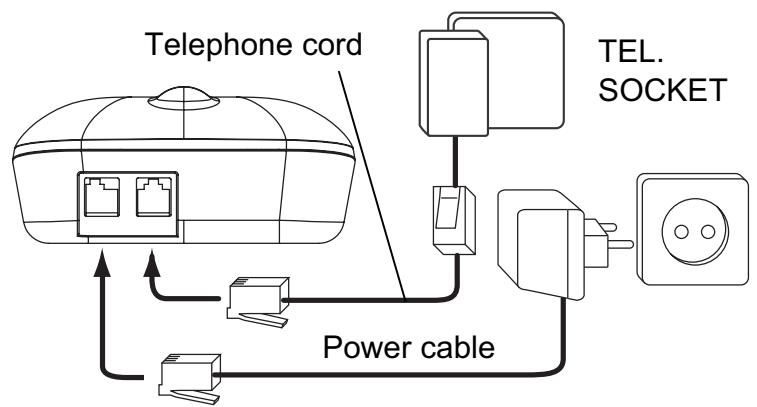
Base
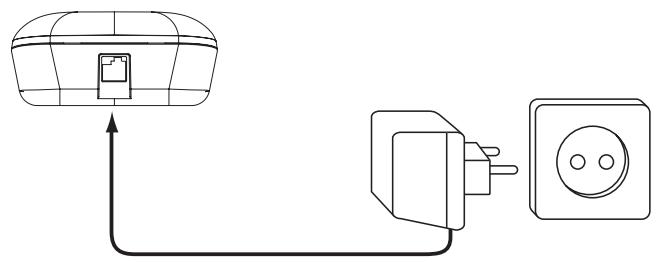
Multi charger
- Insert 2 rechargeable batteries (AAA) inside the battery compartment of the handset...
Put the handset on the base unit. The red Charge LED will lit as long as the handset is on the base. Charge the handset for a period of 24 hours before using the handset for the first time. To extend the battery life time, discharge the batteries completely from time to time. As soon as the handset emits a warning tone or when the battery icon is empty, you have to put it back on the base unit for charging.
4 Battery low indication
When the battery is empty, the handset no longer carries out operations. When a battery is completely empty and you have put the handset on the base unit for a short period of time, the Battery symbol will appear to be fully charged but this is actually not the case. The battery capacity will decrease rapidly.
We advise you to put the handset on the base unit for 12 hrs so that it can be recharged completely:
Full battery Empty battery
When you are in the middle of a conversation and the battery is almost empty, the handset will emit a warning signal. Place the handset on the base unit to charge.
5 Operation
5.1 Outgoing calls
5.1.1 Making a phone call or redialing the last number
Press the Off-hook button ±b . You will hear the dial tone. Enter the desired telephone number or press the Redial key to dial out the number you last called. Press the on-hook button when you want to terminate the call.
5.1.2 Call setup with dial preparation
Enter the desired telephone number. An incorrect number can be corrected by means of the Mute button. Press the Off-hook button . The number will be dialled automatically. Press the On-hook button when you want to terminate the call.
5.1.3 Redial one of the last 5 numbers dialled
Press the Redial key O . The number you last called appears on the display. If you would like to dial one of the last 5 numbers dialled, press the scroll keys a few times until the desired number appears on the display. Press the Off-hook key. The number shown on the display is dialled automatically. After finishing your call, press the On-hook key to hang up.
5.2 Incoming calls
When a call comes in, the handset will start to ring. Press the Off-hook button to answer the incoming call. To end the call press the On-hook button.
5.3 Programming memory numbers
You can program 10 indirect numbers (of max. 24 digits) in the phone's memory.
Press the Memory button short. The first entry will be shown on the display Press and hold the Memory button until the -icon appears on the display. Enter the location (0-9) where you want to store the telephone number under. Enter the telephone number you wish to store. Press the Memory button again to confirm. You will hear a confirmation tone and the next entry will appear. To leave the memory programming, press the on-hook button.

If you wish to insert a pause, press the Redial/Pause button /P on the location where you want a pause of 3 sec.
5.4 Calling a memory number
Press the Memory button Scroll with the Up/Down keys to the entry you want to dial (0-9). Press the Off-hook button. The memory number will be dialled automatically. Press the On-hook button to terminate the call.
5.5 Direct access memory (Key 1,2,3 and M1)
The product has 3 locations (Key '1', '2' and '3') where you can store a number under and dial it by pressing and holding one of these keys in standby. The phone will automatically take the line and dial the number which is stored under this key. The number stored under key '1' can also be dialed out by pressing the 'M1'-key shortly in standby.
5.5.1 Programming the direct memory keys
Press the Memory button short. Press and hold the Memory button until the -icon appears on the display. Press and hold one of the 3 direct memory keys (Key 1,2 or 3) where you want to store the number under until 'Sx - _' appears. Enter the telephone number you whish to store. Press the Memory button again to confirm. You will hear a confirmation tone and the next entry will appear. To leave the direct memory programming, press the On-hook button
5.6 Mute function
It is possible to deactivate the microphone during a conversation. Now you can speak openly without being heard by your correspondent. Press the Mute button during a conversation. to deactivate or activate the microphone.
5.7 Setting the volume
During a conversation you can set the volume by pressing the scroll button . You can set the volume between 1-5.
5.8 Paging
When you press the Paging button on the base unit, the handset emits a ringing signal for 20 seconds. This signal helps you find a lost handset. Press any key to stop the ringing on all handsets.
5.9 Flash button (R)
When you press the R button, also called flash or recall, the unit generates a line interruption (of 100 ms or 250 ms). It gives you the possibility to use the special services of your telephone provider and/or to transfer calls when you have a telephone exchange. You can change the flash time if needed (See "Setting the Flash time" on page 6).
5.10 Programming procedure
You can change the ring melody, volume, day, time etc... by going into the program procedure: To go into the program procedure you have to press and hold the Program button until the icon starts to flash. Press the Program button again to change the first setting. Each time you press the Program button you will confirm the previous setting and jump to the next setting:

5.10.1 Handset External melody and volume
Press and hold the Program button until the icon starts to flash. Press the Program button again, the external melody is heard and the EXT-icon is flashing. Select the desired melody (1-5) by entering a number (1 - 5). Use the scroll keys to select the desired volume (Off or 1-5) Press again to confirm the setting and to go to the next setting below.
5.10.2 Handset Internal melody and volume
The internal melody is heard and the INT-icon is flashing. Select the desired melody (1-5) by entering a number (1 - 5). Use the scroll keys to select the desired volume (Off or 1-5) Press again to confirm the setting and to go to the next setting below.
5.10.3 Date time setting
After setting the internal ring melody and volume you can set the date and time:
DD-MM HH:MM (DD= day, MM=month, HH=hour and MM=minutes)
Enter the date and time using the number key. The flashing cursor can be moved by the scroll keys
· Press again to confirm the setting and to go to the next setting below.
5.10.4 Setting the Dial mode
After setting the date/time you can set the dial mode. There are two types of dialling mode:
- 1 -DTMF/Tone dialling (the most common) (default)
OR
- 2 - Pulse dialling (for older installations)
Press '1' or '2' and press again to confirm the setting and to go to the next setting below.
5.10.5 Setting the Flash time
After setting the Dial mode you can set the flash time. There are two flash times:
- 1 - 100ms
OR
-2-250ms
Press '1' or '2' and press again to confirm the setting and to go to the next setting below.
5.10.6 Base melody and volume
The base ringer is heard. Select the desired melody (1-5) by entering a number (1 - 5). Use the scroll keys to select the desired volume (Off or 1-5) Press again to confirm the setting and to go back to standby.
5.11 Keypad lock
When the keypad is locked, pressing any key will have no effect during standby (except holding the 一 key).
Press and hold the key. appears on the display and the keypad is locked. Press twice the key again to unlock the keypad
6 Caller-ID function (CLIP)
The Topcom Diablo displays the telephone numbers of incoming calls. This function is only possible if you are subscribed to a telephone operator that provides this service. Contact your telephone provider for more information. When you receive a call, the numbers are saved in a Call list. This list can hold 10 telephone numbers (each of max. 20 digits). If the number is longer then 12 digits, you can press the program key to show the other digits!
6.1 New calls
When you've received a new unanswered call, the CLIP symbol will blink on the display.
6.2 Consulting the Call list
Press the Call Log button ~口~ . The last received call is shown on the display. If the list is empty, ' -' is shown on the display. For answered calls the -icon appears and unanswered calls the -icon appears Press the program key to show the other digits (if longer then 12) or to show the date and time. Use the scroll keys to scroll to the previous call. When you reach the top or bottom of the list an error tone will be sounded You can leave the Call list by pressing the on-hook button.
6.3 Calling a number from the Call list
Scroll through the Call list until the desired number is shown on the display. Press the Off-hook button . The number will be dialled automatically.
6.4 Erasing one or all number from the Call list
Scroll through the Call list until the desired number is shown on the display. Press the Mute button short to erase the current entry or press and hold the Mute button for 3 sec. to erase the compleet call list.
6.5 Store a number from the call log into the memory
Scroll through the Call list until the desired number is shown on the display. Press and program button for 3 sec. The memory will be shown and you can scroll through it with the scroll keys ▲ to see which entry is still empty (0-9) Enter the memory location (0-9) where you want to store the number. Edit the number if needed and press the program button again to confirm and to go back to standby.
7 Register/de-register a handset
7.1 Register to a Topcom Diablo base
You can subscribe 5 handsets to one base unit. By default, each handset is subscribed on the base unit upon delivery.
You only need to subscribe the handset if:
The handset subscription has been removed from the base unit (e.g. for reinitialisation)
- You want to subscribe a different handset to this base unit.
The below procedure is only applicable to a Topcom Diablo handset and base unit!!
Keep the Paging key on the base unit pressed for 10 seconds until the Line/Charge indicator on the base unit begins to blink rapidly. The Line/Charge indicator r / will blink rapidly for one minute. During this minute, the base unit is in register mode and you must do the following to subscribe the handset:
Press and hold the Program key for 6 sec until there is a - scrolling on the screen from left to right. The handset is now searching for the base. When a base is found the handset will ask to enter the pincode P1 - . . Enter the base pin code (0000). If the pin is wrong, the handset will restart the searching for the base. When the handset is registered, it will show the handset number followed by the time.
8 Call transfer and Intercom between two handsets

These functions only work when more than one handset (like a Twin/Triple/Quattro version) is registered to the base!
8.1 Call transfer and conference call during an external call
During an external call, press and hold the INT key until INT appears. Press the number (1-5) of the other handset. The other handset will start to ring:
- When the other handset takes the line you can talk internally.
If you hang up, the external line will be connected with the other handset.
If you press the '#'-key you can talk with the 2nd handset and external line at the same time (conference call)
- Or press and hold the INT key again to return to the external call.
Press the On-hook button to end the call.
8.2 Internal call (intercom)
In standby press and hold the INT key until INT appears. Enter the number (1-5) of the other handset. The other handset will start to ring. If the other handset answers the call by pressing the Off-hook button c you can talk internally. Press the On-hook button to end the call.
9 Troubleshooting
| Problem | Possible cause | Solution |
| No display | Batteries not charged | Check the position of the batteries |
| Recharge the batteries | ||
| No dialling tone | Telephone cable not properly connected | Check the connection of the telephone cable |
| Volume of conversation partner too low | Adjust the volume during the conversation by pressing the volume key | |
| Handset ringer volume too low | Adjust the ringer volume | |
| Not possible to dial a number | Wrong dial mode | See “Setting the Dial mode” on page 6 |
10 Technical Data
Range: up to 300 m in open space
up to 50 m in buildings
DTMF (tone) and Pulse
2 x 1.2V, 550 mAh AAA Type NiMH rechargeable
approx. 100 hours
10 hours
+5°C to +45°C
Dialling options:
Batteries:
Max. standby time:
Max. talk time:
Ambient temperature:
Permitted relative air humidity:
Power supply base adapter:
Memories
25 to 85 %
220/230V , 50 Hz
10 indirect with max. 25 digits
visit our website
www.topcom.net
U8006630