
Mi Internet Speaker - Speakers Xiaomi - Free user manual and instructions
Find the device manual for free Mi Internet Speaker Xiaomi in PDF.


Pick your language and provide your email: we'll send you a specifically translated version.
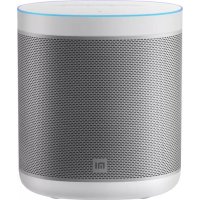
| Product Type | Smart Speaker with AI Assistant |
| Brand | Xiaomi |
| Model | Mi Internet Speaker |
| Category | Wireless Speaker |
| Dimensions | 118 mm × 118 mm × 86 mm |
| Weight | 700 g |
| Power Supply | AC adapter, 12V/1.75A |
| Connectivity | Wi-Fi 802.11 a/b/g/n/ac (2.4GHz & 5GHz), Bluetooth 4.1 |
| Audio Output | 20W high-fidelity driver, 6Ω impedance |
| Microphones | 6 far-field microphones |
| AI Assistant | Xiaomi AI voice assistant with far-field voice recognition |
| Control | Touch controls and voice commands |
| Frequency Response | 60 Hz – 20 kHz |
| Smart Home | Controls compatible Xiaomi smart home devices |
| Streaming Services | Support for major music platforms via Mi Home app |
| Compatible OS | Android 4.4+ / iOS 8.0+ |
| Power Consumption | Typical 12W, standby < 1W |
| Material | ABS plastic with acoustic fabric grille |
| Maintenance | Wipe with a soft dry cloth |
| Cleaning | Do not use water or liquid cleaners; keep vents clear |
| Safety | Do not disassemble or expose to moisture |
| Spare Parts | Not user-replaceable; contact authorized Xiaomi service |
| Reparability | Professional repair recommended; limited user maintenance |
Frequently Asked Questions - Mi Internet Speaker Xiaomi
How do I set up my Xiaomi Mi Internet Speaker?
To set up, download the Mi Home app on your smartphone, plug in the speaker, and press and hold the power button until the indicator light flashes. Then follow the in-app instructions to connect the speaker to your Wi-Fi network.
What voice commands can I use with the speaker?
Say "Xiao Ai" to wake the assistant. You can ask for weather updates, play music, control smart devices, set alarms, and more.
How do I reset the Mi Internet Speaker to factory defaults?
Use a paperclip to press the reset button located on the bottom of the speaker for about 5 seconds. The indicator light will turn orange and then reset. The speaker will restart and enter pairing mode.
Can I connect my phone via Bluetooth?
Yes. Say "Pair Bluetooth" or press the Bluetooth button on the app. The speaker will be discoverable, and you can pair it from your phone's Bluetooth settings.
Which music services are supported?
The speaker supports mainstream streaming services through the Mi Home app, including Mi Music and third-party services like Spotify (availability may vary by region).
How do I update the speaker's firmware?
Open the Mi Home app, select the speaker, and go to Settings. Check for firmware updates and install them. Ensure the speaker is plugged in and connected to Wi-Fi during the update.
Can I use the speaker with my smart home devices?
Yes, the Mi Internet Speaker can control compatible Xiaomi smart devices such as lights, plugs, and sensors, using voice commands or routines in the Mi Home app.
What should I do if the speaker cannot connect to Wi-Fi?
Verify your Wi-Fi is 2.4GHz (5GHz is also supported), keep the speaker close to the router, restart the speaker, and try again. If the issue persists, perform a factory reset and reconfigure.
How do I clean and maintain the speaker?
Use a soft, dry microfiber cloth to wipe the exterior. Do not use water or cleaning sprays. Keep the speaker away from dust and moisture to ensure optimal performance.
Is it safe to leave the speaker plugged in overnight?
Yes, the speaker is designed for continuous use and has overcharge protection. However, for safety, unplug it during intense thunderstorms or if you are away for long periods.
User questions about Mi Internet Speaker Xiaomi
0 question about this device. Answer the ones you know or ask your own.
Ask a new question about this device
No questions yet. Be the first to ask one.
Download the instructions for your Speakers in PDF format for free! Find your manual Mi Internet Speaker - Xiaomi and take your electronic device back in hand. On this page are published all the documents necessary for the use of your device. Mi Internet Speaker by Xiaomi.
USER MANUAL Mi Internet Speaker Xiaomi

Manual assistant
Powered by Anthropic
Waiting for your message
Product information
Brand : Xiaomi
Model : Mi Internet Speaker
Category : Speakers