
Mi TV Bar - Speakers Xiaomi - Free user manual and instructions
Find the device manual for free Mi TV Bar Xiaomi in PDF.


| Product Type | Soundbar |
| Brand | Xiaomi |
| Model | Mi TV Bar |
| Dimensions (W x H x D) | 950 x 70 x 120 mm |
| Weight | 2.5 kg |
| Power Supply | AC 100-240V, 50/60Hz |
| Power Consumption | 50W (typical), <0.5W standby |
| Audio Output Power | 100W RMS (2.0 channels) |
| Speaker Drivers | 2 x full-range, 2 x tweeter |
| Sound Enhancement | DTS Virtual:X, Dolby Audio |
| Connectivity | Bluetooth 5.0, HDMI ARC, Optical, USB, 3.5mm AUX |
| Supported Audio Formats | MP3, WMA, FLAC, AAC, AC3, DTS |
| Control | Remote control, buttons on soundbar, Xiaomi Home app |
| Wall Mountable | Yes (brackets included) |
| Inputs | HDMI (ARC), Optical, USB, Aux |
| Microphone | No |
| Cleaning Instructions | Wipe with dry cloth; do not use liquids or solvents |
| Safety Notes | Do not block ventilation; keep away from heat sources and moisture |
| Spare Parts | Remote control, power cable, wall mount brackets |
| Repairability | Not user-serviceable; contact Xiaomi support for repairs |
Frequently Asked Questions - Mi TV Bar Xiaomi
User questions about Mi TV Bar Xiaomi
0 question about this device. Answer the ones you know or ask your own.
Ask a new question about this device
Download the instructions for your Speakers in PDF format for free! Find your manual Mi TV Bar - Xiaomi and take your electronic device back in hand. On this page are published all the documents necessary for the use of your device. Mi TV Bar by Xiaomi.
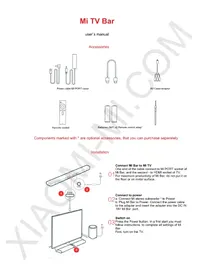
USER MANUAL Mi TV Bar Xiaomi
Power cable, MI PORT cable

AV cable adapter
Remote control
Batteries (size 7) x2, remote control strap*

Components marked with * are optional accessories that you can purchase separately.
Installation
Connect Mi Bar to Mi TV
Connect one end of the cable to the MI PORT socket of the Mi Bar, and the second end to the HDMI socket of the TV. For maximum performance of the Mi Bar, do not place it on the floor or on a metal surface.
Connect to power
02 a: Connect the Mi stereo subwoofer* to power. b: Plug the Mi Bar into power. Connect the power cable to the adapter and insert the adapter into the DC IN 19V port on the Mi Bar.
Switch on
03 Press the Power button. On first start, you must follow the instructions to complete all settings of the Mi Bar. First, turn on the TV.
The main unit sockets
When you need to connect a wired/wireless port, or install a device in port F for connecting a coaxial line, you can choose an antenna adapter.

Download the Smart Speakers APP to your smartphone and edit music channels.
The Main Unit is the processing center of the TV content as well as Smart Speakers is connecting to the network. Use this application to edit and add music channels.
Remote control


Bluetooth console marked only with this symbol... Voice operated console marked with these symbols...
Using the strap for the remote control
- Thread the strap through the hole at the bottom of the battery compartment;
- Once you have inserted a loop of the strap through the hole at the bottom of the battery compartment, slide it through the latch between the two batteries;
- Insert the batteries, and close the back cover of the battery compartment.

Notices:
The remote, that supports the audio control mode, can be used together with a gamepad, TV set to become the gaming device!
Pairing a remote control with TV set
In the lower right corner of the TV has a special Bluetooth system, which operates in the range of 20 meters.
Simultaneously press the button and , you will hear the sound, then you can release buttons (please adhere to the specified distance). Then you will hear two beeps from the panel that will indicate successful pairing.
Power: press Power button to turn off the TV; press and hold the button to turn off, restart or set the time off.
Home: press the button to quick return to the homepage. Press and hold for 2 seconds to view a list of recently used applications.
Menu: demonstrates the interface and options.
At the online video interface, go to a search; playable files in the interface display the video parameters; you can also find more video categories in the list, etc.
Wheel of options: control of choice (up, down, left, right). While watching a video, using these buttons you can rewind, fast forward, or go backward.
Set: confirms your current selection. During video playback, you can stop it, pause, or play the current video.
Back: Go back one step.
Parameters
Processor and memory
CPU: Cortex-A17 4-core 1.4G
Internal memory: 2GB DDR3 Three channel
Flash memory: 8GB eMMC memory speed
GPU: Mali-760 MP4
Ports
Power: port DC IN 19V
Input: port HDMI 2.0 x3; AV x1; VGA x1 analog / digital TV (DTMB) x1
Output: Port MI PORT Audio out x1 (Mi subwoofer connection only)
Data interface: USB 2.0 x1; USB 3.0 x1; Ethernet x1
Connecting antennas
Wi-Fi dual 2.4 GHz, 5 GHz, 802.11 a/b/g/n/ac, (support for Beamforming, TWIN ANTENNA 2x2 MIMO) Bluetooth 4.1, BLE low power consumption
Audio and Video
Audio standards: FLAC, AC3, WMA, MP3, AMR, DTS, AAC, OGG
Video standards: AVC, MPEG2/4, H.263, H.265, VP8, COOK
Sound effects
Dolby Audio x2 (Global Sound, Bass Boost, voice enhancement and other audio control functions)
Multiscreen
Support for images, music and video, based on Milian, compatible with Air Play, DLNA, Miracast and WIDI.
Power
Requirement: 65W rated power
Speaker features
Connections: Wi-Fi; AV; AUX in; HDMI
Frequency range: 60 ~ 22,000 Hz
Speaker configuration: 2.5-inch full-range speakers - 4 pieces, tweeters - 2 pcs
Connect: 2.5mm audio cable, Bluetooth
Frequency range: 30 \~ 170Hz (for Choice)
Speaker size: 6.5-inch subwoofer + 6.5-inch passive subwoofer
Components marked with * are optional components that you can purchase separately
Warranty
- Within 7 days of purchase, in case of problems with the device, the buyer is entitled to a free replacement product the same model or refund.
- Within 30 days of purchase, in case of problems with the device, the buyer is entitled to a free replacement product the same model. • Warranty of Mi Bar: 1 year.
- Do not make any changes to the warranty card, otherwise it is invalid.
- The warranty card is valid only with the appropriate stamp.
- You need to properly maintain all receipts and other documents, if you change the product within 30 days, it repaired within a year, device repaired the main components for three years.
- For safety device during transportation must use special packaging. Once you have acknowledged in the document on receipt of goods, we recommend storing properly a packaging unit for 30 days. In case of return or exchange goods if there is some damage to the packaging or you lost or utilized it, Xiaomi may require reimburse the cost of packaging. Thanks for understanding!
The conditions under which goods are not covered by warranty
- Maintenance unit in authorized service centers, misuse, fall, neglect, abuse, caused by water, accident, broken, or if zamazaly label and marking device;
- Damage resulting from improper use of the device or improper care of him;
- Damage incurred in a force majeure such as lightning, fire or flood;
- Do not match models specified in the warranty card, directly from the model of the device;
- Damage to or failure of the device due to virus infection, hacker attacks or other intentional violations;
- Damage resulting from the use of other software that is not licensed by Xiaomi.

- CONNECT MI BAR TO MI TV
- CONNECT TO POWER
- SWITCH ON
- REMOTE CONTROL
- USING THE STRAP FOR THE REMOTE CONTROL
- NOTICES
- PAIRING A REMOTE CONTROL WITH TV SET
- PARAMETERS
- PROCESSOR AND MEMORY
- PORTS
- CONNECTING ANTENNAS
- AUDIO AND VIDEO
- SOUND EFFECTS
- MULTISCREEN
- POWER
- SPEAKER FEATURES
- WARRANTY
- THE CONDITIONS UNDER WHICH GOODS ARE NOT COVERED BY WARRANTY
Brand : Xiaomi
Model : Mi TV Bar
Category : Speakers