Smart Speaker Lite - Speaker Xiaomi - Free user manual and instructions
Find the device manual for free Smart Speaker Lite Xiaomi in PDF.


Pick your language and provide your email: we'll send you a specifically translated version.
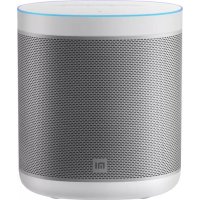
| Brand | Xiaomi |
| Model | Smart Speaker Lite |
| Product Type | Smart Speaker |
| Dimensions (L x W x H) | 152 x 95 x 95 mm |
| Weight | Approximately 560 g |
| Power Supply | AC adapter 12V DC, 1A |
| Connectivity | Wi-Fi 2.4 GHz (802.11 b/g/n), Bluetooth 4.2 |
| Voice Assistant | XiaoAI (compatible with Xiaomi ecosystem) |
| Main Functions | Voice control, music streaming, Internet radio, podcasts, control of Xiaomi smart home devices, alarm, timer |
| Speaker | 1.75-inch full-range speaker |
| Output Power | 5W (RMS) |
| Microphones | 2 microphones for far-field voice recognition |
| Care and Cleaning | Clean with a soft, dry cloth. Do not use harsh chemicals. |
| Safety | Do not expose to water or moisture. Unplug the adapter during storms or extended non-use. |
| Spare Parts and Repairability | AC adapter available separately. The device is not designed for user repair. Contact Xiaomi support. |
| General Information | Built-in XiaoAI voice assistant. Compatible with Xiaomi Home and Mi Home apps. Firmware updates via the app. |
Frequently Asked Questions - Smart Speaker Lite Xiaomi
How do I connect my Xiaomi Smart Speaker Lite to Wi-Fi?
Download the Mi Home app on your smartphone. Follow the instructions to add a device, then select the speaker. Enter your Wi-Fi password (2.4 GHz only) to complete the setup.
How do I reset the Smart Speaker Lite to factory settings?
Press and hold the reset button on the back of the device for about 10 seconds until you hear a voice message saying the device will be reset. Release the button after hearing the message.
Can I use the speaker without an Internet connection?
Yes, you can use Bluetooth to stream music from your phone. However, voice functions require an active Internet connection.
How do I update the firmware of the Smart Speaker Lite?
Open the Mi Home app, go to device settings. If an update is available, you'll see a notification. Follow the instructions to download and install the update. Make sure the speaker is connected to Wi-Fi and power.
The speaker does not respond to voice commands, what should I do?
Check that the speaker is connected to the Internet and the microphone is not blocked. Make sure the wake word (usually 'XiaoAi Tongxue') is correct. Try restarting the device by unplugging and plugging it back in.
How do I adjust the volume or mute the sound?
Use voice commands ('XiaoAi Tongxue, turn up the volume') or the touch controls on the top of the speaker: swipe clockwise to increase volume, counterclockwise to decrease, and tap the center to mute the microphone.
Can I connect multiple devices via Bluetooth simultaneously?
No, the speaker only supports one Bluetooth connection at a time. To connect another device, first disconnect the current device.
How do I set an alarm or timer?
Say 'XiaoAi Tongxue, set an alarm for 7 AM' or 'set a timer for 10 minutes'. You can manage alarms in the Mi Home app under device settings.
Which music services are compatible?
The speaker supports the following music services: QQ Music, NetEase Music, Xiami Music (depending on region). You can set your default service in the Mi Home app.
What should I do if the speaker produces poor quality sound or has delay?
Check your Wi-Fi connection. Place the speaker near the router. Avoid interference from other electronic devices. If the problem persists, restart the speaker or reset it. Make sure the firmware is up to date.
User questions about Smart Speaker Lite Xiaomi
0 question about this device. Answer the ones you know or ask your own.
Ask a new question about this device
No questions yet. Be the first to ask one.
Download the instructions for your Speaker in PDF format for free! Find your manual Smart Speaker Lite - Xiaomi and take your electronic device back in hand. On this page are published all the documents necessary for the use of your device. Smart Speaker Lite by Xiaomi.
USER MANUAL Smart Speaker Lite Xiaomi

Manual assistant
Powered by Anthropic
Waiting for your message
Product information
Brand : Xiaomi
Model : Smart Speaker Lite
Category : Speaker