
CX-77IV - Watch CITIZEN - Free user manual and instructions
Find the device manual for free CX-77IV CITIZEN in PDF.



| Product type | Printing calculator |
| Brand | CITIZEN |
| Model | CX-77IV |
| Power supply | 4 AA batteries (UM-3) or AC adapter 6V/300mA (not included) |
| Main functions | Arithmetic calculations, percentage, memory (M+, M-), grand total (GT), currency conversion, tax calculation, margin, paper printing, rounding selector, floating/fixed decimal, non-add/date |
| Printing | Thermal printer, paper roll, disposable ink roller (IR-30 cartridge) |
| Display | Digital screen, indicators: M, -, GT, E, COST, SELL, MARGIN%, SET, %, TAX, +TAX, -TAX, LOCAL, 8 |
| Maintenance | Replace ink roller (IR-30) if prints are faint; replace batteries; reset via RESET button |
| Safety | Do not dispose with household waste; comply with WEEE legislation (Directive 2002/96/EC) |
| Spare parts | Spare ink roller IR-30; AA batteries (UM-3) |
| Dimensions | Approximately 30 x 20 x 8 cm (estimate) |
| Weight | Approximately 400 g (estimate) |
| Reset | Press [RESET] button at the bottom of the battery compartment with a thin object if the device freezes |
Frequently Asked Questions - CX-77IV CITIZEN
User questions about CX-77IV CITIZEN
0 question about this device. Answer the ones you know or ask your own.
Ask a new question about this device
Download the instructions for your Watch in PDF format for free! Find your manual CX-77IV - CITIZEN and take your electronic device back in hand. On this page are published all the documents necessary for the use of your device. CX-77IV by CITIZEN.
USER MANUAL CX-77IV CITIZEN
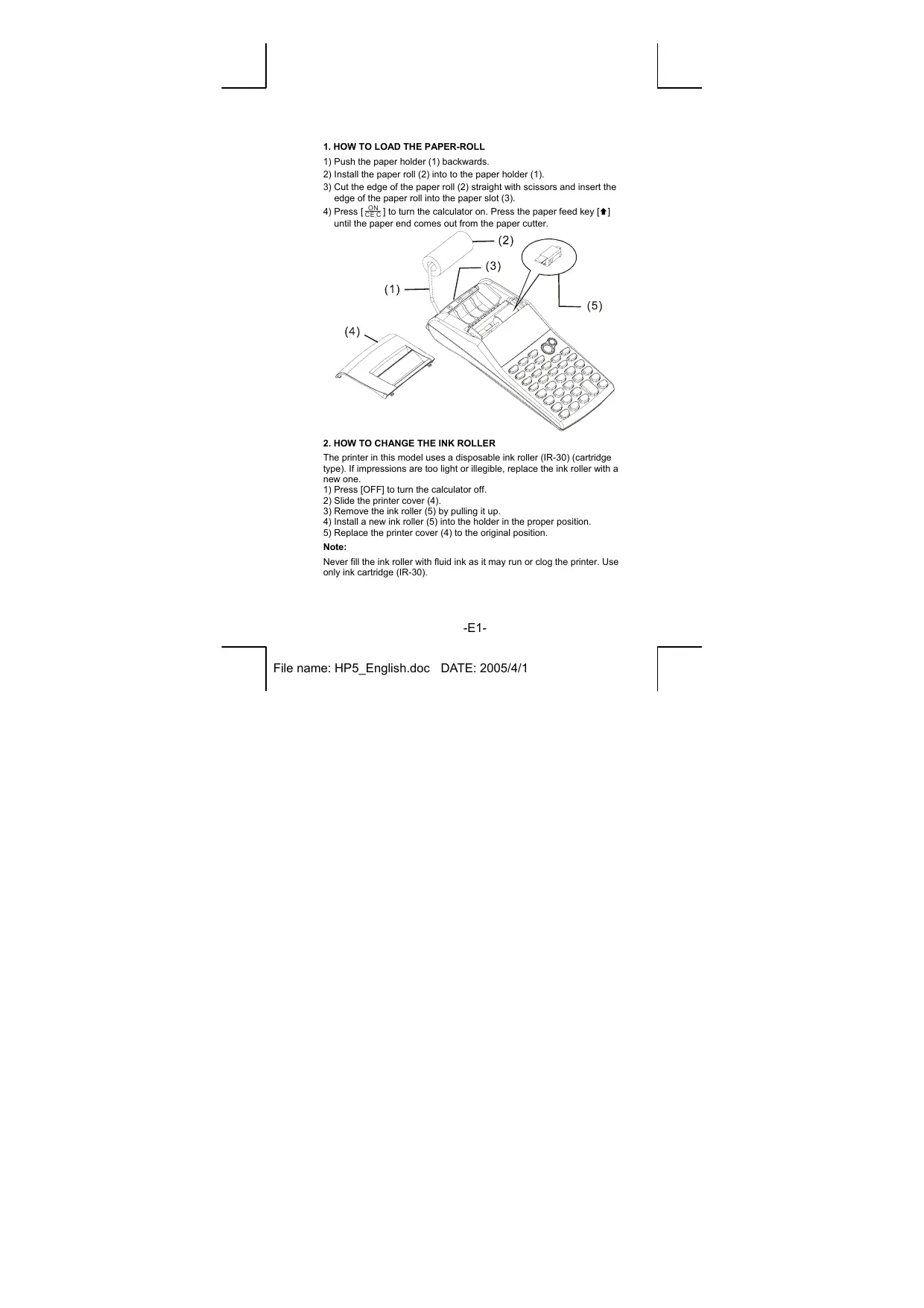
1) Push the paper holder (1) backwards.
2) Install the paper roll (2) into to the paper holder (1).
3) Cut the edge of the paper roll (2) straight with scissors and insert the edge of the paper roll into the paper slot (3).
4) Press [ & CEC & ] to turn the calculator on. Press the paper feed key [↑] until the paper end comes out from the paper cutter.
2. HOW TO CHANGE THE INK ROLLER
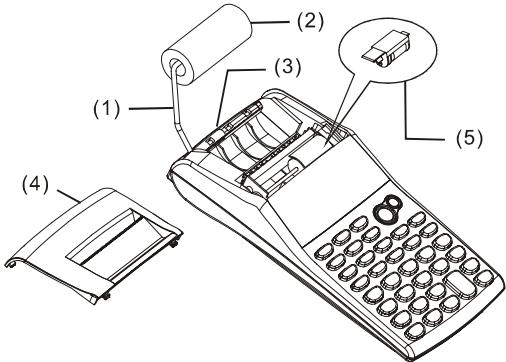
The printer in this model uses a disposable ink roller (IR-30) (cartridge type). If impressions are too light or illegible, replace the ink roller with a new one.
1) Press [OFF] to turn the calculator off.
2) Slide the printer cover (4).
3) Remove the ink roller (5) by pulling it up.
4) Install a new ink roller (5) into the holder in the proper position.
5) Replace the printer cover (4) to the original position.
Note:
Never fill the ink roller with fluid ink as it may run or clog the printer. Use only ink cartridge (IR-30).
3. TO REPLACE BATTERIES
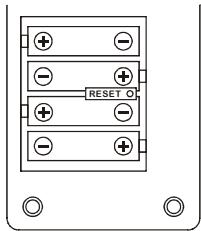
1) Open the battery compartment cover.
2) Remove the exhausted batteries.
3) Insert new batteries (UM-3 / AA BATTERY x 4) with polarity in correct directions
4) Replace the cover.
4. TO USE AC ADAPTER
1) Turn the power off.
2) Connect the AC adapter (6V / 300mA, -G+ to the plug.
5. RESET:
Electromagnetic interference or electrostatic discharge may cause the display to malfunction or the contents of the memory to be lost or altered. If it occurs, use the tip of a ball point pen (or similar sharp object) to press the [RESET] button at the bottom of the battery case..
[0]~[9]
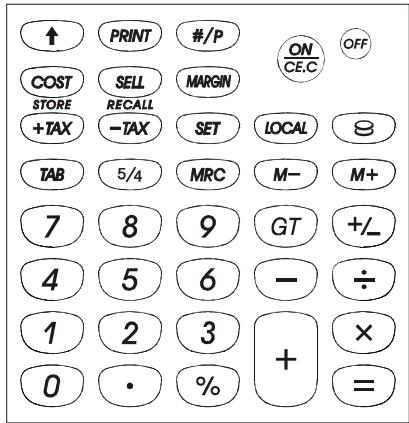
Number Keys
Set the entered numbers.
[·]
Decimal Point Key
Set the decimal point.
[ON]
Power On / Clear Entry / Clear Key
ON:Turns the calculator on.
CE: Press to clear the last entered number (displayed number) before any function key is depressed.
C: Press to clear all except memory contents.
[OFF]
Power Off
Turns the calculator off.
[+][-]
Arithmetic Keys
[× ][÷ ] Performss addition, subtraction, multiplication and division respectively.
[ = ]
Equal Key
Obtains the result.
[%]
Percentage Key
Converts percentage to the decimal value. Also, converts for add-on and discount calculation.
[+ / - ]
Sign Change Key
Uses to change the algebraic sign of a display number/operand.
[TAB]
Decimal Point Selector
F: Floating decimal mode.
023:Fixed decimal mode.
A: ADD Mode -- Addition and subtraction calculations are preformed with an automatic 2-digit decimal so that decimal point entry is not required.
[5/4]
Rounding Selector Key
Used for round-up () , round-off (5/4), or round-down () to the pre-selected decimal digits in the result.
[GT]
Grand Total Key
Obtains grand total value of a series of calculations.
[↑]
Paper Feed Key
Advance the paper roll.
[#/P]
Data printout key
Used for printing out displayed content but it does not affect calculation such as dates and serial numbers. Figures are printed on the left-hand side of the paper.
[PRINT]
Print Mode Selector
Entries and results will appear on the display and will be printed out.
[M+]
Memory Plus Key
Accumulates the displayed number or calculated result directly into the memory.
[M-]
Memory Minus Key
Subtracts the displayed number or calculated result from the memory storage.
[MRC]
Memory Recall Key / Memory Clear Key
Recalls the content of the memory to the display and/or the printing paper.
Clears the content of the memory after recalling its contents to the display and/or to printing paper.
[O] [LOCAL]
Currency Exchange Key
: Convert Local currency into Universal currency.
LOCAL: Convert Universal currency into Local currency.
[SET]
Exchange Rate Setting Key / Tax Rate Setting Key
STORE [+TAX]
Add tax key
Used for adding the tax amount to the displayed figure.
RECALL [-TAX]
Deduct Tax key
Used for deducting the tax amount from the displayed figure.
[SELL]
Selling Price/ Cost / Margin Key
[COST]
Used for calculating the cost, selling price and profit margin amount. Enter the value of any 2 items to obtain the balance item.
[MARGIN]
THE SIGNS OF THE DISPLAY MEAN THE FOLLOWING
M:Memory
- :Minus (or negative)
GT : Grand total
E:Overflow-error
COST:Cost
SELL: Selling price
MARGIN% : Margin percentage
SET: Exchange rate or Tax rate setting
% : Tax rate stored
TAX : Amount of tax
+TAX : Price including tax
-TAX : Price excluding tax
Various symbols mean the following:
| * | Total (result) | ◇ | Print ON/Off |
| T◇ | Recall Grand Total value | M+ | Add to memory |
| T* | Clear Grand Total value | M- | Subtract from memory |
| = | Equals | M◇ | Memory recall |
| # | Non-add or date | M* | Memory clear |
| % | Percentage | C | Cost |
| MM | Local currency | S | Sell price |
| CC | Universal currency | M% | Margin |
| …… | Overflow-error |
1. CÓMOCARGAR EL ROLLO DE PAPEL
Touchedaddition de la taxa
Ingen addition / Print taste
IooBaeBHeHBEeHHo3HHeHnI npEeyltbTaTOB OoneaepnBnAmpTb.
[M-] Knabnwa "namrmbmhyc
BbHtAnTHe N iNAMTNI BVEeHNO3HaueHnI INP e9yIbTuT oNEaPUN.
[MRC] Knabniura nIbIeueHnI 3n pAmTn /Knabniua c6poca npamTn
H3BneueHn DaHbXu N3 naMTn BuBOD,Ha DCINNEH uNn Hn EAeYb. OOCTKa NaMTn NOcNE H3BneueHn DAHNbXu N1PcOcMOTpa N/Un pacNeaybaBHAA.
[ ] [LOCAL] KlaBnSiK KOHBePtauIN BaHOT
9:KoHBeptnpyet MeCTHyIO BaIHO TY B HOCtpaHHyIO.
LOCAL: KOhebpTnpyet NIOCTpaHHy BAnIOTy B MeChTyO.
[SET] KnaBuaa yctaHOBKu Kypca o6MeHa BaNHT/BbOda ypOBHn Hanora.
[STORE + TAX] Add tax key
IcnoJb3yeTcA DnA BbUncHeHnCeHbC HAIrOm.
[RECALL] -TAX] Deduct Tax key
NcIbOJIyETcTnE BbVHTaHINHa NHaOrI ΜινCπΑ, BbCBeYeHONO HαKρελe.
[SELL] IpoDAxHa yEHa / Ce6EcToHMoCTb / Mapka
[COST] IcnoIb3yeTcIyIpaCpeTOBce6eCTOnMocTn,
[MARGIN] npdoaXhoIeHbI MApKm.ДЯнлоуненябаанca BBeDte IIO6OE 3IbDy 3aHeyen.
3HAUHNE INHДNKATOPOB 3KPAHA:
M:naprmb
Obtain the result of multiplication or division.
[%]
Klawisz procentów
F: Model Floating decimal.
023:ModelFixeddesimal.
- Percentage /Porcentaje /Porcentagem/Prozent/Fourcentage/ Percentuale/Procent/Fprocent/IpooentHoeOTHOUeHne/ Procenty/ 日 _ 日 sIaIaIaIaIaIaIaIaIaIaIaIaIaIaIaIaIaIaIaIaIaIaIaIaIaIaIaIaIaIaIaIaIaIaIaIaIaIaIaIaIaIaIaIaIaIaIaIaIaIaIaa
| PRINT PRINT 5/4 5/4 TAB A 0 2 3 F | |||
| 1200×15%=60 | [ON CEC] | 0. | 0·* |
| 1200 [x] | 1'200. | 1,200·x | |
| 15 [%] | 180. | 15·% | |
| 180·* | |||
| 1200×6%=72 | 6 [%] | 72. | 6·% |
| 72·* | |||
| 75/120÷100=62.5 | 75 [÷] | 75. | 75·÷ |
| 120 [%] | 62.5 | 120·% | |
| 62.5* | |||
| PRINT PRINT 5/4 5/4 TAB A 0 2 3 F | |||
| 123×(1-5/100)=117 | [ONCE.C] | 0. | 0·* |
| 123[x] | 123. | 123·× | |
| 5 [%] | 6. | 5·% | |
| 6·* | |||
| [-] | 6. | 6·- | |
| [=] | 117. | 117·* | |
| 456×(1+8/100)=492 | [ONCE.C] | 0. | 0·* |
| 456[x] | 456. | 456·× | |
| 8 [%] | 36. | 8·% | |
| 36·* | |||
| [+] | 36. | 36·+ | |
| [=] | 492. | 492·* | |
| PRINT PRINT 5/4 5/4 TAB A 0 2 3 F | |||
| 123,456,789,012 x 100 = 12,345,678,901,200 | 123456789012 [x]100 [=] | E 12.3456789012 | 123,456,789,012 · × 100 · = 12·3456789012 * 0 · * |
| [ON CEC] [ON CEC] | 12.3456789012 0. | ||
| 999,999,999,999+1 =1,000,000,000,000 | 999999999999 [M+] | M 999'999'999'999 | M 999,999,999,999 · + 1 · + 1·00000000000 * |
| 1 [M+] | M 1.00000000000 | ||
| [ON CEC] | M 1.00000000000 | ||
| [MRC] | M 999'999'999'999 | ||
| [MRC] | 999'999'999'999 | ||
| [MRC] | 0. | M 0 · * | |
| 1÷0=0 | 1 [÷] 0 [=] | E | 0. | 1 · ÷ 0 · = |
| [ON CE,C] | 0. | 0 · * | ||
| 0 · * |
- Currency Exchange / Cambio monetario / Cambio de Moeda / Währungswechsel / CHANGE DE DEVISE / Cambio di valuta / Munteenheid converteren / Vekselkurs / O&Meh Baniot / Zamiana waluty / L'alle snc / Nilai Tukar Ung / vuaalaymuatikn iooiia
| PRINT PRINT 5/4 5/4 TAB A023F | |||
| USD: EURO = 1.2140:1 (LOCAL) (€) | [ON]CE.C | 0. | 0·* |
| [€] | 1. | = 1·C | |
| [SET]1 | SET 1. | ||
| [SET] | 1. | = 1·C | |
| [LOCAL] | LOCAL 1. | = 1·M | |
| [SET] | SET LOCAL 1. | ||
| 1.2140 [SET] | LOCAL 1.2140 | = 1·2140 M | |
| EURO 10 = USD 12.14 | [ON]CE.C | 0. | 0·* |
| 10 [€] | LOCAL 12.14 | C 10·CM 12·14 M | |
| USD 25 = EURO 20.59 | 25 [LOCAL] [?] | 20.59 | M 25·M C 20·59 C |
| 1) The conversion result will automatically round at 2 decimal. 2) It is not allowed to set the rate = 0. 1) El résultat de la conversion sera autom. redondeado a 2 decimales. No se permitte establecer una tasa = 0 1) O résultat da conversão se arredondará automaticamente para 2 decimais. Não é permitido establecer a taxa = 0 1) Das Ergebnis der Währungsumrechnung wird automatisch auf zwei achkommenstellen gerundet. 2) Der Kurs kann nicht = 0 sein 1) Le résultat de la conversion sera automatiquement arrondi a 2 décimales. 2) Fixer le taux = 0 n'est pas possible II) Il resultedato della conversione verrà automatistically arrodontato a 2 decimali. Non è permesso impostare il tasso = 0 1) Het geconverteerde resultaat wordt automatisch afgerond op 2 cijfers après de komma. 2) Het is Niet togeteilen om het tarié = 0 te nemen 1) Omregninger runder automatisk af til 2 decimaler. 2) Det er/DDKE tilladt at saètte raten = 0 1) Peçúytat kONHEPÇM é/æTET ABOTMATINHECKI ZAKPYTEN do 2-fo 3naka. 2) YɒpOBENH He MÖKET δbɪtB = 0 1) Wynik konwersjti automatycznie bedzie zaokraglony do 2 znaków po przechinku. 2) Poziom nie maye byc = 0 1) Târguiča nažováčka nažováčka nažováčka nažováčka nažováčka nažováčka nažováčka nažováčka nažováčka nažováčka nažováčka nažováčka nažováčka nažováčka nažováčka nažováčka nažováčka nažovík 2) Tidak diperbolehkan untuk menyetel rata - rata. 1) rate ( )=0 1) To αποτέλεσμα της Μεταροτής θα στρογγυλοτοιηθείναύ ματα σθόν δεκαδίκα. 2) Δεν επιρέβεται να θεαετε ητην οιοιμία = 0 | |||
- Tax Calculation / Calculación de impuestos / Cálculo da Taxa / Steuerberechnung / Calcul de l'impôt / Calcolo della tassazione / Berekening van belastingen / Afgiftsberegning / Búnicenie hanoorb / Oblicienie podatu / ἀς φρούσει / Perhitungan Pajak / / Ψτολονιμός φόρου
| PRINT PRINT 5/4 5/4 TAB A 0 2 3 F | |||
| TAX%=5% | 5 [SET][+TAX] | 5. % | 5. % |
| 2) 2000+TAX(5%) =2100 | 2000 [+TAX] | +TAX 2'100. | 2,000. |
| Tax sum = 100 | 5. % | ||
| Tax inclusive value = 2100 | 100.◇ | ||
| 2,100. * | |||
| 3150-TAX(5%) =3000 | 3150 [-TAX] | -TAX 3'000. | 3,150. |
| Tax sum = 150 | 5. % | ||
| Tax exclusive value = 3000 | -150.◇ | ||
| 3,000. * | |||
| • Tax sum • Suma de impuesto • Soma de Imposto • Steuersumme • Montant de l'impôt • Importo dell'imposta • Belastingbedrag • Skatte tal • Cymma hana • Suma podatku • Jumlah pajak • Σύνολo φόρου | • Tax inclusive value • Valor con impuesto • Valor con imposto • Wert mit Steuersumme • Valeur avec l'impôt • Valore con imposta • De warde inclusif belastingterief • Værdien inklusive skatteprocent • Cymma c hanoorom • Cena z podatkiem • Σúliai termasuk pajak • Ελία συμπεριλαβανομένου του φόρου | • Tax exclusive value • Valor sin impuesto • Valor excluido de Taxa • Wert ohne steuersumme • Valeur hors l'impôt • Valore senza tassa • De warde exclusif belastingterief • Værdien undtagen skatteprocent • Cymma δεδ hana • Ekskluzymwa wysokosć podatku • Ανηλ di luar pajak • Αξία ἀνει φόρου | |
- Cost-Sell-Margin Calculation / Cálculo de costo-venta-margen / Cálculo de Margem do Custo-Venda / Gewinnspannenberechnung / Calcuol CuToV- Vente-Marge/CalcoloCosto-Vendita-Margine/ Berekening van kost-verkoop-marge / Omkostninger, Salgspir og Daekningsbidrag Beregning/BbInCnIeNna Mapx/Obliczenie kosztow wasnych minus marza /* 1 1 1 1 1 1 1 1 1 1 1 1 1 1 1 1 1 1 1 1 1 1 1 1 1 1 1 1 1 1 1 1 1 1 1 1 1 1 1 1 1 1 1 1 1 1 1 1 1 1 2
Penghitow gan batasan Harga/Jual / - - - - - - - - - - - - - - - - - - - - - - - - - - - - - - - - - - - - - - - - - - - - - - - - - - - - - - - - - - - - - - - - - - - - - - - -
| PRINT PRINT 5/4 5/4 TAB A 0 2 3 F | |||
| Selling price $1,000 Profit margin 20% → Cost = 800 → Selling price-Cost = 200 | ON [CE.C] | 0. | |
| SELL COST | 1'000 | 1,000·S | |
| 20[MARGIN] | 800. | M | |
| 20·% | |||
| 200·◇ | |||
| 800·C | |||
| Selling price $1,600 Cost = 800 → Profit margin = 50% → Selling price-Cost = 800 | 1600[SELL] | MARGIN% | 50. |
| 800·C | |||
| 1,600·S | |||
| M | |||
| 50·% | |||
| 800·◇ | |||
| Cost 100 Selling price 125 → Profit margin = 20% → Selling price-Cost = 25 Selling price150 Profit margin = 20% → Cost 120 → Selling price-Cost = 30 | ONCE.CG 100 [COST] 125 [SELL] | 0. COST 100. MARGIN% 20. | 0 · * 100 · C 125 · S M 20 · % 25 ·◇ M 20 · % 30 ·◇ 150 · S 120 · C |
| COST 120. | |||
| • Selling price • Costo de vente • Preço de Venda • Verkaufspreis • Prix de vente • Prezzo di vendita • verkoopspríjs • Salgspris • Pródagenshaça • Cena sprezza | • Profit margin • Margen de ganancia • Margem de Lucros • Gewinnspanne • Marge de profit • Margine del profotto • Winstmarge • Profit margin • Déoxod on tproudxn • Marza | •Cost •Costo •Custo •Kosten •Coüt •Costo •Kost •Omkosstringer •Cebecctonmmoctb •Koszty wlasne | a.k.a. • a.k.a. • Harga • Kótoz |
| • Nilai jual • Tímu πώληοις | • Batas Keuntungan • Περίθωριο κέρδους | •Harga • Kótoz | |
- Data printout / Impresion de datos / Impressao de datas / Datum und Referenznummern-Druck / Impression des donnees / Stampata dei dati / Datum afdrukken / Data udprint / Pacneuataka daTbI / Wydruk dato/ / Pencetakan Data / botia
| PRINT PRINT 5/4 5/4 TAB A023F | |||
| To print date 2005.10.21 and the serial number 15,000 before the calculation | 2005.10.21 [#/P] | 2'005.1021 | #2005·10·21……… |
| 15000 [#/P] | 15'000. | #15000……… | |
- To print date 2005.10.25 and the serial number 15,000 before the calculation.
- Para imprintar lacke 2005.10.25 y el numero de series 15,000 antes del calculo.
- Para imprimir a data 2005.10.25 e o número serial 15,000 antes do calculo.
Um das Datum 25.10.2005 und die Referenznummer 15.000 vor der Berechnung zu drucken.
Pour imprimer la date 2005.10.25 et le numero de série 15.000 avant le calcul.
Per stampare la data 2005.25.10 ed il numero di serie 15.000 prima del calcolo. - Om de datum 2005.10.25 en het seriENUMmer 15,000 voor de berekening af te drukken.
For at udskrivate datoen 2005.10.25 og serialnummmet 15,000 for beregningen.
Дяп расецаткдаты 2005.10.25и сершого homepа 15,000\ népep chaşETAMи. - Aby wydrukowac date 2005.10.25 i numer seryjny 15,000 przyd obliczienium.
15000 25.10.2005
-
Untuk mencetak tanggal 2005.10.25 dan nomor serial 15,000 sebelum penghitungan.
2005.10.25 15,000
Γι ην εκτυτωπας τη υμερούνλες 2005.10.25 και τοῦ σθμου εσράς 15,000 πρι αἰτό τον utολοίμου. -
GT-Memory / MEMORIA GT / GT-MEMORIA / GT-SPEICHER / Mémoire / MEMORIA GT / GT-GEHEUGEN / GT-HUKOMMELSE / NAMRTb GT / PAMIEC GT / éguyé à la l'archiv / GT-MEMORI / Mvrjung GT
-
Pressing [GT] twice before you operate GT function.
- Presionar [GT] dos vezes antes de que ugust operere con la referencia GT.
- Pressione [GT] das vezes antes de operar a funcao GT.
- Drücken Sie zweimal [GT], bevor Sie die GT-Funktion ausführten.
- Pressez [GT] (Total Général) deux fois avant d'utiliser la fonction TG.
- Premendo [GT] due volte prima di attivare la funzione GT
- Druk tweemaal op [GT] alvorens bewerkingen met de GT-functione te beginnen.
To tryk pa [GT] for anvendelse af GT Funktion.
-Дяпегекха В реким GTнakmite Клавиу [GT]Два раза. - Aby przyȩść do obliczenia w trybie GT, naciśnij [GT] dwa razy.
[GT]y
Tekanlah [GT] duo kali sebelum Anda mengoperasikan fungsi GT.
[GT]
PiEoVtac doo opec [GT] Tpv va xpnoiotnioeT n aeIoupyia GT.
| PRINT PRINT 5/4 5/4 TAB A 0 2 3 F | |||
| 20+10=30 | [GT] [GT] | 0. | |
| 45-25=20 | [CEC] | T | |
| +)50x3=150 | 0·◇ | ||
| T | |||
| 0·* | |||
| = 200 → A | 0·* | ||
| x)15% | 20 [+] 10 [=] | GT 30. | 20·+ |
| = 30 → B | 10·= | ||
| 30·* | |||
If you want to dispose this product, do not mix with general household waste. There is a separate collection systems for used electronics products in accordance with legislation under the WEEE Directive (Directive 2002/96/EC) and is effective only within European Union.
Ge
The unit complies with the requirements of Directive 89/336 / EEC as amended by 93/68 / EEC
CITIZEN is a registered trademark of CITIZEN WATCH CO.,LTD.,Japan.
Design and specifications are subject to change without notice.
Brand : CITIZEN
Model : CX-77IV
Category : Watch