YT60311 - Weather Station Vevor - Free user manual and instructions

Find the device manual for free YT60311 Vevor in PDF.

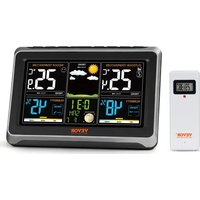
Vevor YT60311 - Weather Station
📄 504 pages English EN Download 💬 AI Question 11 questions ⚙️ Specs
Notice Vevor YT60311 - page 1
Pick your language and provide your email: we'll send you a specifically translated version.
Product type Wireless weather station
Brand Vevor
Model YT60311
Display Backlit LCD screen
Outdoor sensor Wireless 433 MHz sensor with data transmission
Transmission range Approximately 60 meters in open field
Indoor temperature Range from 0 °C to 50 °C with accuracy of ± 1 °C
Outdoor temperature Range from -20 °C to 60 °C with accuracy of ± 1 °C
Hygrometry Measures relative humidity from 20% to 95%
Atmospheric pressure Display in hPa or mmHg and barometric trend
Weather forecast Icons for sunny, partly cloudy, cloudy, rainy, or stormy
Clock Time, date, and calendar with manual adjustment
Alarm Daily alarm with snooze function
Weather trends Trend arrows for temperature and humidity
Power supply 2 AAA batteries for the station and 2 AAA batteries for the outdoor sensor
Station dimensions Approximately 150 x 100 x 20 mm
Sensor dimensions Approximately 96 x 50 x 25 mm
Total weight Approximately 300 g
Package contents Station, outdoor sensor, and quick start guide
Maintenance Clean with a soft, dry cloth, do not use solvents
Safety Keep out of reach of children and respect battery polarity
Spare parts and repairability Sensor and batteries replaceable, parts available via Vevor customer service

Frequently Asked Questions - YT60311 Vevor

What is the range of the outdoor sensor?
The sensor transmits on the 433 MHz frequency with a range of about 60 meters in open field. Walls and obstacles reduce this distance.
How to install the outdoor sensor?
Place the sensor sheltered from rain and direct sunlight, at least 1.5 meters above the ground, and make sure it is within the transmission range of the station.
How to change the batteries of the station and the sensor?
Open the battery compartment located on the back of each device, insert two AAA batteries respecting polarity, then reset if necessary.
What to do if the outdoor sensor is not detected?
Check the batteries, move the sensor closer to the station, press the synchronization button, or turn the base station off and on again.
Are the temperature units adjustable?
Yes, the station allows you to choose between Celsius degrees and Fahrenheit degrees via a setting button or from the rear panel.
How to set the time and date?
Press and hold the Mode or Setting button, then use the + and – buttons to adjust the blinking parameters.
Can the backlight stay on permanently?
Depending on the model, a short press on the light button activates temporary lighting; some modes allow continuous lighting or an adjustable duration.
What weather forecasts are shown?
The device displays icons for sunny, partly cloudy, cloudy, rainy, or stormy, calculated from atmospheric pressure.
How to maintain the weather station?
Dust regularly with a dry microfiber cloth, avoid chemical products, and protect the outdoor sensor from water splashes.
What to do if the display is unreadable?
Remove the batteries, wait a few seconds, reinsert them, then perform a full reset by holding the RESET button if present.

User questions about YT60311 Vevor

1 question about this device. Answer the ones you know or ask your own.

Ask a new question about this device

Your email remains private: it is only used to notify you if someone answers your question.

How do I print this manual?
Frequently Asked Questions - 1 d
Response Notice-Facile

To print the Vevor YT60311 manual, follow this procedure:

From the PDF viewer on the page

  • Locate the printer icon at the top right of the PDF reader
  • Click on it, or use the keyboard shortcut Ctrl+P (Windows) / Cmd+P (Mac)

Useful printing options

  • You can print all pages or a specific range. Since this manual contains 504 pages, it may be wise to print only the sections that interest you (for example, pages 1-50 for installation)
  • Choose a physical printer or select "Save as PDF" to keep a digital copy that is easily accessible
  • To save paper and ink, enable black and white mode and disable background image printing if necessary

Tip: if you are only looking for a specific section (installation, troubleshooting, etc.), first download the complete PDF manual, then use the search function (Ctrl+F) to quickly locate your topic before printing.
Respond (be the first)

Download the instructions for your Weather Station in PDF format for free! Find your manual YT60311 - Vevor and take your electronic device back in hand. On this page are published all the documents necessary for the use of your device. YT60311 by Vevor.

USER MANUAL YT60311 Vevor

Manual assistant
Powered by Anthropic
Waiting for your message
Product information

Brand : Vevor

Model : YT60311

Category : Weather Station