
FANY 05 - Fan PUR LINE - Free user manual and instructions
Find the device manual for free FANY 05 PUR LINE in PDF.


User questions about FANY 05 PUR LINE
0 question about this device. Answer the ones you know or ask your own.
Ask a new question about this device
Download the instructions for your Fan in PDF format for free! Find your manual FANY 05 - PUR LINE and take your electronic device back in hand. On this page are published all the documents necessary for the use of your device. FANY 05 by PUR LINE.
USER MANUAL FANY 05 PUR LINE
We congratulate you on having chosen a PUR LINE
Tower Fan. You have just acquired a quality device that will give you full satisfaction.
This instruction manual contains important instructions on the operation and maintenance of this device. Get familiar with it.
Please read and keep this manual for your later reference:
You must read and follow the following instructions before installing, using, cleaning, or repairing your device so as to avoid any danger and in order to not risk causing damage to your belongings.
This device is destined for domestic use.
SAFETY GUIDELINES
- Please read the following instructions carefully.
- Assure that the power supply is correct.
- Please only use this device as is described in this manual. Any other use not recommended by the manufacturer could cause a fire, electrocution or injuries.
- The device must be installed in such a way that children cannot handle it.
- You must first turn off and then unplug the device before any handling. This is extremely important and must always be done before moving, cleaning or repairing the device.
- The fan must not be used in the presence of flammable material, alcohol vapours, insecticides, oil etc. or in a very humid environment.
- When it is raining, the device MUST NOT be installed next to a window or an open door; that could be dangerous.
- By carefully following the instructions, proceed with the assembly of the device before starting it up.
- This device is equipped with a grounding plug to be plugged into a grounded wall socket. If you don't manage to correctly plug in the device, please have it checked by an electrician; do not try to change the plug or the electrical cord yourself.
- In order to avoid any overheating, an electric extension cord must not be used, and the device must not be plugged into a multi-way socket.
- If the electrical cord or the plug is damaged, if the fan is damaged or if it falls, they must be repaired by a qualified person. Do not use the device without the protection grille or if it is damaged.
- You must never insert fingers or any other object into the air intake or output vents; this could cause a fire, electrocution, or damage the fan. You must never touch the fan; all objects must be moved away from the fan (furniture, etc.) while it is in use.
- The device must be installed on a stable, flat, hard surface; it must not be able to be knocked over. Avoid placing any object on the electrical cord or locating the cord in an area of traffic, could cause tripping. Do not put it under a rug etc.
- The device must absolutely not be installed in a laundry room, a bathroom near a sink, a pool... That could be dangerous and cause and electrocution.
- The fan must not be used outside.
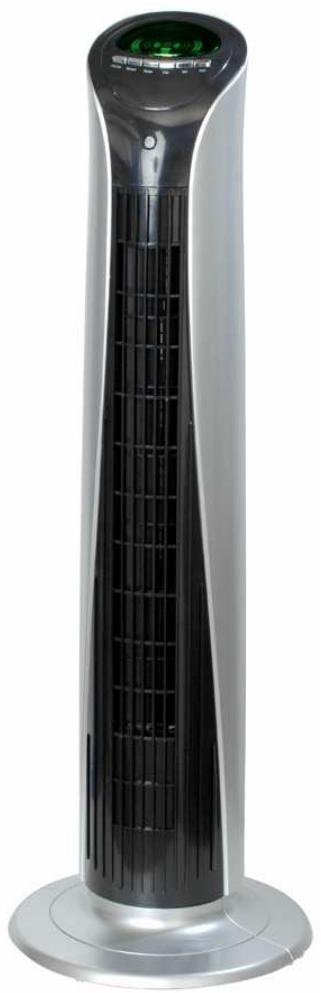
DESCRIPTION
- Control panel
- Control keyboard
- Air intake
- Ionizer
- Right support
- Left support
- Carrying handle
- Remote control
- Air intake
- LED for TiO2 radiation
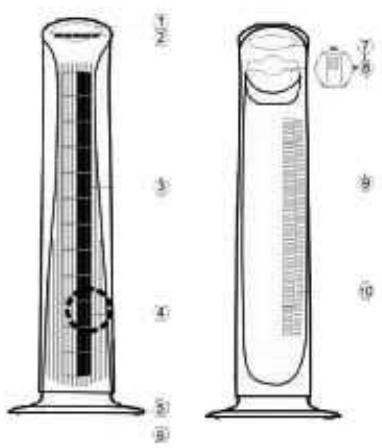
ASSEMBLY
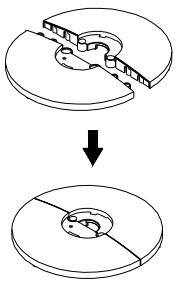
Pass the electrical cord through the base, and then assemble the two halves that form it. Insert the base into the bottom of the tower taking care to align the corresponding openings with each other. Carefully turn over the tower; assemble the base and the tower with the help of the two supplied screws. Carefully install the electrical cord in "the cord passage guide" pointing toward the back of the device.
REMOTE CONTROL
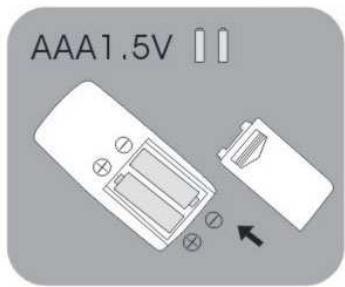
- Open the case of the remote control
- Install the batteries (AAA).
- Close the case.
NOTE: Insert the batteries correctly... When the batteries are worn out, remove them from the remote control and dispose of them in a proper place.
OPERATION
The fan can be controlled from the remote control or the control panel on the device.
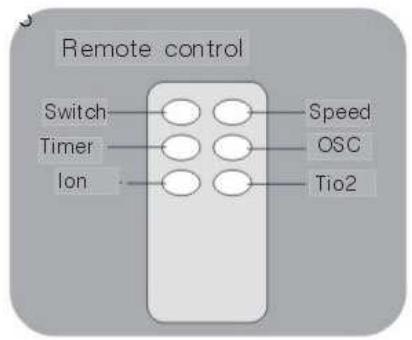
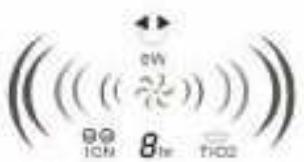
ON/OFF SWITCH On/Off Button, press once on this button in order to turn on the device. Press again on this button in order to turn off the device.
Fan speed: Use the SPEED buttons to increase and reduce the speed of the device.

"OSCILLATION" button Press on the OSC button in order to make the device oscillate, in order to stop the oscillation press again on this button The two arrows are displayed on the LED screen when oscillation is requested.
"TIMER" button This can function from 1 to 8 hours. Press on this button one time and the device will function for one hour; press two times and it will function two hours and so on up to 12 times in order to obtain 12 hours of functioning. In order to stop the timer, press a thirteenth time.
The LED screen displays the number of hours requested.
"ION" button = Ionizer, press on the ION button in order to obtain this function. This symbol is displayed on the LED screen when this function is requested. Vice generates Negative Ions that purify the air. In order to stop this function, press again on the ION button.
"TiO2" button = Disinfection by cold photocatalysis. This method makes it possible to clean the air of all its bacteria, germs etc.
MAINTENANCE
WARNING: TURNOFF AND UNPLUG THE DEVICE
Use a soft and slightly moist cloth to clean the device. Assure that no moisture penetrates into the device
Never use chemical products, petrol, abrasive detergents etc. These would damage the fan.
SPECIFICATIONS
Model: FANY05
Net Weight: 3.8 KG
Oscillation: 90^
Timer: 1 to 8 Hours
Electrical consumption: 48 W
Voltage: 220/240V\~50Hz
This data can vary for technical reasons. For more details, please refer to the nameplate placed on the device.
Cleaning
Unplug the device.
Use a soft and moist cloth to clean the device and free it from any obstruction that could prevent the free passage of air.
GUARANTEE:
2 years from the date of purchase.
In order to claim the guarantee, please bring the device or send it POSTAGE PAID to your reseller, accompanied by the proof of purchase indicating the date of this purchase.
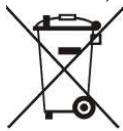
Removal of worn out household appliances
The European directive 2002/96/EC on Waste Electrical and Electronic Equipment (WEEE), requires that worn out household appliances not be discarded in the normal flow of municipal waste. Worn out appliances must be collected separately so as to optimise the recovery and recycling rate of the materials that compose them and reduce the impact on human health and the environment.
The "crossed out trash bin" symbol is affixed on all the products as a reminder of the obligations of separate collection.
The consumers must contact the local authorities or their reseller concerning the procedure to follow for the removal of their appliance.
Tour de Ventilation
PURLINE
FANY 05
MANUEL DE L'UTILISATEUR
WinEurope - FRANCE.
Internet: www.purline.com
FELICITATIONS.
Ossillation: 90^