
WR-1CL - Portable radio SANGEAN - Free user manual and instructions
Find the device manual for free WR-1CL SANGEAN in PDF.


User questions about WR-1CL SANGEAN
0 question about this device. Answer the ones you know or ask your own.
Ask a new question about this device
Download the instructions for your Portable radio in PDF format for free! Find your manual WR-1CL - SANGEAN and take your electronic device back in hand. On this page are published all the documents necessary for the use of your device. WR-1CL by SANGEAN.
USER MANUAL WR-1CL SANGEAN
IMPORTANT SAFETY INSTRUCTIONS
- Read these instructions.
- Keep these instructions.
- Heed all warnings.
- Follow all instructions.
- Do not use this apparatus near water.
- Clean only with dry cloth.
- Do not block any ventilation openings. Install in accordance with the manufacturer's instructions.
- Do not install near any heat sources such as radiators, heat registers, stoves, or other apparatus (including amplifiers) that produce heat.
-
Do not defeat the safety purpose of the polarized or grounding-type plug. A polarized plug has two blades with one wider than the other. A grounding type plug has two blades and a third grounding prong. The wide blade or the third prong are provided for your safety. If the provided plug does not fit into your outlet, consult an electrician for replacement of the obsolete outlet.
-
Protect the power cord from being walked on or pinched particularly at plugs, convenience receptacles, and the point where they exit from the apparatus.
- Only use attachments/accessories specified by the manufacturer.
- Use only with the cart, stand, tripod, bracket, or table specified by the manufacturer, or sold with the apparatus. When a cart is used, use caution when moving the cart/apparatus combination to avoid injury from tip-over.
- Unplug this apparatus during lightning storms or when unused for long periods of time.
- Refer all servicing to qualified service personnel. Servicing is required when the apparatus has been damaged in any way, such as power-supply cord or plug is damaged. liquid has been spilled or objects have fallen into the apparatus, the apparatus has been exposed to rain or moisture, does not operate normally, or has been dropped.
- To Reduce the Risk of Fire or Electric Shock, Do not Expose This Appliance To Rain or Moisture.
- The Shock Hazard Marking and Associated Graphical Symbol is provided on the bottom panel of unit.
- Apparatus shall not be exposed to dripping or splashing and no objects filled with liquids, shall not be placed on the apparatus.
GB
Features
(1) AM/FM 2 bands.
(2) Wooden cabinet made of MDF in real cherry or walnut or other optional wood veneer.
(3) Soft and precision tuning.
(4) Rotary tuning and volume control.
(5) Tuning LED indicator.
(6) Detachable power cord.
(7) Headphone socket.
(8) REC out socket can be used as a separate tuner to the Hi-Fi amplifier or record the radio program by using the output.
(9) Aux in. socket to connect stereo/mono audio source like CD walkman.
(10) 3 inches 7W full range heavy-duty magnet speaker.
(11) Dynamic Bass compensation for rich bass.
(12) External AM antenna terminal to connect outdoors AM antenna (USA version only).
(13) External F type FM antenna terminal to connect outdoors FM antenna.
(14) Internal/External FM antenna switch to select built-in or external antenna.
(15) 9-14 voltages power adaptor socket for AC adaptor or vehicle/boat power.
GB
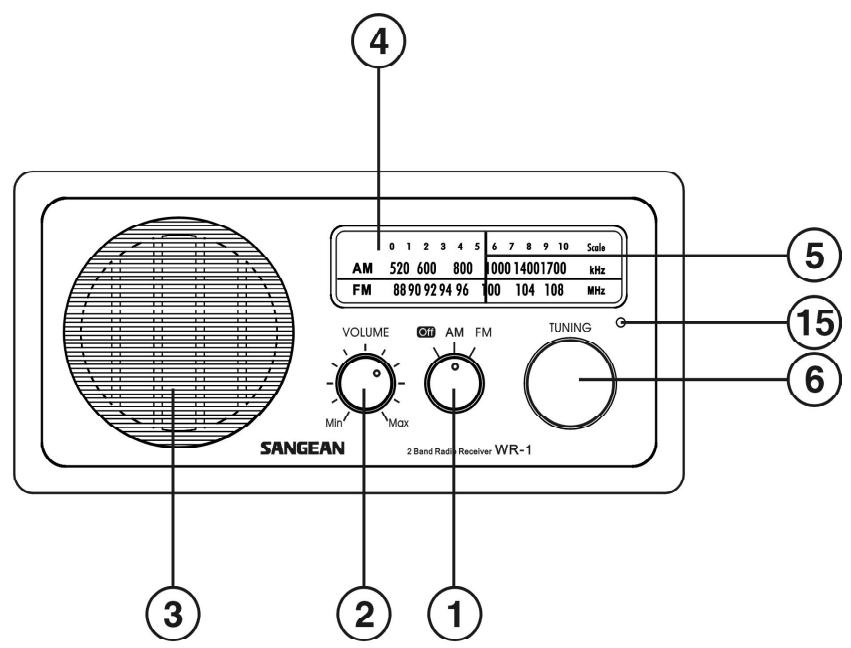
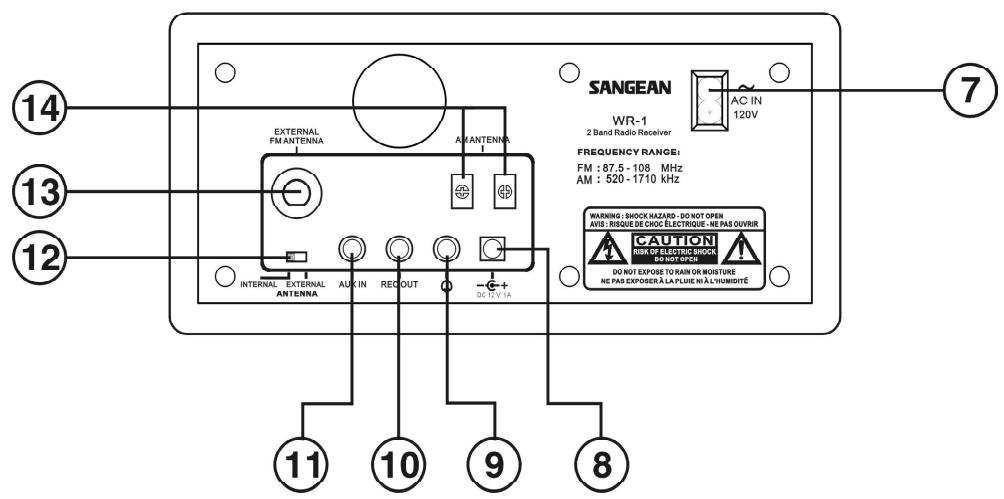
Controls
(1) Power and AM/FM band switch
② Volume Control
③ Speaker
④ Dial scale
⑤ Dial indicator
⑥ Tuning Control
⑦ AC power cord socket
(8) 12V DC input socket (ideal for vehicles/boats)
⑨ Headphone socket
⑩ REC out socket
11 Aux in socket
External/Internal antenna switch
13 F-type external antenna terminal
14 AM external antenna terminal (USA version only)
⑤ Tuning LED indicator
Power your radio
AC operation
Before you plug the AC cord into the radio, be sure the AC voltage is correct. Insert the plug on the end of the supplied power cord into the AC power socket on the back of the radio.
DC operation
For outdoors use, you can power the radio by using 12V DC input socket from a DC power supply (example, from the power supply of vehicles or boats). An AC power adaptor with 1 Ampere and center positive in polarity can also power the radio in house.
Operating your radio FM
1. Connect the Antenna
The radio comes with built-in AM/FM antenna. To improve
FM reception, insert the end of the supplied FM wire antenna into the F-type antenna terminal and adjust the wire for best reception.
A 75 ohm coaxial cable of outdoor antenna may also be attached to the terminal. Be sure to switch external/internal antenna switch to external position while using the supplied wire antenna or connect the outdoor antenna. In some of the European countries, you may have to connect the supplied antenna terminal adaptor to connect with the outdoor antenna.
- Turn on your radio by switching the Power knob to FM position.
- Rotate the Tuning Control to select the desired station. On FM, the tuning scale is marked in MHz (Megahertz). The tuning LED indicator will appear brightest when best tuning has been achieved.
- Adjust the Volume Control for comfortable listening.
- To switch off the radio, turn the Power knob to OFF position.
Operating your radio AM
- Connecting the antenna
The radio comes with built-in AM antenna which should be enough for normal listening. To improve the AM reception, you may connect the outdoor AM antenna with AM antenna terminal (USA version only).
- Turn on your radio by switching the Power knob to AM position.
- Rotate the Tuning Control to select the desired station. On AM, the tuning scale is marked in kHz (Kilohertz). The tuning LED will appear brightest when best tuning has been achieved.
- Rotate your radio for best reception.
- Adjust the Volume Control for comfortable listening.
- To switch off your radio, turn the power knob to OFF position.
Headphone use
Headphone use with this radio should be fitted with a 3.5 mm jack plug. Insert the headphones plug into the socket marked on the rear side of the radio. When the headphones are plugged in, the loudspeaker is automatically disconnected.
AUX IN socket
Connect a stereo or mono audio source (like CD walkman) to this input to listen the audio program via the speaker.
REC out socket
The radio can be used as a separate tuner by connecting this input to Hi-Fi system (amplifier) or using this input to make recording in mono from audio program.
Specifications
Frequency Coverage: FM 87.50 - 108 MHz AM 520 - 1710 kHz
Power: AC 120 V/60 Hz/25W or AC 230 V/50 Hz/25W
Internal Antenna System: AM Built-in ferrite aerial FM Built-in wire aerial
External antenna terminal:
AM antenna terminal (USA version only)
FM F-type antenna terminal
Output Power: 7W 10% T.H.D. @100Hz
Headphones socket:
3.5 mm dia. Stereo jack monaural output
Output : 5mW + 5mW
Aux in socket:
3.5 mm dia. Stereo jack.
Input sensitivity: IN 150mV Output 7W @100Hz
Input impedance: 47 Kohm
REC OUT: output impedance: 2.2Kohm
DC IN: 12V/1A center pin positive (operational voltage 9-14V)
Accessories:
FM F-terminal antenna wire
AC Power Cord
F to PAL terminal adapter (European version only)
Dimension: 240(W) x 114 (H) x 169.5 (D) mm
Weight: 2.35 KG.
CONSIGNES DE SECURITÉ IMPORTANTES
Specifications techniques
Plage de balayage:
FM 87.50 - 108 MHz
AM 520 - 1710 kHz
Puissance: AC 120 V/60 Hz/25 W ou AC 230 V/50 Hz/25 W
Spanning: AC 120 V/60 Hz/25W of AC 230 V/50 Hz/25W
Intern antennesystem: