
BTA840XL - Toaster BREVILLE - Free user manual and instructions
Find the device manual for free BTA840XL BREVILLE in PDF.


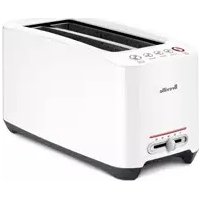
| Product Type | 4-Slice Toaster |
| Brand | Breville |
| Model | BTA840XL |
| Power Supply | 110 V, polarized plug |
| Material | Die-cast metal |
| Capacity | 4 slices (2 independent pairs of slots) |
| Main Functions | Toast/Cancel, A Bit More, Bagel, Defrost, Lift & Look |
| Controls | Electronic with LED progression indicators |
| Browning Levels | 5 levels (1 light to 5 dark) |
| Plug Type | Exclusive Assist Plug™ |
| Crumb Tray | Removable, must be emptied regularly |
| Power Cord | Short (for safety) |
| Safety | Automatic shut-off, polarized plug, safety instructions |
| Cleaning | Removable tray, wipe exterior with damp cloth |
| Warranty | 1 year limited |
| Customer Service | 1-866-BREVILLE (1-866-273-8455) |
| Usage | Independent for each pair of slots |
Frequently Asked Questions - BTA840XL BREVILLE
User questions about BTA840XL BREVILLE
0 question about this device. Answer the ones you know or ask your own.
Ask a new question about this device
Download the instructions for your Toaster in PDF format for free! Find your manual BTA840XL - BREVILLE and take your electronic device back in hand. On this page are published all the documents necessary for the use of your device. BTA840XL by BREVILLE.
USER MANUAL BTA840XL BREVILLE
Breville is a registered trademark of Breville Pty. Ltd.
Breville Customer Service Center
US Customers
19400 S. Western Ave
Los Angeles
CA 90501-1119
Service Center: 1 (866) BREVILLE
Email askus@brevilleUSA.com
www.breville.com
Canada Customers
Anglo Canadian
2555, de l'Aviation
| Page | |
| Breville recommends safety first | 4 |
| Know your Breville 4-Slice Smart Toaster™ | 6 |
| Operating your Breville 4-Slice Smart Toaster™ | 7 |
| ‘TOAST/CANCEL’ button | 9 |
| ‘A BIT MORE™’ button | 9 |
| ‘BAGEL’ button | 9 |
| ‘DEFROST’ button | 10 |
| ‘LIFT & LOOK™’ button | 11 |
| Care and cleaning | 12 |
| Storage | 12 |
| One year limited warranty | 13 |
| French | 14 |
Congratulations
on the purchase of your new Breville 4-Slice Smart Toaster™
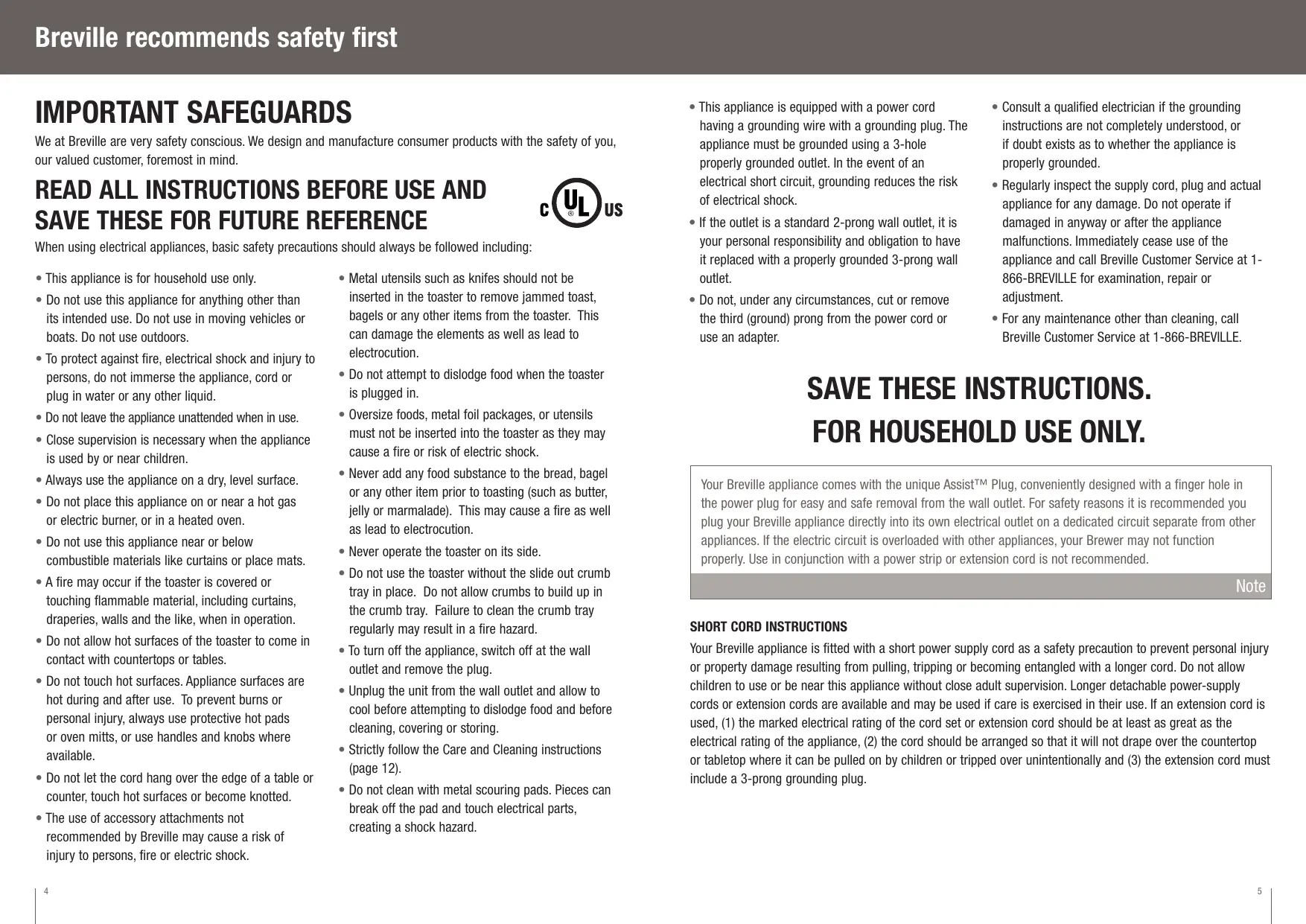
IMPORTANT SAFEGUARDS
We at Breville are very safety conscious. We design and manufacture consumer products with the safety of you, our valued customer, foremost in mind.
READ ALL INSTRUCTIONS BEFORE USE AND SAVE THESE FOR FUTURE REFERENCE

When using electrical appliances, basic safety precautions should always be followed including:
- This appliance is for household use only.
- Do not use this appliance for anything other than its intended use. Do not use in moving vehicles or boats. Do not use outdoors.
- To protect against fire, electrical shock and injury to persons, do not immerse the appliance, cord or plug in water or any other liquid.
- Do not leave the appliance unattended when in use.
- Close supervision is necessary when the appliance is used by or near children.
Always use the appliance on a dry, level surface. - Do not place this appliance on or near a hot gas or electric burner, or in a heated oven.
- Do not use this appliance near or below combustible materials like curtains or place mats.
- A fire may occur if the toaster is covered or touching flammable material, including curtains, draperies, walls and the like, when in operation.
- Do not allow hot surfaces of the toaster to come in contact with countertops or tables.
- Do not touch hot surfaces. Appliance surfaces are hot during and after use. To prevent burns or personal injury, always use protective hot pads or oven mitts, or use handles and knobs where available.
- Do not let the cord hang over the edge of a table or counter, touch hot surfaces or become knotted.
-
The use of accessory attachments not recommended by Breville may cause a risk of injury to persons, fire or electric shock.
-
Metal utensils such as knives should not be inserted in the toaster to remove jammed toast, bagels or any other items from the toaster. This can damage the elements as well as lead to electrocution.
- Do not attempt to dislodge food when the toaster is plugged in.
- Oversize foods, metal foil packages, or utensils must not be inserted into the toaster as they may cause a fire or risk of electric shock.
- Never add any food substance to the bread, bagel or any other item prior to toasting (such as butter, jelly or marmalade). This may cause a fire as well as lead to electrocution.
- Never operate the toaster on its side.
- Do not use the toaster without the slide out crumb tray in place. Do not allow crumbs to build up in the crumb tray. Failure to clean the crumb tray regularly may result in a fire hazard.
- To turn off the appliance, switch off at the wall outlet and remove the plug.
- Unplug the unit from the wall outlet and allow to cool before attempting to dislodge food and before cleaning, covering or storing.
- Strictly follow the Care and Cleaning instructions (page 12).
-
Do not clean with metal scouring pads. Pieces can break off the pad and touch electrical parts, creating a shock hazard.
-
This appliance is equipped with a power cord having a grounding wire with a grounding plug. The appliance must be grounded using a 3-hole properly grounded outlet. In the event of an electrical short circuit, grounding reduces the risk of electrical shock.
- If the outlet is a standard 2-prong wall outlet, it is your personal responsibility and obligation to have it replaced with a properly grounded 3-prong wall outlet.
-
Do not, under any circumstances, cut or remove the third (ground) prong from the power cord or use an adapter.
-
Consult a qualified electrician if the grounding instructions are not completely understood, or if doubt exists as to whether the appliance is properly grounded.
- Regularly inspect the supply cord, plug and actual appliance for any damage. Do not operate if damaged in anyway or after the appliance malfunctions. Immediately cease use of the appliance and call Breville Customer Service at 1-866-BREVILLE for examination, repair or adjustment.
- For any maintenance other than cleaning, call Breville Customer Service at 1-866-BREVILLE.
SAVE THESE INSTRUCTIONS. FOR HOUSEHOLD USE ONLY.
Your Breville appliance comes with the unique Assist™ Plug, conveniently designed with a finger hole in the power plug for easy and safe removal from the wall outlet. For safety reasons it is recommended you plug your Breville appliance directly into its own electrical outlet on a dedicated circuit separate from other appliances. If the electric circuit is overloaded with other appliances, your Brewer may not function properly. Use in conjunction with a power strip or extension cord is not recommended.
Note
SHORT CORD INSTRUCTIONS
Your Breville appliance is fitted with a short power supply cord as a safety precaution to prevent personal injury or property damage resulting from pulling, tripping or becoming entangled with a longer cord. Do not allow children to use or be near this appliance without close adult supervision. Longer detachable power-supply cords or extension cords are available and may be used if care is exercised in their use. If an extension cord is used, (1) the marked electrical rating of the cord set or extension cord should be at least as great as the electrical rating of the appliance, (2) the cord should be arranged so that it will not drape over the countertop or tabletop where it can be pulled on by children or tripped over unintentionally and (3) the extension cord must include a 3-prong grounding plug.
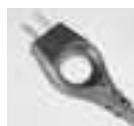
Features the unique Breville Assist PlugTM
Easier to insert, easier to remove
Registered design
Operating your Breville 4-Slice Smart Toaster™
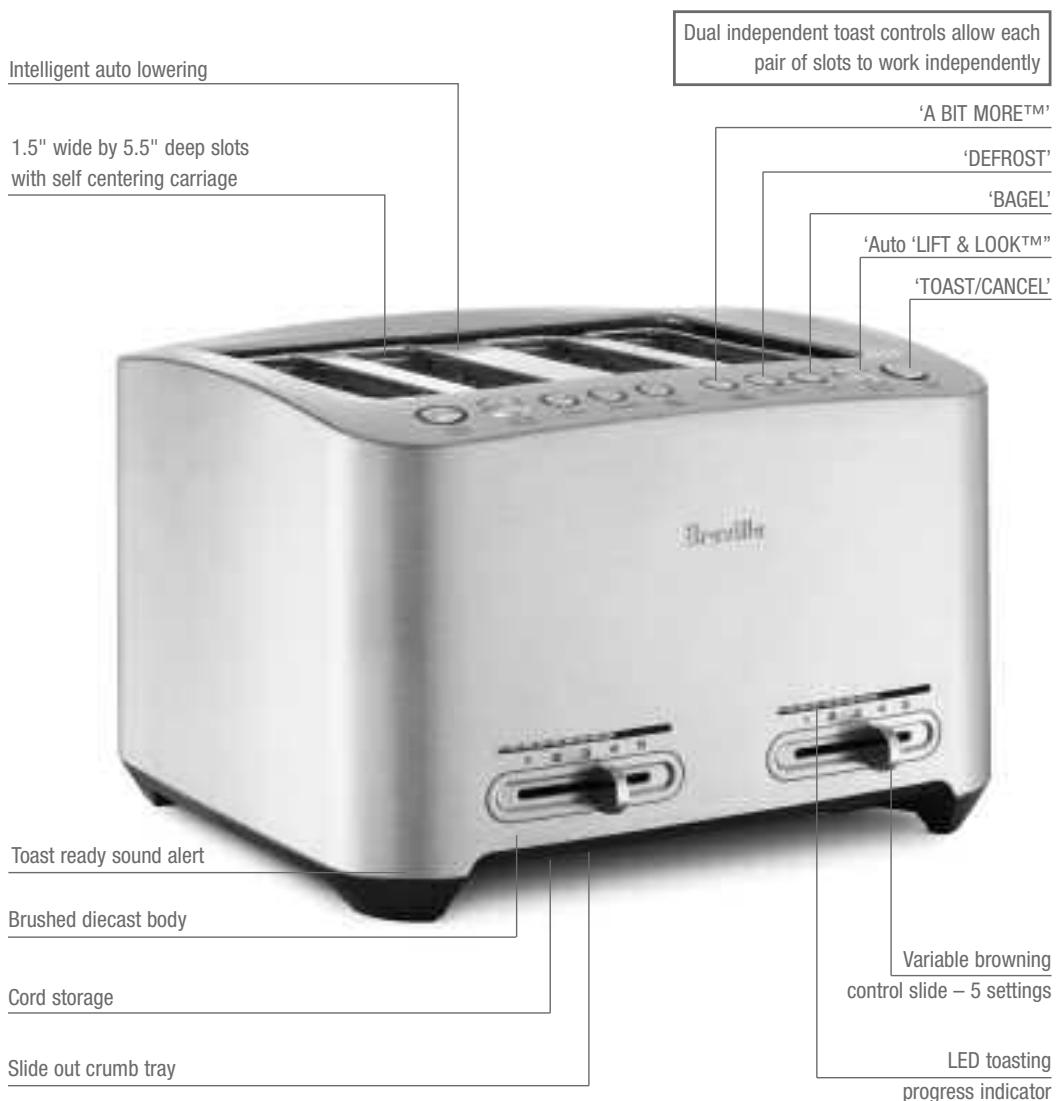
The Breville 4-Slice Smart Toaster™ features dual independent toast controls - two complete sets of controls that allow each pair of slots to work independently. Use the instructions provided to independently set the two pairs of slots to your individual preferences. For example, you can toast bread in one pair of slots, while simultaneously toasting bagels on another setting in the second pair of slots.
Note
Before first use, remove any promotional stickers or packaging material attached to your toaster
- Insert the power plug into a 120 volt power outlet then turn the power on. The 'TOAST/CANCEL' button will illuminate white for up to 30 seconds. The LED's on the toasting progress indicator will illuminate one-by-one all the way to the right, then turn off one-by-one until the selected browning setting (indicated by the browning control slide) is reached.
- Place 1 slice of bread, half a bagel or half an English muffin only, into each of the toasting slots. Ensure they are not too large or too thick to fit in the toasting slots.
- Select the desired browning setting by adjusting the browning control slide on the front of the toaster. The browning settings range from '1' (lightest) to '5' (darkest). The LED's on the toasting progress indicator will illuminate according to the selected setting.
When using the toaster for the first time, we suggest toasting on the maximum setting without bread. The toaster may emit a thin smoke or distinct odor on initial use. This is normal and not detrimental to the performance of the toaster.
Note
When using the toaster for the second time (this time with bread), we suggested you initially toast on setting '3'. For example, raisin toast and white light-textured breads may require a lighter setting, whilst heavier textured rye breads may require a darker settings.
Note
- To start the toasting cycle, press the 'TOAST/CANCEL' button which will illuminate red. The bread will automatically lower into the toasting slots. As the toasting cycle begins, the toasting progress LED above the selected setting will flash and start to count down, indicating how long is left in the toasting cycle.
The toaster will revert to stand-by mode after 30 seconds if none of the buttons are pressed or the browning control slide is not adjusted. The 'TOAST/CANCEL' button illumination and toasting progress LED's will go out.
The toaster will re-activate, and the 'TOAST/CANCEL' button and LED's will re-illuminate when:
a) any of the buttons are pressed.
b) the browning control slide is moved.
c) the power at the power outlet is turned off then on again.
Note
The Breville 4-Slice Smart Toaster™ features an auto 'LIFT & LOOK™' button. This automatically raises the bread carriage without canceling or resetting the cycle. You can view toasting progression during the toasting cycle and, if necessary, cancel the cycle when the desired toast color is achieved.
Note
- The 'LIFT & LOOK™' button will illuminate white. You can select this feature anytime during this period to view the toasting progression. If selected, the flashing toasting progress LED will cease to flash, indicating that the selected toasting cycle time has temporarily been disrupted (without canceling or resetting the cycle). The 'LIFT & LOOK™' button will flash. When the 'LIFT & LOOK™' cycle is finished the toasting cycle will re-commence, indicted by the flashing toasting progress LED.
The toasting cycle can be stopped at any time by pressing the 'TOAST/CANCEL' button. This will cancel the cycle and send the carriage to the top position.
Note
- As the toasting cycle nears completion, the 'TOAST/CANCEL' button will flash.
- 10 seconds before the end of the toasting cycle, the 'LIFT & LOOK™' button will cease to illuminate and the toast will automatically rise from the toasting slots.
- The toast ready signal will sound and the 'TOAST/CANCEL' button will illuminate white for up to 30 seconds, ready for the next toasting cycle. The toasting progress LED's will re-illuminate to the selected setting.
The Breville 4-Slice Smart Toaster™ features an 'A BIT MORE™' button which can be selected before or after the toasting cycle. This automatically lowers the bread carriage for additional toasting time so you can brown your toast 'A BIT MORE™' until the desired color is achieved.
Note

IN THE UNLIKELY EVENT THAT BREAD, BAGELS OR MUFFINS BECOME JAMMED IN THE TOASTING SLOTS, ALL THE BUTTONS AND THE TOASTING PROGRESS INDICATOR WILL FLASH. SWITCH THE TOASTER OFF AT THE POWER OUTLET, REMOVE THE PLUG AND ALLOW THE TOASTER TO COOL COMPLETELY BEFORE CAREFULLY EASING OUT THE BREAD. TAKE CARE NOT TO DAMAGE THE ELEMENTS.
The Breville 4-Slice Smart Toaster™ features dual independent toast controls - two complete sets of controls that allow allow each pair of slots to work independently. Use the instructions provided to independently set the two pairs of slots to your individual preferences. For example, you can simultaneously toast bread on one side while toasting a bagel on the other side with another setting.
Note
'TOAST/CANCEL' button
- This button will illuminate white for up to 30 seconds when the appliance is turned on. If no buttons are selected or the browning control slide is not moved after 30 seconds, the toaster will revert to standby mode and the illumination will go out.
- Press this button once to lower the bread carriage and start the toasting process. The button will illuminate red.
- Press this button during operation to cancel the toasting process or any other function. The button illumination will change from red to white and stay illuminated for up to 30 seconds.
'A BIT MORE™' button
This feature can be selected before or after the toasting cycle. It automatically lowers the bread carriage for additional toasting time so you can brown your toast ‘A BIT MORE™’ until the desired color is achieved.
If this feature is selected:
-
The 'A BIT MORE™' button will illuminate white. The bread carriage will automatically lower and begin the additional toasting time. The third toasting progress LED will flash and start to count down the additional browning time.
-
The 'TOAST/CANCEL' button will illuminate red.
- The 'LIFT & LOOK™' button will illuminate white allowing you to check on the toasting progression and, if necessary, cancel the cycle with the 'TOAST/CANCEL' button when the desired toast color is achieved.
- As the additional toasting time nears completion, the 'TOAST/CANCEL' button will flash.
- 10 seconds before the end of the toasting cycle, the 'LIFT & LOOK™' button will cease to illuminate and the toast will automatically rise from the toasting slots.
- The toast ready signal will sound and the 'TOAST/CANCEL' button will illuminate white for up to 30 seconds, ready for next toasting cycle. The toasting progress LED's will re-illuminate to the selected setting.
'BAGEL' button
This feature activates additional heat to the centre heating elements to cook the insides of your cut bagel without burning the outside.
To toastbagels:
- Place the cut bagel into the toasting slots with the inside of the bagel facing inwards toward the middle of the toaster.
- Select the desired browning setting.
- Press the 'BAGEL' button which will illuminate white. The heating elements will automatically adjust. The toasting time will also automatically increase, but will not illuminate more of the toasting progress LED's. It will only increase the time each LED flashes for.
-
Press the 'TOAST/CANCEL' button which will illuminate red. The bagel will automatically lower into the toasting slots.
-
The 'LIFT & LOOK™' button will illuminate white allowing you to check on the toasting progression and, if necessary, cancel the cycle with the 'TOAST/CANCEL' button when the desired toast color is achieved.
- As the toasting cycle nears completion, the 'TOAST/CANCEL' button will flash.
- 10 seconds before the end of the toasting cycle, the 'LIFT & LOOK™' button will cease to illuminate and the toast will automatically rise from the toasting slots.
- The toast ready signal will sound and the 'TOAST/CANCEL' button will illuminate white for up to 30 seconds, ready for next toasting cycle. The toasting progress LED's will re-illuminate to the selected setting.
The inside of the bagel must always face inwards towards the middle of the toaster. The toaster will revert back to the bread toast setting after each toasting cycle, unless the 'BAGEL' setting is activated again.
Note
'DEFROST' button
This feature activates additional toasting time required to toast frozen bread.
To toast frozen bread:
- Place the bread into the toasting slots.
- Select the desired browning setting.
- Press the 'DEFROST' button which will illuminate white. The toasting time will automatically increase, but will not illuminate more of the toasting progress LED's. It will only increase the time each LED flashes for.
If toasting a frozen bagel, follow steps 1-3 above, then press the 'BAGEL' button which will illuminate white. The toasting time will automatically adjust to account for the defrosting time and the bagel toasting time.
Note
- Press the 'TOAST/CANCEL' button which will illuminate red. The bread will automatically lower into the toasting slots.
- The 'LIFT & LOOK™' button will illuminate white allowing you to check on the toasting progression and, if necessary, cancel the cycle with the 'TOAST/CANCEL' button when the desired toast color is achieved.
- As the additional toasting time nears completion, the 'TOAST/CANCEL' button will flash.
- 10 seconds before the end of the toasting cycle, the 'LIFT & LOOK™' button will cease to illuminate and the toast will automatically rise from the toasting slots.
- The toast ready signal will sound and the 'TOAST/CANCEL' button will illuminate white for up to 30 seconds, ready for next toasting cycle. The toasting progress LED's will re-illuminate to the selected setting.
The toaster will revert back to the bread toast setting after each toasting cycle, unless the 'DEFROST' button is activated again.
Note
Auto 'LIFT & LOOK™' button
This feature automatically raises the bread carriage without canceling or resetting the cycle. You can view toasting progression during the toasting cycle and, if necessary, cancel the cycle with the 'TOAST/CANCEL' button when the desired toast color is achieved.
To select this feature:
- The 'LIFT & LOOK™' button will illuminate white during the toasting cycle. You can select this feature anytime during this period to view the toasting progression. If selected, the 'LIFT & LOOK™' button will flash. The flashing toasting progress LED will cease to flash indicating that the selected toasting cycle time has temporarily been disrupted (without canceling or resetting the cycle). When the 'LIFT & LOOK™' cycle is finished, the toasting cycle will re-commence, indicted by the flashing toasting progress LED.
- As the toasting cycle nears completion, the 'TOAST/CANCEL' button will flash.
- 10 seconds before the end of the toasting cycle the 'LIFT & LOOK™' button will cease to illuminate and the toast will automatically rise from the toasting slots.
- The toast ready signal will sound and the 'TOAST/CANCEL' button will illuminate white for up to 30 seconds, ready for the next Toasting cycle.
Any servicing or maintenance other than cleaning should be performed by an authorized service representative. Call Breville Customer Service at 1-866-BREVILLE.
- Switch the toaster off at the power outlet and then remove the plug. Allow the toaster to cool completely before cleaning.
- To clean any crumbs from the toaster, remove the crumb tray on the lower front of the toaster by pulling it outwards to eject. Empty and replace the crumb tray before using the toaster again. Replace the crumb tray by pressing it inwards slightly until it locks into position.
Do not use the toaster without the slide out crumb tray in place.
Do not allow crumbs to build up in the crumb tray. Failure to clean the crumb tray regularly may result in a fire hazard.
Note
- To clean any additional crumbs, turn the toaster upside down over the sink and shake crumbs free.
- Wipe the outside of the toaster with a slightly dampened cloth and polish with a soft dry cloth.
Warranty
Storage
Switch the toaster off at the power outlet and then remove the plug. Allow the toaster to cool completely before storing. Follow the directions for cleaning and store in an upright position on a flat surface on your bench top or in an accessible cupboard. Do not store anything on top of the toaster.
Breville® warrants this Breville® appliance against defects that are due to faulty material or workmanship for a period of one (1) year from the date of original consumer purchase. This warranty does not cover damage from abuse, neglect, use for commercial purposes, or any other use not found in the printed "Instructions for use" booklet. There is no warranty for glass parts, glass containers, filter basket, blades and agitators. HWI Breville® expressly disclaim all responsibility for consequential damages for incidental losses caused by use of this appliance.
Some states or provinces do not allow this exclusion or limitation for incidental or consequential losses, so the foregoing disclaimer may not apply to you.
ANY WARRANTY OF MERCHANTABILITY OR FITNESS WITH RESPECT TO THIS PRODUCT IS ALSO LIMITED TO THE ONE YEAR LIMITED WARRANTY PERIOD.
Some states or provinces do not allow disclaimer of the implied warranty with respect to consumer goods, so the foregoing disclaimer may not apply to you.
This warranty gives you specific legal rights and you may also have other legal rights which vary from state to state or province to province.
If the appliance should become defective within the warranty period, do not return the appliance to the store. Please contact our Customer Service Center.
Toll free phone number:
1-866-BREVILLE (1-866-273-8455)
Internet email:
AskUs@BrevilleUSA.com
AskUs@Breville.ca (in Canada)
ORIGINAL RECEIPT IS REQUIRED FOR ALL RETURNS
*HWI Breville® products are distributed in Canada by Anglo Canadian Housewares, L.P. and in USA by Metro/Thebe Inc.
- Breville Customer Service Center
- US Customers
- Canada Customers
- Congratulations
- IMPORTANT SAFEGUARDS
- READ ALL INSTRUCTIONS BEFORE USE AND SAVE THESE FOR FUTURE REFERENCE
- SAVE THESE INSTRUCTIONS. FOR HOUSEHOLD USE ONLY.
- SHORT CORD INSTRUCTIONS
- Operating your Breville 4-Slice Smart Toaster™
- Note
- 'TOAST/CANCEL' button
- 'A BIT MORE™' button
- 'BAGEL' button
- To toastbagels:
- 'DEFROST' button
- Auto 'LIFT & LOOK™' button
- To select this feature:
- Warranty
- Storage
Brand : BREVILLE
Model : BTA840XL
Category : Toaster